program KIA RIO HATCHBACK 2014 Owners Manual
[x] Cancel search | Manufacturer: KIA, Model Year: 2014, Model line: RIO HATCHBACK, Model: KIA RIO HATCHBACK 2014Pages: 446, PDF Size: 12.98 MB
Page 78 of 446
47
Features of your vehicle
Smart key precautions
If you lose your smart key, you willnot be able to start the engine.
Towing the vehicle to an authorized
dealer may be necessary.
A maximum of 2 smart keys can be registered to a single vehicle. If a
smart key is lost, take the vehicle
and remaining key to your author-
ized Kia dealer for reprogramming.
This will not allow the lost key from
starting the vehicle and will protect
from potential theft.
The smart key will not work if any of following occurs:
- If the vehicle key is close to aradio transmitter such as a radio
station it can interfere with normal
operation of the smart key sys-
tem
- The smart key near a mobile two- way radio system or a cellular
phone.
- Another vehicle’s smart key is being operated close to your
vehicle.
(Continued)(Continued)
When the smart key does not work
correctly, open and close the door
with the mechanical key. If you
have a problem with the smart key,
contact an authorized Kia dealer.
If the smart key is in close proximi- ty to your cell phone or smart
phone, the signal from the smart
key could be blocked by normal
operation of your cell phone or
smart phone. This is especially
important when the phone is active
such as making calls, receiving
calls, text messaging, and/or send-
ing/receiving emails. Pleacing the
Smart Key and cell phone in close
proximity can disrupt the signals of
the Smart Key This device complies with Part 15
of the FCC rules.
Operation is subject to the following
two conditions:
1.This device may not cause harmful
interference, and
2.This device must accept any inter- ference received, including inter-
ference that may cause undesired
operation.
✽ ✽
NOTICE
Changes or modifications not
expressly approved by the party
responsible for compliance could
void the user’s authority to operate
the equipment. If the keyless entry
system is inoperative due to changes
or modifications not expressly
approved by the party responsible
for compliance, it will not be cov-
ered by your manufacturer’s vehicle
warranty.
CAUTION- Transmitter
Keep the smart key away from
water or any liquid as it canbecome damaged and not func-tion properly.
Page 168 of 446
497
Features of your vehicle
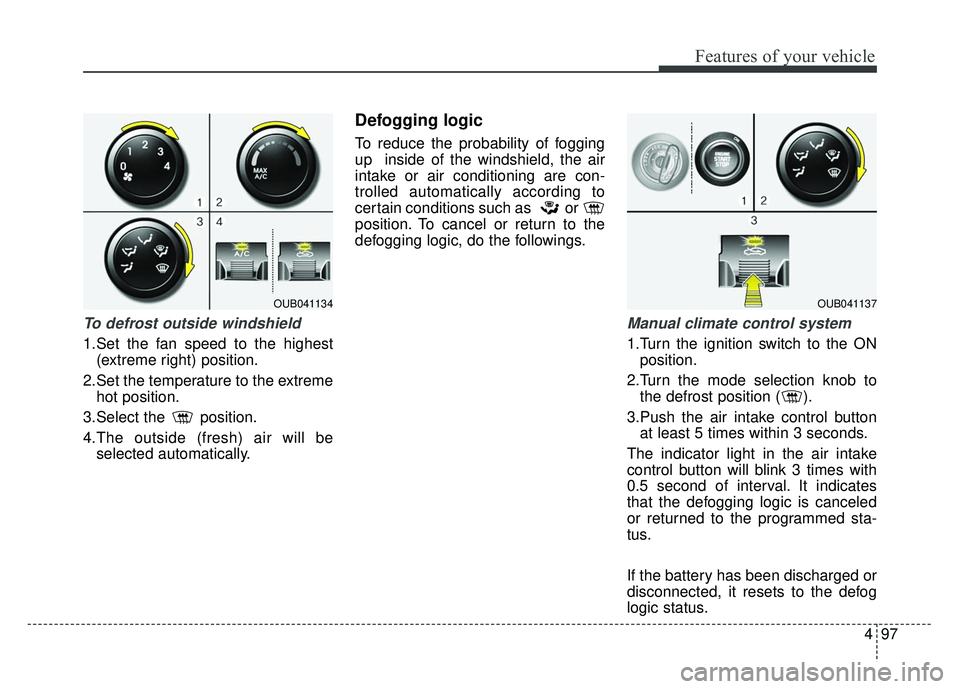
To defrost outside windshield
1.Set the fan speed to the highest(extreme right) position.
2.Set the temperature to the extreme hot position.
3.Select the position.
4.The outside (fresh) air will be selected automatically.
Defogging logic
To reduce the probability of fogging
up inside of the windshield, the air
intake or air conditioning are con-
trolled automatically according to
certain conditions such as or
position. To cancel or return to the
defogging logic, do the followings.
Manual climate control system
1.Turn the ignition switch to the ONposition.
2.Turn the mode selection knob to the defrost position ( ).
3.Push the air intake control button at least 5 times within 3 seconds.
The indicator light in the air intake
control button will blink 3 times with
0.5 second of interval. It indicates
that the defogging logic is canceled
or returned to the programmed sta-
tus.
If the battery has been discharged or
disconnected, it resets to the defog
logic status.
OUB041134OUB041137
Page 198 of 446
4127
Features of your vehicle
SIRIUS Satellite Radio information (if equipped)
Satellite Radio channels:
SIRIUS Satellite Radio has over 130
channels, including 69 channels of
100% commercial-free music, plus
sports, news, talk and entertainment
available nationwide in your vehicle.
For more information and a complete
list of SIRIUS Satellite Radio chan-
nels, visit siriusxm.com in the United
States, sirius-canada.ca in Canada,
or call SIRIUS at 1-888-539-7474.
Satellite Radio reception factors:
To receive the satellite signal, your
vehicle has been equipped with a
satellite radio antenna located on the
roof of your vehicle. The vehicle roof
provides the best location for an
unobstructed, open view of the sky, a
requirement of a satellite radio sys-
tem. Like AM/FM, there are several
factors that can affect satellite radio
reception performance:
Antenna obstructions: For optimalreception performance, keep the
antenna clear of snow and ice
build-up and keep luggage and
other material as far away from the
antenna as possible. Terrain: Hills, mountains, tall build-
ings, bridges, tunnels, freeway over-
passes, parking garages, dense
tree foliage and thunderstorms can
interfere with your reception.
SIRIUS Satellite Radio service:
SIRIUS Satellite Radio is a subscrip-
tion based satellite radio service that
broadcasts music, sports, news and
entertainment programming to radio
receivers, which are available for
installation in motor vehicles or facto-
ry installed, as well as for the home,
portable and wireless devices, and
through an Internet connection on
personal computer.
Vehicles that are equipped with a
factory installed SIRIUS Satellite
Radio system include:
Hardware and an introductory trial subscription term, which begins on
the date of sale or lease of the
vehicle.
For a small upgrade fee, access to SIRIUS music channels, and other
select channels over the Internet
using any computer connected to
the Internet (U.S. customers only). For information on extended sub-
scription terms, contact SIRIUS at
1-888-539-7474.
NOTE:
Satellite Radio requires SIRIUS®
compatible receiver and a subscrip-
tion service fee after trial period.
Vehicles without a factory-installed
radio receiver require hardware pur-
chase and installation. Please see
your dealer for further details. All
fees and programming subject to
change.
Subscriptions governed by the SIR-
IUS Terms & Conditions available at
www.siriusxm.com / service terms.
Available only in the 48 contiguous
United States and the District of
Columbia. Service available in
Canada; see www
.siriuscanada.caKia shall not be responsible for
any such programming changes.
Satellite Radio Electronic Serial
Number (ESN) :
This 12-digit
Satellite Serial Number is needed to
re-activate, modify or track your
satellite radio account. You will need
this number when communicating
with SIRIUS.
Page 199 of 446
Features of your vehicle
128
4
SIRIUS RADIO
Using SIRIUS Satellite Radio
Your Kia vehicle is equipped with a 3
month complimentary period of SIR-
IUS Satellite Radio so you have
access to over 130 channels of
music, information, and entertain-
ment programming.
Activation
In order to extend or reactivate your
subscription to SIRIUS Satellite
Radio, you will need to contact SIR-
IUS Customer Care at 800-643-
2112. Have your 12 digit SID (Sirius
Identification Number)/ESN
(Electronic Serial Number) ready. To
retrieve the SID/ESN, turn on the
radio, press the [SAT] button, and
tune to channel zero. Please note that the vehicle will need
to be turned on, in Sirius mode, and
have an unobstructed view of the sky
in order for the radio to receive the
activation signal.
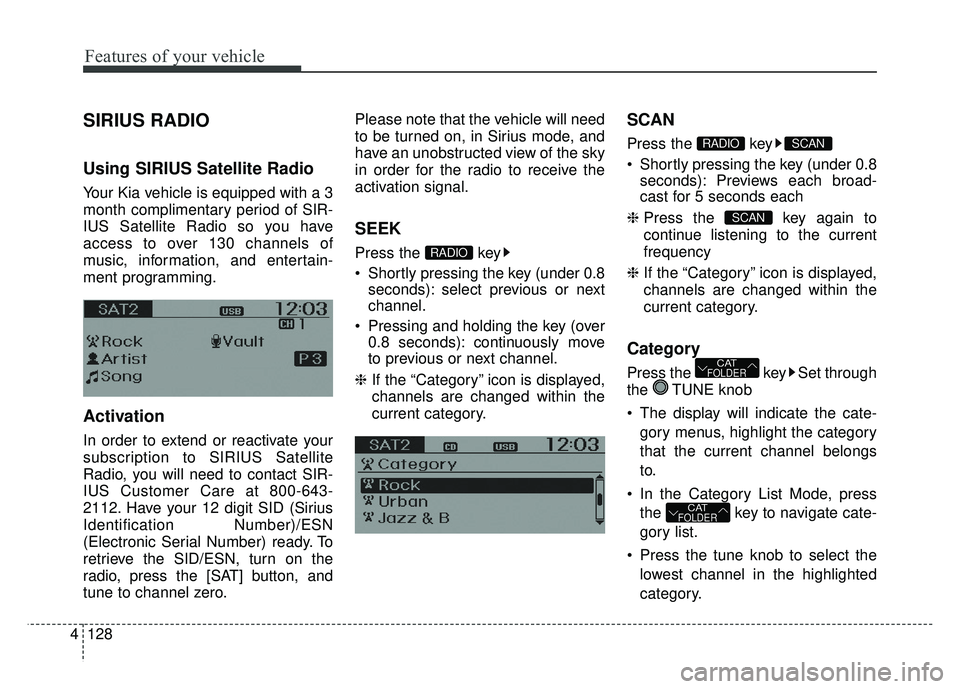
SEEK
Press the key
Shortly pressing the key (under 0.8
seconds): select previous or next
channel.
Pressing and holding the key (over 0.8 seconds): continuously move
to previous or next channel.
❈ If the “Category” icon is displayed,
channels are changed within the
current category.
SCAN
Press the key
Shortly pressing the key (under 0.8
seconds): Previews each broad-
cast for 5 seconds each
❈ Press the key again to
continue listening to the current
frequency
❈ If the “Category” icon is displayed,
channels are changed within the
current category.
Category
Press the key Set through
the TUNE knob
The display will indicate the cate-
gory menus, highlight the category
that the current channel belongs
to.
In the Category List Mode, press the key to navigate cate-
gory list.
Press the tune knob to select the lowest channel in the highlighted
category.
CATFOLDER
CATFOLDER
SCAN
SCANRADIO
RADIO
Page 273 of 446
535
Driving your vehicle
The cruise control system allows you
to program the vehicle to maintain a
constant speed without depressing
the accelerator pedal.
This system is designed to function
above approximately 25 mph (40
km/h).
If the cruise control is left on,
(CRUISE indicator light in the instru-
ment cluster illuminated) the cruise
control can be switched on acciden-
tally. Keep the cruise control system
off (CRUISE indicator light OFF)
when the cruise control is not in use,
to avoid inadvertently setting a
speed.
Use the cruise control system only
when traveling on open highways in
good weather.
Do not use the cruise control when
driving in heavy or varying traffic, or
on slippery (rainy, icy or snow-cov-
ered) or winding roads or over 6%
up-hill or down-hill roads.✽ ✽NOTICE
During normal cruise control opera-
tion, when the SET switch is activat-
ed or reactivated after applying the
brakes, the cruise control will ener-
gize after approximately 3 seconds.
This delay is normal.
✽ ✽NOTICE
To activate cruise control, depress
the brake pedal at least once after
turning the ignition switch to the
ON position or starting the engine.
This is to check if the brake switch
which is important part to cancel
cruise control is in normal condi-
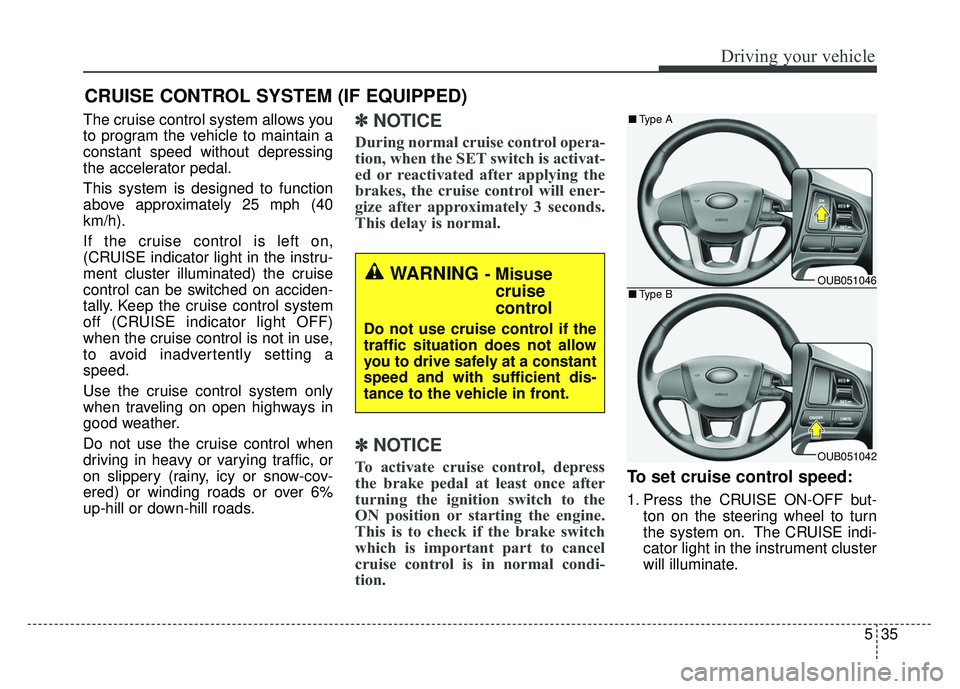
tion.To set cruise control speed:
1. Press the CRUISE ON-OFF but-
ton on the steering wheel to turn
the system on. The CRUISE indi-
cator light in the instrument cluster
will illuminate.
CRUISE CONTROL SYSTEM (IF EQUIPPED)
WARNING - Misusecruise
control
Do not use cruise control if the
traffic situation does not allow
you to drive safely at a constant
speed and with sufficient dis-
tance to the vehicle in front.
OUB051046
OUB051042
■ Type A
■Type B
Page 437 of 446

Index
2I
Active Eco System ··················\
··················\
··················\
···5-45
Air bag warning label ··················\
··················\
················3-54
Air bag warning light··················\
··················\
·················3-34\
Air bags··················\
··················\
··················\
··················\
··3-31Air bag warning label ··················\
··················\
··············3-54
Air bag warning light ··················\
··················\
··············3-34
Curtain air bag ··················\
··················\
··················\
·······3-46
Driver's and passenger's front air bag··········\
················3-42
Occupant detection system ··················\
··················\
······3-37
Side impact air bag ··················\
··················\
··················\
3-45
SRS components and functions ··················\
·················3-34\
Air cleaner ··················\
··················\
··················\
···············7-32
Antenna (Roof) ··················\
··················\
··················\
······4-109
Anti-Lock Brake System (ABS) ··················\
··················\
5-26
Appearance care··················\
··················\
··················\
·······7-81 Exterior care ··················\
··················\
··················\
··········7-81
Interior care ··················\
··················\
··················\
···········7-86
Ashtray ··················\
··················\
··················\
··················\
·4-102
Audio system ··················\
··················\
··················\
·········4-109 Antenna··················\
··················\
··················\
················4-109
Steering wheel audio control ··················\
··················\
·4-110
Automatic transaxle ··················\
··················\
··················\
·5-16 Shift lock ··················\
··················\
··················\
···············5-20
Sports mode ··················\
··················\
··················\
···········5-18
Automatic transaxle fluid ··················\
··················\
··········7-31
Aux, USB and iPod port ··················\
··················\
··········4-111 Base curb weight ··················\
··················\
··················\
·····5-61
Battery··················\
··················\
··················\
··················\
····7-39
Battery saver function ··················\
··················\
················4-76
Before driving ··················\
··················\
··················\
············5-3
Bottle holders, see cup holders ··················\
··················\
4-103
Brake system··················\
··················\
··················\
············5-22
Anti-lock brake system (ABS) ··················\
··················\
5-26
Electronic stability program (ESC) ··················\
···········5-27
Hill-start assist control············\
··················\
··················\
·5-31
Parking brake ··················\
··················\
··················\
·········5-24
Power brakes··················\
··················\
··················\
··········5-22
Vehicle stability management··················\
··················\
··5-31
Brakes/clutch fluid ··················\
··················\
··················\
···7-30
Bulb replacement ··················\
··················\
··················\
·····7-68
Bulb wattage ··················\
··················\
··················\
··············8-3
Calendar ··················\
··················\
··················\
·················4-10\
6
Capacities (Lubricants) ··················\
··················\
················8-6
Car option ··················\
··················\
··················\
················4-55
Care Exterior care ··················\
··················\
··················\
··········7-81
Interior care ··················\
··················\
··················\
···········7-86
Tire care ··················\
··················\
··················\
·················7-42\
AB
C
Page 439 of 446

Index
4I
Economical operation ··················\
··················\
················5-46
Electric power steering ··················\
··················\
··············4-39
Electronic stability program (ESC) ··················\
·············5-27
Emergency starting ··················\
··················\
··················\
····6-5Jump starting ··················\
··················\
··················\
···········6-5
Push starting ··················\
··················\
··················\
············6-7
Emergency while driving ··················\
··················\
·············6-3
Emission control system ··················\
··················\
············7-88 Crankcase emission control system··················\
···········7-88
Evaporative emission control System ··················\
·······7-88
Exhaust emission control system ··················\
··············7-89
Engine ··················\
··················\
··················\
··················\
······8-2
Engine compartment ··················\
··················\
··················\
··2-6
Engine compartment panel fuse ··················\
··················\
7-58
Engine coolant ··················\
··················\
··················\
·········7-27
Engine coolcant temperature gauge··················\
·············4-47
Engine number ··················\
··················\
··················\
···········8-9
Engine oil ··················\
··················\
··················\
·················7-26\
Engine overheats ··················\
··················\
··················\
········6-8
Engine start/stop button ··················\
··················\
···············5-7
Engine will not start··················\
··················\
··················\
···6-4
Evaporative emission control System ··················\
··········7-88
Exhaust emission control system··················\
·················7-89\
Explanation of scheduled maintenance items ···············7-23
Exterior care··················\
··················\
··················\
·············7-81 Flat tire (with spare tire) ··················\
··················\
············6-14
Jack and tools ··················\
··················\
··················\
········6-14
Changing tires··················\
··················\
··················\
········6-15
Compact spare tire ··················\
··················\
··················\
·6-20
Removing and storing the spare tire···········\
·················6-15\
Flat tire (with tire mobility kit) ··················\
··················\
·6-22
Floor mat anchor(s) ··················\
··················\
·················4-10\
7
Fluid Automatic transaxle fluid ··················\
··················\
········7-31
Brakes/clutch fluid··················\
··················\
··················\
·7-30
Washer fluid··················\
··················\
··················\
···········7-31
Folding the outside rearviwe mirror ··················\
············4-44
Folding the rear seat ··················\
··················\
··················\
3-10
Front passenger and rear seat belt ··················\
···············3-17
Front seat adjustment ··················\
··················\
··················\
·3-4
Fuel filler lid ··················\
··················\
··················\
············4-32
Fuel gauge··················\
··················\
··················\
················4-47
Fuel requirements ··················\
··················\
··················\
······1-3
Fuses ··················\
··················\
··················\
··················\
······7-56 Engine compartment panel fuse ··················\
················7-58
Fuse/relay panel description ··················\
··················\
····7-59
Instrument panel fuse ··················\
··················\
··············7-57
Memory fuse··················\
··················\
··················\
··········7-58
Multi fuse ··················\
··················\
··················\
··············7-59
FE