wheel KIA RIO HATCHBACK 2015 User Guide
[x] Cancel search | Manufacturer: KIA, Model Year: 2015, Model line: RIO HATCHBACK, Model: KIA RIO HATCHBACK 2015Pages: 447, PDF Size: 9.49 MB
Page 63 of 447
Safety features of your vehicle
46
3
The side impact air bag is supple-
mental to the driver's and the pas-
senger's seat belt systems and is not
a substitute for them. Therefore your
seat belts must be worn at all times
while the vehicle is in operation.
For best protection from the side air
bag system and to avoid being
injured by the deploying side air bag,
both front seat occupants should sit
in an upright position with the seat
belt properly fastened. The driver's
hands should be placed on the steer-
ing wheel at the 9:00 and 3:00 posi-
tions. The passenger's arms and
hands should be placed on their
laps. If seat or seat cover is damaged,
have the vehicle checked and
repaired by an authorized Kia dealer.
Inform that your vehicle is equipped
with side impact air bags and an
occupant detection system.
❈
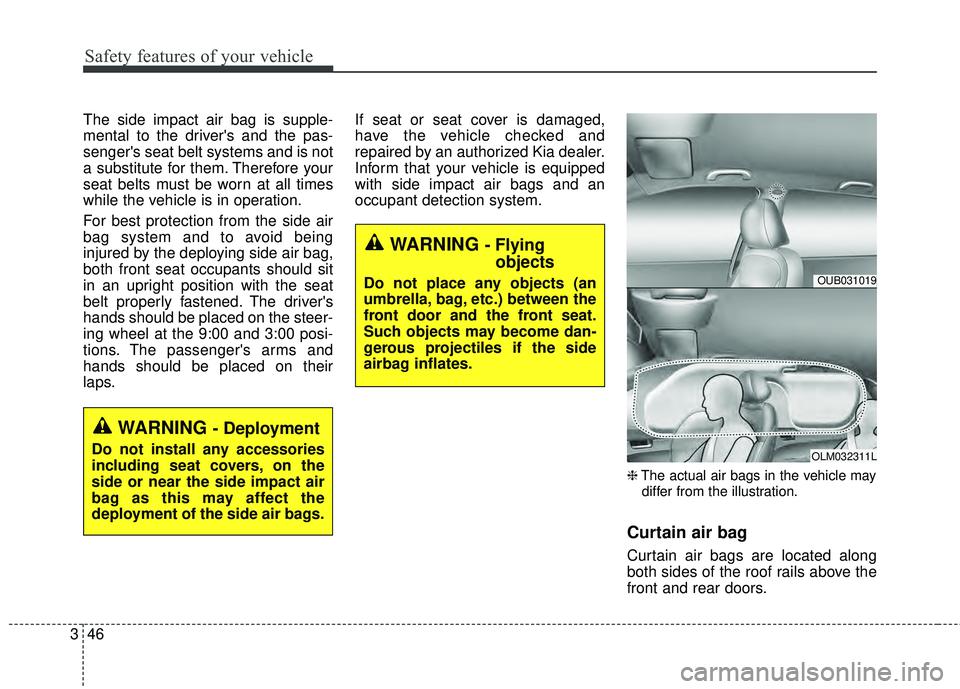
The actual air bags in the vehicle may
differ from the illustration.
Curtain air bag
Curtain air bags are located along
both sides of the roof rails above the
front and rear doors.
WARNING - Deployment
Do not install any accessories
including seat covers, on the
side or near the side impact air
bag as this may affect the
deployment of the side air bags.
WARNING - Flying objects
Do not place any objects (an
umbrella, bag, etc.) between the
front door and the front seat.
Such objects may become dan-
gerous projectiles if the side
airbag inflates.OUB031019
OLM032311L
Page 70 of 447
353
Safety features of your vehicle
SRS Care
The SRS is virtually maintenance-
free and there are no parts you can
safely service by yourself. If the SRS
air bag warning light does not illumi-
nate, or continuously remains on,
have your vehicle immediately
inspected by an authorized Kia deal-
er.
Any work on the SRS system, such
as removing, installing, repairing, or
any work on the steering wheel must
be performed by an authorized Kia
dealer. Improper handling of the SRS
system may result in serious person-
al injury.
For cleaning the air bag pad covers,
use only a soft, dry cloth or one
which has been moistened with plain
water. Solvents or cleaners could
adversely affect the air bag covers
and proper deployment of the sys-
tem.If components of the air bag system
must be discarded, or if the vehicle
must be scrapped, certain safety
precautions must be observed. An
authorized Kia dealer knows these
precautions and can give you the
necessary information. Failure to fol-
low these precautions and proce-
dures could increase the risk of per-
sonal injury.
Adding equipment to or modi-
fying your air bag-equipped
vehicle
If you modify your vehicle by chang-
ing your vehicle's frame, bumper sys-
tem, front end or side sheet metal or
ride height, this may affect the oper-
ation of your vehicle's air bag sys-
tem.
WARNING - Tampering
with SRS
Do not tamper with or discon-
nect SRS wiring, or other com-
ponents of the SRS system.
Doing so could result in the
accidental inflation of the air
bags or by rendering the SRS
inoperative.
Page 72 of 447

Features of your vehicle
Keys . . . . . . . . . . . . . . . . . . . . . . . . . . . . . . . . . . . . \
. 4-3
• Record your key number . . . . . . . . . . . . . . . . . . . . . 4-3
. . . . . . . . . . . . . . . . . . . . . . . . . . . . . . 4-3
Smart key . . . . . . . . . . . . . . . . . . . . . . . . . . . . . . . . 4-5
. . . . . . . . . . . . . . . . . . . . . . . . . . 4-5
. . . . . . . . . . . . . . . . . . . . . . . . 4-7
Remote keyless entry . . . . . . . . . . . . . . . . . . . . . . . 4-8
. . . . . . . . . 4-8
. . . . . . . . . . . . . . . . . . . . . . 4-9
. . . . . . . . . . . . . . . . . . . . . . . . . 4-10
. . . . . . . . . . . . . . . . . . . . . . . . . . 4-11
Theft-alarm system . . . . . . . . . . . . . . . . . . . . . . . . 4-13
Door locks . . . . . . . . . . . . . . . . . . . . . . . . . . . . . . . . 4-16
. . . . . . . . . . . . . . . . . . . . . . . . . . . 4-16
. . . . . . . . . . . . . . . . . . . . . . . . . . . . 4-17
. . . . . . . . . . . . . . . . . . . . . 4-19
. . . . . . . . . . . . . . . . . 4-19
Trunk . . . . . . . . . . . . . . . . . . . . . . . . . . . . . . . . . . . 4-\
21
Tailgate . . . . . . . . . . . . . . . . . . . . . . . . . . . . . . . . . . 4-23\
Windows . . . . . . . . . . . . . . . . . . . . . . . . . . . . . . . . . 4-25
Hood . . . . . . . . . . . . . . . . . . . . . . . . . . . . . . . . . . . . \
4-30
Fuel filler lid . . . . . . . . . . . . . . . . . . . . . . . . . . . . . . 4-32
Sunroof . . . . . . . . . . . . . . . . . . . . . . . . . . . . . . . . . . 4-35\
Steering wheel . . . . . . . . . . . . . . . . . . . . . . . . . . . . 4-39
4-39
. . . . . . . . . . . . . . . . . . . 4-40
. . . . . . . . . . . . . . . . . . . . . . . . 4-40
. . . . . . . . . . . . . . . . . . . . . . . . . . . . . . . . . . . . \
. . 4-41
Mirrors . . . . . . . . . . . . . . . . . . . . . . . . . . . . . . . . . . 4-42\
. . . . . . . . . . . . . . . . . . . . . . . 4-42
. . . . . . . . . . . . . . . . . . . . . . 4-42
Instrument cluster . . . . . . . . . . . . . . . . . . . . . . . . . 4-45
. . . . . . . . . . . . . . . . . 4-46
. . . . . . . . . . . . . . . . . . . . . . . . . . . . . . . . . . . . \
. 4-46
. . . . . . . . . . . . . . . . . . . . . . . . . . . . . . . . 4-49
- Trip computer . . . . . . . . . . . . . . . . . . . . . . . . . . . . . 4-49
- User settings . . . . . . . . . . . . . . . . . . . . . . . . . . . . . . . 4-54
- Maintenance system . . . . . . . . . . . . . . . . . . . . . . . . 4-56
- Warnings and indicators . . . . . . . . . . . . . . . . . . . . . 4-69
. . . . . . 4-58
Rear-Camera Display . . . . . . . . . . . . . . . . . . . . . . 4-75
Hazard warning flasher . . . . . . . . . . . . . . . . . . . . 4-76
4
Page 110 of 447
439
Features of your vehicle
Electric power steering
Power steering uses a motor to
assist you in steering the vehicle. If
the engine is off or if the power steer-
ing system becomes inoperative, the
vehicle may still be steered, but it will
require increased steering effort.
The motor driven power steering is
controlled by the power steering con-
trol unit which senses the steering
wheel torque and vehicle speed to
command the motor.
The steering wheel becomes heavier
as the vehicle’s speed increases and
becomes lighter as the vehicle’s
speed decreases for better control of
the steering wheel.
Should you notice any change in the
effort required to steer during normal
vehicle operation, have the power
steering checked by an authorized
Kia dealer.
✽ ✽
NOTICE
The following symptoms may occur
during normal vehicle operation:
• The steering effort is high immedi-
ately after turning the ignition
switch on. This happens as the sys-
tem performs the EPS system
diagnostics. When the diagnostics
is completed, the steering wheel
will return to its normal condition.
• A click noise may be heard from the EPS relay after the ignition
switch is turned to the ON or
LOCK position.
• Motor noise may be heard when the vehicle is at a stop or at a low
driving speed.
• The steering effort increases if the steering wheel is rotated continu-
ously when the vehicle is not in
motion. However, after a few min-
utes, it will return to its normal
conditions.
• When you operate the steering wheel in low temperature, abnor-
mal noise could occur. If tempera-
ture rises, the noise will disappear.
This is a normal condition.
If the Electric Power Steering System
does not operate normally, the warn-
ing light will illuminate on the instru-
ment cluster. The steering wheel may
become difficult to control or operate
abnormally. Take your vehicle to an
authorized Kia dealer and have the
vehicle checked as soon as possible.
STEERING WHEEL
Page 111 of 447
Features of your vehicle
40
4
Tilt and telescoping
(if equipped) steering
Tilt steering allows you to adjust the
steering wheel before you drive. You
can also raise it to give your legs
more room when you exit and enter
the vehicle.
The steering wheel should be posi-
tioned so that it is comfortable for
you to drive, while permitting you to
see the instrument panel warning
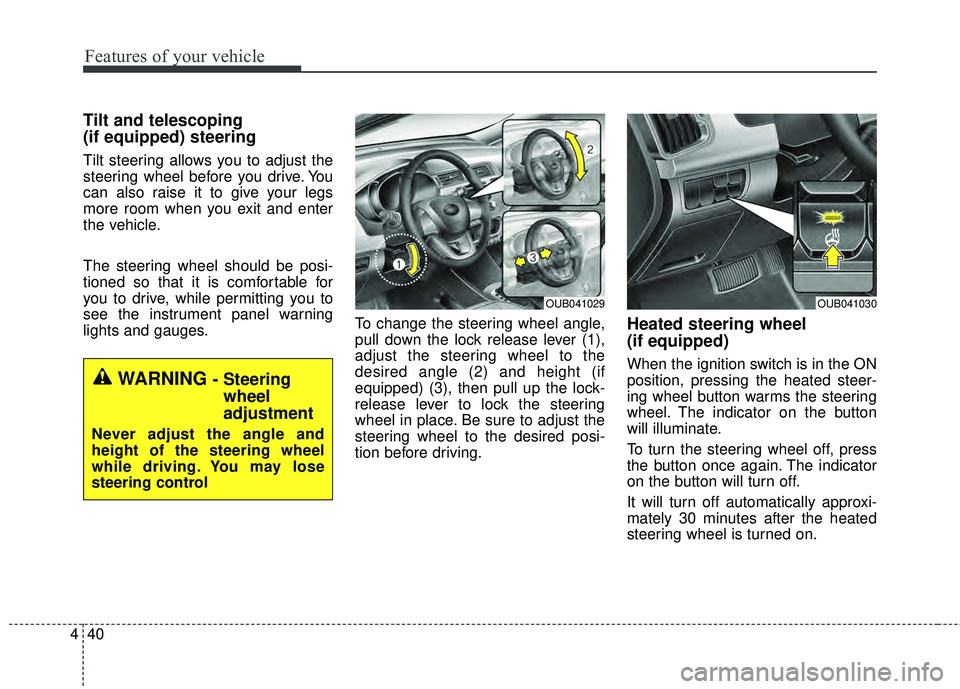
lights and gauges. To change the steering wheel angle,
pull down the lock release lever (1),
adjust the steering wheel to the
desired angle (2) and height (if
equipped) (3), then pull up the lock-
release lever to lock the steering
wheel in place. Be sure to adjust the
steering wheel to the desired posi-
tion before driving.
Heated steering wheel
(if equipped)
When the ignition switch is in the ON
position, pressing the heated steer-
ing wheel button warms the steering
wheel. The indicator on the button
will illuminate.
To turn the steering wheel off, press
the button once again. The indicator
on the button will turn off.
It will turn off automatically approxi-
mately 30 minutes after the heated
steering wheel is turned on.
WARNING - Steering
wheel
adjustment
Never adjust the angle and
height of the steering wheel
while driving. You may lose
steering control
OUB041029OUB041030
Page 112 of 447
441
Features of your vehicle
If the ignition is turned off and then
on again within a half hour (while the
heated steering wheel button is
pressed), the steering wheel heating
system will remain on.
Horn
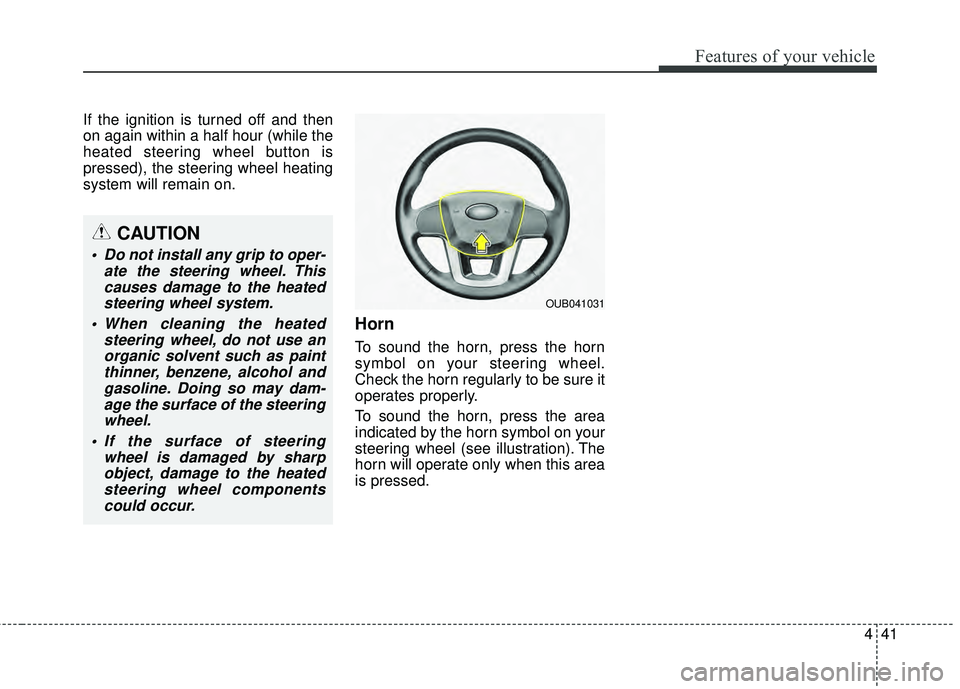
To sound the horn, press the horn
symbol on your steering wheel.
Check the horn regularly to be sure it
operates properly.
To sound the horn, press the area
indicated by the horn symbol on your
steering wheel (see illustration). The
horn will operate only when this area
is pressed.
OUB041031
CAUTION
Do not install any grip to oper-ate the steering wheel. Thiscauses damage to the heatedsteering wheel system.
When cleaning the heated steering wheel, do not use anorganic solvent such as paintthinner, benzene, alcohol andgasoline. Doing so may dam-age the surface of the steeringwheel.
If the surface of steering wheel is damaged by sharpobject, damage to the heatedsteering wheel componentscould occur.
Page 126 of 447
455
Features of your vehicle
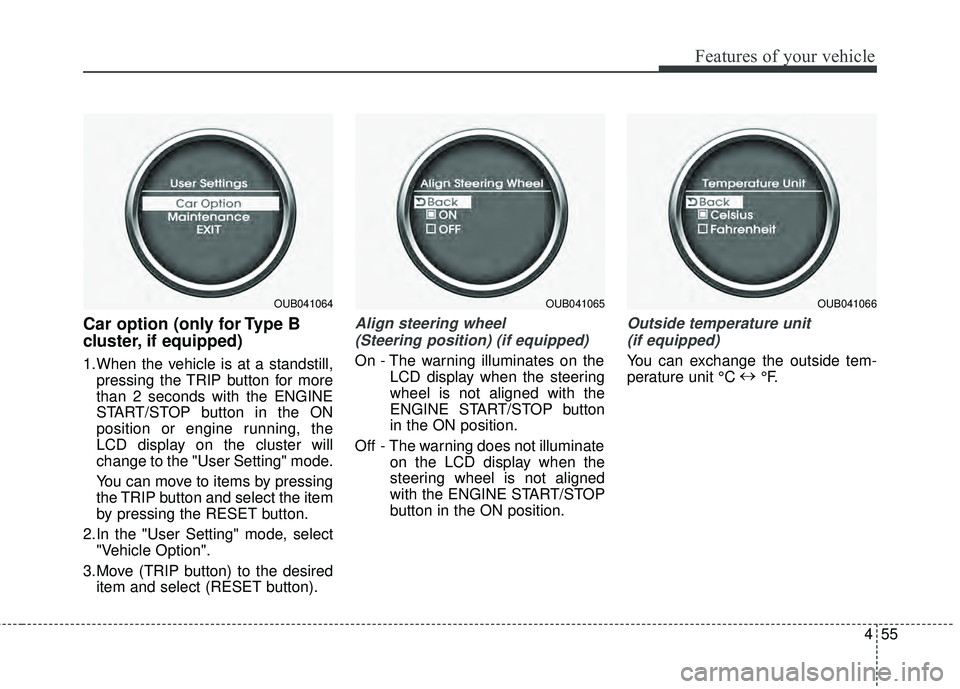
Car option (only for Type B
cluster, if equipped)
1.When the vehicle is at a standstill,pressing the TRIP button for more
than 2 seconds with the ENGINE
START/STOP button in the ON
position or engine running, the
LCD display on the cluster will
change to the "User Setting" mode.
You can move to items by pressing
the TRIP button and select the item
by pressing the RESET button.
2.In the "User Setting" mode, select "Vehicle Option".
3.Move (TRIP button) to the desired item and select (RESET button).
Align steering wheel
(Steering position) (if equipped)
On - The warning illuminates on the LCD display when the steering
wheel is not aligned with the
ENGINE START/STOP button
in the ON position.
Off - The warning does not illuminate on the LCD display when the
steering wheel is not aligned
with the ENGINE START/STOP
button in the ON position.
Outside temperature unit
(if equipped)
You can exchange the outside tem-
perature unit °C ↔
°F.
OUB041064OUB041065OUB041066
Page 133 of 447
Features of your vehicle
62
4
Low brake fluid level warning
If the warning light remains on, it may
indicate that the brake fluid level in
the reservoir is low.
If the warning light remains on:
1.Drive carefully to the nearest safe
location and stop your vehicle.
2.With the engine stopped, check the brake fluid level immediately and
add fluid as required. Then check
all brake components for fluid
leaks.
3.Do not drive the vehicle if leaks are found, the warning light remains on
or the brakes do not operate prop-
erly. Have the vehicle towed to any
authorized Kia dealer for a brake
system inspection and necessary
repairs. Your vehicle is equipped with dual-
diagonal braking systems. This
means you still have braking on two
wheels even if one of the dual sys-
tems should fail. With only one of the
dual systems working, more than
normal pedal travel and greater
pedal pressure are required to stop
the vehicle. Also, the vehicle will not
stop in as short a distance with only
a portion of the brake system work-
ing. If the brakes fail while you are
driving, shift to a lower gear for addi-
tional engine braking and stop the
vehicle as soon as it is safe to do so.
To check bulb operation, check
whether the parking brake and brake
fluid warning light illuminates when
the ignition switch is in the ON posi-
tion.Charging system warn-
ing light
This warning light indicates a mal-
function of either the generator or
electrical charging system.
If the warning light illuminates while
the vehicle is in motion:
1.Drive to the nearest safe location.
2.With the engine off, check the gen- erator drive belt for looseness or
breakage.
3.If the belt is adjusted properly, a problem exists somewhere in the
electrical charging system. Have
an authorized Kia dealer correct
the problem as soon as possible.
Page 136 of 447

465
Features of your vehicle
ESC indicator(Electronic StabilityControl)
The ESC indicator will illuminate
when the ignition switch is turned
ON, but should go off after approxi-
mately 3 seconds. When the ESC is
on, it monitors the driving conditions
under normal driving conditions, the
ESC light will remain off. When a slip-
pery or low traction condition is
encountered, the ESC will operate,
and the ESC indicator will blink to
indicate the ESC is operating.
If the ESC indicator stays on, the
ESC may have a malfunction. Take
your car to an authorized Kia dealer
and have the system checked.
ESC OFF indicator
The ESC OFF indicator will illumi-
nate when the ignition switch is
turned ON, but should go off after
approximately 3 seconds. To switch
to ESC OFF mode, press the ESC
OFF button. The ESC OFF indicator
will illuminate indicating the ESC is
deactivated.
Low tire pressure telltale
The low tire pressure telltale comes
on for 3 seconds after the ignition
key is turned to the "ON" position.
If the warning light does not come
on, or continuously remains on after
coming on for about 3 seconds when
you turned the ignition key to the
"ON" position, the Tire Pressure
Monitoring System is not working
properly. If this occurs, have your
vehicle checked by an Kia authorized
dealer as soon as possible.
This warning light will also illuminate
if one or more of your tires is signifi-
cantly under-inflated. You should
stop and check your tires as soon as
possible. If the warning light illumi-
nates while driving, reduce vehicle
speed immediately and stop the
vehicle.
Avoid hard braking and overcorrect-
ing at the steering wheel. Inflate the
tires to the proper pressure as indi-
cated on the vehicle’s tire information
placard.
Page 137 of 447

Features of your vehicle
66
4
Cruise indicator (if equipped)
CRUISE indicator
The indicator illuminates when the
cruise control system is enabled.
The cruise indicator in the instrument
cluster is illuminated when the cruise
control ON/OFF button on the steer-
ing wheel is pushed.
The indicator goes off when the
cruise control ON/OFF button is
pushed again. For more Information,
refer to “Cruise control system” in
section 5. Cruise SET indicator
The indicator illuminates when the
cruise function switch (SET- or
RES+) is ON.
The cruise SET indicator in the
instrument cluster illuminates when
the cruise control switch (SET- or
RES+) is pushed.
The cruise SET indicator does not
illuminate when the cruise control
switch (CANCEL) is pushed or the
system is disengaged.
Key reminder warning chime
(if equipped)
If the driver’s door is opened while
the ignition key is left in the ignition
switch (ACC or LOCK position), the
key reminder warning chime will
sound. This is to prevent you from
locking your keys in the vehicle. The
chime sounds until the key is
removed from the ignition switch or
the driver’s door is closed.
SET
CRUISE
WARNING - Low tire pressure
Significantly low tire pressure
makes the vehicle unstable and
can contribute to loss of vehicle
control and increased braking
distances.
Continued driving on tires with
low pressure will cause the tires
to overheat and fail.