steering KIA RIO HATCHBACK 2017 Owner's Manual
[x] Cancel search | Manufacturer: KIA, Model Year: 2017, Model line: RIO HATCHBACK, Model: KIA RIO HATCHBACK 2017Pages: 532, PDF Size: 12.04 MB
Page 147 of 532
477
Features of your vehicle
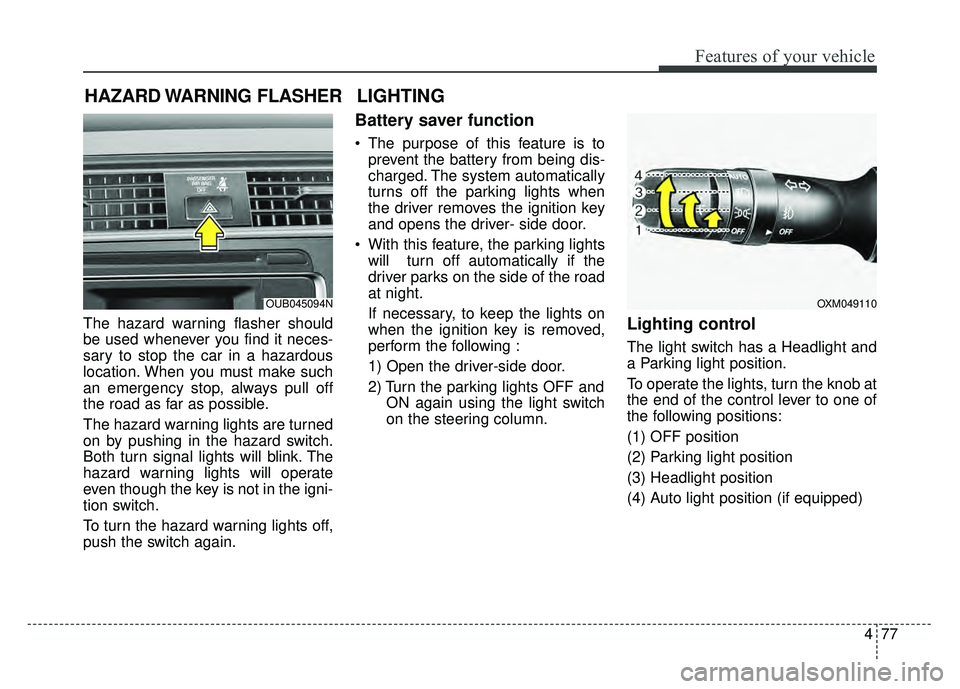
The hazard warning flasher should
be used whenever you find it neces-
sary to stop the car in a hazardous
location. When you must make such
an emergency stop, always pull off
the road as far as possible.
The hazard warning lights are turned
on by pushing in the hazard switch.
Both turn signal lights will blink. The
hazard warning lights will operate
even though the key is not in the igni-
tion switch.
To turn the hazard warning lights off,
push the switch again.
Battery saver function
The purpose of this feature is toprevent the battery from being dis-
charged. The system automatically
turns off the parking lights when
the driver removes the ignition key
and opens the driver- side door.
With this feature, the parking lights will turn off automatically if the
driver parks on the side of the road
at night.
If necessary, to keep the lights on
when the ignition key is removed,
perform the following :
1) Open the driver-side door.
2) Turn the parking lights OFF and ON again using the light switch
on the steering column.
Lighting control
The light switch has a Headlight and
a Parking light position.
To operate the lights, turn the knob at
the end of the control lever to one of
the following positions:
(1) OFF position
(2) Parking light position
(3) Headlight position
(4) Auto light position (if equipped)
HAZARD WARNING FLASHER
OXM049110
LIGHTING
OUB045094N
Page 196 of 532
Features of your vehicle
126
4
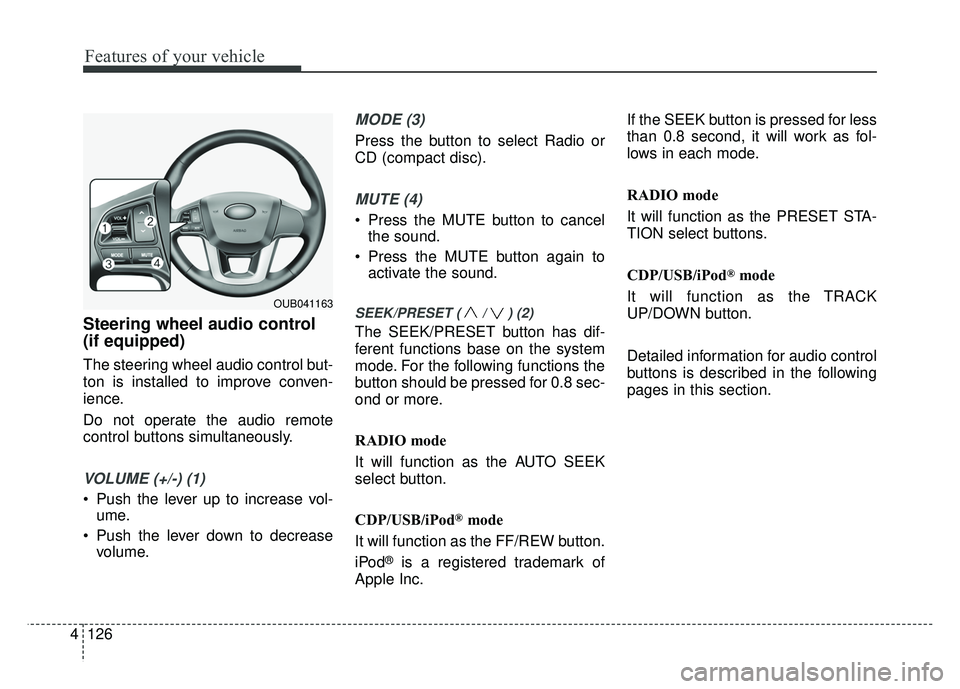
Steering wheel audio control
(if equipped)
The steering wheel audio control but-
ton is installed to improve conven-
ience.
Do not operate the audio remote
control buttons simultaneously.
VOLUME (+/-) (1)
Push the lever up to increase vol-
ume.
Push the lever down to decrease volume.
MODE (3)
Press the button to select Radio or
CD (compact disc).
MUTE (4)
Press the MUTE button to cancelthe sound.
Press the MUTE button again to activate the sound.
SEEK/PRESET ( / ) (2)
The SEEK/PRESET button has dif-
ferent functions base on the system
mode. For the following functions the
button should be pressed for 0.8 sec-
ond or more.
RADIO mode
It will function as the AUTO SEEK
select button.
CDP/USB/iPod
®mode
It will function as the FF/REW button.
iPod
®is a registered trademark of
Apple Inc. If the SEEK button is pressed for less
than 0.8 second, it will work as fol-
lows in each mode.
RADIO mode
It will function as the PRESET STA-
TION select buttons.
CDP/USB/iPod
®mode
It will function as the TRACK
UP/DOWN button.
Detailed information for audio control
buttons is described in the following
pages in this section.
OUB041163
Page 216 of 532
![KIA RIO HATCHBACK 2017 Owners Manual Features of your vehicle
146
4
CLOCK SETTINGS
Press the key Select
[Clock] through TUNE knob or
key Select menu through TUNE
knob
Clock Settings
This menu is used to set the time.
Select [Clock Se](/img/2/57977/w960_57977-215.png "KIA RIO HATCHBACK 2017 Owners Manual Features of your vehicle
146
4
CLOCK SETTINGS
Press the key Select
[Clock] through TUNE knob or
key Select menu through TUNE
knob
Clock Settings
This menu is used to set the time.
Select [Clock Se")
Features of your vehicle
146
4
CLOCK SETTINGS
Press the key Select
[Clock] through TUNE knob or
key Select menu through TUNE
knob
Clock Settings
This menu is used to set the time.
Select [Clock Settings] Set through TUNE knob Press TUNE knob
❈Adjust the number currently in
focus to set the [hour] and press
the tune knob to set the [minute]
and [AM/PM].
Calendar Settings
This menu is used to set the date.
Select [Calendar Settings] Set through
TUNE knob Press TUNE knob
❈Adjust the number currently in
focus to make the settings and
press the tune knob to move to the
next setting.
Time Format
This function is used to set the 12/24
hour time format of the audio system.
Select [Time Format] Set 12Hr / 24Hr
through TUNE knob.
Clock Display when Power is OFF
Select [Clock Disp.(Pwr Off)] Set
/through TUNEknob
: Displays time/date on screen
: Turn off.
Off
On
OffOn
3
SETUP/CLOCK
WARNING- Clock Setting Distraction
Do not adjust the clock while
driving. You may lose your
steering control and cause
severe personal injury or acci-
dents.
Page 229 of 532
Features of your vehicle
4159
PHONE
Before using the Bluetooth®Wireless
Technology phone features
In order to use
Bluetooth®Wireless
Technology phone, you must first
pair and connect the
Bluetooth®
Wireless Technology mobile phone.
If the mobile phone is not paired or connected, it is not possible to
enter Phone mode. Once a phone
is paired or connected, the guid-
ance screen will be displayed.
If Priority is set upon vehicle igni- tion (IGN/ACC ON), the
Bluetooth®
Wireless Technology phone will be
automatically connected. Even if
you are outside, the
Bluetooth®
Wireless Technology phone will be
automatically connected once you
are in the vicinity of the vehicle. If
you do not want automatic
Bluetooth®Wireless Technology
phone connection, set the
Bluetooth®Wireless Technology
power to OFF.
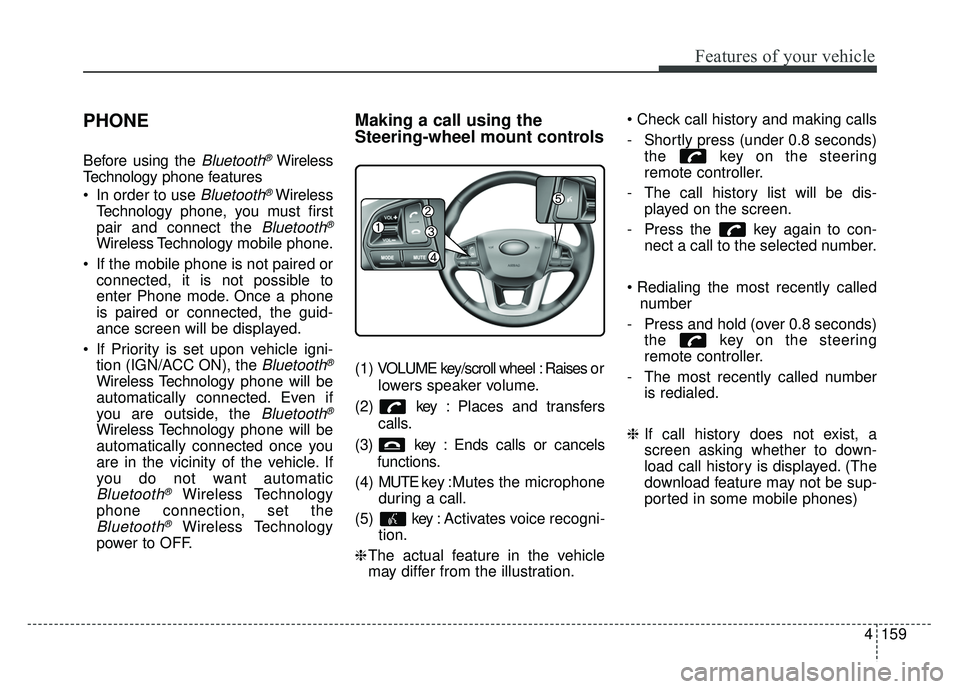
Making a call using the
Steering-wheel mount controls
( 1 ) VOLUME key/scroll wheel : Raises o r
lowers speaker volume.
(2) key : Places and transfers calls.
(3) key : Ends calls or cancels functions.
(4) MUTE key : Mutes the microphone
during a call.
(5) key : Activates voice recogni- tion.
❈ The actual feature in the vehicle
may differ from the illustration.
- Shortly press (under 0.8 seconds)
the key on the steering
remote controller.
- The call history list will be dis- played on the screen.
- Press the key again to con- nect a call to the selected number.
number
- Press and hold (over 0.8 seconds) the key on the steering
remote controller.
- The most recently called number is redialed.
❈ If call history does not exist, a
screen asking whether to down-
load call history is displayed. (The
download feature may not be sup-
ported in some mobile phones)
Page 230 of 532
Features of your vehicle
160
4
Bluetooth®Wireless Technology
Pairing a
Bluetooth®Wireless
Technology Device
What is Bluetooth®Wireless
Technology Pairing?
Pairing refers to the process of syn-
chronizing your
Bluetooth®Wireless
Technology phone or device with the
car audio system for connection.
Pairing is necessary to connect and
use the
Bluetooth®Wireless Technology
feature.
The Bluetooth
®word mark and logos
are registered trademarks owned by
Bluetooth SIG, Inc. and any use of
such marks by Kia is under license.
Other trademarks and trade names
are those of their respective owners.
A Bluetooth
®enabled cell phone is
required to use
Bluetooth®Wireless
Technology
Pairing key / key
on the Steering Remote
Controller
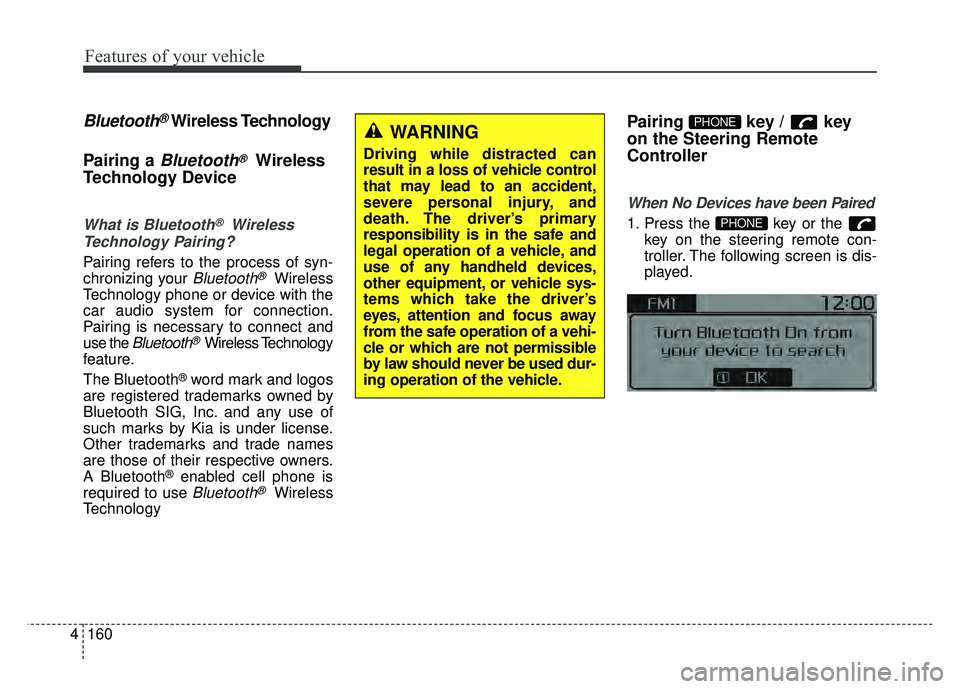
When No Devices have been Paired
1. Press the key or the key on the steering remote con-
troller. The following screen is dis-
played.PHONE
PHONEWARNING
Driving while distracted can
result in a loss of vehicle control
that may lead to an accident,
severe personal injury, and
death. The driver’s primary
responsibility is in the safe and
legal operation of a vehicle, and
use of any handheld devices,
other equipment, or vehicle sys-
tems which take the driver’s
eyes, attention and focus away
from the safe operation of a vehi-
cle or which are not permissible
by law should never be used dur-
ing operation of the vehicle.
Page 231 of 532
![KIA RIO HATCHBACK 2017 Owners Manual Features of your vehicle
4161
2. Select [OK] button to enter thePair Phone screen.
1) Vehicle Name : Name of device as shown when searching from your
Bluetooth®Wireless Technology
device
2) Passkey :](/img/2/57977/w960_57977-230.png "KIA RIO HATCHBACK 2017 Owners Manual Features of your vehicle
4161
2. Select [OK] button to enter thePair Phone screen.
1) Vehicle Name : Name of device as shown when searching from your
Bluetooth®Wireless Technology
device
2) Passkey :")
Features of your vehicle
4161
2. Select [OK] button to enter thePair Phone screen.
1) Vehicle Name : Name of device as shown when searching from your
Bluetooth®Wireless Technology
device
2) Passkey : Passkey used to pair the device
3. From your
Bluetooth®Wireless
Technology device (i.e. Mobile
Phone), search and select your
car audio system.
[Non SSP supported device]
(SSP: Secure Simple Pairing)
4. After a few moments, a screen is displayed where the passkey is
entered. Hear, enter the passkey
"0000" to pair your
Bluetooth®
Wireless Technology device with
the car audio system. [SSP supported device]
4. After a few moments, a screen is
displayed 6 digits passkey. Hear,
check the passkey on your
Bluetooth®Wireless Technology
device and confirm.
5. Once pairing is complete, the fol- lowing screen is displayed.
Some phones (i.e., iPhone
®, Android TM
and Blackberry®phones) may offer
an option to allow acceptance of all
future Bluetooth connection requests
by default." and "Visit http://www.kia.
com/us/en/content/owners/bluetooth
for additional information on pairing
your Bluetooth-enabled mobile
phone, and to view a phone compat-
ibility list. If
Bluetooth®Wireless Technology
devices are paired but none are
currently connected, pressing the key or the key on the
steering wheel displays the follow-
ing screen. Select [Pair] button to
pair a new device or select [Connect]
to connect a previously paired
device.
PHONE
Page 236 of 532
Features of your vehicle
166
4
USING Bluetooth®Wireless
Technology
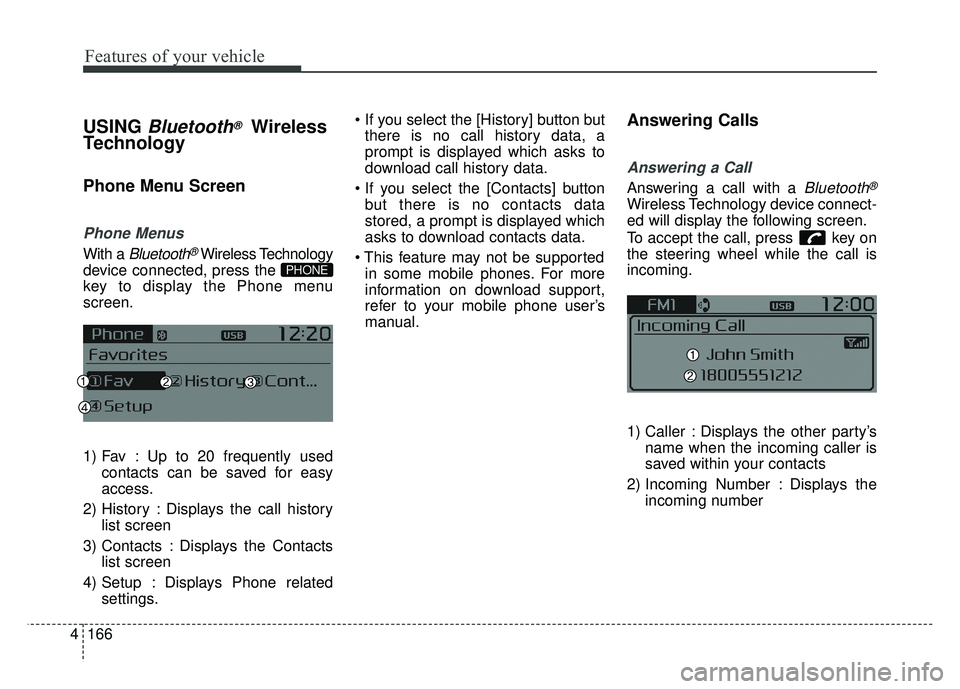
Phone Menu Screen
Phone Menus
With a Bluetooth®Wireless Technology
device connected, press the
key to display the Phone menu
screen.
1) Fav : Up to 20 frequently used contacts can be saved for easy
access.
2) History : Displays the call history list screen
3) Contacts : Displays the Contacts list screen
4) Setup : Displays Phone related settings.
there is no call history data, a
prompt is displayed which asks to
download call history data.
but there is no contacts data
stored, a prompt is displayed which
asks to download contacts data.
in some mobile phones. For more
information on download support,
refer to your mobile phone user’s
manual.
Answering Calls
Answering a Call
Answering a call with a Bluetooth®
Wireless Technology device connect-
ed will display the following screen.
To accept the call, press key on
the steering wheel while the call is
incoming.
1) Caller : Displays the other party’s name when the incoming caller is
saved within your contacts
2) Incoming Number : Displays the incoming number
PHONE
Page 242 of 532
![KIA RIO HATCHBACK 2017 Owners Manual Features of your vehicle
172
4
VOICE RECOGNITION
Using Voice Recognition
Starting Voice Recognition
Shortly press the key on the
steering wheel. Say a command.
If prompt feedback is in [ON], then
t](/img/2/57977/w960_57977-241.png "KIA RIO HATCHBACK 2017 Owners Manual Features of your vehicle
172
4
VOICE RECOGNITION
Using Voice Recognition
Starting Voice Recognition
Shortly press the key on the
steering wheel. Say a command.
If prompt feedback is in [ON], then
t")
Features of your vehicle
172
4
VOICE RECOGNITION
Using Voice Recognition
Starting Voice Recognition
Shortly press the key on the
steering wheel. Say a command.
If prompt feedback is in [ON], then
the system will say “Please say a
command after the beep (BEEP)”
If prompt feedback is in [OFF]
mode, then the system will only
say “(BEEP)”
To change Prompt Feedback [On]/[Off], go to
[System] [Prompt Feedback]
For proper recognition, say the command after the voice instruc-
tion and beep tone.
Contact List Best Practices
1) Use full names vs. short or single- syllable names (“John Smith” vs.
“Dad”, “Smith Residence” vs.
“Home”)
2) Avoid using special characters or hyphens (@, &, #, /, -, *, +, etc.)
3) Avoid using acronyms (“In Case Emergency” vs. “ICE”)
4) Spell words completely, no abbre- viations (“Doctor Goodman” vs.
“Dr. Goodman”)
Skipping Prompt Messages
While prompt message is being stat-
ed Shortly press the key on the
steering remote controller
The prompt message is immediately
ended and the beep tone will sound.
After the “beep”, say the voice com-
mand.
Re-starting Voice Recognition
While system waits for a command
Shortly press the key on the
steering remote controller
The command wait state is immedi-
ately ended and the beep tone will
sound. After the “beep”, say the voice
command.
SETUP/CLOCK
Page 243 of 532
Features of your vehicle
4173
ENDING VOICE
RECOGNITION
While Voice Recognition is operatingPress and hold the key on the
steering remote controller
ing any steering wheel control or a
different key will end voice com-
mand.
voice command, say “cancel” or
“end” to end voice command.
voice command, press and hold the key on the steering wheel to
end voice command.
Voice Recognition and Phone
Contact Tips:
The Kia Voice Recognition System may
have difficulty understanding some
accents or uncommon names. When
using Voice Recognition to place a call,
speak in a moderate tone, with clear
pronunciation.
To maximize the use of Voice
Recognition, consider these guidelines
when storing contacts :
Use full names vs. short or single syllable names (“John Smith” vs.
“Dad”, “Smith Residence” vs.
“Home”)
Avoid using special characters or hyphens (@, &, #, /, -, *, +, etc.)
Avoid using acronyms (“In Case Emergency” vs. “ICE”)
Spell words completely, no abbre- viations (“Doctor Goodman” vs.
“Dr. Goodman”)
Page 254 of 532
Features of your vehicle
184
44
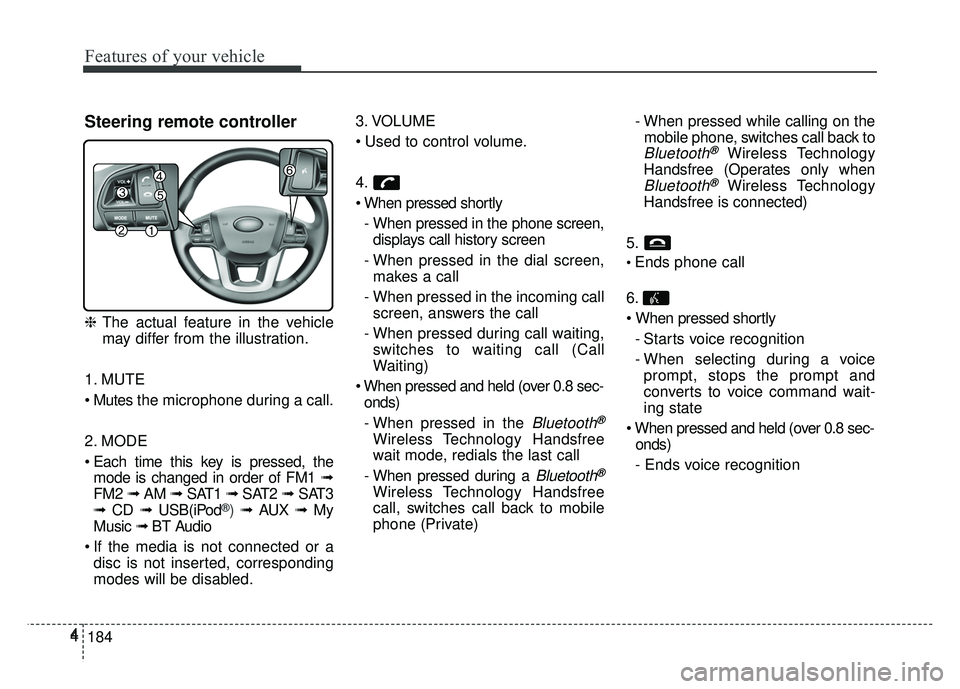
Steering remote controller
❈
The actual feature in the vehicle
may differ from the illustration.
1. MUTE
the microphone during a call.
2. MODE
Each time this key is pressed, the mode is changed in order of FM1 ➟
FM2 ➟ AM ➟ SAT1 ➟ SAT2 ➟SAT3
➟ CD ➟ USB(iPod
®) ➟ AUX ➟ My
Music ➟ BT Audio
If the media is not connected or a disc is not inserted, corresponding
modes will be disabled. 3. VOLUME
4.
- When pressed in the phone screen,displays call history screen
- When pressed in the dial screen, makes a call
- When pressed in the incoming call screen, answers the call
- When pressed during call waiting, switches to waiting call (Call
Waiting)
onds)
- When pressed in the
Bluetooth®
Wireless Technology Handsfree
wait mode, redials the last call
- When pressed during a
Bluetooth®
Wireless Technology Handsfree
call, switches call back to mobile
phone (Private) - When pressed while calling on the
mobile phone, switches call back to
Bluetooth®Wireless Technology
Handsfree (Operates only when
Bluetooth®Wireless Technology
Handsfree is connected)
5.
Ends phone call
6.
- Starts voice recognition
- When selecting during a voiceprompt, stops the prompt and
converts to voice command wait-
ing state
onds)
- Ends voice recognition