USB port KIA RIO HATCHBACK 2018 User Guide
[x] Cancel search | Manufacturer: KIA, Model Year: 2018, Model line: RIO HATCHBACK, Model: KIA RIO HATCHBACK 2018Pages: 492, PDF Size: 10.36 MB
Page 232 of 492
Audio system
23
5
(Continued)
• The search and song play order in
the iPod
®device may be different
from the search order in the audio
system.
• If the iPod
®has failed due to an
internal defect, please reset the
iPod
®(consult your iPod®manual).
• Depending on the software ver- sion, the iPod
®may fail to sync
with the system. If the media is
removed or disconnected before
recognition, the previous mode
may not be restored (iPad
®cannot
be charged).
• Cables other than the 1-meter cable provided with iPod
®/iPhone®
products may not be recognized.
• When other music apps are used on your iPod
®, the system sync
function may fail due to malfunc-
tion of the iPod
®application.
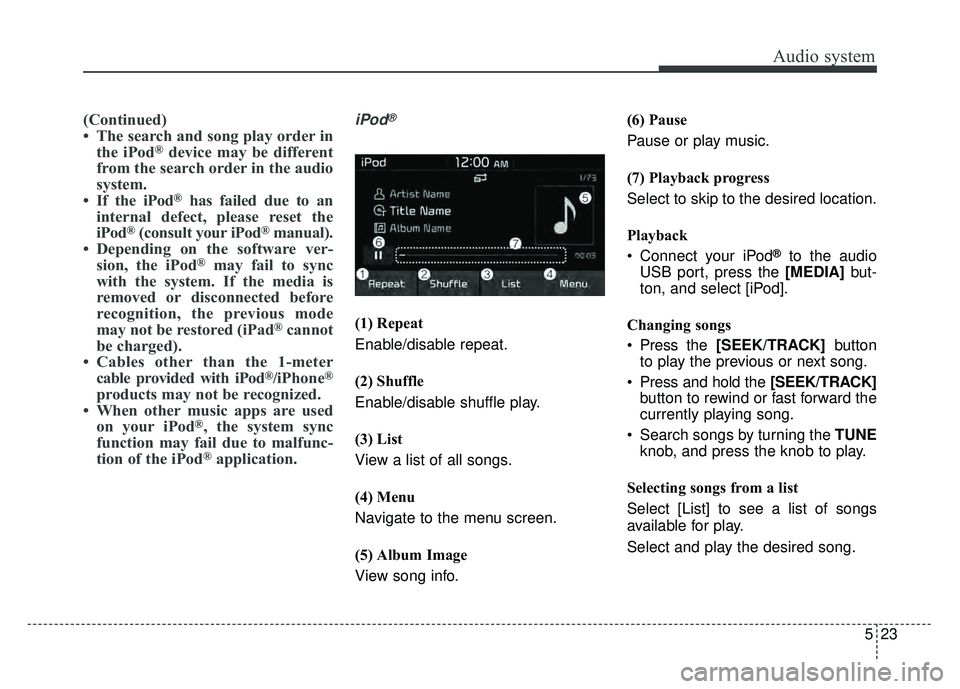
iPod®
(1) Repeat
Enable/disable repeat.
(2) Shuffle
Enable/disable shuffle play.
(3) List
View a list of all songs.
(4) Menu
Navigate to the menu screen.
(5) Album Image
View song info. (6) Pause
Pause or play music.
(7) Playback progress
Select to skip to the desired location.
Playback
Connect your iPod
®to the audio
USB port, press the [MEDIA] but-
ton, and select [iPod].
Changing songs
Press the [SEEK/TRACK] button
to play the previous or next song.
Press and hold the [SEEK/TRACK] button to rewind or fast forward the
currently playing song.
Search songs by turning the TUNE knob, and press the knob to play.
Selecting songs from a list
Select [List] to see a list of songs
available for play.
Select and play the desired song.
Page 246 of 492
Audio system
37
5
✽
✽
NOTICE
• When paired devices are deleted,
the call history and contacts of the
device saved to the audio system
are deleted.
• For Bluetooth
®Wireless Technology
connections with low connection pri-
ority, some time may be required for
the connection to be established.
• Contacts can be downloaded only from the currently connected
Bluetooth
®Wireless Technology
device.
If no Bluetooth
®Wireless Technology
device is connected, the download
contacts button is disabled.
• If the language setting is Korean, Bluetooth
®Wireless Technology
voice prompts are not supported.
System
Press the [SETUP] button on the
audio system ➟ Select [System].
Language: Change the user lan- guage.
Default: Reset the audio system.
System Information: At the System Information screen, Software version
information, updates are available.
- System Update: At the SystemInformation screen, insert the
USB memory with the latest file
downloaded, and then select the
[Update] to begin updating. The
system with then reboot auto-
matically.
✽ ✽ NOTICE
• The system resets to the default
values, and all saved data and set-
tings are lost.
• This product needs supplemented software updates and additional
functions, which collectively may
take some time to complete,
depending on the amount of data.
• If the Power is disconnected or the USB is removed during an update,
the data might be damaged. Please
wait until the update is complete
while engine is on.
Page 480 of 492
Index
2I
Air bag inflation conditions ..........................................3-51
Air bag non-inflation conditions ..................................3-52
Air bag warning label ....................................................3-55
Air bag warning light ....................................................3-34
Air bags........................................................................\
..3-30Operation ....................................................................3-31\
Air bag warning light ..................................................3-34
SRS components and functions ..................................3-34
Occupant detection system ........................................3-37
Driver's and passenger's front air bag ........................3-44
Side air bag ................................................................3-47
Curtain air bag ............................................................3-48
Air bag inflation conditions ........................................3-51
Air bag non-inflation conditions ................................3-52
SRS care ......................................................................3-\
54
Adding equipment to or modifying your air bag-equipped vehicle ................................................3-55
Air bag warning label ................................................3-55
Air cleaner ....................................................................8-34\
Filter replacement ......................................................8-34
Air Conditioning System ................................................9-6
Anti-lock brake system (ABS) ......................................6-27
Appearance care ..........................................................8-101 Exterior care ..............................................................8-101
Interior care ..............................................................8-106 Audio (without touch screen) ..........................................5-7
Feature of your audio ....................................................5-8
Radio ........................................................................\
..5-14
SiriusXM ....................................................................5-16\
Media ........................................................................\
..5-18
Phone ........................................................................\
..5-28
Setup ........................................................................\
..5-36
Audio system ..................................................................5-2 Antenna ........................................................................\
5-2
AUX, USB port ............................................................5-3
Auto light position ........................................................4-89
Automatic climate control system ..............................4-114 Automatic heating and air conditioning ..................4-115
Manual heating and air conditioning ........................4-116
System operation ......................................................4-121
Automatic transaxle ......................................................6-18 Automatic transaxle operation ....................................6-18
Good driving practices ................................................6-22
Back-up lamp bulb replacement (4 door) ......................8-94
Back-up lamp bulb replacement (5 door) ......................8-89
A
B