radio KIA RIO HATCHBACK 2018 User Guide
[x] Cancel search | Manufacturer: KIA, Model Year: 2018, Model line: RIO HATCHBACK, Model: KIA RIO HATCHBACK 2018Pages: 492, PDF Size: 10.36 MB
Page 223 of 492
Audio system
514
Radio
You can listen to FM, AM and
SiriusXM radio.
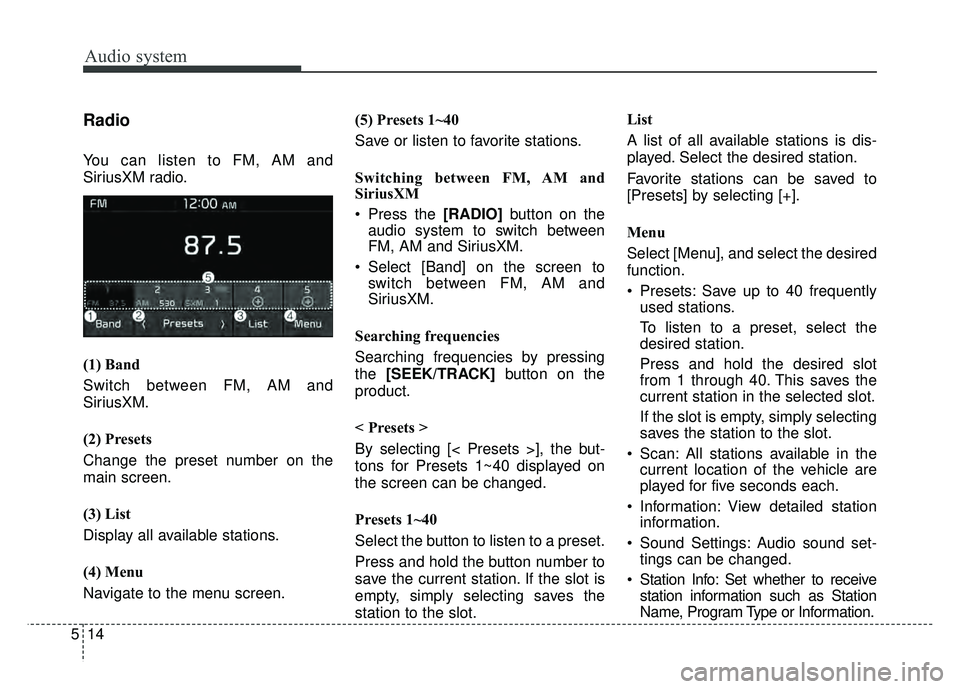
(1) Band
Switch between FM, AM and
SiriusXM.
(2) Presets
Change the preset number on the
main screen.
(3) List
Display all available stations.
(4) Menu
Navigate to the menu screen.(5) Presets 1~40
Save or listen to favorite stations.
Switching between FM, AM and
SiriusXM
Press the [RADIO]
button on the
audio system to switch between
FM, AM and SiriusXM.
Select [Band] on the screen to switch between FM, AM and
SiriusXM.
Searching frequencies
Searching frequencies by pressing
the [SEEK/TRACK] button on the
product.
< Presets >
By selecting [< Presets >], the but-
tons for Presets 1~40 displayed on
the screen can be changed.
Presets 1~40
Select the button to listen to a preset.
Press and hold the button number to
save the current station. If the slot is
empty, simply selecting saves the
station to the slot. List
A list of all available stations is dis-
played. Select the desired station.
Favorite stations can be saved to
[Presets] by selecting [+].
Menu
Select [Menu], and select the desired
function.
Presets: Save up to 40 frequently
used stations.
To listen to a preset, select the
desired station.
Press and hold the desired slot
from 1 through 40. This saves the
current station in the selected slot.
If the slot is empty, simply selecting
saves the station to the slot.
Scan: All stations available in the current location of the vehicle are
played for five seconds each.
Information: View detailed station information.
Sound Settings: Audio sound set- tings can be changed.
Station Info: Set whether to receive station information such as Station
Name, Program Type or Information.
Page 224 of 492
Audio system
15
5
✽
✽
NOTICE - SiriusXM®Satellite
Radio information
• Satellite Radio channels: Enjoy SiriusXM Satellite Radio
with a 3-month trial subscription
to the Sirius Select package. You’ll
get over variable channels, includ-
ing commercialfree music, plus all
your favorite sports, exclusive
talk, entertainment, and a selec-
tion of premium programming.
For more information and a com-
plete list of SiriusXM channels,
visit siriusxm.com in the United
States, siriusxm.ca in Canada, or
call SiriusXM at 1-888-539-7474.
• Satellite Radio reception factors: To receive the satellite signal, your
vehicle has been equipped with a
satellite radio antenna located on
the roof of your vehicle. The vehi-
cle roof provides the best location
for an unobstructed, open view of
the sky, a requirement of a satellite
radio system. Like AM/FM, there
are several factors that can affect
satellite radio reception perform-
ance: (Continued)(Continued)
- Antenna obstructions: For opti-mal reception performance, keep
the antenna clear of snow and
ice build-up and keep luggage
and other material as far away
from the antenna as possible.
• SiriusXM Satellite Radio service: SiriusXM is a subscription-based
satellite radio service that broad-
casts music, sports, news and
entertainment programming to
radio receivers, which are avail-
able for installation in motor vehi-
cles or factory installed, as well as
for the home, portable and wire-
less devices, and through an Internet
connection on a personal computer.
Vehicles that are equipped with a
factory installed SiriusXM Satellite
Radio system include:
- Hardware and an introductorytrial subscription term, which
begins on the date of sale or lease
of the vehicle.
- For a small upgrade fee, access to SiriusXM music channels, and
other select channels over the
Internet using any computer con-
nected to the Internet (U.S. cus-
tomers only).
(Continued)(Continued)
• SiriusXM services require a sub-
scription sold separately, or as a
package, by Sirius XM Radio Inc.
If you decide to continue service
after your trial, the subscription
plan you choose will automatically
renew thereafter and you will be
charged according to your chosen
payment method at then-current
rates. Fees and taxes apply. To
cancel you must call SiriusXM at
1-866-635-2349. See SiriusXM
Customer Agreement for complete
terms at www.siriusxm.com.
SiriusXM U.S. satellite and data
services are available only in the
48 contiguous states, DC and
Puerto Rico (with coverage limita-
tions). SiriusXM satellite service is
also available in Canada; see
www.siriusxm.ca. All fees and pro-
gramming subject to change.
Sirius, XM and all related marks
and logos are trademarks of Sirius
XM Radio Inc.
Page 225 of 492
Audio system
516
SiriusXM
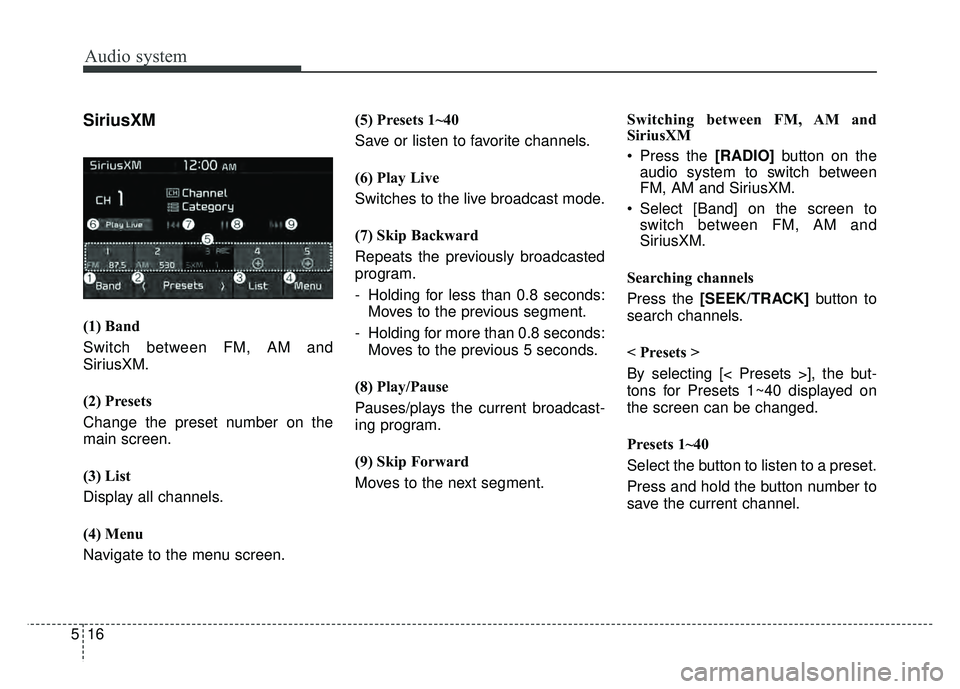
(1) Band
Switch between FM, AM and
SiriusXM.
(2) Presets
Change the preset number on the
main screen.
(3) List
Display all channels.
(4) Menu
Navigate to the menu screen.(5) Presets 1~40
Save or listen to favorite channels.
(6) Play Live
Switches to the live broadcast mode.
(7) Skip Backward
Repeats the previously broadcasted
program.
- Holding for less than 0.8 seconds:
Moves to the previous segment.
- Holding for more than 0.8 seconds: Moves to the previous 5 seconds.
(8) Play/Pause
Pauses/plays the current broadcast-
ing program.
(9) Skip Forward
Moves to the next segment. Switching between FM, AM and
SiriusXM
Press the [RADIO]
button on the
audio system to switch between
FM, AM and SiriusXM.
Select [Band] on the screen to switch between FM, AM and
SiriusXM.
Searching channels
Press the [SEEK/TRACK] button to
search channels.
< Presets >
By selecting [< Presets >], the but-
tons for Presets 1~40 displayed on
the screen can be changed.
Presets 1~40
Select the button to listen to a preset.
Press and hold the button number to
save the current channel.
Page 248 of 492
Audio system
39
5
FCC
This equipment has been tested and found to comply with the limits for a Class B digital device, pursuant to part 15
of the FCC Rules. These limits are designed to provide reasonable protection against harmful interference in a resi-
dential installation.
This equipment generates, uses and can radiate radio frequency energy and, if not installed and used in accordance
with the instructions, may cause harmful interference to radio communications. However, there is no guarantee that
interference will not occur in a particular installation. If this equipment does cause harmful interference to radio or tel-
evision reception, which can be determined by turning the equipment off and on, the user is encouraged to try to cor-
rect the interference by one or more of the following measures:
Reorient or relocate the receiving antenna.
Increase the separation between the equipment and receiver.
Connect the equipment into an outlet on a circuit different from that to which the receiver is connected.
Consult the dealer or an experienced radio/TV technician for help.
This device complies with part 15 of the FCC Rules. Operation is subject to the following two conditions: (1) This
device may not cause harmful interference, and (2) this device must accept any interference received, including inter-
ference that may cause undesired operation.
Caution: Any changes or modifications to this device not expressly approved by the party responsible for compliance
could void your authority to operate the equipment.
This equipment complies with FCC radiation exposure limits set forth for an uncontrolled environment.
This equipment should be installed and operated with minimum 20 cm between the radiator and your body. This trans-
mitter must not be collocated or operating in conjunction with any other antenna or transmitter unless authorized to
do so by the FCC.
Declaration of Conformity
Page 328 of 492
79
What to do in an emergency
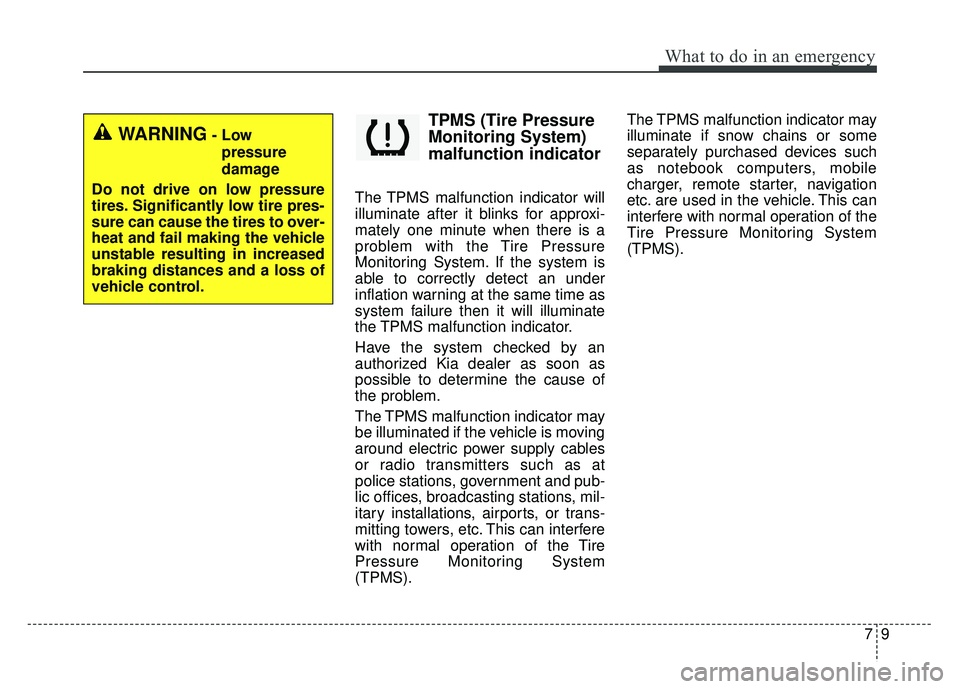
TPMS (Tire Pressure
Monitoring System)
malfunction indicator
The TPMS malfunction indicator will
illuminate after it blinks for approxi-
mately one minute when there is a
problem with the Tire Pressure
Monitoring System. If the system is
able to correctly detect an under
inflation warning at the same time as
system failure then it will illuminate
the TPMS malfunction indicator.
Have the system checked by an
authorized Kia dealer as soon as
possible to determine the cause of
the problem.
The TPMS malfunction indicator may
be illuminated if the vehicle is moving
around electric power supply cables
or radio transmitters such as at
police stations, government and pub-
lic offices, broadcasting stations, mil-
itary installations, airports, or trans-
mitting towers, etc. This can interfere
with normal operation of the Tire
Pressure Monitoring System
(TPMS).The TPMS malfunction indicator may
illuminate if snow chains or some
separately purchased devices such
as notebook computers, mobile
charger, remote starter, navigation
etc. are used in the vehicle. This can
interfere with normal operation of the
Tire Pressure Monitoring System
(TPMS).
WARNING- Low
pressure
damage
Do not drive on low pressure
tires. Significantly low tire pres-
sure can cause the tires to over-
heat and fail making the vehicle
unstable resulting in increased
braking distances and a loss of
vehicle control.
Page 334 of 492
715
What to do in an emergency
When you drive your vehicle from a
warm area to a cold area or from a cold
area to a warm area, or the outside
temperature is greatly higher or lower,
you should check the tire inflation pres-
sure and adjust the tires to the recom-
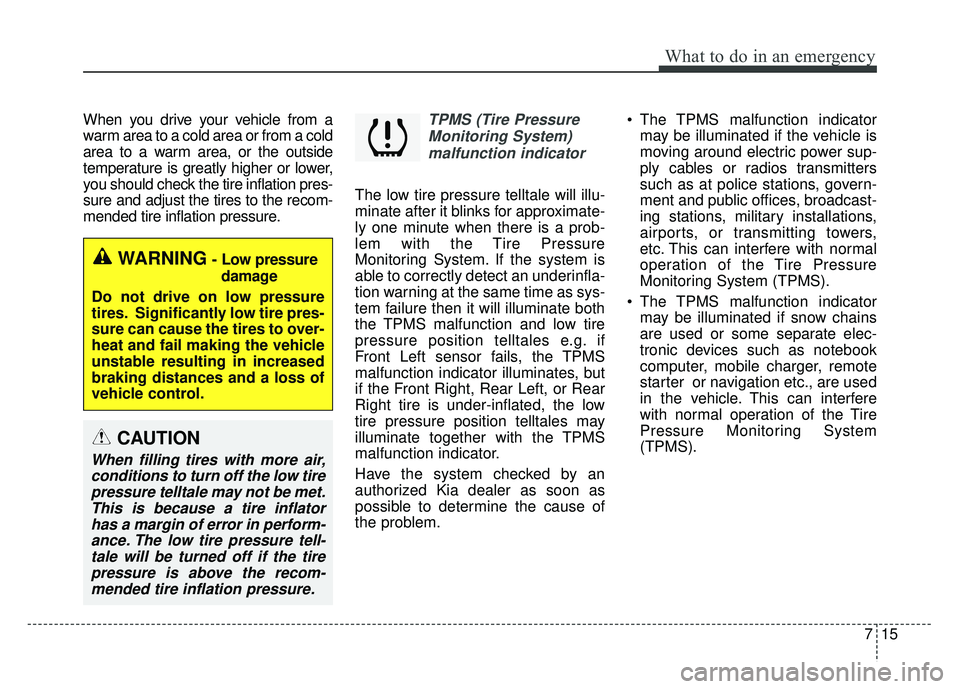
mended tire inflation pressure.TPMS (Tire PressureMonitoring System)malfunction indicator
The low tire pressure telltale will illu-
minate after it blinks for approximate-
ly one minute when there is a prob-
lem with the Tire Pressure
Monitoring System. If the system is
able to correctly detect an underinfla-
tion warning at the same time as sys-
tem failure then it will illuminate both
the TPMS malfunction and low tire
pressure position telltales e.g. if
Front Left sensor fails, the TPMS
malfunction indicator illuminates, but
if the Front Right, Rear Left, or Rear
Right tire is under-inflated, the low
tire pressure position telltales may
illuminate together with the TPMS
malfunction indicator.
Have the system checked by an
authorized Kia dealer as soon as
possible to determine the cause of
the problem. The TPMS malfunction indicator
may be illuminated if the vehicle is
moving around electric power sup-
ply cables or radios transmitters
such as at police stations, govern-
ment and public offices, broadcast-
ing stations, military installations,
airports, or transmitting towers,
etc. This can interfere with normal
operation of the Tire Pressure
Monitoring System (TPMS).
The TPMS malfunction indicator may be illuminated if snow chains
are used or some separate elec-
tronic devices such as notebook
computer, mobile charger, remote
starter or navigation etc., are used
in the vehicle. This can interfere
with normal operation of the Tire
Pressure Monitoring System
(TPMS).
WARNING- Low pressure
damage
Do not drive on low pressure
tires. Significantly low tire pres-
sure can cause the tires to over-
heat and fail making the vehicle
unstable resulting in increased
braking distances and a loss of
vehicle control.
CAUTION
When filling tires with more air, conditions to turn off the low tirepressure telltale may not be met.This is because a tire inflatorhas a margin of error in perform-ance. The low tire pressure tell-tale will be turned off if the tirepressure is above the recom-mended tire inflation pressure.
Page 415 of 492
865
Maintenance
✽
✽NOTICE
Do not disassemble nor assemble the
multi fuse when it is secured with
nuts and bolts. Incorrect or partial
assembly torque may cause a fire.
Have the vehicle checked by an
authorized Kia dealer.
✽ ✽NOTICE- Random wiring pro-
hibited when retrofitting equip-
ment
Use of random wiring in the vehicle
might cause danger due to failure and
damage of the vehicle’s performance.
Using random wires especially when
retrofitting AVN or theft alarm sys-
tem, remote engine control, car
phone or radio might damage the
vehicle or cause fire.
✽ ✽ NOTICE- Remodeling
Prohibited
Do not try remodeling the vehicle in
any way. It is illegal, and may affect
the vehicle’s performance, durabili-
ty, and safety. Warranty is also not
provided for problems caused by
remodeling.
Be aware of safety problems caused
by remodeling the vehicle with unau-
thorized electrical devices(lamp,
black box, electrical equipment,
diagnostic device, communication
device, etc.). It might cause malfunc-
tion of the vehicle, wiring damage,
battery discharge, connector dam-
age, or fire. the vehicle or cause fire.
Window tinting precaution
Window tint(especially metallic film)
might cause communication disorder
or poor radio reception, and malfunc-
tion of the automatic lighting system
due to excessive change of illumina-
tion inside the vehicle. The solution
used might also flow into electric,
electronic devices causing disorder
and failure.
CAUTION
Visually inspect the battery capto ensure it is securely closed.If the battery cap is not securelyclosed, moisture may enter thesystem and damage the electri-cal components.
Page 477 of 492
915
Specifications, Consumer information, Reporting safety defects
ELECTRICAL EQUIPMENT (U.S. ONLY)
The electrical system of your vehicle is designed to per-
form under all reasonably expected operating conditions.
However,before any additional electrical equipment is
installed in your vehicle, consult an Authorized Kia
Dealer, in order to ensure that you do not void your war-
ranty.
Certain electrical equipment, or the way in which it is
installed, may adversely affect the operation of your vehi-
cle, includingsuch systems as the engine control system,
the audio system and the electrical charging system and
thus potentially void all or part of your warranty.
We assume no responsibility for any expense you may
incur or for any malfunction of your vehicle or any of its
components or systems that may result from the installa-
tion of additional electrical equipment that is not supplied,
or recommended for installation by, Kia.
Installation of a mobile two-way radio system
If a mobile two-way radio system is installed improperly,
or if an excessively powerful type of system is used, other
electronic systems may be adversely affected. To avoid
damage to your vehicle, consult an Authorized Kia Dealer
concerning the proper equipment and installation.
Kia motor vehicles are designed and manufactured to
meet or exceed all applicable safety standards.
For your safety, however, we strongly urge you to read
and follow all directions in this Owner's Manual, particu-
larly the information under the headings "NOTICE",
"CAUTION" and "WARNING".
If, after reading this manual, you have any questions
regarding the operation of your vehicle, safety issues and
defects please contact your Kia's toll-free Consumer
Assistance hot line as below:
National Consumer Affairs Manager
Kia Motors America, Inc.
P.O. Box 52410
Irvine, CA 92619-2410
1-800-333-4Kia (4542)
Page 480 of 492
Index
2I
Air bag inflation conditions ..........................................3-51
Air bag non-inflation conditions ..................................3-52
Air bag warning label ....................................................3-55
Air bag warning light ....................................................3-34
Air bags........................................................................\
..3-30Operation ....................................................................3-31\
Air bag warning light ..................................................3-34
SRS components and functions ..................................3-34
Occupant detection system ........................................3-37
Driver's and passenger's front air bag ........................3-44
Side air bag ................................................................3-47
Curtain air bag ............................................................3-48
Air bag inflation conditions ........................................3-51
Air bag non-inflation conditions ................................3-52
SRS care ......................................................................3-\
54
Adding equipment to or modifying your air bag-equipped vehicle ................................................3-55
Air bag warning label ................................................3-55
Air cleaner ....................................................................8-34\
Filter replacement ......................................................8-34
Air Conditioning System ................................................9-6
Anti-lock brake system (ABS) ......................................6-27
Appearance care ..........................................................8-101 Exterior care ..............................................................8-101
Interior care ..............................................................8-106 Audio (without touch screen) ..........................................5-7
Feature of your audio ....................................................5-8
Radio ........................................................................\
..5-14
SiriusXM ....................................................................5-16\
Media ........................................................................\
..5-18
Phone ........................................................................\
..5-28
Setup ........................................................................\
..5-36
Audio system ..................................................................5-2 Antenna ........................................................................\
5-2
AUX, USB port ............................................................5-3
Auto light position ........................................................4-89
Automatic climate control system ..............................4-114 Automatic heating and air conditioning ..................4-115
Manual heating and air conditioning ........................4-116
System operation ......................................................4-121
Automatic transaxle ......................................................6-18 Automatic transaxle operation ....................................6-18
Good driving practices ................................................6-22
Back-up lamp bulb replacement (4 door) ......................8-94
Back-up lamp bulb replacement (5 door) ......................8-89
A
B