engine KIA RIO HATCHBACK 2018 Owner's Manual
[x] Cancel search | Manufacturer: KIA, Model Year: 2018, Model line: RIO HATCHBACK, Model: KIA RIO HATCHBACK 2018Pages: 492, PDF Size: 10.36 MB
Page 114 of 492
Features of your vehicle
42
4
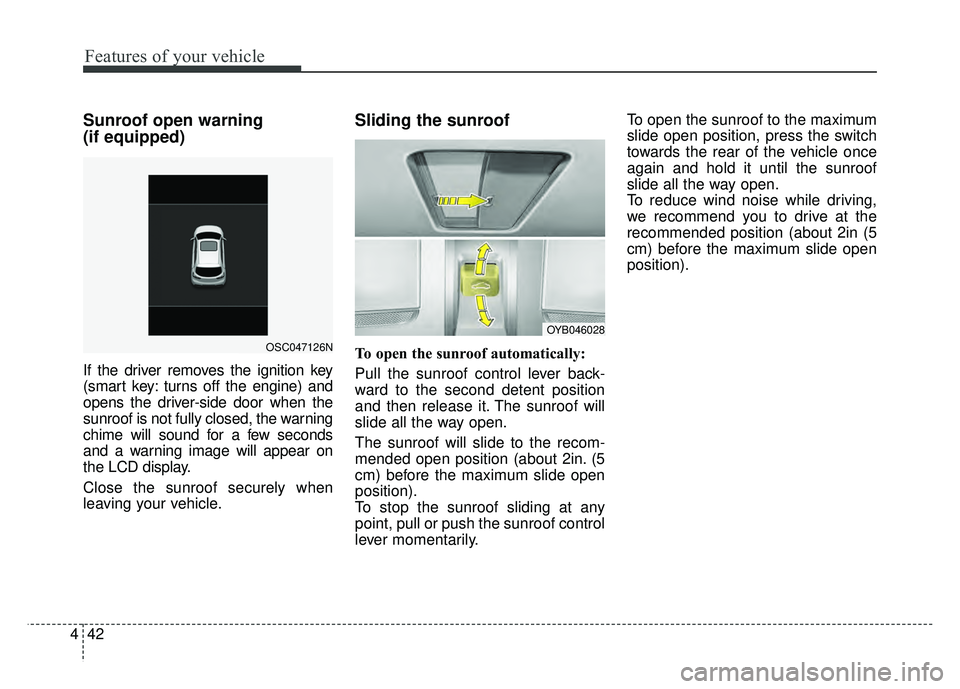
Sunroof open warning
(if equipped)
If the driver removes the ignition key
(smart key: turns off the engine) and
opens the driver-side door when the
sunroof is not fully closed, the warning
chime will sound for a few seconds
and a warning image will appear on
the LCD display.
Close the sunroof securely when
leaving your vehicle.
Sliding the sunroof
To open the sunroof automatically:
Pull the sunroof control lever back-
ward to the second detent position
and then release it. The sunroof will
slide all the way open.
The sunroof will slide to the recom-
mended open position (about 2in. (5
cm) before the maximum slide open
position).
To stop the sunroof sliding at any
point, pull or push the sunroof control
lever momentarily. To open the sunroof to the maximum
slide open position, press the switch
towards the rear of the vehicle once
again and hold it until the sunroof
slide all the way open.
To reduce wind noise while driving,
we recommend you to drive at the
recommended position (about 2in (5
cm) before the maximum slide open
position).
OYB046028
OSC047126N
Page 118 of 492
Features of your vehicle
46
4
Electric power steering (EPS)
Power steering uses the motor to
assist you in steering the vehicle. If
the engine is off or if the power steer-
ing system becomes inoperative, the
vehicle may still be steered, but it will
require increased steering effort.
The electric power steering is con-
trolled by the power steering control
unit which senses the steering wheel
torque and vehicle speed to com-
mand the motor.
The steering wheel becomes heavier
as the vehicle’s speed increases and
becomes lighter as the vehicle’s
speed decreases for better control of
the steering wheel.
Should you notice any change in the
effort required to steer during normal
vehicle operation, have the power
steering checked by an authorized
Kia dealer.
✽ ✽
NOTICE
The following symptoms may occur
during normal vehicle operation:
• The steering effort is increased
immediately after turning the igni-
tion switch on. This happens as the
system performs the EPS system
diagnostics. When the diagnostics
are completed, the steering wheel
will return to its normal condition
• A click noise may be heard from the EPS relay after the ignition
switch is turned to the ON or
LOCK position.
• Motor noise may be heard when the vehicle is at a stop or at a low
driving speed.
• The steering effort increases if the steering wheel is rotated continu-
ously when the vehicle is not in
motion. However, after a few min-
utes, it will return to its normal
condition.
• When you operate the steering wheel in low temperature, noise
may occur. If the temperature
rises, the noise will likely disap-
pear. This is a normal condition. (Continued)(Continued)
• When the charging system warn-
ing light comes on or the battery
voltage is low (when the alternator
or battery does not operate nor-
mally), the steering wheel may get
heavy and become difficult to con-
trol operate abnormally.
If the Electric Power Steering System
does not operate normally, the warn-
ing light will illuminate on the instru-
ment cluster. The steering wheel may
require increased steering effort.
Take your vehicle to an authorized
Kia dealer and have the vehicle
checked as soon as possible.
STEERING WHEEL
Page 123 of 492
451
Features of your vehicle
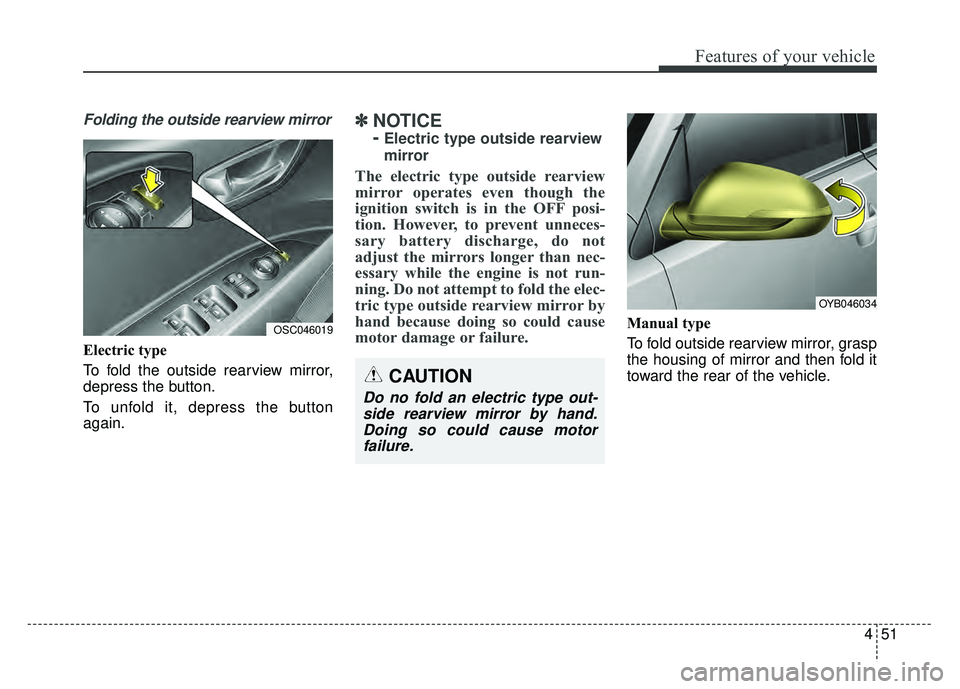
Folding the outside rearview mirror
Electric type
To fold the outside rearview mirror,
depress the button.
To unfold it, depress the button
again.
✽ ✽NOTICE
-
Electric type outside rearview
mirror
The electric type outside rearview
mirror operates even though the
ignition switch is in the OFF posi-
tion. However, to prevent unneces-
sary battery discharge, do not
adjust the mirrors longer than nec-
essary while the engine is not run-
ning. Do not attempt to fold the elec-
tric type outside rearview mirror by
hand because doing so could cause
motor damage or failure.
Manual type
To fold outside rearview mirror, grasp
the housing of mirror and then fold it
toward the rear of the vehicle.OSC046019
CAUTION
Do no fold an electric type out-
side rearview mirror by hand.Doing so could cause motorfailure.
OYB046034
Page 124 of 492
Features of your vehicle
52
4
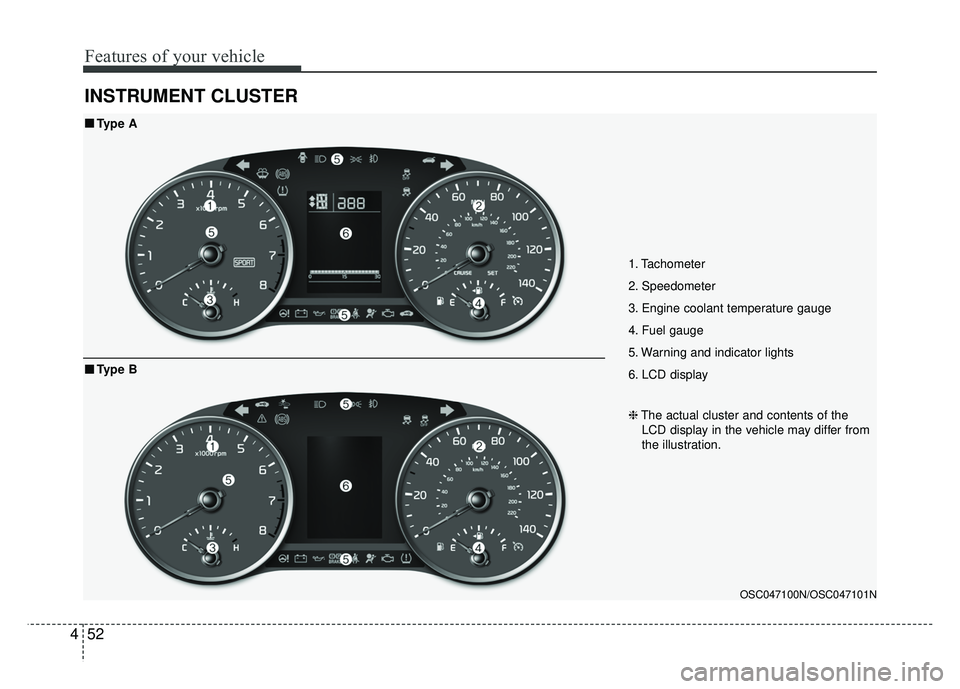
INSTRUMENT CLUSTER
1. Tachometer
2. Speedometer
3. Engine coolant temperature gauge
4. Fuel gauge
5. Warning and indicator lights
6. LCD display
OSC047100N/OSC047101N
■
■
Type A
❈The actual cluster and contents of the
LCD display in the vehicle may differ from
the illustration.
■
■ Type B
Page 126 of 492
![KIA RIO HATCHBACK 2018 Owners Manual Features of your vehicle
54
4
[Type B]
(1) : MODE button for change the
LCD MODES
(2) / : MO VE scroll switch for
select the items
(3) OK : SET/RESET button for set the items or reset the items
â�](/img/2/57983/w960_57983-125.png "KIA RIO HATCHBACK 2018 Owners Manual Features of your vehicle
54
4
[Type B]
(1) : MODE button for change the
LCD MODES
(2) / : MO VE scroll switch for
select the items
(3) OK : SET/RESET button for set the items or reset the items
â�")
Features of your vehicle
54
4
[Type B]
(1) : MODE button for change the
LCD MODES
(2) / : MO VE scroll switch for
select the items
(3) OK : SET/RESET button for set the items or reset the items
❈ For the LCD modes, refer to “LCD
window” in this chapter.Gauges
Speedometer
The speedometer indicates the for-
ward speed of the vehicle.
The speedometer is calibrated in
miles per hour and/or kilometers per
hour.
Tachometer
The tachometer indicates the
approximate number of engine revo-
lutions per minute (rpm).
Use the tachometer to select the cor-
rect shift points and to prevent lug-
ging and/or over-revving the engine.
The tachometer pointer may move
slightly when the ignition switch is in
ACC or ON position with the engine
OFF. This movement is normal and
will not affect the accuracy of the
tachometer once the engine is run-
ning.OYB046105
OYB046106
Page 127 of 492
455
Features of your vehicle
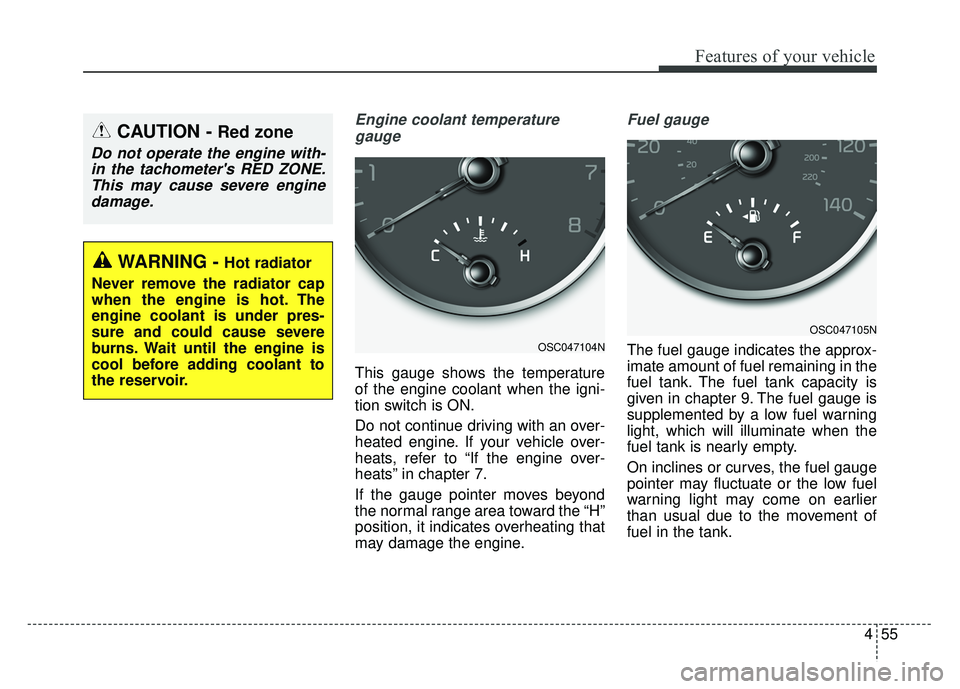
Engine coolant temperaturegauge
This gauge shows the temperature
of the engine coolant when the igni-
tion switch is ON.
Do not continue driving with an over-
heated engine. If your vehicle over-
heats, refer to “If the engine over-
heats” in chapter 7.
If the gauge pointer moves beyond
the normal range area toward the “H”
position, it indicates overheating that
may damage the engine.
Fuel gauge
The fuel gauge indicates the approx-
imate amount of fuel remaining in the
fuel tank. The fuel tank capacity is
given in chapter 9. The fuel gauge is
supplemented by a low fuel warning
light, which will illuminate when the
fuel tank is nearly empty.
On inclines or curves, the fuel gauge
pointer may fluctuate or the low fuel
warning light may come on earlier
than usual due to the movement of
fuel in the tank.
CAUTION - Red zone
Do not operate the engine with-in the tachometer's RED ZONE.This may cause severe enginedamage.
OSC047104N
OSC047105N
WARNING - Hot radiator
Never remove the radiator cap
when the engine is hot. The
engine coolant is under pres-
sure and could cause severe
burns. Wait until the engine is
cool before adding coolant to
the reservoir.
Page 128 of 492
Features of your vehicle
56
4
✽
✽
NOTICE- Fuel gauge
Running out of fuel can expose vehi-
cle occupants to danger. You must
stop and obtain additional fuel as
soon as possible after the warning
light comes on or when the gauge
indicator comes close to the “E
(Empty)” level.
Odometer
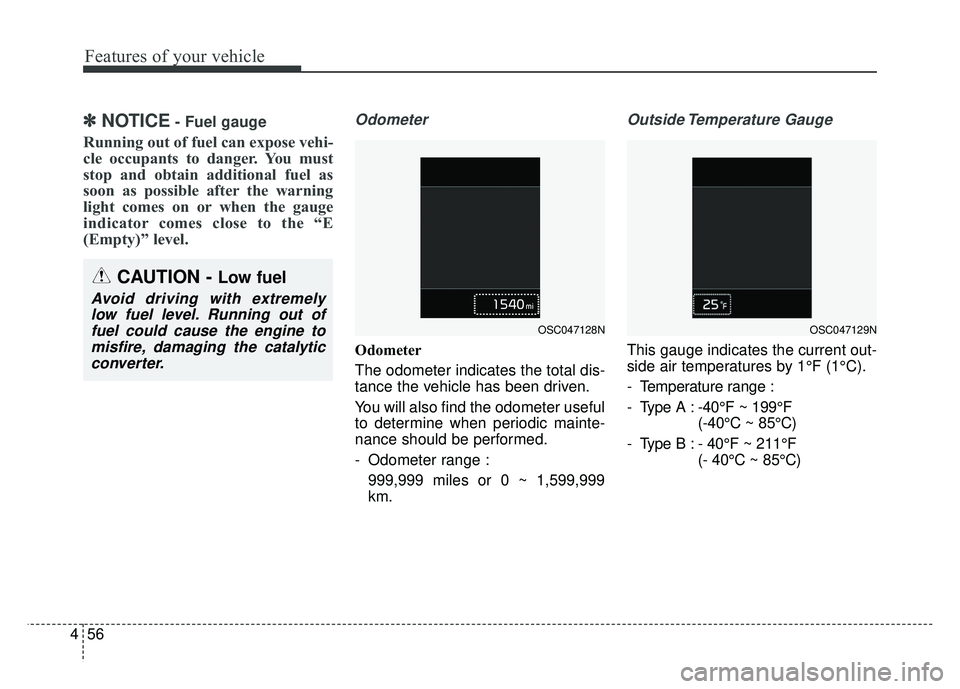
Odometer
The odometer indicates the total dis-
tance the vehicle has been driven.
You will also find the odometer useful
to determine when periodic mainte-
nance should be performed.
- Odometer range :
999,999 miles or 0 ~ 1,599,999
km.
Outside Temperature Gauge
This gauge indicates the current out-
side air temperatures by 1°F (1°C).
- Temperature range :
- Type A : -40°F ~ 199°F (-40°C ~ 85°C)
- Type B : - 40°F ~ 211°F (- 40°C ~ 85°C)
CAUTION - Low fuel
Avoid driving with extremelylow fuel level. Running out offuel could cause the engine tomisfire, damaging the catalyticconverter.
OSC047128NOSC047129N
Page 133 of 492
461
Features of your vehicle
Average Fuel Economy (2)
The average fuel economy is cal-culated by the total driving dis-
tance and fuel consumption since
the last average fuel economy
reset.
- Fuel economy range: 0.0 ~ 99.9MPG or L/100 km, km/L
The average fuel economy can be reset both manually and automati-
cally.
Manual reset
To clear the average fuel economy
manually, press the RESET (for Type
A cluster), OK ( for Type B cluster)
(reset) on the steering wheel for
more than 1 second when the aver-
age fuel economy is displayed. Automatic reset (for type B cluster)
To make the average fuel economy
be reset automatically whenever refu-
eling, select the “Fuel economy auto
reset” mode in User Setting menu of
the LCD window (Refer to “LCD win-
dow”).
OFF - You may set to default manu-
ally by using the trip switch reset but-
ton.
After ignition - The vehicle will auto- matically set to default once 4 hours
pass after the Ignition is in OFF.
After refueling - After refueling more than 1.6 gallons (6 liters) and driving
over 1 mph (1 km/h), the vehicle will
reset to default automatically.
✽ ✽ NOTICE
The average fuel economy is not dis-
played for more accurate calculation
if the vehicle does not drive more
than 10 seconds or 0.03 miles (50
meters) since the ignition switch or
Engine Start/Stop button is turned
to ON.
Instant Fuel Economy (3)
This mode displays the instant fuel
economy during the last few sec-
onds when the vehicle speed is
more than 6.2MPH(10km/h).
- Fuel economy range:
30.0 L/100 km or 0.0 ~ 50.0 MPG
Page 134 of 492
Features of your vehicle
62
4
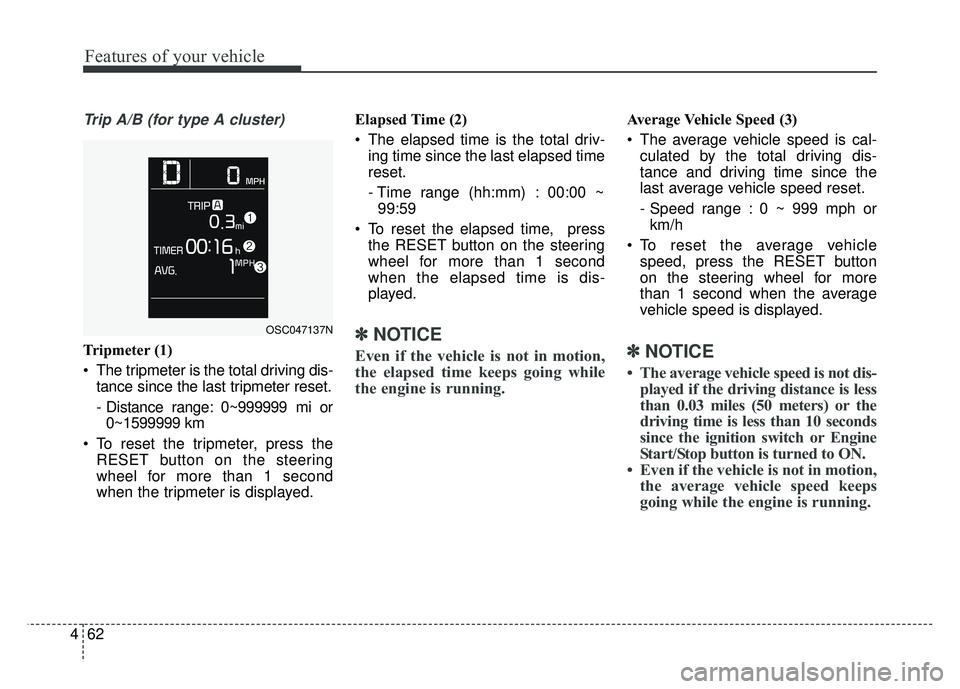
Trip A/B (for type A cluster)
Tripmeter (1)
The tripmeter is the total driving dis-
tance since the last tripmeter reset.
- Distance range: 0~999999 mi or0~1599999 km
To reset the tripmeter, press the RESET button on the steering
wheel for more than 1 second
when the tripmeter is displayed. Elapsed Time (2)
The elapsed time is the total driv-
ing time since the last elapsed time
reset.
- Time range (hh:mm) : 00:00 ~99:59
To reset the elapsed time, press the RESET button on the steering
wheel for more than 1 second
when the elapsed time is dis-
played.✽ ✽ NOTICE
Even if the vehicle is not in motion,
the elapsed time keeps going while
the engine is running.
Average Vehicle Speed (3)
The average vehicle speed is cal-
culated by the total driving dis-
tance and driving time since the
last average vehicle speed reset.
- Speed range : 0 ~ 999 mph orkm/h
To reset the average vehicle speed, press the RESET button
on the steering wheel for more
than 1 second when the average
vehicle speed is displayed.
✽ ✽ NOTICE
• The average vehicle speed is not dis-
played if the driving distance is less
than 0.03 miles (50 meters) or the
driving time is less than 10 seconds
since the ignition switch or Engine
Start/Stop button is turned to ON.
• Even if the vehicle is not in motion, the average vehicle speed keeps
going while the engine is running.
OSC047137N
Page 135 of 492
463
Features of your vehicle
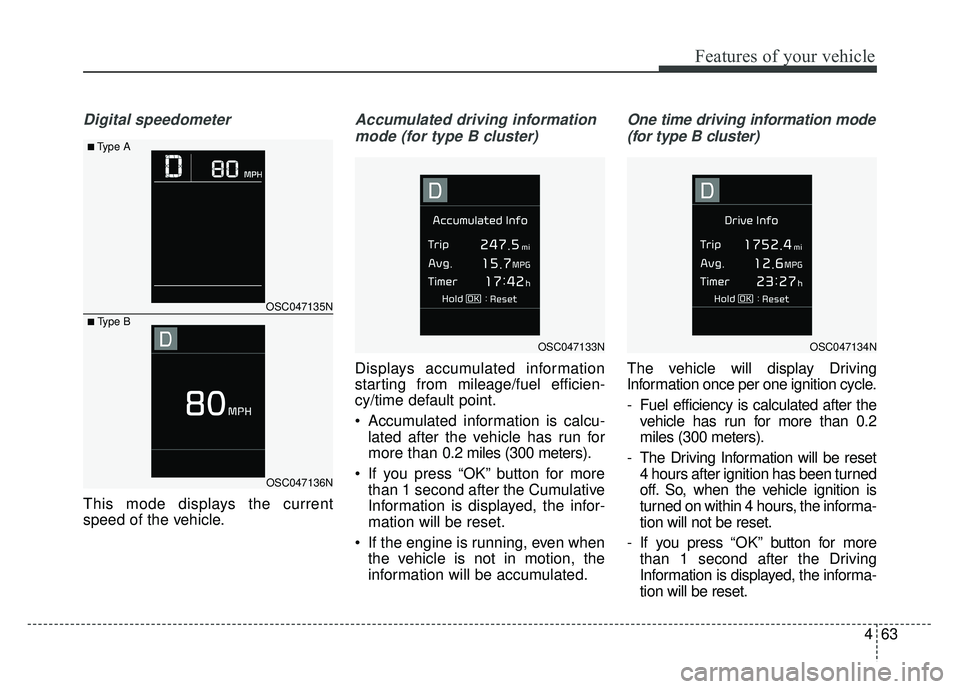
Digital speedometer
This mode displays the current
speed of the vehicle.
Accumulated driving informationmode (for type B cluster)
Displays accumulated information
starting from mileage/fuel efficien-
cy/time default point.
• Accumulated information is calcu- lated after the vehicle has run for
more than 0.2 miles (300 meters).
If you press “OK” button for more than 1 second after the Cumulative
Information is displayed, the infor-
mation will be reset.
If the engine is running, even when the vehicle is not in motion, the
information will be accumulated.
One time driving information mode
(for type B cluster)
The vehicle will display Driving
Information once per one ignition cycle.
- Fuel efficiency is calculated after the vehicle has run for more than 0.2
miles (300 meters).
- The Driving Information will be reset 4 hours after ignition has been turned
off. So, when the vehicle ignition is
turned on within 4 hours, the informa-
tion will not be reset.
- If you press “OK” button for more
than 1 second after the Driving
Information is displayed, the informa-
tion will be reset.
OSC047135N
OSC047136N
■Type A
■ Type B
OSC047133NOSC047134N