lock KIA RIO HATCHBACK 2018 Owner's Guide
[x] Cancel search | Manufacturer: KIA, Model Year: 2018, Model line: RIO HATCHBACK, Model: KIA RIO HATCHBACK 2018Pages: 492, PDF Size: 10.36 MB
Page 87 of 492
415
Features of your vehicle
Using the transmitter
Park the vehicle and stop the engine.
Arm the system as described below.
1.Turn off the engine and remove theignition key from the ignition
switch.
2.Make sure that all doors (and tail- gate), the engine hood are closed
and latched.
3.Lock the doors by pressing the lock button on the transmitter.
After completion of the steps
above, the hazard warning lights
will blink once to indicate that the
system is armed.
If any door (and tailgate) or engine
hood remains open, the hazard
warning lights won't operate and
theft-alarm will not arm. After this, if
all doors (and tailgate) and engine
hood are closed, the hazard warn-
ing lights blink once. • Do not arm the system until all
passengers have left the vehi-
cle. If the system is armed while
a passenger(s) remains in the
vehicle, the alarm may be acti-
vated when the remaining pas-
senger(s) leave the vehicle. If
any door, tailgate or engine
hood is opened within 30 sec-
onds after entering the armed
stage, the system is disarmed to
prevent unnecessary alarm.
Theft-alarm stage
The alarm will be activated if any of
the following occurs while the system
is armed.
A front or rear door is opened withoutusing the mechanical key or trans-
mitter (or smart key).
The trunk/tailgate is opened with- out using the mechanical key or
transmitter (or smart key).
The engine hood is opened.
The horn will sound and the hazard
warning lights will blink continuously for
approximately 27 seconds (2times). To
turn off the system, unlock the doors
with the transmitter (or smart key).
Page 88 of 492
Features of your vehicle
16
4
Disarmed stage
The system will be disarmed when:
Transmitter
- The door unlock button is pressed.
- The engine is started. (within 3
seconds)
- The ignition switch is in the "ON" position for 30 seconds or more.
Smart key
- The door unlock button is pressed.
- The button of the front outside dooris pressed while carrying the smart
key.
- The engine is started. (within 3 seconds)
After the doors are unlocked, the haz-
ard warning lights will blink twice to
indicate that the system is disarmed.
After pressing the unlock button, if any
door (or trunk/tailgate) is not opened
within 30 seconds, the system will be
rearmed. Avoid trying to start the engine
while the alarm is activated. The
vehicle starting motor is disabled
during the theft-alarm stage.
If the system is not disarmed with
the transmitter, insert the key into
the ignition switch, turn the ignition
switch to the ON position and wait
for 30 seconds. Then the system
will be disarmed.
If you lose your keys, consult your authorized Kia dealer.
If the system is not disarmed with the transmitter, insert the key into
the ignition switch and start the
engine. Then the system will be
disarmed.
If you lose your keys, consult your authorized Kia dealer.
Page 89 of 492
417
Features of your vehicle
DOOR LOCKS
Operating door locks from
outside the vehicle
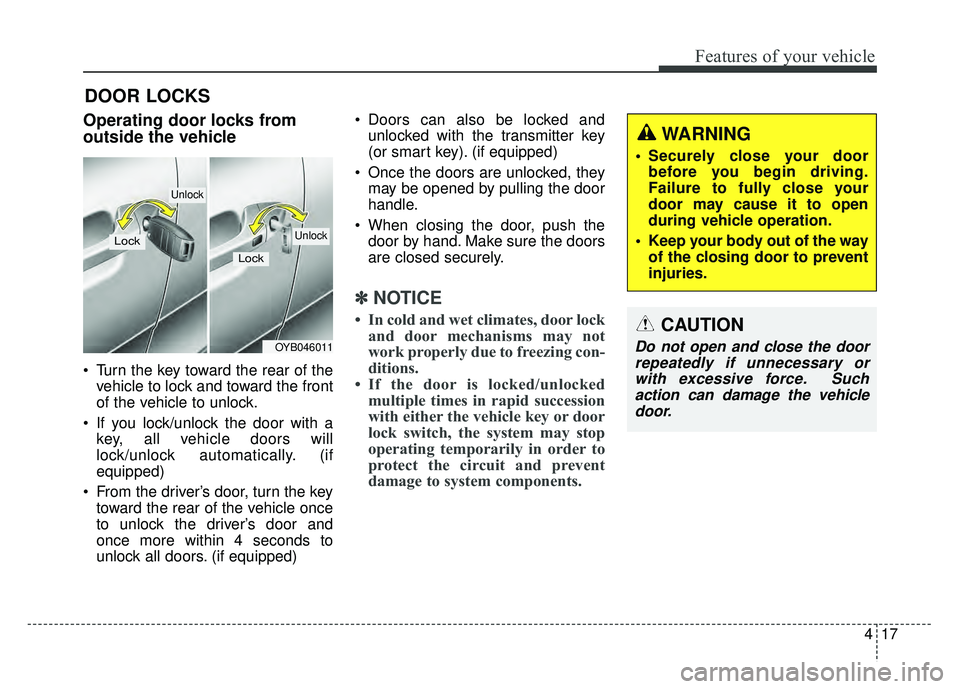
Turn the key toward the rear of thevehicle to lock and toward the front
of the vehicle to unlock.
If you lock/unlock the door with a key, all vehicle doors will
lock/unlock automatically. (if
equipped)
From the driver’s door, turn the key toward the rear of the vehicle once
to unlock the driver’s door and
once more within 4 seconds to
unlock all doors. (if equipped) Doors can also be locked and
unlocked with the transmitter key
(or smart key). (if equipped)
Once the doors are unlocked, they may be opened by pulling the door
handle.
When closing the door, push the door by hand. Make sure the doors
are closed securely.
✽ ✽ NOTICE
• In cold and wet climates, door lock
and door mechanisms may not
work properly due to freezing con-
ditions.
• If the door is locked/unlocked multiple times in rapid succession
with either the vehicle key or door
lock switch, the system may stop
operating temporarily in order to
protect the circuit and prevent
damage to system components.
OYB046011
Lock
Unlock
Lock
Unlock
WARNING
Securely close your door
before you begin driving.
Failure to fully close your
door may cause it to open
during vehicle operation.
Keep your body out of the way of the closing door to prevent
injuries.
CAUTION
Do not open and close the doorrepeatedly if unnecessary orwith excessive force. Suchaction can damage the vehicledoor.
Page 90 of 492
Features of your vehicle
18
4
Operating door locks from
inside the vehicle
With the door lock button
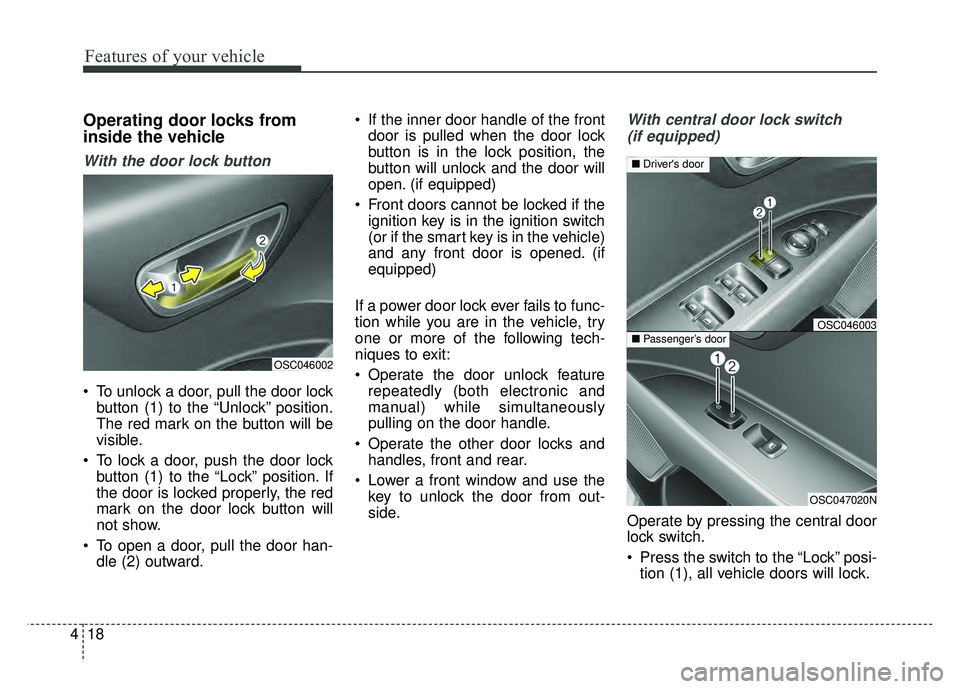
To unlock a door, pull the door lock
button (1) to the “Unlock” position.
The red mark on the button will be
visible.
To lock a door, push the door lock button (1) to the “Lock” position. If
the door is locked properly, the red
mark on the door lock button will
not show.
To open a door, pull the door han- dle (2) outward. If the inner door handle of the front
door is pulled when the door lock
button is in the lock position, the
button will unlock and the door will
open. (if equipped)
Front doors cannot be locked if the ignition key is in the ignition switch
(or if the smart key is in the vehicle)
and any front door is opened. (if
equipped)
If a power door lock ever fails to func-
tion while you are in the vehicle, try
one or more of the following tech-
niques to exit:
Operate the door unlock feature repeatedly (both electronic and
manual) while simultaneously
pulling on the door handle.
Operate the other door locks and handles, front and rear.
Lower a front window and use the key to unlock the door from out-
side.
With central door lock switch
(if equipped)
Operate by pressing the central door
lock switch.
Press the switch to the “Lock” posi- tion (1), all vehicle doors will lock.
OSC046002
OSC047020N
■ Passenger’s door
■Driver's door
OSC046003
Page 91 of 492
419
Features of your vehicle
Press the switch to the “Unlock”position (2), all vehicle doors will
unlock.
If the key is in the ignition switch (or if the smart key is in the vehicle)
and any front door is opened, the
doors will not lock when the “Lock”
position (1) of the central door lock
switch is pressed. (if equipped)Impact sensing door unlock
system (if equipped)
All doors will automatically unlock
when an impact causes the air bags
to deploy.
Auto door lock/unlock feature
(if equipped)
All doors will automatically lockwhen the transaxle shift lever is
shifted out of P (Park).
All doors will automatically unlock when the transaxle shift lever is
shifted into P (Park).
WARNING - Doors
The doors should always be fully closed and locked while
the vehicle is in motion to pre-
vent accidental opening of the
door.
Be careful when opening doors and watch for vehicles, motor-
cycles, bicycles or pedestrians
approaching the vehicle in the
path of the door. Opening a
door when something is
approaching can cause dam-
age or injury.
WARNING- Unattended
children/animals
Never leave children or animals
unattended in your vehicle.
An enclosed vehicle can become
extremely hot, causing death or
severe injury to unattended chil-
dren or animals who cannot
escape the vehicle.
Page 92 of 492
Features of your vehicle
20
4
Speed sensing door lock sys-
tem (if equipped)
All doors will be automatically locked
after the vehicle speed exceeds 9
mph. And all doors will be automati-
cally unlocked when you turn the
engine off or when you remove the
ignition key. (if equipped)
An authorized Kia dealer can acti-
vate or deactivate some auto door
lock/ unlock features as follows;
Auto door unlock by using the dri-
ver's door lock button
Auto door lock/unlock by shifting the transaxle shift lever out of P
(Park) or into P (Park)
Auto door unlock when the ignition key is removed from the ignition
switch (for smart key, when the
ENGINE START/STOP button is
turned to the OFF position)
If you want to activate or deactivate
some door lock/unlock feature, con-
sult an authorized Kia dealer.
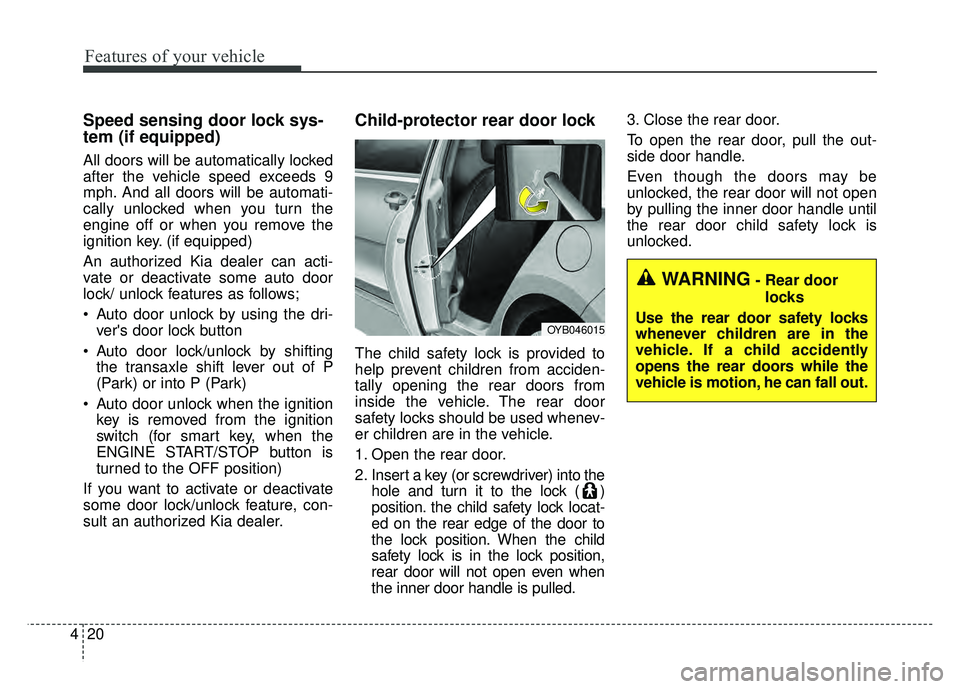
Child-protector rear door lock
The child safety lock is provided to
help prevent children from acciden-
tally opening the rear doors from
inside the vehicle. The rear door
safety locks should be used whenev-
er children are in the vehicle.
1. Open the rear door.
2. Insert a key (or screwdriver) into the hole and turn it to the lock ( )
position. the child safety lock locat-
ed on the rear edge of the door to
the lock position. When the child
safety lock is in the lock position,
rear door will not open even when
the inner door handle is pulled. 3. Close the rear door.
To open the rear door, pull the out-
side door handle.
Even though the doors may be
unlocked, the rear door will not open
by pulling the inner door handle until
the rear door child safety lock is
unlocked.
OYB046015
WARNING- Rear door
locks
Use the rear door safety locks
whenever children are in the
vehicle. If a child accidently
opens the rear doors while the
vehicle is motion, he can fall out.
Page 93 of 492
421
Features of your vehicle
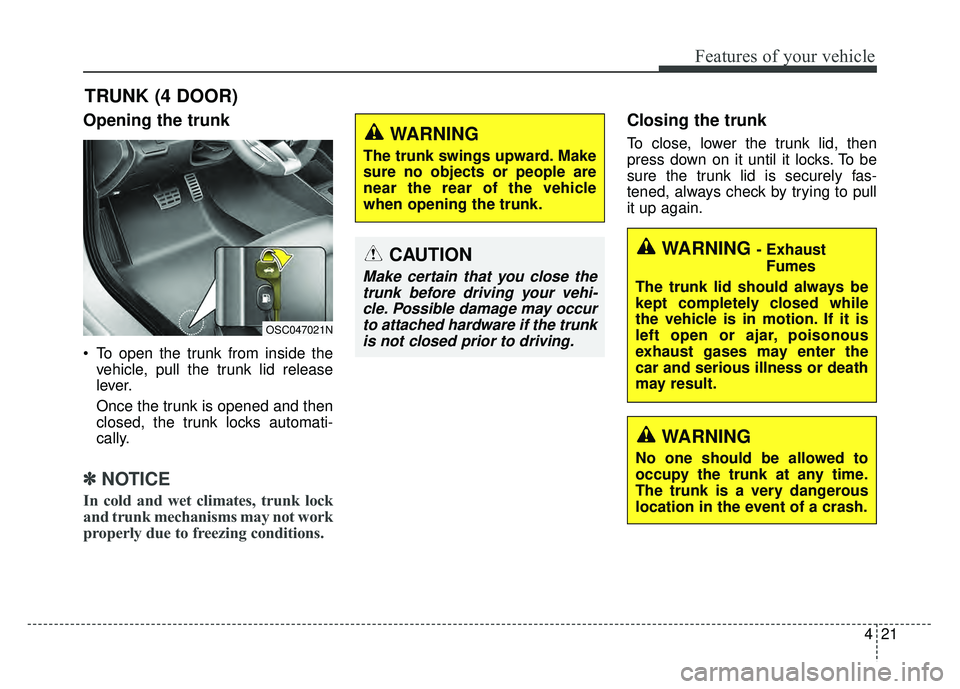
Opening the trunk
To open the trunk from inside thevehicle, pull the trunk lid release
lever.
Once the trunk is opened and then
closed, the trunk locks automati-
cally.
✽ ✽ NOTICE
In cold and wet climates, trunk lock
and trunk mechanisms may not work
properly due to freezing conditions.
Closing the trunk
To close, lower the trunk lid, then
press down on it until it locks. To be
sure the trunk lid is securely fas-
tened, always check by trying to pull
it up again.
TRUNK (4 DOOR)
OSC047021N
CAUTION
Make certain that you close the
trunk before driving your vehi-cle. Possible damage may occurto attached hardware if the trunkis not closed prior to driving.
WARNING
The trunk swings upward. Make
sure no objects or people are
near the rear of the vehicle
when opening the trunk.
WARNING - Exhaust
Fumes
The trunk lid should always be
kept completely closed while
the vehicle is in motion. If it is
left open or ajar, poisonous
exhaust gases may enter the
car and serious illness or death
may result.
WARNING
No one should be allowed to
occupy the trunk at any time.
The trunk is a very dangerous
location in the event of a crash.
Page 94 of 492
Features of your vehicle
22
4
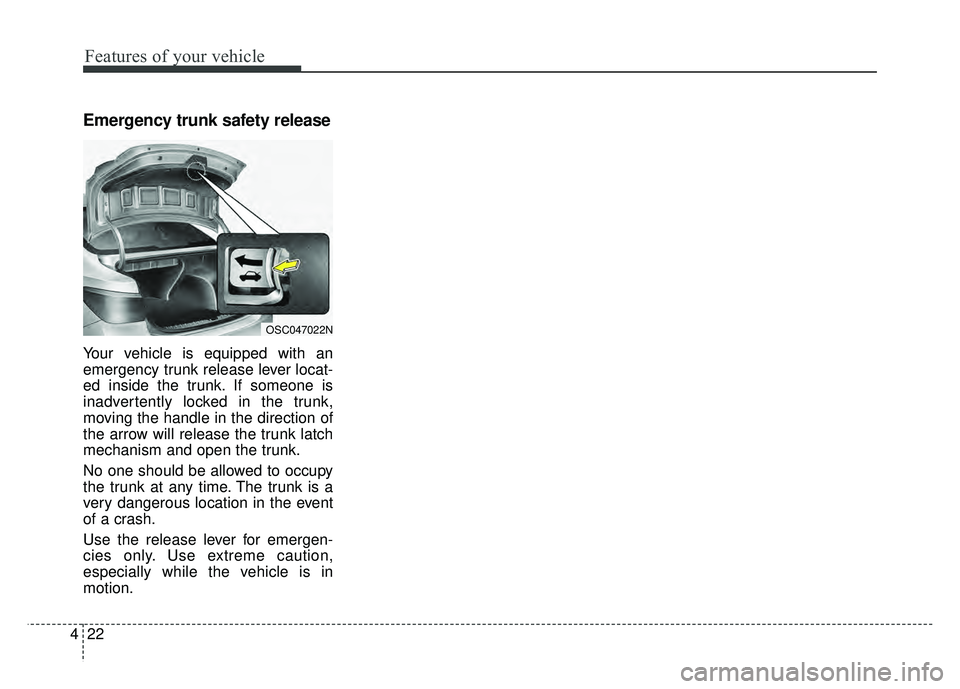
Emergency trunk safety release
Your vehicle is equipped with an
emergency trunk release lever locat-
ed inside the trunk. If someone is
inadvertently locked in the trunk,
moving the handle in the direction of
the arrow will release the trunk latch
mechanism and open the trunk.
No one should be allowed to occupy
the trunk at any time. The trunk is a
very dangerous location in the event
of a crash.
Use the release lever for emergen-
cies only. Use extreme caution,
especially while the vehicle is in
motion.
OSC047022N
Page 95 of 492
423
Features of your vehicle
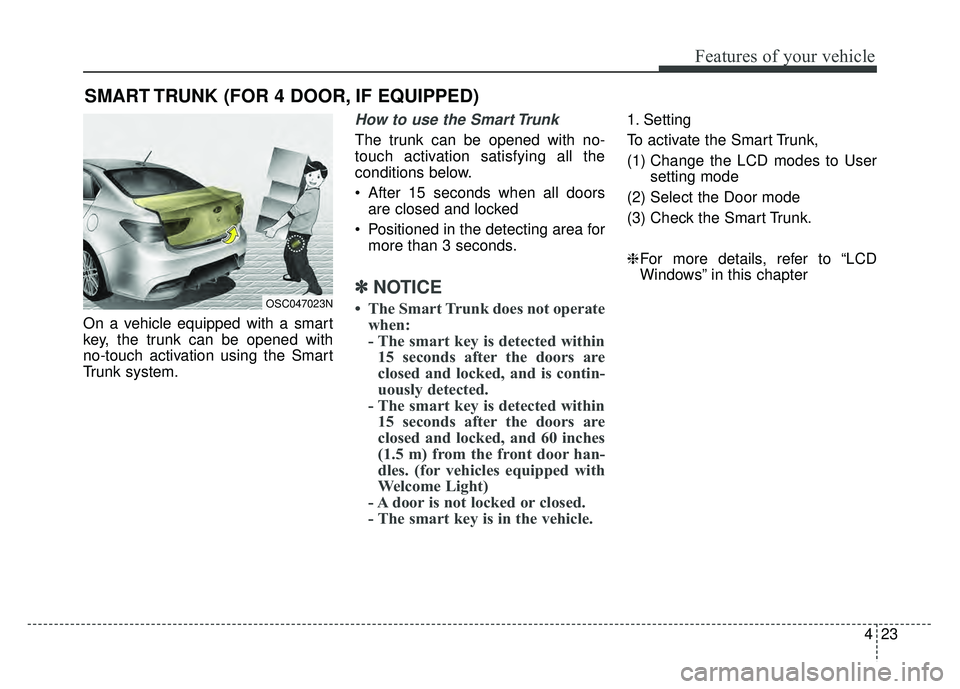
On a vehicle equipped with a smart
key, the trunk can be opened with
no-touch activation using the Smart
Trunk system.
How to use the Smart Trunk
The trunk can be opened with no-
touch activation satisfying all the
conditions below.
After 15 seconds when all doorsare closed and locked
Positioned in the detecting area for more than 3 seconds.
✽ ✽ NOTICE
• The Smart Trunk does not operate
when:
- The smart key is detected within15 seconds after the doors are
closed and locked, and is contin-
uously detected.
- The smart key is detected within 15 seconds after the doors are
closed and locked, and 60 inches
(1.5 m) from the front door han-
dles. (for vehicles equipped with
Welcome Light)
- A door is not locked or closed.
- The smart key is in the vehicle.
1. Setting
To activate the Smart Trunk,
(1) Change the LCD modes to User
setting mode
(2) Select the Door mode
(3) Check the Smart Trunk.
❈ For more details, refer to “LCD
Windows” in this chapter
SMART TRUNK (FOR 4 DOOR, IF EQUIPPED)
OSC047023N
Page 97 of 492
425
Features of your vehicle
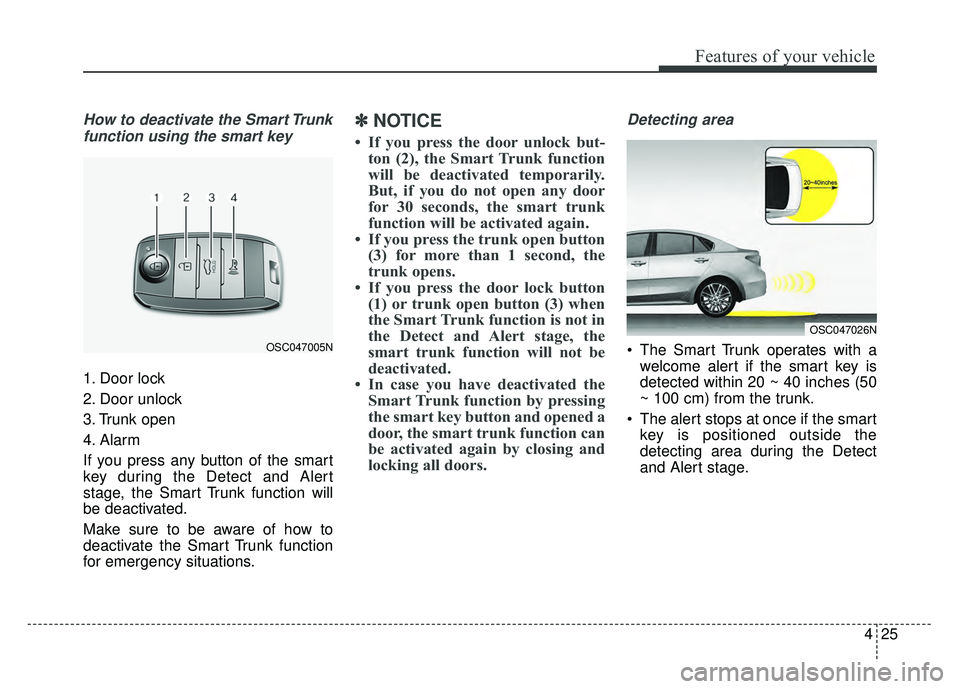
How to deactivate the Smart Trunkfunction using the smart key
1. Door lock
2. Door unlock
3. Trunk open
4. Alarm
If you press any button of the smart
key during the Detect and Alert
stage, the Smart Trunk function will
be deactivated.
Make sure to be aware of how to
deactivate the Smart Trunk function
for emergency situations.
✽ ✽ NOTICE
• If you press the door unlock but-
ton (2), the Smart Trunk function
will be deactivated temporarily.
But, if you do not open any door
for 30 seconds, the smart trunk
function will be activated again.
• If you press the trunk open button (3) for more than 1 second, the
trunk opens.
• If you press the door lock button (1) or trunk open button (3) when
the Smart Trunk function is not in
the Detect and Alert stage, the
smart trunk function will not be
deactivated.
• In case you have deactivated the Smart Trunk function by pressing
the smart key button and opened a
door, the smart trunk function can
be activated again by closing and
locking all doors.
Detecting area
The Smart Trunk operates with a
welcome alert if the smart key is
detected within 20 ~ 40 inches (50
~ 100 cm) from the trunk.
The alert stops at once if the smart key is positioned outside the
detecting area during the Detect
and Alert stage.
OSC047026N
OSC047005N