transmission KIA RIO HATCHBACK 2019 Owner's Manual
[x] Cancel search | Manufacturer: KIA, Model Year: 2019, Model line: RIO HATCHBACK, Model: KIA RIO HATCHBACK 2019Pages: 503, PDF Size: 10.42 MB
Page 280 of 503
Driving your vehicle
18
6
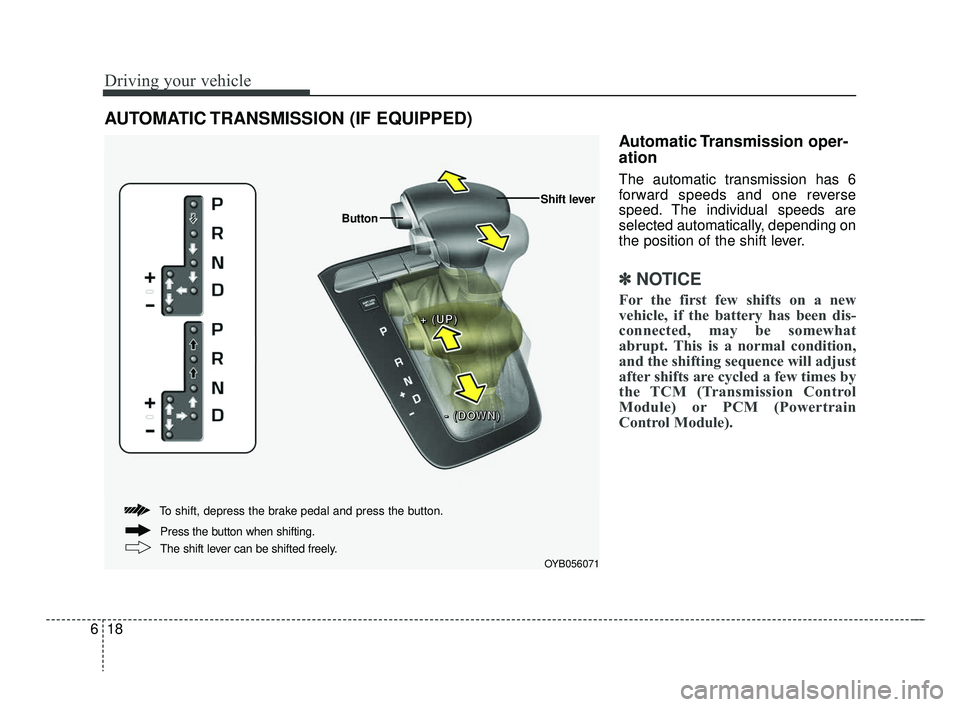
Automatic Transmission oper-
ation
The automatic transmission has 6
forward speeds and one reverse
speed. The individual speeds are
selected automatically, depending on
the position of the shift lever.
✽ ✽
NOTICE
For the first few shifts on a new
vehicle, if the battery has been dis-
connected, may be somewhat
abrupt. This is a normal condition,
and the shifting sequence will adjust
after shifts are cycled a few times by
the TCM (Transmission Control
Module) or PCM (Powertrain
Control Module).
AUTOMATIC TRANSMISSION (IF EQUIPPED)
OYB056071
+ +
+ +
( (
( (
U U
U U
P P
P P
) )
) )
Button
Shift lever
- -
- -
( (
( (
D D
D D
O O
O O
W W
W W
N N
N N
) )
) )
To shift, depress the brake pedal and press the button.
The shift lever can be shifted freely. Press the button when shifting.
SC CAN (ENG) 6.QXP 7/18/2018 5:41 PM Page 18
Page 281 of 503
619
Driving your vehicle
For smooth operation, depress thebrake pedal when shifting from N(Neutral) to a forward or reversegear.When stopped on an incline, do not
hold the vehicle stationary with
engine power.
Use the service brake or the parking
brake.
Transmission ranges
The indicator light in the instrument
cluster displays the shift lever posi-
tion when the ignition switch is in the
ON position.
P (Park)
Always come to a complete stop
before shifting into P (Park). This
position locks the transmission and
prevents the front wheels from rotat-
ing.
CAUTION - Transmission
To avoid damage to your trans-mission, do not accelerate theengine in R (Reverse) or any for-ward gear position with thebrakes on. The transmissionmay be damaged if you shiftinto P (Park) while the vehicle isin motion.
WARNING- Automatic
Transmission
Before leaving the driver's seat,
always make sure the shift lever
is engaged in P (Park), set the
parking brake fully and shut the
engine off. Unexpected and
sudden vehicle movement may
occur if these precautions are
not followed.
WARNING
Shifting into P (Park) while the
vehicle is in motion will cause
the drive wheels to lock which
will cause you to lose control of
the vehicle.
WARNING
ALWAYS check the surround- ing areas near your vehicle for
people, especially children,
before shifting a vehicle into D
(Drive) or R (Reverse).
Do not use engine braking (rapidly shifting from a high
gear to lower gear) on slippery
roads. The vehicle may slip
causing an accident.
SC CAN (ENG) 6.QXP 7/18/2018 5:41 PM Page 19
Page 282 of 503
Driving your vehicle
20
6
R (Reverse)
Use this position to drive the vehicle
backward.
N (Neutral)
The wheels and transmission are not
engaged. The vehicle will roll freely
even on the slightest incline unless
the parking brake or service brakes
are applied. - Parking in N (Neutral) gear
Follow the steps below when parking
and you want the vehicle to move
when pushed.
1.After parking your vehicle, step on
the brake pedal and move the shift
lever to [P] with the ignition button
in [ON] or while the engine is run-
ning.
2.If the parking brake is applied unlock the parking brake.
3.While pressing the brake pedal, turn the ignition button [OFF].
- For smart key equipped vehicles,the ignition switch can be moved
to [OFF] only when the shift lever
is in [P].
4.Change the gear shift lever to [N] (Neutral) while pressing the brake
pedal and pushing [SHIFT LOCK
RELEASE] button or inserting a
tool (e.g. flathead screw-driver) into
the [SHIFT LOCK RELEASE]
access hole at the same time.
Then, the vehicle will move when
external force is applied.
WARNING
• With the exception of parkingin neutral gear, always park
the vehicle in [P] (Park) for
safety and engage the parking
brake.
Before parking in N (Neutral) gear, first make sure the park-
ing ground is level and flat. Do
not park in [N] gear on any
slopes or gradients.
If parked and left in [N], the
vehicle may move and cause
serious damage and injury.
CAUTION - Shifting
Always come to a complete stopbefore shifting into or out of R(Reverse); you may damage thetransmission if you shift into R(Reverse) while the vehicle is inmotion, except when "Rockingthe Vehicle" explained in thischapter.
SC CAN (ENG) 6.QXP 7/25/2018 12:14 PM Page 20
Page 283 of 503
621
Driving your vehicle
D (Drive)
This is the normal forward driving
position. The transmission will auto-
matically shift through a 6-gear
sequence, providing the best fuel
economy and power.
For extra power when passing anoth-
er vehicle or climbing grades,
depress the accelerator fully, at
which time the transmission will
automatically downshift to the next
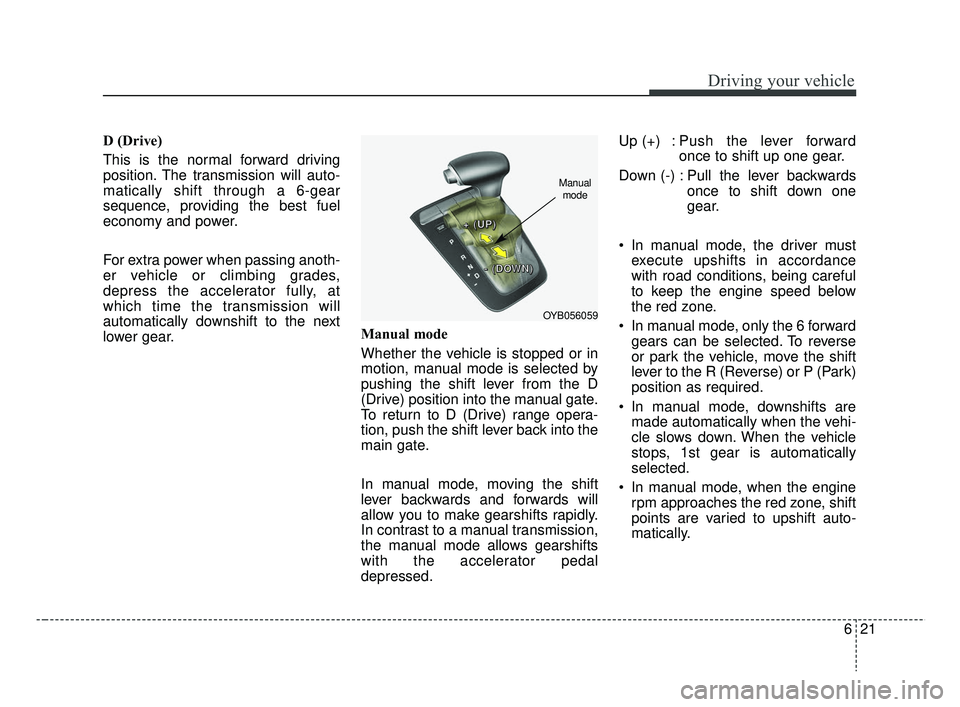
lower gear.Manual mode
Whether the vehicle is stopped or in
motion, manual mode is selected by
pushing the shift lever from the D
(Drive) position into the manual gate.
To return to D (Drive) range opera-
tion, push the shift lever back into the
main gate.
In manual mode, moving the shift
lever backwards and forwards will
allow you to make gearshifts rapidly.
In contrast to a manual transmission,
the manual mode allows gearshifts
with the accelerator pedal
depressed.Up (+) : Push the lever forward
once to shift up one gear.
Down (-) : Pull the lever backwards once to shift down one
gear.
In manual mode, the driver must execute upshifts in accordance
with road conditions, being careful
to keep the engine speed below
the red zone.
In manual mode, only the 6 forward gears can be selected. To reverse
or park the vehicle, move the shift
lever to the R (Reverse) or P (Park)
position as required.
In manual mode, downshifts are made automatically when the vehi-
cle slows down. When the vehicle
stops, 1st gear is automatically
selected.
In manual mode, when the engine rpm approaches the red zone, shift
points are varied to upshift auto-
matically.
OYB056059
+ +
+ +
( (
( (
U U
U U
P P
P P
) )
) )
- -
- -
( (
( (
D D
D D
O O
O O
W W
W W
N N
N N
) )
) )
Manual
mode
SC CAN (ENG) 6.QXP 7/18/2018 5:41 PM Page 21
Page 284 of 503
Driving your vehicle
22
6
To maintain the required levels of
vehicle performance and safety,
the system may not execute cer-
tain gearshifts when the shift lever
is operated.
When driving on a slippery road, push the shift lever forward into the
+(up) position. This causes the
transmission to shift into the 2nd
gear which is better for smooth
driving on a slippery road. Push
the shift lever to the -(down) side to
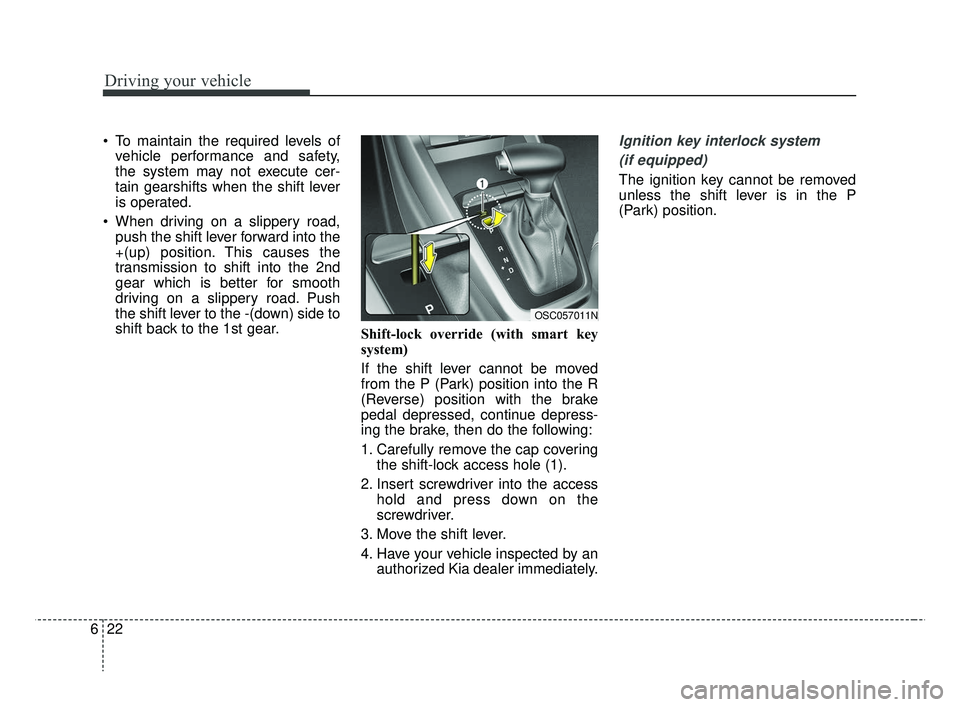
shift back to the 1st gear. Shift-lock override (with smart key
system)
If the shift lever cannot be moved
from the P (Park) position into the R
(Reverse) position with the brake
pedal depressed, continue depress-
ing the brake, then do the following:
1. Carefully remove the cap covering
the shift-lock access hole (1).
2. Insert screwdriver into the access hold and press down on the
screwdriver.
3. Move the shift lever.
4. Have your vehicle inspected by an authorized Kia dealer immediately.Ignition key interlock system
(if equipped)
The ignition key cannot be removed
unless the shift lever is in the P
(Park) position.
OSC057011N
SC CAN (ENG) 6.QXP 7/18/2018 5:41 PM Page 22
Page 288 of 503
Driving your vehicle
26
6
Rear drum brakes (if equipped)
Your rear drum brakes do not have
wear indicators. Therefore, have the
rear brake linings inspected if you
hear a rear brake rubbing noise. Also
have your rear brakes inspected
each time you change or rotate your
tires and when you have the front
brakes replaced.
Parking brake
Applying the parking brake
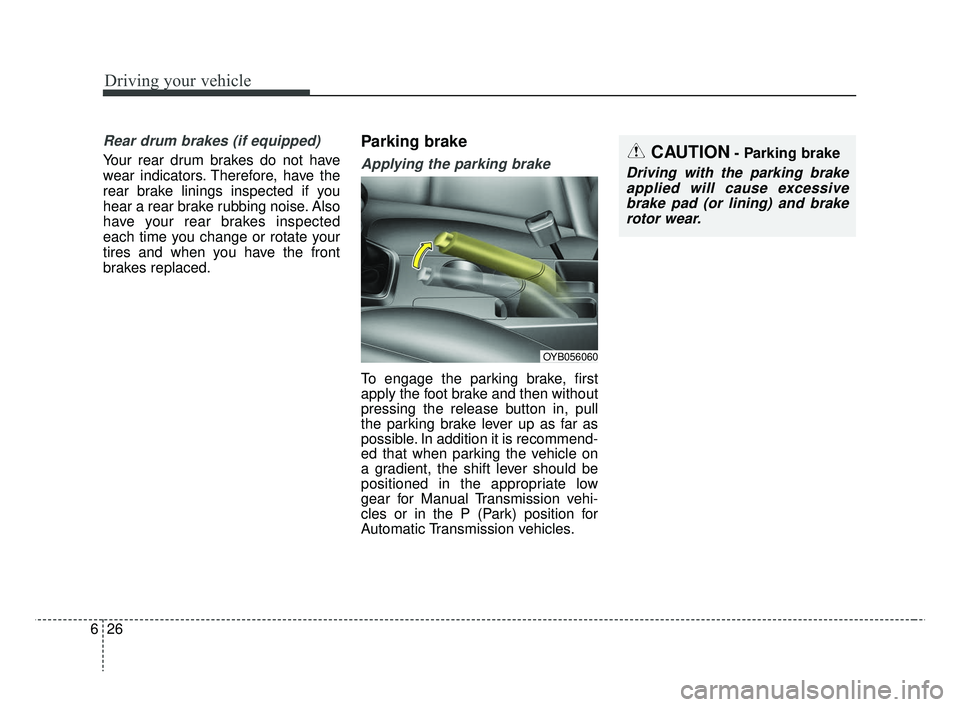
To engage the parking brake, first
apply the foot brake and then without
pressing the release button in, pull
the parking brake lever up as far as
possible. In addition it is recommend-
ed that when parking the vehicle on
a gradient, the shift lever should be
positioned in the appropriate low
gear for Manual Transmission vehi-
cles or in the P (Park) position for
Automatic Transmission vehicles.
CAUTION- Parking brake
Driving with the parking brake
applied will cause excessivebrake pad (or lining) and brakerotor wear.
OYB056060
SC CAN (ENG) 6.QXP 7/18/2018 5:41 PM Page 26
Page 289 of 503
627
Driving your vehicle
Releasing the parking brake
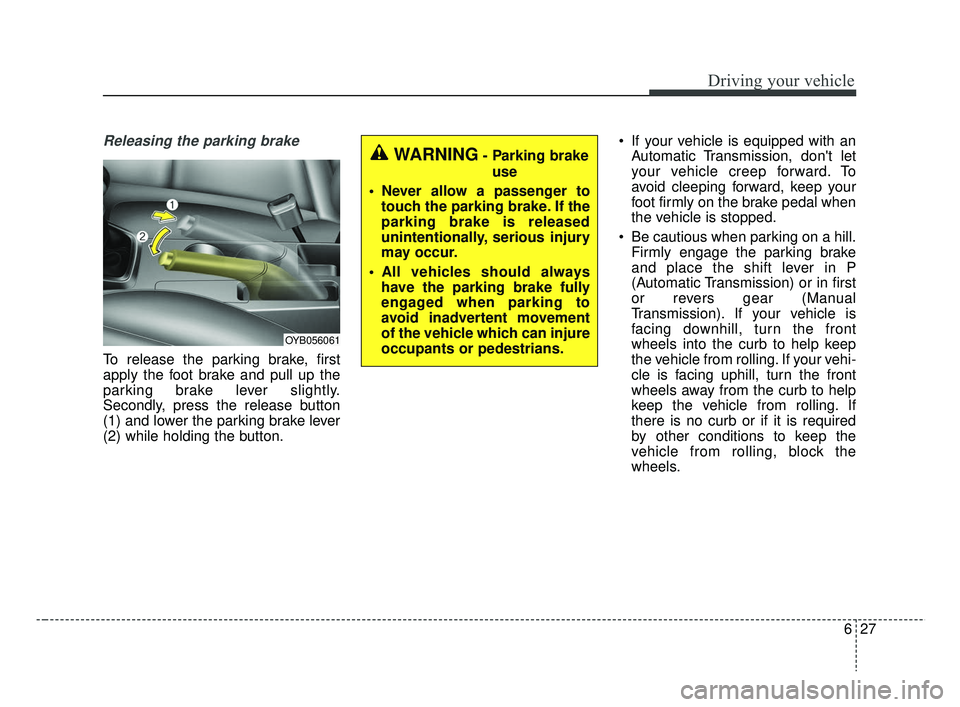
To release the parking brake, first
apply the foot brake and pull up the
parking brake lever slightly.
Secondly, press the release button
(1) and lower the parking brake lever
(2) while holding the button. If your vehicle is equipped with an
Automatic Transmission, don't let
your vehicle creep forward. To
avoid cleeping forward, keep your
foot firmly on the brake pedal when
the vehicle is stopped.
Be cautious when parking on a hill. Firmly engage the parking brake
and place the shift lever in P
(Automatic Transmission) or in first
or revers gear (Manual
Transmission). If your vehicle is
facing downhill, turn the front
wheels into the curb to help keep
the vehicle from rolling. If your vehi-
cle is facing uphill, turn the front
wheels away from the curb to help
keep the vehicle from rolling. If
there is no curb or if it is required
by other conditions to keep the
vehicle from rolling, block the
wheels.
WARNING- Parking brake
use
Never allow a passenger to touch the parking brake. If the
parking brake is released
unintentionally, serious injury
may occur.
All vehicles should always have the parking brake fully
engaged when parking to
avoid inadvertent movement
of the vehicle which can injure
occupants or pedestrians.
OYB056061
SC CAN (ENG) 6.QXP 7/18/2018 5:42 PM Page 27
Page 290 of 503
Driving your vehicle
28
6
Under some conditions your park-
ing brake can freeze in the
engaged position. This is most like-
ly to happen when there is an
accumulation of snow or ice aroud
or near the rear brakes or if the
brakes are wet. If there is a risk
that the parking brake may freeze,
apply it only temporarily while you
put the shift lever in P (Automatic
Transmission) or in first or reverse
gear (Manual Transmission) and
block the rear wheels so the vehi-
cle cannot roll. Then release the
parking brake.
Do not hold the vehicle on the upgrade with the accelerator
pedal. This can cause the trans-
mission to overheat. Always use
the brake pedal or parking brake. Check the brake warning light by
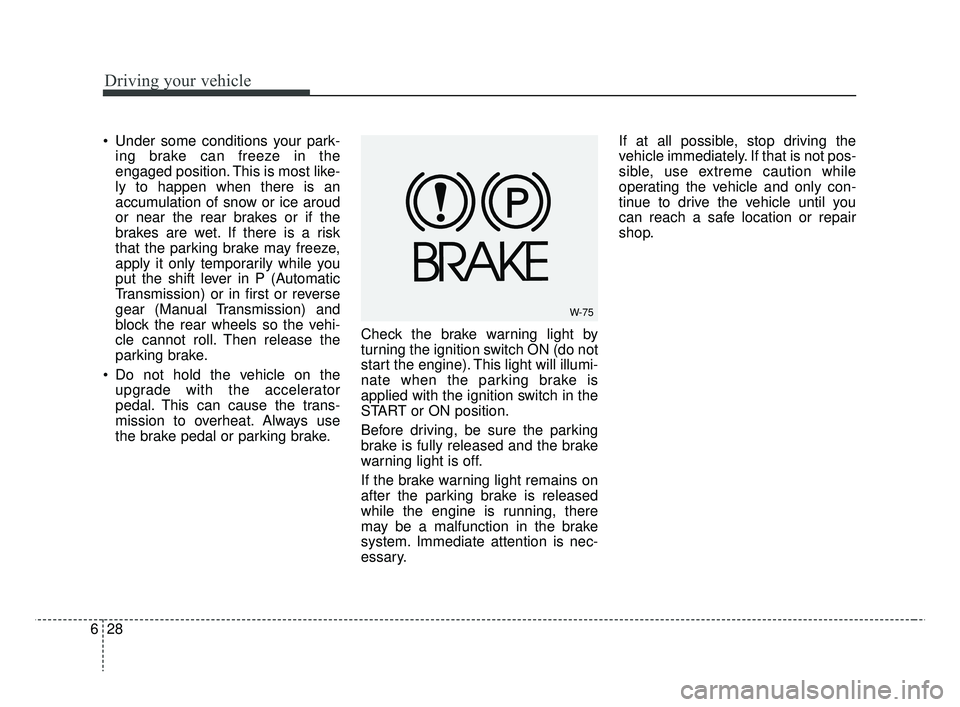
turning the ignition switch ON (do not
start the engine). This light will illumi-
nate when the parking brake is
applied with the ignition switch in the
START or ON position.
Before driving, be sure the parking
brake is fully released and the brake
warning light is off.
If the brake warning light remains on
after the parking brake is released
while the engine is running, there
may be a malfunction in the brake
system. Immediate attention is nec-
essary. If at all possible, stop driving the
vehicle immediately. If that is not pos-
sible, use extreme caution while
operating the vehicle and only con-
tinue to drive the vehicle until you
can reach a safe location or repair
shop.
W-75
SC CAN (ENG) 6.QXP 7/18/2018 5:42 PM Page 28
Page 297 of 503
635
Driving your vehicle
Vehicle stability management
(VSM)
This system is designed to provide
further enhancements to vehicle sta-
bility and steering responses when a
vehicle is driving on a slippery road
or a vehicle detected changes in
coefficient of friction between right
wheels and left wheels when brak-
ing.
VSM operation
When the VSM is in operation, ESC
indicator light ( ) blinks.
When the vehicle stability manage-
ment is operating properly, you can
feel a slight pulsation in the vehicle
and/or abnormal steering responses
(EPS). This is only the effect of brake
and EPS control and indicates noth-
ing unusual.The VSM does not operate when:
Driving on bank roads such as gra-
dient or incline
Driving in reverse
ESC OFF indicator light ( ) remains on the instrument cluster
EPS indicator light remains on the instrument cluster
WARNING- Maintaining
Brake Pressure on Incline
HAC does not replace the need
to apply brakes while stopped on
an incline. While stopped, make
sure you maintain brake pres-
sure sufficient to prevent your
vehicle from rolling backward
and causing an accident. Don’t
release the brake pedal until you
are ready to accelerate forward.
CAUTION
The HAC does not operate when the transmission shiftlever is in the P (Park) or N(Neutral) position.
The HAC activates even though the ESC is off but itdoes not activate when theESC has malfunctioned.
SC CAN (ENG) 6.QXP 7/18/2018 5:42 PM Page 35
Page 299 of 503
637
Driving your vehicle
Good braking practices
Check to be sure the parking brakeis not engaged and that the park-
ing brake indicator light is out
before driving away.
Driving through water may get the brakes wet. They can also get wet
when the vehicle is washed. Wet
brakes can be dangerous! Your
vehicle will not stop as quickly if the
brakes are wet. Wet brakes may
cause the vehicle to pull to one
side.
To dry the brakes, apply the brakes
lightly until the braking action
returns to normal, taking care to
keep the vehicle under control at
all times. If the braking action does
not return to normal, stop as soon
as it is safe to do so and call an
authorized Kia dealer for assis-
tance.
Don't coast down hills with the vehicle out of gear. This is extreme-
ly hazardous. Keep the vehicle in
gear at all times, use the brakes to
slow down, then shift to a lower
gear so that engine braking will
help you maintain a safe speed. Don't "ride" the brake pedal.
Resting your foot on the brake
pedal while driving can be danger-
ous because the brakes might
overheat and lose their effective-
ness. It also increases the wear of
the brake components.
If a tire goes flat while you are driv- ing, apply the brakes gently and
keep the vehicle pointed straight
ahead while you slow down. When
you are moving slowly enough for it
to be safe to do so, pull off the road
and stop in a safe place.
If your vehicle is equipped with an Automatic Transmission, don't let
your vehicle creep forward. To
avoid creeping forward, keep your
foot firmly on the brake pedal when
the vehicle is stopped.WARNING- Tire/Wheel
size
When replacing tires and
wheels, make sure they are the
same size as the original tires
and wheels installed. Driving
with varying tire or wheel sizes
may affect the vehicle's han-
dling.
WARNING
For maximum protection, always
wear your seat belt. No system,
no matter how advanced, can
compensate for all driver error
and/or driving conditions.
Always drive responsibly.
SC CAN (ENG) 6.QXP 7/18/2018 5:42 PM Page 37