audio KIA RIO HATCHBACK 2019 Service Manual
[x] Cancel search | Manufacturer: KIA, Model Year: 2019, Model line: RIO HATCHBACK, Model: KIA RIO HATCHBACK 2019Pages: 503, PDF Size: 10.42 MB
Page 256 of 503
Audio system
536
✽ ✽NOTICE
• Some Bluetooth®Wireless Technology
devices may not support the
Private function.
• The outgoing voice volume may vary depending on the type of
Bluetooth
®Wireless Technology
device. If the outgoing voice vol-
ume is too high or low, adjust the
Out Vol.
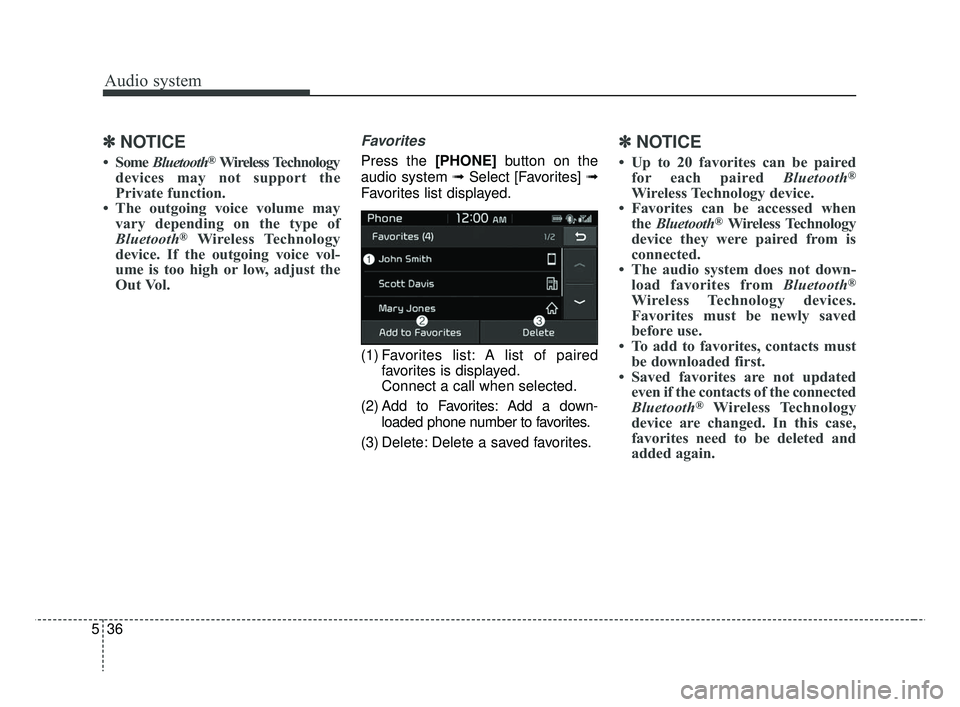
Favorites
Press the [PHONE] button on the
audio system ➟ Select [Favorites] ➟
Favorites list displayed.
(1) Favorites list: A list of paired favorites is displayed.
Connect a call when selected.
(2) Add to Favorites: Add a down- loaded phone number to favorites.
(3) Delete: Delete a saved favorites.
✽ ✽ NOTICE
• Up to 20 favorites can be paired
for each paired Bluetooth®
Wireless Technology device.
• Favorites can be accessed when the Bluetooth
®Wireless Technology
device they were paired from is
connected.
• The audio system does not down- load favorites from Bluetooth
®
Wireless Technology devices.
Favorites must be newly saved
before use.
• To add to favorites, contacts must be downloaded first.
• Saved favorites are not updated even if the contacts of the connected
Bluetooth
®Wireless Technology
device are changed. In this case,
favorites need to be deleted and
added again.
SC CAN (ENG) 5(audio).qxp 7/18/2018 6:02 PM Page 36
Page 257 of 503
![KIA RIO HATCHBACK 2019 Service Manual Audio system
37
5
Call history
Press the [PHONE] button on the
audio system ➟ Select [Call history]
➟ Call history is displayed.
(1) Call history: Display the down- loaded call history list.
Conne](/img/2/57981/w960_57981-256.png "KIA RIO HATCHBACK 2019 Service Manual Audio system
37
5
Call history
Press the [PHONE] button on the
audio system ➟ Select [Call history]
➟ Call history is displayed.
(1) Call history: Display the down- loaded call history list.
Conne")
Audio system
37
5
Call history
Press the [PHONE] button on the
audio system ➟ Select [Call history]
➟ Call history is displayed.
(1) Call history: Display the down- loaded call history list.
Connect a call when selected.
(2) Sort by: Sort by all calls, dialed calls, received calls or missed calls.
(3) Download: Download call history from connected
Bluetooth®Wireless
Technology devices.
✽ ✽ NOTICE
• Up to 50 dialed, received and
missed calls are saved.
• When the latest call history is received, the existing call history is
deleted.
Contacts
Press the [PHONE] button on the
audio system ➟ Select [Contacts] ➟
Select letter (ABC) ➟ Contacts dis-
played.
(1) Contacts: Display downloaded contacts.
Connect a call when selected.
(2) Download: Download contacts from connected
Bluetooth®
Wireless Technology devices.
✽ ✽NOTICE
• Only supported contacts format
can be downloaded and displayed
from the Bluetooth
®Wireless
Technology device, contacts from
some applications will not be
included.
• Up to 2,000 contacts can be saved.
• In some cases, additional confir- mation from your Bluetooth
®
Wireless Technology device is nec-
essary when downloading con-
tacts. If downloading of contacts
unsuccessful, consult your
Bluetooth
®Wireless Technology
device’s settings or the audio
screen to approve the download.
• Contacts without phone numbers are not displayed.
SC CAN (ENG) 5(audio).qxp 7/18/2018 6:02 PM Page 37
Page 258 of 503
![KIA RIO HATCHBACK 2019 Service Manual Audio system
538
Dial
Press the [PHONE]button on the
audio ➟Select [Dial].
(1) Phone number entry window: The phone number entered using the
keypad is displayed.
(2) Clear - Select to delete indivi](/img/2/57981/w960_57981-257.png "KIA RIO HATCHBACK 2019 Service Manual Audio system
538
Dial
Press the [PHONE]button on the
audio ➟Select [Dial].
(1) Phone number entry window: The phone number entered using the
keypad is displayed.
(2) Clear - Select to delete indivi")
Audio system
538
Dial
Press the [PHONE]button on the
audio ➟Select [Dial].
(1) Phone number entry window: The phone number entered using the
keypad is displayed.
(2) Clear - Select to delete individual digits.
- Press and hold to delete theentire phone number.
(3) Keypad: Enter phone number.
(4)
Bluetooth®Wireless Technology
phone name
- The name of the connected
Bluetooth®Wireless Technology
device is displayed.
- Contacts matching the keypad number/letter input are displayed.(5) Call
- Enter and select a phone num-ber to call.
- Select without entering a phone number to see the most recent
dialed call.
Connections (if equipped)
Press the [PHONE] button on the
audio ➟Select [Connections].
- For connections setting, refer to Setup ➟Select [Bluetooth] ➟
Select [Connections] page.
Setup
Press the [PHONE] button on the
audio ➟Select [Settings].
- For phone Setup, refer to Setup page ➟Select [Bluetooth].
WARNING- Distracted
driving
Driving while distracted can
result in a loss of vehicle control
that may lead to an accident,
severe personal injury, and death.
The driver's primary responsibili-
ty is in the safe and legal opera-
tion of a vehicle, and use of any
handheld devices, other equip-
ment, or vehicle systems which
take the driver's eyes, attention
and focus away from the safe
operation of a vehicle or which
are not permissible by law should
never be used during operation
of the vehicle.
SC CAN (ENG) 5(audio).qxp 7/18/2018 6:02 PM Page 38
Page 259 of 503
![KIA RIO HATCHBACK 2019 Service Manual Audio system
39
5
Setup
Access Display, Sound, Date/Time,
Bluetooth, System, Screen Saver
and Display Off settings.
Press the [SETUP] button on the
audio system.
Display
Press the [SETUP] button on t](/img/2/57981/w960_57981-258.png "KIA RIO HATCHBACK 2019 Service Manual Audio system
39
5
Setup
Access Display, Sound, Date/Time,
Bluetooth, System, Screen Saver
and Display Off settings.
Press the [SETUP] button on the
audio system.
Display
Press the [SETUP] button on t")
Audio system
39
5
Setup
Access Display, Sound, Date/Time,
Bluetooth, System, Screen Saver
and Display Off settings.
Press the [SETUP] button on the
audio system.
Display
Press the [SETUP] button on the
audio system ➟ Select [Display].
Mode: Audio screen brightness can be adjusted to the time of day.
Illumination: The brightness of the audio screen can be changed.
Sound
Press the [SETUP] button on the
audio system ➟ Select [Sound].
Position: Sound balance and pan- ning can be adjusted.
Tone: Sound tone color can be adjusted.
Back-up Warning Priority: Automatically lower audio volume while reversing.
Speed Dependent Volume: Automatically adjust volume based
on vehicle speed.
Beep: Select whether to play a sound when the screen is touched.
Date/Time
Press the [SETUP] button on the
audio system ➟ Select [Date/Time].
Set Time: Set the time displayed on the audio screen.
Time Format: Choose between 12- hour and 24-hour time formats.
Set Date: Set the date displayed on the audio screen.
SC CAN (ENG) 5(audio).qxp 7/18/2018 6:02 PM Page 39
Page 260 of 503
![KIA RIO HATCHBACK 2019 Service Manual Audio system
540
Bluetooth
Press the [SETUP]button on the
audio system ➟ Select [Bluetooth].
Connections: Control pairing, dele- tion, connection and disconnection
of
Bluetooth®Wireless Technolog](/img/2/57981/w960_57981-259.png "KIA RIO HATCHBACK 2019 Service Manual Audio system
540
Bluetooth
Press the [SETUP]button on the
audio system ➟ Select [Bluetooth].
Connections: Control pairing, dele- tion, connection and disconnection
of
Bluetooth®Wireless Technolog")
Audio system
540
Bluetooth
Press the [SETUP]button on the
audio system ➟ Select [Bluetooth].
Connections: Control pairing, dele- tion, connection and disconnection
of
Bluetooth®Wireless Technology
devices.
Auto Connection Priority: Set the connection priority of
Bluetooth®
Wireless Technology devices when
the vehicle is started.
Download Contacts: Contacts can be downloaded from connected
Bluetooth®Wireless Technology
devices.
Bluetooth Voice Prompts: Play or mute voice prompts for
Bluetooth®
Wireless Technology device pair-
ing, connection and errors.
✽ ✽ NOTICE
• When paired devices are deleted,
the call history and contacts of the
device saved to the audio system
are deleted.
• For Bluetooth
®Wireless Technology
connections with low connection pri-
ority, some time may be required for
the connection to be established.
• Contacts can be downloaded only from the currently connected
Bluetooth
®Wireless Technology
device.
If no Bluetooth
®Wireless Technology
device is connected, the download
contacts button is disabled.
System
Press the [SETUP] button on the
audio system ➟ Select [System].
Language: Change the user lan- guage.
SC CAN (ENG) 5(audio).qxp 7/18/2018 6:02 PM Page 40
Page 261 of 503
![KIA RIO HATCHBACK 2019 Service Manual Audio system
41
5
Screen Saver
Set the information displayed when
the audio system is switched off or
the screen is turned off.
Press the [SETUP] button on the
audio system ➟ Select [Screen
Saver].](/img/2/57981/w960_57981-260.png "KIA RIO HATCHBACK 2019 Service Manual Audio system
41
5
Screen Saver
Set the information displayed when
the audio system is switched off or
the screen is turned off.
Press the [SETUP] button on the
audio system ➟ Select [Screen
Saver].")
Audio system
41
5
Screen Saver
Set the information displayed when
the audio system is switched off or
the screen is turned off.
Press the [SETUP] button on the
audio system ➟ Select [Screen
Saver].
Analog: An analog clock is dis- played.
Digital: A digital clock is displayed.
None: No information is displayed.
Display Off
To prevent glare, the screen can be
turned off with the audio system in
operation.
Press the [SETUP] button on the
audio system ➟ Select [Display Off].
SC CAN (ENG) 5(audio).qxp 7/18/2018 6:02 PM Page 41
Page 262 of 503
IC
This device complies with Industry Canada license-exempt RSS standard(s). Operation is subject to the following two
conditions: (1) This device may not cause interference; and (2) This device must accept any interference, including
interference that may cause undesired operation of the device.
Le présent appareil est conforme aux CNR d'Industrie Canada applicables aux appareils radio exempts de licence.
L'exploitation est autorisée aux deux conditions suivantes: (1) l'appareil ne doit pas produire de brouillage, et
(2) l'utilisateur de l'appareil doit accepter tout brouillage radioélectrique subi, même si le brouillage est sus-
ceptible d'en compromettre le fonctionnement.
RF Exposure
The antenna (or antennas) must be installed so as to maintain at all times a distance minimum of at least 20 cm
between the radiation source (antenna) and any individual. This device may not be installed or used in conjunction
with any other antenna or transmitter.
l'exposition aux RF
L’antenne (ou les antennes) doit tre install e de fa on maintenir tout instant une distance minimum de au moins 20 cm
entre la source de radiation (l’antenne) et toute personne physique.
Declaration of Conformity
42
5
Audio system
SC CAN (ENG) 5(audio).qxp 7/18/2018 6:02 PM Page 42
Page 306 of 503
Driving your vehicle
44
6
✽ ✽
NOTICE
• Do not install any accessories,
such as a license plate bracket or
bumper sticker near the sensor
area. Do not replace the bumper
by yourself. Doing so may
adversely affect the sensing per-
formance.
• Always keep the sensor/bumper area clean.
• Use only a soft cloth to wash the vehicle. Also, do not spray highly
pressurized water on the sensor
installed on the bumper.
• Be careful not to apply unneces- sary force on the frontal sensor
area. When the sensor moves out
of the correct position due to
external force, the system may not
operate correctly even without the
warning light or message. In this
case, have the vehicle inspected by
an authorized Kia dealer. (Continued)(Continued)
• Use only the genuine Kia sensor
cover. Do not apply paint on the
sensor cover.
• Do not remove or impact the radar components.
• If the audio volume is too high, you may not be able to hear a
warning alarm from the FCA sys-
tem.
System malfunction
When the FCA is not working prop-
erly, the FCA warning light ( ) will
illuminate and the warning mes-
sage (“Check FCA system”) will
appear for a few seconds. After the
message disappears, the master
warning light ( ) will illuminate. In
this case, have the vehicle inspect-
ed by an authorized Kia dealer.
The FCA warning message may appear along with the illumination
of the ESC warning light.
WARNING
The FCA is only a supplemental
system for the driver’s conven-
ience.
It is the driver's responsibility to
control the vehicle. Do not sole-
ly depend on the FCA system.
Rather, maintain a safe braking
distance, and, if necessary,
depress the brake pedal to
lower the driving speed.
SC CAN (ENG) 6.QXP 7/18/2018 5:42 PM Page 44
Page 430 of 503
Maintenance
58
8
✽ ✽
NOTICE
• Set all switches to ON before driv-
ing.
• If the vehicle is going to be unused for over 1 month, set all switches
to OFF to prevent the batteries
from draining.
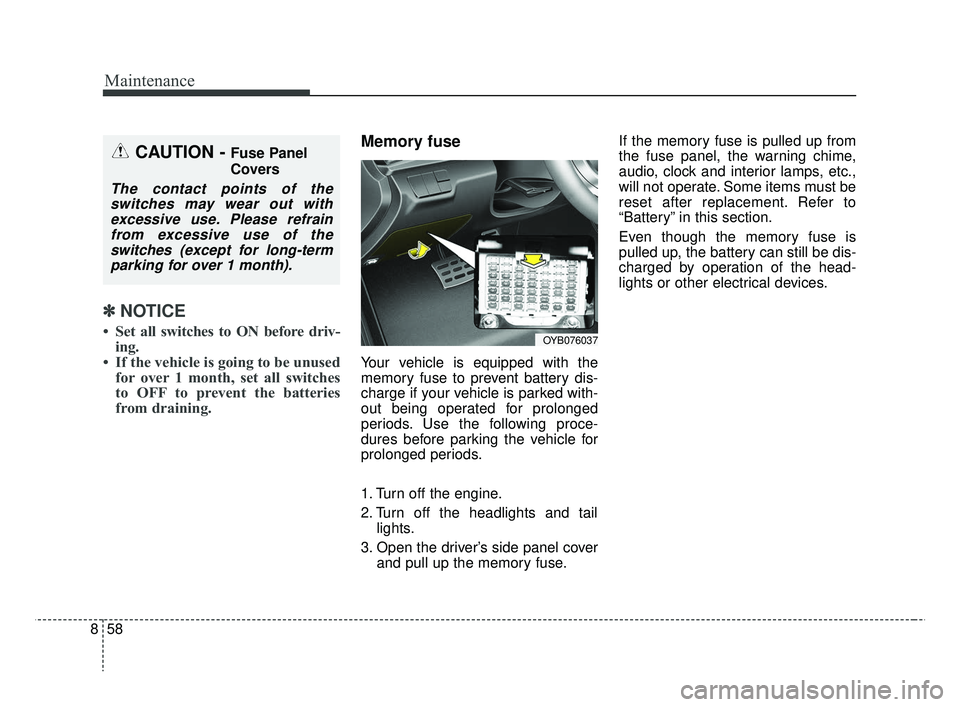
Memory fuse
Your vehicle is equipped with the
memory fuse to prevent battery dis-
charge if your vehicle is parked with-
out being operated for prolonged
periods. Use the following proce-
dures before parking the vehicle for
prolonged periods.
1. Turn off the engine.
2. Turn off the headlights and tail
lights.
3. Open the driver’s side panel cover and pull up the memory fuse. If the memory fuse is pulled up from
the fuse panel, the warning chime,
audio, clock and interior lamps, etc.,
will not operate. Some items must be
reset after replacement. Refer to
“Battery” in this section.
Even though the memory fuse is
pulled up, the battery can still be dis-
charged by operation of the head-
lights or other electrical devices.
CAUTION - Fuse Panel
Covers
The contact points of the
switches may wear out withexcessive use. Please refrainfrom excessive use of theswitches (except for long-termparking for over 1 month).
OYB076037
SC CAN (ENG) 8.qxp 7/18/2018 5:34 PM Page 58
Page 435 of 503
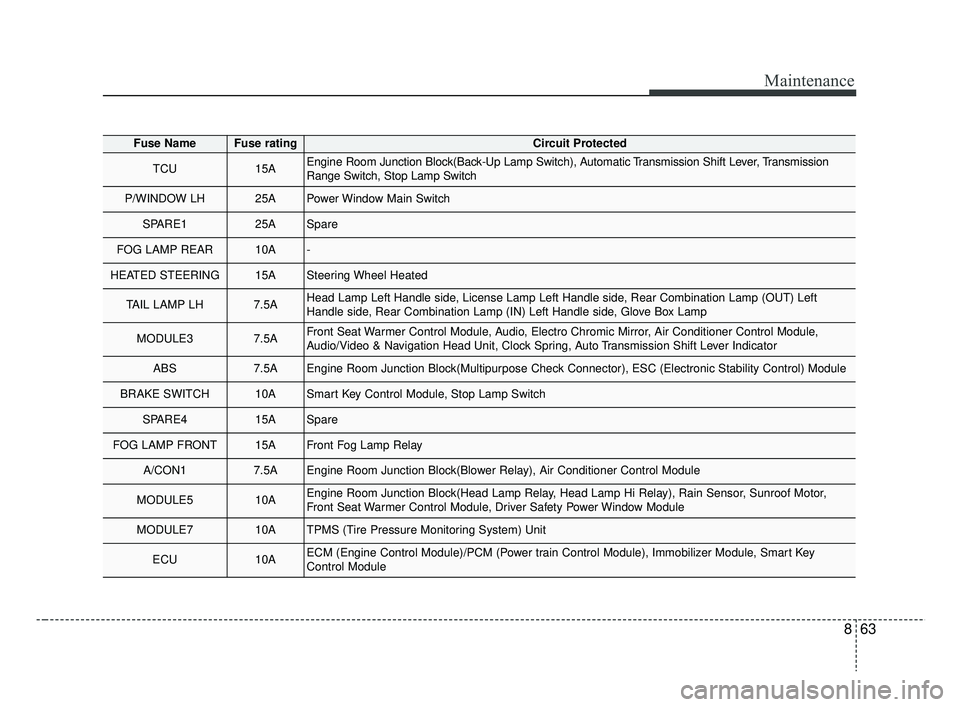
863
Maintenance
Fuse NameFuse ratingCircuit Protected
TCU15AEngine Room Junction Block(Back-Up Lamp Switch), Automatic Transmission Shift Lever, Transmission
Range Switch, Stop Lamp Switch
P/WINDOW LH25APower Window Main Switch
SPARE125ASpare
FOG LAMP REAR10A-
HEATED STEERING15ASteering Wheel Heated
TAIL LAMP LH7.5AHead Lamp Left Handle side, License Lamp Left Handle side, Rear Combination Lamp (OUT) Left
Handle side, Rear Combination Lamp (IN) Left Handle side, Glove Box Lamp
MODULE37.5AFront Seat Warmer Control Module, Audio, Electro Chromic Mirror, Air Conditioner Control Module,
Audio/Video & Navigation Head Unit, Clock Spring, Auto Transmission Shift Lever Indicator
ABS7.5AEngine Room Junction Block(Multipurpose Check Connector), ESC (Electronic Stability Control) Module
BRAKE SWITCH10ASmart Key Control Module, Stop Lamp Switch
SPARE415ASpare
FOG LAMP FRONT15AFront Fog Lamp Relay
A/CON17.5AEngine Room Junction Block(Blower Relay), Air Conditioner Control Module
MODULE510AEngine Room Junction Block(Head Lamp Relay, Head Lamp Hi Relay), Rain Sensor, Sunroof Motor,
Front Seat Warmer Control Module, Driver Safety Power Window Module
MODULE710ATPMS (Tire Pressure Monitoring System) Unit
ECU10AECM (Engine Control Module)/PCM (Power train Control Module), Immobilizer Module, Smart Key
Control Module
SC CAN (ENG) 8.qxp 7/18/2018 5:34 PM Page 63