audio KIA Rondo 2008 2.G Owner's Guide
[x] Cancel search | Manufacturer: KIA, Model Year: 2008, Model line: Rondo, Model: KIA Rondo 2008 2.GPages: 341, PDF Size: 6.23 MB
Page 199 of 341
Features of your vehicle120 4 If you do not release RPT operation
after all the tracks are played back, the
unit will play back again from the first
track.
This process will be continued until you
push the button again or turn the power
OFF then ON.11. RANDOM (RDM) ButtonWith random, you can listen to the tracks
in random, rather than sequential order
on one disc.
To use random, do the following:
Press the RDM button to listen to
recorded tracks in random sequence.
Press RDM again to cancel or turn the
power OFF then ON. The unit defaults
to playing tracks in sequential order.
To listen to the music within the select-
ed folder in random order, press the
RDM button within a second. To can-
cel, press it again or turn the power
OFF then ON. (MP3 CD only)
12. DISC UP/DOWN Button By pressing "DISC "/"DISC "
while CD changer is playing you can
move backward or forward to the next
disc and playback automatically
begins.
If any of the slots do not contain a CD,
your car audio will skip the empty slot
and play only those that contain a CD.
When switching CD’s, the LCD dis-
plays the selected CD’s number.13. FILE SEARCH Knob
(TUNE Select Knob) You can skip the track (file) by turning
the FILE SEARCH knob clockwise or
counterclockwise.
After selecting the desired track (file),
press the FILE SEARCH knob to play-
back the track (file).
If you do not press the FILE SEARCH
knob within five seconds, the search
will stop.
14. FOLDER SEARCH (FLDR) Button You can move through the folder by
pushing the FLDR button to up ( )
and down( ).
After moving the desired folder, press
the FILE SEARCH knob to play back in
the selected folder. If you do not press
the FILE SEARCH knob within 5 sec-
onds, the folder searching function will
be released. It can not be operated in a
single folder.15. INFO ButtonWhile playing CD(MP3), If this button is
pressed repeatedly, the played file infor-
mation will be displayed in the following
order.
FILE NAME
➟
SONG TITLE
➟
ARTIST
NAME
➟
ALBUM TITLE
➟
FOLDER
NAME
➟
TOTAL FILE
➟
MARK
ADDRESS
➟ FILE NAME
“NO DATA” wil be displayed in case that
there is no information on the selected
item.
Page 200 of 341
4121
Features of your vehicle
✽ ✽
NOTICE• To assure proper operation of the unit,
keep the vehicle interior temperature
within a normal range by using the
vehicle's air conditioning or heating
system.
• When replacing the fuse, replace it
with a fuse having the correct capaci-
ty.
• Stored bookmarks are all erased when
the car battery is disconnected or
power to the vehicle is lost. If this
occurs, the bookmarks will have to be
reset.
• This equipment is designed to be used
only in a 12 volt DC battery system
with negative ground.
• This unit is made of precision parts.
Do not attempt to disassemble or
adjust any parts.
• Do not expose this equipment (includ-
ing the speakers and tape) to water or
excessive moisture.
✽ ✽
NOTICE• Do not insert warped or poor quality
discs into the CD player as damage to
the unit may occur.
• Do not insert anything like coins into
the player slot as damage to the unit
may occur.
• Do not place beverages close to the
audio system. The playback mecha-
nism may be damaged if you spill
them.
• Do not strike or allow anything to
impact the audio system, damage to
the system mechanisms could occur.
• Off-road or rough surface driving
may cause the compact disc to skip.
Do not use the compact disc when
driving in such conditions as damage
to the compact disc face could occur.
• Do not attempt to grab or pull the
compact disc out while the disc is
being pulled into the audio unit by the
self-loading mechanism. Damage to
the audio unit and compact disc could
occur.
• Avoid using recorded compact discs in
your audio unit. Original compact
discs are recommended.
WARNING
When driving your vehicle, be sure
to keep the volume of the unit set
low enough to allow you to hear
sounds coming from the outside.
Page 299 of 341
Maintenance30 7
G190300AUNReset itemsItems should be reset after the battery
has been discharged or the battery has
been disconnected.
Auto up/down window (See section 4)
Sunroof (See section 4)
Trip computer (See section 4)
Climate control system
(See section 4)
Clock (See section 4)
Audio (See section 4)
WARNING
Before performing maintenance
or recharging the battery, turn off
all accessories and stop the
engine.
The negative battery cable must
be removed first and installed
last when the battery is discon-
nected.
Page 315 of 341
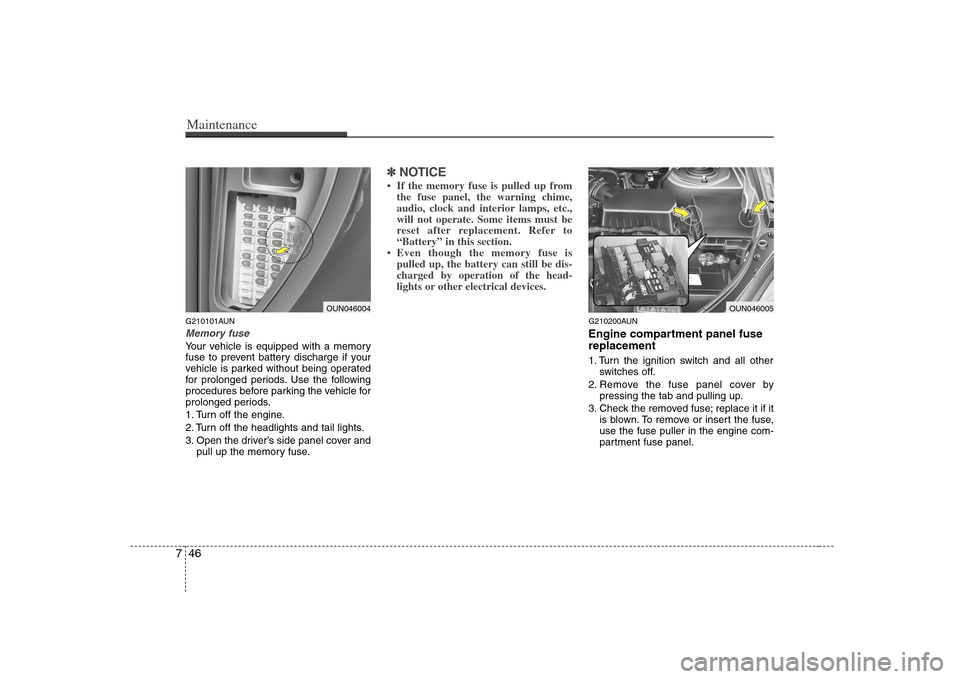
Maintenance46 7G210101AUNMemory fuseYour vehicle is equipped with a memory
fuse to prevent battery discharge if your
vehicle is parked without being operated
for prolonged periods. Use the following
procedures before parking the vehicle for
prolonged periods.
1. Turn off the engine.
2. Turn off the headlights and tail lights.
3. Open the driver’s side panel cover and
pull up the memory fuse.
✽ ✽
NOTICE• If the memory fuse is pulled up from
the fuse panel, the warning chime,
audio, clock and interior lamps, etc.,
will not operate. Some items must be
reset after replacement. Refer to
“Battery” in this section.
• Even though the memory fuse is
pulled up, the battery can still be dis-
charged by operation of the head-
lights or other electrical devices.
G210200AUNEngine compartment panel fuse
replacement1. Turn the ignition switch and all other
switches off.
2. Remove the fuse panel cover by
pressing the tab and pulling up.
3. Check the removed fuse; replace it if it
is blown. To remove or insert the fuse,
use the fuse puller in the engine com-
partment fuse panel.
OUN046004
OUN046005
Page 318 of 341
749
Maintenance
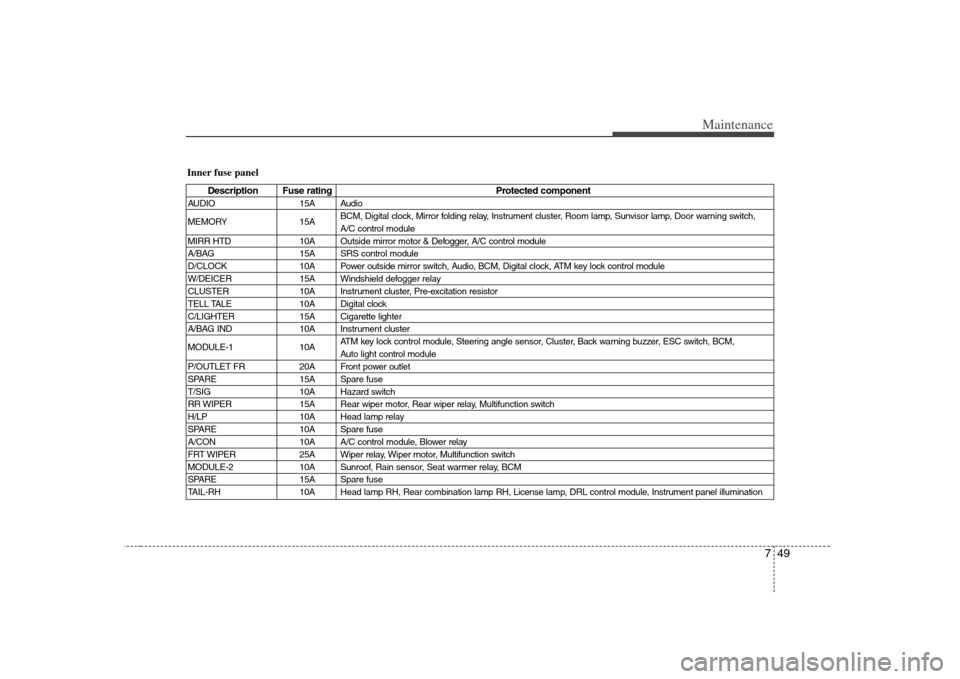
Inner fuse panel
Description Fuse rating Protected component
AUDIO 15A Audio
MEMORY 15ABCM, Digital clock, Mirror folding relay, Instrument cluster, Room lamp, Sunvisor lamp, Door warning switch,
A/C control module
MIRR HTD 10A Outside mirror motor & Defogger, A/C control module
A/BAG 15A SRS control module
D/CLOCK 10A Power outside mirror switch, Audio, BCM, Digital clock, ATM key lock control module
W/DEICER 15A Windshield defogger relay
CLUSTER 10A Instrument cluster, Pre-excitation resistor
TELL TALE 10A Digital clock
C/LIGHTER 15A Cigarette lighter
A/BAG IND 10A Instrument cluster
MODULE-1 10AATM key lock control module, Steering angle sensor, Cluster, Back warning buzzer, ESC switch, BCM,
Auto light control module
P/OUTLET FR 20A Front power outlet
SPARE 15A Spare fuse
T/SIG 10A Hazard switch
RR WIPER 15A Rear wiper motor, Rear wiper relay, Multifunction switch
H/LP 10A Head lamp relay
SPARE 10A Spare fuse
A/CON 10A A/C control module, Blower relay
FRT WIPER 25A Wiper relay, Wiper motor, Multifunction switch
MODULE-2 10A Sunroof, Rain sensor, Seat warmer relay, BCM
SPARE 15A Spare fuse
TAIL-RH 10A Head lamp RH, Rear combination lamp RH, License lamp, DRL control module, Instrument panel illumination
Page 339 of 341
Index2I
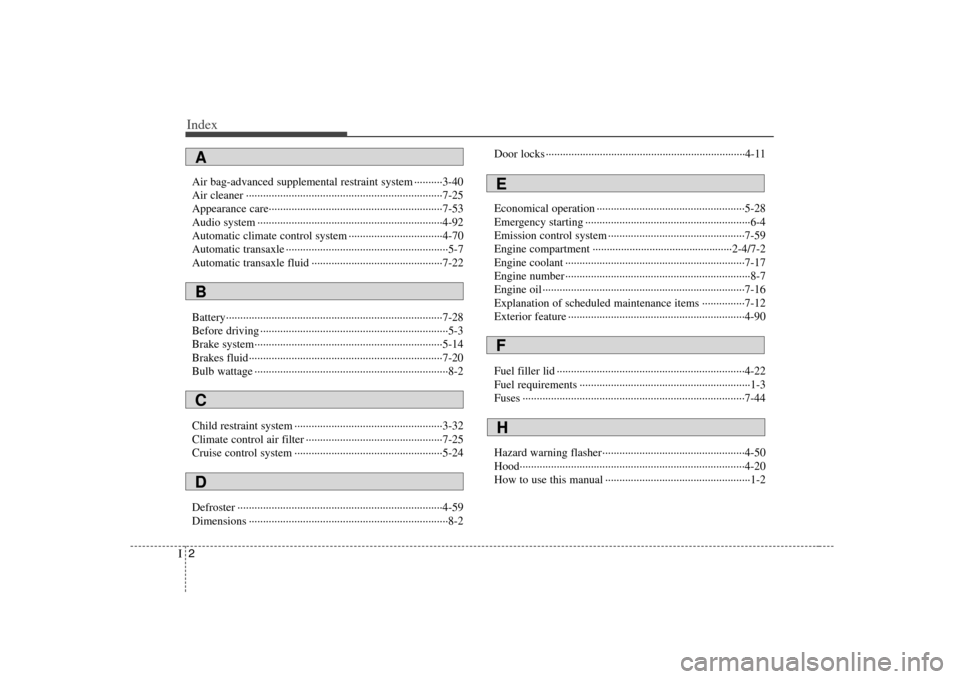
Air bag-advanced supplemental restraint system ··········3-40
Air cleaner ·····································································7-25
Appearance care·····························································7-53
Audio system ·································································4-92
Automatic climate control system ·································4-70
Automatic transaxle ·························································5-7
Automatic transaxle fluid ··············································7-22
Battery············································································7-28
Before driving ··································································5-3
Brake system··································································5-14
Brakes fluid····································································7-20
Bulb wattage ····································································8-2
Child restraint system ····················································3-32
Climate control air filter ················································7-25
Cruise control system ····················································5-24
Defroster ········································································4-59
Dimensions ······································································8-2Door locks ······································································4-11
Economical operation ····················································5-28
Emergency starting ··························································6-4
Emission control system ················································7-59
Engine compartment ·················································2-4/7-2
Engine coolant ·······························································7-17
Engine number ·································································8-7
Engine oil ·······································································7-16
Explanation of scheduled maintenance items ···············7-12
Exterior feature ······························································4-90
Fuel filler lid ··································································4-22
Fuel requirements ····························································1-3
Fuses ··············································································7-44
Hazard warning flasher··················································4-50
Hood···············································································4-20
How to use this manual ···················································1-2ABCD
EFH