reset KIA Rondo 2015 3.G Owner's Guide
[x] Cancel search | Manufacturer: KIA, Model Year: 2015, Model line: Rondo, Model: KIA Rondo 2015 3.GPages: 564, PDF Size: 19.11 MB
Page 305 of 564
Features of your vehicle
4217
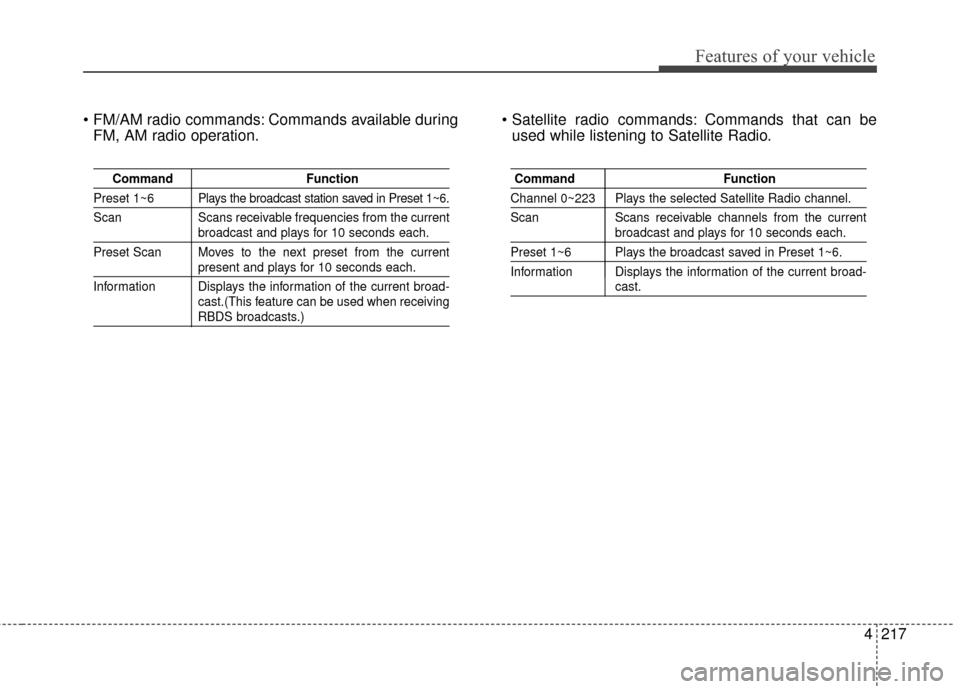
Commands available duringFM, AM radio operation. Commands that can be
used while listening to Satellite Radio.
Command Function
Preset 1~6 Plays the broadcast station saved in Preset 1~6.
Scan Scans receivable frequencies from the current
broadcast and plays for 10 seconds each.
Preset Scan Moves to the next preset from the current
present and plays for 10 seconds each.
Information Displays the information of the current broad- cast.(This feature can be used when receiving
RBDS broadcasts.)
Command Function
Channel 0~223 Plays the selected Satellite Radio channel.
Scan Scans receivable channels from the current
broadcast and plays for 10 seconds each.
Preset 1~6 Plays the broadcast saved in Preset 1~6.
Information Displays the information of the current broad-
cast.
Page 356 of 564
Driving your vehicle
48
5
To temporarily accelerate with
the cruise control on:
If you want to speed up temporarily
when the cruise control is on,
depress the accelerator pedal.
Increased speed will not interfere
with cruise control operation or
change the set speed.
To return to the set speed, take your
foot off the accelerator.
To cancel cruise control, do
one of the following:
Press the brake pedal.
Depress the clutch pedal if
equipped with a manual transaxle.
Shift into N (Neutral) with an auto- matic transaxle.
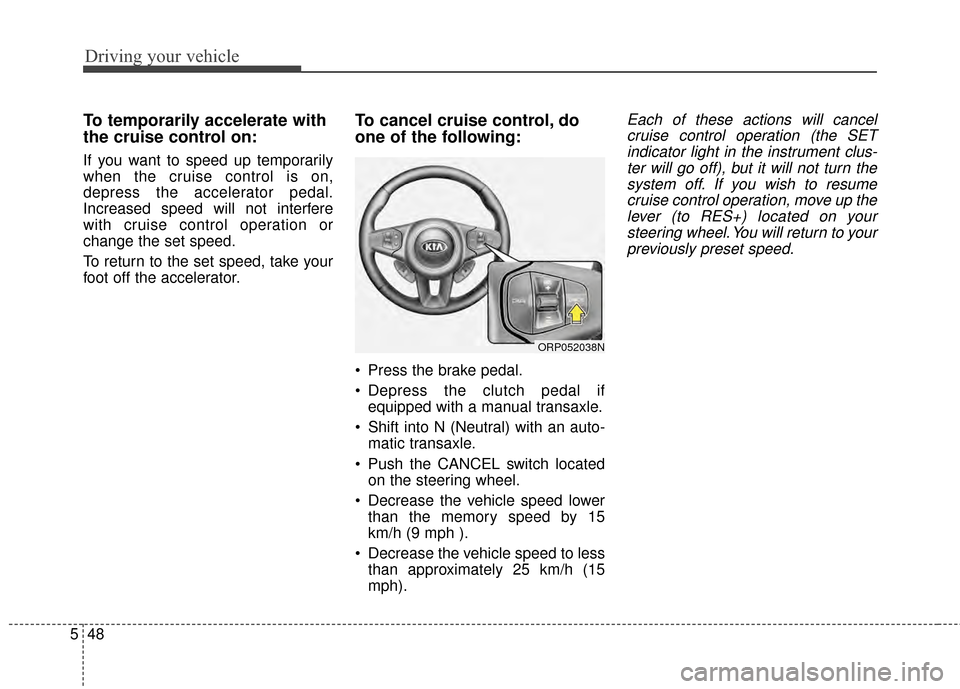
Push the CANCEL switch located on the steering wheel.
Decrease the vehicle speed lower than the memory speed by 15
km/h (9 mph ).
Decrease the vehicle speed to less than approximately 25 km/h (15
mph).
Each of these actions will cancelcruise control operation (the SETindicator light in the instrument clus-ter will go off), but it will not turn thesystem off. If you wish to resumecruise control operation, move up thelever (to RES+) located on yoursteering wheel. You will return to yourpreviously preset speed.
ORP052038N
Page 458 of 564
745
Maintenance
Reset items
Items should be reset after the bat-
tery has been discharged or the bat-
tery has been disconnected.
Auto down window (See section 4)
Sunroof (See section 4)
Trip computer (See section 4)
Climate control system (See section 4)
Clock (See section 4)
Audio (See section 4)
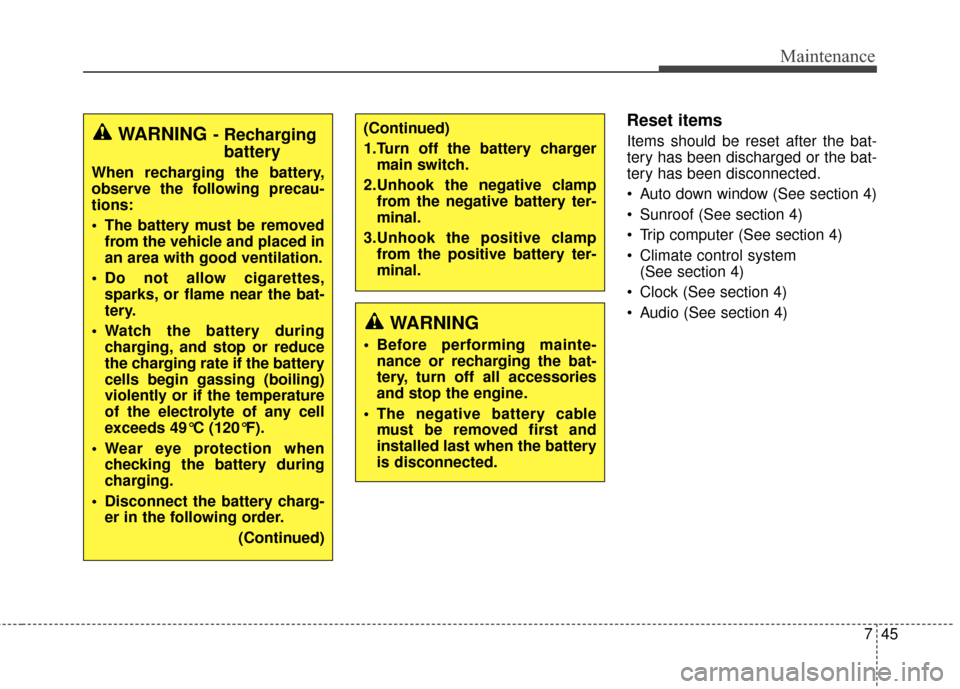
WARNING
Before performing mainte- nance or recharging the bat-
tery, turn off all accessories
and stop the engine.
The negative battery cable must be removed first and
installed last when the battery
is disconnected.
(Continued)
1.Turn off the battery chargermain switch.
2.Unhook the negative clamp from the negative battery ter-
minal.
3.Unhook the positive clamp from the positive battery ter-
minal.WARNING- Rechargingbattery
When recharging the battery,
observe the following precau-
tions:
The battery must be removed
from the vehicle and placed in
an area with good ventilation.
Do not allow cigarettes, sparks, or flame near the bat-
tery.
Watch the battery during charging, and stop or reduce
the charging rate if the battery
cells begin gassing (boiling)
violently or if the temperature
of the electrolyte of any cell
exceeds 49°C (120°F).
Wear eye protection when checking the battery during
charging.
Disconnect the battery charg- er in the following order.
(Continued)
Page 463 of 564
Maintenance
50
7
Wheel alignment and tire bal-
ance
The wheels on your vehicle were
aligned and balanced carefully at the
factory to give you the longest tire life
and best overall performance.
In most cases, you will not need to
have your wheels aligned again.
However, if you notice unusual tire
wear or your vehicle pulling one way
or the other, the alignment may need
to be reset.
If you notice your vehicle vibrating
when driving on a smooth road, your
wheels may need to be rebalanced.
Tire replacement
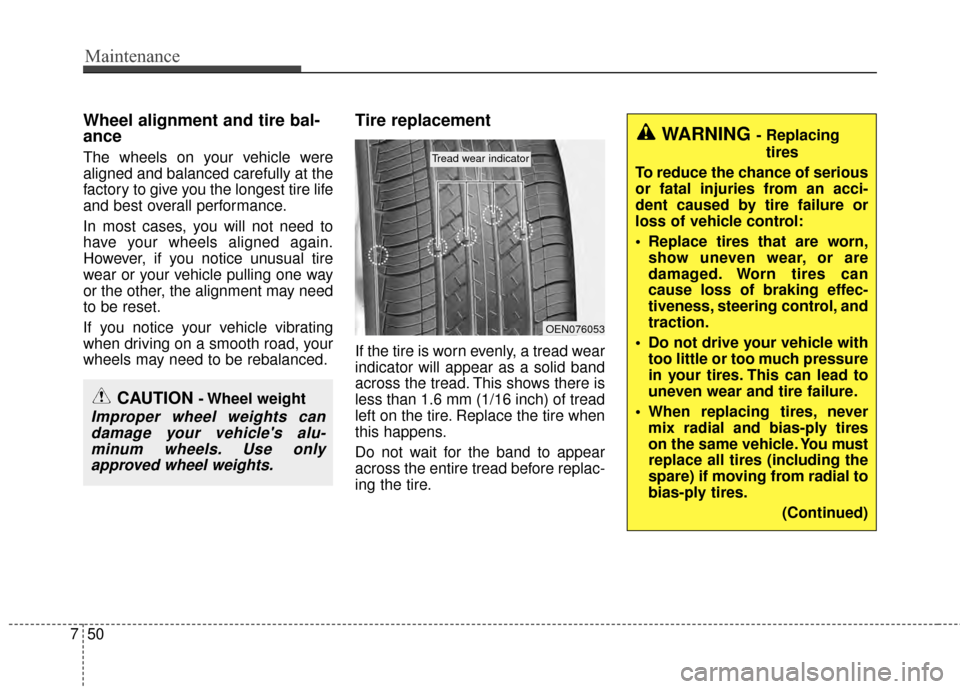
If the tire is worn evenly, a tread wear
indicator will appear as a solid band
across the tread. This shows there is
less than 1.6 mm (1/16 inch) of tread
left on the tire. Replace the tire when
this happens.
Do not wait for the band to appear
across the entire tread before replac-
ing the tire.
CAUTION - Wheel weight
Improper wheel weights can
damage your vehicle's alu-minum wheels. Use onlyapproved wheel weights.
OEN076053
Tread wear indicator
WARNING - Replacing
tires
To reduce the chance of serious
or fatal injuries from an acci-
dent caused by tire failure or
loss of vehicle control:
Replace tires that are worn, show uneven wear, or are
damaged. Worn tires can
cause loss of braking effec-
tiveness, steering control, and
traction.
Do not drive your vehicle with too little or too much pressure
in your tires. This can lead to
uneven wear and tire failure.
When replacing tires, never mix radial and bias-ply tires
on the same vehicle. You must
replace all tires (including the
spare) if moving from radial to
bias-ply tires.
(Continued)
Page 476 of 564
763
Maintenance
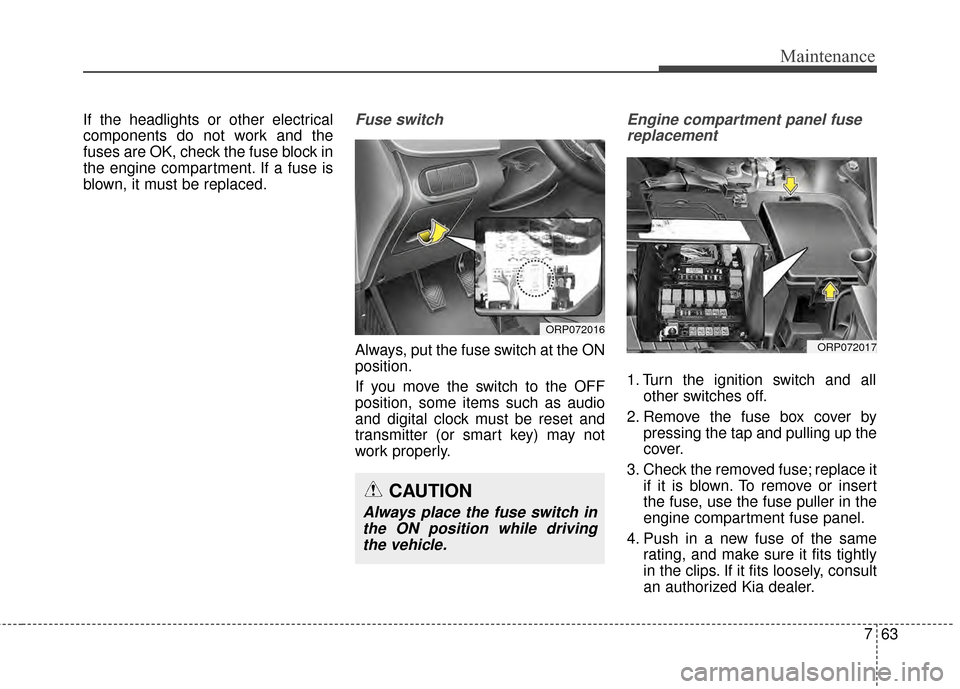
If the headlights or other electrical
components do not work and the
fuses are OK, check the fuse block in
the engine compartment. If a fuse is
blown, it must be replaced.Fuse switch
Always, put the fuse switch at the ON
position.
If you move the switch to the OFF
position, some items such as audio
and digital clock must be reset and
transmitter (or smart key) may not
work properly.
Engine compartment panel fusereplacement
1. Turn the ignition switch and all other switches off.
2. Remove the fuse box cover by pressing the tap and pulling up the
cover.
3. Check the removed fuse; replace it if it is blown. To remove or insert
the fuse, use the fuse puller in the
engine compartment fuse panel.
4. Push in a new fuse of the same rating, and make sure it fits tightly
in the clips. If it fits loosely, consult
an authorized Kia dealer.
ORP072016
CAUTION
Always place the fuse switch inthe ON position while drivingthe vehicle.
ORP072017
Page 515 of 564
Index
8I
Resetting the sunroof . . . . . . . . . . . . . . . . . . . . . . . . 4-42
Sunroof open warning . . . . . . . . . . . . . . . . . . . . . . . 4-39
Sunshade. . . . . . . . . . . . . . . . . . . . . . . . . . . . . . . . . . 4-41\
Parking assist system . . . . . . . . . . . . . . . . . . . . . . . . . . 4-91
Parking brake . . . . . . . . . . . . . . . . . . . . . . . . . . . . . . . . 5-27 Checking the parking brake . . . . . . . . . . . . . . . . . . . 7-37
Portable lamp . . . . . . . . . . . . . . . . . . . . . . . . . . . . . . . 4-160
Power brakes . . . . . . . . . . . . . . . . . . . . . . . . . . . . . . . . . 5-25
Power outlet . . . . . . . . . . . . . . . . . . . . . . . . . . . . . . . . 4-155
Power window lock button . . . . . . . . . . . . . . . . . . . . . . 4-30
Precautions (seat belt). . . . . . . . . . . . . . . . . . . . . . . . . . 3-31
Pre-tensioner seat belt. . . . . . . . . . . . . . . . . . . . . . . . . . 3-28
Puddle lamp welcome. . . . . . . . . . . . . . . . . . . . . . . . . 4-114
Rear parking assist system . . . . . . . . . . . . . . . . . . . . . . 4-87
Rear seat adjustment . . . . . . . . . . . . . . . . . . . . . . . . . . . 3-11
Rear view camera . . . . . . . . . . . . . . . . . . . . . . . . . . . . . 4-97
Rear window wiper and washer switch . . . . . . . . . . . 4-110
Recommended cold tire inflation pressures . . . . . . . . . 7-46
Recommended lubricants and capacities . . . . . . . . . . . . 8-6 Recommended SAE viscosity number. . . . . . . . . . . . 8-7
Resetting the sunroof . . . . . . . . . . . . . . . . . . . . . . . . . . 4-42
Road warning . . . . . . . . . . . . . . . . . . . . . . . . . . . . . . . . . 6-2
Rocking the vehicle . . . . . . . . . . . . . . . . . . . . . . . . . . . 5-53
Roof rack . . . . . . . . . . . . . . . . . . . . . . . . . . . . . . . . . . 4-16\
2 Room lamp . . . . . . . . . . . . . . . . . . . . . . . . . . . . . . . . . 4-112
Rotation (Tire) . . . . . . . . . . . . . . . . . . . . . . . . . . . . . . . 7-49
Scheduled maintenance service . . . . . . . . . . . . . . . . . . . 7-8
Seat belt restraint system . . . . . . . . . . . . . . . . . . . . . . . 3-19
Seat belt warning . . . . . . . . . . . . . . . . . . . . . . . . . . . . . 3-20
Seat belts . . . . . . . . . . . . . . . . . . . . . . . . . . . . . . . . . . . . \
3-19
3-point rear seat belt . . . . . . . . . . . . . . . . . . . . . . . . 3-25
3-point system seat belt . . . . . . . . . . . . . . . . . . . . . . 3-22
Height adjustment . . . . . . . . . . . . . . . . . . . . . . . . . . 3-22
Precautions (seat belt) . . . . . . . . . . . . . . . . . . . . . . . 3-31
Pre-tensioner seat belt . . . . . . . . . . . . . . . . . . . . . . . 3-28
Seat belt restraint system . . . . . . . . . . . . . . . . . . . . . 3-19
Seat belt warning . . . . . . . . . . . . . . . . . . . . . . . . . . . 3-20
Stowing the rear seat belt . . . . . . . . . . . . . . . . . . . . . 3-27
Seat warmer . . . . . . . . . . . . . . . . . . . . . . . . . . . . . . . . 4-151
Seatback pocket . . . . . . . . . . . . . . . . . . . . . . . . . . . . . . 3-10
Seats . . . . . . . . . . . . . . . . . . . . . . . . . . . . . . . . . . . . \
. . . . 3-2 Front seat adjustment - Manual . . . . . . . . . . . . . . . . . 3-5
Front seat adjustment - power . . . . . . . . . . . . . . . . . . 3-6
Headrest(front) . . . . . . . . . . . . . . . . . . . . . . . . . . . . . . 3-8
Headrest(rear) . . . . . . . . . . . . . . . . . . . . . . . . . . . . . . 3-16
Rear seat adjustment . . . . . . . . . . . . . . . . . . . . . . . . 3-11
Seatback pocket . . . . . . . . . . . . . . . . . . . . . . . . . . . . 3-10
Service Mode . . . . . . . . . . . . . . . . . . . . . . . . . . . . . . . . 4-61
Shift lock system . . . . . . . . . . . . . . . . . . . . . . . . . . . . . 5-21
R
S
Page 523 of 564
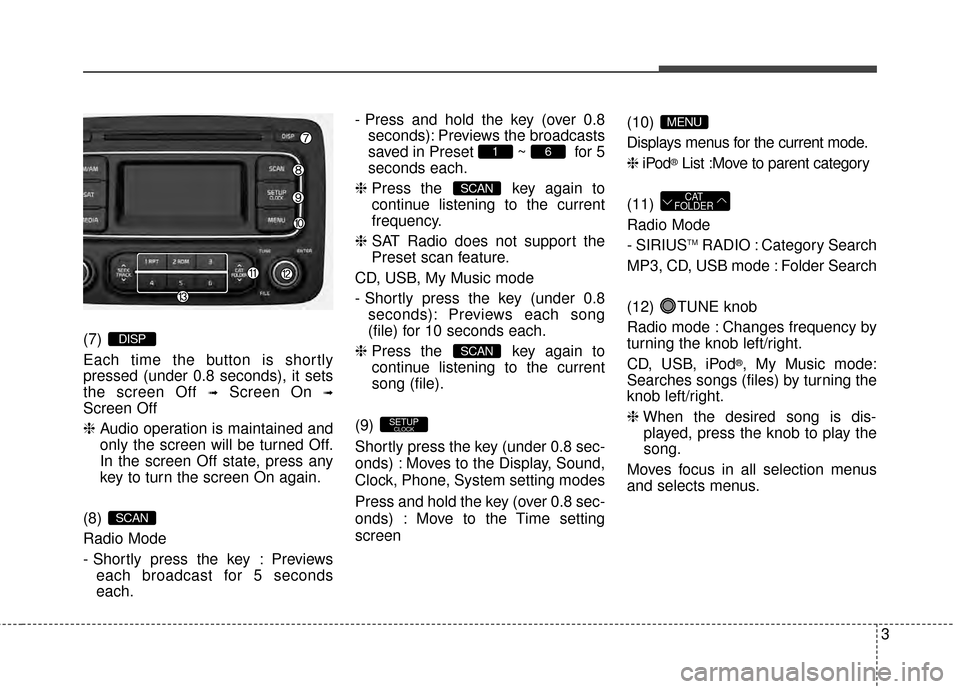
(7)
Each time the button is shortly
pressed (under 0.8 seconds), it sets
the screen Off
➟Screen On ➟
Screen Off
❈Audio operation is maintained and
only the screen will be turned Off.
In the screen Off state, press any
key to turn the screen On again.
(8)
Radio Mode
- Shortly press the key : Previews each broadcast for 5 seconds
each. - Press and hold the key (over 0.8
seconds): Previews the broadcasts
saved in Preset ~ for 5
seconds each.
❈ Press the key again to
continue listening to the current
frequency.
❈ SAT Radio does not support the
Preset scan feature.
CD, USB, My Music mode
- Shortly press the key (under 0.8 seconds): Previews each song
(file) for 10 seconds each.
❈ Press the key again to
continue listening to the current
song (file).
(9)
Shortly press the key (under 0.8 sec-
onds) : Moves to the Display, Sound,
Clock, Phone, System setting modes
Press and hold the key (over 0.8 sec-
onds) : Move to the Time setting
screen (10)
Displays menus for the current mode.
❈
iPod
®List :Move to parent category
(11)
Radio Mode
- SIRIUS
TMRADIO : Category Search
MP3, CD, USB mode : Folder Search
(12) TUNE knob
Radio mode : Changes frequency by
turning the knob left/right.
CD, USB, iPod
®, My Music mode:
Searches songs (files) by turning the
knob left/right.
❈ When the desired song is dis-
played, press the knob to play the
song.
Moves focus in all selection menus
and selects menus.
CAT
FOLDER
MENU
SETUPCLOCK
SCAN
SCAN
61
SCAN
DISP
3
Page 524 of 564
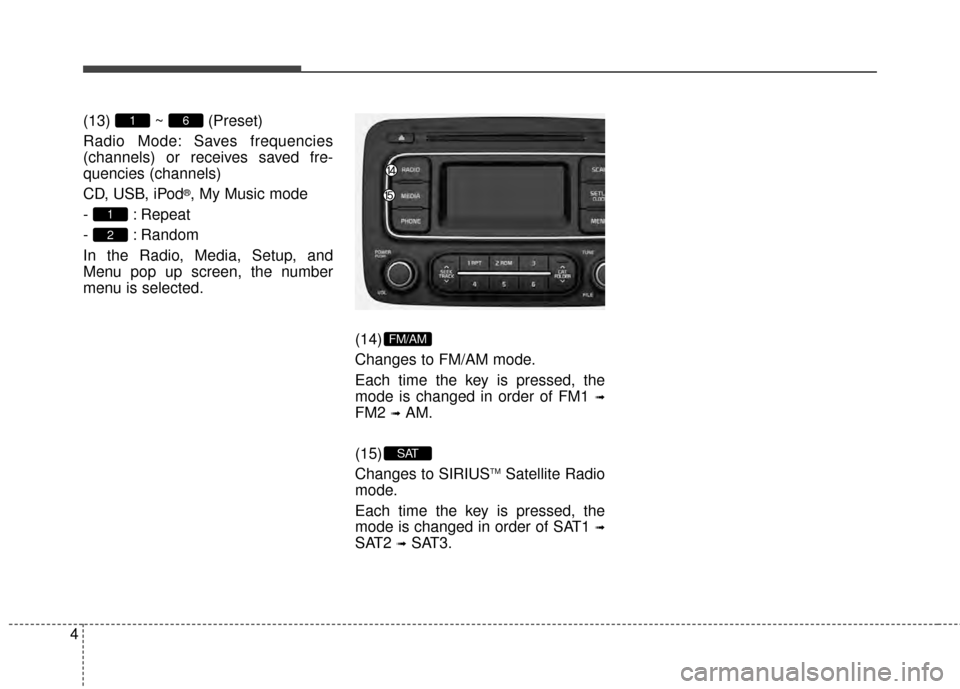
4(13) ~ (Preset)
Radio Mode: Saves frequencies
(channels) or receives saved fre-
quencies (channels)
CD, USB, iPod
®, My Music mode
- : Repeat
- : Random
In the Radio, Media, Setup, and
Menu pop up screen, the number
menu is selected.
(14)
Changes to FM/AM mode.
Each time the key is pressed, the
mode is changed in order of FM1
➟
FM2 ➟AM.
(15)
Changes to SIRIUS
TMSatellite Radio
mode.
Each time the key is pressed, the
mode is changed in order of SAT1
➟
SAT2 ➟SAT3.
SAT
FM/AM
2
1
61
Page 529 of 564
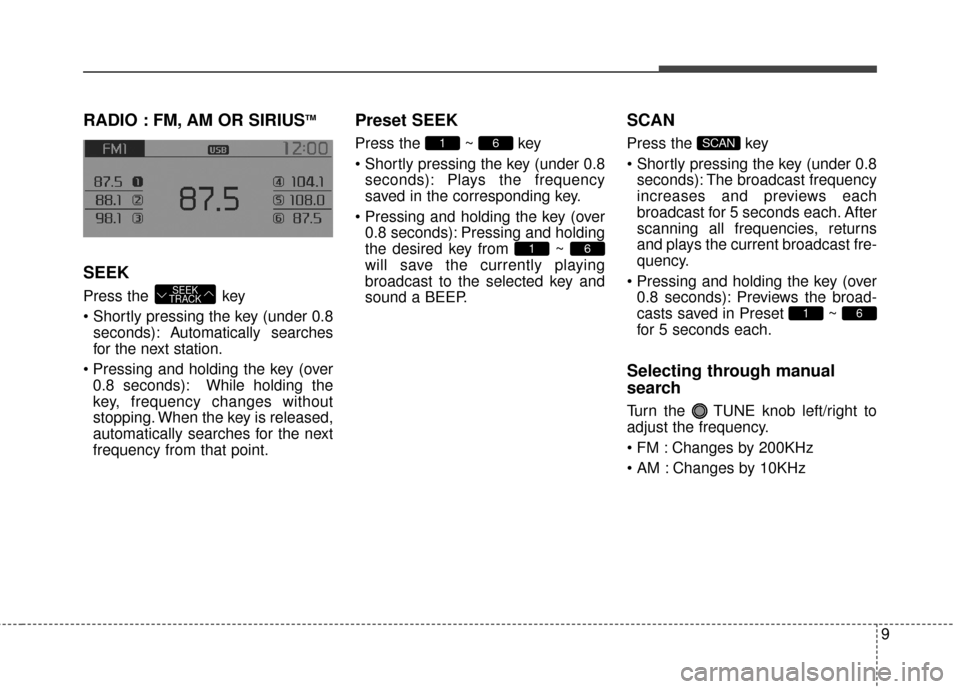
RADIO : FM, AM OR SIRIUSTM
SEEK
Press the key
seconds): A utomatically searches
for the next station.
0.8 seconds): While holding the
key, frequency changes without
stopping. When the key is released,
automatically searches for the next
frequency from that point.
Preset SEEK
Press the ~ key
seconds): Plays the frequency
saved in the corresponding key.
0.8 seconds): Pressing and holding
the desired key from ~
will save the currently playing
broadcast to the selected key and
sound a BEEP.
SCAN
Press the key
seconds): The broadcast frequency
increases and previews each
broadcast for 5 seconds each. After
scanning all frequencies, returns
and plays the current broadcast fre-
quency.
0.8 seconds): Previews the broad-
casts saved in Preset ~
for 5 seconds each.
Selecting through manual
search
Turn the TUNE knob left/right to
adjust the frequency.
Changes by 200KHz
Changes by 10KHz
61
SCAN
61
61
SEEK
TRACK
9
Page 533 of 564
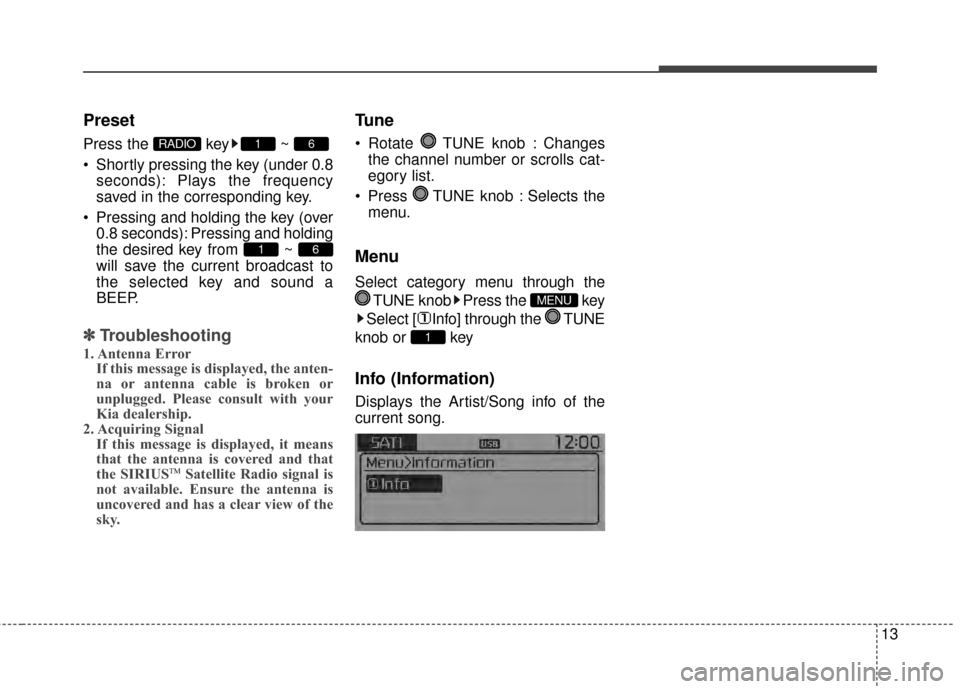
Preset
Press the key ~
Shortly pressing the key (under 0.8seconds): Plays the frequency
saved in the corresponding key.
Pressing and holding the key (over 0.8 seconds): Pressing and holding
the desired key from ~
will save the current broadcast to
the selected key and sound a
BEEP.
✽ ✽ Troubleshooting
1. Antenna Error
If this message is displayed, the anten-
na or antenna cable is broken or
unplugged. Please consult with your
Kia dealership.
2. Acquiring Signal If this message is displayed, it means
that the antenna is covered and that
the SIRIUS
TMSatellite Radio signal is
not available. Ensure the antenna is
uncovered and has a clear view of the
sky.
Tune
Rotate TUNE knob : Changes
the channel number or scrolls cat-
egory list.
Press TUNE knob : Selects the menu.
Menu
Select category menu through the
TUNE knob Press the key
Select [ Info] through the TUNE
knob or key
Info (Information)
Displays the Artist/Song info of the
current song.
1
MENU
61
61RADIO
13