instrument panel KIA Rondo 2017 3.G User Guide
[x] Cancel search | Manufacturer: KIA, Model Year: 2017, Model line: Rondo, Model: KIA Rondo 2017 3.GPages: 625, PDF Size: 19.69 MB
Page 84 of 625
Safety features of your vehicle
68
3
(Continued)
Never place a child in any
child or booster seat in the
front seat.
ABC – Always Buckle Children in the 2nd Row seat.
It is the safest place for chil-
dren of any age to ride.
Front and side air bags can injure occupants improperly
positioned in the front seats.
Move your seat as far back as practical from the front air
bags, while still maintaining
control of the vehicle.
You and your passengers should never sit or lean
unnecessarily close to the air
bags. Improperly positioned
drivers and passengers can
be severely injured by inflat-
ing air bags.
(Continued)(Continued)
Never lean against the door orcenter console – always sit in
an upright position.
Do not allow a passenger to ride in the front seat when the
PASSENGER AIR BAG “OFF”
indicator is illuminated,
because the air bag will not
deploy in the event of a mod-
erate or severe frontal crash.
No objects should be placed over or near the air bag mod-
ules on the steering wheel,
instrument panel or the front
passenger's panel above the
glove box, because any such
object could cause harm if the
vehicle is in a crash severe
enough to cause the air bags
to deploy.
(Continued)(Continued)
Never place covers, blanketsor aftermarket seat warmers
on the passenger seat as
these may interfere with the
occupant detection system.
Do not tamper with or discon- nect SRS wiring or other com-
ponents of the SRS system.
Doing so could result in injury,
due to accidental deployment
of the air bags or by rendering
the SRS inoperative.
If the SRS air bag warning light remains illuminated
while the vehicle is being driv-
en, have an authorized Kia
dealer inspect the air bag sys-
tem as soon as possible.
Air bags can only be used once – have an authorized Kia
dealer replace the air bag
immediately after deployment.
(Continued)
Page 86 of 625
Safety features of your vehicle
70
3
(Continued)
Sitting improperly or out of
position can result in serious
or fatal injury in a crash. All
occupants should sit upright
with the seat back in an upright
position, centered on the seat
cushion with their seat belt on,
legs comfortably extended and
their feet on the floor until the
vehicle is parked and the igni-
tion key is removed or the
engine is shut off.
The SRS air bag system must deploy very rapidly to provide
protection in a crash. If an
occupant is out of position
because of not wearing a seat
belt, the air bag may forcefully
contact the occupant causing
serious or fatal injuries.WARNING - No attaching
objects
No objects (such as crash pad
cover, cellular phone holder,
cup holder, perfume or stickers)
should be placed over or near
the air bag modules on the
steering wheel, instrument
panel, windshield glass, and the
front passenger's panel above
the glove box. Such objects
could cause harm if the vehicle
is in a crash severe enough to
cause the air bags to deploy. Do
not place any objects over the
air bag or between the air bag
and yourself.
Do not place any objects over
the air bag or between the air
bag and yourself.
OEP036096N
OVQ036018N
1VQA2091
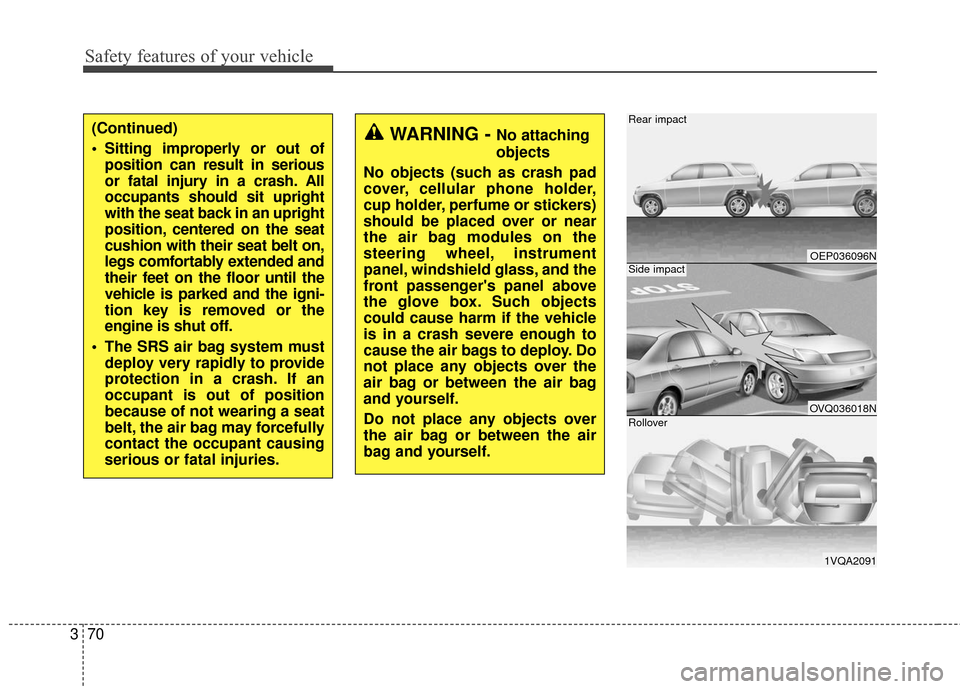
Rear impact
Side impact
Rollover
Page 95 of 625
379
Safety features of your vehicle
SRS Care
The SRS is virtually maintenance-free
and so there are no parts you can
safely service by yourself. If the SRS
air bag warning light does not illumi-
nate, or continuously remains on,
have your vehicle immediately
inspected by an authorized Kia dealer.
Any work on the SRS system, such
as removing, installing, repairing, or
any work on the steering wheel, the
front passenger’s panel, front seats
and roof rails must be performed by
an authorized Kia dealer. Improper
handling of the SRS system may
result in serious personal injury.WARNING
Modification to SRS compo-nents or wiring, including the
addition of any kind of badges
to the pad covers or modifica-
tions to the body structure, can
adversely affect SRS perform-
ance and lead to possible injury.
For cleaning the air bag pad covers, use only a soft, dry
cloth or one which has been
moistened with plain water.
Solvents or cleaners could
adversely affect the air bag
covers and proper deploy-
ment of the system.
No objects should be placed over or near the air bag mod-
ules on the steering wheel,
instrument panel, and the
front passenger's panel above
the glove box, because any
such object could cause harm
if the vehicle is in a crash
severe enough to cause the
air bags to inflate.
(Continued)
(Continued)
If the air bags inflate, theymust be replaced by an
authorized Kia dealer.
Do not tamper with or discon- nect SRS wiring, or other com-
ponents of the SRS system.
Doing so could result in injury,
due to accidental inflation of
the air bags or by rendering the
SRS inoperative.
If components of the air bag system must be discarded, or if
the vehicle must be scrapped,
certain safety precautions must
be observed. An authorized Kia
dealer knows these precau-
tions and can give you the nec-
essary information. Failure to
follow these precautions and
procedures could increase the
risk of personal injury.
If your vehicle was flooded and has soaked carpeting or
water on flooring, you should-
n't try to start the engine;
have the vehicle towed to an
authorized Kia dealer.
Page 146 of 625
449
Features of your vehicle
(Continued)
• If the Electric Power SteeringSystem does not operate normally,
the warning light will illuminate on
the instrument cluster. The steer-
ing wheel may become difficult to
control or operate abnormally.
Take your vehicle to an authorized
Kia dealer and have the vehicle
checked as soon as possible.
• When you operate the steering wheel in low temperature, abnor-
mal noise may occur. If tempera-
ture rises, the noise will likely dis-
appear. This is a normal condition.
• When the charging system warn- ing light comes on due to the low
voltage (When the alternator or
battery) does not operate normal-
ly or it malfunctions), the steering
wheel may require increased
steering effort.Tilt and telescopic steering
Tilt and telescopic steering allows
you to adjust the steering wheel
before you drive. You can also raise it
to give your legs more room when
you exit and enter the vehicle.
The steering wheel should be posi-
tioned so that it is comfortable for
you to drive, while permitting you to
see the instrument panel warning
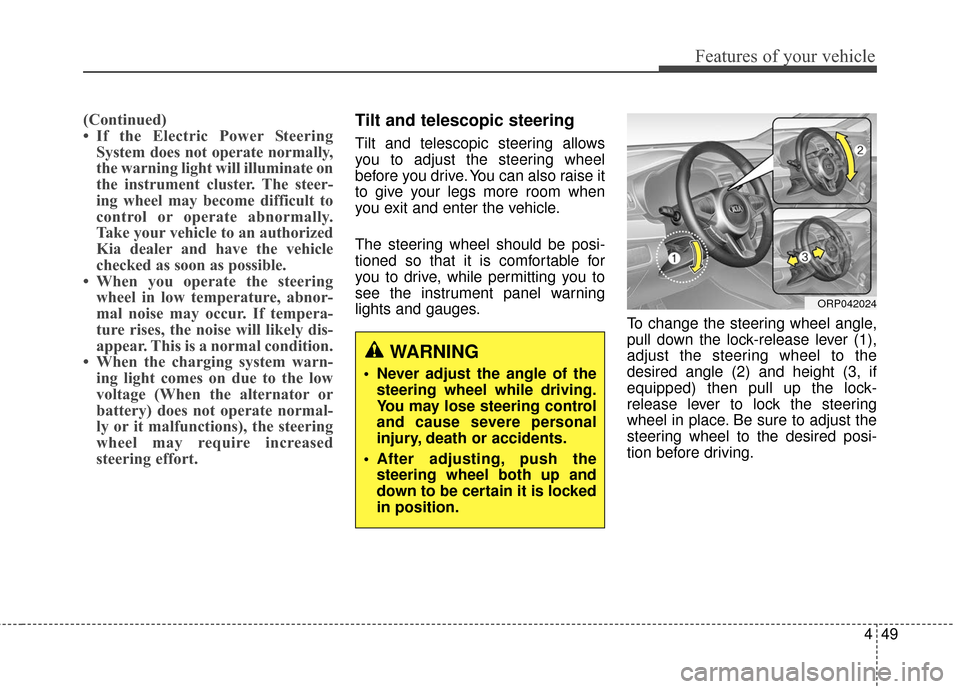
lights and gauges. To change the steering wheel angle,
pull down the lock-release lever (1),
adjust the steering wheel to the
desired angle (2) and height (3, if
equipped) then pull up the lock-
release lever to lock the steering
wheel in place. Be sure to adjust the
steering wheel to the desired posi-
tion before driving.
WARNING
Never adjust the angle of the
steering wheel while driving.
You may lose steering control
and cause severe personal
injury, death or accidents.
After adjusting, push the steering wheel both up and
down to be certain it is locked
in position.
ORP042024
Page 156 of 625
459
Features of your vehicle
Instrument Cluster Control
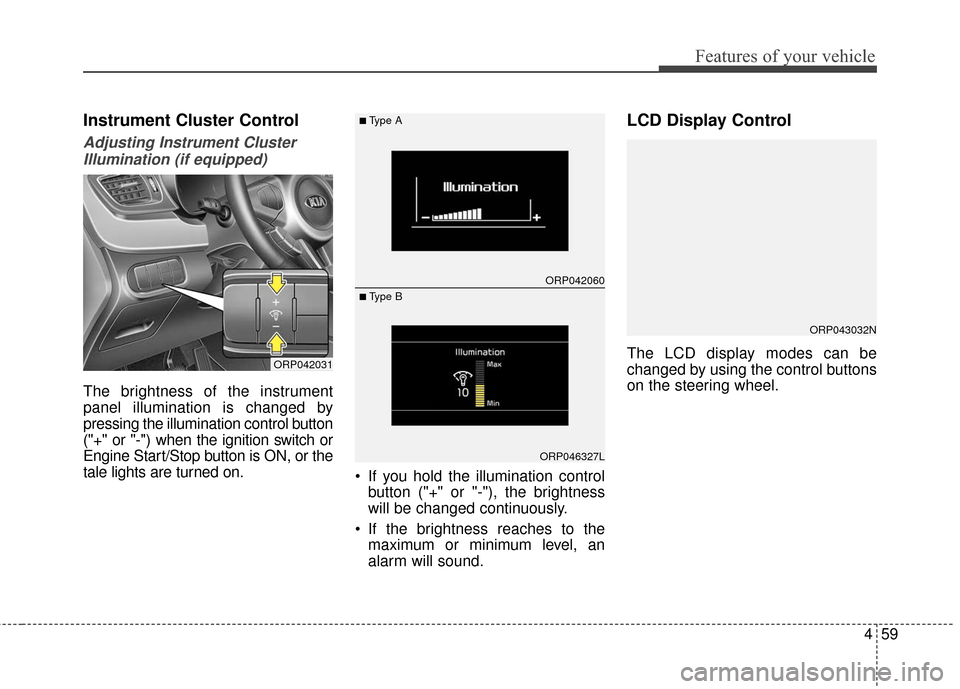
Adjusting Instrument ClusterIllumination (if equipped)
The brightness of the instrument
panel illumination is changed by
pressing the illumination control button
("+" or "-") when the ignition switch or
Engine Start/Stop button is ON, or the
tale lights are turned on. If you hold the illumination control
button ("+" or "-"), the brightness
will be changed continuously.
If the brightness reaches to the maximum or minimum level, an
alarm will sound.
LCD Display Control
The LCD display modes can be
changed by using the control buttons
on the steering wheel.ORP042031
ORP042060
ORP046327L
■Type A
■ Type B
ORP043032N
Page 203 of 625
Features of your vehicle
106
4
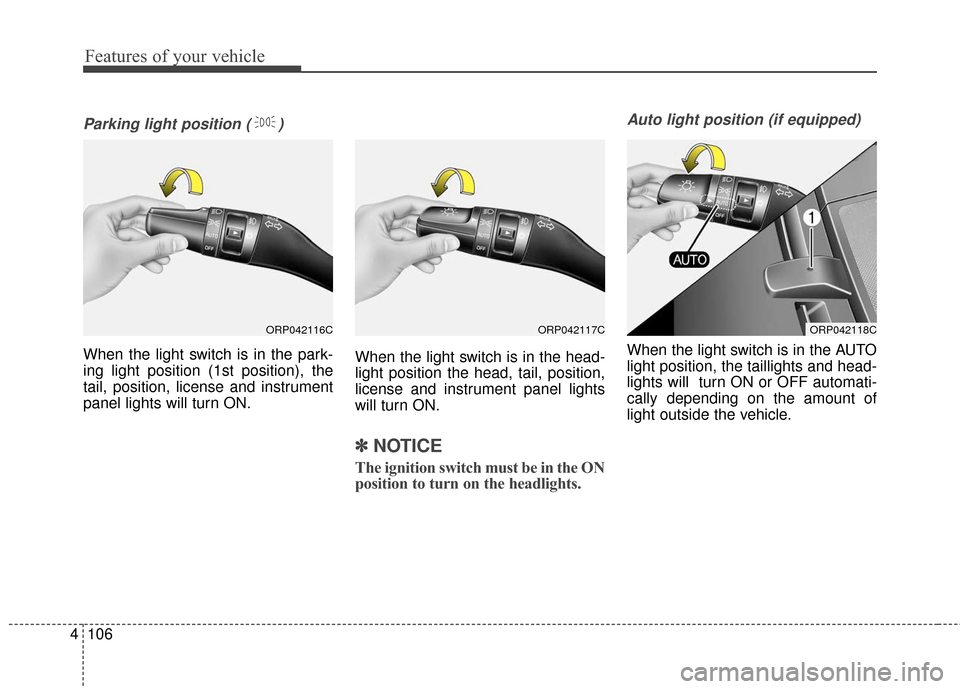
Parking light position ( )
When the light switch is in the park-
ing light position (1st position), the
tail, position, license and instrument
panel lights will turn ON. When the light switch is in the head-
light position the head, tail, position,
license and instrument panel lights
will turn ON.
✽ ✽
NOTICE
The ignition switch must be in the ON
position to turn on the headlights.
Auto light position (if equipped)
When the light switch is in the AUTO
light position, the taillights and head-
lights will turn ON or OFF automati-
cally depending on the amount of
light outside the vehicle.
ORP042116CORP042117CORP042118C
Page 204 of 625
4107
Features of your vehicle
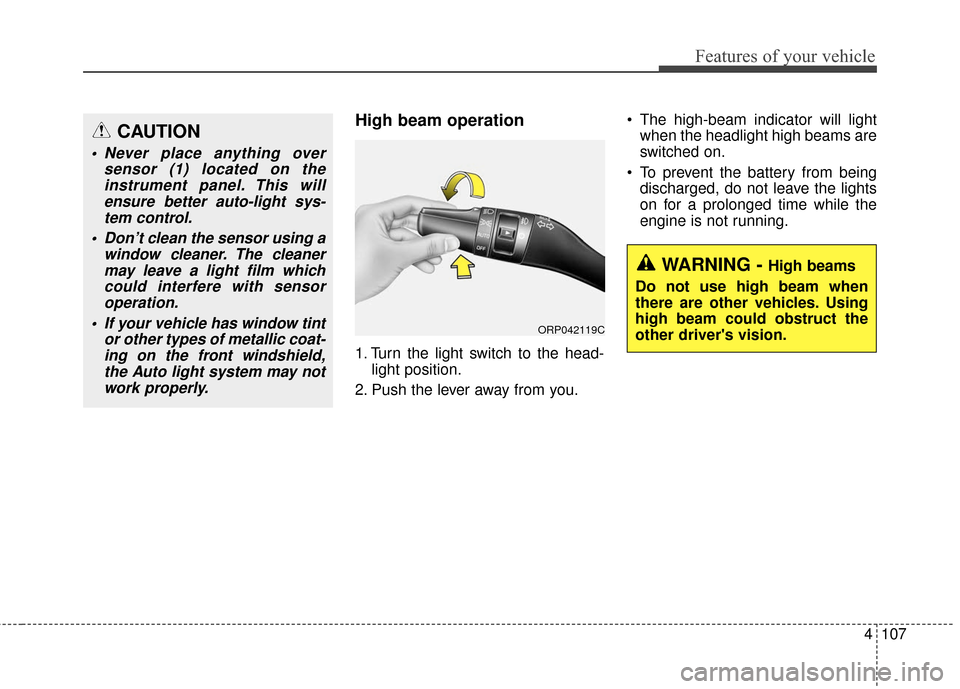
High beam operation
1. Turn the light switch to the head-light position.
2. Push the lever away from you. The high-beam indicator will light
when the headlight high beams are
switched on.
To prevent the battery from being discharged, do not leave the lights
on for a prolonged time while the
engine is not running.
CAUTION
Never place anything over sensor (1) located on theinstrument panel. This willensure better auto-light sys-tem control.
Don’t clean the sensor using a window cleaner. The cleanermay leave a light film whichcould interfere with sensoroperation.
If your vehicle has window tint or other types of metallic coat-ing on the front windshield,the Auto light system may notwork properly.
WARNING - High beams
Do not use high beam when
there are other vehicles. Using
high beam could obstruct the
other driver's vision.
ORP042119C
Page 205 of 625
Features of your vehicle
108
4
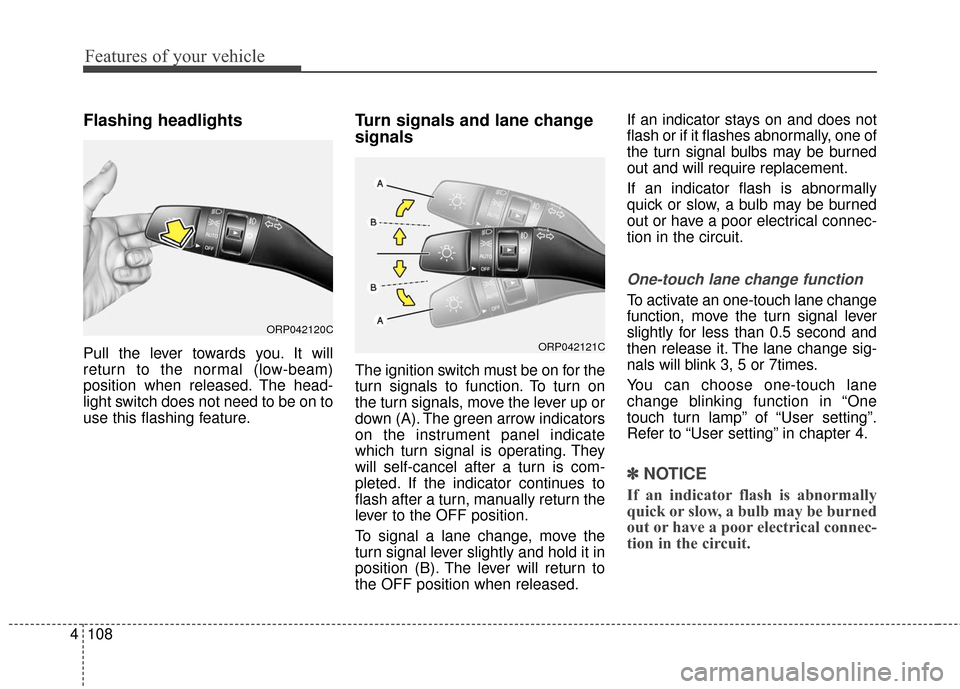
Flashing headlights
Pull the lever towards you. It will
return to the normal (low-beam)
position when released. The head-
light switch does not need to be on to
use this flashing feature.
Turn signals and lane change
signals
The ignition switch must be on for the
turn signals to function. To turn on
the turn signals, move the lever up or
down (A). The green arrow indicators
on the instrument panel indicate
which turn signal is operating. They
will self-cancel after a turn is com-
pleted. If the indicator continues to
flash after a turn, manually return the
lever to the OFF position.
To signal a lane change, move the
turn signal lever slightly and hold it in
position (B). The lever will return to
the OFF position when released. If an indicator stays on and does not
flash or if it flashes abnormally, one of
the turn signal bulbs may be burned
out and will require replacement.
If an indicator flash is abnormally
quick or slow, a bulb may be burned
out or have a poor electrical connec-
tion in the circuit.
One-touch lane change function
To activate an one-touch lane change
function, move the turn signal lever
slightly for less than 0.5 second and
then release it. The lane change sig-
nals will blink 3, 5 or 7times.
You can choose one-touch lane
change blinking function in “One
touch turn lamp” of “User setting”.
Refer to “User setting” in chapter 4.
✽ ✽
NOTICE
If an indicator flash is abnormally
quick or slow, a bulb may be burned
out or have a poor electrical connec-
tion in the circuit.
ORP042120C
ORP042121C
Page 219 of 625
Features of your vehicle
122
4
DEFROSTER
✽ ✽ NOTICE
If you want to defrost and defog the
front windshield, refer to “Windshield
Defrosting and Defogging” in this
chapter.
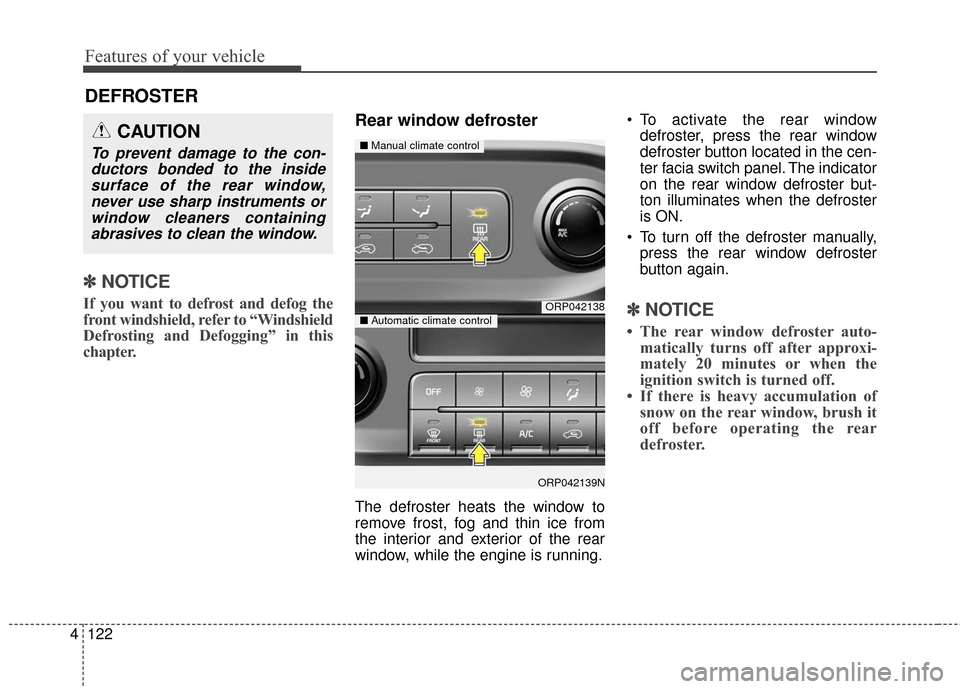
Rear window defroster
The defroster heats the window to
remove frost, fog and thin ice from
the interior and exterior of the rear
window, while the engine is running. To activate the rear window
defroster, press the rear window
defroster button located in the cen-
ter facia switch panel. The indicator
on the rear window defroster but-
ton illuminates when the defroster
is ON.
To turn off the defroster manually, press the rear window defroster
button again.
✽ ✽ NOTICE
• The rear window defroster auto-
matically turns off after approxi-
mately 20 minutes or when the
ignition switch is turned off.
• If there is heavy accumulation of snow on the rear window, brush it
off before operating the rear
defroster.
ORP042138
ORP042139N
■ Manual climate control
■Automatic climate control
CAUTION
To prevent damage to the con-
ductors bonded to the insidesurface of the rear window,never use sharp instruments orwindow cleaners containingabrasives to clean the window.
Page 224 of 625
4127
Features of your vehicle
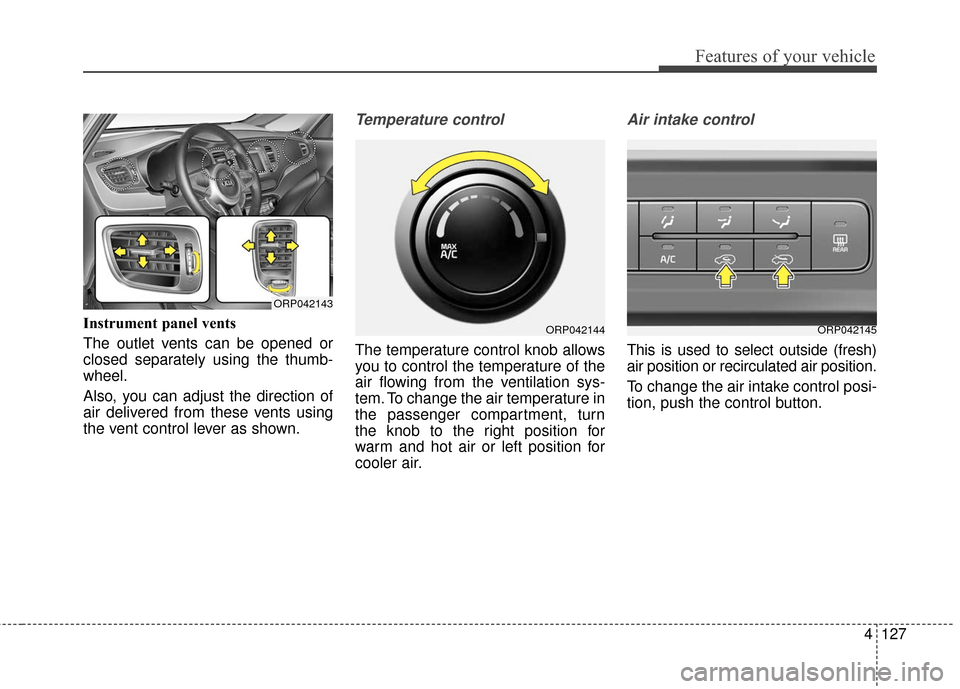
Instrument panel vents
The outlet vents can be opened or
closed separately using the thumb-
wheel.
Also, you can adjust the direction of
air delivered from these vents using
the vent control lever as shown.
Temperature control
The temperature control knob allows
you to control the temperature of the
air flowing from the ventilation sys-
tem. To change the air temperature in
the passenger compartment, turn
the knob to the right position for
warm and hot air or left position for
cooler air.
Air intake control
This is used to select outside (fresh)
air position or recirculated air position.
To change the air intake control posi-
tion, push the control button.
ORP042144ORP042145
ORP042143