instrument cluster KIA Rondo 2017 3.G Owner's Manual
[x] Cancel search | Manufacturer: KIA, Model Year: 2017, Model line: Rondo, Model: KIA Rondo 2017 3.GPages: 625, PDF Size: 19.69 MB
Page 15 of 625
25
Your vehicle at a glance
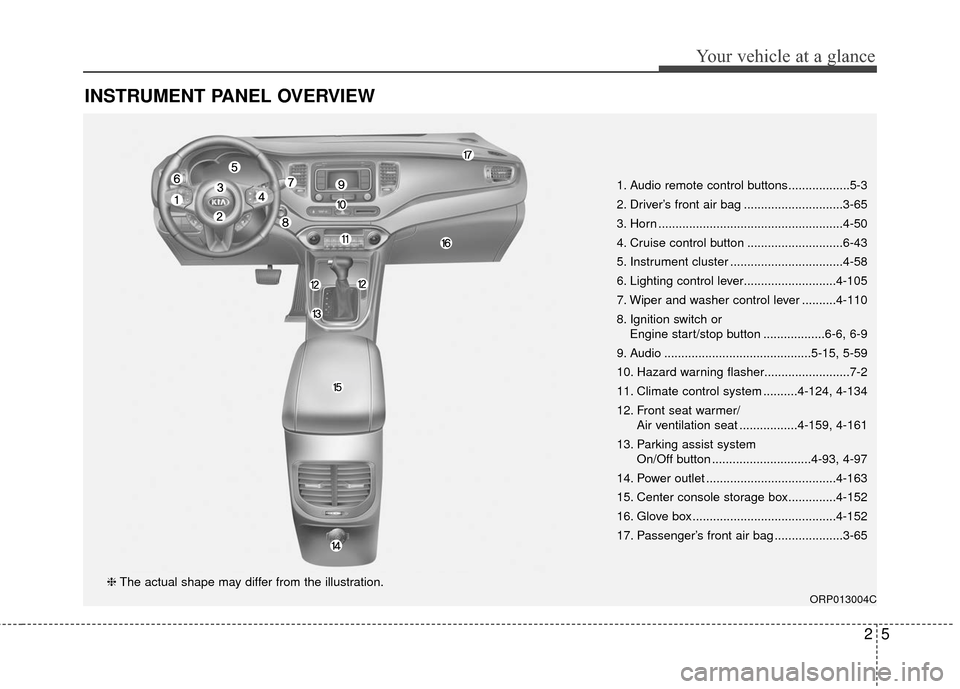
INSTRUMENT PANEL OVERVIEW
1. Audio remote control buttons..................5-3
2. Driver’s front air bag .............................3-65
3. Horn ......................................................4-50
4. Cruise control button ............................6-43
5. Instrument cluster .................................4-58
6. Lighting control lever...........................4-105
7. Wiper and washer control lever ..........4-110
8. Ignition switch orEngine start/stop button ..................6-6, 6-9
9. Audio ...........................................5-15, 5-59
10. Hazard warning flasher.........................7-2
11. Climate control system ..........4-124, 4-134
12. Front seat warmer/ Air ventilation seat .................4-159, 4-161
13. Parking assist system On/Off button .............................4-93, 4-97
14. Power outlet ......................................4-163
15. Center console storage box..............4-152
16. Glove box ..........................................4-152
17. Passenger’s front air bag ....................3-65
ORP013004C
❈ The actual shape may differ from the illustration.
Page 72 of 625
Safety features of your vehicle
56
3
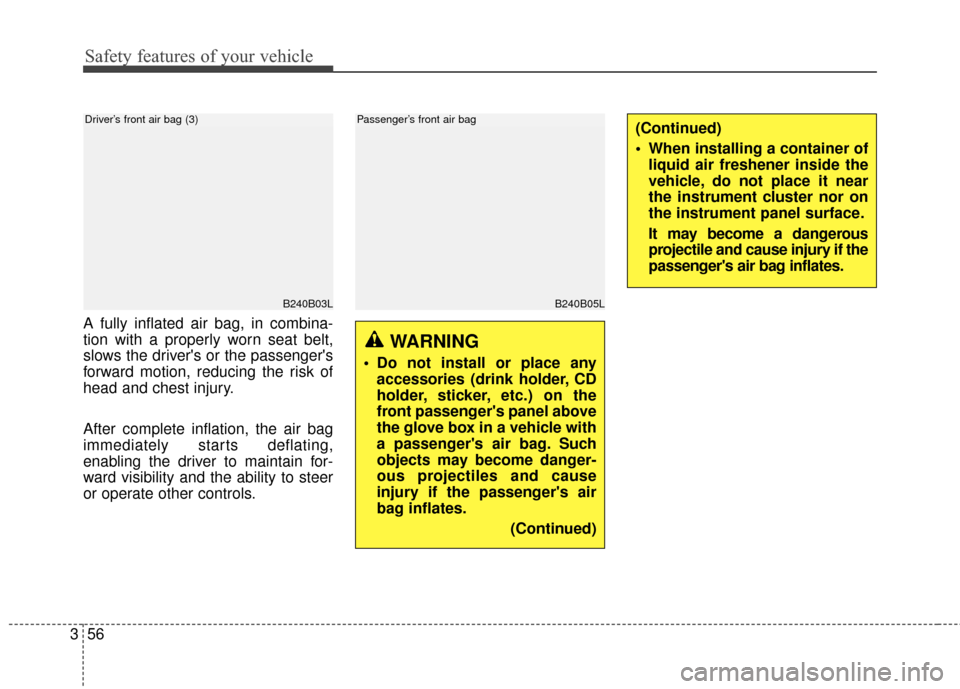
A fully inflated air bag, in combina-
tion with a properly worn seat belt,
slows the driver's or the passenger's
forward motion, reducing the risk of
head and chest injury.
After complete inflation, the air bag
immediately starts deflating,
enabling the driver to maintain for-
ward visibility and the ability to steer
or operate other controls.
B240B03L
Driver’s front air bag (3)
WARNING
Do not install or place any
accessories (drink holder, CD
holder, sticker, etc.) on the
front passenger's panel above
the glove box in a vehicle with
a passenger's air bag. Such
objects may become danger-
ous projectiles and cause
injury if the passenger's air
bag inflates.
(Continued)
B240B05L
Passenger’s front air bag(Continued)
When installing a container ofliquid air freshener inside the
vehicle, do not place it near
the instrument cluster nor on
the instrument panel surface.
It may become a dangerous
projectile and cause injury if the
passenger's air bag inflates.
Page 99 of 625
Instrument cluster . . . . . . . . . . . . . . . . . . . . . . . . . 4-58
. . . . . . . . . . . . . . . . . . . . 4-59
. . . . . . . . . . . . . . . . . . . . . . . . . 4-59
. . . . . . . . . . . . . . . . . . . . . . . . . . . . . . . . . . . . \
. 4-60
. . . . . . . . . . . . . . . . . . . . . . 4-63
LCD Display . . . . . . . . . . . . . . . . . . . . . . . . . . . . . . 4-64
. . . . . . . . . . . . . . . . 4-64
. . . . . . . . . . . . . . . . . . . . . . . . . . . . . . . . 4-65
. . . . . . . . . . . . . . . . . . . . . . . . . . . 4-66
. . . . . . . . . . . . . . . . . . . . . . . . . . 4-69
. . . . . . . . . . . . . . . . . . . . . . . . . . . . 4-69
Trip computer . . . . . . . . . . . . . . . . . . . . . . . . . . . . . 4-74
. . . . . . . . . . . . . . . . . . . . . . . . . . . . . . . 4-75
. . . . . . . . . . . . . . . . . . . 4-77
. . . . 4-78
. . . . . . . . . . . 4-78
Warning and indicator lights . . . . . . . . . . . . . . . . 4-80
. . . . . . . . . . . . . . . . . . . . . . . . . . . . . . . 4-80
Rear parking assist system . . . . . . . . . . . . . . . . . . 4-93
assist system . . . . . . . . . . . . . . . . . . . . . . . . . . . . . . . . 4-94
. . . . . . . . . . 4-95
. . . . . . . . . . . . . . . . . . . . . . . . . . . . . . . . 4-96
Parking assist system . . . . . . . . . . . . . . . . . . . . . . . 4-97
. . . . . . . . . . . 4-98
assist system . . . . . . . . . . . . . . . . . . . . . . . . . . . . . . . 4-100
. . . . . . . . . . . . . . . . . . . . . . . . . . . . . . . 4-102
Rearview camera . . . . . . . . . . . . . . . . . . . . . . . . . 4-103
Lighting . . . . . . . . . . . . . . . . . . . . . . . . . . . . . . . . . 4-104
. . . . . . . . . . . . . . . . . . . . . 4-104
. . . . . . . . . . . . . . . . . . . 4-105
. . . . . . . . . . . . . . . . . . . . . . . . 4-105
. . . . . . . . . . . . . . . . . . . . . . . . . . . . . 4-105
. . . . . . . . . . . . . . . . . . . . . . . . 4-107
. . . . . . . . . . . . . . . . . . . . . . . . . . 4-108
. . . . . . . . . . . 4-108
. . . . . . . . . . . . . . . . . . . . . . . . . . . . . . 4-109
. . . . . . . . . . . . . . . . . . . . . 4-109
Wipers and washers . . . . . . . . . . . . . . . . . . . . . . . 4-110
. . . . . . . . . . . . . . . . . . . . 4-110
. . . . . . . . . . . . . . . . . . . . . . . . . . . 4-112
. . . . . . . . . . . . . . . . . . . 4-115
. . . . . . . . . 4-117
Interior light . . . . . . . . . . . . . . . . . . . . . . . . . . . . . 4-118
. . . . . . . . . . . . . . . . . . . . . . 4-118
. . . . . . . . . . . . . . . . . . . . . . . . . . . . . . . . . 4-118
. . . . . . . . . . . . . . . . . . . . . . . . . . . . . . . . . 4-119
4
Page 145 of 625
Features of your vehicle
48
4
Electric power steering (EPS)
The power steering uses a motor to
assist you in steering the vehicle. If
the engine is off or if the power steer-
ing system becomes inoperative, the
vehicle may still be steered, but it will
require increased steering effort.
The motor driven power steering is
controlled by a power steering con-
trol unit which senses the steering
wheel torque and vehicle speed to
command the motor.
The steering becomes heavier as
the vehicle’s speed increases and
becomes lighter as the vehicle’s
speed decreases for optimum steer-
ing control.
Should you notice any change in the
effort required to steer during normal
vehicle operation, have the power
steering checked by an authorized
Kia dealer.
✽ ✽
NOTICE
The following symptoms may occur
during normal vehicle operation:
• The EPS warning light does not
illuminate.
• The steering gets heavy immedi- ately after turning the ignition
switch on. This happens as the sys-
tem performs the EPS system
diagnostics. When the diagnostics
are completed, the steering wheel
will return to its normal condition.
• A click noise may be heard from the EPS relay after the ignition
switch is turned to the ON or
LOCK (OFF) position.
• A motor noise may be heard when the vehicle is at a stop or at a low
driving speed. (Continued)
STEERING WHEEL
CAUTION
If the Electric Power Steering
System does not operate nor-mally, the warning light willilluminate on the instrumentcluster. The steering wheelmay require increased steer-ing effort. Take your vehicle toan authorized Kia dealer andhave the vehicle checked assoon as possible.
When you operate the steering wheel in low temperature,noise may occur. If temperaturerises, the noise will likely disap-pear. This is a normal condition.
When the vehicle is stationary, when the steering wheel isturned all the way to the left orright continuously, the steer-ing wheel becomes harder toturn. The power assist is limit-ed to protect the motor fromoverheating.
As time passes, the steeringwheel return to its normalcondition.
Page 146 of 625
449
Features of your vehicle
(Continued)
• If the Electric Power SteeringSystem does not operate normally,
the warning light will illuminate on
the instrument cluster. The steer-
ing wheel may become difficult to
control or operate abnormally.
Take your vehicle to an authorized
Kia dealer and have the vehicle
checked as soon as possible.
• When you operate the steering wheel in low temperature, abnor-
mal noise may occur. If tempera-
ture rises, the noise will likely dis-
appear. This is a normal condition.
• When the charging system warn- ing light comes on due to the low
voltage (When the alternator or
battery) does not operate normal-
ly or it malfunctions), the steering
wheel may require increased
steering effort.Tilt and telescopic steering
Tilt and telescopic steering allows
you to adjust the steering wheel
before you drive. You can also raise it
to give your legs more room when
you exit and enter the vehicle.
The steering wheel should be posi-
tioned so that it is comfortable for
you to drive, while permitting you to
see the instrument panel warning
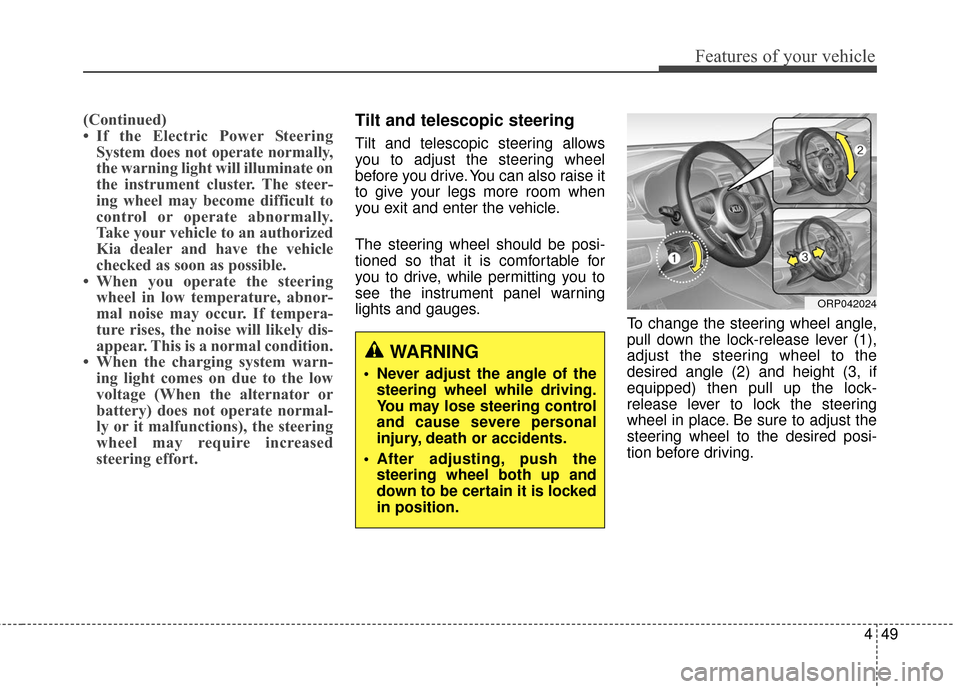
lights and gauges. To change the steering wheel angle,
pull down the lock-release lever (1),
adjust the steering wheel to the
desired angle (2) and height (3, if
equipped) then pull up the lock-
release lever to lock the steering
wheel in place. Be sure to adjust the
steering wheel to the desired posi-
tion before driving.
WARNING
Never adjust the angle of the
steering wheel while driving.
You may lose steering control
and cause severe personal
injury, death or accidents.
After adjusting, push the steering wheel both up and
down to be certain it is locked
in position.
ORP042024
Page 155 of 625
Features of your vehicle
58
4
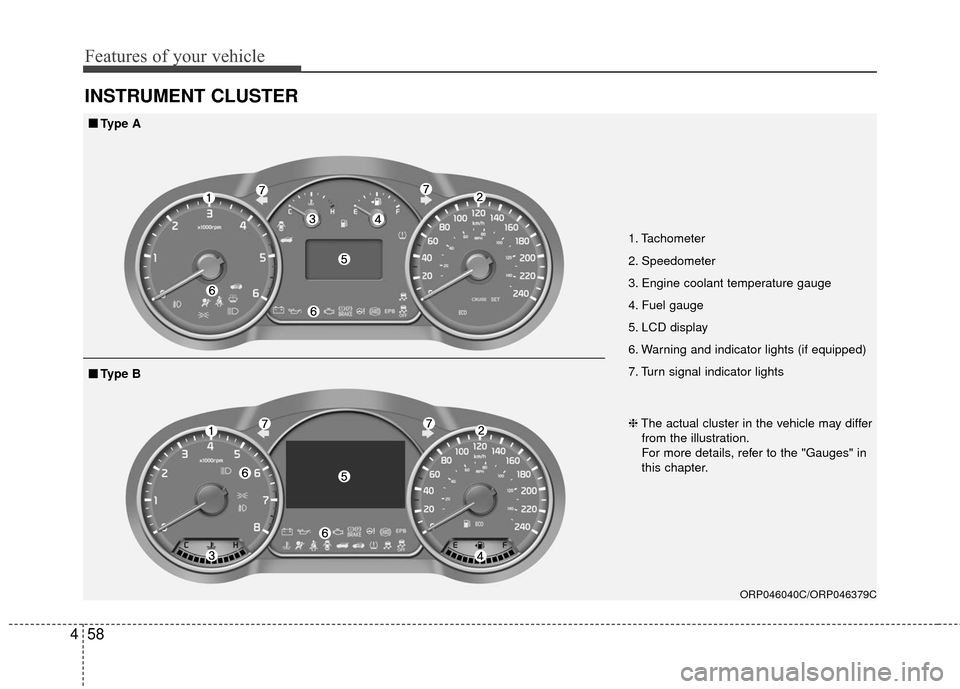
INSTRUMENT CLUSTER
1. Tachometer
2. Speedometer
3. Engine coolant temperature gauge
4. Fuel gauge
5. LCD display
6. Warning and indicator lights (if equipped)
7. Turn signal indicator lights
ORP046040C/ORP046379C
■ ■
Type A
❈The actual cluster in the vehicle may differ
from the illustration.
For more details, refer to the "Gauges" in
this chapter.
■ ■ Type B
Page 156 of 625
459
Features of your vehicle
Instrument Cluster Control
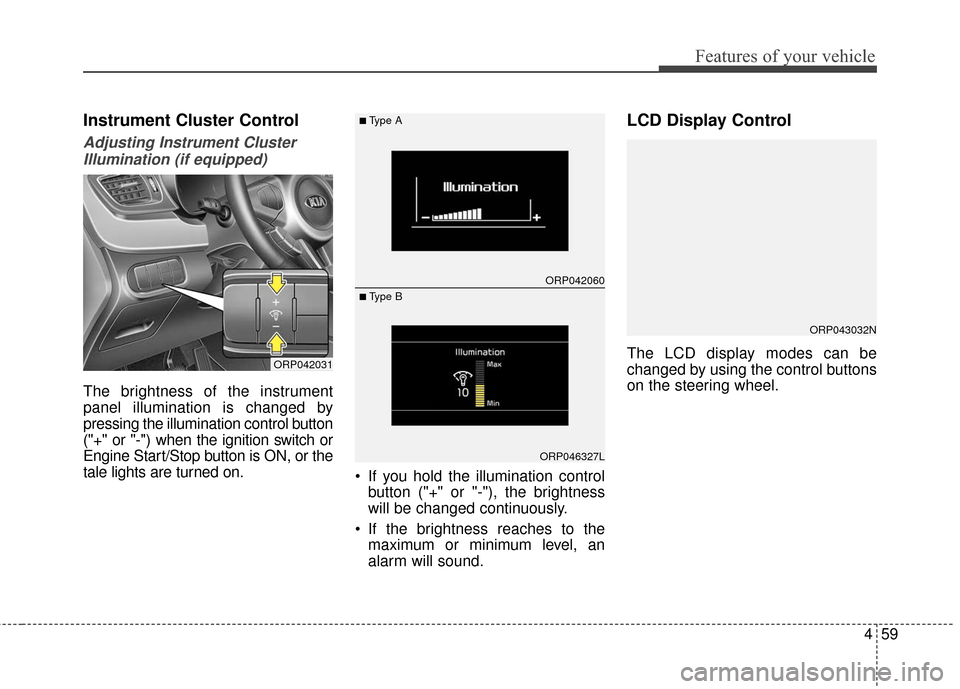
Adjusting Instrument ClusterIllumination (if equipped)
The brightness of the instrument
panel illumination is changed by
pressing the illumination control button
("+" or "-") when the ignition switch or
Engine Start/Stop button is ON, or the
tale lights are turned on. If you hold the illumination control
button ("+" or "-"), the brightness
will be changed continuously.
If the brightness reaches to the maximum or minimum level, an
alarm will sound.
LCD Display Control
The LCD display modes can be
changed by using the control buttons
on the steering wheel.ORP042031
ORP042060
ORP046327L
■Type A
■ Type B
ORP043032N
Page 194 of 625
497
Features of your vehicle
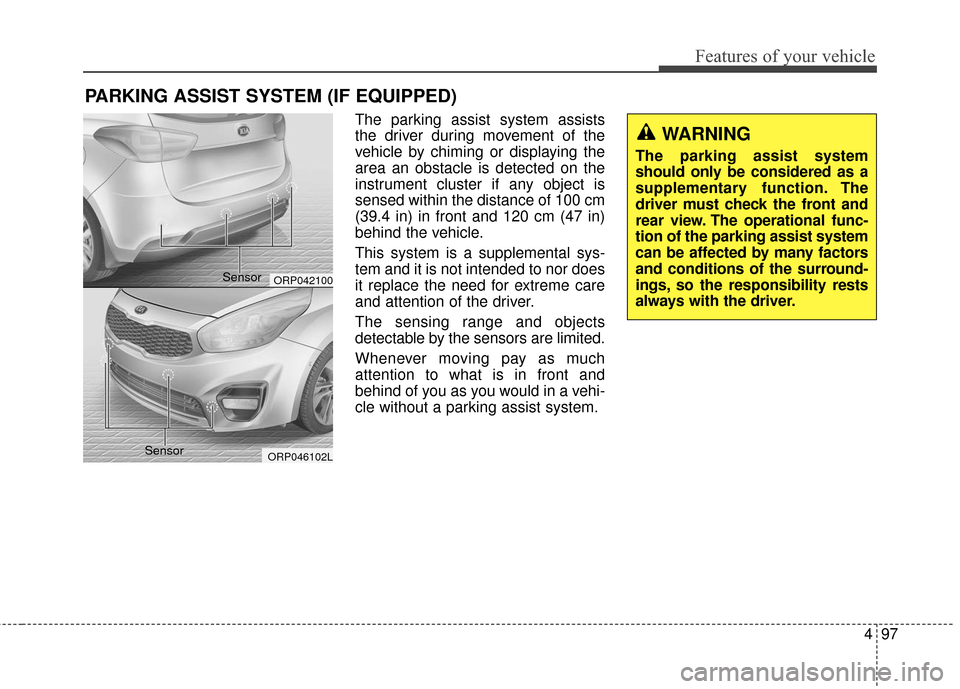
The parking assist system assists
the driver during movement of the
vehicle by chiming or displaying the
area an obstacle is detected on the
instrument cluster if any object is
sensed within the distance of 100 cm
(39.4 in) in front and 120 cm (47 in)
behind the vehicle.
This system is a supplemental sys-
tem and it is not intended to nor does
it replace the need for extreme care
and attention of the driver.
The sensing range and objects
detectable by the sensors are limited.
Whenever moving pay as much
attention to what is in front and
behind of you as you would in a vehi-
cle without a parking assist system.
PARKING ASSIST SYSTEM (IF EQUIPPED)
WARNING
The parking assist system
should only be considered as a
supplementary function. The
driver must check the front and
rear view. The operational func-
tion of the parking assist system
can be affected by many factors
and conditions of the surround-
ings, so the responsibility rests
always with the driver.
ORP042100
ORP046102L
Sensor
Sensor
Page 427 of 625
639
Driving your vehicle
✽ ✽NOTICE
• When operating the vehicle on a
dynamometer, ensure that the
ESC is turned off (ESC OFF light
illuminated). If the ESC is left on,
it may prevent the vehicle speed
from increasing, and result in false
diagnosis.
• Turning the ESC off does not affect ABS or brake system opera-
tion.
Vehicle stability management
(VSM)
This system provides further
enhancements to vehicle stability
and steering responses when a vehi-
cle is driving on a slippery road or a
vehicle detects changes in coeffi-
cient of friction between right wheels
and left wheels when braking.
VSM operation
When the VSM is in operation, ESC
indicator light ( ) blinks.
When the vehicle stability manage-
ment is operating properly, you can
feel a slight pulsation in the vehicle
and/or abnormal steering responses
(EPS). This is only the effect of brake
and EPS control and indicates noth-
ing unusual. The VSM does not operate when:
Driving on bank road such as gra-
dient or incline
Driving in reverse
ESC OFF indicator light ( ) remains on the instrument cluster
EPS indicator light remains on the instrument cluster
VSM operation off
If you press the ESC OFF button to
turn off the ESC, the VSM will also
cancel and the ESC OFF indicator
light ( ) illuminates.
To turn on the VSM, press the button
again. The ESC OFF indicator light
goes out.
Page 431 of 625
643
Driving your vehicle
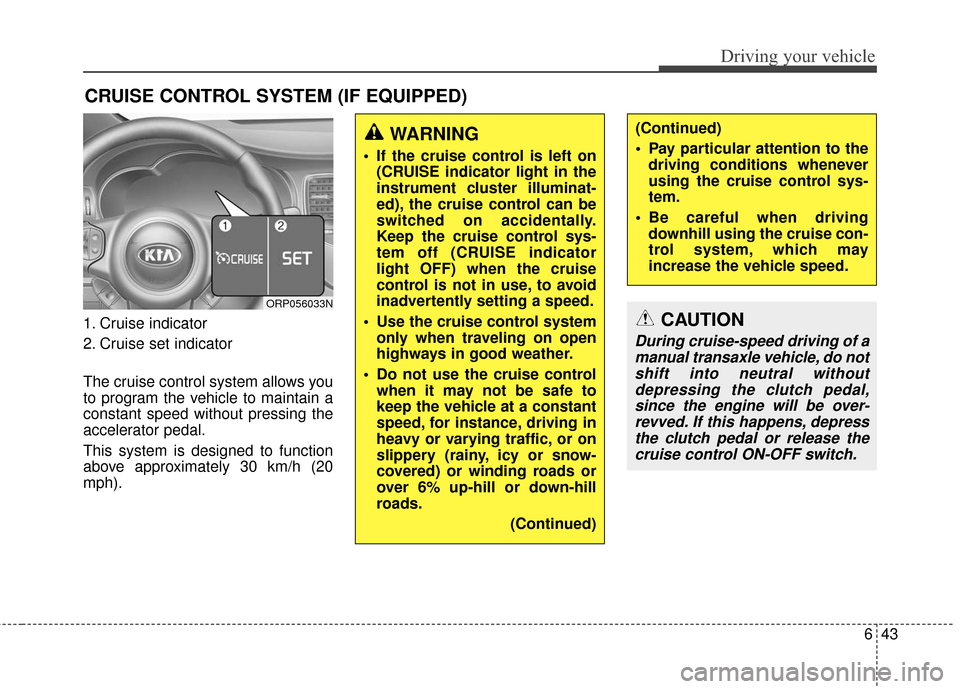
1. Cruise indicator
2. Cruise set indicator
The cruise control system allows you
to program the vehicle to maintain a
constant speed without pressing the
accelerator pedal.
This system is designed to function
above approximately 30 km/h (20
mph).
CRUISE CONTROL SYSTEM (IF EQUIPPED)
WARNING
If the cruise control is left on(CRUISE indicator light in the
instrument cluster illuminat-
ed), the cruise control can be
switched on accidentally.
Keep the cruise control sys-
tem off (CRUISE indicator
light OFF) when the cruise
control is not in use, to avoid
inadvertently setting a speed.
Use the cruise control system only when traveling on open
highways in good weather.
Do not use the cruise control when it may not be safe to
keep the vehicle at a constant
speed, for instance, driving in
heavy or varying traffic, or on
slippery (rainy, icy or snow-
covered) or winding roads or
over 6% up-hill or down-hill
roads.
(Continued)
(Continued)
Pay particular attention to thedriving conditions whenever
using the cruise control sys-
tem.
Be careful when driving downhill using the cruise con-
trol system, which may
increase the vehicle speed.
ORP056033N
CAUTION
During cruise-speed driving of amanual transaxle vehicle, do notshift into neutral withoutdepressing the clutch pedal,since the engine will be over-revved. If this happens, depressthe clutch pedal or release thecruise control ON-OFF switch.