Fold KIA SEDONA 2017 Features and Functions Guide
[x] Cancel search | Manufacturer: KIA, Model Year: 2017, Model line: SEDONA, Model: KIA SEDONA 2017Pages: 54, PDF Size: 4.91 MB
Page 3 of 54
ESSENTIAL FEATURES
SEDONA FE ATURES & FUNCTIONS GUIDE*IF EQUIPPED
Air Conditioning / Automatic Climate Control* 24
Audio System – Standard Audio System* 19
Audio System – UVO eServices System* 20
Audio System – UVO eServices / Premium Navigation* 22
Aux/USB/iPod® Port, AC Inverter* and Power Outlets 27
Bluetooth® Wireless Technology 16
Cruise Control 15
Digital Clock 27
Passenger Airbag Off Indicator 44
Service Mode 06
Smart Key* 37
Tire Pressure Monitoring System (TPMS) 04
Trip Computer / Tripmeter 05
User Settings 06
Windshield/Rear Wipers & Washers* 14
VIDEOS & QR CODES 02
INSTRUMENT CLUSTERInstrument Cluster Overview / Indicators & Warning Lights 03Tire Pressure Monitoring System (TPMS) 04Fuel Economy 04LCD Instrument Cluster Modes 05Trip Computer / Tripmeter 05User Settings 06Service Mode 06Drive Mode Integrated Control System* 07Active ECO System (ECO Mode)* 07
DRIVER’S PANELElectronic Stability Control (ESC) 08Hill-Start Assist Control (HAC) 08Instrument Panel Dimmer 08AC Inverter* 08Blind Spot Detection (BSD) System* 09Lane Departure Warning System (LDWS)* 10Autonomous (Assist) Emergency Braking (AEB) /Forward Collision Warning System (FCWS)* 10Power Windows, Window Lock & Central Door Lock 11Power Folding Outside Mirrors* 11Power/Heated Outside Mirrors* 11Automatic Door Lock /Unlock 11Fuel Door Release Button 11Reverse Parking Aid Function* 12Engine Start/Stop Button* 12
STEERING WHEEL CONTROLSTilt/ Telescoping Steering Wheel 13Headlights & High Beams 13Turn Signals & Fog Lights* 14Windshield/Rear Wipers & Washers* 14Audio Controls 15Standard Cruise Control 15Bluetooth® Wireless Technology 16Smart Cruise Control System (SCC)* 18
AUDIO SYSTEMSStandard Audio System* 19UVO eServices Setup* 20UVO eServices System* 21UVO eServices with Premium Navigation* 22
CENTER PANELSurround View Monitor (SVM)* 23Automatic Climate Control* 24Manual Climate Control* 26Digital Clock* 27Aux/USB/iPod® Port, AC Inverter* and Power Outlets 27Heated Steering Wheel* 28Seat Warmers / Ventilated Seats* 28Automatic Gear Shift with Sportmatic® Shifting 29
S E AT I N GFront Seat Headrest Adjustment 30Driver Position Memory System* 30Power Adjustable Driver's Seat* 31Manual Adjustable Driver's Seat* 312nd-Row Seat 322nd-Row Walk-In Seat* 322nd-Row First-Class Lounge Seating* 332nd-Row Tumble (Center) Seat* 343rd-Row Seat - Folding and Stowing 35
OTHER KEY FEATURESRemote Keyless Entry (Folding Key)* 36Double-Turn Lock /Unlock All 36Power Sliding Doors 36Smart Key* 37HomeLink® with Auto-Dimming Rearview Mirror* 38Map/Room Lamps 39Sunvisor 39Sunroof Operation* 40Parking Assist System* 40Back-Up Warning System (Rear Parking Assist System)* 41Rear-Camera Display* 41Power Liftgate / Smart Liftgate* 42Hood Release Lever and Latch 43 Fuel Cap / Malfunction Indicator (Check Engine Light) 43Child Safety Locks 43
SAFETY FEATURESOccupant Detection System (ODS) /Passenger Airbag Off Indicator 44Seat Belts 44Seat Belt Retractor Locks 44
NORMAL MAINTENANCE SCHEDULE 45
LEGAL DISCLAIMERS See Back Inside Cover Page
Driving while distracted can result in a loss of vehicle control that may lead to an accident, severe personal injury and death. The driver’s primary responsibility is in the safe and legal operation of a vehicle, and use of any handheld devices, other equipment or vehicle systems which take the driver’s eyes, attention and focus away from the safe operation of a vehicle or that are not permissible by law should never be used during operation of the vehicle.
Page 13 of 54
11ALWAYS CHECK THE OWNER’S MANUAL FOR COMPLETE OPER ATING INFORMATION AND SAFET Y WARNINGS *IF EQUIPPED
(Button located left of Steering Wheel)
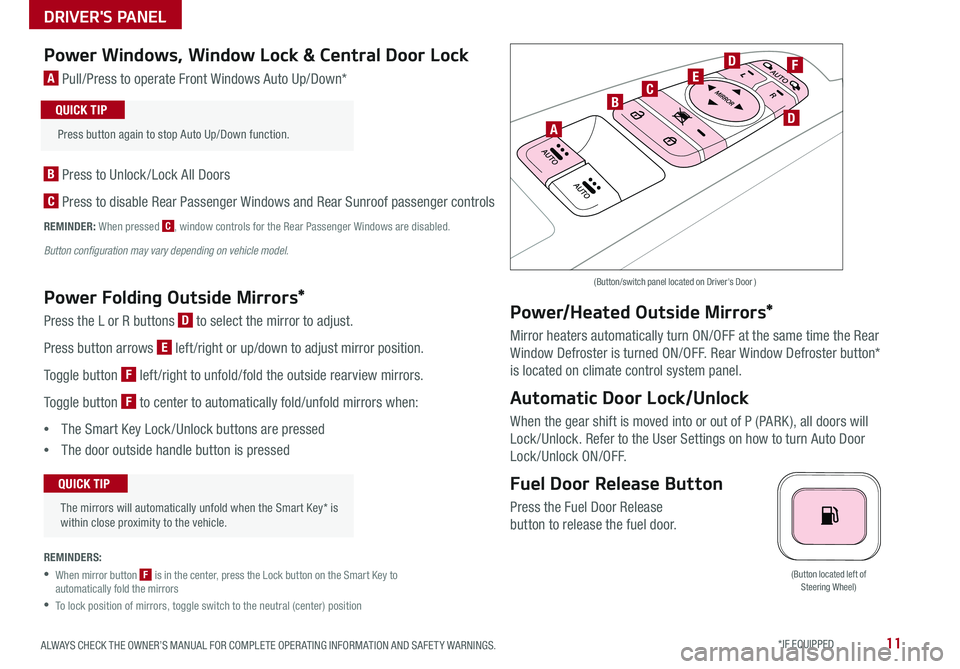
Power Windows, Window Lock & Central Door Lock
A Pull/Press to operate Front Windows Auto Up/Down*
B Press to Unlock /Lock All Doors
C Press to disable Rear Passenger Windows and Rear Sunroof passenger controls
REMINDER: When pressed C, window controls for the Rear Passenger Windows are disabled
Button configuration may vary depending on vehicle model.
Power Folding Outside Mirrors*
Press the L or R buttons D to select the mirror to adjust
Press button arrows E left /right or up/down to adjust mirror position
Toggle button F left /right to unfold/fold the outside rearview mirrors
Toggle button F to center to automatically fold/unfold mirrors when:
•The Smart Key Lock /Unlock buttons are pressed
•The door outside handle button is pressed
REMINDERS:
•
When mirror button F is in the center, press the Lock button on the Smart Key to automatically fold the mirrors
•To lock position of mirrors, toggle switch to the neutral (center) position
Power/Heated Outside Mirrors*
Mirror heaters automatically turn ON/OFF at the same time the Rear
Window Defroster is turned ON/OFF Rear Window Defroster button*
is located on climate control system panel
Automatic Door Lock/Unlock
When the gear shift is moved into or out of P (PARK ), all doors will
Lock /Unlock Refer to the User Settings on how to turn Auto Door
Lock/Unlock ON/OFF
Fuel Door Release Button
Press the Fuel Door Release
button to release the fuel door
(Button/switch panel located on Driver's Door )
The mirrors will automatically unfold when the Smart Key* is within close proximity to the vehicle
QUICK TIP
Press button again to stop Auto Up/Down function
QUICK TIP
A
BC
D
D
EF
DRIVER'S PANEL
Page 21 of 54
19ALWAYS CHECK THE OWNER’S MANUAL FOR COMPLETE OPER ATING INFORMATION AND SAFET Y WARNINGS *IF EQUIPPED
AUDIO SYSTEMS
REMINDER: To minimize driver distraction, some audio system functionalities have been modified while the vehicle is in Drive, Reverse or moved out of Park
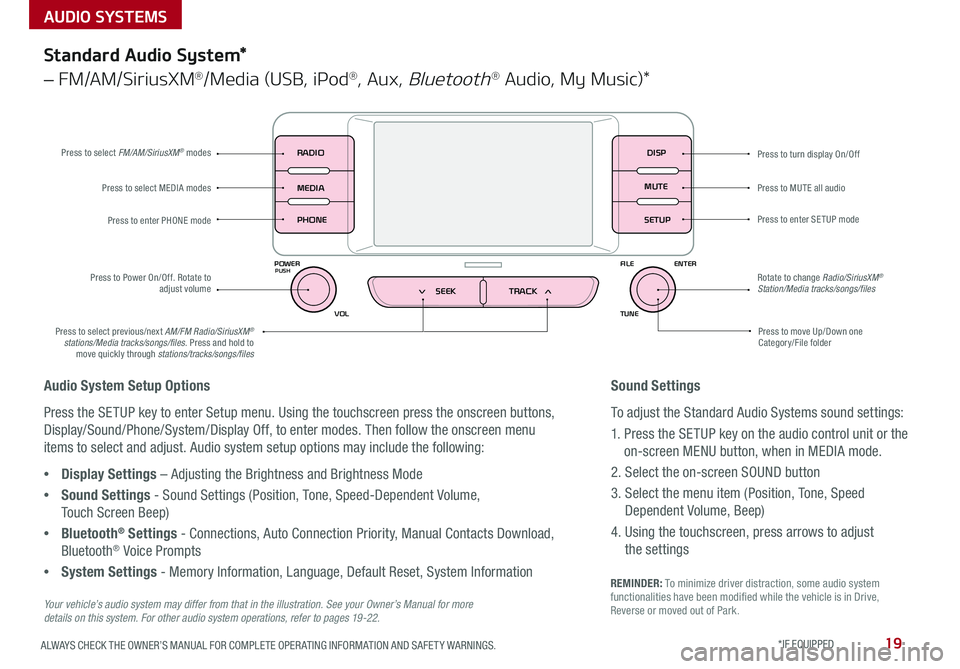
Press to turn display On/Off
Audio System Setup Options
Press the SETUP key to enter Setup menu Using the touchscreen press the onscreen buttons,
Display/Sound/Phone/System/Display Off, to enter modes Then follow the onscreen menu
items to select and adjust Audio system setup options may include the following:
•Display Settings – Adjusting the Brightness and Brightness Mode
•Sound Settings - Sound Settings (Position, Tone, Speed-Dependent Volume,
Touch Screen Beep)
•Bluetooth® Settings - Connections, Auto Connection Priority, Manual Contacts Download,
Bluetooth® Voice Prompts
•System Settings - Memory Information, Language, Default Reset, System Information
DISP
RADIO
MEDIA
PHONE
POWER FILE
TUNE
VOL ENTERPUSH
MUTE
SETUP
SEEK TRACK
Standard Audio System*
– FM/AM/SiriusXM®/Media (USB, iPod®, Aux, Bluetooth® Audio, My Music)*
Press to move Up/Down one Category/File folder
Press to MUTE all audio
Press to enter SETUP mode
Rotate to change Radio/SiriusXM® Station/Media tracks/songs/files
Press to select previous/next AM/FM Radio/SiriusXM® stations/Media tracks/songs/files Press and hold to move quickly through stations/tracks/songs/files
Press to Power On/Off Rotate to adjust volume
Press to select MEDIA modes
Press to enter PHONE mode
Press to select FM/AM/SiriusXM® modes
Your vehicle’s audio system may differ from that in the illustration. See your Owner’s Manual for more details on this system. For other audio system operations, refer to pages 19 -22.
Sound Settings
To adjust the Standard Audio Systems sound settings:
1 Press the SETUP key on the audio control unit or the
on-screen MENU button, when in MEDIA mode
2 Select the on-screen SOUND button
3 Select the menu item (Position, Tone, Speed
Dependent Volume, Beep)
4 Using the touchscreen, press arrows to adjust
the settings
Page 34 of 54

SEATING
SEDONA FEATURES & FUNCTIONS GUIDE32*IF EQUIPPED
2nd-Row Seat
Folding 2nd-Row Seat
1 Lower the 2nd-Row Seat Headrest to the lowest position
2 Pull up on the Seatback folding lever or strap and fold the
Seatback down
Unfolding 2nd-Row Seat
1 Lift the folding Seatback lever and move the Seatback backward
2 Then lift the lever again or return it to an upright usable position
2nd-Row Walk-In Seat*
To get in and out of the 3rd-Row Seat, adjust the 2nd-Row Walk-In Seat as
follows:
1 Lift the 2nd-Row Seat armrest
2 Adjust headrest to the lowest position
3 Accessing from outside of the vehicle: Pull up the Walk-In Lever A –
the seat will stand up and headrest will fold automatically C
4 Accessing from the 3rd-Row seat: Pull the release strap B – the seat
will stand up and headrest will fold automatically C
5 Return the 2nd-Row Seat to its original position and push until it locks
(clicks) into place and the headrest unfolds
•When you return Seatback to its original position, ensure it locks (clicks) into place •It may be necessary to slide the front Seat forward and adjust the front Seatbacks to fully lower rear seats •Lower Rear Headrests to the lowest position
QUICK TIPS
•For specific information on how to use the 2nd- and 3rd-Row Center Seat Belts, please refer to your Owner's Manual
QUICK TIP
B
A
For more information on 2nd-Row Walk-In Seat operation, refer to the Owner's Manual.
For more information on 2nd-Row Seat operation, refer to the Owner's Manual.
C
Page 36 of 54

SEATING
SEDONA FEATURES & FUNCTIONS GUIDE34*IF EQUIPPED
Installing Tumble Seat
1 Place and align the Tumble Seat properly E
2 Lower Tumble Seat and push down firmly until
it clicks into place
3 Ensure the Tumble Seat is latched securely by
the green indicator
4 Pull up the Tumble Seatback recline strap F,
lift Seatback backward until it locks (clicks)
into place
5 Return the Seat Belt to its proper position
Unfastening the Center
Shoulder Seat Belt from
Buckle
1 If Seat Belt is buckled,
press the release button
on the buckle
2 To retract the center seatbelt
webbing G in 2nd and/or
3rd rows, use the lap belt
tongue plate H to push
the “release button” in the
small slot on the center
belt buckle J
2nd-Row Tumble (Center) Seat*
Removing the Tumble Seat
1 Insert the seat belt into the belt assembly cover, and the
seat belt buckle into the seat cushion pocket
2 Lower the headrest A to the lowest position
3 Slide the Seat backward to the farthest position
4 Pull up the recline strap B and fold the Seatback forward
5
Pull the removal strap C and lift the back of the Tumble
Seat forward
6
Pull up the catch release lever D under the Tumble Seat
cushion and lift out of the anchorsREMINDERS:
•
Never install or remove the Tumble Seat while there are occupants in the 3rd-Row Seat
•
Ensure to raise up both the left and right side seatbacks before installing tumble seat
For more information on the Tumble Seat, refer to the Owner's Manual.
For more information on removing the Tumble Seat, refer to the Owner's Manual.
A
B
C
E
F
D
•For specific information on how to use the 2nd- and 3rd-Row Center Seat Belts, please refer to your Owner's Manual
QUICK TIP
H
HG
G
J
J
Page 37 of 54

SEATING
35ALWAYS CHECK THE OWNER’S MANUAL FOR COMPLETE OPER ATING INFORMATION AND SAFET Y WARNINGS *IF EQUIPPED
3rd-Row Seat - Folding and Stowing
Folding 3rd-Row Seat
1 Fully lower headrest A
2 Pull Seat folding strap located in the back of the Seatback B
3 Fold Seat down C
Stowing 3rd-Row Seats*
The rear seats can be folded and stowed in the
luggage compartment for additional cargo space
1 Fully lower headrests D
2 Pull release lever E and push Seat firmly in place
REMINDER: The seat straps on the front and back of the 3rd-Row Seat are for folding only
D
E
B
A
C
For more information on 3rd-Row Seat operation, refer to the Owner's Manual.
Sedona 2nd and 3rd Row Seat Video
To view a video on your mobile device, snap this QR Code or visit the listed website
Refer to page 2 for more information
QR CODE
www.KuTechVideos.com/yp13/2017
•For specific information on how to use the 2nd- and 3rd-Row Center Seat Belts, please refer to your Owner's Manual
QUICK TIP
Page 38 of 54

SEDONA FEATURES & FUNCTIONS GUIDE36*IF EQUIPPED
Remote Keyless Entry (Folding Key)*
A Press the release button to unfold the key
B Press to lock All Doors
C Press to unlock Driver’s Door: Press twice in 4 seconds to unlock All Doors and Liftgate, and manually
open
D
Press and hold left /right button to automatically open/close the power sliding doors*
E Manual Liftgate*: Press and hold for more than 1 second to unlock Liftgate and manually open Power
Liftgate*: Press and hold for more than 1 second for Power Liftgate to automatically open/close
F Press and hold more than a half second for Panic Alarm To turn OFF Alarm, press any button
Remote button configuration may vary depending on vehicle options.
Double-Turn Lock/Unlock All
•Turn counterclockwise once to unlock Driver’s Door
•Turn counterclockwise again within 4 seconds to unlock All Doors
•Turn clockwise once to lock All Doors
A
B
C
D
FE
D
Power Sliding Doors*
Press the left /right Power Sliding Door button G on the overhead controls,
on the Center Pillars H or on the key fob D to automatically open/close
the sliding doors
FRONT
REARFRONTREARFRONTREARFRONTREAR
REAR
REAR
G
H
G
REMINDER: If the POWER DOOR OFF button is depressed, the Smart Power Liftgate* will not operate
For more information on the Power Sliding Doors operation, please refer to the Owner's Manual.
(Buttons located in overhead controls)(Buttons located on center pillars)
(Type B shown)
OTHER KEY FEATURES