battery KIA SEDONA 2017 User Guide
[x] Cancel search | Manufacturer: KIA, Model Year: 2017, Model line: SEDONA, Model: KIA SEDONA 2017Pages: 586, PDF Size: 14.12 MB
Page 122 of 586
Features of your vehicle
20
4
Battery replacement
A smart key battery should last for
several years, but if the smart key is
not working properly, try replacing
the battery with a new one. If you are
unsure how to use your smart key or
replace the battery, contact an
authorized Kia dealer.
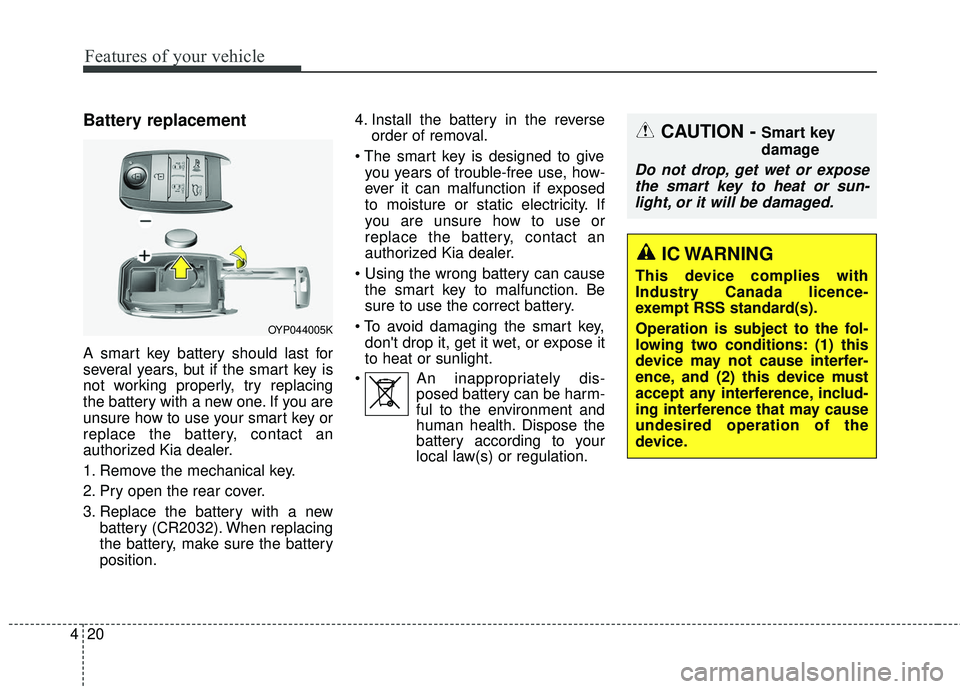
1. Remove the mechanical key.
2. Pry open the rear cover.
3. Replace the battery with a new
battery (CR2032). When replacing
the battery, make sure the battery
position. 4. Install the battery in the reverse
order of removal.
you years of trouble-free use, how-
ever it can malfunction if exposed
to moisture or static electricity. If
you are unsure how to use or
replace the battery, contact an
authorized Kia dealer.
the smart key to malfunction. Be
sure to use the correct battery.
don't drop it, get it wet, or expose it
to heat or sunlight.
An inappropriately dis- posed battery can be harm-
ful to the environment and
human health. Dispose the
battery according to your
local law(s) or regulation.
CAUTION - Smart key
damage
Do not drop, get wet or expose
the smart key to heat or sun-light, or it will be damaged.
OYP044005K
IC WARNING
This device complies with
Industry Canada licence-
exempt RSS standard(s).
Operation is subject to the fol-
lowing two conditions: (1) this
device may not cause interfer-
ence, and (2) this device must
accept any interference, includ-
ing interference that may cause
undesired operation of the
device.
Page 137 of 586
435
Features of your vehicle
✽ ✽NOTICE
In cold and wet climates, power slid-
ing doors and tailgate may not work
properly due to freezing conditions.
✽ ✽NOTICE
When the sliding doors are opened
manually (power OFF), more effort
will be required to open and close
than on non-power sliding doors.
✽ ✽NOTICE
• The power sliding door and power
tailgate can be operated when the
engine is not running. However
the power operation consumes
large amounts of vehicle electric
power. To prevent the battery
from being discharged, do not
operate them excessively.
• To prevent the battery from being discharged, do not leave the power
sliding door and power tailgate at
open position for a long lime.
• When jacking up the vehicle to change a tire or repair the vehicle, do
not operate the power sliding door
or power tailgate. This could cause
the power sliding door or power tail-
gate to operate improperly.CAUTION - Operating
sliding door/tailgate
Do not apply excessive force while operating the power slid-ing door or power liftgate (tail-gate). This could cause damageto the power sliding door orpower liftgate (tailgate).
Page 138 of 586
Features of your vehicle
36
4
Automatic stop and reversal
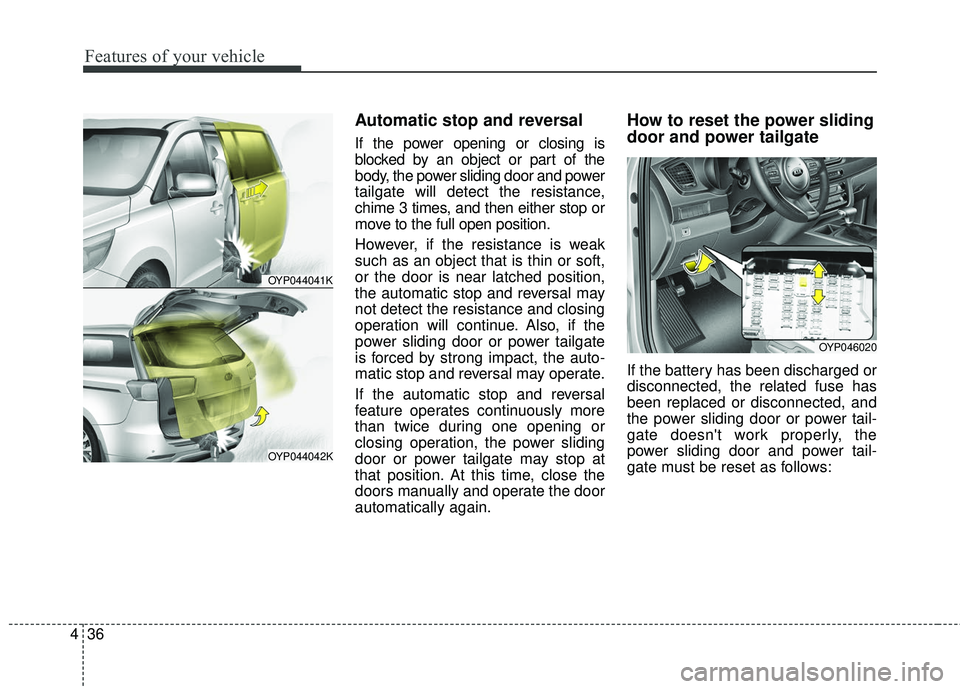
If the power opening or closing is
blocked by an object or part of the
body, the power sliding door and power
tailgate will detect the resistance,
chime 3 times, and then either stop or
move to the full open position.
However, if the resistance is weak
such as an object that is thin or soft,
or the door is near latched position,
the automatic stop and reversal may
not detect the resistance and closing
operation will continue. Also, if the
power sliding door or power tailgate
is forced by strong impact, the auto-
matic stop and reversal may operate.
If the automatic stop and reversal
feature operates continuously more
than twice during one opening or
closing operation, the power sliding
door or power tailgate may stop at
that position. At this time, close the
doors manually and operate the door
automatically again.
How to reset the power sliding
door and power tailgate
If the battery has been discharged or
disconnected, the related fuse has
been replaced or disconnected, and
the power sliding door or power tail-
gate doesn't work properly, the
power sliding door and power tail-
gate must be reset as follows:
OYP044041K
OYP044042K
OYP046020
Page 167 of 586
465
Features of your vehicle
Do not extend the face, neck, arms or
body outside the sunroof while driving.
Care should be taken that no objects
stick out through the sunroof. In a
sudden stop, pertinent parts may be
damaged.
With the sunroof open for an extended
period of time, dirt may accumulate on
the guide rails causing noise during
opening and closing. Periodically
remove dirt using a clean cloth.Sunshade
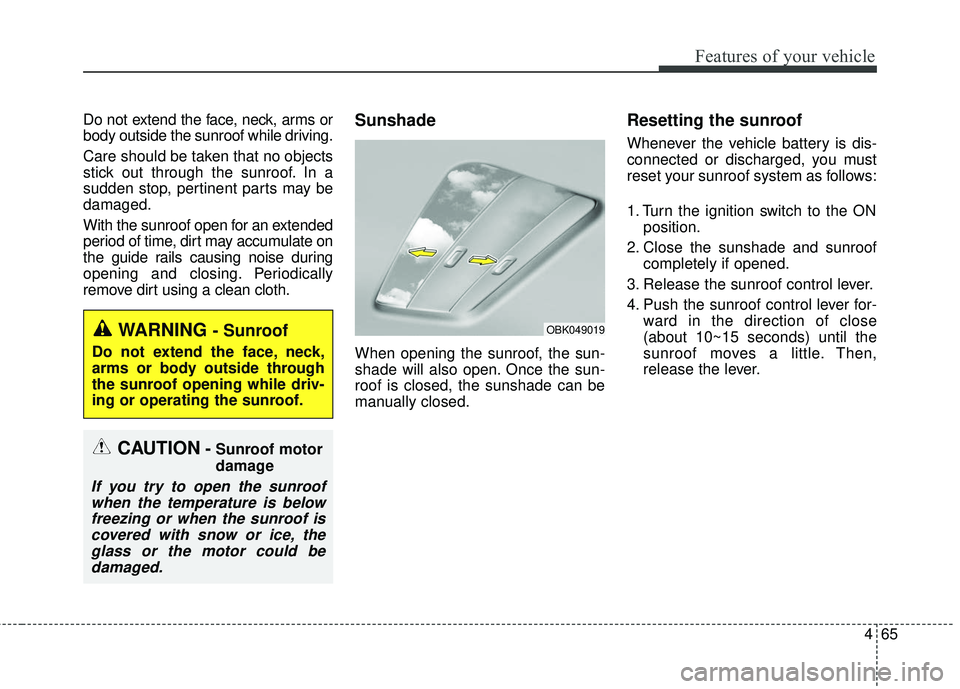
When opening the sunroof, the sun-
shade will also open. Once the sun-
roof is closed, the sunshade can be
manually closed.
Resetting the sunroof
Whenever the vehicle battery is dis-
connected or discharged, you must
reset your sunroof system as follows:
1. Turn the ignition switch to the ONposition.
2. Close the sunshade and sunroof completely if opened.
3. Release the sunroof control lever.
4. Push the sunroof control lever for- ward in the direction of close
(about 10~15 seconds) until the
sunroof moves a little. Then,
release the lever.
OBK049019
CAUTION- Sunroof motor
damage
If you try to open the sunroofwhen the temperature is belowfreezing or when the sunroof iscovered with snow or ice, theglass or the motor could bedamaged.
WARNING - Sunroof
Do not extend the face, neck,
arms or body outside through
the sunroof opening while driv-
ing or operating the sunroof.
Page 168 of 586
Features of your vehicle
66
4
5. Push the sunroof control lever for-
ward in the direction of close, until
the sunroof operates as follows
again:
The sunroof glass slide open → The sunroof glass slide close
Then, release the lever.
When this is complete, the sunroof
system has been reset.Rear sunroof lock
When the power window lock switch
is pressed, the rear sunroof control
cannot operate the rear sunroof. But
The front master sunroof control can
operate both front and rear sunroofs
(if equipped).
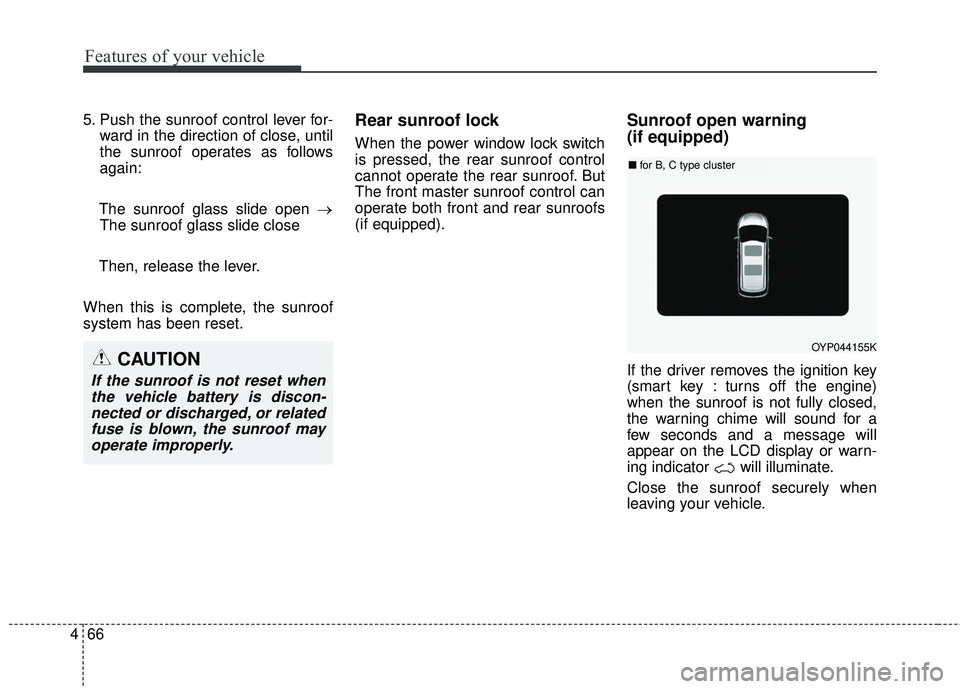
Sunroof open warning
(if equipped)
If the driver removes the ignition key
(smart key : turns off the engine)
when the sunroof is not fully closed,
the warning chime will sound for a
few seconds and a message will
appear on the LCD display or warn-
ing indicator will illuminate.
Close the sunroof securely when
leaving your vehicle.
OYP044155K
■ for B, C type cluster
CAUTION
If the sunroof is not reset when
the vehicle battery is discon-nected or discharged, or relatedfuse is blown, the sunroof mayoperate improperly.
Page 174 of 586
Features of your vehicle
72
4
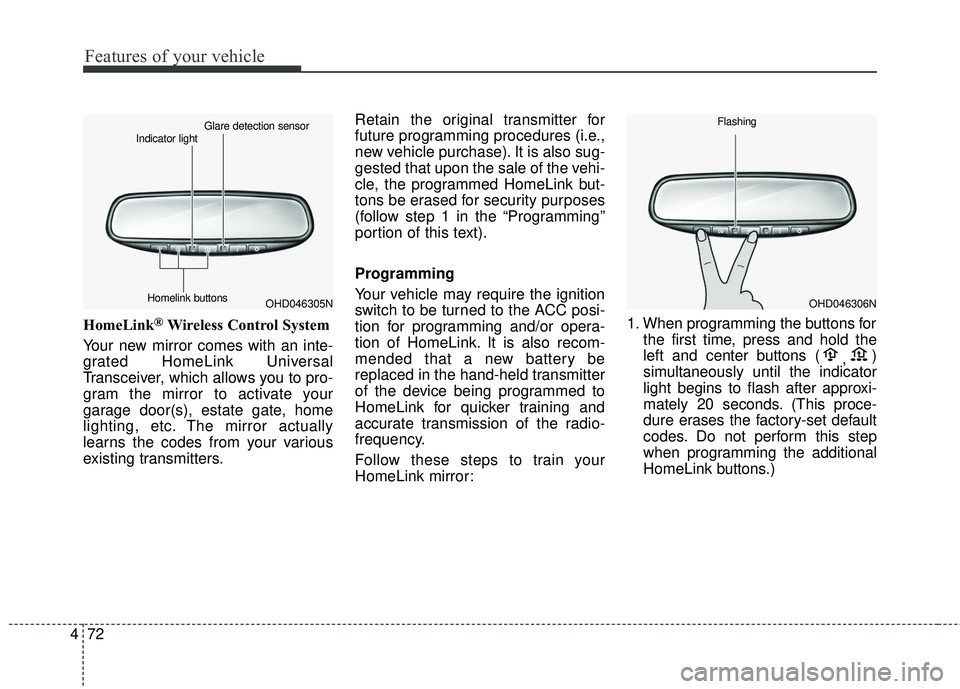
HomeLink®Wireless Control System
Your new mirror comes with an inte-
grated HomeLink Universal
Transceiver, which allows you to pro-
gram the mirror to activate your
garage door(s), estate gate, home
lighting, etc. The mirror actually
learns the codes from your various
existing transmitters. Retain the original transmitter for
future programming procedures (i.e.,
new vehicle purchase). It is also sug-
gested that upon the sale of the vehi-
cle, the programmed HomeLink but-
tons be erased for security purposes
(follow step 1 in the “Programming”
portion of this text).
Programming
Your vehicle may require the ignition
switch to be turned to the ACC posi-
tion for programming and/or opera-
tion of HomeLink. It is also recom-
mended that a new battery be
replaced in the hand-held transmitter
of the device being programmed to
HomeLink for quicker training and
accurate transmission of the radio-
frequency.
Follow these steps to train your
HomeLink mirror:
1. When programming the buttons for
the first time, press and hold the
left and center buttons ( ,)
simultaneously until the indicator
light begins to flash after approxi-
mately 20 seconds. (This proce-
dure erases the factory-set default
codes. Do not perform this step
when programming the additional
HomeLink buttons.)
OHD046305N
Glare detection sensor
Indicator light
Homelink buttonsOHD046306N
Flashing
Page 182 of 586
Features of your vehicle
80
4
Center (AUTO, 3) :
The mirror will fold or unfold auto-
matically as follows :
The mirror will fold or unfold when the door is locked or unlocked by
the folding key or smart key.
The mirror will fold or unfold when the door is locked or unlocked by the
button on the outside door handle.
The mirror will unfold when you approach the vehicle (all doors
closed and locked) with a smart
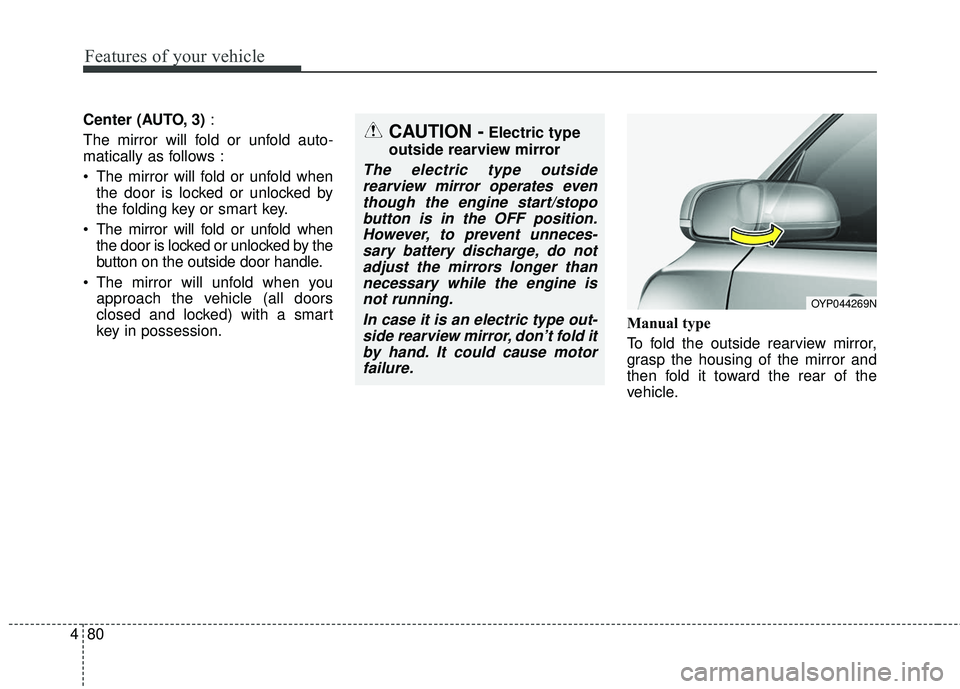
key in possession. Manual type
To fold the outside rearview mirror,
grasp the housing of the mirror and
then fold it toward the rear of the
vehicle.
OYP044269N
CAUTION -Electric type
outside rearview mirror
The electric type outside rearview mirror operates eventhough the engine start/stopobutton is in the OFF position.However, to prevent unneces-sary battery discharge, do notadjust the mirrors longer thannecessary while the engine isnot running.
In case it is an electric type out-side rearview mirror, don’t fold itby hand. It could cause motorfailure.
Page 193 of 586
491
Features of your vehicle
- For type A cluster
Service symbol ( ) will blink and the
chime will sound for several seconds
each time
you set the ignition switch or Engine
Start/Stop Button to the ON position.
- For Type B and C cluster
“Service required” message is dis-
played for several seconds each time
you set the ignition switch or Engine
Start/Stop Button to the ON position.
To reset the service interval to the
mileage and days you inputted
before:
- For Type A clusterConsult your authorized Kia dealer.
- For Type B and C cluster Press the RESET button (OK) for
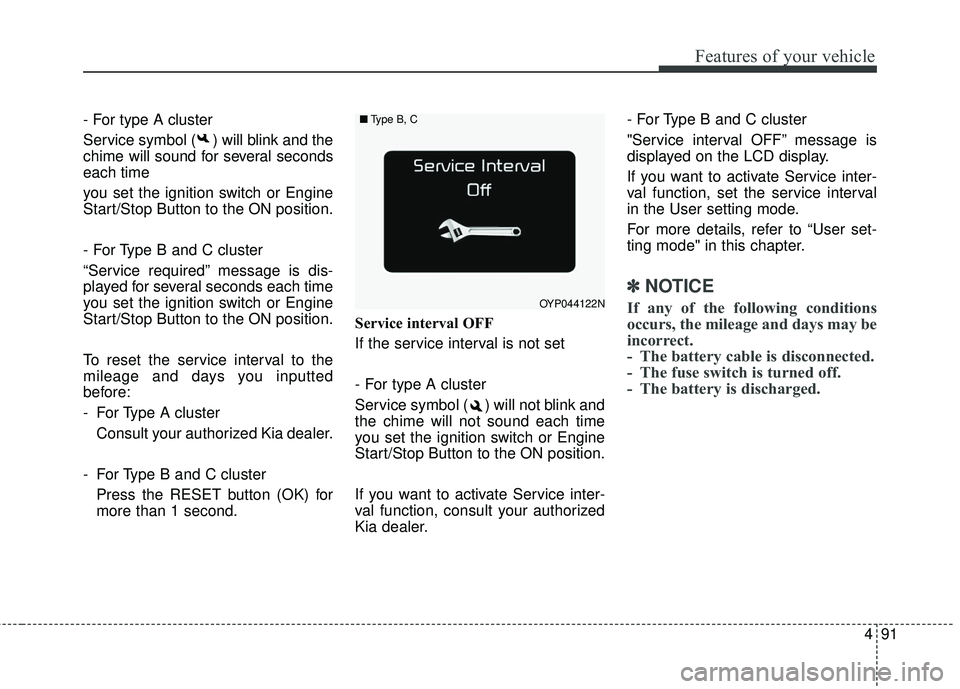
more than 1 second. Service interval OFF
If the service interval is not set
- For type A cluster
Service symbol ( ) will not blink and
the chime will not sound each time
you set the ignition switch or Engine
Start/Stop Button to the ON position.
If you want to activate Service inter-
val function, consult your authorized
Kia dealer. - For Type B and C cluster
"Service interval OFF” message is
displayed on the LCD display.
If you want to activate Service inter-
val function, set the service interval
in the User setting mode.
For more details, refer to “User set-
ting mode" in this chapter.
✽ ✽
NOTICE
If any of the following conditions
occurs, the mileage and days may be
incorrect.
- The battery cable is disconnected.
- The fuse switch is turned off.
- The battery is discharged.OYP044122N
■ Type B, C
Page 199 of 586
497
Features of your vehicle
Warning Messages
(for Type B and C cluaster)
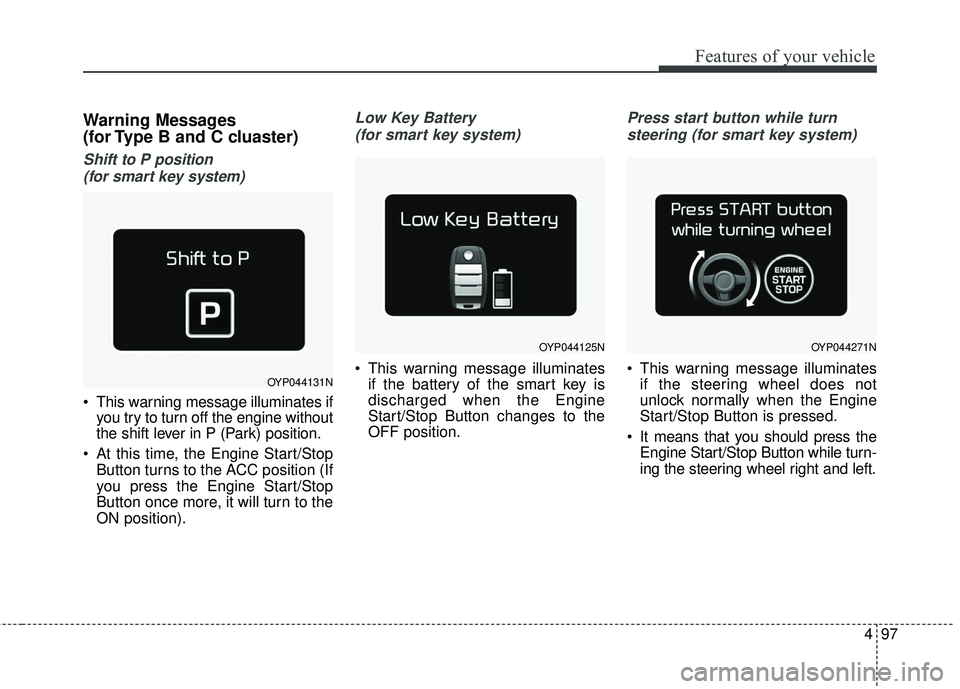
Shift to P position (for smart key system)
This warning message illuminates if you try to turn off the engine without
the shift lever in P (Park) position.
At this time, the Engine Start/Stop Button turns to the ACC position (If
you press the Engine Start/Stop
Button once more, it will turn to the
ON position).
Low Key Battery
(for smart key system)
This warning message illuminates if the battery of the smart key is
discharged when the Engine
Start/Stop Button changes to the
OFF position.
Press start button while turn
steering (for smart key system)
This warning message illuminates if the steering wheel does not
unlock normally when the Engine
Start/Stop Button is pressed.
It means that you should press the Engine Start/Stop Button while turn-
ing the steering wheel right and left.OYP044131N
OYP044125NOYP044271N
Page 205 of 586
4103
Features of your vehicle
Overview
Description
The trip computer is a microcomput-
er-controlled driver information sys-
tem that displays information related
to driving.
✽ ✽NOTICE
Some driving information stored in
the trip computer (for example
Average Vehicle Speed) resets if the
battery is disconnected.
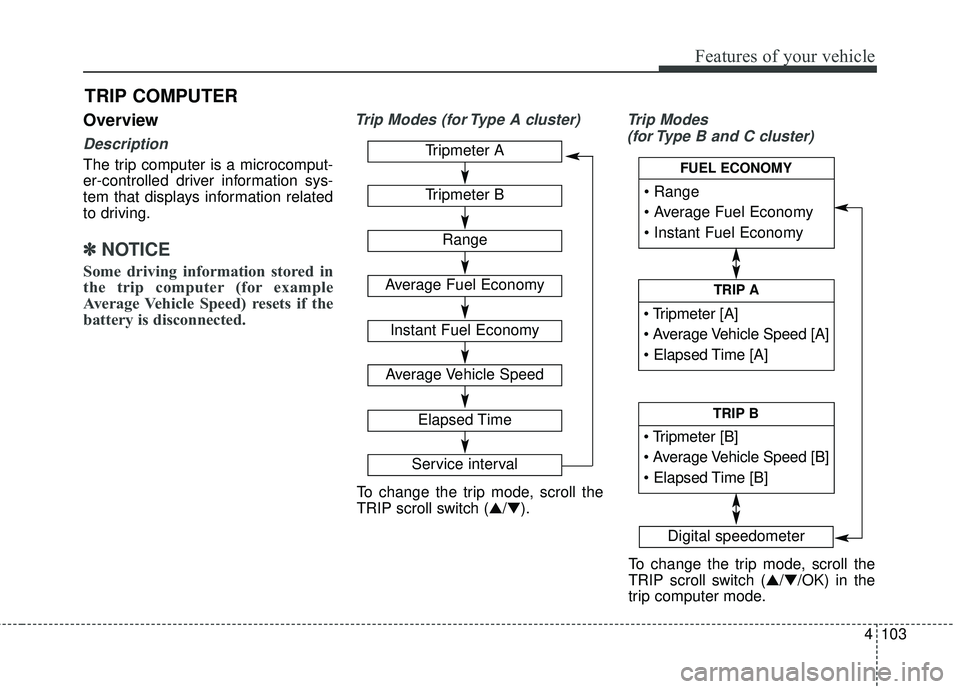
Trip Modes (for Type A cluster) Trip Modes
(for Type B and C cluster)
TRIP COMPUTER
Tripmeter A
Tripmeter B
Range
Average Fuel Economy
Instant Fuel Economy
Average Vehicle Speed
Elapsed Time
Service interval
Digital speedometer
To change the trip mode, scroll the
TRIP scroll switch (▲/▼).
To change the trip mode, scroll the
TRIP scroll switch (▲/▼/OK) in the
trip computer mode.
TRIP A
TRIP B
FUEL ECONOMY