cruise control KIA SEDONA 2017 User Guide
[x] Cancel search | Manufacturer: KIA, Model Year: 2017, Model line: SEDONA, Model: KIA SEDONA 2017Pages: 586, PDF Size: 14.12 MB
Page 393 of 586
549
Driving your vehicle
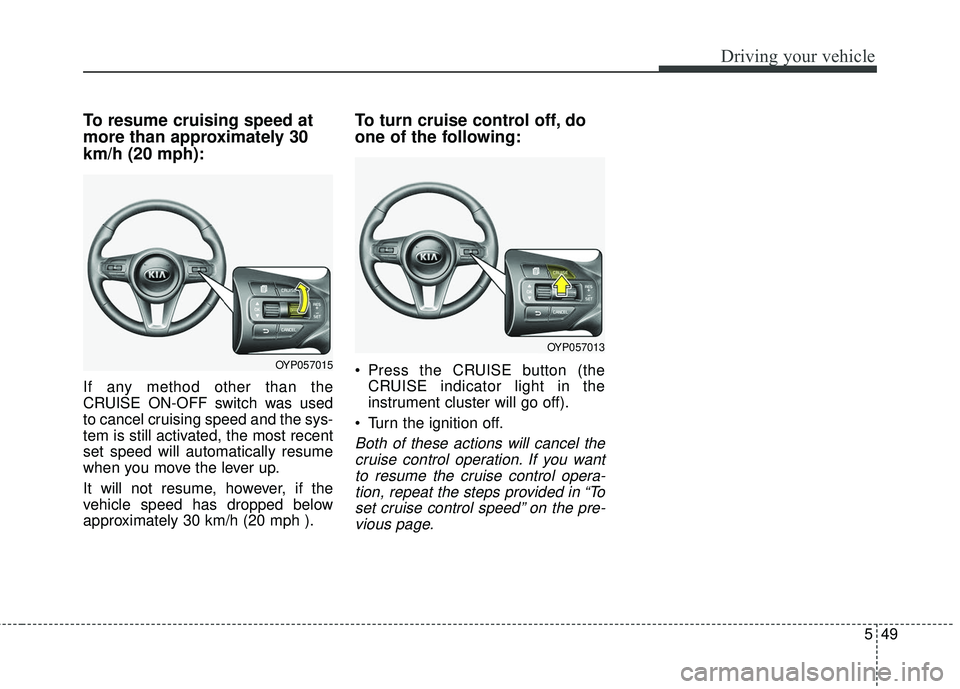
To resume cruising speed at
more than approximately 30
km/h (20 mph):
If any method other than the
CRUISE ON-OFF switch was used
to cancel cruising speed and the sys-
tem is still activated, the most recent
set speed will automatically resume
when you move the lever up.
It will not resume, however, if the
vehicle speed has dropped below
approximately 30 km/h (20 mph ).
To turn cruise control off, do
one of the following:
Press the CRUISE button (theCRUISE indicator light in the
instrument cluster will go off).
Turn the ignition off.
Both of these actions will cancel the cruise control operation. If you wantto resume the cruise control opera-tion, repeat the steps provided in “Toset cruise control speed” on the pre-vious page.
OYP057015
OYP057013
Page 394 of 586
Driving your vehicle
50
5
SMART CRUISE CONTROL SYSTEM (SCC) (IF EQUIPPED)
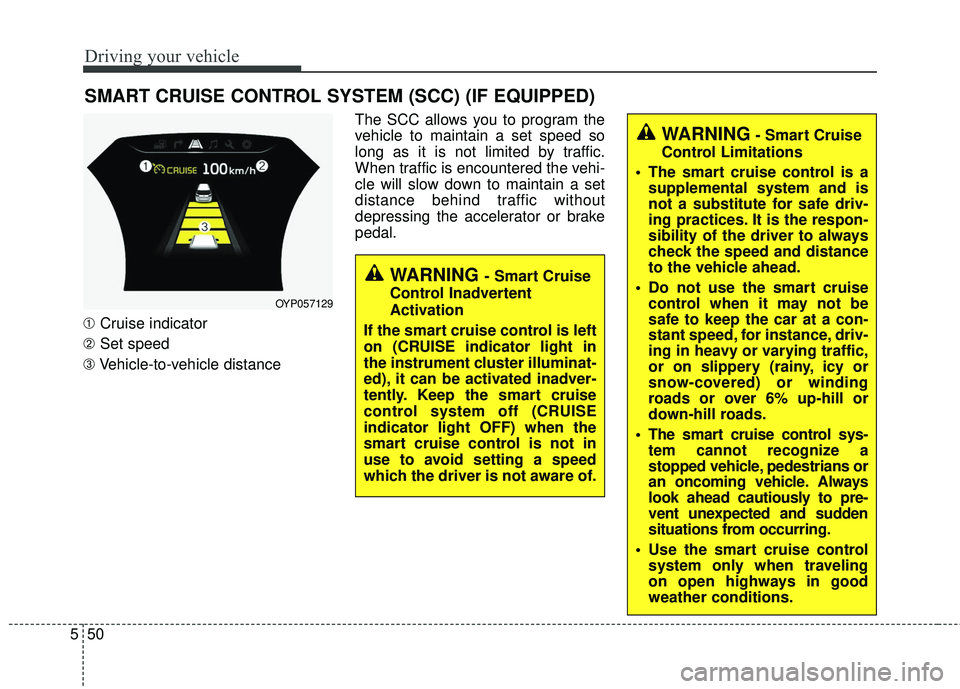
➀ Cruise indicator
➁ Set speed
➂ Vehicle-to-vehicle distance The SCC allows you to program the
vehicle to maintain a set speed so
long as it is not limited by traffic.
When traffic is encountered the vehi-
cle will slow down to maintain a set
distance behind traffic without
depressing the accelerator or brake
pedal.
WARNING - Smart Cruise
Control Inadvertent
Activation
If the smart cruise control is left
on (CRUISE indicator light in
the instrument cluster illuminat-
ed), it can be activated inadver-
tently. Keep the smart cruise
control system off (CRUISE
indicator light OFF) when the
smart cruise control is not in
use to avoid setting a speed
which the driver is not aware of.
WARNING- Smart Cruise
Control Limitations
The smart cruise control is a supplemental system and is
not a substitute for safe driv-
ing practices. It is the respon-
sibility of the driver to always
check the speed and distance
to the vehicle ahead.
Do not use the smart cruise control when it may not be
safe to keep the car at a con-
stant speed, for instance, driv-
ing in heavy or varying traffic,
or on slippery (rainy, icy or
snow-covered) or winding
roads or over 6% up-hill or
down-hill roads.
The smart cruise control sys- tem cannot recognize a
stopped vehicle, pedestrians or
an oncoming vehicle. Always
look ahead cautiously to pre-
vent unexpected and sudden
situations from occurring.
Use the smart cruise control system only when traveling
on open highways in good
weather conditions.
OYP057129
Page 395 of 586
551
Driving your vehicle
Speed setting (SCC)
To set cruise control speed:
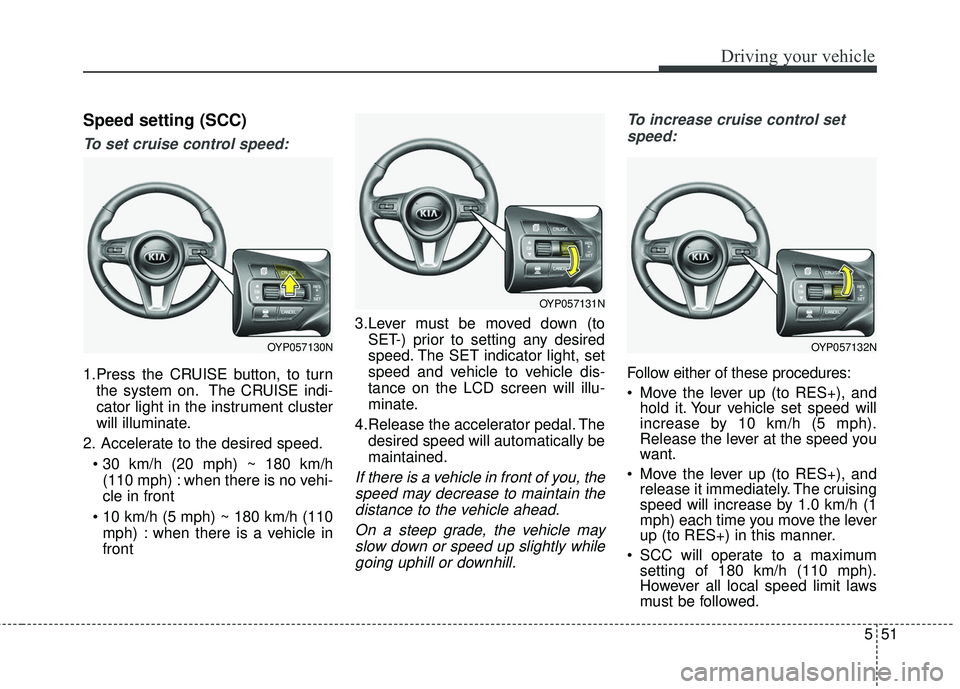
1.Press the CRUISE button, to turnthe system on. The CRUISE indi-
cator light in the instrument cluster
will illuminate.
2. Accelerate to the desired speed. (110 mph) : when there is no vehi-
cle in front
mph) : when there is a vehicle in
front 3.Lever must be moved down (to
SET-) prior to setting any desired
speed. The SET indicator light, set
speed and vehicle to vehicle dis-
tance on the LCD screen will illu-
minate.
4.Release the accelerator pedal. The desired speed will automatically be
maintained.
If there is a vehicle in front of you, thespeed may decrease to maintain thedistance to the vehicle ahead.
On a steep grade, the vehicle mayslow down or speed up slightly whilegoing uphill or downhill. To increase cruise control set
speed:
Follow either of these procedures:
Move the lever up (to RES+), and hold it. Your vehicle set speed will
increase by 10 km/h (5 mph).
Release the lever at the speed you
want.
Move the lever up (to RES+), and release it immediately. The cruising
speed will increase by 1.0 km/h (1
mph) each time you move the lever
up (to RES+) in this manner.
SCC will operate to a maximum setting of 180 km/h (110 mph).
However all local speed limit laws
must be followed.
OYP057131N
OYP057132NOYP057130N
Page 396 of 586
Driving your vehicle
52
5
To decrease the crusie control
set speed:
Follow either of these procedures:
Move the lever down (to SET-), and hold it. Your vehicle set speed will
decrease by 10 km/h (5 mph).
Release the lever at the speed you
want.
Move the lever down (to SET-), and release it immediately. The cruising
speed will decrease by 1.0 km/h (1
mph) each time you move the lever
down (to SET-) in this manner.
You can set the cruise control to any speed above 30 km/h (20 mph).
To temporarily accelerate with the
cruise control on:
If you want to speed up temporarily
when the cruise control is on,
depress the accelerator pedal.
Increased speed will not interfere
with cruise control operation or
change the set speed.
To return to the set speed, take your
foot off the accelerator.
If you move the lever down (to SET-)
at increased speed, the cruising
speed will be set again.
✽ ✽ NOTICE
Be careful when accelerating tem-
porarily, because the speed is not
regulated automatically at this time
even if there is a vehicle in front of
you.
SCC will be temporarily canceled
when:
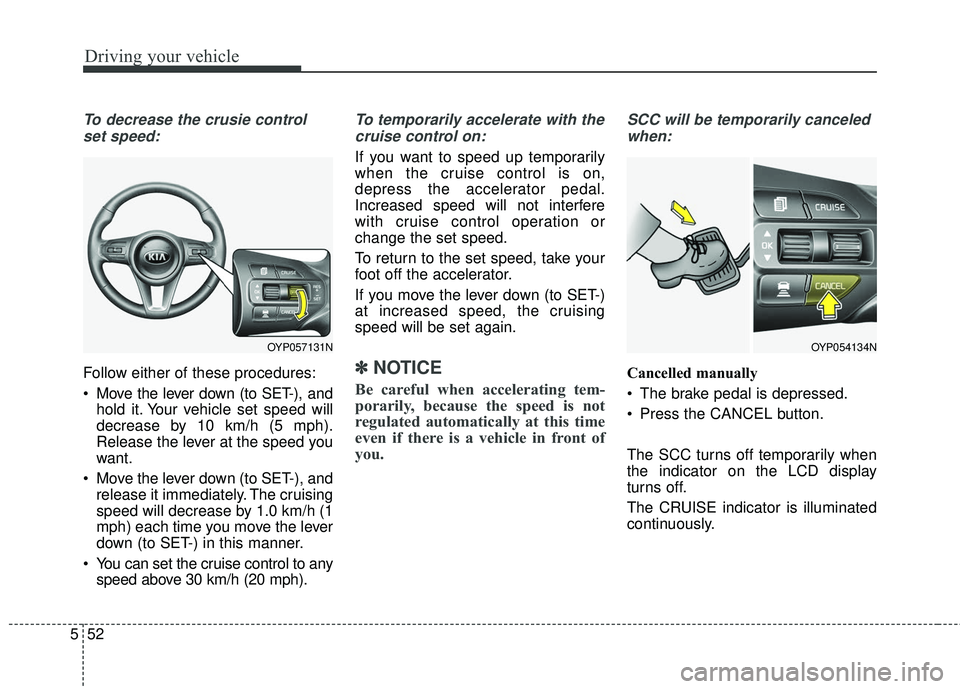
Cancelled manually
The brake pedal is depressed.
Press the CANCEL button.
The SCC turns off temporarily when
the indicator on the LCD display
turns off.
The CRUISE indicator is illuminated
continuously.
OYP054134NOYP057131N
Page 398 of 586
Driving your vehicle
54
5
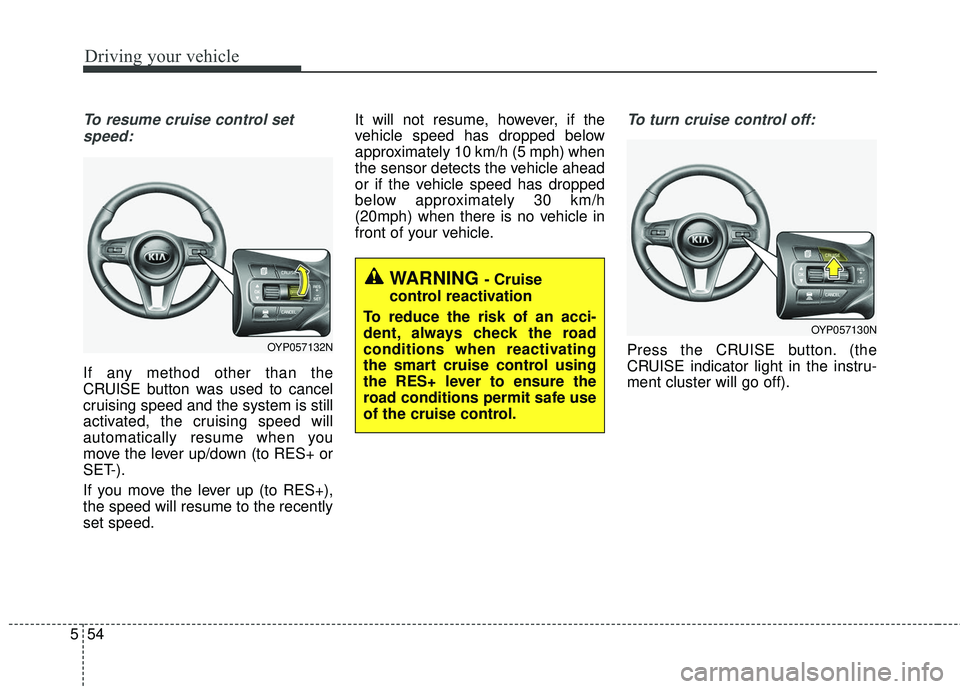
To resume cruise control set
speed:
If any method other than the
CRUISE button was used to cancel
cruising speed and the system is still
activated, the cruising speed will
automatically resume when you
move the lever up/down (to RES+ or
SET-).
If you move the lever up (to RES+),
the speed will resume to the recently
set speed. It will not resume, however, if the
vehicle speed has dropped below
approximately 10 km/h (5 mph) when
the sensor detects the vehicle ahead
or if the vehicle speed has dropped
below approximately 30 km/h
(20mph) when there is no vehicle in
front of your vehicle.
To turn cruise control off:
Press the CRUISE button. (the
CRUISE indicator light in the instru-
ment cluster will go off).
WARNING - Cruise
control reactivation
To reduce the risk of an acci-
dent, always check the road
conditions when reactivating
the smart cruise control using
the RES+ lever to ensure the
road conditions permit safe use
of the cruise control.
OYP057132N
OYP057130N
Page 399 of 586
555
Driving your vehicle
Vehicle to vehicle distance
setting (SCC)
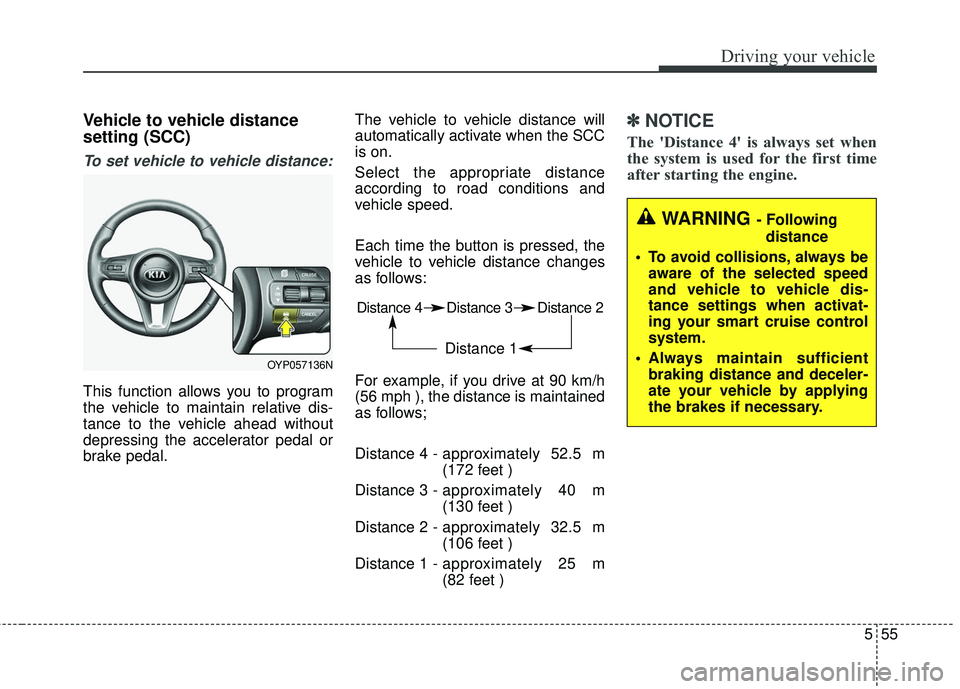
To set vehicle to vehicle distance:
This function allows you to program
the vehicle to maintain relative dis-
tance to the vehicle ahead without
depressing the accelerator pedal or
brake pedal.The vehicle to vehicle distance will
automatically activate when the SCC
is on.
Select the appropriate distance
according to road conditions and
vehicle speed.
Each time the button is pressed, the
vehicle to vehicle distance changes
as follows:
For example, if you drive at 90 km/h
(56 mph ), the distance is maintained
as follows;
Distance 4 -
approximately 52.5 m
(172 feet )
Distance 3 - approximately 40 m
(130 feet )
Distance 2 - approximately 32.5 m
(106 feet )
Distance 1 - approximately 25 m
(82 feet )
✽ ✽
NOTICE
The 'Distance 4' is always set when
the system is used for the first time
after starting the engine.
Distance 4 Distance 3 Distance 2
Distance 1
WARNING - Following
distance
To avoid collisions, always be aware of the selected speed
and vehicle to vehicle dis-
tance settings when activat-
ing your smart cruise control
system.
Always maintain sufficient braking distance and deceler-
ate your vehicle by applying
the brakes if necessary.
OYP057136N
Page 403 of 586
559
Driving your vehicle
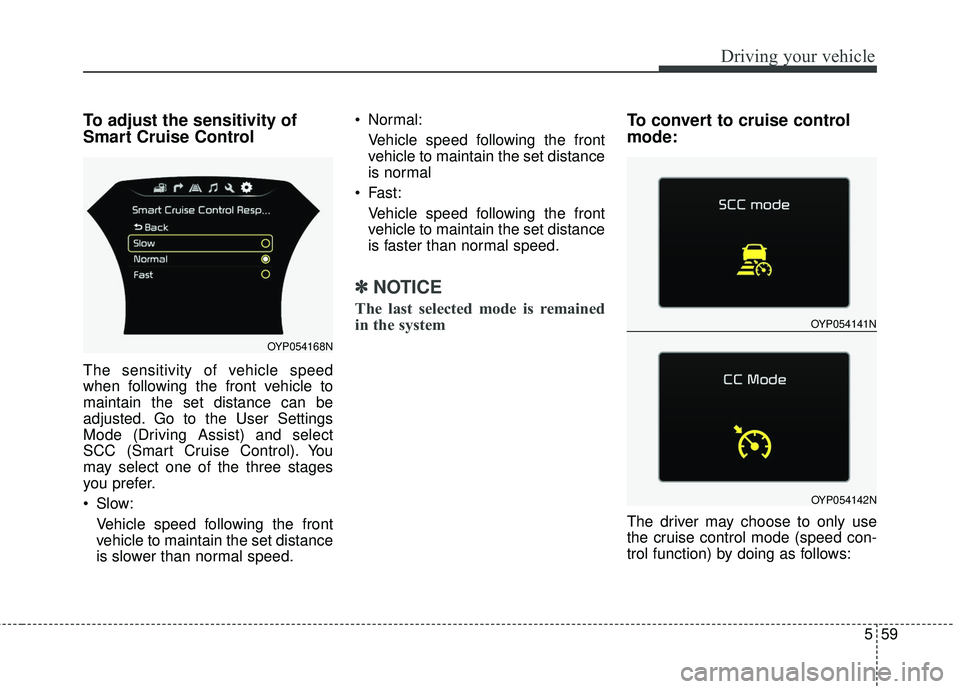
To adjust the sensitivity of
Smart Cruise Control
The sensitivity of vehicle speed
when following the front vehicle to
maintain the set distance can be
adjusted. Go to the User Settings
Mode (Driving Assist) and select
SCC (Smart Cruise Control). You
may select one of the three stages
you prefer.
Slow:Vehicle speed following the front
vehicle to maintain the set distance
is slower than normal speed. Normal:
Vehicle speed following the front
vehicle to maintain the set distance
is normal
Fast: Vehicle speed following the front
vehicle to maintain the set distance
is faster than normal speed.
✽ ✽ NOTICE
The last selected mode is remained
in the system
To convert to cruise control
mode:
The driver may choose to only use
the cruise control mode (speed con-
trol function) by doing as follows:
OYP054141N
OYP054142N
OYP054168N
Page 404 of 586
Driving your vehicle
60
5
1.Turn the SCC on (the cruise indi-
cator light will be on but the system
will not be activated).
2.Push the distance to distance switch for more than 2 seconds.
3.Choose between "Smart cruise control(SCC) mode" and "Cruise
control(CC) mode".
When using the cruise control mode,
you must manually assess the dis-
tance to other vehicles as the system
will not automatically brake to slow
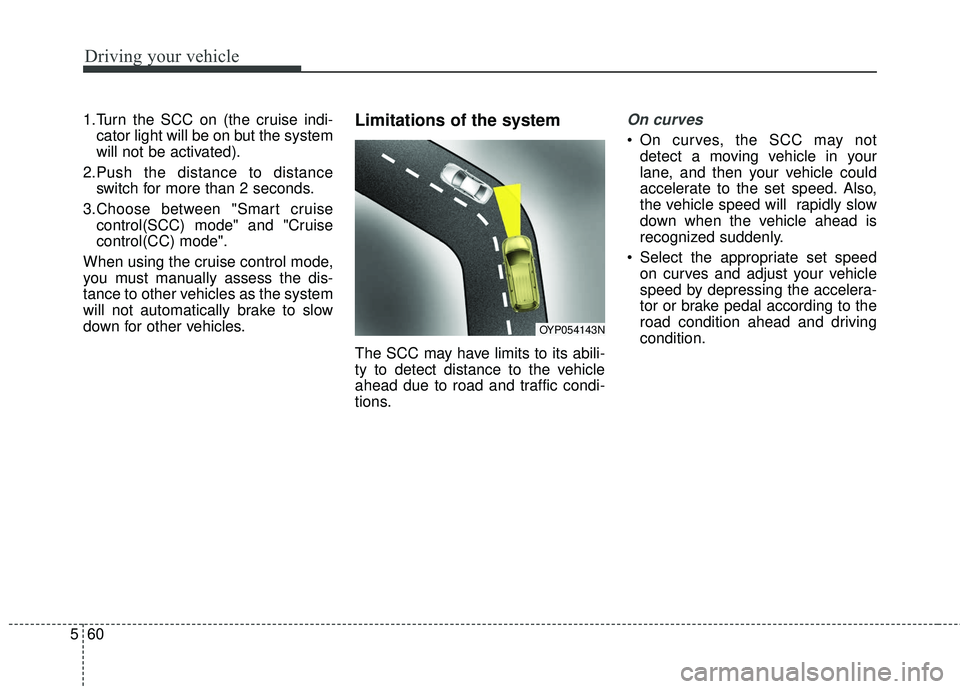
down for other vehicles.Limitations of the system
The SCC may have limits to its abili-
ty to detect distance to the vehicle
ahead due to road and traffic condi-
tions.
On curves
On curves, the SCC may not detect a moving vehicle in your
lane, and then your vehicle could
accelerate to the set speed. Also,
the vehicle speed will rapidly slow
down when the vehicle ahead is
recognized suddenly.
Select the appropriate set speed on curves and adjust your vehicle
speed by depressing the accelera-
tor or brake pedal according to the
road condition ahead and driving
condition.
OYP054143N
Page 540 of 586
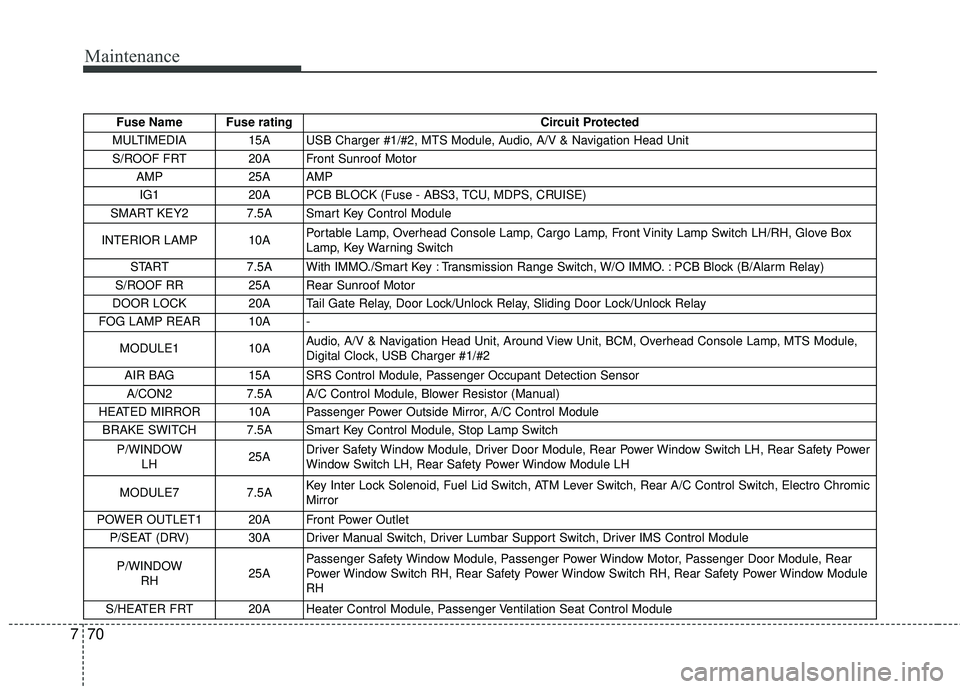
Maintenance
70
7
Fuse Name Fuse rating Circuit Protected
MULTIMEDIA 15A USB Charger #1/#2, MTS Module, Audio, A/V & Navigation Head Unit S/ROOF FRT 20A Front Sunroof Motor AMP 25A AMP IG1 20A PCB BLOCK (Fuse - ABS3, TCU, MDPS, CRUISE)
SMART KEY2 7.5A Smart Key Control Module
INTERIOR LAMP 10A Portable Lamp, Overhead Console Lamp, Cargo Lamp, Front Vinity Lamp Switch LH/RH, Glove Box
Lamp, Key Warning Switch
START 7.5A With IMMO./Smart Key : Transmission Range Switch, W/O IMMO. : PCB Block (B/Alarm Relay)
S/ROOF RR 25A Rear Sunroof Motor
DOOR LOCK 20A Tail Gate Relay, Door Lock/Unlock Relay, Sliding Door Lock/Unlock Relay
FOG LAMP REAR 10A -
MODULE1 10A Audio, A/V & Navigation Head Unit, Around View Unit, BCM, Overhead Console Lamp, MTS Module,
Digital Clock, USB Charger #1/#2
AIR BAG 15A SRS Control Module, Passenger Occupant Detection Sensor
A/CON2 7.5A A/C Control Module, Blower Resistor (Manual)
HEATED MIRROR 10A Passenger Power Outside Mirror, A/C Control Module BRAKE SWITCH 7.5A Smart Key Control Module, Stop Lamp Switch
P/WINDOW LH 25ADriver Safety Window Module, Driver Door Module, Rear Power Window Switch LH, Rear Safety Power
Window Switch LH, Rear Safety Power Window Module LH
MODULE7 7.5A Key Inter Lock Solenoid, Fuel Lid Switch, ATM Lever Switch, Rear A/C Control Switch, Electro Chromic
Mirror
POWER OUTLET1 20A Front Power Outlet P/SEAT (DRV) 30A Driver Manual Switch, Driver Lumbar Support Switch, Driver IMS Control Module
P/WINDOW RH 25APassenger Safety Window Module, Passenger Power Window Motor, Passenger Door Module, Rear
Power Window Switch RH, Rear Safety Power Window Switch RH, Rear Safety Power Window Module
RH
S/HEATER FRT 20A Heater Control Module, Passenger Ventilation Seat Control Module
Page 543 of 586
773
Maintenance
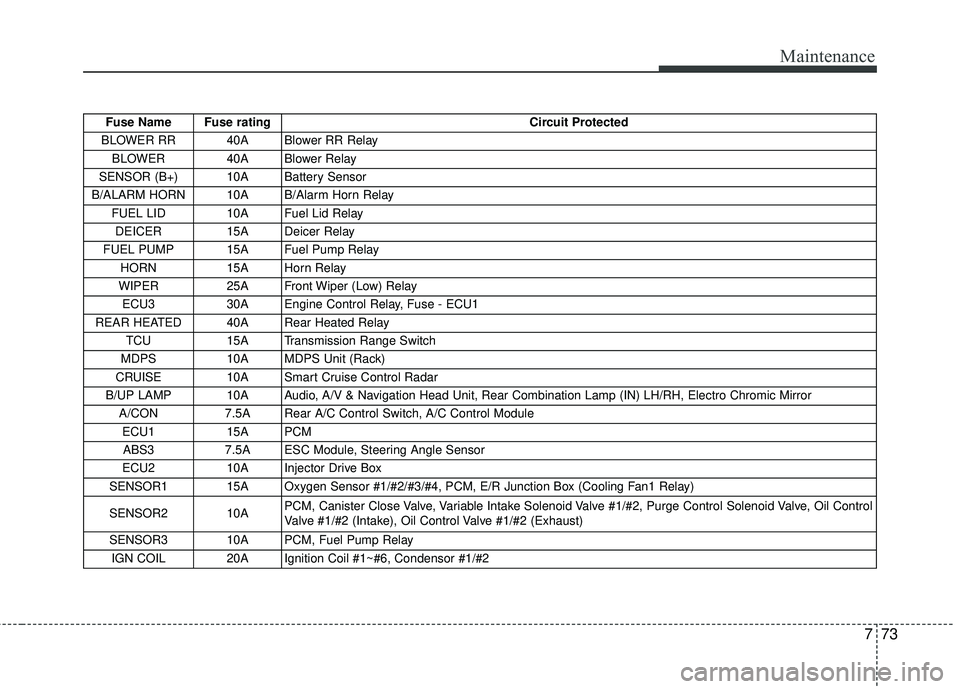
Fuse Name Fuse ratingCircuit Protected
BLOWER RR 40A Blower RR Relay BLOWER 40A Blower Relay
SENSOR (B+) 10A Battery Sensor
B/ALARM HORN 10A B/Alarm Horn Relay FUEL LID 10A Fuel Lid Relay DEICER 15A Deicer Relay
FUEL PUMP 15A Fuel Pump Relay HORN 15A Horn Relay
WIPER 25A Front Wiper (Low) Relay
ECU3 30A Engine Control Relay, Fuse - ECU1
REAR HEATED 40A Rear Heated Relay TCU 15A Transmission Range Switch
MDPS 10A MDPS Unit (Rack)
CRUISE 10A Smart Cruise Control Radar
B/UP LAMP 10A Audio, A/V & Navigation Head Unit, Rear Combination Lamp (IN) LH/RH, Electro Chromic \
Mirror A/CON 7.5A Rear A/C Control Switch, A/C Control Module
ECU1 15A PCM ABS3 7.5A ESC Module, Steering Angle Sensor
ECU2 10A Injector Drive Box
SENSOR1 15A Oxygen Sensor #1/#2/#3/#4, PCM, E/R Junction Box (Cooling Fan1 Relay)
SENSOR2 10A PCM, Canister Close Valve, Variable Intake Solenoid Valve #1/#2, Purge Control Solenoid Valve, Oil Control
Valve #1/#2 (Intake), Oil Control Valve #1/#2 (Exhaust)
SENSOR3 10A PCM, Fuel Pump Relay IGN COIL 20A Ignition Coil #1~#6, Condensor #1/#2