ignition KIA SEDONA 2017 Repair Manual
[x] Cancel search | Manufacturer: KIA, Model Year: 2017, Model line: SEDONA, Model: KIA SEDONA 2017Pages: 586, PDF Size: 14.12 MB
Page 231 of 586
4129
Features of your vehicle
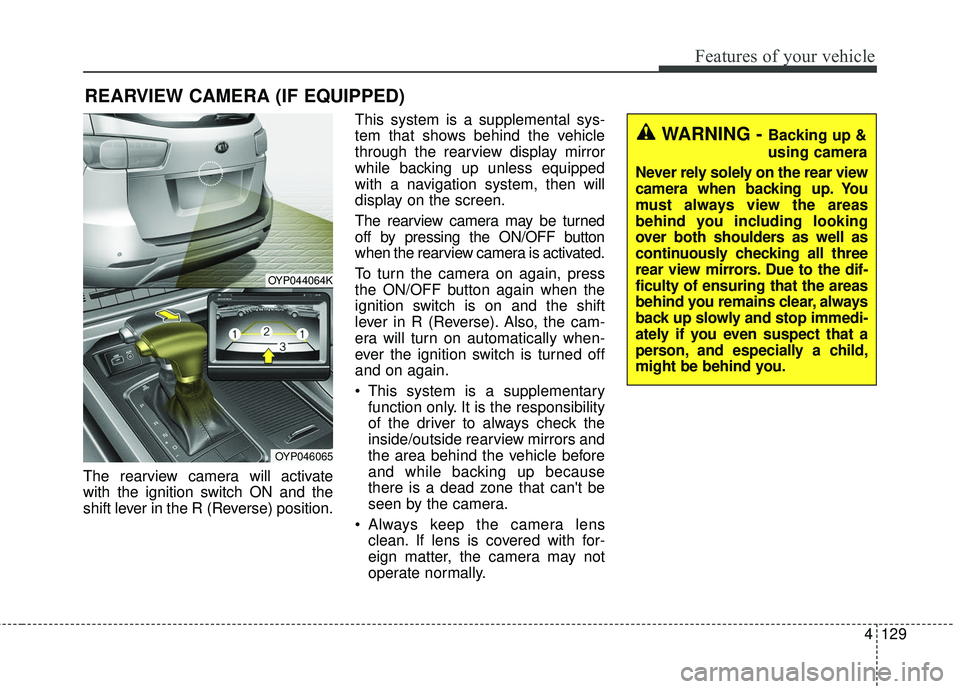
The rearview camera will activate
with the ignition switch ON and the
shift lever in the R (Reverse) position.This system is a supplemental sys-
tem that shows behind the vehicle
through the rearview display mirror
while backing up unless equipped
with a navigation system, then will
display on the screen.
The rearview camera may be turned
off by pressing the ON/OFF button
when the rearview camera is activated.
To turn the camera on again, press
the ON/OFF button again when the
ignition switch is on and the shift
lever in R (Reverse). Also, the cam-
era will turn on automatically when-
ever the ignition switch is turned off
and on again.
This system is a supplementary
function only. It is the responsibility
of the driver to always check the
inside/outside rearview mirrors and
the area behind the vehicle before
and while backing up because
there is a dead zone that can't be
seen by the camera.
Always keep the camera lens clean. If lens is covered with for-
eign matter, the camera may not
operate normally.
REARVIEW CAMERA (IF EQUIPPED)
OYP044064K
OYP046065
WARNING - Backing up &
using camera
Never rely solely on the rear view
camera when backing up. You
must always view the areas
behind you including looking
over both shoulders as well as
continuously checking all three
rear view mirrors. Due to the dif-
ficulty of ensuring that the areas
behind you remains clear, always
back up slowly and stop immedi-
ately if you even suspect that a
person, and especially a child,
might be behind you.
Page 233 of 586
4131
Features of your vehicle
Battery saver function
The purpose of this feature is toprevent the battery from being dis-
charged if the lights are left in the
ON position. The system automati-
cally shuts off the parking lights 30
seconds after the ignition key is
removed and the driver’s door is
opened and closed.
With this feature, the parking lights will turn off automatically if the driver
parks on the side of the road at night
and opens the driver’s side door.
If necessary, to keep the parking
lights on when the ignition key is
removed, perform the following :
1) Open the driver-side door.
2) Turn the parking lights OFF and ON again using the light switch
on the steering column.
Headlight escort function
If you turn the ignition switch to the
ACC or OFF position with the head-
lights ON, the headlights remain on
for about 5 minutes. However, if the
driver's door is opened and closed,
the headlights are turned off after 15
seconds.
The headlights can be turned off by
pressing the lock button on the trans-
mitter (or smart key) twice or turning
the light switch to the OFF position.
If the driver gets out of the vehicle
through other doors (except driver’s
door), the battery saver function
does not operate and the headlight
escort function does not turn off
automatically. Therefore, It causes
the battery to be discharged. In this
case, make sure to turn off the lamp
before getting out of the vehicle.
Daytime running light
Daytime Running Lights (DRL) can
make it easier for others to see the
front of your vehicle during the day.
DRL can be helpful in many different
driving conditions, and it is especially
helpful after dawn and before sunset.
The DRL system will turn OFF when :
The headlights are ON.
Engine stops.
The parking brake is applied.
LIGHTING
Page 234 of 586
Features of your vehicle
132
4
Lighting control
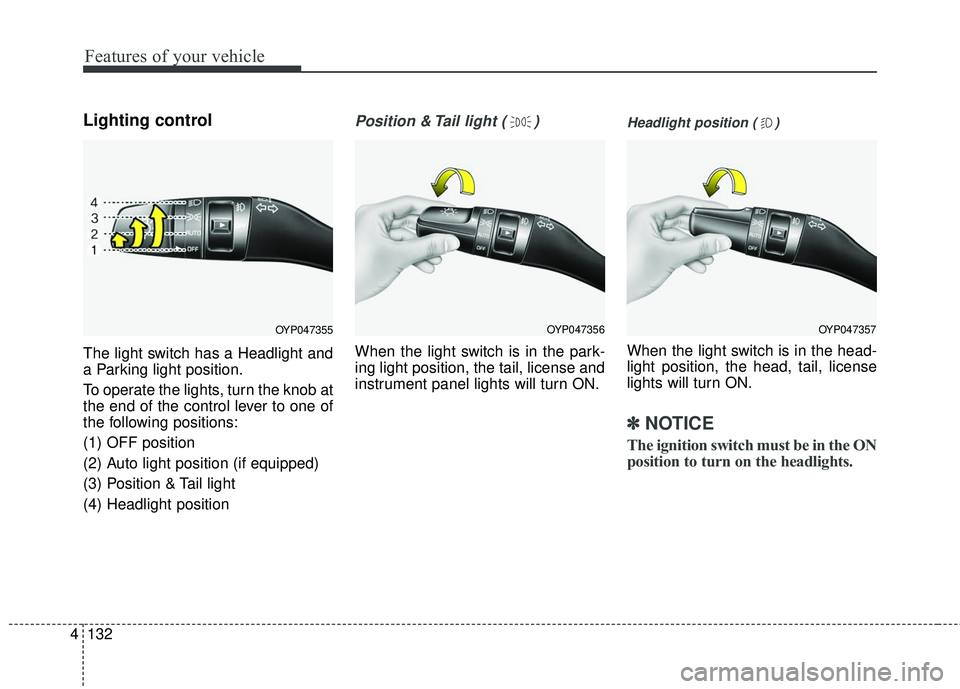
The light switch has a Headlight and
a Parking light position.
To operate the lights, turn the knob at
the end of the control lever to one of
the following positions:
(1) OFF position
(2) Auto light position (if equipped)
(3) Position & Tail light
(4) Headlight position
Position & Tail light ( )
When the light switch is in the park-
ing light position, the tail, license and
instrument panel lights will turn ON.
Headlight position ( )
When the light switch is in the head-
light position, the head, tail, license
lights will turn ON.
✽ ✽
NOTICE
The ignition switch must be in the ON
position to turn on the headlights.
OYP047356OYP047357OYP047355
Page 238 of 586
Features of your vehicle
136
4
Do not place any accessories,
stickers or tint the windshield.
Have the windshield glass replaced from an authorized dealer.
Do not remove or impact related parts of the High Beam system.
Be careful that water doesn’t get into the High Beam unit.
Do not place objects on the dash- board that reflects light such as
mirrors, white paper, etc. The sys-
tem may malfunction if sunlight is
reflected.
At times, the High Beam system may not work properly, always
check the road conditions for your
safety. When the system does not
operate normally, manually change
between the high beam and low
beam.Turn signals and lane change
signals
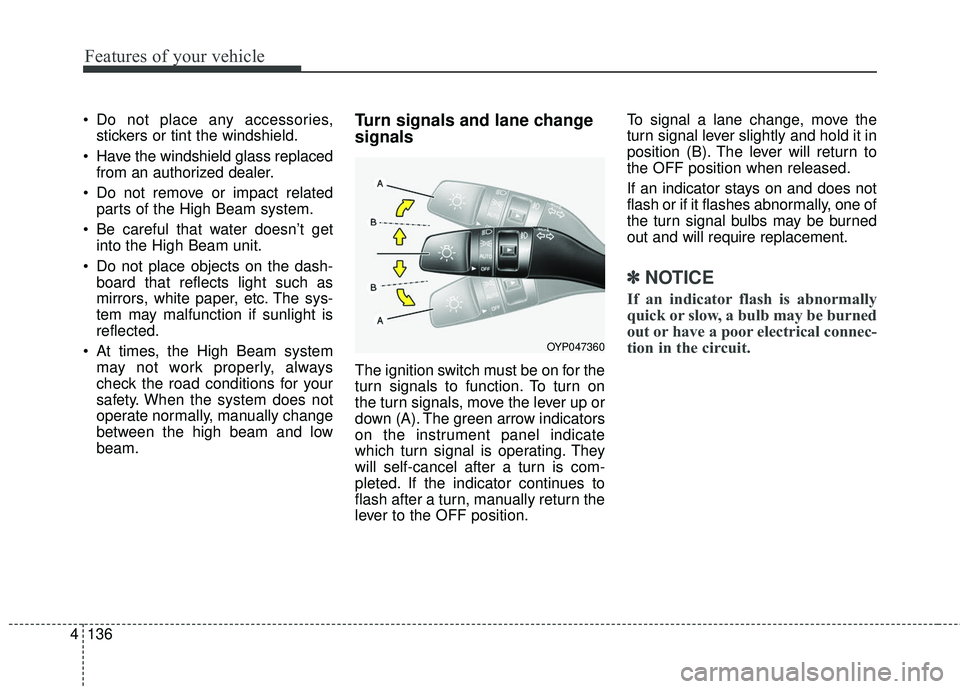
The ignition switch must be on for the
turn signals to function. To turn on
the turn signals, move the lever up or
down (A). The green arrow indicators
on the instrument panel indicate
which turn signal is operating. They
will self-cancel after a turn is com-
pleted. If the indicator continues to
flash after a turn, manually return the
lever to the OFF position. To signal a lane change, move the
turn signal lever slightly and hold it in
position (B). The lever will return to
the OFF position when released.
If an indicator stays on and does not
flash or if it flashes abnormally, one of
the turn signal bulbs may be burned
out and will require replacement.
✽ ✽
NOTICE
If an indicator flash is abnormally
quick or slow, a bulb may be burned
out or have a poor electrical connec-
tion in the circuit.
OYP047360
Page 242 of 586
Features of your vehicle
140
4
Rear window wiper and wash-
er switch
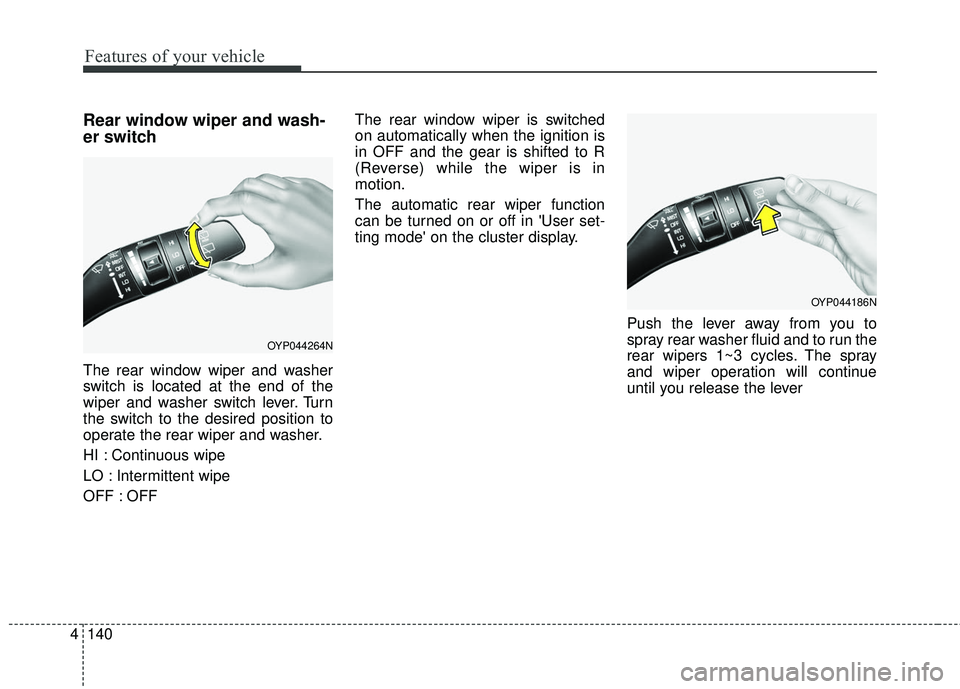
The rear window wiper and washer
switch is located at the end of the
wiper and washer switch lever. Turn
the switch to the desired position to
operate the rear wiper and washer.
HI : Continuous wipe
LO : Intermittent wipe
OFF : OFF The rear window wiper is switched
on automatically when the ignition is
in OFF and the gear is shifted to R
(Reverse) while the wiper is in
motion.
The automatic rear wiper function
can be turned on or off in 'User set-
ting mode' on the cluster display.
Push the lever away from you to
spray rear washer fluid and to run the
rear wipers 1~3 cycles. The spray
and wiper operation will continue
until you release the lever
OYP044264N
OYP044186N
Page 243 of 586
4141
Features of your vehicle
Do not use the interior lights for
extended periods when the engine is
not running.
It may cause battery discharge.Automatic turn off function
(if equipped)
The interior lights automatically turn
off approximately 20 minutes after
the ignition switch is turned off, if the
lights are in the ON position.
If your vehicle is equipped with the
theft alarm system, the interior lights
automatically turn off approximately
3 seconds after the system in armed
stage.
Room lamp
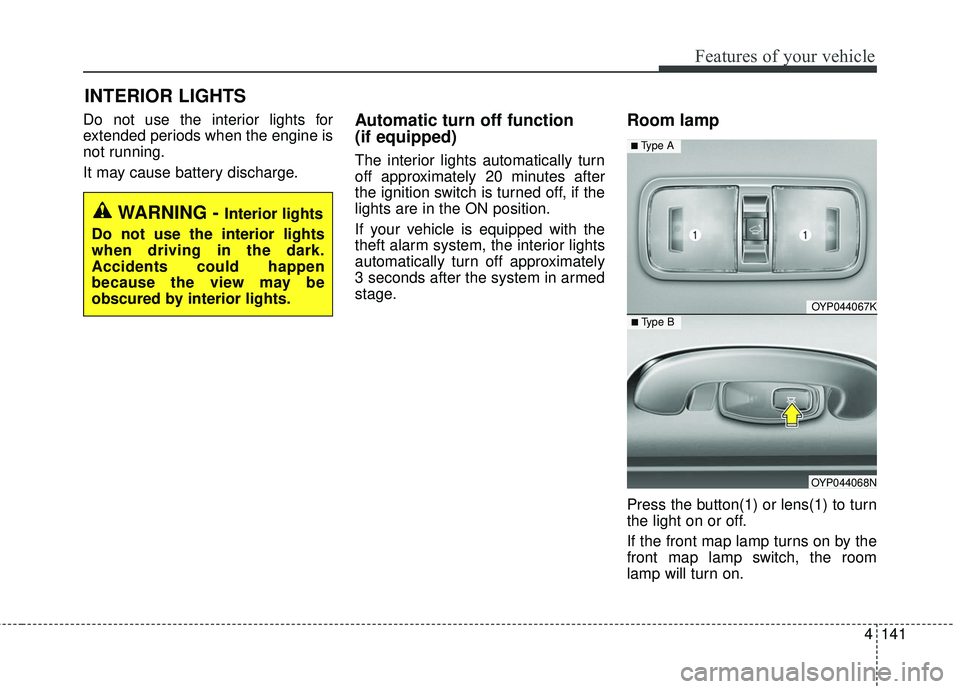
Press the button(1) or lens(1) to turn
the light on or off.
If the front map lamp turns on by the
front map lamp switch, the room
lamp will turn on.
INTERIOR LIGHTS
WARNING - Interior lights
Do not use the interior lights
when driving in the dark.
Accidents could happen
because the view may be
obscured by interior lights.
OYP044067K
OYP044068N
■ Type B
■ Type A
Page 244 of 586
Features of your vehicle
142
4
Map lamp
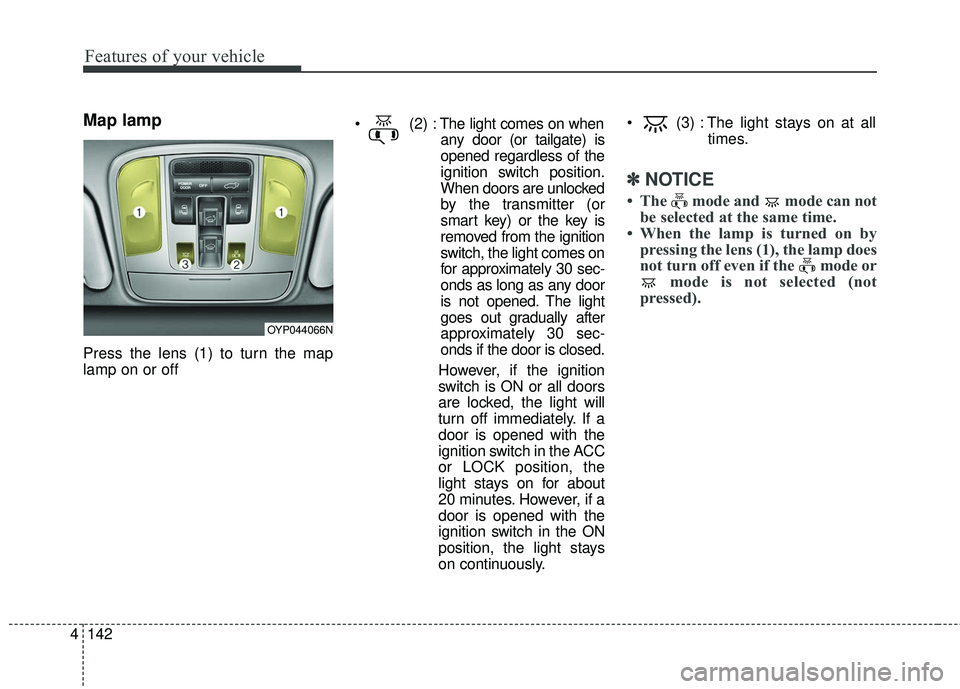
Press the lens (1) to turn the map
lamp on or off
The light comes on when
any door (or tailgate) is
opened regardless of the
ignition switch position.
When doors are unlocked
by the transmitter (or
smart key) or the key is
removed from the ignition
switch, the light comes on
for approximately 30 sec-
onds as long as any door
is not opened. The light
goes out gradually after
approximately 30 sec-
onds if the door is closed.
However, if the ignition
switch is ON or all doors
are locked, the light will
turn off immediately. If a
door is opened with the
ignition switch in the ACC
or LOCK position, the
light stays on for about
20 minutes. However, if a
door is opened with the
ignition switch in the ON
position, the light stays
on continuously. (3) : The light stays on at all
times.
✽ ✽NOTICE
• The mode and mode can not
be selected at the same time.
• When the lamp is turned on by pressing the lens (1), the lamp does
not turn off even if the mode or mode is not selected (not
pressed).
OYP044066N
Page 245 of 586
4143
Features of your vehicle
Luggage lamp (if equipped)
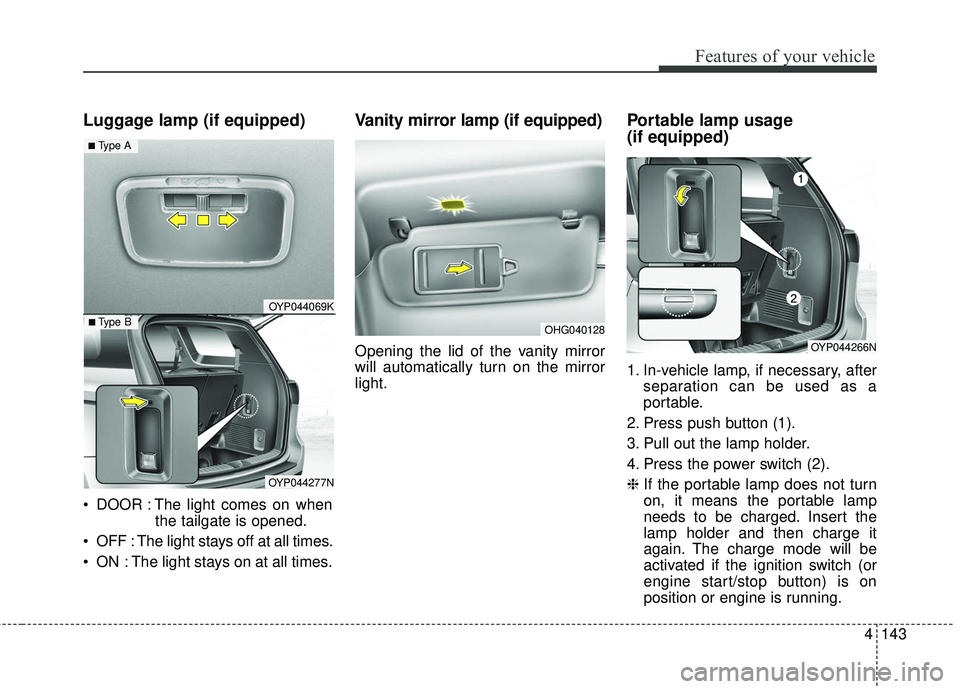
DOOR : The light comes on whenthe tailgate is opened.
OFF : The light stays off at all times.
ON : The light stays on at all times.
Vanity mirror lamp (if equipped)
Opening the lid of the vanity mirror
will automatically turn on the mirror
light.
Portable lamp usage
(if equipped)
1. In-vehicle lamp, if necessary, after separation can be used as a
portable.
2. Press push button (1).
3. Pull out the lamp holder.
4. Press the power switch (2).
❈ If the portable lamp does not turn
on, it means the portable lamp
needs to be charged. Insert the
lamp holder and then charge it
again. The charge mode will be
activated if the ignition switch (or
engine start/stop button) is on
position or engine is running.
OHG040128
OYP044069K
OYP044277N
■ Type B
■ Type A
OYP044266N
Page 247 of 586
4145
Features of your vehicle
If you want to defrost and defog the
front windshield, refer to “Windshield
defrosting and defogging” in this sec-
tion.
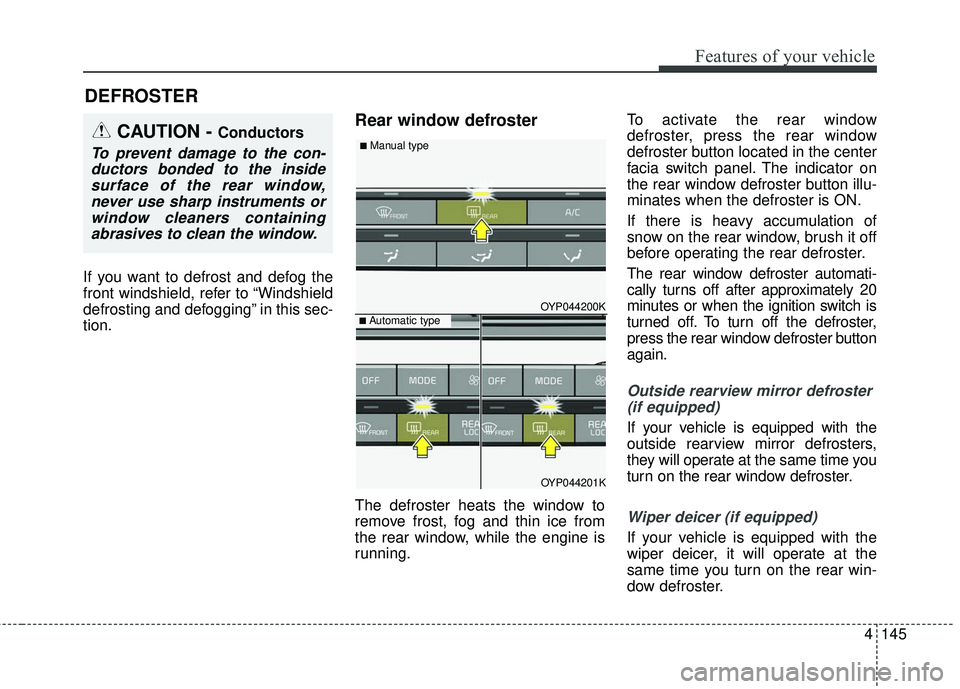
Rear window defroster
The defroster heats the window to
remove frost, fog and thin ice from
the rear window, while the engine is
running.To activate the rear window
defroster, press the rear window
defroster button located in the center
facia switch panel. The indicator on
the rear window defroster button illu-
minates when the defroster is ON.
If there is heavy accumulation of
snow on the rear window, brush it off
before operating the rear defroster.
The rear window defroster automati-
cally turns off after approximately 20
minutes or when the ignition switch is
turned off. To turn off the defroster,
press the rear window defroster button
again.
Outside rearview mirror defroster
(if equipped)
If your vehicle is equipped with the
outside rearview mirror defrosters,
they will operate at the same time you
turn on the rear window defroster.
Wiper deicer (if equipped)
If your vehicle is equipped with the
wiper deicer, it will operate at the
same time you turn on the rear win-
dow defroster.
DEFROSTER
CAUTION - Conductors
To prevent damage to the con-ductors bonded to the insidesurface of the rear window,never use sharp instruments orwindow cleaners containingabrasives to clean the window.
OYP044200K
OYP044201K
■ Automatic type
■ Manual type
Page 253 of 586
4151
Features of your vehicle
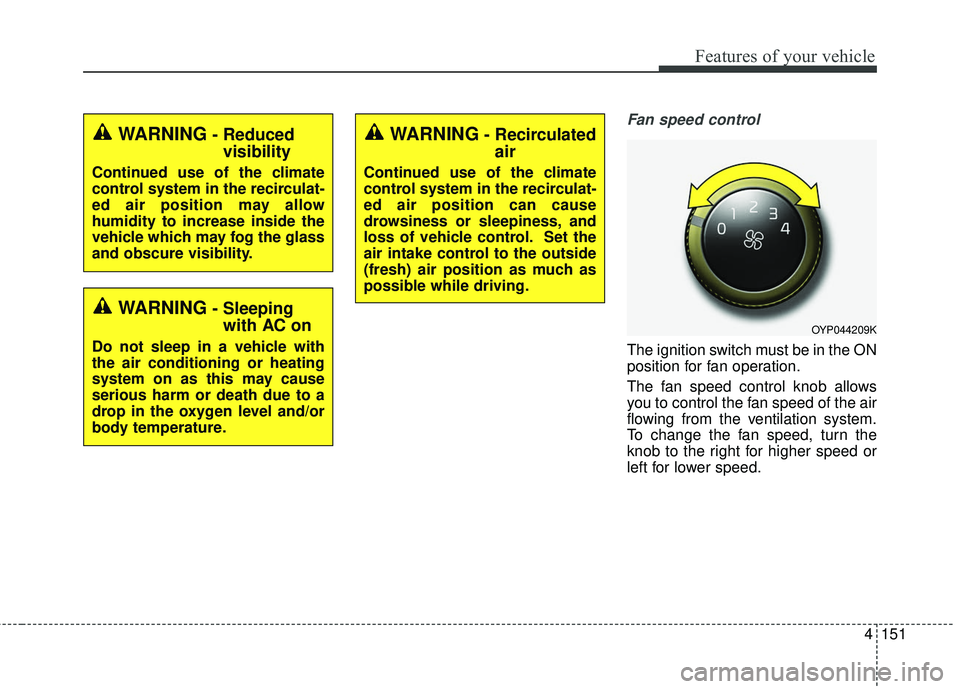
Fan speed control
The ignition switch must be in the ON
position for fan operation.
The fan speed control knob allows
you to control the fan speed of the air
flowing from the ventilation system.
To change the fan speed, turn the
knob to the right for higher speed or
left for lower speed.
WARNING- Reducedvisibility
Continued use of the climate
control system in the recirculat-
ed air position may allow
humidity to increase inside the
vehicle which may fog the glass
and obscure visibility.
WARNING- Sleepingwith AC on
Do not sleep in a vehicle with
the air conditioning or heating
system on as this may cause
serious harm or death due to a
drop in the oxygen level and/or
body temperature.
WARNING- Recirculatedair
Continued use of the climate
control system in the recirculat-
ed air position can cause
drowsiness or sleepiness, and
loss of vehicle control. Set the
air intake control to the outside
(fresh) air position as much as
possible while driving.
OYP044209K