radio KIA SEDONA 2018 User Guide
[x] Cancel search | Manufacturer: KIA, Model Year: 2018, Model line: SEDONA, Model: KIA SEDONA 2018Pages: 586, PDF Size: 14.1 MB
Page 315 of 586
213
4
Features of your vehicle
Radio
You can listen to FM, AM and
SiriusXM radio.
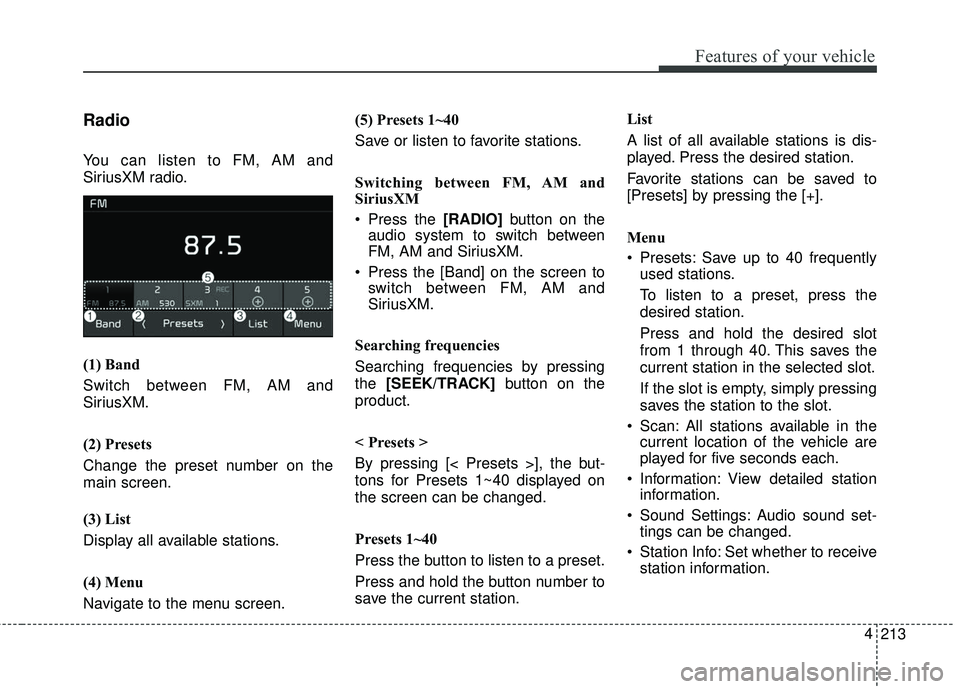
(1) Band
Switch between FM, AM and
SiriusXM.
(2) Presets
Change the preset number on the
main screen.
(3) List
Display all available stations.
(4) Menu
Navigate to the menu screen. (5) Presets 1~40
Save or listen to favorite stations.
Switching between FM, AM and
SiriusXM
Press the [RADIO]
button on the
audio system to switch between
FM, AM and SiriusXM.
Press the [Band] on the screen to switch between FM, AM and
SiriusXM.
Searching frequencies
Searching frequencies by pressing
the [SEEK/TRACK] button on the
product.
< Presets >
By pressing [< Presets >], the but-
tons for Presets 1~40 displayed on
the screen can be changed.
Presets 1~40
Press the button to listen to a preset.
Press and hold the button number to
save the current station. List
A list of all available stations is dis-
played. Press the desired station.
Favorite stations can be saved to
[Presets] by pressing the [+].
Menu
Presets: Save up to 40 frequently
used stations.
To listen to a preset, press the
desired station.
Press and hold the desired slot
from 1 through 40. This saves the
current station in the selected slot.
If the slot is empty, simply pressing
saves the station to the slot.
Scan: All stations available in the current location of the vehicle are
played for five seconds each.
Information: View detailed station information.
Sound Settings: Audio sound set- tings can be changed.
Station Info: Set whether to receive station information.
Page 316 of 586
4 214
Features of your vehicle
SiriusXM
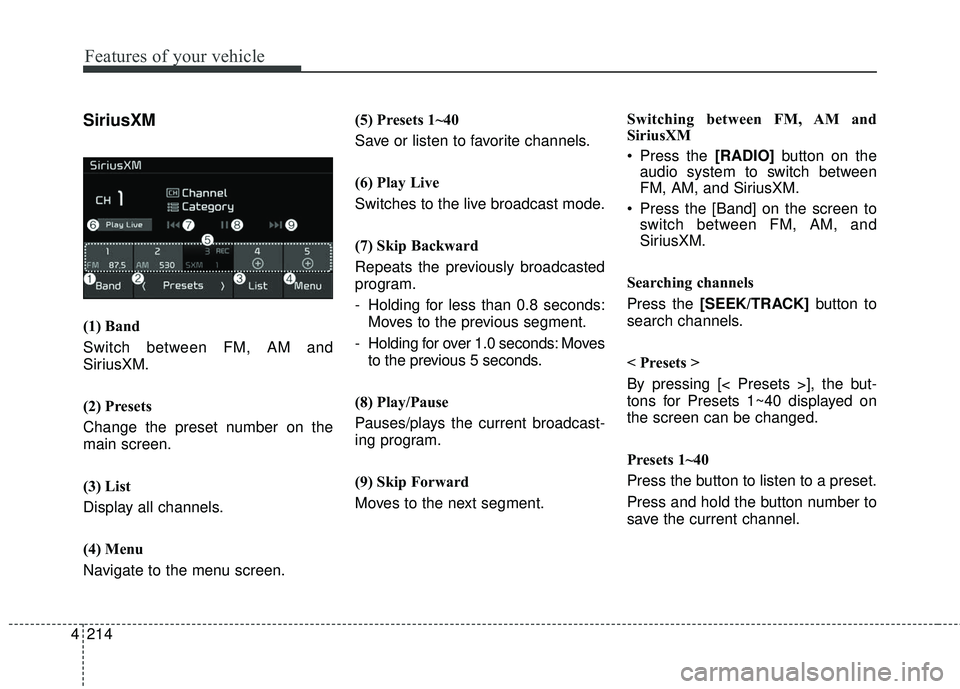
(1) Band
Switch between FM, AM and
SiriusXM.
(2) Presets
Change the preset number on the
main screen.
(3) List
Display all channels.
(4) Menu
Navigate to the menu screen.(5) Presets 1~40
Save or listen to favorite channels.
(6) Play Live
Switches to the live broadcast mode.
(7) Skip Backward
Repeats the previously broadcasted
program.
- Holding for less than 0.8 seconds:
Moves to the previous segment.
- Holding for over 1.0 seconds: Moves to the previous 5 seconds.
(8) Play/Pause
Pauses/plays the current broadcast-
ing program.
(9) Skip Forward
Moves to the next segment. Switching between FM, AM and
SiriusXM
Press the [RADIO]
button on the
audio system to switch between
FM, AM, and SiriusXM.
Press the [Band] on the screen to switch between FM, AM, and
SiriusXM.
Searching channels
Press the [SEEK/TRACK] button to
search channels.
< Presets >
By pressing [< Presets >], the but-
tons for Presets 1~40 displayed on
the screen can be changed.
Presets 1~40
Press the button to listen to a preset.
Press and hold the button number to
save the current channel.
Page 341 of 586
239
4
Features of your vehicle
Siri
✽ ✽
NOTICE - Using Siri
• Android device is not supported to
use Siri.
• If you want to use Siri, you have to connect your iOS device to multi-
media system through Bluetooth
®
Wireless Technology. (Please
check whether your iOS device
supports Siri and turning Siri On)
• If the iOS version is changed, the functions and response may be dif-
ferent according to the iOS device
and the latest version.
• Siri automatically stops in the fol- lowing events.
1) Outgoing and incoming phone calls.
2) Media (USB, etc.) is connected. (Siri mode is maintained when
iPod
®s are connected)
3) Rear camera is activated. (option)
4) Vehicle is started or engine is turned off. (Continued)(Continued)
5) Screen transition buttons, such as RADIO or MEDIA, are
selected.
6) When a pop-up message is dis- played on the screen due to
accidental execution of Siri.
• The microphone is located above the driver’s seat. To ensure proper
Siri, state your voice while main-
taining proper driving posture.
Starting Siri
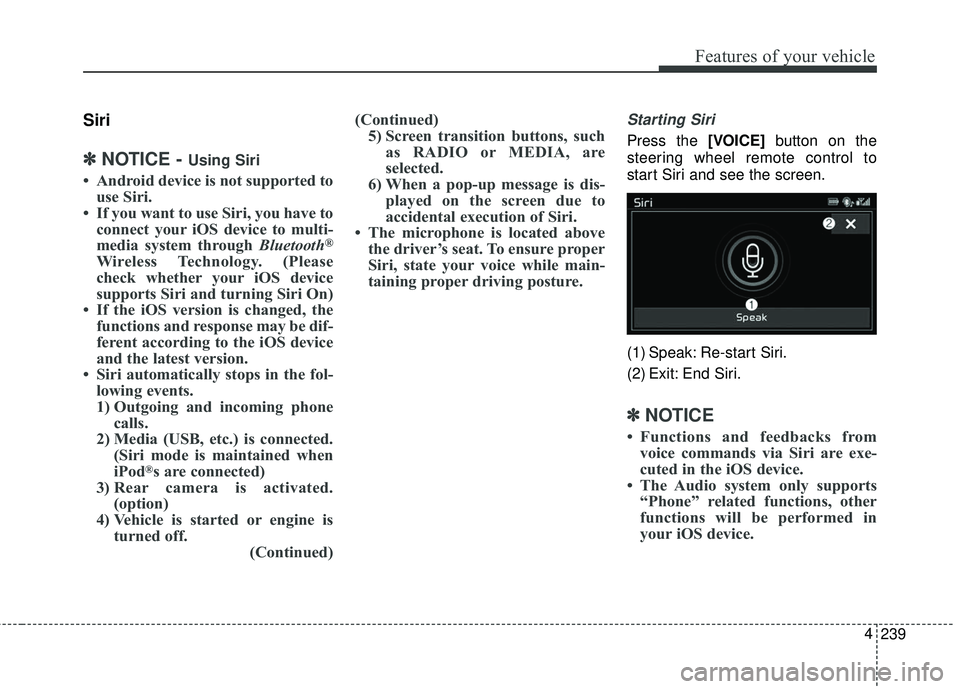
Press the [VOICE] button on the
steering wheel remote control to
start Siri and see the screen.
(1) Speak: Re-start Siri.
(2) Exit: End Siri.
✽ ✽ NOTICE
• Functions and feedbacks from
voice commands via Siri are exe-
cuted in the iOS device.
• The Audio system only supports “Phone” related functions, other
functions will be performed in
your iOS device.
Page 344 of 586
4 242
Features of your vehicle
IC
This device complies with Industry Canada’s licence-exempt RSSs.
Operation is subject to the following two conditions:
(1) This device may not cause interference; and
(2) This device must accept any interference, including interference that may cause undesired operation of the device.
Le présent appareil est conforme aux CNR d'Industrie Canada applicables aux appareils radio exempts de licence.
L'exploitation est autorisée aux deux conditions suivantes: (1) l'appareil ne doit pas produire de brouillage, et
(2) l'utilisateur de l'appareil doit accepter tout brouillage radioélectrique subi, même si le brouillage est susceptible
d'en compromettre le fonctionnement.
Declaration of Conformity
Page 578 of 586
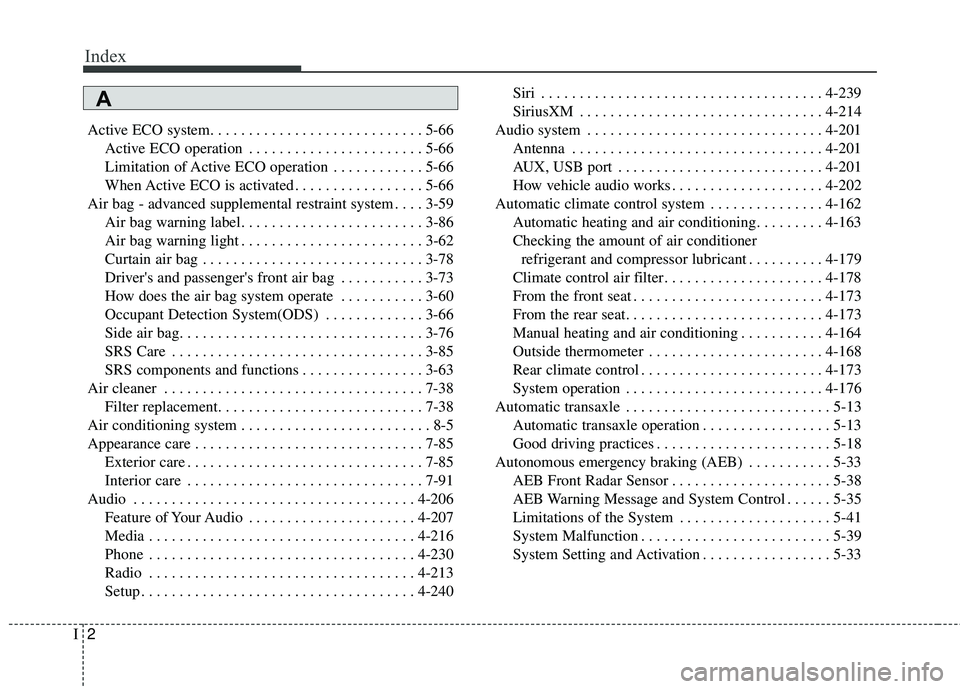
Index
2I
Active ECO system. . . . . . . . . . . . . . . . . . . . . . . . . . . . 5-66Active ECO operation . . . . . . . . . . . . . . . . . . . . . . . 5-66
Limitation of Active ECO operation . . . . . . . . . . . . 5-66
When Active ECO is activated . . . . . . . . . . . . . . . . . 5-66
Air bag - advanced supplemental restraint system . . . . 3-59 Air bag warning label. . . . . . . . . . . . . . . . . . . . . . . . 3-86
Air bag warning light . . . . . . . . . . . . . . . . . . . . . . . . 3-62
Curtain air bag . . . . . . . . . . . . . . . . . . . . . . . . . . . . . 3-78
Driver's and passenger's front air bag . . . . . . . . . . . 3-73
How does the air bag system operate . . . . . . . . . . . 3-60
Occupant Detection System(ODS) . . . . . . . . . . . . . 3-66
Side air bag. . . . . . . . . . . . . . . . . . . . . . . . . . . . . . . . 3-76
SRS Care . . . . . . . . . . . . . . . . . . . . . . . . . . . . . . . . . 3-85
SRS components and functions . . . . . . . . . . . . . . . . 3-63
Air cleaner . . . . . . . . . . . . . . . . . . . . . . . . . . . . . . . . . . 7-38\
Filter replacement. . . . . . . . . . . . . . . . . . . . . . . . . . . 7-38
Air conditioning system . . . . . . . . . . . . . . . . . . . . . . . . . 8-5
Appearance care . . . . . . . . . . . . . . . . . . . . . . . . . . . . . . 7-85 Exterior care . . . . . . . . . . . . . . . . . . . . . . . . . . . . . . . 7-85
Interior care . . . . . . . . . . . . . . . . . . . . . . . . . . . . . . . 7-91
Audio . . . . . . . . . . . . . . . . . . . . . . . . . . . . . . . . . . . . \
. 4-206 Feature of Your Audio . . . . . . . . . . . . . . . . . . . . . . 4-207
Media . . . . . . . . . . . . . . . . . . . . . . . . . . . . . . . . . . . 4-\
216
Phone . . . . . . . . . . . . . . . . . . . . . . . . . . . . . . . . . . . 4-\
230
Radio . . . . . . . . . . . . . . . . . . . . . . . . . . . . . . . . . . . 4-\
213
Setup . . . . . . . . . . . . . . . . . . . . . . . . . . . . . . . . . . . . \
4-240 Siri . . . . . . . . . . . . . . . . . . . . . . . . . . . . . . . . . . . . \
. 4-239
SiriusXM . . . . . . . . . . . . . . . . . . . . . . . . . . . . . . . . 4-214
Audio system . . . . . . . . . . . . . . . . . . . . . . . . . . . . . . . 4-201 Antenna . . . . . . . . . . . . . . . . . . . . . . . . . . . . . . . . . 4-201
AUX, USB port . . . . . . . . . . . . . . . . . . . . . . . . . . . 4-201
How vehicle audio works . . . . . . . . . . . . . . . . . . . . 4-202
Automatic climate control system . . . . . . . . . . . . . . . 4-162 Automatic heating and air conditioning. . . . . . . . . 4-163
Checking the amount of air conditionerrefrigerant and compressor lubricant . . . . . . . . . . 4-179
Climate control air filter. . . . . . . . . . . . . . . . . . . . . 4-178
From the front seat . . . . . . . . . . . . . . . . . . . . . . . . . 4-173
From the rear seat. . . . . . . . . . . . . . . . . . . . . . . . . . 4-173
Manual heating and air conditioning . . . . . . . . . . . 4-164
Outside thermometer . . . . . . . . . . . . . . . . . . . . . . . 4-168
Rear climate control . . . . . . . . . . . . . . . . . . . . . . . . 4-173
System operation . . . . . . . . . . . . . . . . . . . . . . . . . . 4-176
Automatic transaxle . . . . . . . . . . . . . . . . . . . . . . . . . . . 5-13 Automatic transaxle operation . . . . . . . . . . . . . . . . . 5-13
Good driving practices . . . . . . . . . . . . . . . . . . . . . . . 5-18
Autonomous emergency braking (AEB) . . . . . . . . . . . 5-33 AEB Front Radar Sensor . . . . . . . . . . . . . . . . . . . . . 5-38
AEB Warning Message and System Control . . . . . . 5-35
Limitations of the System . . . . . . . . . . . . . . . . . . . . 5-41
System Malfunction . . . . . . . . . . . . . . . . . . . . . . . . . 5-39
System Setting and Activation . . . . . . . . . . . . . . . . . 5-33
A