steering KIA SEDONA 2018 Owner's Manual
[x] Cancel search | Manufacturer: KIA, Model Year: 2018, Model line: SEDONA, Model: KIA SEDONA 2018Pages: 586, PDF Size: 14.1 MB
Page 194 of 586
Features of your vehicle
92
4
Master Warning Mode
• This warning light informs the driv-
er the following situations
- Low washer fluid (if equipped)
- Blind Spot Detection (BSD) mal-function (if equipped)
- Lane Departure warning system (LDWS) malfunction (if equipped)
- Smart cruise control system (SCC) malfunction (if equipped)
- Service reminder (if equipped)
The Master Warning Light illumi-
nates when more than one of the
above warning situations occur. At
this time, the LCD Modes Icon will
change from ( ) to ( ).
If the warning situation is solved, the
master warning light will be turned off
and the LCD Modes Icon will be
changed back to its previous icon ( ).
(ex : refill the washer fluid)
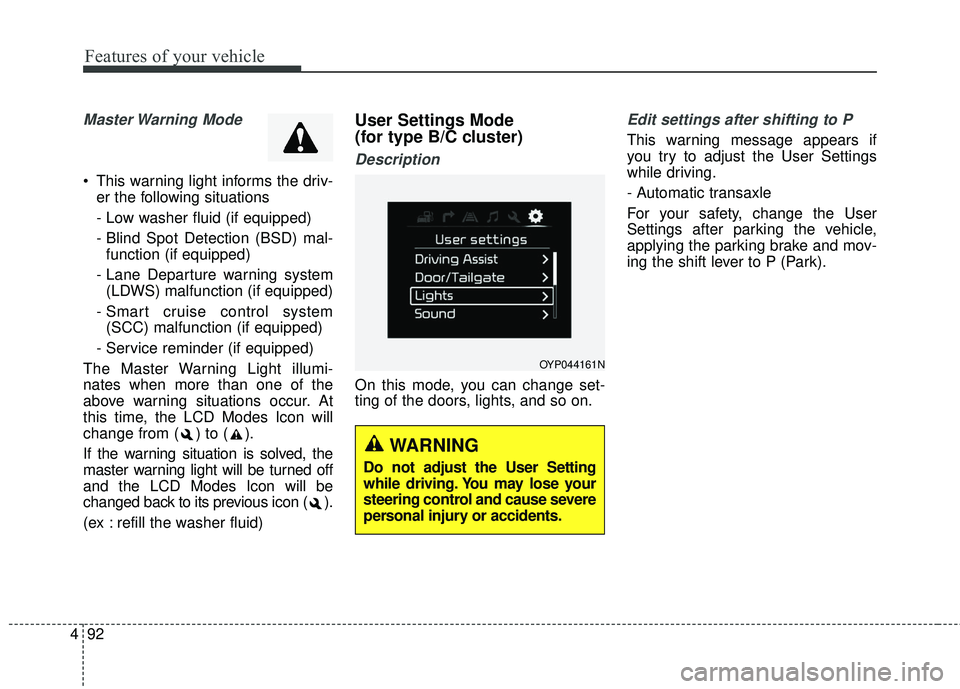
User Settings Mode
(for type B/C cluster)
Description
On this mode, you can change set-
ting of the doors, lights, and so on.
Edit settings after shifting to P
This warning message appears if
you try to adjust the User Settings
while driving.
- Automatic transaxle
For your safety, change the User
Settings after parking the vehicle,
applying the parking brake and mov-
ing the shift lever to P (Park).
OYP044161N
WARNING
Do not adjust the User Setting
while driving. You may lose your
steering control and cause severe
personal injury or accidents.
Page 196 of 586
Features of your vehicle
94
4
Lights
One touch turn signal
If this item is checked, the lane
change signals will blink 3, 5 or 7
times when the turn signal lever is
moved slightly.
Head Lamp Delay (if equipped)
If this item is checked, the headlamp
delay function will be activated.
Welcome Light (if equipped)
If this item is checked, the welcome
light function of the pocket lamp will
be activated.
Sound
Park assist system vol. (if equipped)
Adjust the Park Assist System vol-
ume. (Level 1~3).
Blind spot detection Sound (if equipped)
If this item is checked, the blind spot
detection sound function will be acti-
vated.
Welcome sound (if equipped)
If this item is checked, the welcome
sound function will be activated.
Seat / Steering
Seat easy access (if equipped)
If this item is checked, the driver’s
seat will automatically move forward
or rearward for the driver to enter or
exit the vehicle comfortably.
Steering Position
If this item is checked, the warning
function regarding the steering wheel
alignment will be activated.
Page 199 of 586
497
Features of your vehicle
Warning Messages
(for Type B and C cluaster)
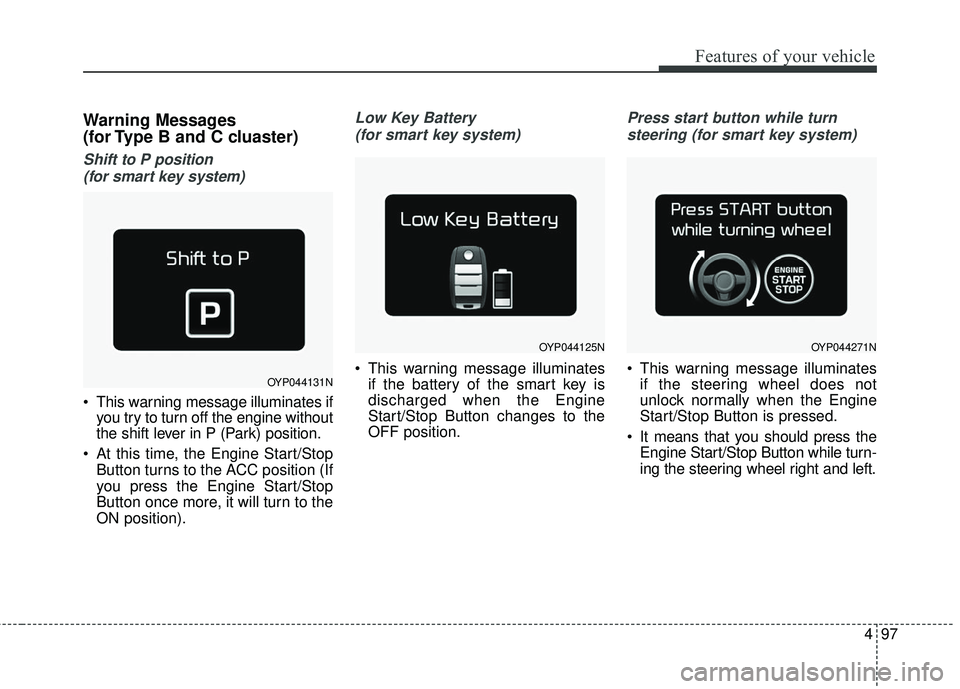
Shift to P position (for smart key system)
This warning message illuminates if you try to turn off the engine without
the shift lever in P (Park) position.
At this time, the Engine Start/Stop Button turns to the ACC position (If
you press the Engine Start/Stop
Button once more, it will turn to the
ON position).
Low Key Battery
(for smart key system)
This warning message illuminates if the battery of the smart key is
discharged when the Engine
Start/Stop Button changes to the
OFF position.
Press start button while turn
steering (for smart key system)
This warning message illuminates if the steering wheel does not
unlock normally when the Engine
Start/Stop Button is pressed.
It means that you should press the Engine Start/Stop Button while turn-
ing the steering wheel right and left.OYP044131N
OYP044125NOYP044271N
Page 203 of 586
4101
Features of your vehicle
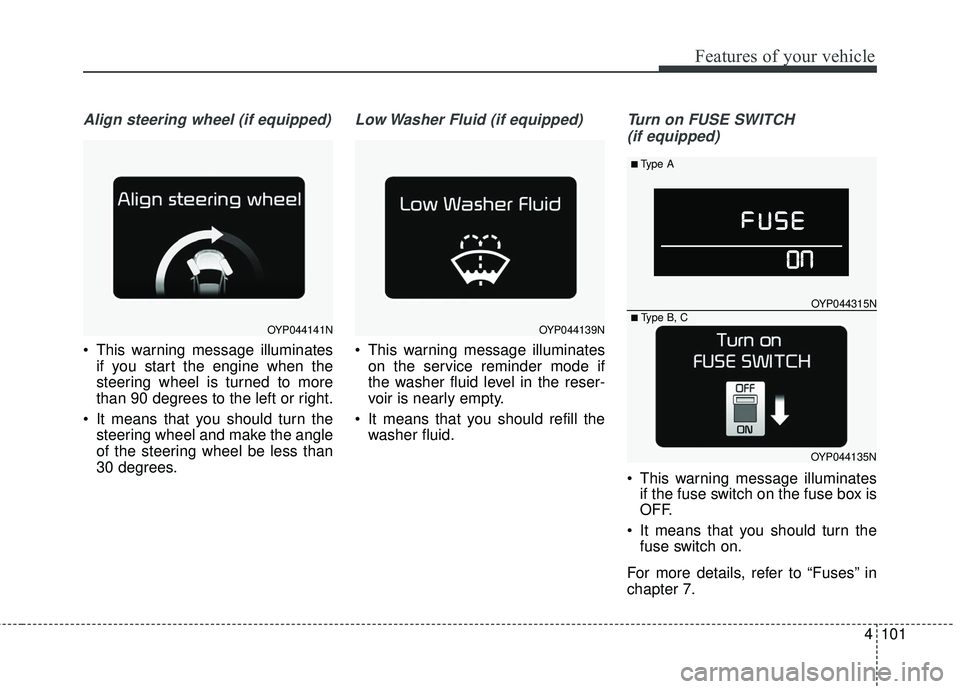
Align steering wheel (if equipped)
This warning message illuminatesif you start the engine when the
steering wheel is turned to more
than 90 degrees to the left or right.
It means that you should turn the steering wheel and make the angle
of the steering wheel be less than
30 degrees.
Low Washer Fluid (if equipped)
This warning message illuminateson the service reminder mode if
the washer fluid level in the reser-
voir is nearly empty.
It means that you should refill the washer fluid.
Turn on FUSE SWITCH
(if equipped)
This warning message illuminates if the fuse switch on the fuse box is
OFF.
It means that you should turn the fuse switch on.
For more details, refer to “Fuses” in
chapter 7.
OYP044141NOYP044139N
■Type A
OYP044315N
OYP044135N■ Type B, C
Page 206 of 586
Features of your vehicle
104
4
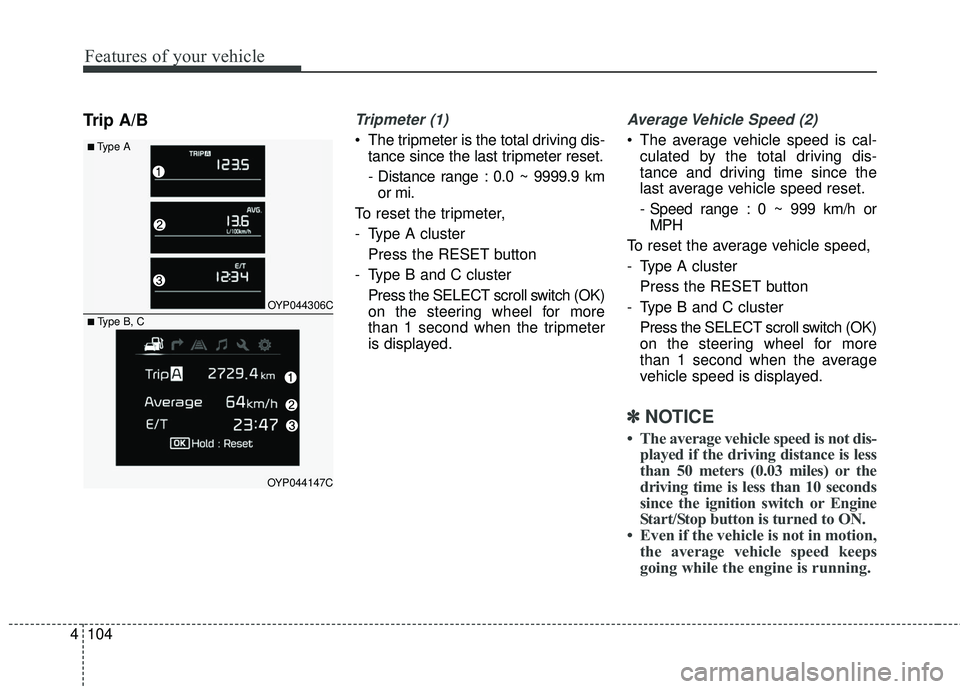
Trip A/BTripmeter (1)
• The tripmeter is the total driving dis-
tance since the last tripmeter reset.
- Distance range : 0.0 ~ 9999.9 kmor mi.
To reset the tripmeter,
- Type A cluster Press the RESET button
- Type B and C cluster Press the SELECT scroll switch (OK)
on the steering wheel for more
than 1 second when the tripmeter
is displayed.
Average Vehicle Speed (2)
The average vehicle speed is cal-culated by the total driving dis-
tance and driving time since the
last average vehicle speed reset.
- Speed range : 0 ~ 999 km/h orMPH
To reset the average vehicle speed,
- Type A cluster Press the RESET button
- Type B and C cluster Press the SELECT scroll switch (OK)
on the steering wheel for more
than 1 second when the average
vehicle speed is displayed.
✽ ✽ NOTICE
• The average vehicle speed is not dis-
played if the driving distance is less
than 50 meters (0.03 miles) or the
driving time is less than 10 seconds
since the ignition switch or Engine
Start/Stop button is turned to ON.
• Even if the vehicle is not in motion, the average vehicle speed keeps
going while the engine is running.
■Type A
OYP044306C
OYP044147C
■ Type B, C
Page 207 of 586
4105
Features of your vehicle
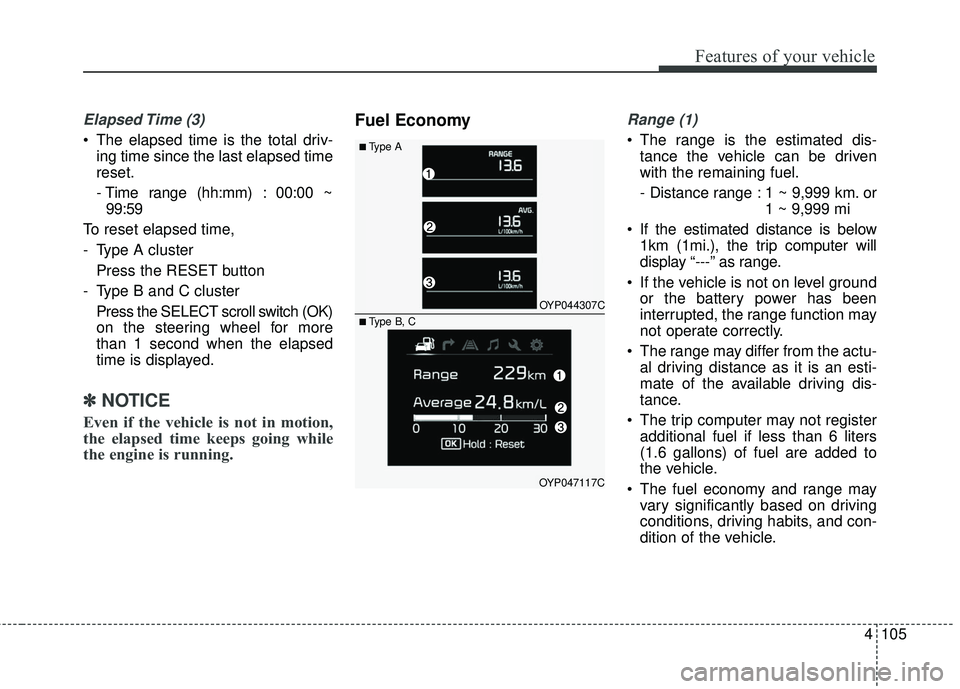
Elapsed Time (3)
The elapsed time is the total driv-ing time since the last elapsed time
reset.
- Time range (hh:mm) : 00:00 ~99:59
To reset elapsed time,
- Type A cluster Press the RESET button
- Type B and C cluster Press the SELECT scroll switch (OK)
on the steering wheel for more
than 1 second when the elapsed
time is displayed.
✽ ✽ NOTICE
Even if the vehicle is not in motion,
the elapsed time keeps going while
the engine is running.
Fuel EconomyRange (1)
The range is the estimated dis-
tance the vehicle can be driven
with the remaining fuel.
- Distance range : 1 ~ 9,999 km. or 1 ~ 9,999 mi
If the estimated distance is below 1km (1mi.), the trip computer will
display “---” as range.
If the vehicle is not on level ground or the battery power has been
interrupted, the range function may
not operate correctly.
The range may differ from the actu- al driving distance as it is an esti-
mate of the available driving dis-
tance.
The trip computer may not register additional fuel if less than 6 liters
(1.6 gallons) of fuel are added to
the vehicle.
The fuel economy and range may vary significantly based on driving
conditions, driving habits, and con-
dition of the vehicle.■Type A
OYP044307C
OYP047117C
■ Type B, C
Page 208 of 586
Features of your vehicle
106
4
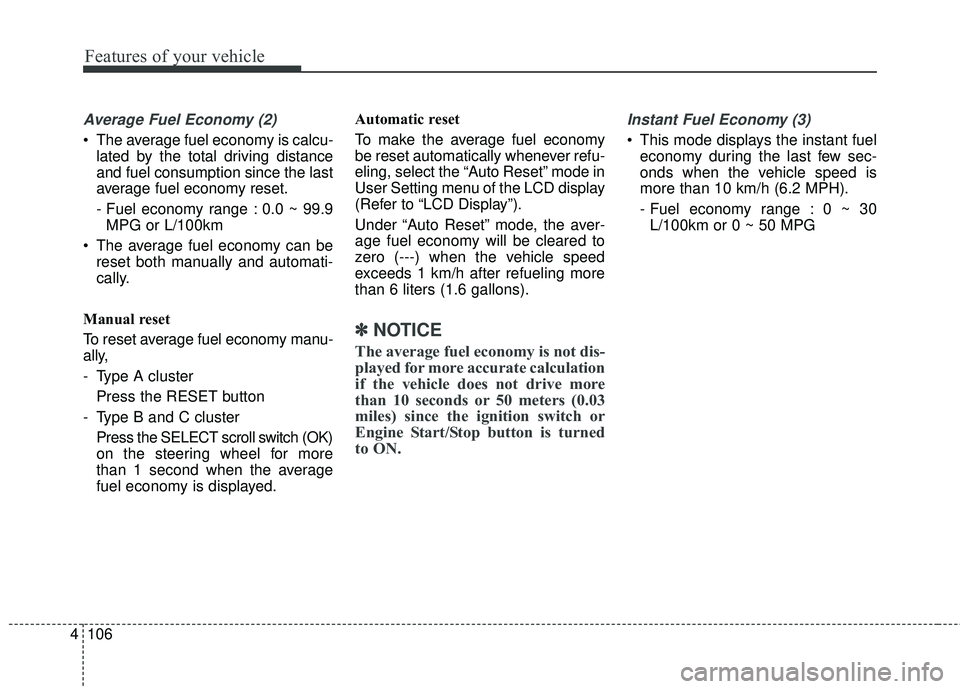
Average Fuel Economy (2)
The average fuel economy is calcu-
lated by the total driving distance
and fuel consumption since the last
average fuel economy reset.
- Fuel economy range : 0.0 ~ 99.9MPG or L/100km
The average fuel economy can be reset both manually and automati-
cally.
Manual reset
To reset average fuel economy manu-
ally,
- Type A cluster Press the RESET button
- Type B and C cluster Press the SELECT scroll switch (OK)
on the steering wheel for more
than 1 second when the average
fuel economy is displayed. Automatic reset
To make the average fuel economy
be reset automatically whenever refu-
eling, select the “Auto Reset” mode in
User Setting menu of the LCD display
(Refer to “LCD Display”).
Under “Auto Reset” mode, the aver-
age fuel economy will be cleared to
zero (---) when the vehicle speed
exceeds 1 km/h after refueling more
than 6 liters (1.6 gallons).
✽ ✽
NOTICE
The average fuel economy is not dis-
played for more accurate calculation
if the vehicle does not drive more
than 10 seconds or 50 meters (0.03
miles) since the ignition switch or
Engine Start/Stop button is turned
to ON.
Instant Fuel Economy (3)
This mode displays the instant fuel
economy during the last few sec-
onds when the vehicle speed is
more than 10 km/h (6.2 MPH).
- Fuel economy range : 0 ~ 30L/100km or 0 ~ 50 MPG
Page 213 of 586
4111
Features of your vehicle
✽ ✽NOTICE- Electronic Brake
force Distribution
(EBD) System
Warning Light
When the ABS Warning Light is on
or both ABS and Parking Brake &
Brake Fluid Warning Lights are on,
the speedometer, odometer, or trip-
meter may not work. Also, the EPS
Warning Light may illuminate and
the steering effort may increase or
decrease.
In this case, have your vehicle inspect-
ed by an authorized Kia dealer as
soon as possible.
Electronic Power
Steering (EPS) WarningLight (if equipped)
This warning light illuminates :
Once you set the ignition switch or Engine Start/Stop Button to the ON
position.
- It remains on until the engine isstarted.
When there is a malfunction with the EPS.
In this case, have your vehicle
inspected by an authorized Kia
dealer.
WARNING - Electronic
Brake force Distribution
(EBD) System Warning Light
When both ABS and Parking
Brake & Brake Fluid Warning
Lights are on, the brake system
will not work normally and you
may experience an unexpected
and dangerous situation during
sudden braking.
In this case, avoid high speed
driving and abrupt braking.
Have your vehicle inspected by
an authorized Kia dealer as
soon as possible.
Page 233 of 586
4131
Features of your vehicle
Battery saver function
• The purpose of this feature is toprevent the battery from being dis-
charged if the lights are left in the
ON position. The system automati-
cally shuts off the parking lights 30
seconds after the ignition key is
removed and the driver’s door is
opened and closed.
With this feature, the parking lights will turn off automatically if the driver
parks on the side of the road at night
and opens the driver’s side door.
If necessary, to keep the parking
lights on when the ignition key is
removed, perform the following :
1) Open the driver-side door.
2) Turn the parking lights OFF and ON again using the light switch
on the steering column.
Headlight escort function
If you turn the ignition switch to the
ACC or OFF position with the head-
lights ON, the headlights remain on
for about 5 minutes. However, if the
driver's door is opened and closed,
the headlights are turned off after 15
seconds.
The headlights can be turned off by
pressing the lock button on the trans-
mitter (or smart key) twice or turning
the light switch to the OFF position.
If the driver gets out of the vehicle
through other doors (except driver’s
door), the battery saver function
does not operate and the headlight
escort function does not turn off
automatically. Therefore, It causes
the battery to be discharged. In this
case, make sure to turn off the lamp
before getting out of the vehicle.
Daytime running light
(if equipped)
The Daytime Running Lights (DRL)
can make it easier for others to see
the front of your vehicle during the
day. DRL can be helpful in many dif-
ferent driving conditions, and it is
especially helpful after dawn and
before sunset.
The DRL system turns OFF when:
1. The headlight switch is on
2. The engine is off
3. The front fog light is on.
4. Engaging the Parking Brake
LIGHTING
Page 239 of 586
4137
Features of your vehicle
Front fog light (if equipped)
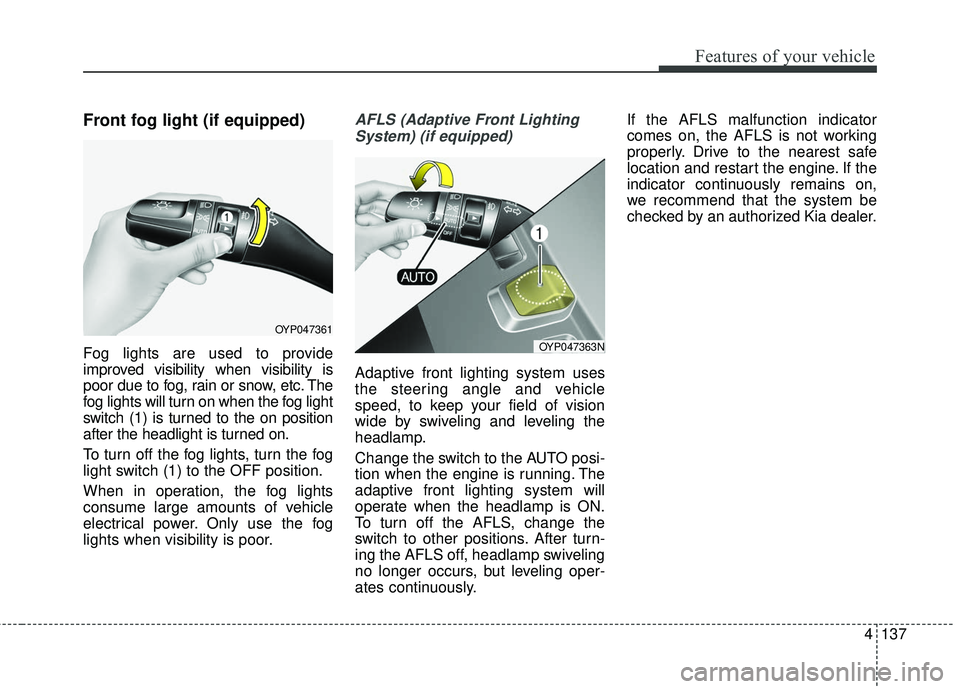
Fog lights are used to provide
improved visibility when visibility is
poor due to fog, rain or snow, etc. The
fog lights will turn on when the fog light
switch (1) is turned to the on position
after the headlight is turned on.
To turn off the fog lights, turn the fog
light switch (1) to the OFF position.
When in operation, the fog lights
consume large amounts of vehicle
electrical power. Only use the fog
lights when visibility is poor.
AFLS (Adaptive Front LightingSystem) (if equipped)
Adaptive front lighting system uses
the steering angle and vehicle
speed, to keep your field of vision
wide by swiveling and leveling the
headlamp.
Change the switch to the AUTO posi-
tion when the engine is running. The
adaptive front lighting system will
operate when the headlamp is ON.
To turn off the AFLS, change the
switch to other positions. After turn-
ing the AFLS off, headlamp swiveling
no longer occurs, but leveling oper-
ates continuously. If the AFLS malfunction indicator
comes on, the AFLS is not working
properly. Drive to the nearest safe
location and restart the engine. If the
indicator continuously remains on,
we recommend that the system be
checked by an authorized Kia dealer.
OYP047361
OYP047363N