climate control KIA SEDONA 2020 Owners Manual
[x] Cancel search | Manufacturer: KIA, Model Year: 2020, Model line: SEDONA, Model: KIA SEDONA 2020Pages: 604, PDF Size: 16.24 MB
Page 15 of 604
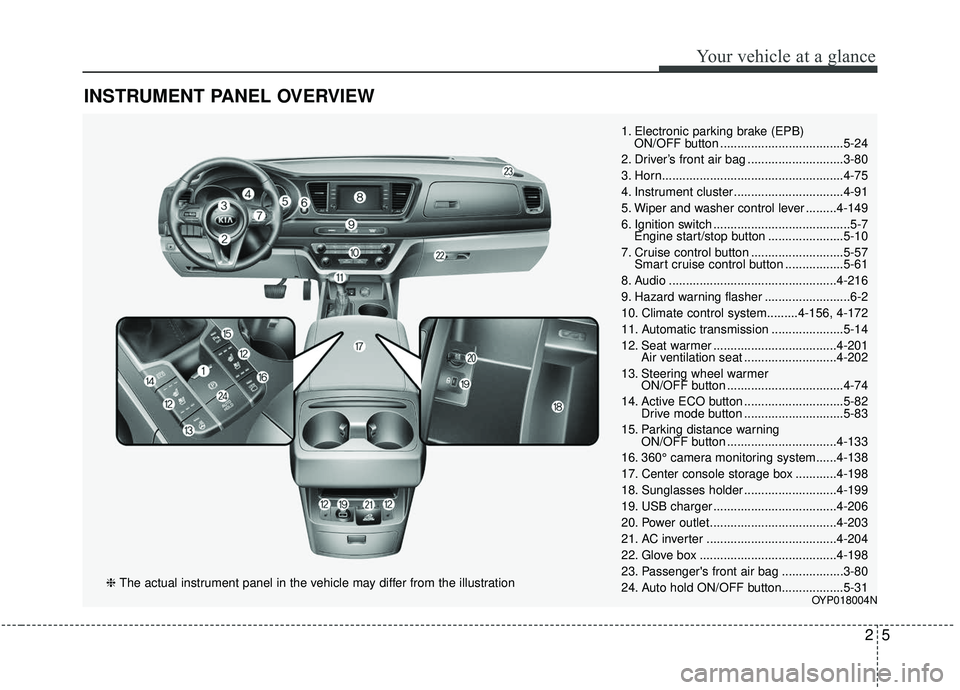
INSTRUMENT PANEL OVERVIEW
25
Your vehicle at a glance
1. Electronic parking brake (EPB) ON/OFF button ....................................5-24
2. Driver’s front air bag ............................3-80
3. Horn.....................................................4-75
4. Instrument cluster ................................4-91
5. Wiper and washer control lever .........4-149
6. Ignition switch ........................................5-7 Engine start/stop button ......................5-10
7. Cruise control button ...........................5-57 Smart cruise control button .................5-61
8. Audio .................................................4-216
9. Hazard warning flasher .........................6-2
10. Climate control system.........4-156, 4-172
11. Automatic transmission .....................5-14
12. Seat warmer ....................................4-201 Air ventilation seat ...........................4-202
13. Steering wheel warmer ON/OFF button ..................................4-74
14. Active ECO button .............................5-82 Drive mode button .............................5-83
15. Parking distance warning ON/OFF button ................................4-133
16. 360° camera monitoring system......4-138
17. Center console storage box ............4-198
18. Sunglasses holder ...........................4-199
19. USB charger ....................................4-206
20. Power outlet.....................................4-203
21. AC inverter ......................................4-204
22. Glove box ........................................4-198
23. Passenger's front air bag ..................3-80
24. Auto hold ON/OFF button..................5-31
OYP018004N
❈ The actual instrument panel in the vehicle may differ from the illustration
Page 112 of 604
Parking distance warning . . . . . . . . . . . . . . . . . . 4-132
• Operation of the parking distance warning . . . . . . 4-133
• Non-operational conditions of parking distance warning. . . . . . . . . . . . . . . . . . . . . . . . . . . . . . . . . . . 4-\
134
• Self-diagnosis . . . . . . . . . . . . . . . . . . . . . . . . . . . . . . . 4-136
Rear view monitor . . . . . . . . . . . . . . . . . . . . . . . . 4-137
360° camera monitoring system . . . . . . . . . . . . . 4-138
Lighting . . . . . . . . . . . . . . . . . . . . . . . . . . . . . . . . . 4-139
• Battery saver function. . . . . . . . . . . . . . . . . . . . . . . . 4-139
• Headlight escort function . . . . . . . . . . . . . . . . . . . . . 4-139
• Daytime running light . . . . . . . . . . . . . . . . . . . . . . . . 4-139
• Lighting control . . . . . . . . . . . . . . . . . . . . . . . . . . . . . 4-140
• High beam operation. . . . . . . . . . . . . . . . . . . . . . . . . 4-142
• High beam assist . . . . . . . . . . . . . . . . . . . . . . . . . . . . 4-143
• Turn signals and lane change signals . . . . . . . . . . . 4-146
• Front fog light . . . . . . . . . . . . . . . . . . . . . . . . . . . . . . 4-147
• Headlight leveling device . . . . . . . . . . . . . . . . . . . . . 4-147
• Dynamic Bending Light (DBL) . . . . . . . . . . . . . . . . 4-147
Wipers and washers . . . . . . . . . . . . . . . . . . . . . . . 4-149
• Windshield wipers . . . . . . . . . . . . . . . . . . . . . . . . . . . 4-149
• Front windshield washers . . . . . . . . . . . . . . . . . . . . . 4-150
• Rear window wiper and washer switch. . . . . . . . . . 4-151
Interior lights . . . . . . . . . . . . . . . . . . . . . . . . . . . . 4-152
• Automatic turn off function . . . . . . . . . . . . . . . . . . . 4-152
• Room lamp . . . . . . . . . . . . . . . . . . . . . . . . . . . . . . . . . 4-152 • Map lamp . . . . . . . . . . . . . . . . . . . . . . . . . . . . . . . . . . 4-15\
3
• Luggage lamp. . . . . . . . . . . . . . . . . . . . . . . . . . . . . . . 4-154
• Vanity mirror lamp . . . . . . . . . . . . . . . . . . . . . . . . . . 4-154
• Glove box lamp . . . . . . . . . . . . . . . . . . . . . . . . . . . . . 4-154
Defroster . . . . . . . . . . . . . . . . . . . . . . . . . . . . . . . . 4-155
• Rear window defroster . . . . . . . . . . . . . . . . . . . . . . . 4-155
Manual climate control system . . . . . . . . . . . . . . 4-156
• Heating and air conditioning . . . . . . . . . . . . . . . . . . 4-157
• Rear climate control . . . . . . . . . . . . . . . . . . . . . . . . . 4-164
• System operation . . . . . . . . . . . . . . . . . . . . . . . . . . . . 4-167
• Climate control air filter . . . . . . . . . . . . . . . . . . . . . . 4-170
• Checking the amount of air conditioner
refrigerant and compressor lubricant . . . . . . . . . . 4-171
Automatic climate control system . . . . . . . . . . . 4-172
• Automatic heating and air conditioning . . . . . . . . . 4-173
• Manual heating and air conditioning . . . . . . . . . . . 4-174
• Outside thermometer . . . . . . . . . . . . . . . . . . . . . . . . 4-178
• Rear climate control . . . . . . . . . . . . . . . . . . . . . . . . . 4-183
• System operation . . . . . . . . . . . . . . . . . . . . . . . . . . . . 4-186
• Climate control air filter . . . . . . . . . . . . . . . . . . . . . . 4-188
• Checking the amount of air conditionerrefrigerant and compressor lubricant . . . . . . . . . . 4-189
4
Page 113 of 604
Windshield defrosting and defogging . . . . . . . . . 4-191
• Manual climate control system . . . . . . . . . . . . . . . . 4-191
• Automatic climate control system . . . . . . . . . . . . . . 4-192
• Defogging logic. . . . . . . . . . . . . . . . . . . . . . . . . . . . . . 4-193
Clean air . . . . . . . . . . . . . . . . . . . . . . . . . . . . . . . . 4-196
Storage compartments . . . . . . . . . . . . . . . . . . . . . 4-197
• Center console storage . . . . . . . . . . . . . . . . . . . . . . . 4-198
• Glove box . . . . . . . . . . . . . . . . . . . . . . . . . . . . . . . . . . 4-19\
8
• Sunglass holder . . . . . . . . . . . . . . . . . . . . . . . . . . . . . 4-199
• Cool box . . . . . . . . . . . . . . . . . . . . . . . . . . . . . . . . . . . 4-\
199
Interior features . . . . . . . . . . . . . . . . . . . . . . . . . . 4-200
• Cup holder . . . . . . . . . . . . . . . . . . . . . . . . . . . . . . . . . 4-200
• Bottle holder. . . . . . . . . . . . . . . . . . . . . . . . . . . . . . . . 4-200
• Seat warmer . . . . . . . . . . . . . . . . . . . . . . . . . . . . . . . . 4-201
• Air ventilation seat . . . . . . . . . . . . . . . . . . . . . . . . . . 4-202
• Sunvisor . . . . . . . . . . . . . . . . . . . . . . . . . . . . . . . . . . . 4-\
202
• Power outlet . . . . . . . . . . . . . . . . . . . . . . . . . . . . . . . . 4-203
• AC inverter . . . . . . . . . . . . . . . . . . . . . . . . . . . . . . . . 4-204
• USB charger . . . . . . . . . . . . . . . . . . . . . . . . . . . . . . . . 4-206
• Wireless smart phone charging system . . . . . . . . . . 4-206
• Coat hook . . . . . . . . . . . . . . . . . . . . . . . . . . . . . . . . . . 4-21\
0
• Floor mat anchor(s). . . . . . . . . . . . . . . . . . . . . . . . . . 4-210
• Side curtain . . . . . . . . . . . . . . . . . . . . . . . . . . . . . . . . 4-212
• Luggage net holder . . . . . . . . . . . . . . . . . . . . . . . . . . 4-212
Exterior features . . . . . . . . . . . . . . . . . . . . . . . . . . 4-214
• Roof rack . . . . . . . . . . . . . . . . . . . . . . . . . . . . . . . . . . 4-21\
4
Audio system . . . . . . . . . . . . . . . . . . . . . . . . . . . . . 4-216
• Antenna . . . . . . . . . . . . . . . . . . . . . . . . . . . . . . . . . . . 4-\
216
• AUX, USB port . . . . . . . . . . . . . . . . . . . . . . . . . . . . . 4-216
• How vehicle radio works . . . . . . . . . . . . . . . . . . . . . 4-217
Declaration of Conformity . . . . . . . . . . . . . . . . . 4-220
• IC. . . . . . . . . . . . . . . . . . . . . . . . . . . . . . . . . . . \
. . . . . . 4-220
4
Page 174 of 604
465
Features of your vehicle
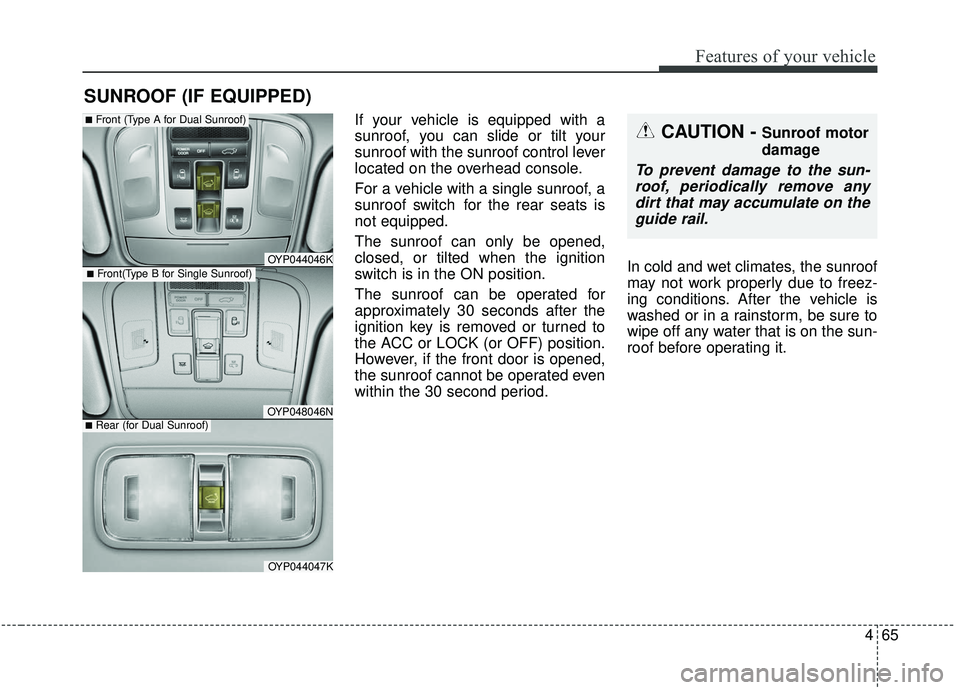
If your vehicle is equipped with a
sunroof, you can slide or tilt your
sunroof with the sunroof control lever
located on the overhead console.
For a vehicle with a single sunroof, a
sunroof switch for the rear seats is
not equipped.
The sunroof can only be opened,
closed, or tilted when the ignition
switch is in the ON position.
The sunroof can be operated for
approximately 30 seconds after the
ignition key is removed or turned to
the ACC or LOCK (or OFF) position.
However, if the front door is opened,
the sunroof cannot be operated even
within the 30 second period.In cold and wet climates, the sunroof
may not work properly due to freez-
ing conditions. After the vehicle is
washed or in a rainstorm, be sure to
wipe off any water that is on the sun-
roof before operating it.
SUNROOF (IF EQUIPPED)
CAUTION - Sunroof motor
damage
To prevent damage to the sun-
roof, periodically remove anydirt that may accumulate on theguide rail.
OYP044046K
OYP048046N
■Front (Type A for Dual Sunroof)
OYP044047K
■Rear (for Dual Sunroof)
■Front(Type B for Single Sunroof)
Page 265 of 604
Features of your vehicle
156
4
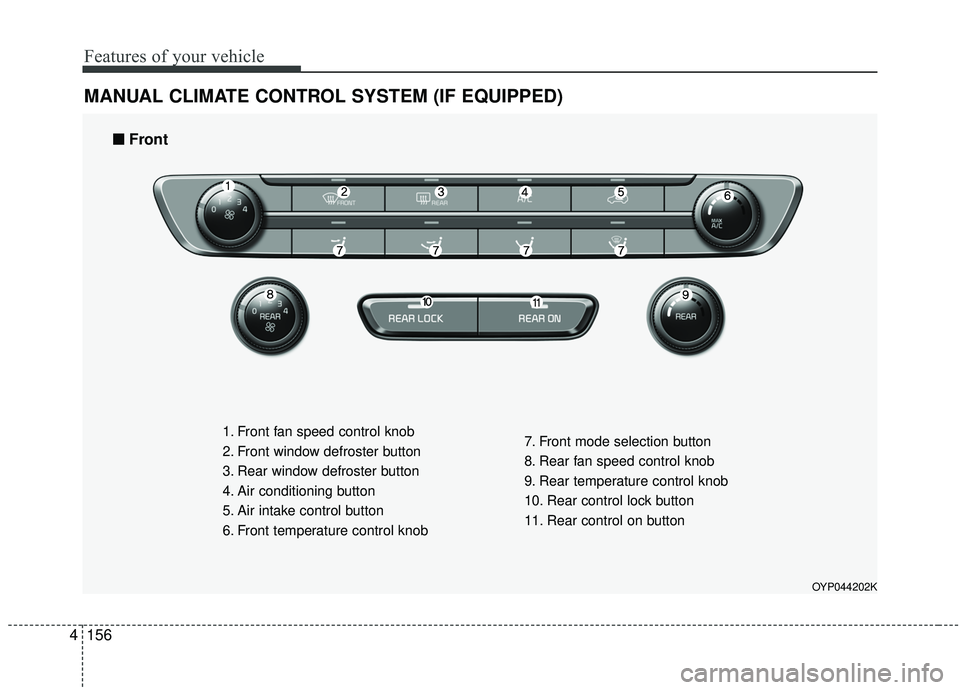
MANUAL CLIMATE CONTROL SYSTEM (IF EQUIPPED)
OYP044202K
1. Front fan speed control knob
2. Front window defroster button
3. Rear window defroster button
4. Air conditioning button
5. Air intake control button
6. Front temperature control knob 7. Front mode selection button
8. Rear fan speed control knob
9. Rear temperature control knob
10. Rear control lock button
11. Rear control on button
■ ■
Front
Page 270 of 604
4161
Features of your vehicle
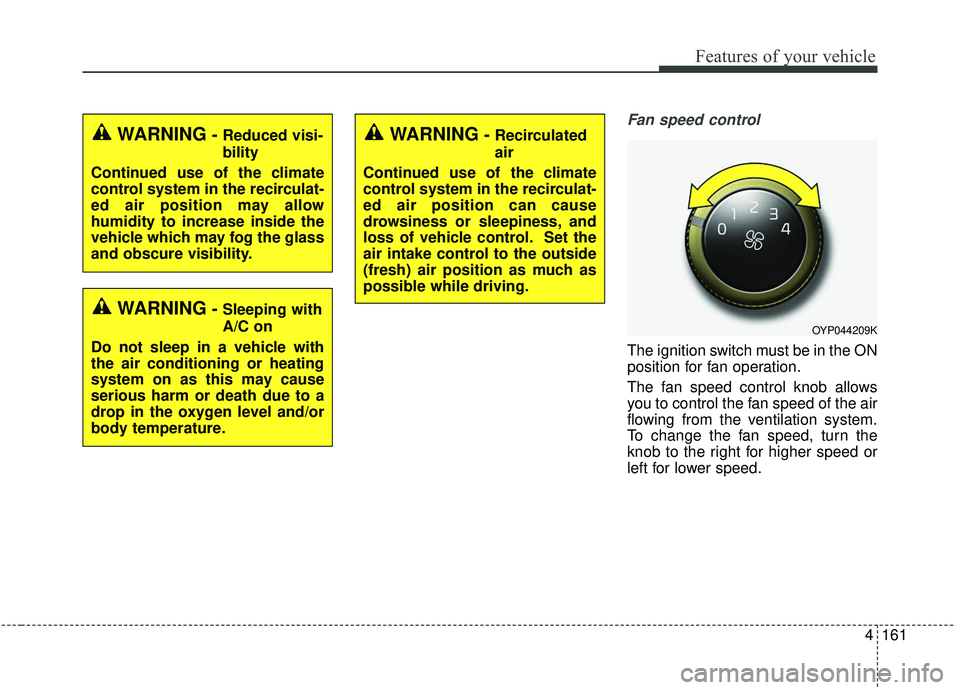
Fan speed control
The ignition switch must be in the ON
position for fan operation.
The fan speed control knob allows
you to control the fan speed of the air
flowing from the ventilation system.
To change the fan speed, turn the
knob to the right for higher speed or
left for lower speed.
WARNING- Reduced visi-
bility
Continued use of the climate
control system in the recirculat-
ed air position may allow
humidity to increase inside the
vehicle which may fog the glass
and obscure visibility.
WARNING- Sleeping with
A/C on
Do not sleep in a vehicle with
the air conditioning or heating
system on as this may cause
serious harm or death due to a
drop in the oxygen level and/or
body temperature.
WARNING- Recirculated
air
Continued use of the climate
control system in the recirculat-
ed air position can cause
drowsiness or sleepiness, and
loss of vehicle control. Set the
air intake control to the outside
(fresh) air position as much as
possible while driving.
OYP044209K
Page 273 of 604
Features of your vehicle
164
4
Rear climate control
(if equipped)
To turn on the rear climate control
system :
From the front seat
1. Set the rear climate control selec-
tion (REAR ON) button in the front
climate control panel to the ON
position.
2. Set the rear fan speed control knob in the front climate control
panel to the desired position.
3. Set the rear temperature control knob in the front climate control
panel to the desired position.
From the rear seat
1. Set the rear climate control selec-tion (REAR ON) button in the front
climate control panel to the ON
position.
2. Set the rear climate control selec- tion (REAR LOCK) button in the
front climate control panel to the
OFF position.
3. Set the rear fan speed control but- ton on the rear climate control
panel to the desired position.
4. Set the rear temperature control button on the rear climate control
panel to the desired position.
5. Select the desired rear mode button on the rear climate control panel.
6. To turn off the rear air conditioning system, press the off button in the
rear climate control panel.
Page 274 of 604
4165
Features of your vehicle
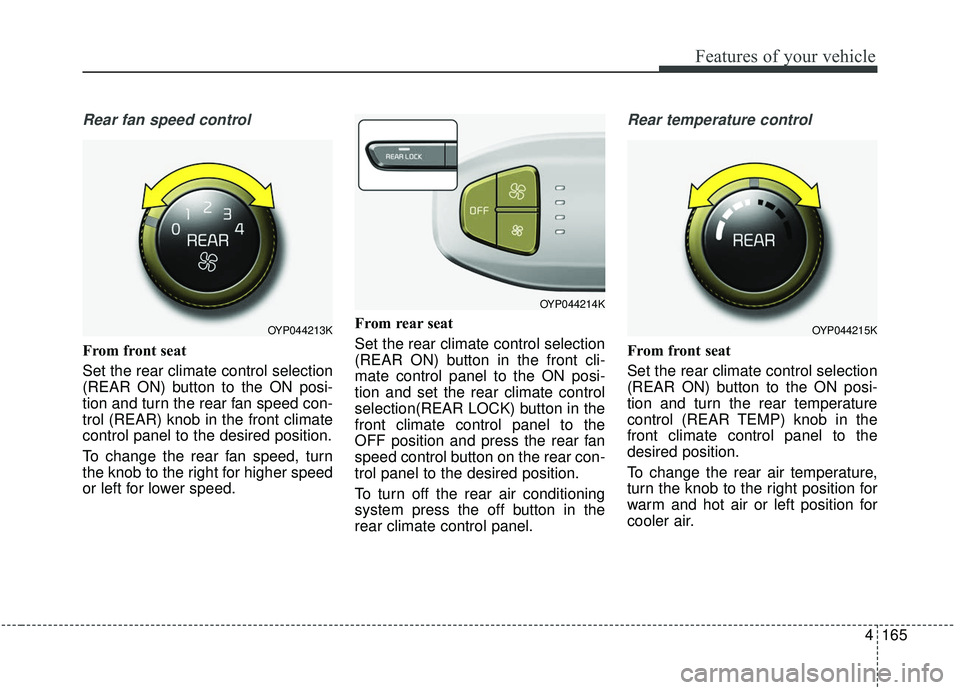
Rear fan speed control
From front seat
Set the rear climate control selection
(REAR ON) button to the ON posi-
tion and turn the rear fan speed con-
trol (REAR) knob in the front climate
control panel to the desired position.
To change the rear fan speed, turn
the knob to the right for higher speed
or left for lower speed.From rear seat
Set the rear climate control selection
(REAR ON) button in the front cli-
mate control panel to the ON posi-
tion and set the rear climate control
selection(REAR LOCK) button in the
front climate control panel to the
OFF position and press the rear fan
speed control button on the rear con-
trol panel to the desired position.
To turn off the rear air conditioning
system press the off button in the
rear climate control panel.
Rear temperature control
From front seat
Set the rear climate control selection
(REAR ON) button to the ON posi-
tion and turn the rear temperature
control (REAR TEMP) knob in the
front climate control panel to the
desired position.
To change the rear air temperature,
turn the knob to the right position for
warm and hot air or left position for
cooler air.
OYP044213K
OYP044214K
OYP044215K
Page 275 of 604
Features of your vehicle
166
4
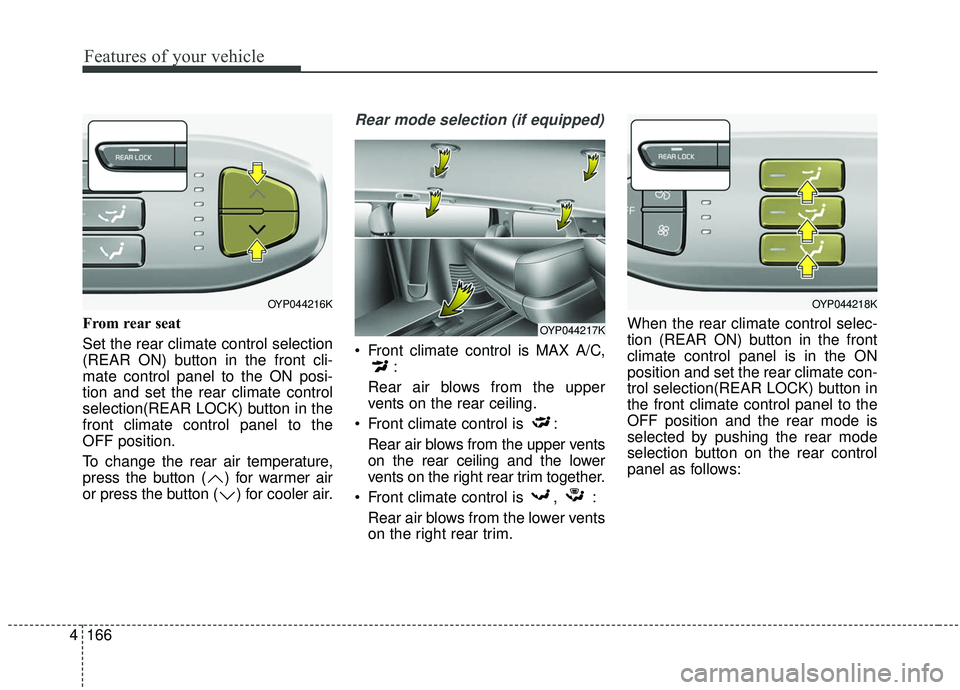
From rear seat
Set the rear climate control selection
(REAR ON) button in the front cli-
mate control panel to the ON posi-
tion and set the rear climate control
selection(REAR LOCK) button in the
front climate control panel to the
OFF position.
To change the rear air temperature,
press the button ( ) for warmer air
or press the button ( ) for cooler air.
Rear mode selection (if equipped)
Front climate control is MAX A/C,
:
Rear air blows from the upper
vents on the rear ceiling.
Front climate control is : Rear air blows from the upper vents
on the rear ceiling and the lower
vents on the right rear trim together.
Front climate control is , : Rear air blows from the lower vents
on the right rear trim. When the rear climate control selec-
tion (REAR ON) button in the front
climate control panel is in the ON
position and set the rear climate con-
trol selection(REAR LOCK) button in
the front climate control panel to the
OFF position and the rear mode is
selected by pushing the rear mode
selection button on the rear control
panel as follows:
OYP044216K
OYP044217K
OYP044218K
Page 279 of 604
Features of your vehicle
170
4
When using the air conditioning
system, you may notice clear water
dripping (or even puddling) on the
ground under the passenger side
of the vehicle. This is a normal sys-
tem operation characteristic.
Operating the air conditioning sys- tem in the recirculated air position
provides maximum cooling, how-
ever, continual operation in this
mode may cause the air inside the
vehicle to become stale.
During cooling operation, you may occasionally notice a misty air flow
because of rapid cooling and
humid air intake. This is a normal
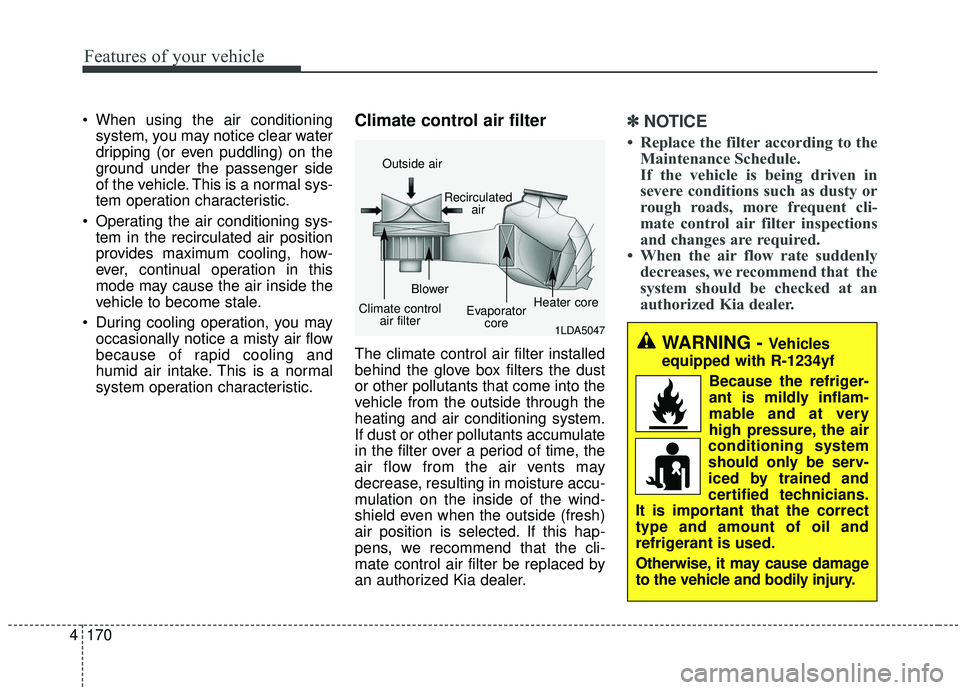
system operation characteristic.Climate control air filter
The climate control air filter installed
behind the glove box filters the dust
or other pollutants that come into the
vehicle from the outside through the
heating and air conditioning system.
If dust or other pollutants accumulate
in the filter over a period of time, the
air flow from the air vents may
decrease, resulting in moisture accu-
mulation on the inside of the wind-
shield even when the outside (fresh)
air position is selected. If this hap-
pens, we recommend that the cli-
mate control air filter be replaced by
an authorized Kia dealer.
✽ ✽ NOTICE
• Replace the filter according to the
Maintenance Schedule.
If the vehicle is being driven in
severe conditions such as dusty or
rough roads, more frequent cli-
mate control air filter inspections
and changes are required.
• When the air flow rate suddenly decreases, we recommend that the
system should be checked at an
authorized Kia dealer.
1LDA5047
Outside air
Recirculatedair
Climate control air filter Blower
Evaporatorcore Heater core
WARNING - Vehicles
equipped with R-1234yf
Because the refriger-
ant is mildly inflam-
mable and at very
high pressure, the air
conditioning system
should only be serv-
iced by trained and
certified technicians.
It is important that the correct
type and amount of oil and
refrigerant is used.
Otherwise, it may cause damage
to the vehicle and bodily injury.