door lock KIA SEDONA 2020 Owners Manual
[x] Cancel search | Manufacturer: KIA, Model Year: 2020, Model line: SEDONA, Model: KIA SEDONA 2020Pages: 604, PDF Size: 16.24 MB
Page 13 of 604
23
Your vehicle at a glance
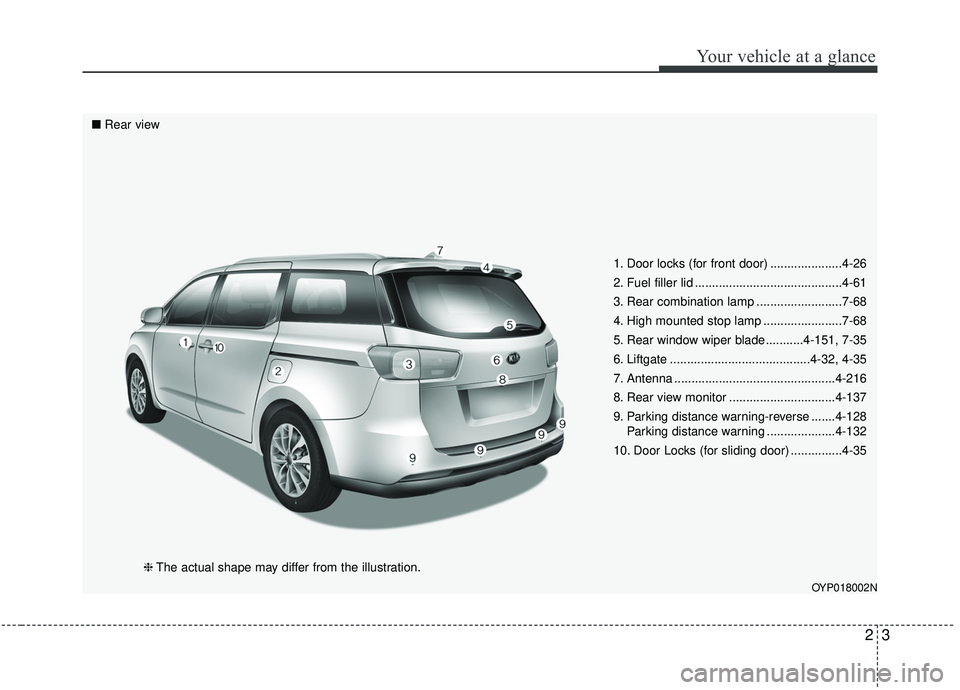
1. Door locks (for front door) .....................4-26
2. Fuel filler lid ...........................................4-61
3. Rear combination lamp .........................7-68
4. High mounted stop lamp .......................7-68
5. Rear window wiper blade ...........4-151, 7-35
6. Liftgate .........................................4-32, 4-35
7. Antenna ...............................................4-216
8. Rear view monitor ...............................4-137
9. Parking distance warning-reverse .......4-128Parking distance warning ....................4-132
10. Door Locks (for sliding door) ...............4-35
OYP018002N
■ Rear view
❈The actual shape may differ from the illustration.
Page 14 of 604
Your vehicle at a glance
42
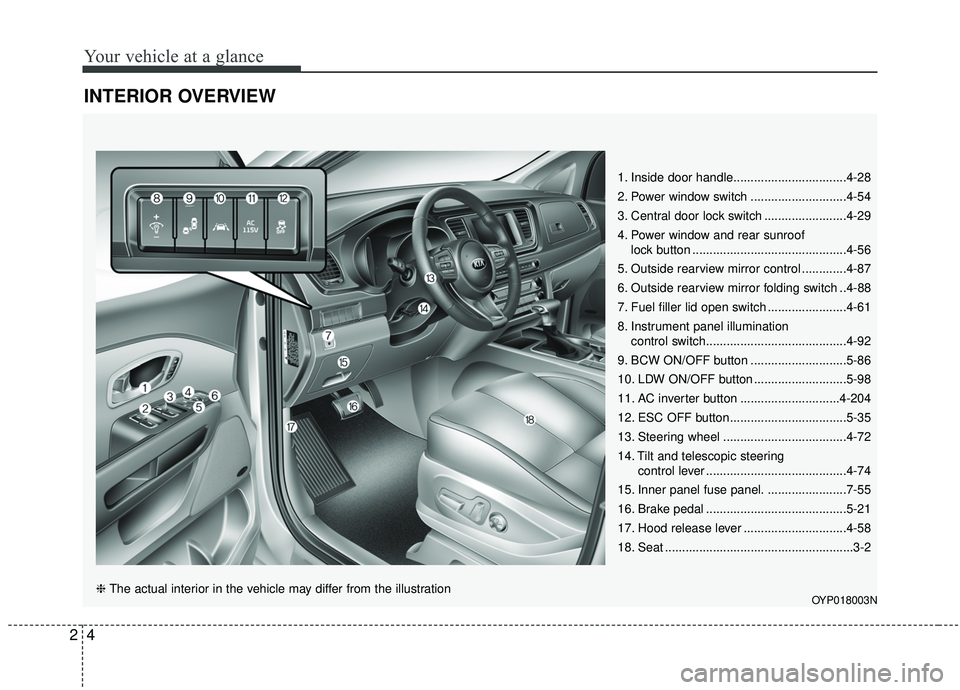
INTERIOR OVERVIEW
1. Inside door handle.................................4-28
2. Power window switch ............................4-54
3. Central door lock switch ........................4-29
4. Power window and rear sunrooflock button .............................................4-56
5. Outside rearview mirror control .............4-87
6. Outside rearview mirror folding switch ..4-88
7. Fuel filler lid open switch .......................4-61
8. Instrument panel illumination control switch.........................................4-92
9. BCW ON/OFF button ............................5-86
10. LDW ON/OFF button ...........................5-98
11. AC inverter button .............................4-204
12. ESC OFF button..................................5-35
13. Steering wheel ....................................4-72
14. Tilt and telescopic steering control lever .........................................4-74
15. Inner panel fuse panel. .......................7-55
16. Brake pedal .........................................5-21
17. Hood release lever ..............................4-58
18. Seat .......................................................3-2
OYP018003N❈ The actual interior in the vehicle may differ from the illustration
Page 54 of 604
Safety features of your vehicle
38
3
You can find the front passenger's
seat belt warning light on the cen-
ter fascia panel.
Even if the front passenger seat is not occupied, the seat belt warning
light will blink for 6 seconds.
The seat belt warning light can blink when a briefcase or purse is
placed on the front passenger
seat.
Riding in an improper position
adversely affects the front passen-
ger's seat belt warning system. It is
important for the driver to instruct the
passenger as to the proper seating
instructions as contained in this
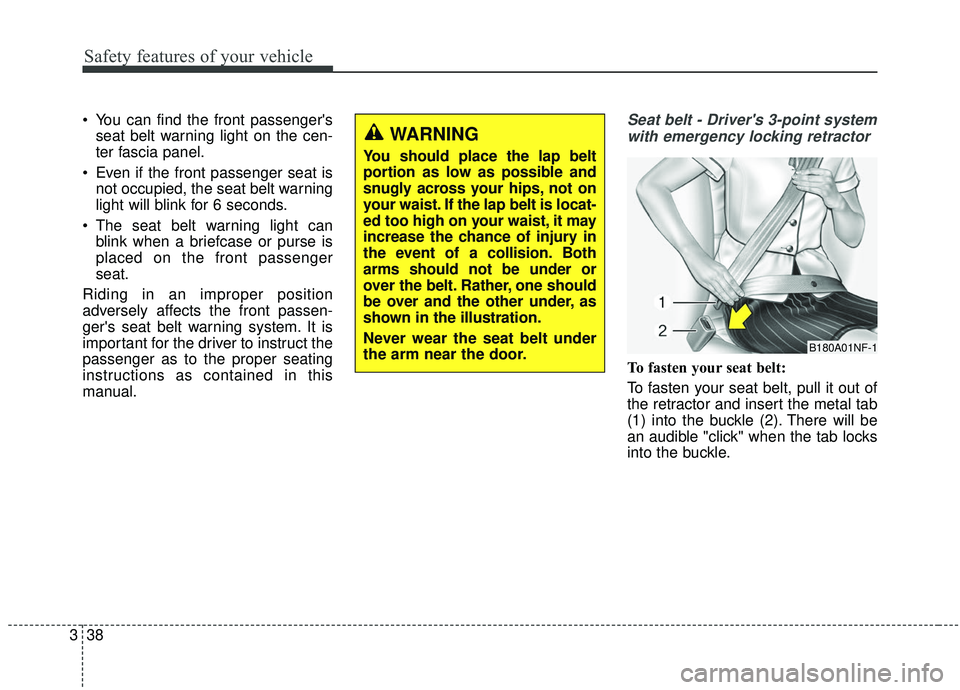
manual.Seat belt - Driver's 3-point system with emergency locking retractor
To fasten your seat belt:
To fasten your seat belt, pull it out of
the retractor and insert the metal tab
(1) into the buckle (2). There will be
an audible "click" when the tab locks
into the buckle.
B180A01NF-1
WARNING
You should place the lap belt
portion as low as possible and
snugly across your hips, not on
your waist. If the lap belt is locat-
ed too high on your waist, it may
increase the chance of injury in
the event of a collision. Both
arms should not be under or
over the belt. Rather, one should
be over and the other under, as
shown in the illustration.
Never wear the seat belt under
the arm near the door.
Page 55 of 604
339
Safety features of your vehicle
The seat belt automatically adjusts to
the proper length only after the lap
belt portion is adjusted manually so
that it fits snugly around your hips. If
you lean forward in a slow, easy
motion, the belt will extend and let
you move around. If there is a sud-
den stop or impact, however, the belt
will lock into position. It will also lock
if you try to lean forward too quickly.
✽ ✽NOTICE
If you are not able to pull out the
seat belt from the retractor, firmly
pull the belt out and release it. Then
you will be able to pull the belt out
smoothly.
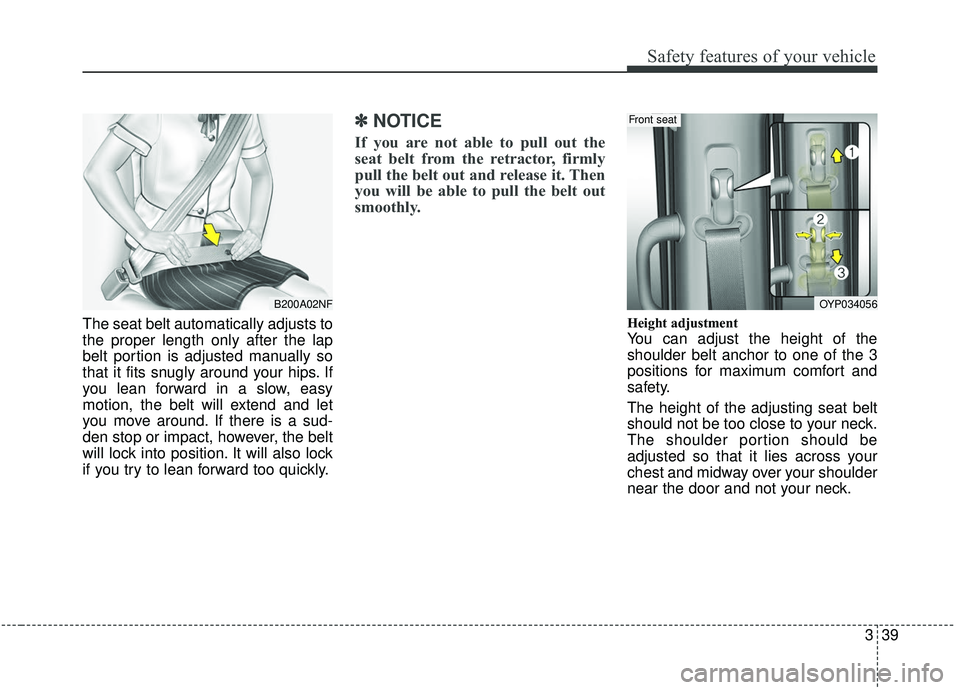
Height adjustment
You can adjust the height of the
shoulder belt anchor to one of the 3
positions for maximum comfort and
safety.
The height of the adjusting seat belt
should not be too close to your neck.
The shoulder portion should be
adjusted so that it lies across your
chest and midway over your shoulder
near the door and not your neck.
B200A02NFOYP034056
Front seat
Page 110 of 604
Features of your vehicle
Folding key . . . . . . . . . . . . . . . . . . . . . . . . . . . . . . . . 4-5
• Record your key number . . . . . . . . . . . . . . . . . . . . . . . 4-5
• Key operations . . . . . . . . . . . . . . . . . . . . . . . . . . . . . . . . 4-5
• Transmitter precautions . . . . . . . . . . . . . . . . . . . . . . . . 4-9
• Battery replacement . . . . . . . . . . . . . . . . . . . . . . . . . . 4-10
• Immobilizer system . . . . . . . . . . . . . . . . . . . . . . . . . . . 4-11
• Limp home (override) procedure . . . . . . . . . . . . . . . 4-13
Smart key . . . . . . . . . . . . . . . . . . . . . . . . . . . . . . . . 4-14
• Record your key number . . . . . . . . . . . . . . . . . . . . . . 4-14
• Smart key function . . . . . . . . . . . . . . . . . . . . . . . . . . . 4-14
• Loss of the smart key . . . . . . . . . . . . . . . . . . . . . . . . . 4-18
• Smart key precautions . . . . . . . . . . . . . . . . . . . . . . . . 4-19
• Battery replacement . . . . . . . . . . . . . . . . . . . . . . . . . . 4-20
• Smart key immobilizer system . . . . . . . . . . . . . . . . . . 4-21
Theft-alarm system . . . . . . . . . . . . . . . . . . . . . . . . 4-23
• Armed stage . . . . . . . . . . . . . . . . . . . . . . . . . . . . . . . . . 4-23
• Theft-alarm stage . . . . . . . . . . . . . . . . . . . . . . . . . . . . 4-24
• Disarmed stage. . . . . . . . . . . . . . . . . . . . . . . . . . . . . . . 4-24
Door locks . . . . . . . . . . . . . . . . . . . . . . . . . . . . . . . . 4-26
• Operating door locks from outside the vehicle. . . . . 4-26
• Operating door locks from inside the vehicle . . . . . . 4-28
• Impact sensing door unlock system . . . . . . . . . . . . . . 4-31
• Automatic door lock system . . . . . . . . . . . . . . . . . . . . 4-31
• Child-protector rear door lock. . . . . . . . . . . . . . . . . . 4-31
Liftgate (for manual liftgate) . . . . . . . . . . . . . . . . 4-32
• Opening the liftgate . . . . . . . . . . . . . . . . . . . . . . . . . . . 4-32
• Closing the liftgate. . . . . . . . . . . . . . . . . . . . . . . . . . . . 4-33
• Emergency liftgate safety release. . . . . . . . . . . . . . . . 4-34
Power sliding door and power liftgate . . . . . . . . . 4-35
• Automatic stop and reversal . . . . . . . . . . . . . . . . . . . 4-37
• How to reset the power sliding door and power liftgate . . . . . . . . . . . . . . . . . . . . . . . . . . . . . . . 4-38
• Power door on/off button . . . . . . . . . . . . . . . . . . . . . . 4-39
• Power sliding door operation . . . . . . . . . . . . . . . . . . . 4-40
• Power liftgate operation . . . . . . . . . . . . . . . . . . . . . . . 4-43
• Power liftgate opening height user setting . . . . . . . . 4-46
• Emergency liftgate safety release. . . . . . . . . . . . . . . . 4-47
• Smart liftgate . . . . . . . . . . . . . . . . . . . . . . . . . . . . . . . . 4-48
Windows . . . . . . . . . . . . . . . . . . . . . . . . . . . . . . . . . 4-53
• Power windows . . . . . . . . . . . . . . . . . . . . . . . . . . . . . . 4-54
Hood. . . . . . . . . . . . . . . . . . . . . . . . . . . . . . . . . . . . \
. 4-58
• Opening the hood . . . . . . . . . . . . . . . . . . . . . . . . . . . . 4-58
• Closing the hood . . . . . . . . . . . . . . . . . . . . . . . . . . . . . 4-59
Fuel filler lid . . . . . . . . . . . . . . . . . . . . . . . . . . . . . . 4-61
• Opening the fuel filler lid . . . . . . . . . . . . . . . . . . . . . . 4-61
• Closing the fuel filler lid . . . . . . . . . . . . . . . . . . . . . . . 4-61
• Emergency fuel filler lid release . . . . . . . . . . . . . . . . 4-64
4
Page 114 of 604
45
Features of your vehicle
Record your key number
The key code num-
ber is stamped on
the key code tag
attached to the key
set. Should you
lose your keys, this number will
enable an authorized Kia dealer to
duplicate the keys easily. Remove
the key code tag and store it in a safe
place. Also, record the key code
number and keep it in a safe place,
but not in the vehicle.
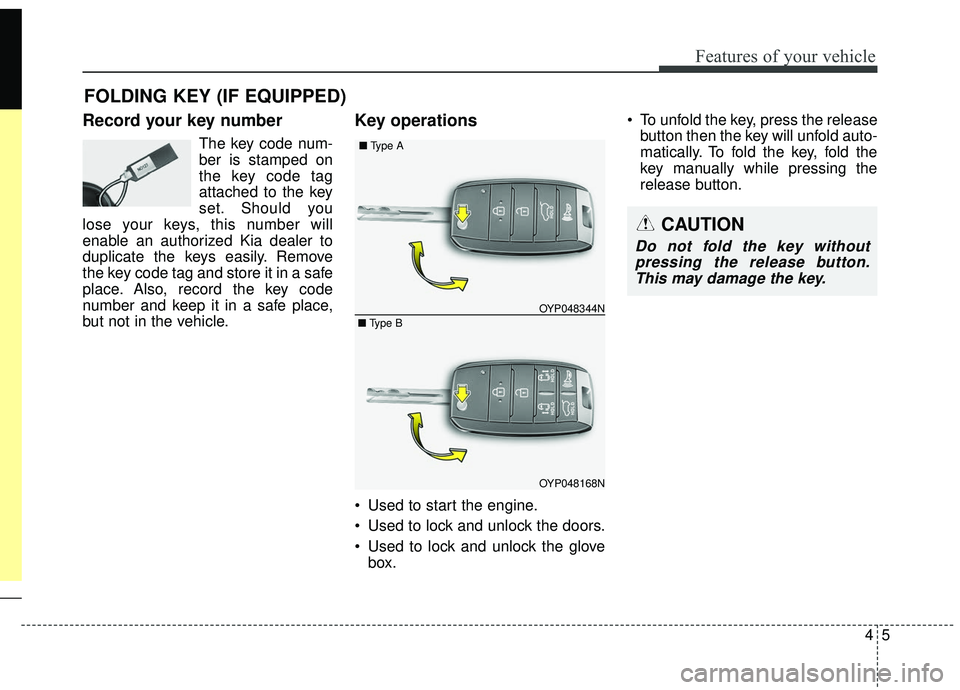
Key operations
• Used to start the engine.
Used to lock and unlock the doors.
Used to lock and unlock the glove box. To unfold the key, press the release
button then the key will unfold auto-
matically. To fold the key, fold the
key manually while pressing the
release button.
FOLDING KEY (IF EQUIPPED)
CAUTION
Do not fold the key withoutpressing the release button.This may damage the key.
OYP048168N
OYP048344N
■
Type A
■ Type B
Page 115 of 604
Features of your vehicle
64
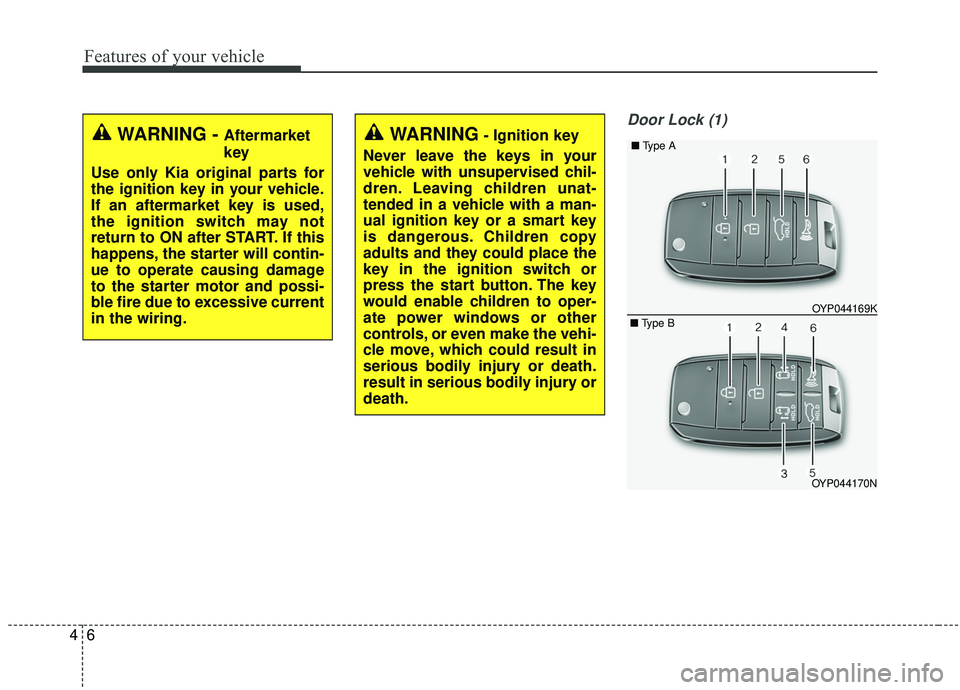
Door Lock (1)
WARNING - Aftermarket
key
Use only Kia original parts for
the ignition key in your vehicle.
If an aftermarket key is used,
the ignition switch may not
return to ON after START. If this
happens, the starter will contin-
ue to operate causing damage
to the starter motor and possi-
ble fire due to excessive current
in the wiring.WARNING- Ignition key
Never leave the keys in your
vehicle with unsupervised chil-
dren. Leaving children unat-
tended in a vehicle with a man-
ual ignition key or a smart key
is dangerous. Children copy
adults and they could place the
key in the ignition switch or
press the start button. The key
would enable children to oper-
ate power windows or other
controls, or even make the vehi-
cle move, which could result in
serious bodily injury or death.
result in serious bodily injury or
death.
OYP044170N OYP044169K
■
Type A
■ Type B
Page 116 of 604
47
Features of your vehicle
1. Close all doors, engine hood andliftgate.
2. Press the lock button (1).
3. All doors and liftgate will lock. The hazard warning lights will blink
once.
4. If the lock button is pressed once more within 4 seconds, the hazard
warning lights will blink and the
horn will sound once.
5. Make sure that doors are locked by checking the door lock button inside
or pulling the outside door handle.Door Unlock (2)
1. Press the unlock button (2).
2. The driver's door will unlock. Thehazard warning lights will blink two
times.
3. Press the unlock button (2) twice within 4 seconds and all doors and
liftgate will unlock. The hazard
warning lights will blink two times.
✽ ✽NOTICE
You can activate or deactivate the
Two Turn Unlock function. Refer to
“User settings” in this chapter.
Left power sliding door opening
or closing (if equipped) (3)
When the power door ON/OFF but-
ton is ON (not depressed):
The left sliding door is opened or
closed automatically if the button is
pressed and held.
When the left sliding door is closed
and more than one door is locked, and
the button is pressed for more than
one second all doors will be unlocked.
Page 117 of 604
Features of your vehicle
84
Right power sliding door openingor closing (if equipped) (4)
When the power door ON/OFF but-
ton is ON (not depressed) :
The right sliding door is opened or
closed automatically if the button is
pressed and held.
When the right sliding door is closed
and more than one door is locked, and
the button is pressed for more than
one second all doors will be unlocked.
❈ For detailed information refer to
the “Power sliding door and power
liftgate” in this chapter.
The power doors can be operated
when the engine is not running.
However, the power doors consume
large amounts of vehicle electric
power. To prevent the battery from
being discharged, do not operate
them at the same time.
Liftgate unlock (5)
The liftgate is unlocked if the button
is pressed for more than 1 second.
Also, once the liftgate is opened and
then closed, the liftgate will be locked
automatically.
For Power Liftgate Only:
The Power Liftgate will open if the
button is pressed for more than 1
second. Also, once the liftgate is
opened and then closed, the liftgate
will be locked again automatically.
❈ For detailed information refer to
the “Power sliding door and power
liftgate” in this chapter.
Panic (6)
The horn sounds and hazard warn-
ing lights flash for about 27 seconds
if this button is pressed for more than
0.5 second. To stop the horn and
lights, press any button on the trans-
mitter.
Page 118 of 604
49
Features of your vehicle
Transmitter precautions
The transmitter will not work if anyof following occur:
- The ignition key is in the ignitionswitch.
- You exceed the operating dis- tance limit (about 10 m [30 feet]).
- The battery in the transmitter is weak.
- Other vehicles or objects may be blocking the signal.
- The weather is extremely cold.
- The transmitter is close to a radio transmitter such as a radio sub-
station or an airport which can
interfere with normal operation of
the transmitter. When the transmitter does not work
correctly, open and close the door
with the ignition key. If you have a
problem with the transmitter, con-
tact an authorized Kia dealer.
If the transmitter is in close proxim- ity to your mobile phone, the signal
could be blocked by your mobile
phones normal operational signals.
This is especially important when
the phone is active such as making
and receiving calls, text messag-
ing, and/or sending/receiving
emails. Avoid placing the transmit-
ter and your mobile phone in the
same pants or jacket pocket and
always try to maintain an adequate
distance between the two devices.
✽ ✽ NOTICE
If the keyless entry system is inoper-
ative due to exposure to water or liq-
uids, it will not be covered by your
manufacturer’s vehicle warranty.
CAUTION
Keep the transmitter away from
water or any liquid as it canbecome damaged and not func-tion properly.