horn KIA SEDONA 2020 Owners Manual
[x] Cancel search | Manufacturer: KIA, Model Year: 2020, Model line: SEDONA, Model: KIA SEDONA 2020Pages: 604, PDF Size: 16.24 MB
Page 15 of 604
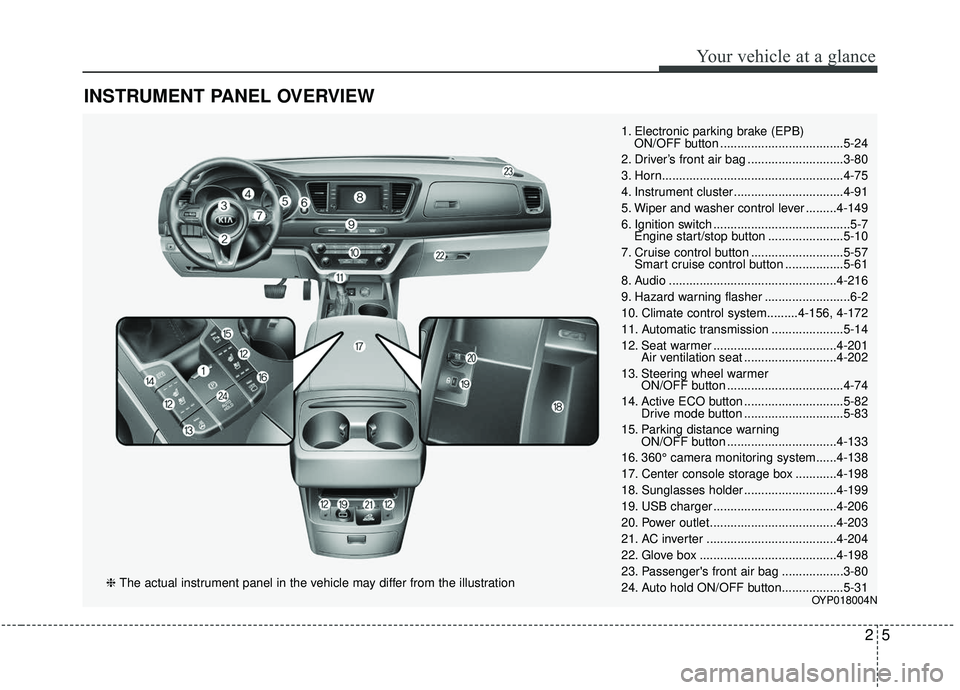
INSTRUMENT PANEL OVERVIEW
25
Your vehicle at a glance
1. Electronic parking brake (EPB) ON/OFF button ....................................5-24
2. Driver’s front air bag ............................3-80
3. Horn.....................................................4-75
4. Instrument cluster ................................4-91
5. Wiper and washer control lever .........4-149
6. Ignition switch ........................................5-7 Engine start/stop button ......................5-10
7. Cruise control button ...........................5-57 Smart cruise control button .................5-61
8. Audio .................................................4-216
9. Hazard warning flasher .........................6-2
10. Climate control system.........4-156, 4-172
11. Automatic transmission .....................5-14
12. Seat warmer ....................................4-201 Air ventilation seat ...........................4-202
13. Steering wheel warmer ON/OFF button ..................................4-74
14. Active ECO button .............................5-82 Drive mode button .............................5-83
15. Parking distance warning ON/OFF button ................................4-133
16. 360° camera monitoring system......4-138
17. Center console storage box ............4-198
18. Sunglasses holder ...........................4-199
19. USB charger ....................................4-206
20. Power outlet.....................................4-203
21. AC inverter ......................................4-204
22. Glove box ........................................4-198
23. Passenger's front air bag ..................3-80
24. Auto hold ON/OFF button..................5-31
OYP018004N
❈ The actual instrument panel in the vehicle may differ from the illustration
Page 111 of 604

Sunroof . . . . . . . . . . . . . . . . . . . . . . . . . . . . . . . . . . 4-65\
• Sliding the sunroof . . . . . . . . . . . . . . . . . . . . . . . . . . . 4-66
• Tilting the sunroof (for front sunroof) . . . . . . . . . . . 4-68
• Sunshade. . . . . . . . . . . . . . . . . . . . . . . . . . . . . . . . \
. . . . 4-69
• Resetting the sunroof . . . . . . . . . . . . . . . . . . . . . . . . . 4-69
• Rear sunroof lock . . . . . . . . . . . . . . . . . . . . . . . . . . . . 4-70
• Sunroof open warning. . . . . . . . . . . . . . . . . . . . . . . . . 4-71
Steering wheel . . . . . . . . . . . . . . . . . . . . . . . . . . . . . 4-72
• Power steering . . . . . . . . . . . . . . . . . . . . . . . . . . . . . . . 4-72
• Electric power steering . . . . . . . . . . . . . . . . . . . . . . . . 4-72
• Tilt and telescopic steering . . . . . . . . . . . . . . . . . . . . . 4-73
• Heated steering wheel . . . . . . . . . . . . . . . . . . . . . . . . . 4-74
• Horn . . . . . . . . . . . . . . . . . . . . . . . . . . . . . . . . . . . . \
. . . 4-75
Mirrors . . . . . . . . . . . . . . . . . . . . . . . . . . . . . . . . . . 4-76\
• Inside rearview mirror . . . . . . . . . . . . . . . . . . . . . . . . 4-76
• Outside rearview mirror. . . . . . . . . . . . . . . . . . . . . . . 4-86
Instrument cluster . . . . . . . . . . . . . . . . . . . . . . . . . 4-91
• Instrument cluster control . . . . . . . . . . . . . . . . . . . . . 4-92
• LCD display control . . . . . . . . . . . . . . . . . . . . . . . . . . 4-92
• Gauges . . . . . . . . . . . . . . . . . . . . . . . . . . . . . . . . . . . . \
. 4-93
• Transmission shift indicator . . . . . . . . . . . . . . . . . . . . 4-96
LCD display . . . . . . . . . . . . . . . . . . . . . . . . . . . . . . 4-98
• LCD modes. . . . . . . . . . . . . . . . . . . . . . . . . . . . . . . . . . 4-98\
Trip modes (Trip computer) . . . . . . . . . . . . . . . . . 4-99
• Trip modes . . . . . . . . . . . . . . . . . . . . . . . . . . . . . . . . . . 4-99\
• Fuel economy . . . . . . . . . . . . . . . . . . . . . . . . . . . . . . . . 4-99
• Accumulated driving information mode . . . . . . . . . 4-101
• One time driving information mode . . . . . . . . . . . . 4-101
• Digital speedometer . . . . . . . . . . . . . . . . . . . . . . . . . . 4-102
• Smart shift . . . . . . . . . . . . . . . . . . . . . . . . . . . . . . . . . 4-102
• Turn by turn mode . . . . . . . . . . . . . . . . . . . . . . . . . . 4-102
• Assist mode. . . . . . . . . . . . . . . . . . . . . . . . . . . . . . . . . 4-103
• Distance to empty . . . . . . . . . . . . . . . . . . . . . . . . . . . 4-105
• User settings mode. . . . . . . . . . . . . . . . . . . . . . . . . . . 4-106
• Warning messages . . . . . . . . . . . . . . . . . . . . . . . . . . . 4-111
Warning and indicator lights . . . . . . . . . . . . . . . 4-116
• Warning lights . . . . . . . . . . . . . . . . . . . . . . . . . . . . . . 4-116
• Indicator lights. . . . . . . . . . . . . . . . . . . . . . . . . . . . . . 4-123
Parking distance warning-reverse . . . . . . . . . . . 4-128
• Operation of the parking distance warning-reverse . 4-128
• Non-operational conditions of the parking distance warning-reverse . . . . . . . . . . . . . . . . . . . . . . . . . . . . 4-129
• Parking distance warning-reverse precautions . . . 4-130
• Self-diagnosis . . . . . . . . . . . . . . . . . . . . . . . . . . . . . . . 4-131
4
Page 116 of 604
47
Features of your vehicle
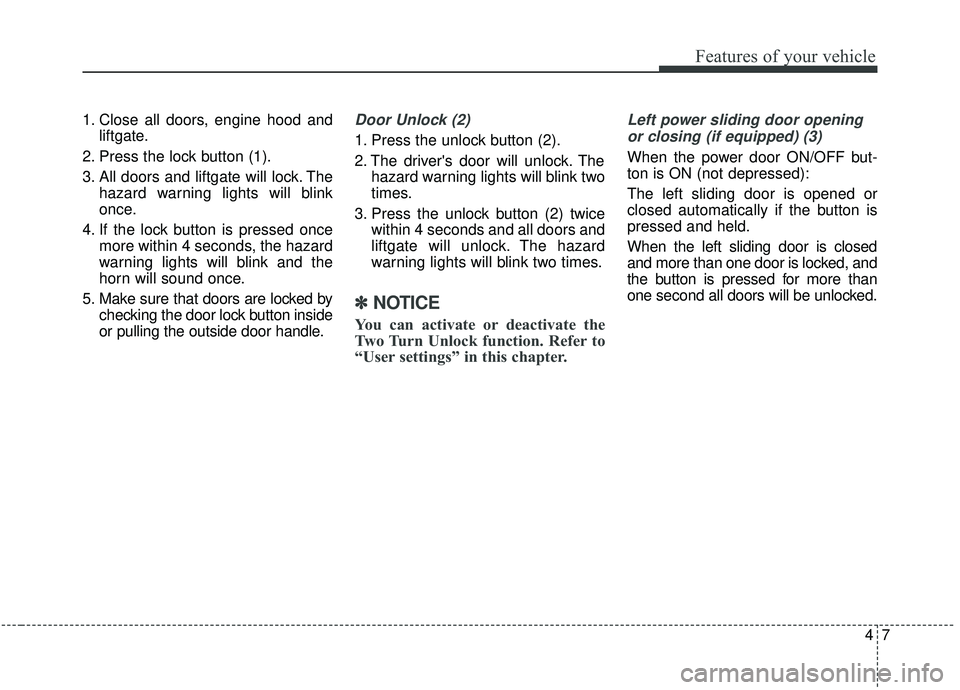
1. Close all doors, engine hood andliftgate.
2. Press the lock button (1).
3. All doors and liftgate will lock. The hazard warning lights will blink
once.
4. If the lock button is pressed once more within 4 seconds, the hazard
warning lights will blink and the
horn will sound once.
5. Make sure that doors are locked by checking the door lock button inside
or pulling the outside door handle.Door Unlock (2)
1. Press the unlock button (2).
2. The driver's door will unlock. Thehazard warning lights will blink two
times.
3. Press the unlock button (2) twice within 4 seconds and all doors and
liftgate will unlock. The hazard
warning lights will blink two times.
✽ ✽NOTICE
You can activate or deactivate the
Two Turn Unlock function. Refer to
“User settings” in this chapter.
Left power sliding door opening
or closing (if equipped) (3)
When the power door ON/OFF but-
ton is ON (not depressed):
The left sliding door is opened or
closed automatically if the button is
pressed and held.
When the left sliding door is closed
and more than one door is locked, and
the button is pressed for more than
one second all doors will be unlocked.
Page 117 of 604
Features of your vehicle
84
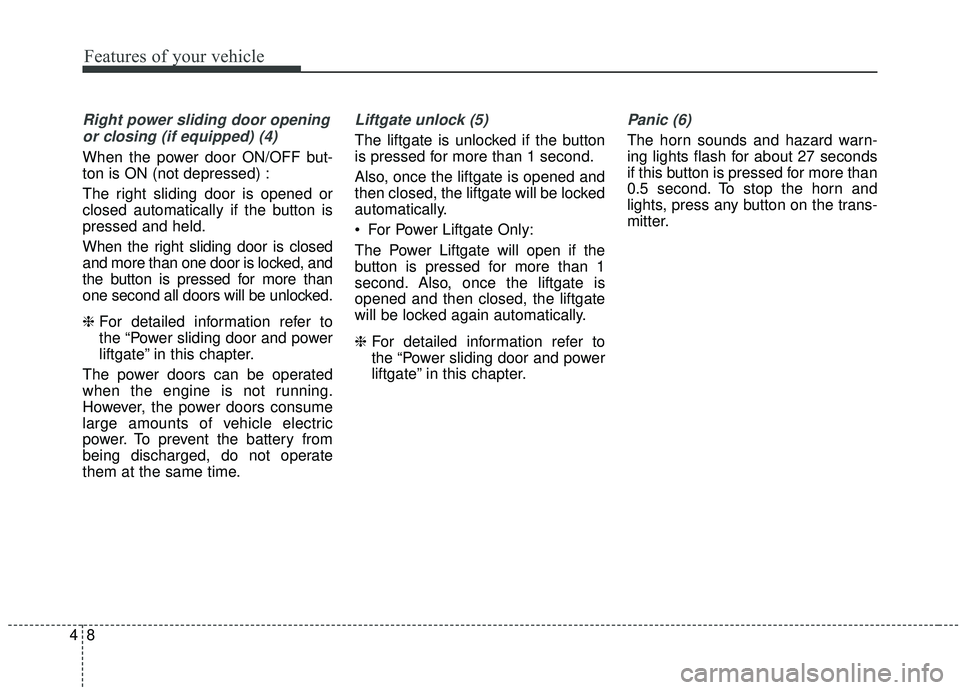
Right power sliding door openingor closing (if equipped) (4)
When the power door ON/OFF but-
ton is ON (not depressed) :
The right sliding door is opened or
closed automatically if the button is
pressed and held.
When the right sliding door is closed
and more than one door is locked, and
the button is pressed for more than
one second all doors will be unlocked.
❈ For detailed information refer to
the “Power sliding door and power
liftgate” in this chapter.
The power doors can be operated
when the engine is not running.
However, the power doors consume
large amounts of vehicle electric
power. To prevent the battery from
being discharged, do not operate
them at the same time.
Liftgate unlock (5)
The liftgate is unlocked if the button
is pressed for more than 1 second.
Also, once the liftgate is opened and
then closed, the liftgate will be locked
automatically.
For Power Liftgate Only:
The Power Liftgate will open if the
button is pressed for more than 1
second. Also, once the liftgate is
opened and then closed, the liftgate
will be locked again automatically.
❈ For detailed information refer to
the “Power sliding door and power
liftgate” in this chapter.
Panic (6)
The horn sounds and hazard warn-
ing lights flash for about 27 seconds
if this button is pressed for more than
0.5 second. To stop the horn and
lights, press any button on the trans-
mitter.
Page 127 of 604
Features of your vehicle
18
4
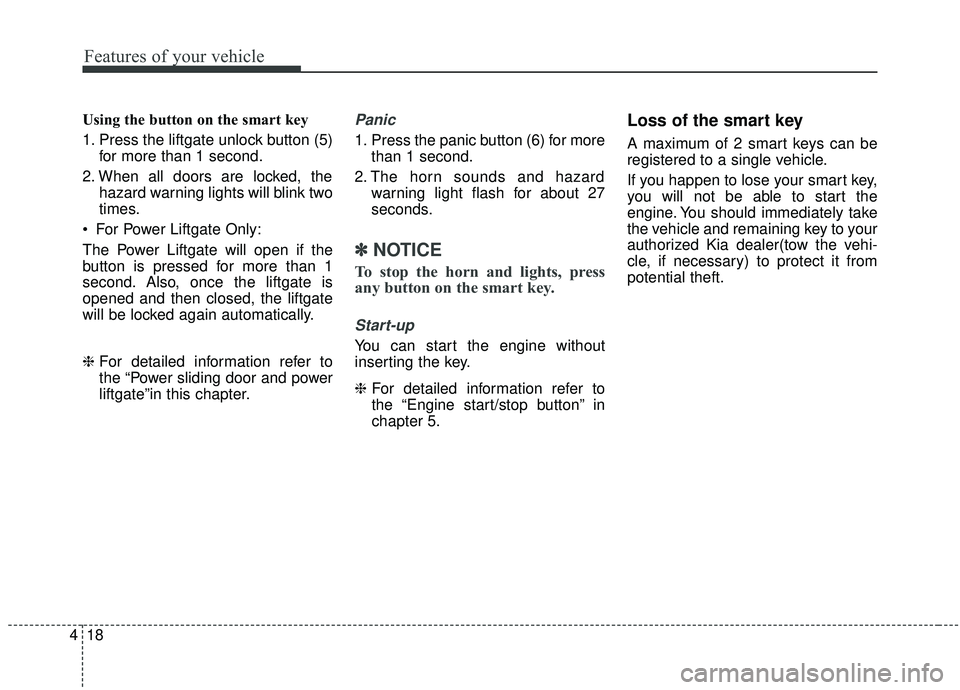
Using the button on the smart key
1. Press the liftgate unlock button (5)
for more than 1 second.
2. When all doors are locked, the hazard warning lights will blink two
times.
For Power Liftgate Only:
The Power Liftgate will open if the
button is pressed for more than 1
second. Also, once the liftgate is
opened and then closed, the liftgate
will be locked again automatically.
❈ For detailed information refer to
the “Power sliding door and power
liftgate”in this chapter.Panic
1. Press the panic button (6) for more
than 1 second.
2. The horn sounds and hazard warning light flash for about 27
seconds.
✽ ✽NOTICE
To stop the horn and lights, press
any button on the smart key.
Start-up
You can start the engine without
inserting the key.
❈ For detailed information refer to
the “Engine start/stop button” in
chapter 5.
Loss of the smart key
A maximum of 2 smart keys can be
registered to a single vehicle.
If you happen to lose your smart key,
you will not be able to start the
engine. You should immediately take
the vehicle and remaining key to your
authorized Kia dealer(tow the vehi-
cle, if necessary) to protect it from
potential theft.
Page 184 of 604
475
Features of your vehicle
Horn
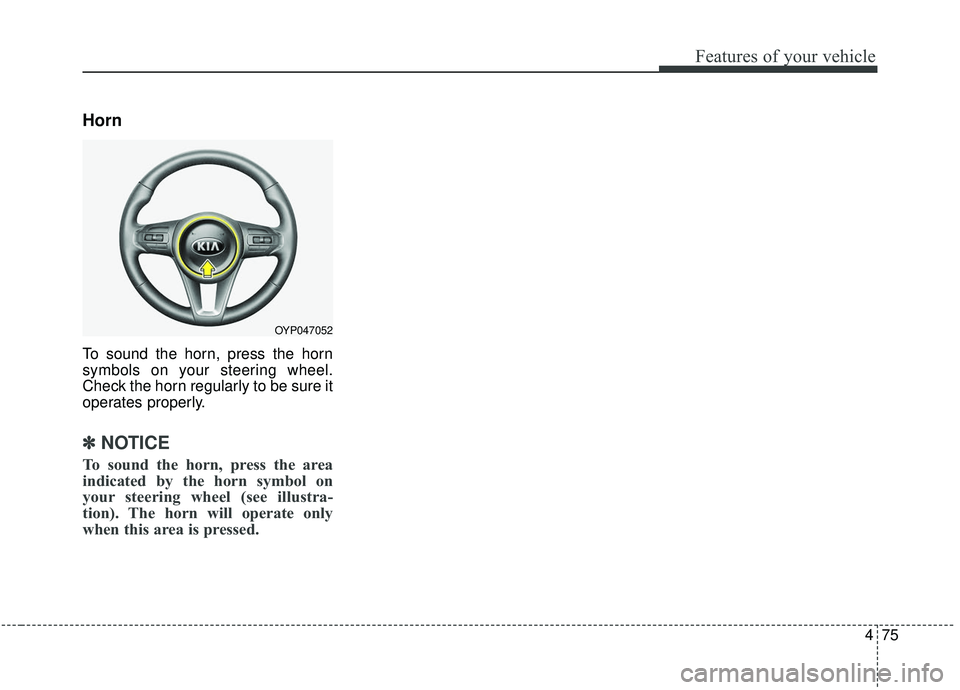
To sound the horn, press the horn
symbols on your steering wheel.
Check the horn regularly to be sure it
operates properly.
✽ ✽NOTICE
To sound the horn, press the area
indicated by the horn symbol on
your steering wheel (see illustra-
tion). The horn will operate only
when this area is pressed.
OYP047052
Page 238 of 604
4129
Features of your vehicle
Types of warning sound
When an object is 120 cm to 61 cm(47 in. to 24 in.) from the rear
bumper: Buzzer beeps intermit-
tently.
When an object is 60 cm to 31 cm (24 in. to 12 in.) from the rear
bumper: Buzzer beeps more fre-
quently.
When an object is within 30 cm (12 in.) of the rear bumper : Buzzer
sounds continuously.
Non-operational conditions of
the parking distance warning-
reverse
The parking distance warning-
reverse may not operate properly
when:
1. Moisture is frozen to the sensor. (It will operate normally when the
moisture has been cleared.)
2. The sensor is covered with foreign matter, such as snow or water, or
the sensor cover is blocked. (It will
operate normally when the materi-
al is removed or the sensor is no
longer blocked.)
3. Driving on uneven road surfaces (unpaved roads, gravel, bumps,
gradient).
4. Objects generating excessive noise (vehicle horns, loud motor-
cycle engines, or truck air brakes)
are within range of the sensor.
5. The weather conditions produce heavy rain or water spray. 6. Wireless transmitters or mobile
phones are within range of the
sensor.
7. The sensor is covered with snow.
8. Trailer towing
Page 244 of 604
4135
Features of your vehicle
There is a possibility of parkingdistance warning malfunctionwhen:
1. Driving on uneven road surfaces such as unpaved roads, gravel,
bumps, or gradient.
2. Objects generating excessive noise such as vehicle horns, loud motor-
cycle engines, or truck air brakes
can interfere with the sensor.
3. The weather conditions produce heavy rain or water spray.
4. Wireless transmitters or mobile phones are present near the sen-
sor.
5. Sensor is covered with snow.
Detecting range may decrease when:
1. Outside air temperature is extremely hot or cold.
2. Undetectable objects smaller than 1 m (39 in.) and narrower than 14
cm (5.5 in.) in diameter.
The following objects may not be
recognized by the sensor:
1. Sharp or slim objects such as ropes, chains or small poles.
2. Objects, which tend to absorb sen- sor frequency such as clothes,
spongy material or snow.
✽ ✽NOTICE
1. The warning may not sound
depending on the speed and
shapes of the objects detected.
2. The parking distance warning may malfunction if the vehicle
bumper height or sensor installa-
tion has been modified. Any non-
factory installed equipment or
accessories may also interfere
with the sensor performance.
3. Sensor may not recognize objects less than 30 cm (12 in.) from the
sensor, or it may sense an incor-
rect distance. Use with caution.
4. When the sensor is frozen or stained with snow or water, the
sensor may be inoperative until
the stains are removed using a
soft cloth.
5. Do not push, scratch or strike the sensor with any hard objects that
could damage the surface of the
sensor. Sensor damage could occur.
Page 547 of 604
Maintenance
64
7
Fuse Name Fuse rating Circuit Protected
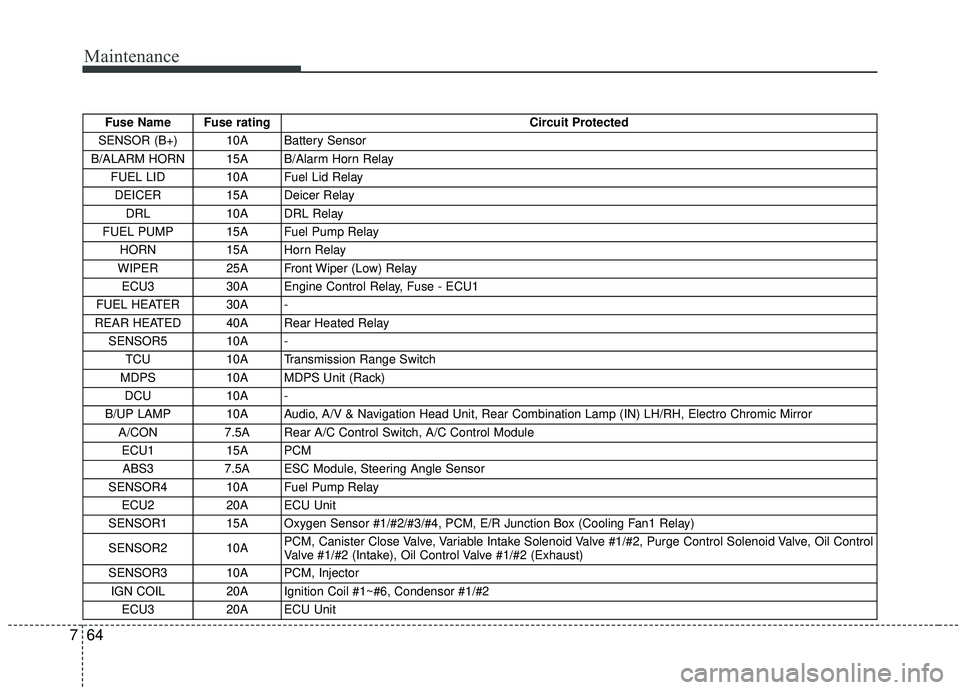
SENSOR (B+) 10A Battery Sensor
B/ALARM HORN 15A B/Alarm Horn Relay FUEL LID 10A Fuel Lid Relay DEICER 15A Deicer Relay
DRL 10A DRL Relay
FUEL PUMP 15A Fuel Pump Relay HORN 15A Horn Relay
WIPER 25A Front Wiper (Low) Relay
ECU3 30A Engine Control Relay, Fuse - ECU1
FUEL HEATER 30A -
REAR HEATED 40A Rear Heated Relay SENSOR5 10A - TCU 10A Transmission Range Switch
MDPS 10A MDPS Unit (Rack)
DCU 10A -
B/UP LAMP 10A Audio, A/V & Navigation Head Unit, Rear Combination Lamp (IN) LH/RH, Electro Chromic \
Mirror A/CON 7.5A Rear A/C Control Switch, A/C Control Module
ECU1 15A PCM ABS3 7.5A ESC Module, Steering Angle Sensor
SENSOR4 10A Fuel Pump Relay ECU2 20A ECU Unit
SENSOR1 15A Oxygen Sensor #1/#2/#3/#4, PCM, E/R Junction Box (Cooling Fan1 Relay)
SENSOR2 10A PCM, Canister Close Valve, Variable Intake Solenoid Valve #1/#2, Purge Control Solenoid Valve, Oil Control
Valve #1/#2 (Intake), Oil Control Valve #1/#2 (Exhaust)
SENSOR3 10A PCM, Injector
IGN COIL 20A Ignition Coil #1~#6, Condensor #1/#2 ECU3 20A ECU Unit
Page 602 of 604
I9
Index
Rear seat adjustment ..................................................3-17
Seatback pocket ..........................................................3-16
Smart Cruise Control with Stop & Go system ..............5-61 Limitations of the system............................................5-7\
5
Smart Cruise Control switch ......................................5-63
Speed setting ..............................................................5-63
To adjust the sensitivity of Smart Cruise Control system ......................................................................5-\
74
To convert to cruise control mode ..............................5-74
Vehicle to vehicle distance setting ..............................5-68
When the lane ahead is clear ......................................5-69
When there is a vehicle ahead of you in your lane ....5-70
Smart key ......................................................................4-\
14 Battery replacement ....................................................4-20
Loss of the smart key ..................................................4-18
Record your key number ............................................4-14
Smart key function ......................................................4-14
Smart key immobilizer system ..................................4-21
Smart key precautions ................................................4-19
Special driving conditions ..........................................5-105 Driving at night ........................................................5-108
Driving in flooded areas ..........................................5-109
Driving in the rain ....................................................5-109
Driving on unpaved roads ........................................5-110
Hazardous driving conditions ..................................5-105
Highway driving ......................................................5-110
Reducing the risk of a rollover ................................5-105 Rocking the vehicle ..................................................5-107
Smooth cornering ......................................................5-108
Steering wheel ..............................................................4-72 Electric power steering ..............................................4-72
Heated steering wheel ................................................4-74
Horn ........................................................................\
....4-75
Power steering ............................................................4-72
Tilt and telescopic steering ........................................4-73
Storage compartments ................................................4-197 Center console storage ..............................................4-198
Cool box....................................................................4-19\
9
Glove box ..................................................................4-198
Sunglass holder ........................................................4-199
Sunroof ........................................................................\
..4-65 Rear sunroof lock ........................................................4-70
Resetting the sunroof ..................................................4-69
Sliding the sunroof ......................................................4-66
Sunroof open warning ................................................4-71
Sunshade ....................................................................4-69\
Tilting the sunroof (for front sunroof) ........................4-68
Theft-alarm system ........................................................4-23 Armed stage ................................................................4-23
Disarmed stage ............................................................4-24
Theft-alarm stage ........................................................4-24
Tire specification and pressure label ..............................8-9
T