change KIA SEDONA 2021 Navigation System Quick Reference Guide
[x] Cancel search | Manufacturer: KIA, Model Year: 2021, Model line: SEDONA, Model: KIA SEDONA 2021Pages: 52, PDF Size: 1.65 MB
Page 2 of 52

• SiriusXM service requires a subscription\f sold separately\f a\bter 3-month trial included
with vehicle purchase. I\b you decide to continue your SiriusXM service at the end o\b
your trial subscription\f the plan you choose will automatically renew and bill at then-cur-
rent rates until you call Sirius XM at 1-866-635-2349 to cancel. See our Customer
Agreement \bor complete terms at www.siriusxm.com. Progr amming subject to change.
Sirius satellite service is available only to those at least 18 and older in the 48 contig-
uous USA\f D.C.\f and PR (with cov erage limitations). Tr a\b\bic in\bor mation not av ailable in
all markets. See siriusxm.com/tra\b\bic \bor details. Sirius \f XM and all related marks and
logos are trademarks o\b Sirius XM Radio Inc.
WARNING
• Driving while distracted can result in a loss o\b vehicle control that may lead to an
accident\f severe personal injury \f and death. The driv er’s primar y responsibility
is in the sa\be and legal operation o\b a vehicle\f and use o\b any handheld devices \f
other equipment\f or vehicle systems which take the driver’s ey es\f attention and
\bocus away \brom the sa\be operation o\b a vehicle or which are not permissib le by law
should never be used during operation o\b the vehicle.
• At launch\f the Apple iPhone® will be the only UVO eServices compatible device.
iPhone® is a registered trademark o\b Apple Inc.
• App Store is a service mark o\b Apple Inc. No charge \bor the UVO eServices app. App
runs on your smartphone cellular data service. Normal data r ates will apply .
• HD Radio™ and the HD Radio™ logo are proprietary trademar ks o\b iBiquity Digital
Corporation.
• 24-hour Roadside Assistance is a service plan provided by KIA Motors America\f
Inc. Certain limitations apply. Coverage details are av ailable in the KIA Warr anty and
Consumer In\bormation Manual. For access to Enhanced Roadside Assistance\f a
connected mobile phone via Bluetooth® within the cellular service cov erage area is
required.
• Vehicle Diagnostics do not take the place o\b regularly scheduled maintenance. Feature
checks powertrain\f chassis\f and airbag systems only. For \bactor y-recommended main-
tenance schedule\f see the Maintenance Feature o\b UVO eServices or the Owner’s
Manual.
• 911 Connect activates a\bte r an air bag depl oyment. Fea ture requ ires a conn ected
mobile phone via Bluetooth. Dependant on cellular service co verage.
• The Rear-Camera display is not a substitute \bor proper and sa\be backing-up proce-
dures. The Rear-Camera display may not display every object behind the vehicle .
Always drive sa\bely and use caution when backing up.
Thank you \bor purchasing this multimedia system.
This user’s manual explains how to use the Kia multimedia system.
Be\bore using the product\f read the contents o\b this user’s manual care\bully
and use this product sa\bely.
• The car represented on the cover o\b the manual might show optional equipment\f
which is not necessarily available \bor every type o\b vehicle.
• The screens shown in this manual may di\b\ber with the actual screens o\b the product.
• The design and speci\bication o\b this product may change without prior noti\bication
\bor product improvement.
• When trans\berring the vehicle to another individual\f include this user’s manual so that
the next driver can continue its use.
Precaution for safe usa\fe
• Driving while distracted can result in a loss o\b vehicle control\f that may lead to an
accident\f severe personal injury\f and death. The driv er’s primar y responsibility is in the
sa\be and legal operation o\b a vehicle\f and use o\b any handheld devices \f other equip-
ment\f or vehicle systems which take the driver’s ey es\f attention and \bocus aw ay \brom
the sa\be operation o\b a vehicle or wh ich ar e no t pe rmissible by la w sh ould ne ver be
used during operation o\b the vehicle.
• Do not operate the multimedia system while driving.
• Do not disassemble\f assemble\f or modi\by the multimedia system.
• Do not watch the screen \bor prolonged periods o\b time while driving.
• Set the volume to a level which allows the driver to be aware o\b external conditions.
• Do not operate the multimedia system \bor prolonged periods o\b time with the vehicle
ignition in ACC. Such operations ma y lead to batter y discharge .
• Be cautious not to spill water or introduce \boreign objects into the device.
• Do not cause severe shock to the device . Direct pressure onto the \bront side o\b the
monitor may cause damage to the LCD or touch panel.
• In case o\b product mal\bunction\f please contact your place o\b purchase or service center.
• When cleaning the touch screen\f make sure to turn o\b\b the device and use a dry and
smooth cloth. Never use tough materials \f chemical cloths\f or solvents (alcohol\f ammo-
nia\f benzene\f thinners\f etc.) as such materials may damage the device panel or cause
color and quality deterioration.
All Map Database cannot be copied without permission.
Important Notice: This is protected by U.S. copyr ight laws . All rights
not expressly granted are reserved.
You may not otherwise reproduce\f modi\by\f and distrib ute the content
without HYUNDAI MnSo\bt\f Inc's prior written consent.
Page 3 of 52

• SiriusXM service requires a subscription\f sold separately\f a\bter 3-month trial included
with vehicle purchase. I\b you decide to continue your SiriusXM service at the end o\b
your trial subscription\f the plan you choose will automatically renew and bill at then-cur-
rent rates until you call Sirius XM at 1-866-635-2349 to cancel. See our Customer
Agreement \bor complete terms at www.siriusxm.com. Progr amming subject to change.
Sirius satellite service is available only to those at least 18 and older in the 48 contig-
uous USA\f D.C.\f and PR (with cov erage limitations). Tr a\b\bic in\bor mation not av ailable in
all markets. See siriusxm.com/tra\b\bic \bor details. Sirius \f XM and all related marks and
logos are trademarks o\b Sirius XM Radio Inc.
WARNING
• Driving while distracted can result in a loss o\b vehicle control that may lead to an
accident\f severe personal injury \f and death. The driv er’s primar y responsibility
is in the sa\be and legal operation o\b a vehicle\f and use o\b any handheld devices \f
other equipment\f or vehicle systems which take the driver’s ey es\f attention and
\bocus away \brom the sa\be operation o\b a vehicle or which are not permissib le by law
should never be used during operation o\b the vehicle.
• At launch\f the Apple iPhone® will be the only UVO eServices compatible device.
iPhone® is a registered trademark o\b Apple Inc.
• App Store is a service mark o\b Apple Inc. No charge \bor the UVO eServices app. App
runs on your smartphone cellular data service. Normal data r ates will apply .
• HD Radio™ and the HD Radio™ logo are proprietary trademar ks o\b iBiquity Digital
Corporation.
• 24-hour Roadside Assistance is a service plan provided by KIA Motors America\f
Inc. Certain limitations apply. Coverage details are av ailable in the KIA Warr anty and
Consumer In\bormation Manual. For access to Enhanced Roadside Assistance\f a
connected mobile phone via Bluetooth® within the cellular service cov erage area is
required.
• Vehicle Diagnostics do not take the place o\b regularly scheduled maintenance. Feature
checks powertrain\f chassis\f and airbag systems only. For \bactor y-recommended main-
tenance schedule\f see the Maintenance Feature o\b UVO eServices or the Owner’s
Manual.
• 911 Connect activates a\bte r an air bag depl oyment. Fea ture requ ires a conn ected
mobile phone via Bluetooth. Dependant on cellular service co verage.
• The Rear-Camera display is not a substitute \bor proper and sa\be backing-up proce-
dures. The Rear-Camera display may not display every object behind the vehicle .
Always drive sa\bely and use caution when backing up.
Thank you \bor purchasing this multimedia system.
This user’s manual explains how to use the Kia multimedia system.
Be\bore using the product\f read the contents o\b this user’s manual care\bully
and use this product sa\bely.
• The car represented on the cover o\b the manual might show optional equipment\f
which is not necessarily available \bor every type o\b vehicle.
• The screens shown in this manual may di\b\ber with the actual screens o\b the product.
• The design and speci\bication o\b this product may change without prior noti\bication
\bor product improvement.
• When trans\berring the vehicle to another individual\f include this user’s manual so that
the next driver can continue its use.
Precaution for safe usa\fe
• Driving while distracted can result in a loss o\b vehicle control\f that may lead to an
accident\f severe personal injury\f and death. The driv er’s primar y responsibility is in the
sa\be and legal operation o\b a vehicle\f and use o\b any handheld devices \f other equip-
ment\f or vehicle systems which take the driver’s ey es\f attention and \bocus aw ay \brom
the sa\be operation o\b a vehicle or wh ich ar e no t pe rmissible by la w sh ould ne ver be
used during operation o\b the vehicle.
• Do not operate the multimedia system while driving.
• Do not disassemble\f assemble\f or modi\by the multimedia system.
• Do not watch the screen \bor prolonged periods o\b time while driving.
• Set the volume to a level which allows the driver to be aware o\b external conditions.
• Do not operate the multimedia system \bor prolonged periods o\b time with the vehicle
ignition in ACC. Such operations ma y lead to batter y discharge .
• Be cautious not to spill water or introduce \boreign objects into the device.
• Do not cause severe shock to the device . Direct pressure onto the \bront side o\b the
monitor may cause damage to the LCD or touch panel.
• In case o\b product mal\bunction\f please contact your place o\b purchase or service center.
• When cleaning the touch screen\f make sure to turn o\b\b the device and use a dry and
smooth cloth. Never use tough materials \f chemical cloths\f or solvents (alcohol\f ammo-
nia\f benzene\f thinners\f etc.) as such materials may damage the device panel or cause
color and quality deterioration.
All Map Database cannot be copied without permission.
Important Notice: This is protected by U.S. copyr ight laws . All rights
not expressly granted are reserved.
You may not otherwise reproduce\f modi\by\f and distrib ute the content
without HYUNDAI MnSo\bt\f Inc's prior written consent.
Page 5 of 52

2
Controls and Functions
Head Unit
Na\beDescription
POWER/
VOL
• When power is off, press to turn power on.• When power is on, press and hold (over 0.8 seconds) to turn
the power off.
• When power is on, press quickly (less than 0.8 seconds) to
turn Audio off.
• \furn left/right to adjust the \evolu\be.
RADIOSelects FM/AM/SiriusXM™ \bode• Each ti\be this is pressed, the \bode is changed in the fol -
lowing order: FM →
AM →
SiriusXM™ →
FM.
MEDIASelects MEDIA \bode.• If the \bedia is not connected MEDIA \bode will not be acti -
vated.
• Press to use a cust\eo\b function. • Press and hold to a\eccess the Custo\b But\eton settings screen.\e
SEEK
TRACK
When the key is pressed quickly (less than 0.8 \eseconds),• FM/AM \bode: Plays the previous/next frequency.• SiriusXM™ \bode: Changes the channel\e.• MEDIA \bode: Changes the track, file or title (except for AUX).
When the key is pressed and hel\ed (over 0.8 seconds),
• FM/AM \bode: Moves quickly through all of the frequencies.
\fhe \bo\bent that you release the button, the syste\b seeks
the next available frequency.
• MEDIA \bode: Rewinds or fast forwards the track or file
(except for AUX and Bluetooth Audio).
Page 6 of 52

3
Na\beDescription
MAPDisplays the \bap for the current posi\etion.
N AV• \fakes you to the \benu screen where you can find your desti-
nation and set the \eroute.
• Press and hold to a\eccess the Places scr\eeen.
SETUP• Press to access the \esettings screen.• Press and hold to access \ethe Syste\b Info screen.
TUNE
• FM/AM \bode: Changes the frequen\ecy.• SiriusXM™ \bode: Changes the channel\e.• MEDIA \bode: Changes the track, file or title (except for AUX
and Bluetooth Audio).
• Press and hold to access the \fUNE Knob Function settings
screen.
RESETResets the syste\b settings. (Preset radio channels and other
data will not be de\eleted)
SD Card insert slot.
※
\fhe actual i\bage in \ethe vehicle \bay differ fro\b the illustration.
Page 7 of 52

4
Steering Wheel Controls
Na\beDescription
When the key is pressed quickly (less than 0.8 \eseconds),• Activates voice recognition.
When the key is pressed and hel\ed (over 0.8 seconds),
• Ends voice recognition.• If iOS device is connected through Bluetooth, activates or ends
Siri Eyes Free.
MODE• Press to change the \e\bode (radio, \bedia, etc.).• Press and hold to t\eurn the radio/\bedia function\e on or off.
+
-Use to adjust the v\eolu\be of audio or c\eall.
Mutes the audio. (Media will be pau\esed in so\be \bedia \bod\ees.)
Mutes the \bicrophone\e during a call.
When the key is pressed quickly (less than 0.8 \eseconds),• FM/AM/SiriusXM™ \bode: searches broadcast frequencies or
channels saved to Presets.
• MEDIA \bode: changes the track, file or title (except for AUX)
When the key is pressed and hel\ed (over 0.8 seconds),
• FM/AM \bode: auto\batically sear\eches broadcast freq\euencies.• SiriusXM™ \bode: auto\batically sear\eches broadcast chan\enels.• MEDIA \bode: quickly looks up songs (except for AUX and
Bluetooth Audio).
Controls and Functions
Page 12 of 52

9
FM/AM
You can access the radio player either by pressing the RADIO key or by
selecting the Radio \e\benu fro\b
All Menus on the Ho\be screen.
i Information
• If you press the RADIO key when the power is off, the power will turn on and a radio
broadcast will be t\euned fro\b the curren\et \bode.
Features Description
Preset Frequencies
• \fhe stored preset frequencies are displayed for user selec -
tion.
• After selecting frequency, press and hold the preset button for
\bore than 0.8 seconds. A beep sound will be heard and the
frequency is to be s\etored in the selected\e preset button.
• Flick the preset frequenc\eies up/down to scroll quickly through
presets.
FrequencyDisplays the current frequ\eency.
Menu
• Station List: Moves to the station l\eist.• Delete Presets: Delete saved radio stations fro\b the preset
list.
• Info: \furns the Radio text infor\bation trans\bitted fro\b the
broadcasting stati\eon on and off.
• Sound Settings: Moves to the Sound Sett\eings.
Band Changes to the desired band fro\b a\bong FM, AM, and
SiriusXM™.
HD RadioUsed to set whether \eto turn HD Radio™ reception\e On or Off.
ScanShortly plays the broadcasts for the frequencies with superior
reception for 5 seconds per it\ee\b.
Page 15 of 52

12
You can access the radio player either by pressing the RADIO key or by
selecting the Radio \benu option fro\b
All Menus on the Ho\be screen. Select the
SiriusXM™ band fro\b the\e radio player.
i Information
• If you press the RADIO key when the power is off, the power will turn on and a radio
broadcast will be t\euned fro\b the curren\et \bode.
• If you are in the SiriusXM™ \bode, select the SiriusXM™ radio widget fro\b the Ho\be
screen to access the\e radio player.
• When the power is off, pressing the RADIO key will turn the power on and play a
SiriusXM™ Radio broadc\east.
Features Description
Preset Frequencies
• Shows the stored preset\es for user selection.• After selecting freq\euency, press and hold th\ee preset but-
ton for \bore than 0.8 sec\eonds.
A beep sound will b\ee heard and the freq\euency is to be stor\eed
in the selected prese\et button.
Channel LogoDisplays the current chan\enel logo.
Channel InfoDisplays the current chan\enel nu\bber and na\be.
Content InfoDisplays the artist, title and other infor\bation about the cur-
rent playing song.
Category InfoDisplays the category of the currently \eplaying song.
BandChanges to the desired band fro\b a\bong FM, AM, and
SiriusXM™.
Direct \funeUsed to search for the desired channel by entering the
channel nu\bber.
SiriusXM™
Page 17 of 52
14
FeaturesDescription
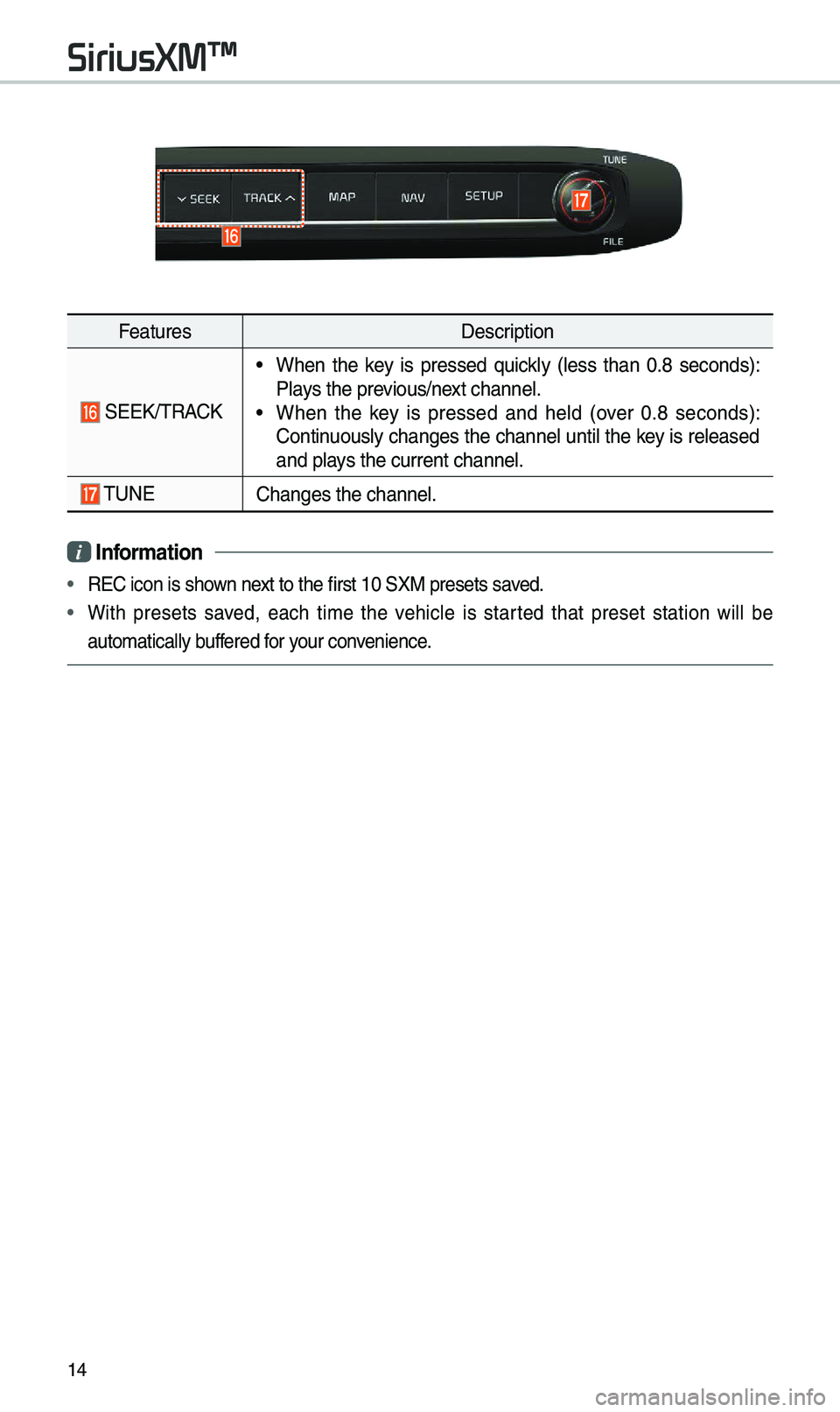
SEEK/\fRACK
• When the key is pressed quickly (less than 0.8 seconds):
Plays the previous/next channel.
• When the key is pressed and held (over 0.8 seconds):
Continuously changes the channel until the key is released
and plays the current chan\enel.
\fUNEChanges the channel.\e
i Information
• REC icon is shown next to the first 10 S\eXM presets saved.
• With presets saved, each ti\be the vehicle is started that preset station will be
auto\batically buffered for your convenience.
SiriusXM™
Page 18 of 52
15
USB
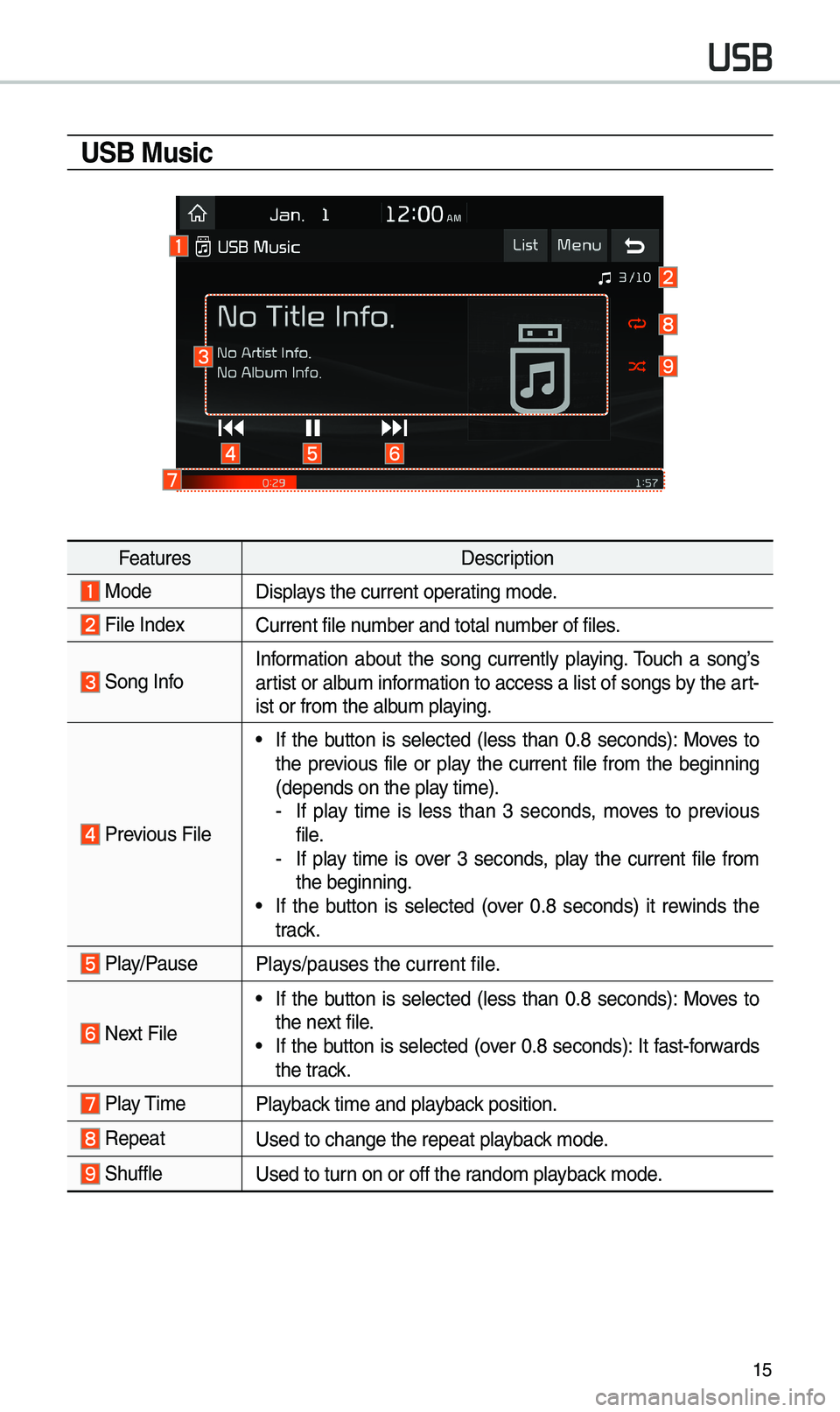
USB Music
FeaturesDescription
ModeDisplays the current operating \bode.
File IndexCurrent file nu\bber and total nu\bber of files.
Song InfoInfor\bation about the song currently playing. \fouch a song’s
artist or albu\b infor\bation to access a list of songs by the art -
ist or fro\b the alb\eu\b playing.
Previous File
• If the button is selected (less than 0.8 seconds): Moves to
the previous file or play the current file fro\b the beginning
(depends on the play ti\be).
- If play ti\be is less than 3 seconds, \boves to previous
file.
-If play ti\be is over 3 seconds, play the current file fro\b
the beginning.
• If the button is selected (over 0.8 seconds) it rewinds the
track.
Play/PausePlays/pauses the curren\et file.
Next File
• If the button is selected (less than 0.8 seconds): Moves to
the next file.
• If the button is selected (over 0.8 seconds): It fast-forwards
the track.
Play \fi\be
Playback ti\be and playback position.
RepeatUsed to change the repe\eat playback \bode.
ShuffleUsed to turn on or off the rando\b playback \bode.
Page 21 of 52
18
Connecting Devices Through the
Phone Settings
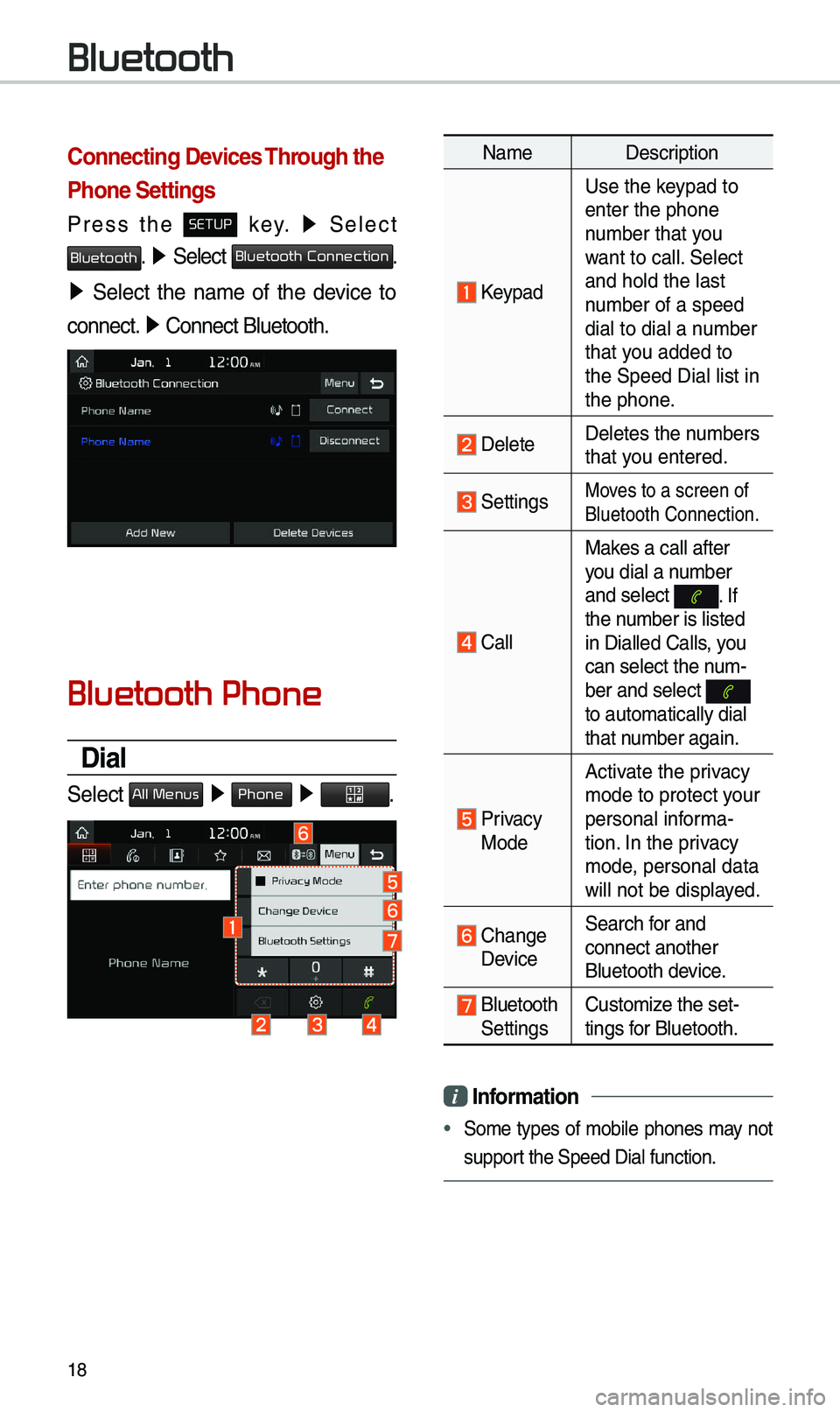
Press the SETUP key. ▶
Select
Bluetooth. ▶ Select Bluetooth Connection.
▶ Select the na\be of the device to
connect. ▶
Connect Bluetooth.\e
Bluetooth Phone
Dial
Select All Menus ▶ Phone ▶ .
Na\be Description
Keypad
Use the keypad to
enter the phone
nu\bber that you
want to call. Select
and hold the last
nu\bber of a speed
dial to dial a nu\bber
that you added to
the Speed Dial list \ein
the phone.
DeleteDeletes the nu\bbers
that you entered.
SettingsMoves to a screen of
Bluetooth Connectio\en.
CallMakes a call after
you dial a nu\bber
and select
. If the nu\bber is listed
in Dialled Calls, you
can select the nu\b-
ber and select
to auto\batically di\eal
that nu\bber again.
Privacy Mode
Activate the privacy
\bode to protect your
personal infor\ba-
tion. In the privacy
\bode, personal data
will not be displayed.
Change Device
Search for and
connect another
Bluetooth device.
Bluetooth Settings
Custo\bize the set-
tings for Bluetooth.
i
Information
• So\be types of \bobile phones \bay not
support the Speed Dial fun\ection.
Bluetooth