service KIA SELTOS 2023 Features and Functions Guide
[x] Cancel search | Manufacturer: KIA, Model Year: 2023, Model line: SELTOS, Model: KIA SELTOS 2023Pages: 62, PDF Size: 7.51 MB
Page 4 of 62
2*IF EQUIPPEDS E LT O S FEATURES & FUNCTIONS GUIDE
TABLE OF CONTENTS
VIDEOS & QR CODES Inside Cover
INSTRUMENT CLUSTERInstrument Cluster Overview 03Indicators & Warning Lights 04Tire Pressure Monitoring System (TPMS) 05Fuel Economy / Tips for Economical Driving 05Drive Mode Integrated Control System 06
VEHICLE SETTINGSLCD Instrument Cluster Modes 07Trip Modes / Trip Computer 07Instant Fuel Economy 07Service Interval Mode* 08Ambient Light and Sound Mood Lamp* 08User Settings – Instrument Cluster 09Vehicle Settings* – Infotainment System 09Vehicle Auto-Shut Off* 10
ADVANCED DRIVER ASSISTANCE
SYSTEMS (ADAS)Forward Collision-Avoidance Assist (FCA) 11Lane Keeping Assist (LK A) 12Blind-Spot Collision-Avoidance Assist (BCA)* 13 Safe Exit Warning (SEW)* 14Driver Attention Warning (DAW) 14Leading Vehicle Departure Alert (LVDA)* 15Smart Cruise Control (SCC)* 16Cruise Control (CC) 17Lane Following Assist (LFA) 18Highway Driving Assist (HDA)* 19Rear View Monitor (RVM) 20Rear Cross-Traffic Collision Avoidance Assist (RCCA)* 21
DRIVER’S PANELInstrument Cluster Control* 22Electronic Stability Control (ESC) 22Hill-Start Assist Control (HAC) 22
DRIVER’S PANEL (CONTINUED)Engine Start/Stop Button* 23Power Windows, Window Lock & Central Door Lock 24Rear Door Locks – Double Pull to Open 24Auto Door Lock/Unlock 24Power Outside Mirrors 25Heated Outside Mirrors* 25Manual Folding Mirrors* 25
STEERING WHEEL CONTROLSTilt/Telescoping Steering Wheel 25Headlights & High Beams 26Daytime Running Lights (DRL)* 26High Beam Assist 26Turn Signals & Fog Lights* 26Windshield Wipers & Washers 27Rear Wiper & Washer* 27
INFOTAINMENT SYSTEMSBluetooth® Wireless Technology 28 Audio Controls 30 Android Auto™ / Apple CarPlay® Setup 31Standard Audio System* 32Kia Connect Activation* 33Kia Connect Assistance* 33Kia Access App Download 34Kia Access App Features Guide 34Kia Connect with Navigation* 35
CENTER PANELDigital Clock (Infotainment System) 36Multimedia USB Port, Power Outlets & USB Charger Port 36Wireless Smartphone Charging System* 37Automatic Climate Control* 38Manual Climate Control* 39Idle, Stop & Go (ISG) System 40Automatic Gear Shift / Sportmatic® Shifting 41
CENTER PANEL (CONTINUED)Dual Clutch Transmission (DCT)* 41Electronic Parking Brake (EPB)* / Auto Hold* 42Downhill Brake Control 43All Wheel Drive (AWD) System* 43Seat Warmers* 44
SEATINGPower Adjustable Driver ’s Seat* 456-Way Manual Adjustable Driver ’s Seat* 45Folding Rear Seats 46Rear Occupant Alert (ROA) with Door Monitoring 46Front Seat Headrest Adjustment 47Unfastening Center Seat Belt 47
OTHER KEY FEATURESSmart Key* 48Remote Keyless Entry (Folding Key)* 49Fuel Cap / Malfunction Indicator 50Fuel Filler Door Release 50Hood Release Lever and Latch 50Map/Room Lamps 51Sunroof Operation* 52Sunvisor 52Manual Liftgate / Liftgate Release Button 53
SAFETY FEATURESSeat Belts 54Occupant Detection System (ODS) / Passenger Airbag Off Indicator 54Child-Protector Rear Door Lock 54
TURBO MAINTENANCE CHART 56
LEGAL DISCLAIMERS Inside Back Cover
NON-TURBO MAINTENANCE
CHART Back Cover
MY23 Seltos FFG Inside March 2022.indd 2MY23 Seltos FFG Inside March 2022.indd 24/15/22 3:39 AM4/15/22 3:39 AM
Page 7 of 62
INSTRUMENT CLUSTER
5†LEGAL DISCL AIMERS ON BACK INSIDE COVER | *IF EQUIPPEDALWAYS CHECK THE OWNER ’S MANUAL FOR COMPLETE OPER ATING INFORMATION AND SAFET Y WARNINGS
INSTRUMENTCLUSTER
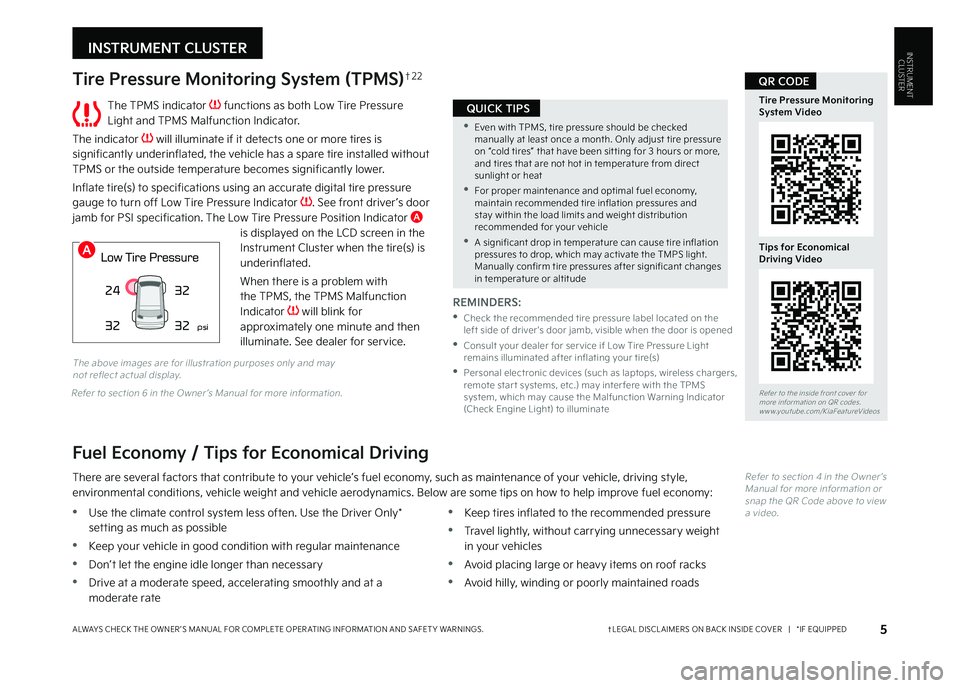
The TPMS indicator functions as both Low Tire Pressure Light and TPMS Malfunction Indicator
The indicator will illuminate if it detects one or more tires is significantly underinflated, the vehicle has a spare tire installed without TPMS or the outside temperature becomes significantly lower
Inflate tire(s) to specifications using an accurate digital tire pressure gauge to turn off Low Tire Pressure Indicator See front driver ’s door jamb for PSI specification The Low Tire Pressure Position Indicator A is displayed on the LCD screen in the Instrument Cluster when the tire(s) is underinflated
When there is a problem with the TPMS, the TPMS Malfunction
Indicator will blink for approximately one minute and then illuminate See dealer for service
Tire Pressure Monitoring System (TPMS)†2 2
REMINDERS:
•
Check the recommended tire pressure label located on the left side of driver's door jamb, visible when the door is opened
•
Consult your dealer for ser vice if Low Tire Pressure Light remains illuminated after inflating your tire(s)
•
Personal electronic devices (such as laptops, wireless chargers, remote star t systems, etc ) may inter fere with the TPMS system, which may cause the Malfunction Warning Indicator (Check Engine Light) to illuminate
Fuel Economy / Tips for Economical Driving
There are several factors that contribute to your vehicle’s fuel economy, such as maintenance of your vehicle, driving style, environmental conditions, vehicle weight and vehicle aerodynamics Below are some tips on how to help improve fuel economy:
Refer to section 4 in the Owner ’s Manual for more information or snap the QR Code above to view a video
The above images are for illustration purposes only and may not reflect actual display
•Use the climate control system less often Use the Driver Only* setting as much as possible
•Keep your vehicle in good condition with regular maintenance
•Don’t let the engine idle longer than necessary
•Drive at a moderate speed, accelerating smoothly and at a moderate rate
•Keep tires inflated to the recommended pressure
•Travel lightly, without carrying unnecessary weight in your vehicles
•Avoid placing large or heavy items on roof racks
•Avoid hilly, winding or poorly maintained roads
24
32 32
32
psi
Refer to the inside front cover for more information on QR codes www youtube com/KiaFeatureVideos
Tire Pressure Monitoring System Video
Tips for Economical Driving Video
QR CODE
•Even with TPMS, tire pressure should be checked manually at least once a month Only adjust tire pressure on “cold tires” that have been sit ting for 3 hours or more, and tires that are not hot in temperature from direct sunlight or heat
•For proper maintenance and optimal fuel economy, maintain recommended tire inflation pressures and stay within the load limits and weight distribution recommended for your vehicle
•A significant drop in temperature can cause tire inflation pressures to drop, which may activate the TMPS light Manually confirm tire pressures after significant changes in temperature or altitude
QUICK TIPS
A
Refer to section 6 in the Owner ’s Manual for more information
MY23 Seltos FFG Inside March 2022.indd 5MY23 Seltos FFG Inside March 2022.indd 54/15/22 3:39 AM4/15/22 3:39 AM
Page 9 of 62
VEHICLE SETTINGS
7 *IF EQUIPPEDALWAYS CHECK THE OWNER ’S MANUAL FOR COMPLETE OPER ATING INFORMATION AND SAFET Y WARNINGS
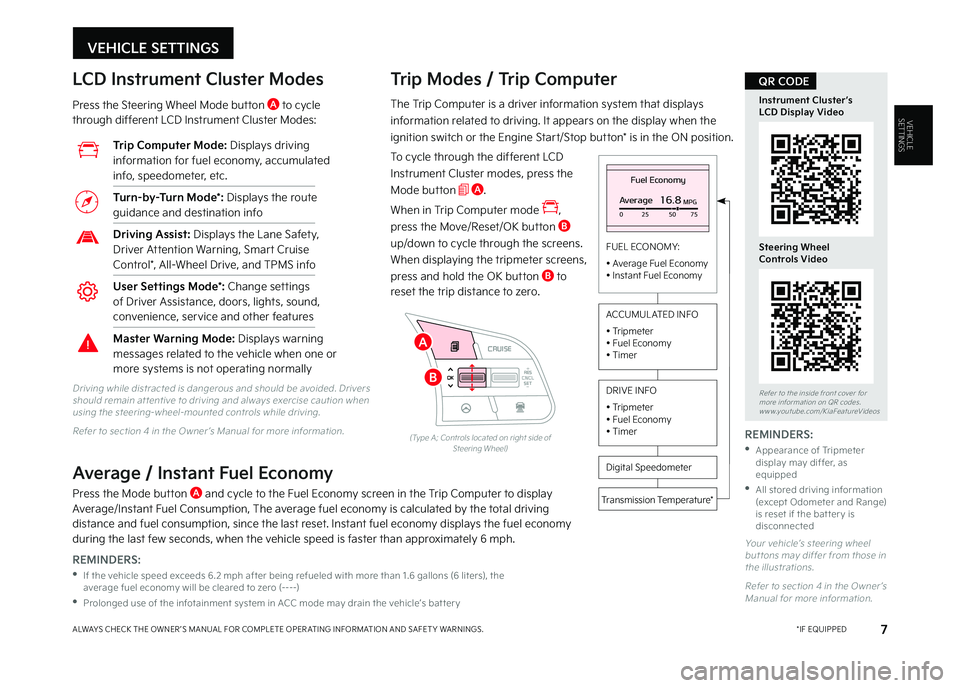
VEHICLESETTINGSThe Trip Computer is a driver information system that displays
information related to driving It appears on the display when the
ignition switch or the Engine Start/Stop button* is in the ON position
To cycle through the different LCD
Instrument Cluster modes, press the
Mode button A
When in Trip Computer mode ,
press the Move/Reset/OK button B
up/down to cycle through the screens
When displaying the tripmeter screens,
press and hold the OK button B to
reset the trip distance to zero
Trip Modes / Trip Computer LCD Instrument Cluster Modes
Press the Steering Wheel Mode button A to cycle through different LCD Instrument Cluster Modes:
Your vehicle’s steering wheel but tons may differ from those in the illustrations
Refer to section 4 in the Owner ’s Manual for more information
Driving while distracted is dangerous and should be avoided Drivers should remain at tentive to driving and always exercise caution when using the steering-wheel-mounted controls while driving
Refer to section 4 in the Owner ’s Manual for more information
Fuel Economy
Average16.8MPG025 5075
FUEL ECONOMY:
• Average Fuel Economy• Instant Fuel Economy
Digital Speedometer
Transmission Temperature*
ACCUMUL ATED INFO
• Tripmeter• Fuel Economy• Timer
DRIVE INFO
• Tripmeter • Fuel Economy • Timer
RES
SET
CNCL+
–
CRUISE
OK
RESSET
CNCL+
–
CRUISE
OKRESSET
CNCL+
–
CRUISE
OK
RESSET+
–
CRUISECRUISE CRUISE
OK
RES
SET+
–
CRUISE
OKRESSET+
–
CRUISE MODE
OK
RES
SET+
–OKRESSET+
–OK
MODE
(Type A; Controls located on right side of Steering Wheel)
Average / Instant Fuel Economy
Press the Mode button A and cycle to the Fuel Economy screen in the Trip Computer to display Average/Instant Fuel Consumption, The average fuel economy is calculated by the total driving distance and fuel consumption, since the last reset Instant fuel economy displays the fuel economy during the last few seconds, when the vehicle speed is faster than approximately 6 mph
Trip Computer Mode: Displays driving information for fuel economy, accumulated info, speedometer, etc
Turn-by-Turn Mode*: Displays the route guidance and destination info
Driving Assist: Displays the Lane Safety, Driver Attention Warning, Smart Cruise Control*, All-Wheel Drive, and TPMS info
User Settings Mode*: Change settings of Driver Assistance, doors, lights, sound, convenience, service and other features
Master Warning Mode: Displays warning messages related to the vehicle when one or more systems is not operating normally
Refer to the inside front cover for more information on QR codes www youtube com/KiaFeatureVideos
Instrument Cluster’s LCD Display Video
Steering Wheel Controls Video
QR CODE
REMINDERS:
•
If the vehicle speed exceeds 6 2 mph after being refueled with more than 1 6 gallons (6 liters), the average fuel economy will be cleared to zero (----)
•
Prolonged use of the infotainment system in ACC mode may drain the vehicle’s bat ter y
REMINDERS:
•
Appearance of Tripmeter display may differ, as equipped
•
All stored driving information (except Odometer and Range) is reset if the bat ter y is disconnected
B
A
MY23 Seltos FFG Inside March 2022.indd 7MY23 Seltos FFG Inside March 2022.indd 74/15/22 3:39 AM4/15/22 3:39 AM
Page 10 of 62
Ambient Light and
Sound Mood Lamp*
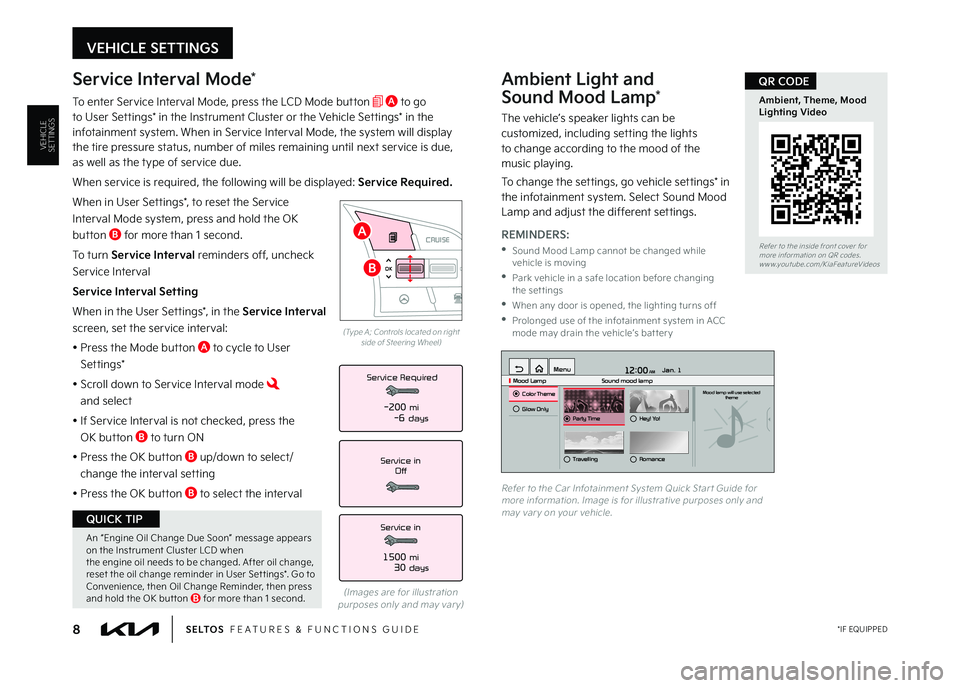
The vehicle’s speaker lights can be customized, including setting the lights to change according to the mood of the music playing
To change the settings, go vehicle settings* in the infotainment system Select Sound Mood Lamp and adjust the different settings
12:00 AM Jan. 1
MenuMood Lamp
Sound mood lampColor ThemeMood lamp will use selected
theme
Glow OnlyParty TimeHey! Yo!
TravellingRomance
Refer to the Car Infotainment System Quick Star t Guide for more information Image is for illustrative purposes only and may var y on your vehicle
VEHICLE SETTINGS
8 *IF EQUIPPEDS E LT O S FEATURES & FUNCTIONS GUIDE
VEHICLESETTINGS
Service Interval Mode*
To enter Service Interval Mode, press the LCD Mode button A to go to User Settings* in the Instrument Cluster or the Vehicle Settings* in the infotainment system When in Service Interval Mode, the system will display the tire pressure status, number of miles remaining until next service is due, as well as the type of service due
When service is required, the following will be displayed: Service Required.
When in User Settings*, to reset the Service
Interval Mode system, press and hold the OK
button B for more than 1 second
To turn Service Interval reminders off, uncheck
Service Interval
Service Interval Setting
When in the User Settings*, in the Service Interval
screen, set the service interval:
• Press the Mode button A to cycle to User
Set tings*
• Scroll down to Service Interval mode and select
•
If Service Interval is not checked, press the
OK button B to turn ON
• Press the OK button B up/down to select/
change the interval setting
•
Press the OK button B to select the interval
Service in
Off
Service Required
Service in
1500 mi30 days
-200 mi-6 days
(Images are for illustration purposes only and may var y)
RES
SET
CNCL+
–
CRUISE
OK
RESSET
CNCL+
–
CRUISE
OKRESSET
CNCL+
–
CRUISE
OK
RESSET+
–
CRUISECRUISE CRUISE
OK
RES
SET+
–
CRUISE
OKRESSET+
–
CRUISE MODE
OK
RES
SET+
–OKRESSET+
–OK
MODE
(Type A; Controls located on right side of Steering Wheel)
Refer to the inside front cover for more information on QR codes www youtube com/KiaFeatureVideos
Ambient, Theme, Mood Lighting Video
QR CODE
REMINDERS:
•
Sound Mood Lamp cannot be changed while vehicle is moving
•
Park vehicle in a safe location before changing the settings
•
When any door is opened, the lighting turns off
•
Prolonged use of the infotainment system in ACC mode may drain the vehicle’s bat ter y
B
A
An “Engine Oil Change Due Soon” message appears on the Instrument Cluster LCD when the engine oil needs to be changed After oil change, reset the oil change reminder in User Set tings* Go to Convenience, then Oil Change Reminder, then press and hold the OK but ton B for more than 1 second
QUICK TIP
MY23 Seltos FFG Inside March 2022.indd 8MY23 Seltos FFG Inside March 2022.indd 84/15/22 3:39 AM4/15/22 3:39 AM
Page 11 of 62
VEHICLE SETTINGS
9 *IF EQUIPPEDALWAYS CHECK THE OWNER ’S MANUAL FOR COMPLETE OPER ATING INFORMATION AND SAFET Y WARNINGS
VEHICLESETTINGS
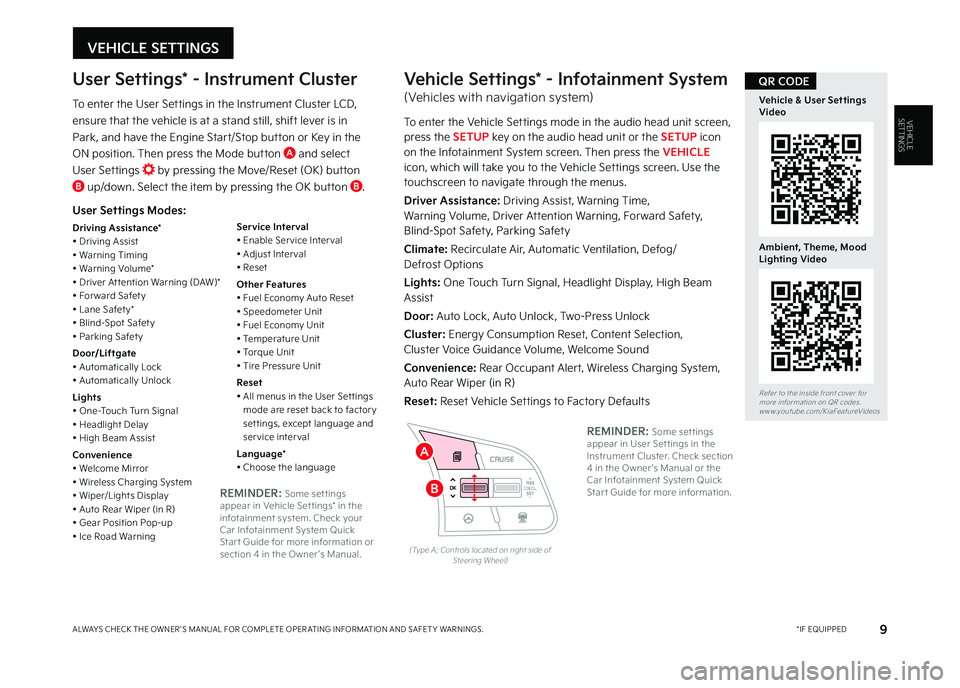
User Settings Modes:
Driving Assistance*• Driving Assist• Warning Timing• Warning Volume*• Driver At tention Warning (DAW)*• For ward Safet y• Lane Safet y*• Blind-Spot Safet y• Parking Safet y
Door/Liftgate• Automatically Lock• Automatically Unlock
Lights• One-Touch Turn Signal• Headlight Delay• High Beam Assist
Convenience• Welcome Mirror• Wireless Charging System• Wiper/Lights Display• Auto Rear Wiper (in R)• Gear Position Pop-up• Ice Road Warning
Service Interval• Enable Ser vice Inter val• Adjust Inter val• Reset
Other Features• Fuel Economy Auto Reset• Speedometer Unit• Fuel Economy Unit• Temperature Unit• Torque Unit• Tire Pressure Unit
Reset• All menus in the User Set tings mode are reset back to factor y set tings, except language and service interval
Language*• Choose the language
User Settings* - Instrument Cluster
To enter the User Settings in the Instrument Cluster LCD,
ensure that the vehicle is at a stand still, shift lever is in
Park, and have the Engine Start/Stop button or Key in the
ON position Then press the Mode button A and select
User Settings by pressing the Move/Reset (OK) button B up/down Select the item by pressing the OK button B
RES
SET
CNCL+
–
CRUISE
OK
RESSET
CNCL+
–
CRUISE
OKRESSET
CNCL+
–
CRUISE
OK
RESSET+
–
CRUISECRUISE CRUISE
OK
RES
SET+
–
CRUISE
OKRESSET+
–
CRUISE MODE
OK
RES
SET+
–OKRESSET+
–OK
MODE
(Type A; Controls located on right side of Steering Wheel)
Vehicle Settings* - Infotainment System
(Vehicles with navigation system)
To enter the Vehicle Settings mode in the audio head unit screen, press the SETUP key on the audio head unit or the SETUP icon on the Infotainment System screen Then press the VEHICLE icon, which will take you to the Vehicle Settings screen Use the touchscreen to navigate through the menus
Driver Assistance: Driving Assist, Warning Time, Warning Volume, Driver Attention Warning, Forward Safety, Blind-Spot Safety, Parking Safety
Climate: Recirculate Air, Automatic Ventilation, Defog/ Defrost Options
Lights: One Touch Turn Signal, Headlight Display, High Beam Assist
Door: Auto Lock, Auto Unlock, Two-Press Unlock
Cluster: Energy Consumption Reset, Content Selection, Cluster Voice Guidance Volume, Welcome Sound
Convenience: Rear Occupant Alert, Wireless Charging System, Auto Rear Wiper (in R)
Reset: Reset Vehicle Settings to Factory DefaultsRefer to the inside front cover for more information on QR codes www youtube com/KiaFeatureVideos
Vehicle & User Settings Video
Ambient, Theme, Mood Lighting Video
QR CODE
REMINDER: Some set tings appear in User Set tings in the Instrument Cluster Check section 4 in the Owner ’s Manual or the Car Infotainment System Quick Star t Guide for more information REMINDER: Some set tings appear in Vehicle Set tings* in the infotainment system Check your Car Infotainment System Quick Star t Guide for more information or section 4 in the Owner ’s Manual
B
A
MY23 Seltos FFG Inside March 2022.indd 9MY23 Seltos FFG Inside March 2022.indd 94/15/22 3:39 AM4/15/22 3:39 AM
Page 35 of 62
INFOTAINMENT SYSTEMS
INFOTAINMENT
SYSTEMS
Kia Connect Activation*†1
Follow these steps to activate your Kia Connect system:
1 Enter the activation screen on your vehicle’s head unit:
a Press SETUP key b Press Kia Connect icon c Press Activate Kia Connect
2 Read and agree to Terms of Service and Privacy Policy and press SUBMIT
3 Enter number or email address to receive a verification code, then press SUBMIT
4 Follow these steps to receive your verification code using your phone text message or email:
a Check your phone text message or email for
verification codeb Open the link in your text or email A page will open requesting that you create your account
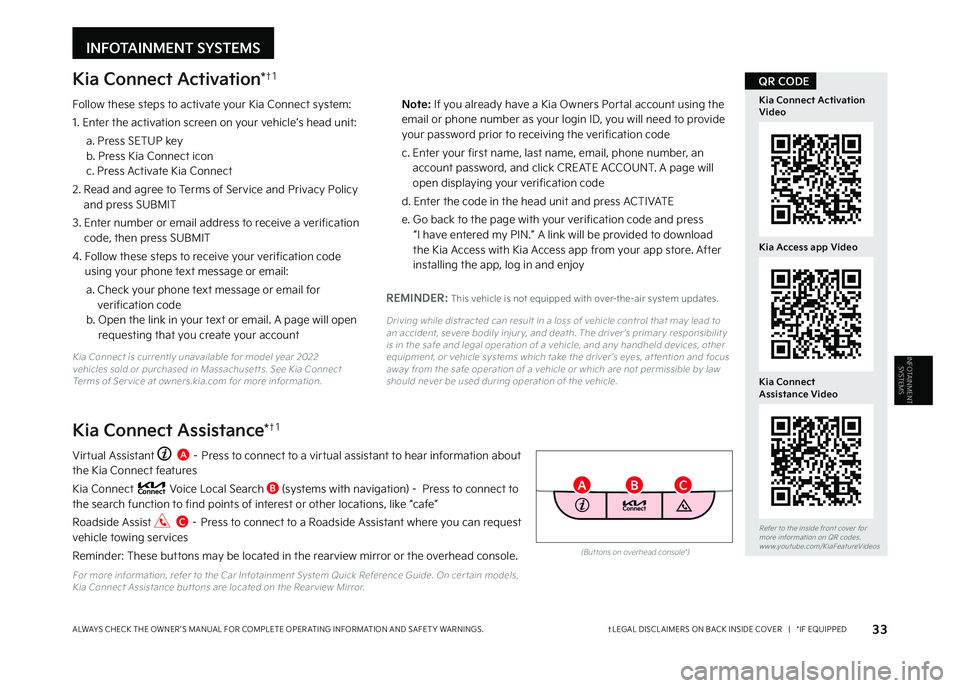
Virtual Assistant A – Press to connect to a virtual assistant to hear information about the Kia Connect features
Kia Connect Voice Local Search B (systems with navigation) - Press to connect to the search function to find points of interest or other locations, like “cafe”
Roadside Assist C – Press to connect to a Roadside Assistant where you can request vehicle towing services
Reminder: These buttons may be located in the rearview mirror or the overhead console
For more information, refer to the Car Infotainment System Quick Reference Guide On cer tain models, Kia Connect Assistance but tons are located on the Rear view Mirror
Kia Connect Assistance*†1
REMINDER: This vehicle is not equipped with over-the-air system updates
Driving while distracted can result in a loss of vehicle control that may lead to an accident, severe bodily injur y, and death The driver ’s primar y responsibilit y is in the safe and legal operation of a vehicle, and any handheld devices, other equipment, or vehicle systems which take the driver ’s eyes, at tention and focus away from the safe operation of a vehicle or which are not permissible by law should never be used during operation of the vehicle
33†LEGAL DISCL AIMERS ON BACK INSIDE COVER | *IF EQUIPPEDALWAYS CHECK THE OWNER ’S MANUAL FOR COMPLETE OPER ATING INFORMATION AND SAFET Y WARNINGS
Refer to the inside front cover for more information on QR codes www youtube com/KiaFeatureVideos
Kia Connect Activation Video
Kia Access app Video
QR CODE
Kia Connect Assistance Video
(But tons on overhead console*)
BC
N o t e : If you already have a Kia Owners Portal account using the email or phone number as your login ID, you will need to provide your password prior to receiving the verification code
c Enter your first name, last name, email, phone number, an account password, and click CREATE ACCOUNT A page will open displaying your verification code
d Enter the code in the head unit and press ACTIVATE
e Go back to the page with your verification code and press “I have entered my PIN ” A link will be provided to download the Kia Access with Kia Access app from your app store After installing the app, log in and enjoy
Kia Connect is currently unavailable for model year 2022 vehicles sold or purchased in Massachuset ts See Kia Connect Terms of Ser vice at owners kia com for more information
A
MY23 Seltos FFG Inside March 2022.indd 33MY23 Seltos FFG Inside March 2022.indd 334/15/22 3:39 AM4/15/22 3:39 AM
Page 36 of 62
Kia Access App Download
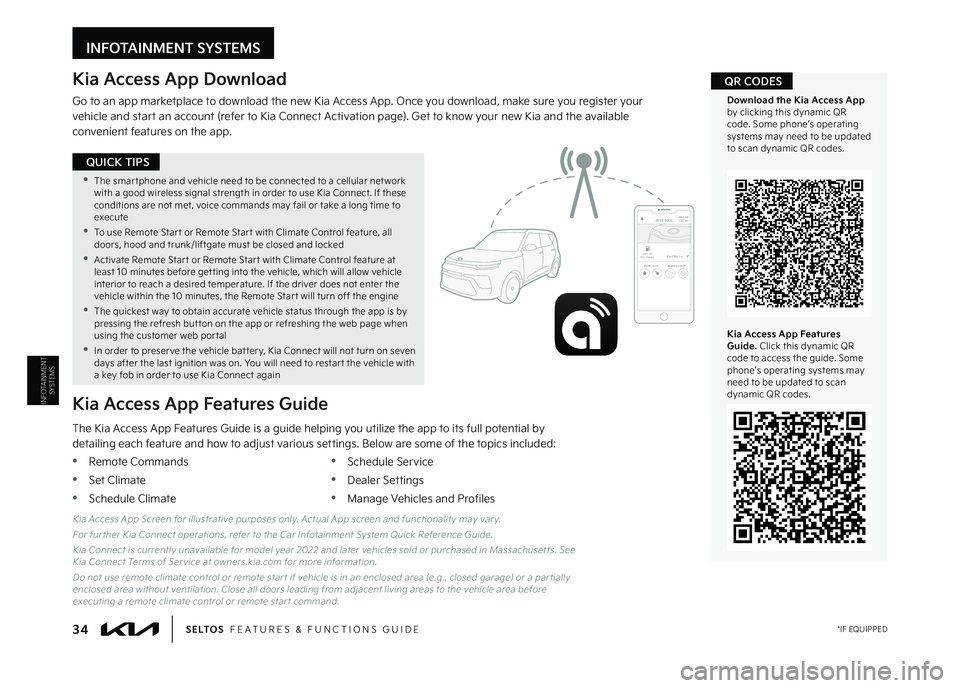
Go to an app marketplace to download the new Kia Access App Once you download, make sure you register your vehicle and start an account (refer to Kia Connect Activation page) Get to know your new Kia and the available convenient features on the app
The Kia Access App Features Guide is a guide helping you utilize the app to its full potential by detailing each feature and how to adjust various settings Below are some of the topics included:
•Remote Commands
•Set Climate
•Schedule Climate
•Schedule Service
•Dealer Settings
•Manage Vehicles and Profiles
Kia Access App Features Guide
2020 SOULMILEAGE722 mi.
355 miEst. RangeDOOR LOCKSREMOTE STARTFind My Car
Kia Access App Screen for illustrative purposes only Actual App screen and functionalit y may var y
For fur ther Kia Connect operations, refer to the Car Infotainment System Quick Reference Guide
Kia Connect is currently unavailable for model year 2022 and later vehicles sold or purchased in Massachuset ts See Kia Connect Terms of Ser vice at owners kia com for more information
Do not use remote climate control or remote star t if vehicle is in an enclosed area (e g , closed garage) or a par tially enclosed area without ventilation Close all doors leading from adjacent living areas to the vehicle area before executing a remote climate control or remote star t command
Kia Access App Features Guide. Click this dynamic QR code to access the guide Some phone’s operating systems may need to be updated to scan dynamic QR codes
Download the Kia Access App by clicking this dynamic QR code Some phone’s operating systems may need to be updated to scan dynamic QR codes
QR CODES
•The smar tphone and vehicle need to be connected to a cellular net work with a good wireless signal strength in order to use Kia Connect If these conditions are not met, voice commands may fail or take a long time to execute
•
To use Remote Star t or Remote Star t with Climate Control feature, all doors, hood and trunk/liftgate must be closed and locked
•
Activate Remote Star t or Remote Star t with Climate Control feature at least 10 minutes before get ting into the vehicle, which will allow vehicle interior to reach a desired temperature If the driver does not enter the vehicle within the 10 minutes, the Remote Star t will turn off the engine
•
The quickest way to obtain accurate vehicle status through the app is by pressing the refresh but ton on the app or refreshing the web page when using the customer web por tal
•In order to preser ve the vehicle bat ter y, Kia Connect will not turn on seven days after the last ignition was on You will need to restar t the vehicle with a key fob in order to use Kia Connect again
QUICK TIPS
INFOTAINMENT SYSTEMS
INFOTAINMENT
SYSTEMS
34 *IF EQUIPPEDS E LT O S FEATURES & FUNCTIONS GUIDE
MY23 Seltos FFG Inside March 2022.indd 34MY23 Seltos FFG Inside March 2022.indd 344/15/22 3:39 AM4/15/22 3:39 AM
Page 43 of 62
CENTER PANEL
41†LEGAL DISCL AIMERS ON BACK INSIDE COVER | *IF EQUIPPEDALWAYS CHECK THE OWNER ’S MANUAL FOR COMPLETE OPER ATING INFORMATION AND SAFET Y WARNINGS
CENTERPANEL
P
R
N
D
+
•
-
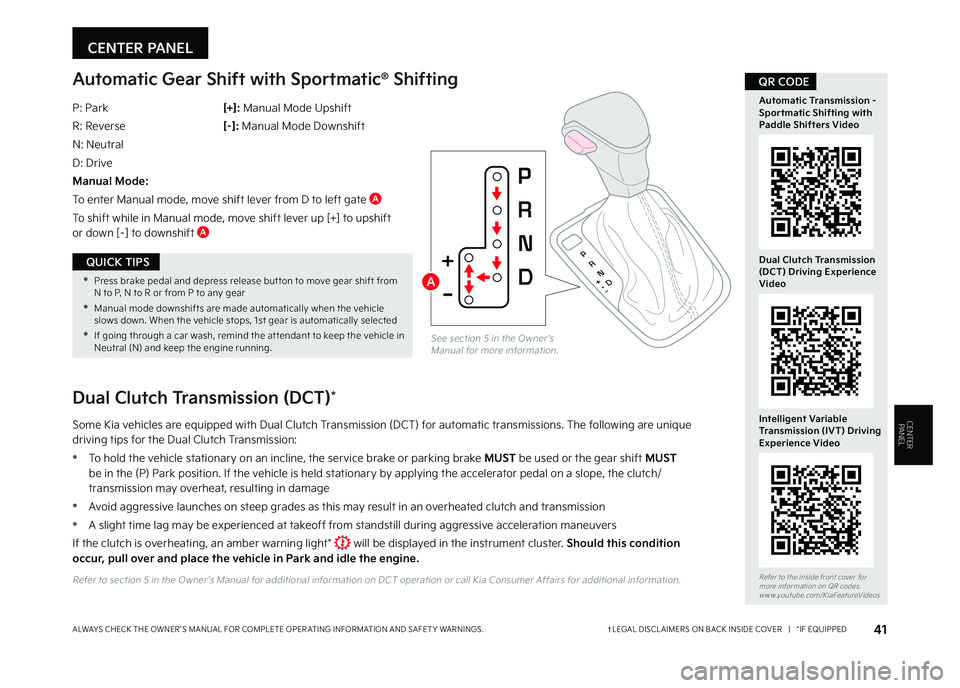
sampleAutomatic Gear Shift with Sportmatic® Shifting
P: Park
R: Reverse
N: Neutral
D: Drive
Manual Mode:
To enter Manual mode, move shift lever from D to left gate A
To shift while in Manual mode, move shift lever up [+] to upshift or down [–] to downshift A
[+]: Manual Mode Upshift
[–] : Manual Mode Downshift
See section 5 in the Owner ’s Manual for more information
Dual Clutch Transmission (DCT)*
Some Kia vehicles are equipped with Dual Clutch Transmission (DCT) for automatic transmissions The following are unique driving tips for the Dual Clutch Transmission:
•To hold the vehicle stationary on an incline, the service brake or parking brake MUST be used or the gear shift MUST be in the (P) Park position If the vehicle is held stationary by applying the accelerator pedal on a slope, the clutch/transmission may overheat, resulting in damage
•Avoid aggressive launches on steep grades as this may result in an overheated clutch and transmission
•A slight time lag may be experienced at takeoff from standstill during aggressive acceleration maneuvers
If the clutch is overheating, an amber warning light* will be displayed in the instrument cluster Should this condition occur, pull over and place the vehicle in Park and idle the engine.
Refer to section 5 in the Owner ’s Manual for additional information on DCT operation or call Kia Consumer Affairs for additional information Refer to the inside front cover for more information on QR codes www youtube com/KiaFeatureVideos
Automatic Transmission - Sportmatic Shifting with Paddle Shifters Video
Dual Clutch Transmission (DCT) Driving Experience Video
Intelligent Variable Transmission (IVT) Driving Experience Video
QR CODE
A •Press brake pedal and depress release but ton to move gear shift from N to P, N to R or from P to any gear
•Manual mode downshifts are made automatically when the vehicle slows down When the vehicle stops, 1st gear is automatically selected
•If going through a car wash, remind the at tendant to keep the vehicle in Neutral (N) and keep the engine running
QUICK TIPS
MY23 Seltos FFG Inside March 2022.indd 41MY23 Seltos FFG Inside March 2022.indd 414/15/22 3:40 AM4/15/22 3:40 AM
Page 59 of 62
2. Android Auto™, Apple CarPlay®, Bluetooth® Wireless Technology, Google Play™ Store, iPhone, SiriusXM®, Sportmatic®: Fair Use of Trademark – The commentary reference to trademarked material is for educational purposes only and not an endorsement by or of the holder of the mark. .3. Apple CarPlay®: Apple® and Apple CarPlay® are trademarks of Apple, Inc., registered in the U.S. and other countries. Apple CarPlay® runs on your smartphone cellular data service. Normal data rates will apply.4. Bluetooth® Wireless Technology: A compatible Bluetooth® wireless technology-enabled cell phone is required to use Bluetooth® wireless technology. The Bluetooth® word mark and logos are registered trademarks owned by Bluetooth SIG, Inc. and any use of such marks by Kia is under license. Other trademarks and trade names are those of their respective owners. A Bluetooth® enabled cell phone is required to use Bluetooth® wireless technology.5. Driver Assist Features — Blind-Spot Collision-Avoidance Assist (BCA), Rear Cross-Traffic Collision-Avoidance Assist (RCCA), Lane Keeping Assist, Lane Following Assist (LFA), Rear View Monitor, Forward Collision-Avoidance Assist (FCA), Smart Cruise Control, Safe Exit Assist (SEA), Highway Driving Assist (HDA): These features are not substitutes for safe driving, and may not detect all objects surrounding vehicle. Always drive safely and use caution.6. Driver Attention Warning (DAW): Driver Attention Warning is not a substitute for safe driving and may not detect all instances of inattentive driving practices. Failure to pay attention to travel conditions and vehicle operation could result in loss of vehicle control. Always drive safely and use caution.7. Electronic Stability Control (ESC)/Traction Control System (TCS)/Hill-start Assist Control (HAC), Downhill Brake Control (DBC): No system, no matter how advanced, can compensate for all driver error and/or driving conditions. Always drive safely.8. Engine Start/Stop Button with Smart Key: Always come to a complete stop before turning the engine on or off. However, if you have an emergency while the vehicle is in motion and must turn the engine off, you can turn the engine off to the ACC position by pressing the Start/Stop button for more than 3 seconds or 3 times in succession. If the vehicle is still moving, you can restart the engine by pressing the Start/Stop button with the shift lever in Neutral (N). With the engine off, power assist for steering and braking will be disabled, and the vehicle will be more difficult to control.9. Front Seat Headrest Adjustment: Never attempt to adjust headrests when vehicle is in motion.10. Google Play™ Store is a trademark of Google, Inc. ©2021 Google LLC. All rights reserved. Google and the Google Logo are registered trademarks of Google LLC.11. Navigation: Distracted driving can result in a loss of vehicle control. When operating a vehicle, never use a handheld device or vehicle system that takes your focus away from safe vehicle operation. Navigation is for information purposes only, and Kia does not make any warranties about the accuracy of the information.
12. Occupant Detection System (ODS): Kia vehicles use a number of different ODS types that vary by model.13. Roadside Assist: 24-hour Enhanced Roadside Assistance is a service plan provided by Kia Motors America, Inc. Certain limitations apply. Coverage details are available in the Kia Warranty and Consumer Information Manual. For access to Enhanced Roadside Assistance, a connected mobile phone via Bluetooth® within the cellular service coverage area is required.14. Seat adjustments: Reclining the passenger seats can reduce the effectiveness of the safety restraint system and may lead to additional injury in an accident.15. Seat Belts / Airbags: For maximum protection, always wear your seatbelt.16. Seat warmers: Use extreme caution when using the seat warmers to avoid burns. Refer to the Owner’s Manual for more information.17. SiriusXM®: SiriusXM® Satellite Radio, SiriusXM® Traffic and SiriusXM® Travel Link each require a subscription sold separately, or as a package, by SiriusXM® Radio Inc. If you decide to continue your service at the end of your trial subscription, the plan you choose will automatically renew and bill at then-current rates until you call 1-866-635-2349 to cancel. See SiriusXM® Customer Agreement for complete terms at www.siriusxm.com. Other fees and taxes will apply. All fees and programming are subject to change. Not all vehicles or devices are capable of receiving all services offered by SiriusXM®. Data displays and individual product availability vary by vehicle hardware. Current information and features may not be available in all locations, or on all receivers. Weather Forecast, Current Conditions may not be available in all locations. Images above are for representative purposes only and are not real products. For actual features and images of real products, consult the vehicle manufacturer. SiriusXM® is not responsible for any errors or inaccuracies in the data services or their use in the vehicle. Travel Link Stocks displays current price and daily delta of around 7,000 actively reported securities traded on the NYSE®, NASDAQ® and AMEX®. The service is delayed approximately 20 minutes. SiriusXM® satellite service is available only to those at least 18 years of age in the 48 contiguous USA, DC, and Puerto Rico (with coverage limitations). SiriusXM® Internet Radio service is available throughout our satellite service area and in AK and HI. © 2022 SiriusXM® Radio Inc. Sirius, XM and all related marks and logos are trademarks of SiriusXM® Radio Inc.18. Steering Wheel Controls: Driving while distracted is dangerous and should be avoided. Remain attentive to driving and be cautious when using steering-wheel-mounted controls while driving.19. Sunvisors: Sunvisor may not shield all direct light. Do not operate the vehicle if Sunvisor is impairing your visibility.20. The myQ logo is a registered trademark of The Chamberlain Group, Inc.21. Tilt/Telescoping Steering Wheel: Never attempt to adjust steering wheel position when vehicle is in motion.22. Tire Pressure Monitoring System (TPMS): Even with Tire Pressure Monitoring System, check tire pressure on a regular basis.23. The myQ logo is a registered trademark of The Chamberlain Group, Inc.
Driving while distracted can result in a loss of vehicle control that may lead to an accident, severe personal injury and/or death. The driver’s primary responsibility is in the safe and legal operation of a vehicle, and any handheld devices, other equipment or vehicle systems which take the driver’s eyes, attention and focus away from the safe operation of the vehicle or that are not permissible by law should never be used during operation of the vehicle.
Safety Features: No system, no matter how advanced, can compensate for all driver error and/or driving conditions. Always drive responsibly.
1.
Kia Connect: Purchase/lease of certain 2022 and newer Kia vehicles with Kia Connect includes a complimentary 1-year subscription starting from new vehicle retail sale/lease date as recorded by the dealer. After your complimentary 1-year Kia Connect subscription expires, continued access to the full suite of Kia Connect services available on your Kia will require a paid subscription at the then-current subscription rate or your use of certain Kia Connect features may immediately terminate. Use of Kia Connect is subject to agreement to the Kia Connect Privacy Policy (available at owners.kia.com/us/en/privacy-policy.html) and Terms of Service (available at owners.kia.com/us/en/terms-of-service.html). Complimentary Kia Connect subscription is transferable to subsequent owner during the original Kia Connect service term. Only use Kia Connect when safe to do so. Kia Connect may currently be unavailable for Model Year 2022 and newer vehicles sold or purchased in Massachusetts; please see the Kia Owners Portal for updates on availability. Kia Access app is available from the Apple® App Store® or Google Play Store™. Kia America, Inc. reserves the right to change or discontinue Kia Connect at any time without prior notification or incurring any future obligation. Message and data rates may apply. Cellular and GPS coverage is required to use most features. Kia Connect features may vary by model, model year, and trim level. Features, specifications, and fees are subject to change. For more on details and limitations, visit www.kia.com or your authorized Kia dealer. Apple® and App Store® are registered trademarks of Apple Inc. Google™ and its logos are trademarks of Google LLC.
LEGAL DISCLAIMERSSales Consultant:
____________________________________________________________________________________
Date:
___________________________
Sales Manager:
_______________________________________________________________________________________
Date:
___________________________
Customer:
____________________________________________________________________________________________
Date:
___________________________
MY23 Seltos FFG Cover March 2022.indd 5MY23 Seltos FFG Cover March 2022.indd 54/15/22 3:48 AM4/15/22 3:48 AM
Page 62 of 62
DURING DELIVERY
CRUISECANCEL
RES
OK
SET
MODE
POWERPUSH
VOLTUNE
FILE ENTERRADIO
< SEEK
TRACK > SETUP
MEDIA
MAP
POWERPUSH
VOL
TUNE
FILE ENTER
N AV
< SEEKTRACK > RADIOMEDIASETUP
KEY FEATURE WALKTHROUGHSales Consultant:
____________________________________________________________________________________
Date:
___________________________
Sales Manager:
_______________________________________________________________________________________
Date:
___________________________
Customer:
____________________________________________________________________________________________
Date:
___________________________
S E LT O S
CUSTOMER DELIVERY CHECKLIST
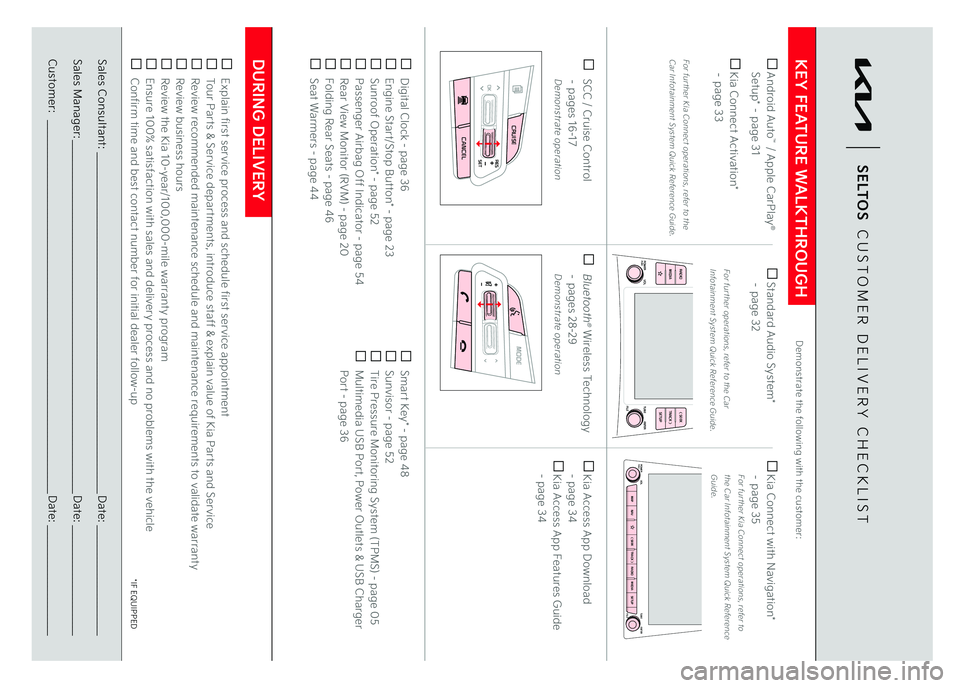
Digital Clock - page 36 Engine Start/Stop Button* - page 23 Sunroof Operation* - page 52 Passenger Airbag Off Indicator - page 54 Rear View Monitor (RVM) - page 20 Folding Rear Seats - page 46 Seat Warmers - page 44
Smart Key* - page 48 Sunvisor - page 52 Tire Pressure Monitoring System (TPMS) - page 05 Multimedia USB Port, Power Outlets & USB Charger Port - page 36
Demonstrate the following with the customer:
Explain first service process and schedule first service appointment Tour Parts & Service departments, introduce staff & explain value of Kia Parts and Service Review recommended maintenance schedule and maintenance requirements to validate warranty Review business hours Review the Kia 10-year/100,000-mile warranty program Ensure 100% satisfaction with sales and delivery process and no problems with the vehicle Confirm time and best contact number for initial dealer follow-up SCC / Cruise Control
– pages 16-17
Demonstrate operation Android Auto
™ / Apple CarPlay
®
Setup* – page 31 Kia Connect Activation*
– page 33For fur ther Kia Connect operations, refer to the Car Infotainment System Quick Reference Guide.
Standard Audio System*
– page 32
For fur ther operations, refer to the Car Infotainment System Quick Reference Guide.
Kia Connect with Navigation*
– page 35
For fur ther Kia Connect operations, refer to the Car Infotainment System Quick Reference Guide.
Bluetooth
® Wireless Technology
– pages 28-29
Demonstrate operation
Kia Access App Download
- page 34 Kia Access App Features Guide
- page 34
*IF EQUIPPED
MY23 Seltos FFG Cover March 2022.indd 6MY23 Seltos FFG Cover March 2022.indd 64/15/22 3:48 AM4/15/22 3:48 AM