audio KIA Sorento 2009 2.G User Guide
[x] Cancel search | Manufacturer: KIA, Model Year: 2009, Model line: Sorento, Model: KIA Sorento 2009 2.GPages: 327, PDF Size: 5.03 MB
Page 111 of 327
Knowing your vehicle102
3
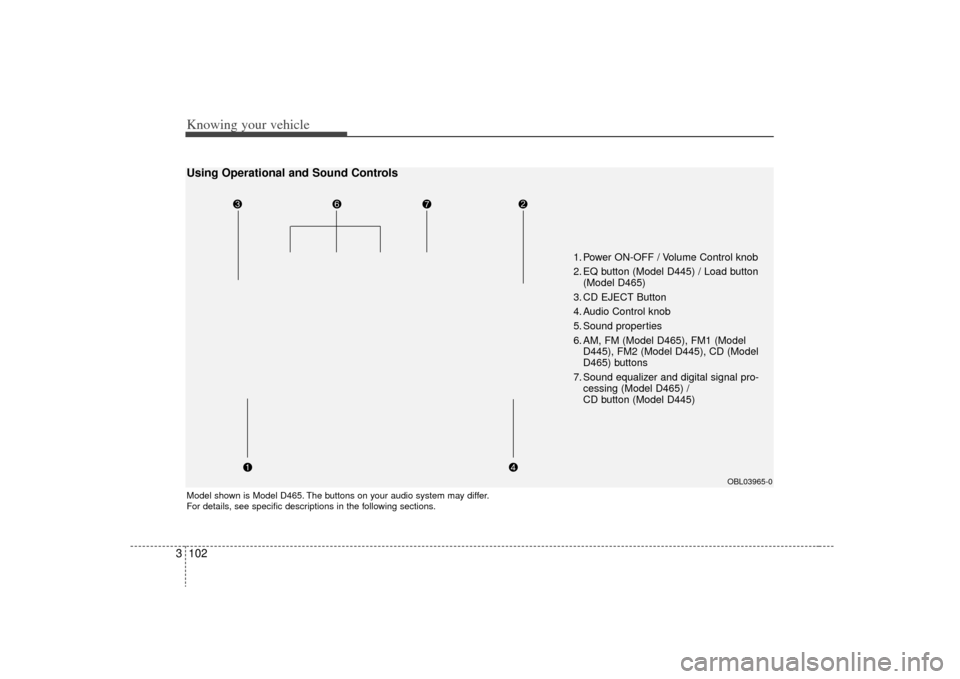
1. Power ON-OFF / Volume Control knob
2. EQ button (Model D445) / Load button
(Model D465)
3. CD EJECT Button
4. Audio Control knob
5. Sound properties
6. AM, FM (Model D465), FM1 (Model D445), FM2 (Model D445), CD (Model
D465) buttons
7. Sound equalizer and digital signal pro- cessing (Model D465) /
CD button (Model D445)
Model shown is Model D465. The buttons on your audio system may differ.
For details, see specific descriptions in the following sections.
OBL03965-0
Using Operational and Sound Controls
Page 112 of 327
3 103
Knowing your vehicle
1. Power ON-OFF / Volume ControlknobPower
To operate your audio system, your igni-
tion key must be in the "ACC" or "ON"
position.
Press the knob to switch on the audio
system. The audio system resumes oper-
ation in either the Radio or CD mode.
Press the knob again to switch off the
audio system.
Volume Control Knob
Rotate the knob clockwise to increase
the volume and rotate the knob counter-
clockwise to reduce the volume.
2. Loading CDsModel D445:
Only one CD can be loaded at any one
time. If there is already a disc inserted in
the CD player, eject the disc before load-
ing a new CD.
To load a CD, gently insert the CD into
the CD slot. The CD will be automatically
loaded. The CD player then starts to play
the CD.✽ ✽NOTICE• Do not force-load the CD as it will
damage the loading mechanism and
cause your disc to jam in the player.
• If a CD cannot be loaded, check if there is already a disc in the player
and eject it first.
Model D465:
Press the LOAD button to automatically
switch the audio system on in CD player
mode.
Follow the instructions on the LCD
screen to load and play your CDs.✽ ✽ NOTICETo load more than 1 CD (maximum of
6), press and hold the load button for
more than 2 seconds. The disc number
indicator will flash to indicate how
many CDs you can still load.
Page 113 of 327
Knowing your vehicle104
33. CD EJECT ( ) ButtonModel D445:
Press the button once to eject the CD
from the CD player.
Model D465
Press the button once to eject the
last CD played.
Press and hold button for more than
2 seconds to eject all the CDs in the
changer in sequence beginning with the
last CD played.✽ ✽
NOTICEYou can eject discs even if the audio sys-
tem is switched off.4. Audio Control knobUse the audio control knob to change
how music playback sounds and also to
control how sound is distributed to the
speaker system. Sound properties
Press the knob repeatedly to display the
corresponding audio control settings
(Bass, Middle, Treble, Fader, Balance
).
The LCD screen displays the audio con-
trol settings in sequence. Once the audio
control setting you want is displayed,
rotate the knob clockwise/anti-clock-
wise to change the level of that audio
setting.
Bass
Increases/decreases Bass response of
audio reproduction
Middle
Increases/decreases Mid-range
response of audio reproduction
Treble
Increases/decreases Treble response of
audio reproduction
Fader
Sets front/rear balance level for your
speaker system
Balance
Sets left/right balance level for your
speaker system
✽ ✽ NOTICETo return all audio control settings to
the default (centered) positions, press
and hold the audio control knob for
more than 2 seconds. An audible beep
indicates that all audio controls have
been returned to the default setting.
Page 114 of 327
3 105
Knowing your vehicle
5. AM, FM, FM1, FM2, CD buttonsModel D445: AM, FM1, FM2, CD
Model D465: AM, FM, CD
Use the input source selector buttons to
select/switch operation modes. Press the
AMband selector button, FM/FM1/FM2
band selector button(s) or CD or button
to resume operation in the corresponding
mode.
Pressing any of these buttons automati-
cally switches the audio system on.
The LCD screen displays either the radio
frequency you are tuned into or the track
currently played back.✽ ✽ NOTICE• Remember that station Presets (1-6)
stored in FM1 mode can only be
accessed in FM1 mode. Similarly,
FM2 presets can only be accessed in
FM2 mode.
• For Model D465: Press the FM band selector button
repeatedly to switch between the FM1
and FM2 modes.
6. Sound equalizer and digital signal
processing Both Model D445 and Model D465: EQ
button
EQ button:
Press the EQ button repeatedly to select
the sound equalizer setting you want.
The 6 settings are: ROCK, POP, JAZZ,
CLASSIC, TALK and equalizer off. If no
icon is displayed in the LCD screen, the
equalizer is switched off.
The 5 preset equalizer settings have
been optimized for the 5 common genres
of music. For example, the ROCKsetting
enhances bass reproduction with rock
music whereas the CLASSIC setting
enhances the clarity of string instruments
during audio reproduction of classical
music. You may want to experiment with
the different settings to confirm your per-
sonal preferences.
✽ ✽ NOTICEIf you store a station Preset (1~6) with a
specific equalizer setting, that setting is
automatically used across other stations
preset.
Page 115 of 327
Knowing your vehicle106
3
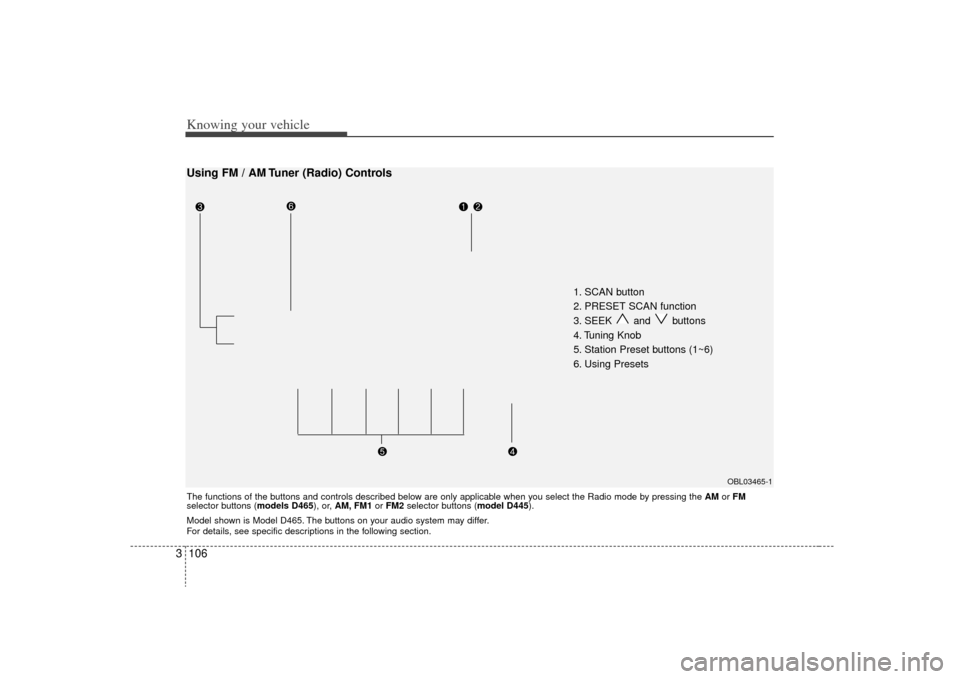
1. SCAN button
2. PRESET SCAN function
3. SEEK and buttons
4. Tuning Knob
5. Station Preset buttons (1~6)
6. Using Presets
OBL03465-1
Using FM / AM Tuner (Radio) ControlsThe functions of the buttons and controls described below are only applicable when you select the Radio mode by pressing the AMor FM
selector buttons (models D465), or, AM, FM1 or FM2 selector buttons (model D445).
Model shown is Model D465. The buttons on your audio system may differ.
For details, see specific descriptions in the following section.
Page 118 of 327
3 109
Knowing your vehicle
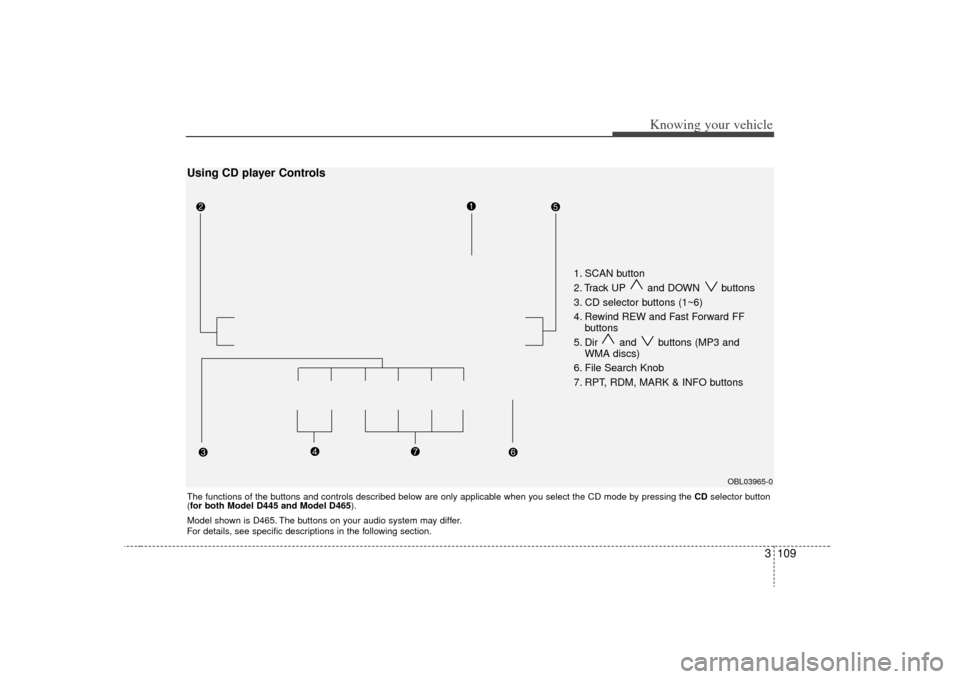
1. SCAN button
2. Track UP and DOWN buttons
3. CD selector buttons (1~6)
4. Rewind REW and Fast Forward FFbuttons
5. Dir and buttons (MP3 and WMA discs)
6. File Search Knob
7. RPT, RDM, MARK & INFO buttons
OBL03965-0
The functions of the buttons and controls described below are only applicable when you select the CD mode by pressing the CDselector button
(for both Model D445 and Model D465 ).Using CD player ControlsModel shown is D465. The buttons on your audio system may differ.
For details, see specific descriptions in the following section.
Page 121 of 327
Knowing your vehicle112
3Model D465
You can load one or more CDs (maxi-
mum of 6) into the CD changer through
the CD loading slot. To do so:
1. Press the Load button to load 1 CD.
The LCD screen displays the number
assigned to the CD as a flashing num-
ber. For example, if the CD changer
currently contains 4 CDs, the loaded
disc will be CD 5.
OR
Press and hold the Load button for
more than 2 seconds to load more than
1 CD.
The LCD screen displays empty slots
in the CD changer as flashing num-
bers.
2. The LCD screen displays the instruc- tions for loading one or more CDs.
Follow the instructions - Wait, Insert
CD1, Loading CD 1, Reading CD1,…
Reading CD6.
3. Once you have finished loading the CD or CDs, the CD player automatically
plays the first track of the last CD
loaded.
If the audio system was in Radio mode
while you were loading the CDs, it
automatically switches to CD player
mode.
✽ ✽ NOTICEThe LCD screen displays Changer Full
to indicate that the CD changer is full.
Do not try to load any other disc.2. Ejecting CDsModel D445
Press the CD EJECT ( ) button to
eject the CD in the CD player.
Model D465
Press the button once to eject the
last CD played.
Press and hold button for more than
2 seconds to eject all the CDs in the
changer in sequence beginning with the
last CD played.✽ ✽NOTICEYou can eject discs without switching on
the audio system using the Power ON-
OFF knob.
To eject 1 CD:
Press the EJECT button once.
If you are playing a CD, playback will
automatically switch to the next available
CD.
The LCD screen displays the number of
the CD ejected as a flashing number.
If there are no other disc left in the CD
changer, the audio system automatically
switches to Radio mode and resumes
with the last channel or frequency select-
ed.
OR
If the audio system is in Radio mode, the
last CD played will be ejected.
The LCD screen displays the number of
the CD ejected as a flashing number.
To eject all CDs:
Press and hold the EJECT button for
more than 2 seconds to eject all the CDs
in the CD changer.
The LCD screen displays the CDs being
ejected in the CD changer as flashing
numbers. The CDs are ejected in
sequence. Follow the instructions dis-
played on the LCD screen to remove all
CDs from the changer.
Page 122 of 327
3 113
Knowing your vehicle
✽
✽NOTICEIf the audio system is in Radio mode,
you can eject CDs without interrupting
the operation of the radio. 3. Selecting a disc to playModel D445
Only the CD loaded in the player can be
played.
Model D465
You can select any disc loaded in the CD
changer for playback.
To do so:
Press the corresponding CD selector
button (1~6).
The CD changer automatically loads the
selected CD and begins playback of the
first track.
The LCD screen displays the selected
CD as a flashing number.
4. Selecting and playing tracks
(songs)To select tracks, you can use one of 3
methods:
Method 1:
Press the Track Up or Track Down but-
ton repeatedly until you find the track you
want.
Method 2:
Rotate the File Search knob to scroll to
the track you want. The number counter
in the LCD screen shows you the track
number.
Press the File Search knob to ENTER
your selection and begin playback. Method 3 (only for MP3 and WMA
CDs):
Press the DIR Up
or Down buttons
repeatedly to switch to the directory you
want on the CD.
The LCD screen displays the name of
the directory you have switched to.
Rotate the File Search knob to scroll to
the track you want in the selected direc-
tory. The number counter in the LCD
screen shows you the track number.
Press the File Search knob to ENTER
your selection and begin playback.
Page 123 of 327
Knowing your vehicle114
35. Using the Repeat function (RPT
button)To repeat playback of the current
track:
Press the RPT button once. The LCD
screen displays RPT to indicate that it is
in REPEAT mode. Playback of the cur-
rent track will be repeated.
Press the RPT button again to resume
normal playback. The RPT indicator is
cleared.
To repeat playback of all tracks on the
current CD/File Directory:
Press and hold the RPT button for more
than 2 seconds. The LCD screen dis-
plays RPT ALL to indicate that it is in
REPEAT ALL mode. The tracks of the
current audio CD or the tracks in the cur-
rent MP3 file directory will be repeated.
Press the RPT button again to resume
normal playback. The RPT ALL indicator
is cleared.
6. Using the Random playback func- tion (RDM button)For random playback in audio CDs
(also applies to current MP3 file direc-
tory):
Press the RDM button once. The LCD
screen displays RDM to indicate that it is
in RANDOM mode. Tracks on the current
audio CD/MP3 directory will be randomly
selected and played.
Press the RDM button again to resume
normal playback. The RDM indicator is
cleared. Normal playback resumes.
For random playback of all tracks on a
CD (only for MP3 and WMA CDs):
Press and hold the RDM button for more
than 2 seconds. The LCD screen dis-
plays RDM ALL to indicate that it is in
RANDOM ALL mode. Tracks from all
directories in the MP3/WMA CD will be
randomly selected and played.
Press the RDM button again to resume
normal playback. The RDM ALLindicator
is cleared.
7. Using the Bookmark function (MARK button) The Bookmark function allows you to
select and add up to 20 tracks from any
CD in the CD changer to a playlist (mark-
list). You can then play the tracks on the
playlist whenever you want.
Adding tracks to the playlist (mark-
list):
1. Play the track you want.
2. Press and hold the MARK button for
more than 2 seconds to add the cur-
rent track to the playlist (marklist). The
LCD screen displays MARK to indicate
that the track has been added to the
playlist (marklist).
3. Repeat steps 1 & 2 to add more tracks to the marklist (maximum of 20 book-
marks.)
Page 125 of 327
Knowing your vehicle116
3Using External Controls1. The Dimmer control
The Dimmer control setting determines
the brightness of the entire vehicle's dis-
plays.
Turn the scroll wheel up or down to
increase or decrease the brightness of
the vehicle's instrument panels, backlit
displays and the audio system's LCD
screen and backlit controls.
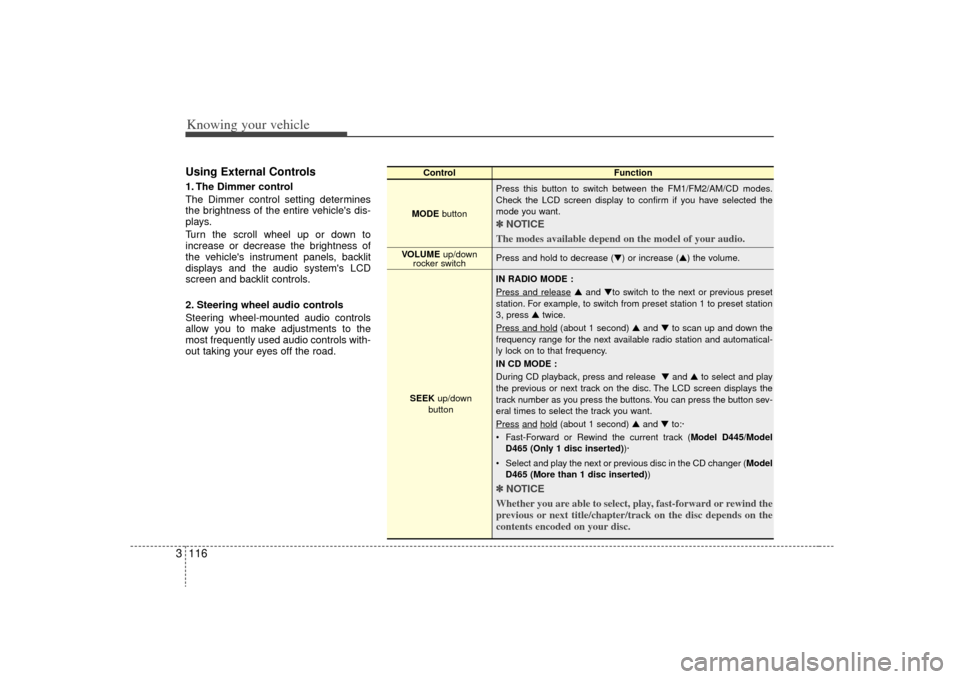
2. Steering wheel audio controls
Steering wheel-mounted audio controls
allow you to make adjustments to the
most frequently used audio controls with-
out taking your eyes off the road.
Control Function
MODE button Press this button to switch between the FM1/FM2/AM/CD modes.
Check the LCD screen display to confirm if you have selected the
mode you want.
✽ ✽
NOTICE
The modes available depend on the model of your audio. Press and hold to decrease (▼) or increase (▲) the volume.
IN RADIO MODE :
Press and release
▲ and ▼to switch to the next or previous preset
station. For example, to switch from preset station 1 to preset station
3, press ▲ twice.
Press and hold
(about 1 second) ▲ and ▼to scan up and down the
frequency range for the next available radio station and automatical-
ly lock on to that frequency.
IN CD MODE :
During CD playback, press and release ▼ and ▲to select and play
the previous or next track on the disc. The LCD screen displays the
track number as you press the buttons. You can press the button sev-
eral times to select the track you want.
Press
and
hold
(about 1 second) ▲ and ▼to:·
Fast-Forward or Rewind the current track ( Model D445/Model
D465 (Only 1 disc inserted) )·
Select and play the next or previous disc in the CD changer (Model D465 (More than 1 disc inserted) )
✽ ✽
NOTICE
Whether you are able to select, play, fast-forward or rewind the
previous or next title/chapter/track on the disc depends on the
contents encoded on your disc.
VOLUME up/down
rocker switch
SEEK up/down
button