climate control KIA Sorento 2011 2.G User Guide
[x] Cancel search | Manufacturer: KIA, Model Year: 2011, Model line: Sorento, Model: KIA Sorento 2011 2.GPages: 377, PDF Size: 7.51 MB
Page 167 of 377
489
Features of your vehicle
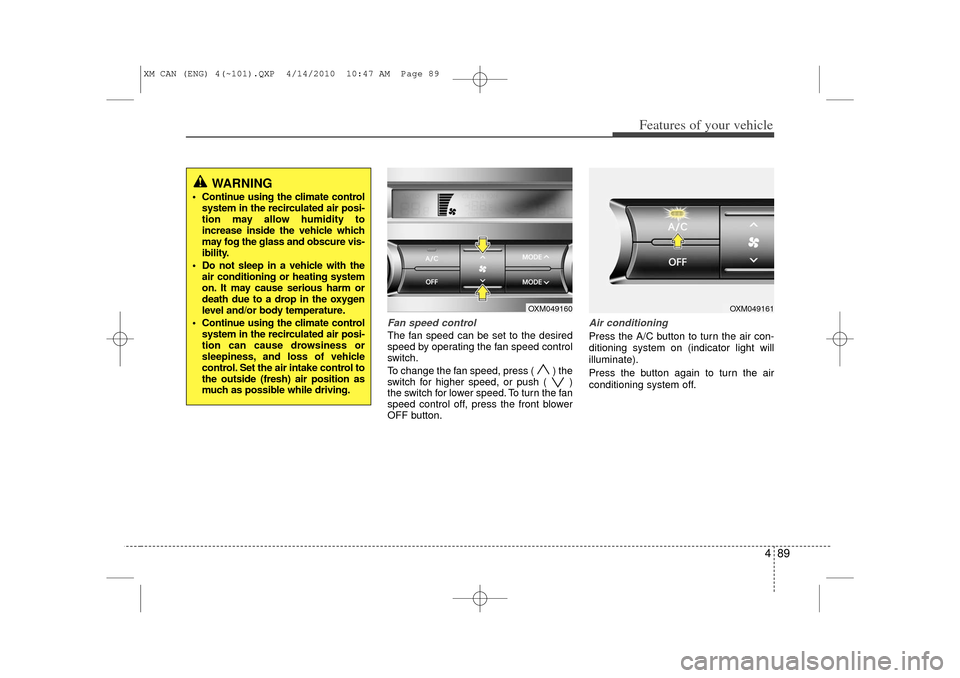
Fan speed controlThe fan speed can be set to the desired
speed by operating the fan speed control
switch.
To change the fan speed, press ( ) the
switch for higher speed, or push ( )
the switch for lower speed. To turn the fan
speed control off, press the front blower
OFF button.
Air conditioningPress the A/C button to turn the air con-
ditioning system on (indicator light will
illuminate).
Press the button again to turn the air
conditioning system off.
OXM049160
OXM049161
WARNING
Continue using the climate controlsystem in the recirculated air posi-
tion may allow humidity to
increase inside the vehicle which
may fog the glass and obscure vis-
ibility.
Do not sleep in a vehicle with the air conditioning or heating system
on. It may cause serious harm or
death due to a drop in the oxygen
level and/or body temperature.
Continue using the climate control system in the recirculated air posi-
tion can cause drowsiness or
sleepiness, and loss of vehicle
control. Set the air intake control to
the outside (fresh) air position as
much as possible while driving.
XM CAN (ENG) 4(~101).QXP 4/14/2010 10:47 AM Page 89
Page 168 of 377
Features of your vehicle90
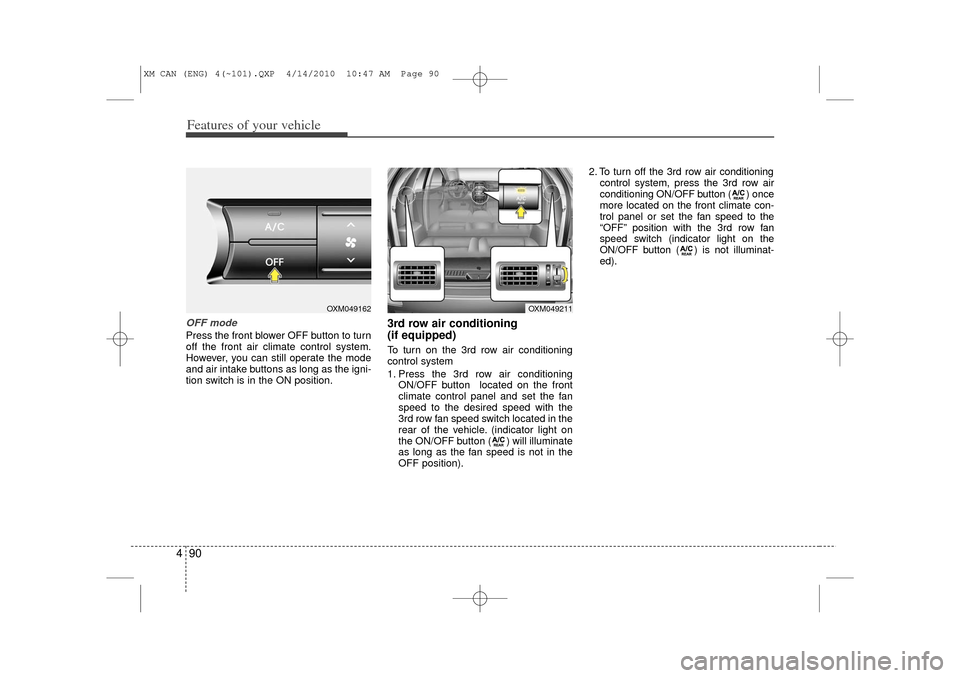
4OFF modePress the front blower OFF button to turn
off the front air climate control system.
However, you can still operate the mode
and air intake buttons as long as the igni-
tion switch is in the ON position.
3rd row air conditioning
(if equipped)To turn on the 3rd row air conditioning
control system
1. Press the 3rd row air conditioning
ON/OFF button located on the front
climate control panel and set the fan
speed to the desired speed with the
3rd row fan speed switch located in the
rear of the vehicle. (indicator light on
the ON/OFF button ( ) will illuminate
as long as the fan speed is not in the
OFF position). 2. To turn off the 3rd row air conditioning
control system, press the 3rd row air
conditioning ON/OFF button ( ) once
more located on the front climate con-
trol panel or set the fan speed to the
“OFF” position with the 3rd row fan
speed switch (indicator light on the
ON/OFF button ( ) is not illuminat-
ed).
OXM049162
OXM049211
XM CAN (ENG) 4(~101).QXP 4/14/2010 10:47 AM Page 90
Page 169 of 377
491
Features of your vehicle
For maximum defrosting, set the tem-perature control to the extreme
right/hot position and the fan speed
control to the highest speed.
If warm air to the floor is desired while defrosting or defogging, set the mode
to the floor-defrost position.
Before driving, clear all snow and ice from the windshield, rear window, out-
side rear view mirrors, and all side win-
dows.
Clear all snow and ice from the hood and air inlet in the cowl grill to improve
heater and defroster efficiency and to
reduce the probability of fogging up the
inside of the windshield.
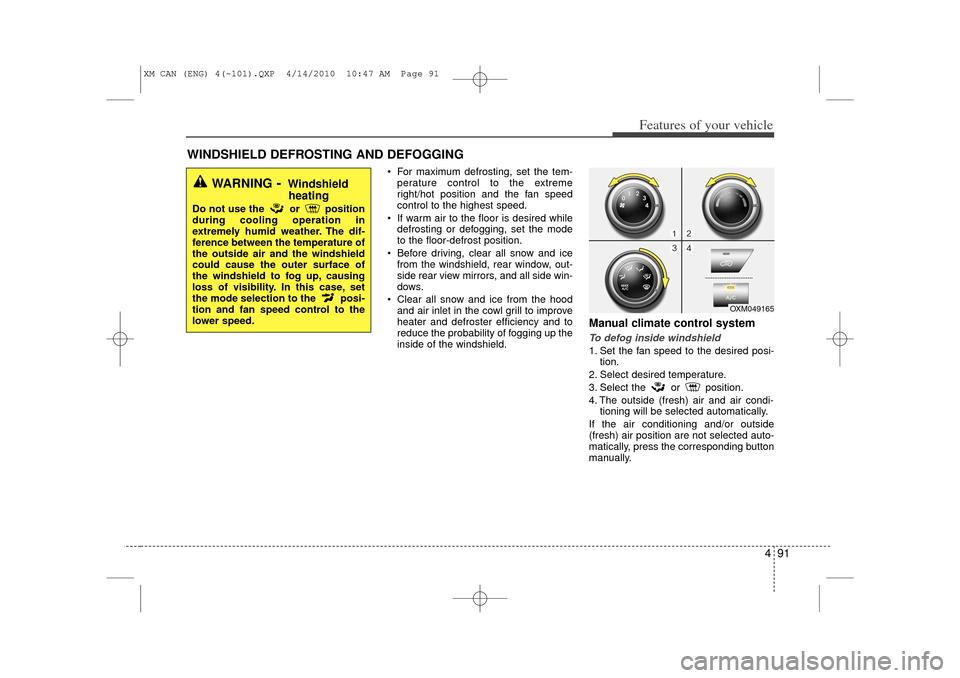
Manual climate control systemTo defog inside windshield 1. Set the fan speed to the desired posi- tion.
2. Select desired temperature.
3. Select the or position.
4. The outside (fresh) air and air condi- tioning will be selected automatically.
If the air conditioning and/or outside
(fresh) air position are not selected auto-
matically, press the corresponding button
manually.
WINDSHIELD DEFROSTING AND DEFOGGING
OXM049165
WARNING
- Windshield heating
Do not use the or position
during cooling operation in
extremely humid weather. The dif-
ference between the temperature of
the outside air and the windshield
could cause the outer surface of
the windshield to fog up, causing
loss of visibility. In this case, set
the mode selection to the posi-
tion and fan speed control to the
lower speed.
XM CAN (ENG) 4(~101).QXP 4/14/2010 10:47 AM Page 91
Page 170 of 377
Features of your vehicle92
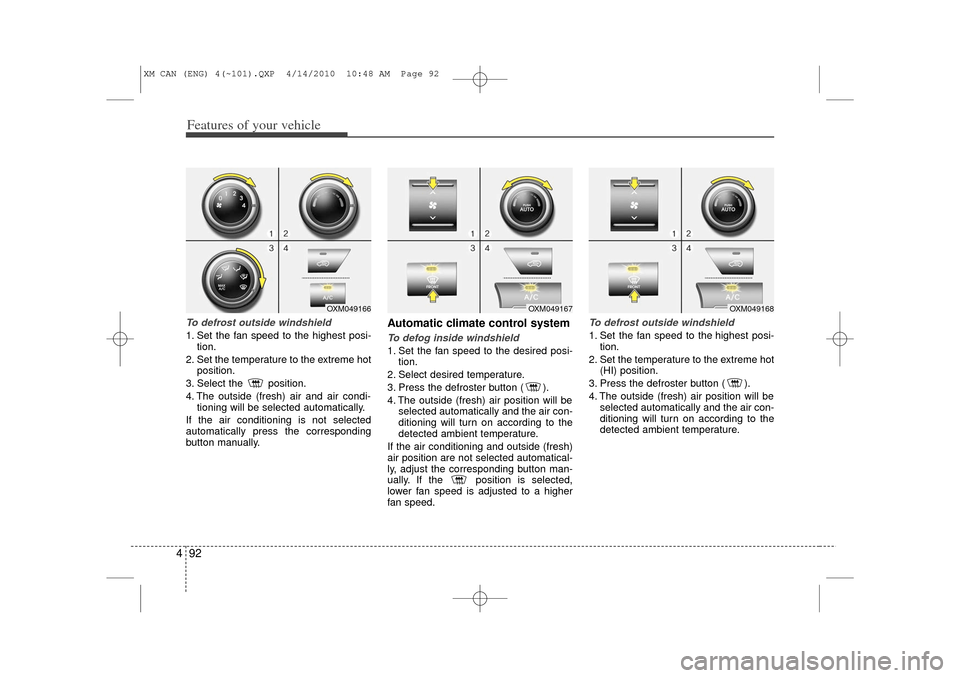
4To defrost outside windshield 1. Set the fan speed to the highest posi-
tion.
2. Set the temperature to the extreme hot position.
3. Select the position.
4. The outside (fresh) air and air condi- tioning will be selected automatically.
If the air conditioning is not selected
automatically press the corresponding
button manually.
Automatic climate control systemTo defog inside windshield 1. Set the fan speed to the desired posi- tion.
2. Select desired temperature.
3. Press the defroster button ( ).
4. The outside (fresh) air position will be selected automatically and the air con-
ditioning will turn on according to the
detected ambient temperature.
If the air conditioning and outside (fresh)
air position are not selected automatical-
ly, adjust the corresponding button man-
ually. If the position is selected,
lower fan speed is adjusted to a higher
fan speed.
To defrost outside windshield 1. Set the fan speed to the highest posi- tion.
2. Set the temperature to the extreme hot (HI) position.
3. Press the defroster button ( ).
4. The outside (fresh) air position will be selected automatically and the air con-
ditioning will turn on according to the
detected ambient temperature.
OXM049167
OXM049168
OXM049166
XM CAN (ENG) 4(~101).QXP 4/14/2010 10:48 AM Page 92
Page 171 of 377
493
Features of your vehicle
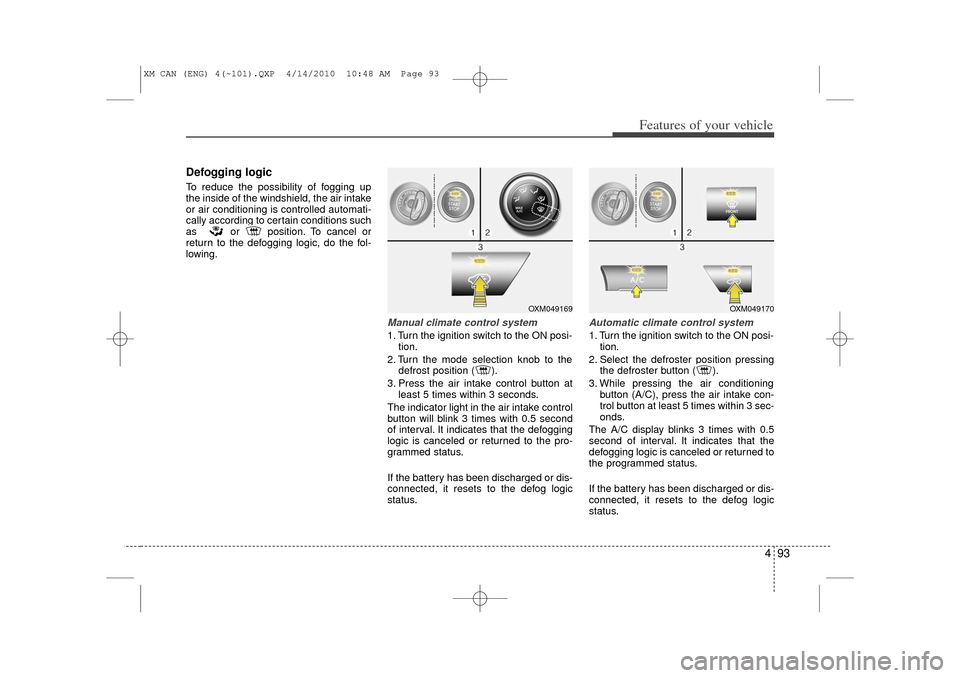
Defogging logicTo reduce the possibility of fogging up
the inside of the windshield, the air intake
or air conditioning is controlled automati-
cally according to certain conditions such
as or position. To cancel or
return to the defogging logic, do the fol-
lowing.
Manual climate control system1. Turn the ignition switch to the ON posi-tion.
2. Turn the mode selection knob to the defrost position ( ).
3. Press the air intake control button at least 5 times within 3 seconds.
The indicator light in the air intake control
button will blink 3 times with 0.5 second
of interval. It indicates that the defogging
logic is canceled or returned to the pro-
grammed status.
If the battery has been discharged or dis-
connected, it resets to the defog logic
status.
Automatic climate control system1. Turn the ignition switch to the ON posi- tion.
2. Select the defroster position pressing the defroster button ( ).
3. While pressing the air conditioning button (A/C), press the air intake con-
trol button at least 5 times within 3 sec-
onds.
The A/C display blinks 3 times with 0.5
second of interval. It indicates that the
defogging logic is canceled or returned to
the programmed status.
If the battery has been discharged or dis-
connected, it resets to the defog logic
status.
OXM049169
OXM049170
XM CAN (ENG) 4(~101).QXP 4/14/2010 10:48 AM Page 93
Page 298 of 377
7
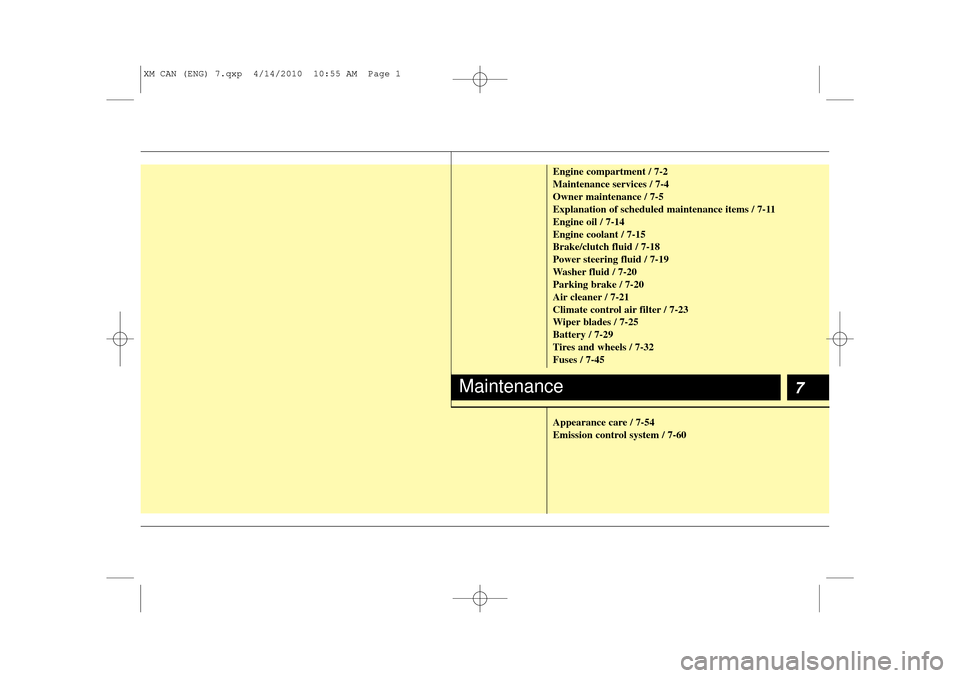
Engine compartment / 7-2
Maintenance services / 7-4
Owner maintenance / 7-5
Explanation of scheduled maintenance items / 7-11
Engine oil / 7-14
Engine coolant / 7-15
Brake/clutch fluid / 7-18
Power steering fluid / 7-19
Washer fluid / 7-20
Parking brake / 7-20
Air cleaner / 7-21
Climate control air filter / 7-23
Wiper blades / 7-25
Battery / 7-29
Tires and wheels / 7-32
Fuses / 7-45
Appearance care / 7-54
Emission control system / 7-60
Maintenance
XM CAN (ENG) 7.qxp 4/14/2010 10:55 AM Page 1
Page 305 of 377
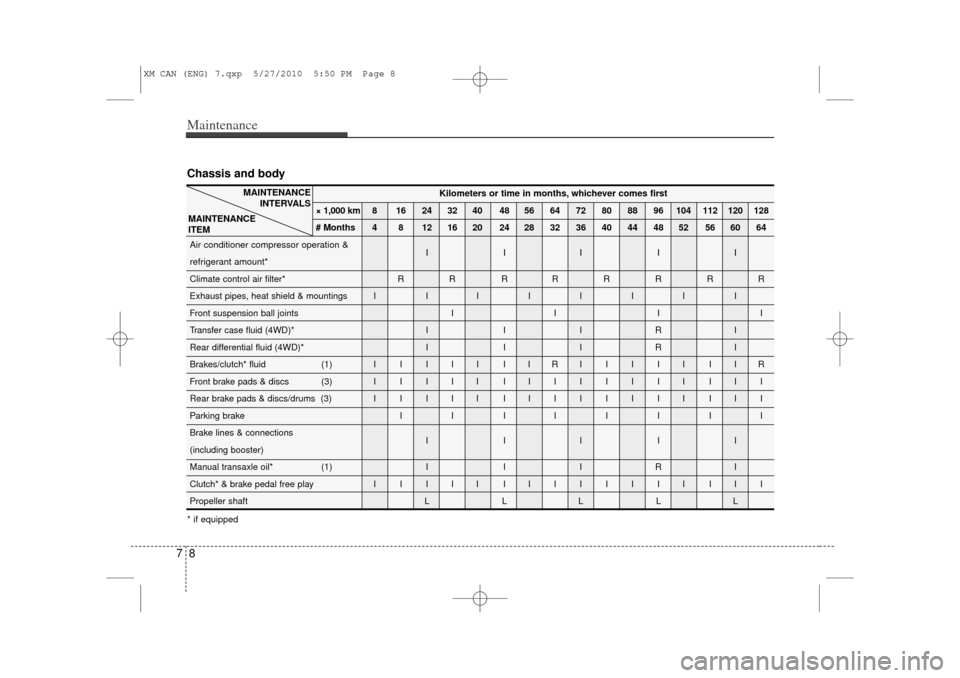
Maintenance87Chassis and body
Kilometers or time in months, whichever comes first
× 1,000 km 8 16 24 32 40 48 56 64 72 80 88 96 104 112 120 128
# Months 4 8 12 16 20 24 28 32 36 40 44 48 52 56 60 64
Air conditioner compressor operation & IIIII
refrigerant amount
*
Climate control air filter* R R R RRRRR
Exhaust pipes, heat shield & mountings I I IIIIII
Front suspension ball joints I I I I
Transfer case fluid (4WD)* I I I R I
Rear differential fluid (4WD)* I I I R I
Brakes/clutch* fluid (1) I I I I I I I R IIIII IIR
Front brake pads & discs (3) I I I I I I IIIIIII III
Rear brake pads & discs/drums (3) I I I I I I IIIIIII III
Parking brake I I I IIIII
Brake lines & connections IIIII
(including booster)
Manual transaxle oil* (1) I I I R I
Clutch* & brake pedal free play I I I I I I IIIIIII III
Propeller shaft L L L L L
MAINTENANCE INTERVALS
MAINTENANCE
ITEM
* if equipped
XM CAN (ENG) 7.qxp 5/27/2010 5:50 PM Page 8
Page 320 of 377
723
Maintenance
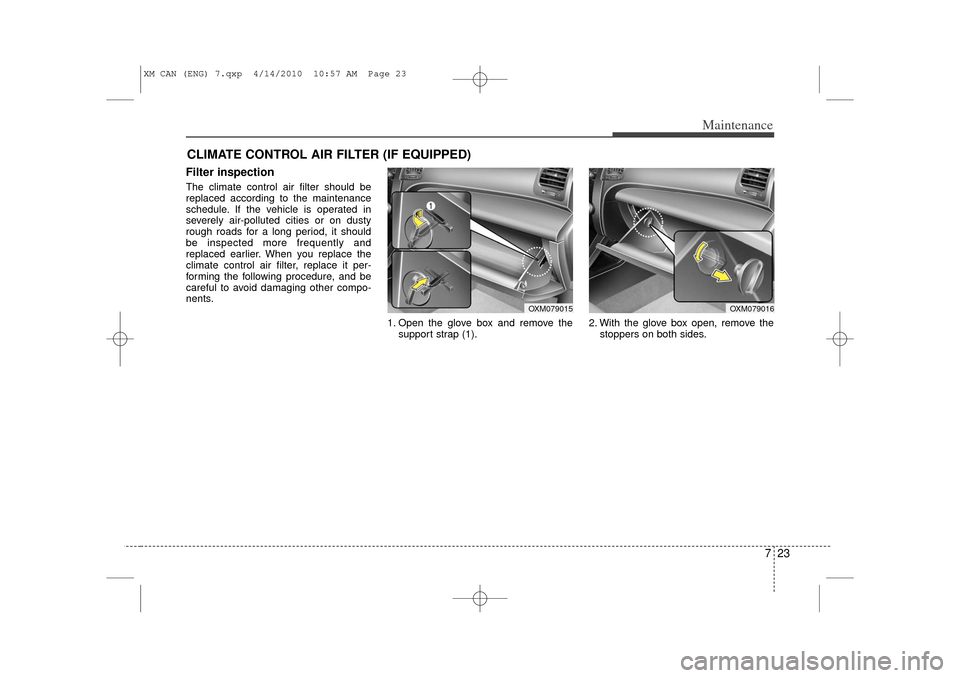
CLIMATE CONTROL AIR FILTER (IF EQUIPPED)Filter inspectionThe climate control air filter should be
replaced according to the maintenance
schedule. If the vehicle is operated in
severely air-polluted cities or on dusty
rough roads for a long period, it should
be inspected more frequently and
replaced earlier. When you replace the
climate control air filter, replace it per-
forming the following procedure, and be
careful to avoid damaging other compo-
nents.1. Open the glove box and remove thesupport strap (1). 2. With the glove box open, remove the
stoppers on both sides.
OXM079016
OXM079015
XM CAN (ENG) 7.qxp 4/14/2010 10:57 AM Page 23
Page 321 of 377
Maintenance24
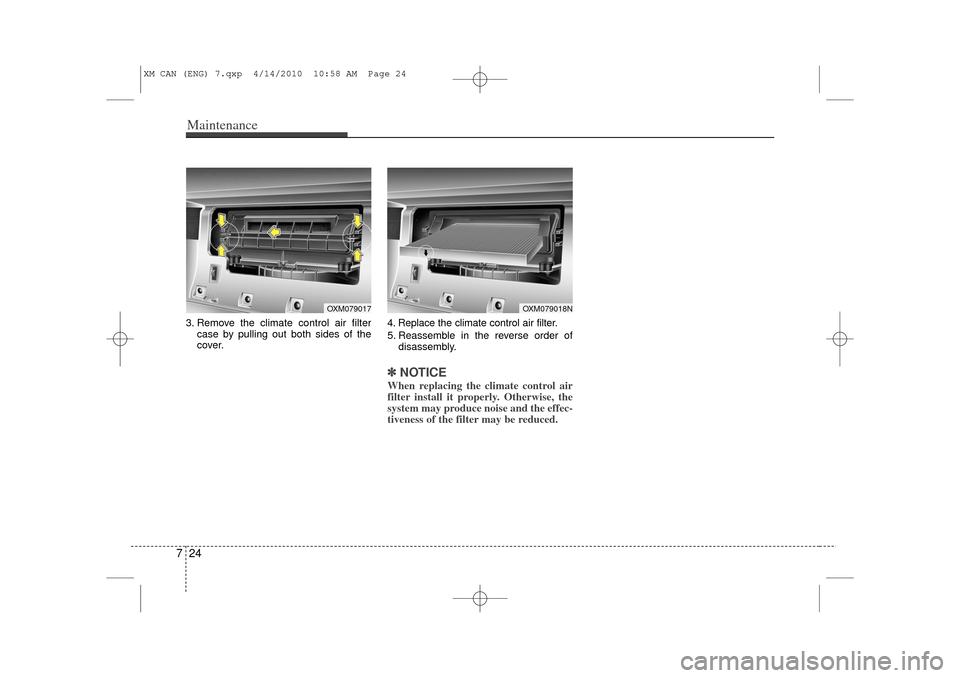
73. Remove the climate control air filter
case by pulling out both sides of the
cover. 4. Replace the climate control air filter.
5. Reassemble in the reverse order of
disassembly.
✽ ✽NOTICEWhen replacing the climate control air
filter install it properly. Otherwise, the
system may produce noise and the effec-
tiveness of the filter may be reduced.
OXM079017
OXM079018N
XM CAN (ENG) 7.qxp 4/14/2010 10:58 AM Page 24
Page 328 of 377
731
Maintenance
G190300AAMReset itemsItems should be reset after the battery
has been discharged or the battery has
been disconnected.
Auto up/down window (See section 4)
Sunroof (See section 4)
Trip computer (See section 4)
Climate control system (See section 4)
Clock (See section 4)
Audio (See section 4)
WARNING
Before performing maintenance or recharging the battery, turn off
all accessories and stop the
engine.
The negative battery cable must be removed first and installed
last when the battery is discon-
nected.
XM CAN (ENG) 7.qxp 4/14/2010 10:58 AM Page 31