steering KIA Sorento 2011 2.G User Guide
[x] Cancel search | Manufacturer: KIA, Model Year: 2011, Model line: Sorento, Model: KIA Sorento 2011 2.GPages: 377, PDF Size: 7.51 MB
Page 69 of 377
Safety features of your vehicle56
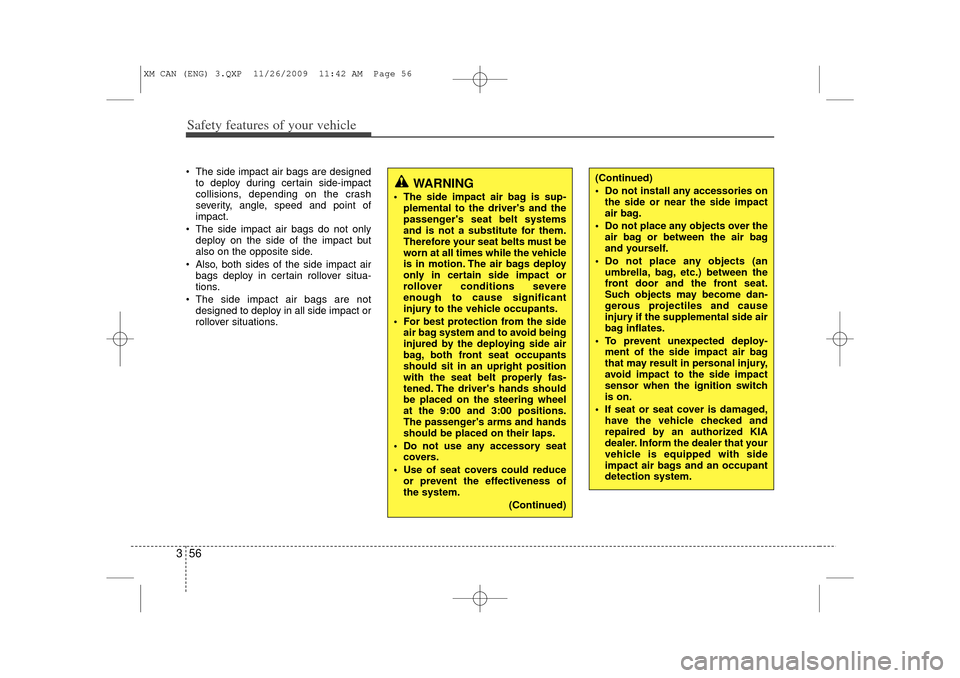
3 The side impact air bags are designed
to deploy during certain side-impact
collisions, depending on the crash
severity, angle, speed and point of
impact.
The side impact air bags do not only deploy on the side of the impact but
also on the opposite side.
Also, both sides of the side impact air bags deploy in certain rollover situa-
tions.
The side impact air bags are not designed to deploy in all side impact or
rollover situations.
(Continued)
Do not install any accessories onthe side or near the side impact
air bag.
Do not place any objects over the air bag or between the air bag
and yourself.
Do not place any objects (an umbrella, bag, etc.) between the
front door and the front seat.
Such objects may become dan-
gerous projectiles and cause
injury if the supplemental side air
bag inflates.
To prevent unexpected deploy- ment of the side impact air bag
that may result in personal injury,
avoid impact to the side impact
sensor when the ignition switch
is on.
If seat or seat cover is damaged, have the vehicle checked and
repaired by an authorized KIA
dealer. Inform the dealer that your
vehicle is equipped with side
impact air bags and an occupant
detection system.
WARNING
The side impact air bag is sup-plemental to the driver's and the
passenger's seat belt systems
and is not a substitute for them.
Therefore your seat belts must be
worn at all times while the vehicle
is in motion. The air bags deploy
only in certain side impact or
rollover conditions severe
enough to cause significant
injury to the vehicle occupants.
For best protection from the side air bag system and to avoid being
injured by the deploying side air
bag, both front seat occupants
should sit in an upright position
with the seat belt properly fas-
tened. The driver's hands should
be placed on the steering wheel
at the 9:00 and 3:00 positions.
The passenger's arms and hands
should be placed on their laps.
Do not use any accessory seat covers.
Use of seat covers could reduce or prevent the effectiveness of
the system.
(Continued)
XM CAN (ENG) 3.QXP 11/26/2009 11:42 AM Page 56
Page 76 of 377
363
Safety features of your vehicle
C041100AUNSRS CareThe SRS is virtually maintenance-free
and so there are no parts you can safely
service by yourself. If the SRS air bag
warning light does not illuminate, or con-
tinuously remains on, have your vehicle
immediately inspected by an authorized
KIA dealer.
Any work on the SRS system, such as
removing, installing, repairing, or any
work on the steering wheel, the front
passenger’s panel, front seats and roof
rails must be performed by an authorized
KIA dealer. Improper handling of the SRS
system may result in serious personal
injury.
WARNING
Modification to SRS componentsor wiring, including the addition
of any kind of badges to the pad
covers or modifications to the
body structure, can adversely
affect SRS performance and lead
to possible injury.
For cleaning the air bag pad cov- ers, use only a soft, dry cloth or
one which has been moistened
with plain water. Solvents or
cleaners could adversely affect
the air bag covers and proper
deployment of the system.
No objects should be placed over
or near the air bag modules on the
steering wheel, instrument panel,
and the front passenger's panel
above the glove box, because any
such object could cause harm if the
vehicle is in a crash severe enough
to cause the air bags to inflate.
(Continued)
(Continued)
If the air bags inflate, they must be replaced by an authorized KIA
dealer.
Do not tamper with or disconnect SRS wiring, or other components
of the SRS system. Doing so
could result in injury, due to acci-
dental inflation of the air bags or
by rendering the SRS inopera-
tive.
If components of the air bag sys- tem must be discarded, or if the
vehicle must be scrapped, certain
safety precautions must be
observed. An authorized KIA
dealer knows these precautions
and can give you the necessary
information. Failure to follow
these precautions and proce-
dures could increase the risk of
personal injury.
If your car was flooded and has soaked carpeting or water on
flooring, you shouldn't try to start
the engine; have the car towed to
an authorized KIA dealer.
XM CAN (ENG) 3.QXP 11/26/2009 11:43 AM Page 63
Page 79 of 377
4
Keys / 4-2
Remote keyless entry / 4-6
Smart key / 4-9
Theft-alarm system / 4-13
Door locks / 4-15
Tailgate / 4-19
Windows / 4-21
Hood / 4-25
Fuel filler lid / 4-27
Panoramic Sunroof / 4-30
Steering wheel / 4-34
Mirrors / 4-36
Instrument cluster / 4-44
Rear parking assist system / 4-59
Rearview camera / 4-62
Hazard warning flasher / 4-62
Lighting / 4-63
Wipers and washers / 4-68
Interior lights / 4-71
Defroster / 4-73
Manual climate control system / 4-74
Automatic climate control system / 4-83
Windshield defrosting and defogging / 4-91
Storage compartments / 4-94
Interior features / 4-96
Exterior feature / 4-101
Audio system / 4-102
Features of your vehicle
XM CAN (ENG) 4(~101).QXP 4/14/2010 10:37 AM Page 1
Page 112 of 377
Features of your vehicle34
4D130100AHM-EU-U1Power steeringPower steering uses energy from the
engine to assist you in steering the vehi-
cle. If the engine is off or if the power
steering system becomes inoperative,
the vehicle may still be steered, but it will
require increased steering effort.
Should you notice any change in the
effort required to steer during normal
vehicle operation, have the power steer-
ing checked by an authorized KIA dealer.
✽ ✽
NOTICEIf the power steering drive belt breaks
or if the power steering pump malfunc-
tions, steering effort will greatly
increase.✽ ✽NOTICEIf the vehicle is parked for extended
periods outside in cold weather (below
-10°C/14°F), the power steering may
require increased effort when the
engine is first started. This is caused by
increased fluid viscosity due to the cold
weather and does not indicate a mal-
function.
When this happens, increase the engine
RPM by depressing the accelerator until
the RPM reaches 1,500 rpm then release
or let the engine idle for two or three
minutes to warm up the fluid.
D130300AUNTilt steering Tilt steering allows you to adjust the
steering wheel before you drive. You can
also raise it to give your legs more room
when you exit and enter the vehicle.
The steering wheel should be positioned
so that it is comfortable for you to drive,
while permitting you to see the instru-
ment panel warning lights and gauges.
STEERING WHEEL
CAUTION
Never hold the steering wheel to the
extreme right or left for more than 5 seconds with the engine running.Holding the steering wheel for morethan 5 seconds in either position may cause damage to the powersteering pump.
WARNING
Never adjust the angle of the steering wheel while driving. You
may lose steering control and
cause severe personal injury,
death or accidents.
After adjusting, push the steering wheel both up and down to be
certain it is locked in position.
XM CAN (ENG) 4(~101).QXP 4/14/2010 10:40 AM Page 34
Page 113 of 377
435
Features of your vehicle
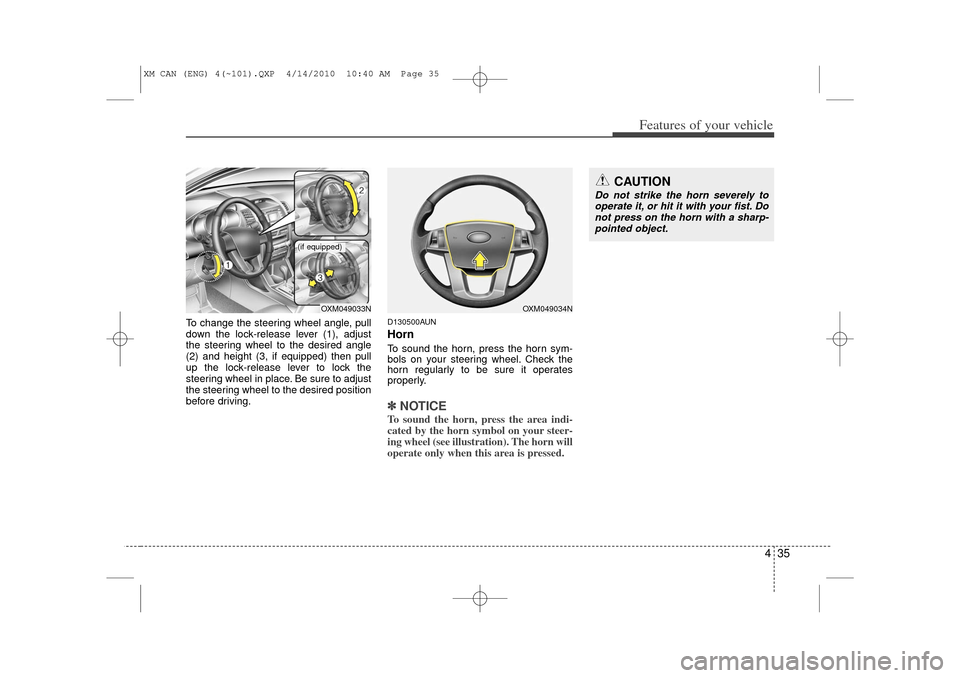
To change the steering wheel angle, pull
down the lock-release lever (1), adjust
the steering wheel to the desired angle
(2) and height (3, if equipped) then pull
up the lock-release lever to lock the
steering wheel in place. Be sure to adjust
the steering wheel to the desired position
before driving.
D130500AUNHornTo sound the horn, press the horn sym-
bols on your steering wheel. Check the
horn regularly to be sure it operates
properly.✽ ✽NOTICETo sound the horn, press the area indi-
cated by the horn symbol on your steer-
ing wheel (see illustration). The horn will
operate only when this area is pressed.
CAUTION
Do not strike the horn severely to
operate it, or hit it with your fist. Do not press on the horn with a sharp-pointed object.
OXM049033N
OXM049034N
(if equipped)
XM CAN (ENG) 4(~101).QXP 4/14/2010 10:40 AM Page 35
Page 135 of 377
457
Features of your vehicle
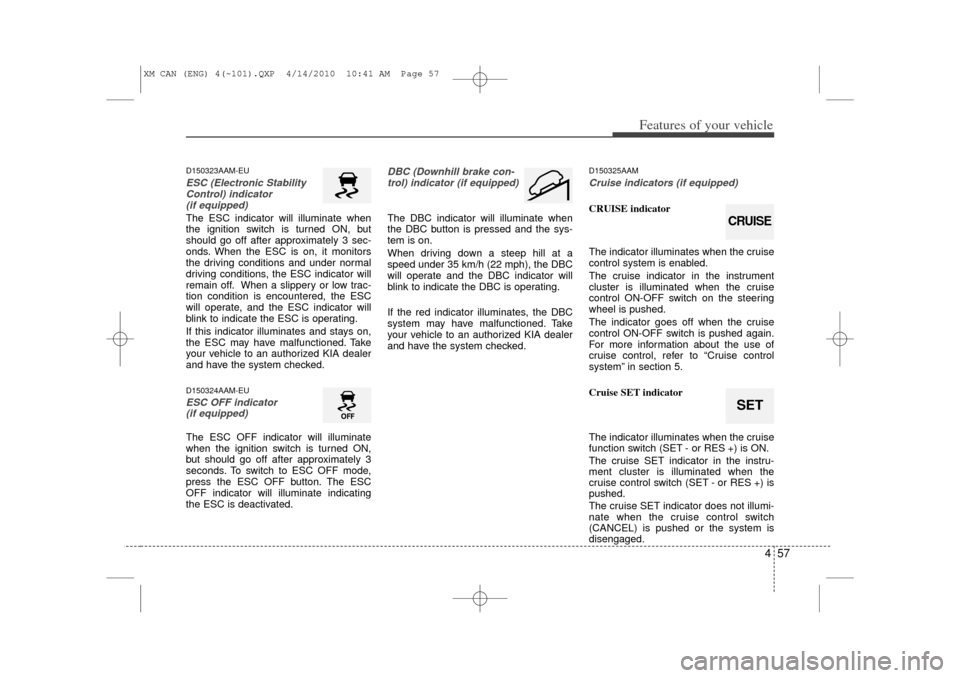
D150323AAM-EUESC (Electronic StabilityControl) indicator (if equipped)The ESC indicator will illuminate when
the ignition switch is turned ON, but
should go off after approximately 3 sec-
onds. When the ESC is on, it monitors
the driving conditions and under normal
driving conditions, the ESC indicator will
remain off. When a slippery or low trac-
tion condition is encountered, the ESC
will operate, and the ESC indicator will
blink to indicate the ESC is operating.
If this indicator illuminates and stays on,
the ESC may have malfunctioned. Take
your vehicle to an authorized KIA dealer
and have the system checked.D150324AAM-EUESC OFF indicator (if equipped)The ESC OFF indicator will illuminate
when the ignition switch is turned ON,
but should go off after approximately 3
seconds. To switch to ESC OFF mode,
press the ESC OFF button. The ESC
OFF indicator will illuminate indicating
the ESC is deactivated.
DBC (Downhill brake con-
trol) indicator (if equipped)The DBC indicator will illuminate when
the DBC button is pressed and the sys-
tem is on.
When driving down a steep hill at a
speed under 35 km/h (22 mph), the DBC
will operate and the DBC indicator will
blink to indicate the DBC is operating.
If the red indicator illuminates, the DBC
system may have malfunctioned. Take
your vehicle to an authorized KIA dealer
and have the system checked.
D150325AAMCruise indicators (if equipped)CRUISE indicator
The indicator illuminates when the cruise
control system is enabled.
The cruise indicator in the instrument
cluster is illuminated when the cruise
control ON-OFF switch on the steering
wheel is pushed.
The indicator goes off when the cruise
control ON-OFF switch is pushed again.
For more information about the use of
cruise control, refer to “Cruise control
system” in section 5.
Cruise SET indicator
The indicator illuminates when the cruise
function switch (SET - or RES +) is ON.
The cruise SET indicator in the instru-
ment cluster is illuminated when the
cruise control switch (SET - or RES +) is
pushed.
The cruise SET indicator does not illumi-
nate when the cruise control switch
(CANCEL) is pushed or the system is
disengaged.
SETCRUISE
XM CAN (ENG) 4(~101).QXP 4/14/2010 10:41 AM Page 57
Page 141 of 377
463
Features of your vehicle
D190100APBBattery saver function The purpose of this feature is to pre-vent the battery from being discharged
if the lights are left in the ON position.
The system automatically shuts off the
parking lights 30 seconds after the
ignition key is removed and the driver’s
door is opened and closed.
With this feature, the parking lights will turn off automatically if the driver parks
on the side of the road at night and
opens the driver’s side door.
If necessary, to keep the parking lights
on when the ignition key is removed,
perform the following:
1) Open the driver-side door.
2) Turn the parking lights OFF and ON again using the light switch on the
steering column.
D190200AHM-EUHeadlight escort function
(if equipped)The headlights and taillights remain on
for approximately 20 minutes after the
ignition key is removed or turned to the
ACC or LOCK position. However, if the
driver’s door is opened and closed, the
headlights and taillights are turned off
after 30 seconds.
The headlights and taillights can be
turned off by pressing the lock button on
the transmitter or turning off the light
switch from the headlight or Auto light
position.
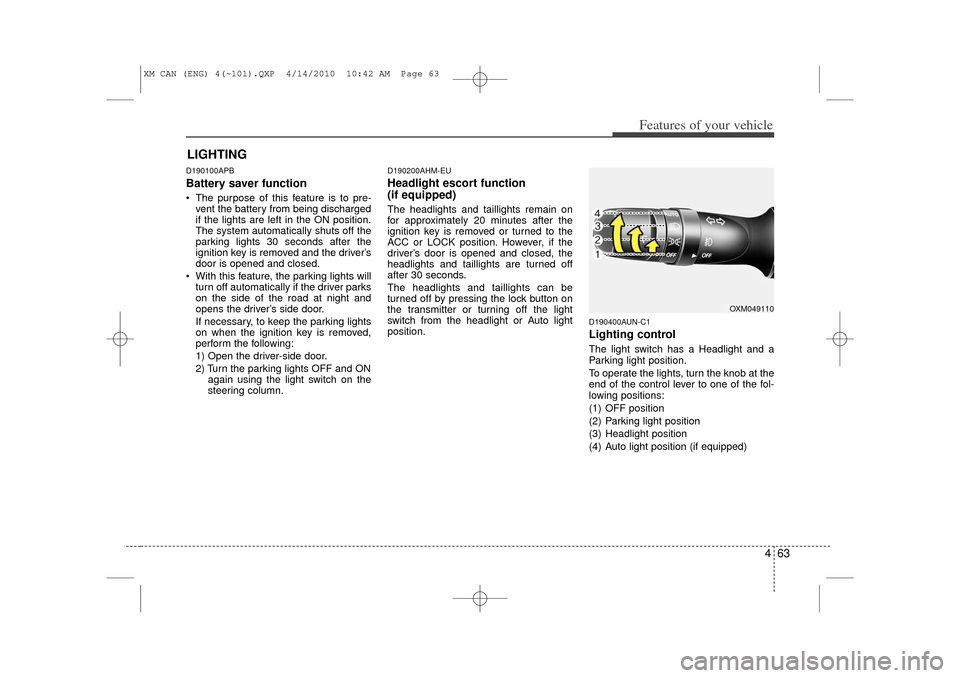
D190400AUN-C1Lighting controlThe light switch has a Headlight and a
Parking light position.
To operate the lights, turn the knob at the
end of the control lever to one of the fol-
lowing positions:
(1) OFF position
(2) Parking light position
(3) Headlight position
(4) Auto light position (if equipped)
LIGHTING
OXM049110
XM CAN (ENG) 4(~101).QXP 4/14/2010 10:42 AM Page 63
Page 181 of 377
4 103
Features of your vehicle
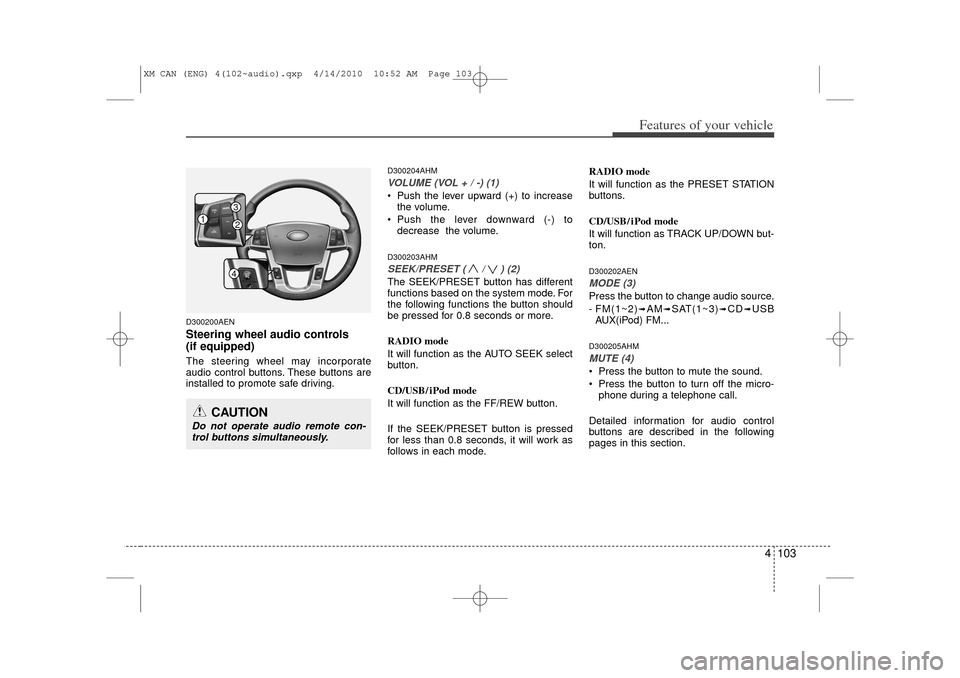
D300200AENSteering wheel audio controls
(if equipped) The steering wheel may incorporate
audio control buttons. These buttons are
installed to promote safe driving.
D300204AHMVOLUME (VOL + / -) (1)• Push the lever upward (+) to increasethe volume.
Push the lever downward (-) to decrease the volume.D300203AHMSEEK/PRESET ( / ) (2)The SEEK/PRESET button has different
functions based on the system mode. For
the following functions the button should
be pressed for 0.8 seconds or more.
RADIO mode
It will function as the AUTO SEEK select
button.
CD/USB/ iPod mode
It will function as the FF/REW button.
If the SEEK/PRESET button is pressed
for less than 0.8 seconds, it will work as
follows in each mode. RADIO mode
It will function as the PRESET STATION
buttons.
CD/USB/ iPod mode
It will function as TRACK UP/DOWN but-
ton.
D300202AENMODE (3)Press the button to change audio source.
- FM(1~2)
➟AM
➟SAT(1~3)
➟CD
➟USB
AUX(iPod) FM...
D300205AHMMUTE (4) Press the button to mute the sound.
Press the button to turn off the micro- phone during a telephone call.
Detailed information for audio control
buttons are described in the following
pages in this section.
CAUTION
Do not operate audio remote con- trol buttons simultaneously.1
324
XM CAN (ENG) 4(102~audio).qxp 4/14/2010 10:52 AM Page 103
Page 203 of 377
4 125
Features of your vehicle
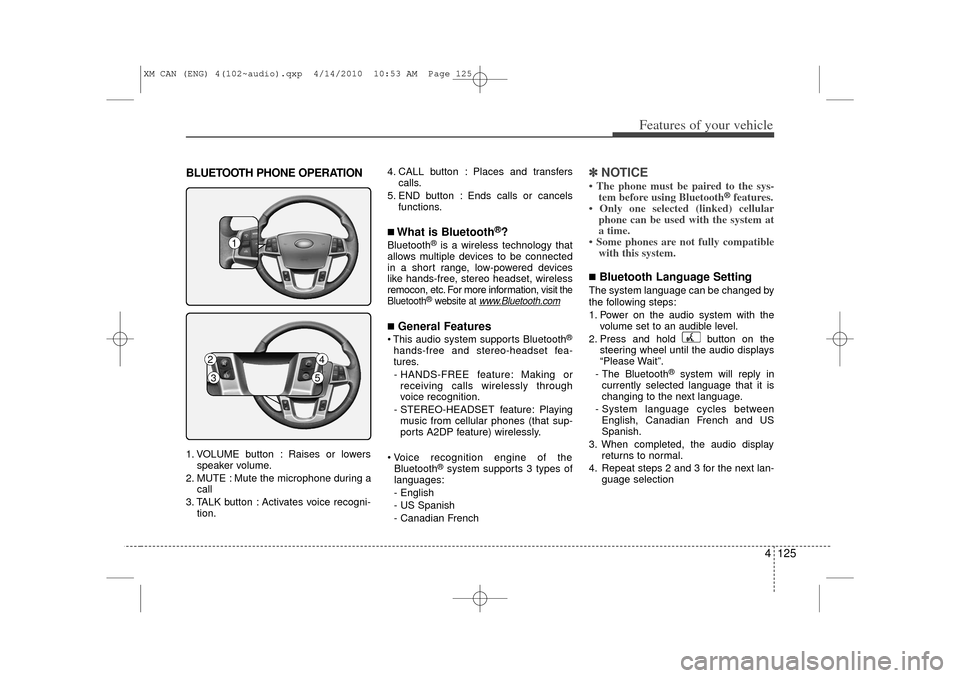
BLUETOOTH PHONE OPERATION1. VOLUME button : Raises or lowersspeaker volume.
2. MUTE : Mute the microphone during a call
3. TALK button : Activates voice recogni- tion. 4. CALL button : Places and transfers
calls.
5. END button : Ends calls or cancels functions.
■What is Bluetooth
®?
Bluetooth
®is a wireless technology that
allows multiple devices to be connected
in a short range, low-powered devices
like hands-free, stereo headset, wireless
remocon, etc. For more information, visit
the
Bluetooth
®website at
www
.Bluetooth.com
■General Features This audio system supports Bluetooth
®
hands-free and stereo-headset fea-
tures.
- HANDS-FREE feature: Making or receiving calls wirelessly through
voice recognition.
- STEREO-HEADSET feature: Playing music from cellular phones (that sup-
ports A2DP feature) wirelessly.
Voice recognition engine of the Bluetooth
®system supports 3 types of
languages:
- English
- US Spanish
- Canadian French
✽ ✽ NOTICE• The phone must be paired to the sys-
tem before using Bluetooth
®features.
• Only one selected (linked) cellular phone can be used with the system at
a time.
• Some phones are not fully compatible with this system.
■Bluetooth Language SettingThe system language can be changed by
the following steps:
1. Power on the audio system with the
volume set to an audible level.
2. Press and hold button on the steering wheel until the audio displays
“Please Wait”.
- The Bluetooth
®
system will reply in
currently selected language that it is
changing to the next language.
- System language cycles between English, Canadian French and US
Spanish.
3. When completed, the audio display returns to normal.
4. Repeat steps 2 and 3 for the next lan- guage selection
1
2
4
3
5
XM CAN (ENG) 4(102~audio).qxp 4/14/2010 10:53 AM Page 125
Page 206 of 377
Features of your vehicle128
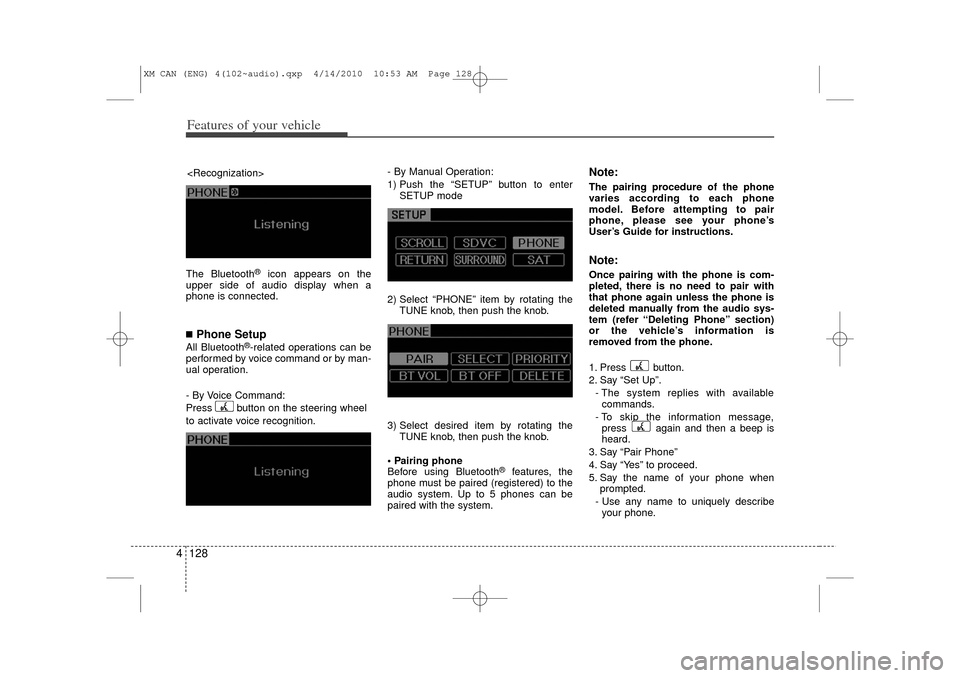
4The Bluetooth
®
icon appears on the
upper side of audio display when a
phone is connected.
■Phone SetupAll Bluetooth
®-related operations can be
performed by voice command or by man-
ual operation.
- By Voice Command:
Press button on the steering wheel
to activate voice recognition. - By Manual Operation:
1) Push the “SETUP” button to enter
SETUP mode
2) Select “PHONE” item by rotating the TUNE knob, then push the knob.
3) Select desired item by rotating the TUNE knob, then push the knob.
Pairing phone
Before using Bluetooth
®
features, the
phone must be paired (registered) to the
audio system. Up to 5 phones can be
paired with the system.
Note:The pairing procedure of the phone
varies according to each phone
model. Before attempting to pair
phone, please see your phone’s
User’s Guide for instructions.Note:Once pairing with the phone is com-
pleted, there is no need to pair with
that phone again unless the phone is
deleted manually from the audio sys-
tem (refer “Deleting Phone” section)
or the vehicle’s information is
removed from the phone.
1. Press button.
2. Say “Set Up”.
- The system replies with availablecommands.
- To skip the information message, press again and then a beep is
heard.
3. Say “Pair Phone”
4. Say “Yes” to proceed.
5. Say the name of your phone when prompted.
- Use any name to uniquely describe your phone.
XM CAN (ENG) 4(102~audio).qxp 4/14/2010 10:53 AM Page 128