audio KIA Sorento 2011 2.G Owner's Guide
[x] Cancel search | Manufacturer: KIA, Model Year: 2011, Model line: Sorento, Model: KIA Sorento 2011 2.GPages: 377, PDF Size: 7.51 MB
Page 197 of 377
4 119
Features of your vehicle
✽
✽NOTICE FOR USING iPod
DEVICE• Some iPod models might not sup- port the communication protocol
and the files will not be played.
Supported iPod models:
- iPod Mini
- iPod 4th(Photo) ~ 6th(Classic)
generation
- iPod Nano 1st~4th generation
- iPod Touch 1st~2nd generation
• The order of search or playback of songs in the iPod can be different
from the order searched in the
audio system.
• If the iPod crashes due to its own malfunction, reset the iPod. (Reset:
Refer to iPod manual)
• An iPod may not operate normally on low battery.
CAUTION IN USING
iPod DEVICE
The Kia iPod Power Cable is
needed in order to operate aniPod with the audio buttons on the audio system. The USB cableprovided by Apple may cause malfunction and should not beused for Kia vehicles.❋ The Kia iPod Power Cable may be purchased through your KiaDealership.
When connecting iPod with the iPod Power Cable, insert the con-nector to the multimedia socketcompletely. If not inserted com-pletely, communications between iPod and audio may be interrupted.
When adjusting the sound effects of an iPod and the audio system,the sound effects of both deviceswill overlap and might reduce or distort the quality of the sound.
Deactivate (turn off) the equalizer function of an iPod when adjust-ing the audio system’s volume,and turn off the equalizer of the audio system when using theequalizer of an iPod.
(Continued)
(Continued) When the iPod cable is connected, the system can be switched to theAUX mode even without the iPoddevice and may cause noise. Disconnect the iPod cable whenyou are not using the iPod device.
When not using iPod with car audio, detach the iPod cable fromiPod. Otherwise, the iPod may remain in accessory mode, andmay not work properly.
XM CAN (ENG) 4(102~audio).qxp 4/14/2010 10:53 AM Page 119
Page 198 of 377
Features of your vehicle120
4Using iPod1. iPod Selection ButtonIf iPod is connected, it switches to the
iPod mode from the previous mode to
play the song files stored in the iPod.
If there is no iPod connected, then it dis-
plays the message "No Media" for 3 sec-
onds and returns to the previous mode.2. TRACK Selection Button Press the [TRACK ] b utton for less
than 0.8 seconds to play from the
beginning of the song currently played.
Press the button for less than 0.8 sec-
onds and press it again within 1 sec-
ond to move to and play the previous
track.
Press the button for 0.8 seconds or
longer to play the song in reverse
direction in fast speed.
Press the [TRACK ] button for less than 0.8 seconds to move to the next
track.
Press the button for 0.8 seconds or
longer to play the song in forward direc-
tion in fast speed.
3. REPEAT ButtonRepeats the song currently played.4. RANDOM Playback Button Press this button for less than 0.8 sec-onds to shuffle order of all songs in
current category. (Song Random)
Press this button for 0.8 seconds or longer to shuffle order of albums in cur-
rent category. (Album Random)
To cancel RANDOM Play, press this button again.5. INFO ButtonDisplays the information of the file cur-
rently played in the order of TITLE
➟
ARTIST
➟ALBUM
➟NORMAL DISPLAY
➟TITLE
➟... (Displays no information if
the file has no song information.)
6. SEARCH Knob & ENTER ButtonWhen you rotate the knob clockwise, it
will display the songs (category) ahead
of the song currently played (category in
the same level). Also, when you rotate the knob counter-
clockwise, it will display the songs (cate-
gory) before the song currently played
(category in the same level).
To listen to the song displayed in the
song category, press the button to skip to
and play the selected song.
Pressing the button changes the BASS,
MIDDLE, TREBLE, FADER and BAL-
ANCE TUNE mode. The mode selected
is shown on the display. After selecting
each mode, rotate the Audio control knob
clockwise or counterclockwise.
7. iPod category Selection ButtonMoves to the upper category from cur-
rently played category of the iPod.
To move to (play) the category (song)
displayed, press TUNE/ENTER knob.
You will be able to search through the
lower category of the selected category.
The order of iPod’s category is SONG,
ALBUMS, ARTISTS, GENRES, and iPod.
XM CAN (ENG) 4(102~audio).qxp 4/14/2010 10:53 AM Page 120
Page 199 of 377
4 121
Features of your vehicle
Satellite radio channels:SIRIUS Satellite Radio has over 130 chan-
nels, including 69 channels of 100% com-
mercial-free music, plus sports, news, talk
and entertainment available nationwide in
your vehicle. For more information and a
complete list of SIRIUS Satellite Radio
channels, visit sirius.com in the United
States, sirius-canada.ca in Canada, or call
SIRIUS at 1-888-539-7474.
Satellite radio reception factors:
To receive the satellite signal, your vehi-
cle has been equipped with a satellite
radio antenna located on the roof of your
vehicle. The vehicle roof provides the
best location for an unobstructed, open
view of the sky, a requirement of a satel-
lite radio system. Like AM/FM, there are
several factors that can affect satellite
radio reception performance:
Antenna obstructions: For optimalreception performance, keep the
antenna clear of snow and ice build-up
and keep luggage and other material
as far away from the antenna as possi-
ble.
Terrain: Hills, mountains, tall buildings, bridges, tunnels, freeway overpasses,
parking garages, dense tree foliage
and thunderstorms can interfere with
your reception.
SIRIUS Satellite Radio service:SIRIUS Satellite Radio is a subscription-
based satellite radio service that broad-
casts music, sports, news and entertain-
ment programming to radio receivers,
which are available for installation in
motor vehicles or factory installed, as
well as for the home, portable and wire-
less devices, and through an Internet
connection on personal computer.
Vehicles that are equipped with a factory
installed SIRIUS Satellite Radio system
include:
Hardware and an introductory trial sub-scription term, which begins on the
date of sale or lease of the vehicle.
For a small upgrade fee, access to SIRIUS music channels, and other
select channels over the Internet using
any computer connected to the
Internet (U.S. customers only).
For information on extended subscrip-
tion terms, contact SIRIUS at 1-888-
539-7474.
NOTE:Satellite Radio requires SIRIUS
®
com-
patible receiver and a subscription serv-
ice fee after trial period.
Vehicles without a factory-installed
radio receiver require hardware pur-
chase and installation. Please see your
dealer for further details. All fees and
programming subject to change.
Subscriptions governed by the SIRIUS
Terms & Conditions available at
www
.sirius.com
/ serviceterms.
Available only in the 48 contiguous
United States and the District of
Columbia. Service available in Canada;
see www
.siriuscanada.ca
KIA shall not be responsible for any
such programming changes.Satellite Radio Electronic Serial
Number (ESN):
This 12-digit Satellite
Serial Number is needed to re-activate,
modify or track your satellite radio
account. You will need this number when
communicating with SIRIUS.
SIRIUS Satellite Radio information (if equipped)
XM CAN (ENG) 4(102~audio).qxp 4/14/2010 10:53 AM Page 121
Page 200 of 377
Features of your vehicle122
4
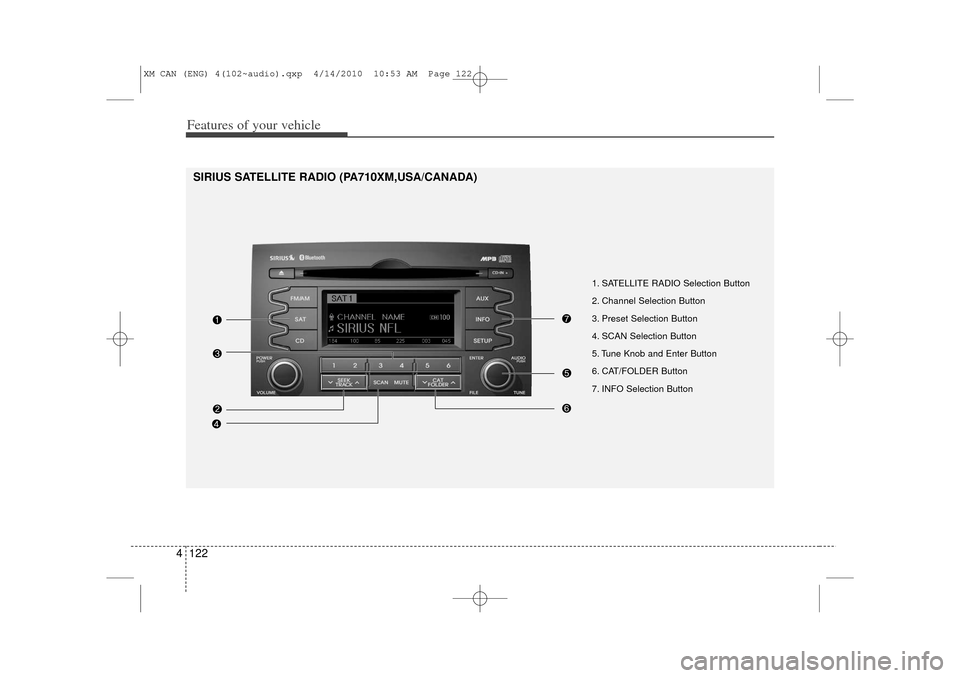
1. SATELLITE RADIO Selection Button
2. Channel Selection Button
3. Preset Selection Button
4. SCAN Selection Button
5. Tune Knob and Enter Button
6. CAT/FOLDER Button
7. INFO Selection Button
SIRIUS SATELLITE RADIO (PA710XM,USA/CANADA)
XM CAN (ENG) 4(102~audio).qxp 4/14/2010 10:53 AM Page 122
Page 201 of 377
4 123
Features of your vehicle
Using SIRIUS Satellite RadioYour Kia vehicle is equipped with a 3
month complimentary period of SIRIUS
Satellite Radio so you have access to
over 130 channels of music, information,
and entertainment programming.ActivationIn order to extend or reactivate your sub-
scription to SIRIUS Satellite Radio, you
will need to contact SIRIUS Customer
Care at 888-539-7474. Have your 12 digit
SID (Sirius Identification Number)/ESN
(Electronic Serial Number) ready. To
retrieve the SID/ESN, turn on the radio,
press the [SAT] button, and tune to chan-
nel zero. Please note that the vehicle will
need to be turned on, in Sirius mode, and
have an unobstructed view of the sky in
order for the radio to receive the activa-
tion signal.
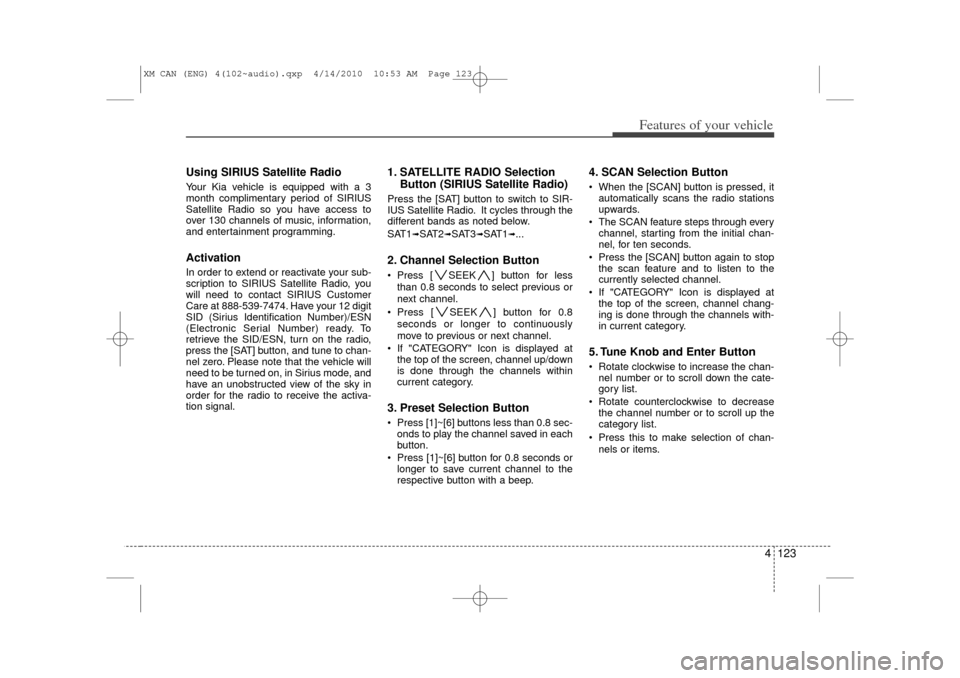
1. SATELLITE RADIO SelectionButton (SIRIUS Satellite Radio)Press the [SAT] button to switch to SIR-
IUS Satellite Radio. It cycles through the
different bands as noted below.
SAT1
➟SAT2
➟SAT3
➟SAT1
➟...
2. Channel Selection Button Press [ SEEK ] button for less
than 0.8 seconds to select previous or
next channel.
Press [ SEEK ] button for 0.8 seconds or longer to continuously
move to previous or next channel.
If "CATEGORY" Icon is displayed at the top of the screen, channel up/down
is done through the channels within
current category.3. Preset Selection Button Press [1]~[6] buttons less than 0.8 sec-onds to play the channel saved in each
button.
Press [1]~[6] button for 0.8 seconds or longer to save current channel to the
respective button with a beep.
4. SCAN Selection Button When the [SCAN] button is pressed, itautomatically scans the radio stations
upwards.
The SCAN feature steps through every channel, starting from the initial chan-
nel, for ten seconds.
Press the [SCAN] button again to stop the scan feature and to listen to the
currently selected channel.
If "CATEGORY" Icon is displayed at the top of the screen, channel chang-
ing is done through the channels with-
in current category.5. Tune Knob and Enter Button Rotate clockwise to increase the chan-nel number or to scroll down the cate-
gory list.
Rotate counterclockwise to decrease the channel number or to scroll up the
category list.
Press this to make selection of chan- nels or items.
XM CAN (ENG) 4(102~audio).qxp 4/14/2010 10:53 AM Page 123
Page 202 of 377
![KIA Sorento 2011 2.G Owners Guide Features of your vehicle124
46. CAT/FOLDER Button Press [ CAT ] button to enter the
Category List Mode. The display will
indicate the category items, highlight
the category that the current channel
b](/img/2/2929/w960_2929-201.png "KIA Sorento 2011 2.G Owners Guide Features of your vehicle124
46. CAT/FOLDER Button Press [ CAT ] button to enter the
Category List Mode. The display will
indicate the category items, highlight
the category that the current channel
b")
Features of your vehicle124
46. CAT/FOLDER Button Press [ CAT ] button to enter the
Category List Mode. The display will
indicate the category items, highlight
the category that the current channel
belongs to.
In the Category List Mode, press these buttons to navigate category list.
Press [ENTER] Button to select the lowest channel in highlighted category.
If channel is selected by selecting cat- egory "CATEGORY" Icon is displayed
at the top of the screen.7. INFO Selection ButtonDisplays the information of the current
channel as below when the button is
pressed each time.
When default display is CAT/CHCategory/Channel
➟Artist/Title
➟
Composer (if available)
➟
Category/
Channel
➟...
When default display is ART/TITLE Artist/Title➟Category/Channel
➟
Composer(if available)
➟Artist/Title
➟...
✽ ✽ Troubleshooting1. Antenna Error
If this message is displayed, the anten-
na or antenna cable is broken or
unplugged. Please consult with your
Kia dealership.
2. Acquiring Signal If this message is displayed, it means
that the antenna is covered and that
the SIRIUS Satellite Radio signal is
not available. Ensure the antenna is
uncovered and has a clear view of the
sky.
XM CAN (ENG) 4(102~audio).qxp 4/14/2010 10:53 AM Page 124
Page 203 of 377
4 125
Features of your vehicle
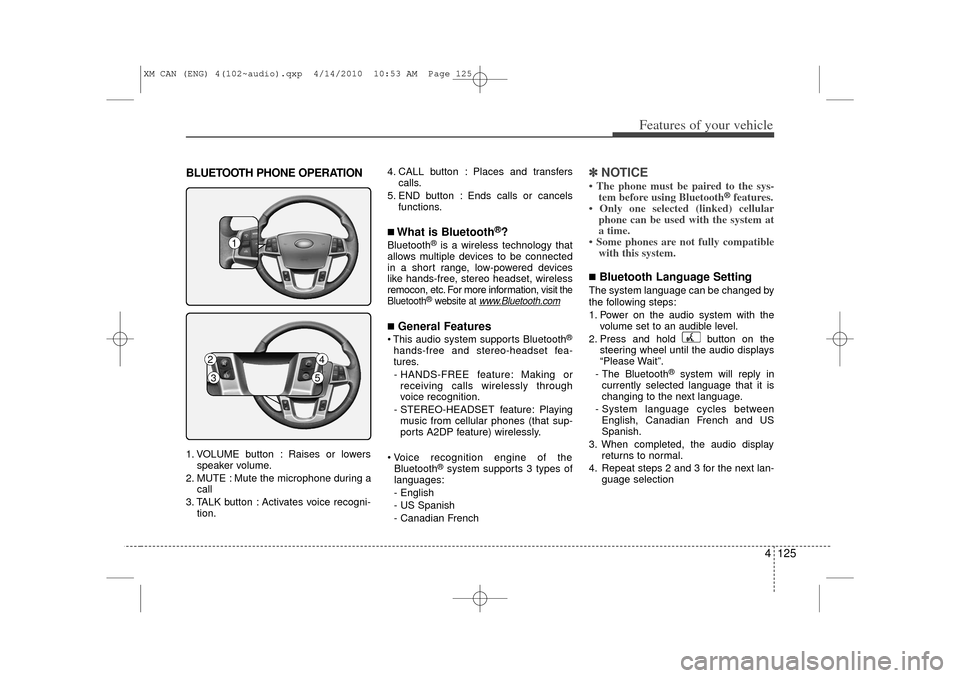
BLUETOOTH PHONE OPERATION1. VOLUME button : Raises or lowersspeaker volume.
2. MUTE : Mute the microphone during a call
3. TALK button : Activates voice recogni- tion. 4. CALL button : Places and transfers
calls.
5. END button : Ends calls or cancels functions.
■What is Bluetooth
®?
Bluetooth
®is a wireless technology that
allows multiple devices to be connected
in a short range, low-powered devices
like hands-free, stereo headset, wireless
remocon, etc. For more information, visit
the
Bluetooth
®website at
www
.Bluetooth.com
■General Features This audio system supports Bluetooth
®
hands-free and stereo-headset fea-
tures.
- HANDS-FREE feature: Making or receiving calls wirelessly through
voice recognition.
- STEREO-HEADSET feature: Playing music from cellular phones (that sup-
ports A2DP feature) wirelessly.
Voice recognition engine of the Bluetooth
®system supports 3 types of
languages:
- English
- US Spanish
- Canadian French
✽ ✽ NOTICE• The phone must be paired to the sys-
tem before using Bluetooth
®features.
• Only one selected (linked) cellular phone can be used with the system at
a time.
• Some phones are not fully compatible with this system.
■Bluetooth Language SettingThe system language can be changed by
the following steps:
1. Power on the audio system with the
volume set to an audible level.
2. Press and hold button on the steering wheel until the audio displays
“Please Wait”.
- The Bluetooth
®
system will reply in
currently selected language that it is
changing to the next language.
- System language cycles between English, Canadian French and US
Spanish.
3. When completed, the audio display returns to normal.
4. Repeat steps 2 and 3 for the next lan- guage selection
1
2
4
3
5
XM CAN (ENG) 4(102~audio).qxp 4/14/2010 10:53 AM Page 125
Page 204 of 377
Features of your vehicle126
4NOTE:The phone needs to be paired again
after changing system language.
- Avoid resting your thumb or finger
on the as the language could
unintentionally change.
CAUTION IN USING
BLUETOOTH
®CELLU-
LAR PHONE
Do not use a cellular phone or
perform Bluetooth
®settings (e.g.
pairing a phone) while driving.
Some Bluetooth
®-enabled phones
may not be recognized by the system or fully compatible withthe system.
Before using Bluetooth
®related
features of the audio system, refer your phone’s User’s Manual for phone-side Bluetooth®opera-
tions.
The phone must be paired to the audio system to use Bluetooth
®
related features. You will not be able to use the hands-free feature when yourphone (in the car) is outside of the cellular service area (e.g. in atunnel, in a underground, in a mountainous area, etc.).
If the cellular phone signal is poor or the vehicles interior noise istoo loud, it may be difficult to hearthe other person’s voice during a call.
(Continued)
(Continued) Do not place the phone near or inside metallic objects, otherwise
Communications with Bluetooth
®
system or cellular service sta-tions can be disturbed.
While a phone is connected through Bluetooth
®
your phone
may discharge quicker than usual for additional Bluetooth
®-related
operations.
Some cellular phones or other devices may cause interferencenoise or malfunction to audiosystem. In this case, storing thedevice in a different location may resolve the situation.
XM CAN (ENG) 4(102~audio).qxp 4/14/2010 10:53 AM Page 126
Page 205 of 377
4 127
Features of your vehicle
■Voice Recognition Activation The voice recognition engine containedin the Bluetooth System can be activat-
ed in the following conditions:
- Button Activation
The voice recognition system will be
active when the button is
pressed and after the sound of a
Beep.
- Active Listening The voice recognition system will be
active for a period of time when the
Voice Recognition system has asked
for a customer response.
The system can recognize single digits- from zero to nine while number greater
than ten will not be recognized.
If the command is not recognized, the system will announce "Pardon" or No
input voice signal from microphone. (No
response)
The system shall cancel voice recogn- tion mode in following cases : When
pressing the button and saying
cancel following the beep. When not
making a call and pressing the
button. When voice recognition has
failed 3 consecutive times. At any time if you say “help”, the system
will announce what commands are
available.
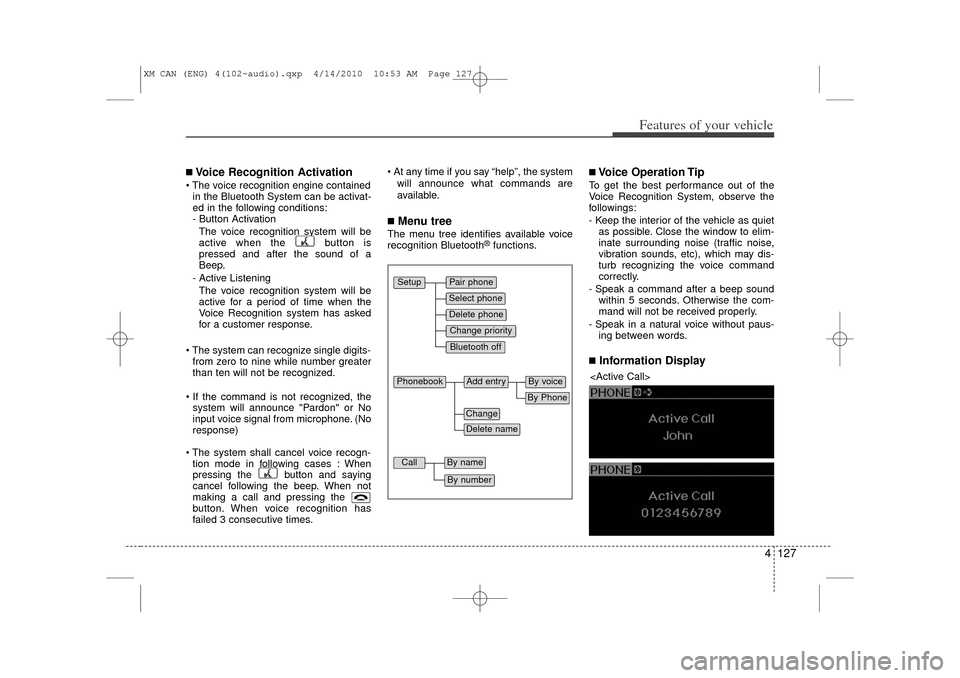
■Menu treeThe menu tree identifies available voice
recognition Bluetooth
®functions.
■Voice Operation TipTo get the best performance out of the
Voice Recognition System, observe the
followings:
- Keep the interior of the vehicle as quietas possible. Close the window to elim-
inate surrounding noise (traffic noise,
vibration sounds, etc), which may dis-
turb recognizing the voice command
correctly.
- Speak a command after a beep sound within 5 seconds. Otherwise the com-
mand will not be received properly.
- Speak in a natural voice without paus- ing between words.■Information Display
Pair phoneSelect phoneChange priorityDelete phoneBluetooth off
Setup
Add entry
Phonebook
ChangeDelete name
By PhoneBy voice
Call
By nameBy number
XM CAN (ENG) 4(102~audio).qxp 4/14/2010 10:53 AM Page 127
Page 206 of 377
Features of your vehicle128
4The Bluetooth
®
icon appears on the
upper side of audio display when a
phone is connected.
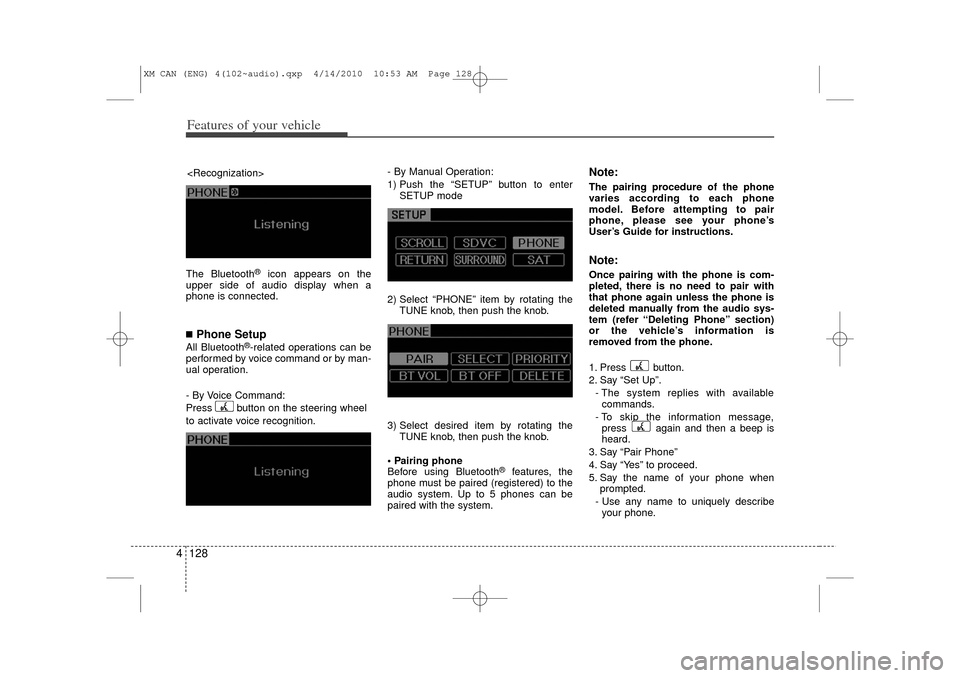
■Phone SetupAll Bluetooth
®-related operations can be
performed by voice command or by man-
ual operation.
- By Voice Command:
Press button on the steering wheel
to activate voice recognition. - By Manual Operation:
1) Push the “SETUP” button to enter
SETUP mode
2) Select “PHONE” item by rotating the TUNE knob, then push the knob.
3) Select desired item by rotating the TUNE knob, then push the knob.
Pairing phone
Before using Bluetooth
®
features, the
phone must be paired (registered) to the
audio system. Up to 5 phones can be
paired with the system.
Note:The pairing procedure of the phone
varies according to each phone
model. Before attempting to pair
phone, please see your phone’s
User’s Guide for instructions.Note:Once pairing with the phone is com-
pleted, there is no need to pair with
that phone again unless the phone is
deleted manually from the audio sys-
tem (refer “Deleting Phone” section)
or the vehicle’s information is
removed from the phone.
1. Press button.
2. Say “Set Up”.
- The system replies with availablecommands.
- To skip the information message, press again and then a beep is
heard.
3. Say “Pair Phone”
4. Say “Yes” to proceed.
5. Say the name of your phone when prompted.
- Use any name to uniquely describe your phone.
XM CAN (ENG) 4(102~audio).qxp 4/14/2010 10:53 AM Page 128