ignition KIA Sorento 2011 2.G Workshop Manual
[x] Cancel search | Manufacturer: KIA, Model Year: 2011, Model line: Sorento, Model: KIA Sorento 2011 2.GPages: 377, PDF Size: 7.51 MB
Page 147 of 377
469
Features of your vehicle
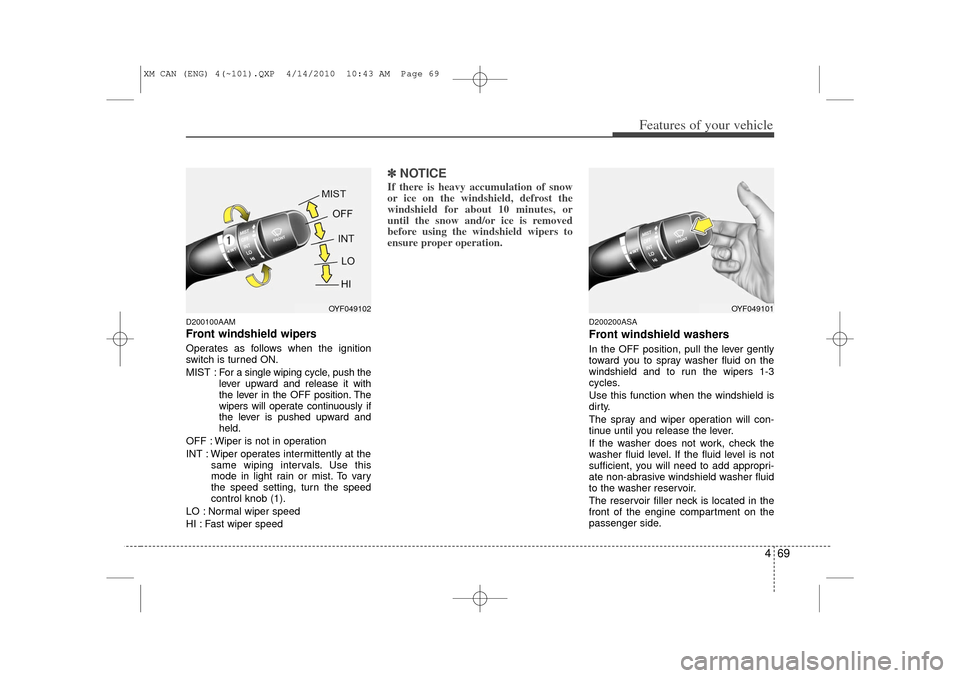
D200100AAMFront windshield wipers Operates as follows when the ignition
switch is turned ON.
MIST : For a single wiping cycle, push the
lever upward and release it with
the lever in the OFF position. The
wipers will operate continuously if
the lever is pushed upward and
held.
OFF : Wiper is not in operation
INT : Wiper operates intermittently at the same wiping intervals. Use this
mode in light rain or mist. To vary
the speed setting, turn the speed
control knob (1).
LO : Normal wiper speed
HI : Fast wiper speed
✽ ✽ NOTICEIf there is heavy accumulation of snow
or ice on the windshield, defrost the
windshield for about 10 minutes, or
until the snow and/or ice is removed
before using the windshield wipers to
ensure proper operation.
D200200ASAFront windshield washersIn the OFF position, pull the lever gently
toward you to spray washer fluid on the
windshield and to run the wipers 1-3
cycles.
Use this function when the windshield is
dirty.
The spray and wiper operation will con-
tinue until you release the lever.
If the washer does not work, check the
washer fluid level. If the fluid level is not
sufficient, you will need to add appropri-
ate non-abrasive windshield washer fluid
to the washer reservoir.
The reservoir filler neck is located in the
front of the engine compartment on the
passenger side.
OYF049102
OYF049101
XM CAN (ENG) 4(~101).QXP 4/14/2010 10:43 AM Page 69
Page 149 of 377
471
Features of your vehicle
D210000AENAutomatic turn off function
(if equipped)The interior lights automatically turn off
approximately 20 minutes after the igni-
tion switch is turned off, if the lights are in
the ON position.
If your vehicle is equipped with the theft
alarm system, the interior lights automat-
ically turns off approximately 3 seconds
after the system is armed stage.
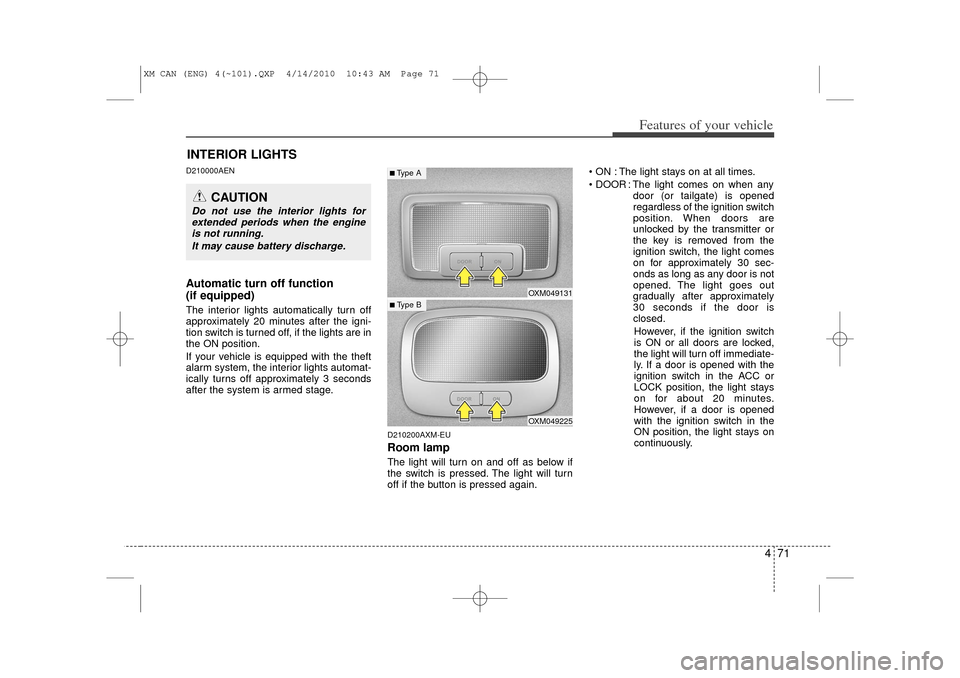
D210200AXM-EURoom lampThe light will turn on and off as below if
the switch is pressed. The light will turn
off if the button is pressed again. ON : The light stays on at all times.
DOOR : The light comes on when any
door (or tailgate) is opened
regardless of the ignition switch
position. When doors are
unlocked by the transmitter or
the key is removed from the
ignition switch, the light comes
on for approximately 30 sec-
onds as long as any door is not
opened. The light goes out
gradually after approximately
30 seconds if the door is
closed.
However, if the ignition switch
is ON or all doors are locked,
the light will turn off immediate-
ly. If a door is opened with the
ignition switch in the ACC or
LOCK position, the light stays
on for about 20 minutes.
However, if a door is opened
with the ignition switch in the
ON position, the light stays on
continuously.
INTERIOR LIGHTS
CAUTION
Do not use the interior lights for extended periods when the engineis not running.
It may cause battery discharge.
OXM049131OXM049225
■ Type B■Type A
XM CAN (ENG) 4(~101).QXP 4/14/2010 10:43 AM Page 71
Page 150 of 377
Features of your vehicle72
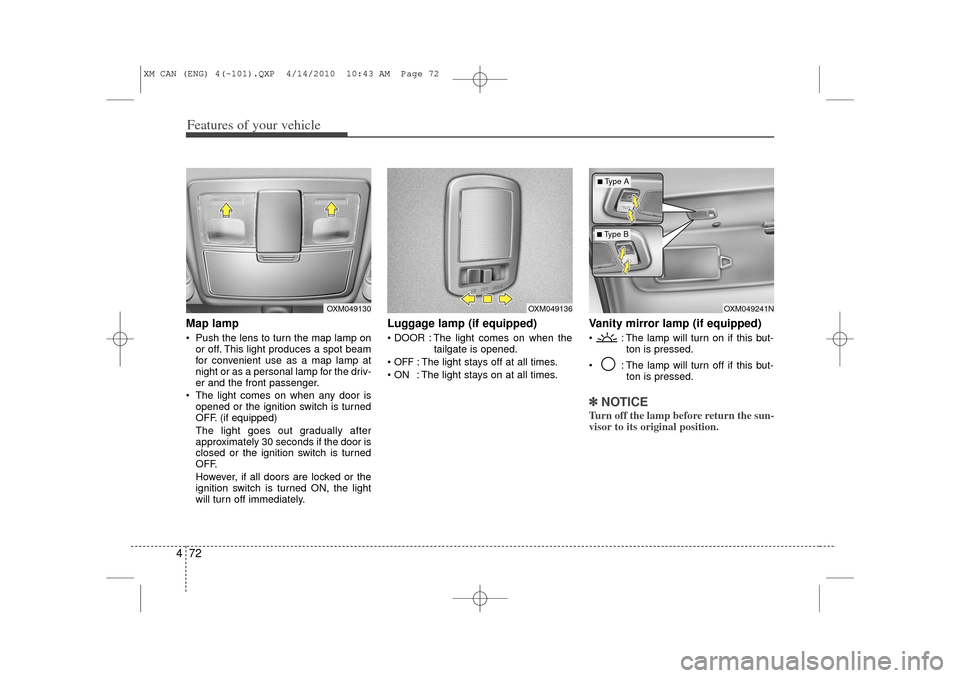
4Map lamp Push the lens to turn the map lamp on
or off. This light produces a spot beam
for convenient use as a map lamp at
night or as a personal lamp for the driv-
er and the front passenger.
The light comes on when any door is opened or the ignition switch is turned
OFF. (if equipped)
The light goes out gradually after
approximately 30 seconds if the door is
closed or the ignition switch is turned
OFF.
However, if all doors are locked or the
ignition switch is turned ON, the light
will turn off immediately.
Luggage lamp (if equipped) DOOR : The light comes on when the tailgate is opened.
OFF
: The light stays off at all times.
ON : The light stays on at all times.
Vanity mirror lamp (if equipped) : The lamp will turn on if this but- ton is pressed.
: The lamp will turn off if this but- ton is pressed.✽ ✽NOTICETurn off the lamp before return the sun-
visor to its original position.
OXM049136
OXM049130
OXM049241N
■ Type B■Type A
XM CAN (ENG) 4(~101).QXP 4/14/2010 10:43 AM Page 72
Page 151 of 377
473
Features of your vehicle
DEFROSTER 220000AUN✽
✽NOTICEIf you want to defrost and defog the
front windshield, refer to “Windshield
defrosting and defogging” in this sec-
tion.
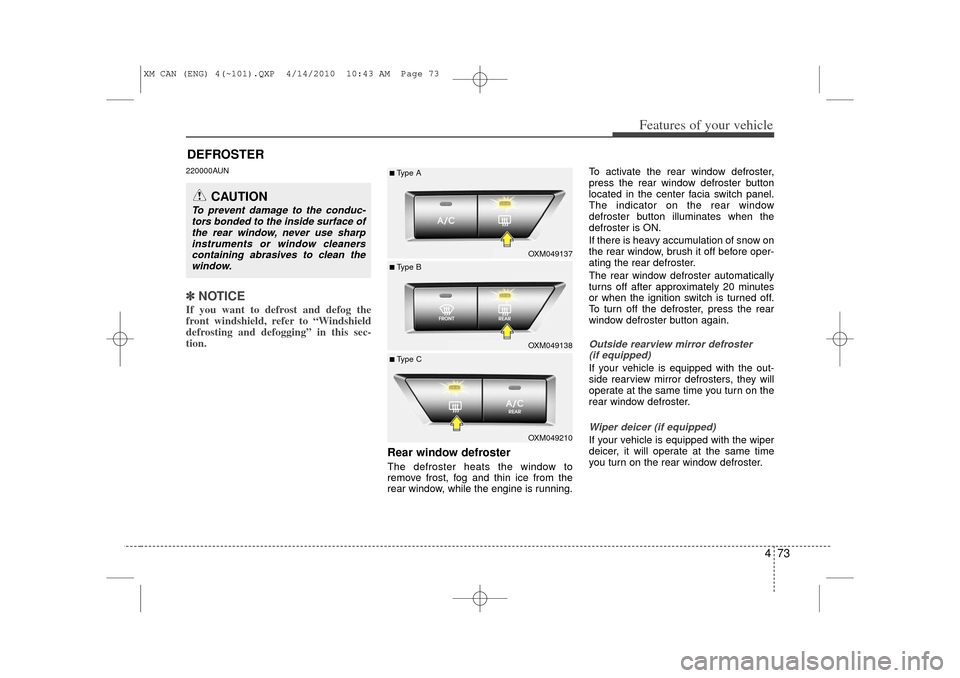
Rear window defrosterThe defroster heats the window to
remove frost, fog and thin ice from the
rear window, while the engine is running. To activate the rear window defroster,
press the rear window defroster button
located in the center facia switch panel.
The indicator on the rear window
defroster button illuminates when the
defroster is ON.
If there is heavy accumulation of snow on
the rear window, brush it off before oper-
ating the rear defroster.
The rear window defroster automatically
turns off after approximately 20 minutes
or when the ignition switch is turned off.
To turn off the defroster, press the rear
window defroster button again.
Outside rearview mirror defroster
(if equipped)If your vehicle is equipped with the out-
side rearview mirror defrosters, they will
operate at the same time you turn on the
rear window defroster.Wiper deicer (if equipped)If your vehicle is equipped with the wiper
deicer, it will operate at the same time
you turn on the rear window defroster.
CAUTION
To prevent damage to the conduc- tors bonded to the inside surface ofthe rear window, never use sharpinstruments or window cleaners containing abrasives to clean thewindow.
OXM049137OXM049138OXM049210
■ Type B■Type A■ Type C
XM CAN (ENG) 4(~101).QXP 4/14/2010 10:43 AM Page 73
Page 156 of 377
Features of your vehicle78
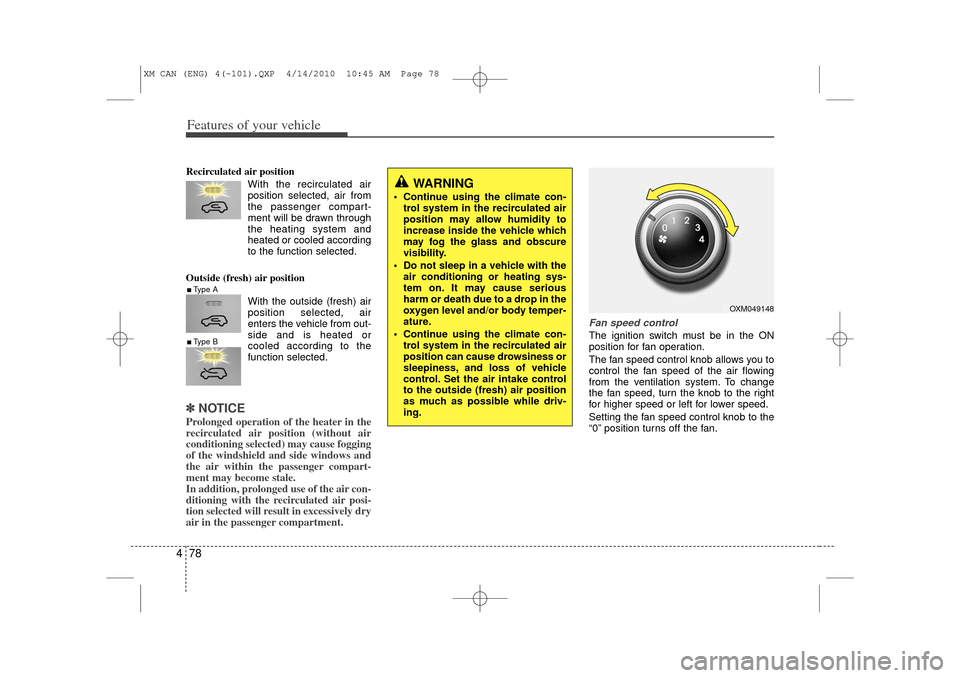
4Recirculated air position
With the recirculated airposition selected, air from
the passenger compart-
ment will be drawn through
the heating system and
heated or cooled according
to the function selected.
Outside (fresh) air position With the outside (fresh) air
position selected, air
enters the vehicle from out-
side and is heated or
cooled according to the
function selected.✽ ✽NOTICEProlonged operation of the heater in the
recirculated air position (without air
conditioning selected) may cause fogging
of the windshield and side windows and
the air within the passenger compart-
ment may become stale.
In addition, prolonged use of the air con-
ditioning with the recirculated air posi-
tion selected will result in excessively dry
air in the passenger compartment.
Fan speed controlThe ignition switch must be in the ON
position for fan operation.
The fan speed control knob allows you to
control the fan speed of the air flowing
from the ventilation system. To change
the fan speed, turn the knob to the right
for higher speed or left for lower speed.
Setting the fan speed control knob to the
“0” position turns off the fan.
WARNING
Continue using the climate con-
trol system in the recirculated air
position may allow humidity to
increase inside the vehicle which
may fog the glass and obscure
visibility.
Do not sleep in a vehicle with the air conditioning or heating sys-
tem on. It may cause serious
harm or death due to a drop in the
oxygen level and/or body temper-
ature.
Continue using the climate con- trol system in the recirculated air
position can cause drowsiness or
sleepiness, and loss of vehicle
control. Set the air intake control
to the outside (fresh) air position
as much as possible while driv-
ing.
OXM049148
■Type A■Type B
XM CAN (ENG) 4(~101).QXP 4/14/2010 10:45 AM Page 78
Page 171 of 377
493
Features of your vehicle
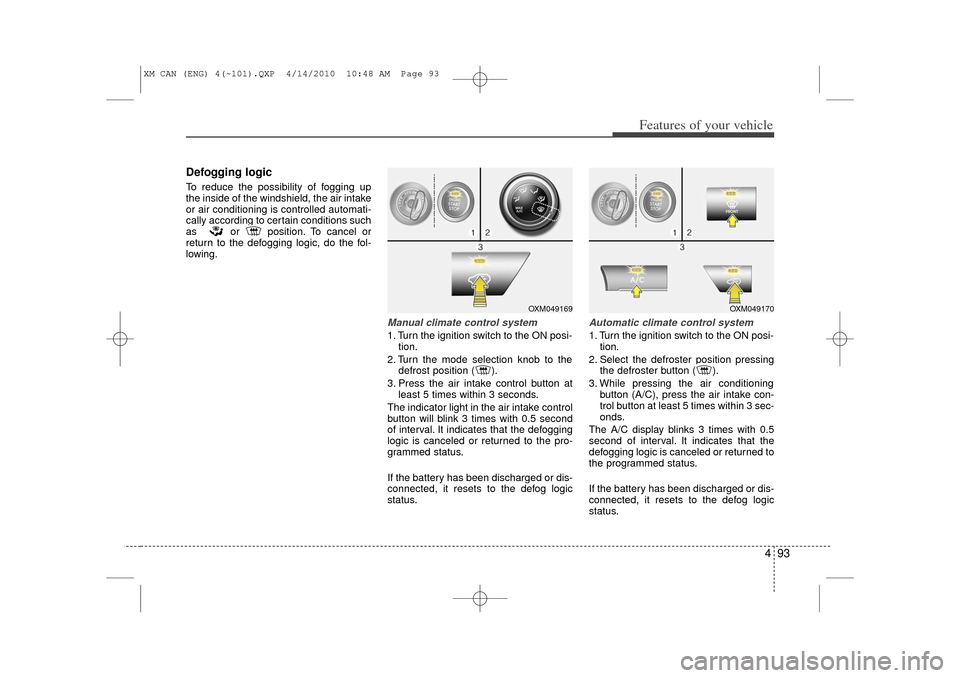
Defogging logicTo reduce the possibility of fogging up
the inside of the windshield, the air intake
or air conditioning is controlled automati-
cally according to certain conditions such
as or position. To cancel or
return to the defogging logic, do the fol-
lowing.
Manual climate control system1. Turn the ignition switch to the ON posi-tion.
2. Turn the mode selection knob to the defrost position ( ).
3. Press the air intake control button at least 5 times within 3 seconds.
The indicator light in the air intake control
button will blink 3 times with 0.5 second
of interval. It indicates that the defogging
logic is canceled or returned to the pro-
grammed status.
If the battery has been discharged or dis-
connected, it resets to the defog logic
status.
Automatic climate control system1. Turn the ignition switch to the ON posi- tion.
2. Select the defroster position pressing the defroster button ( ).
3. While pressing the air conditioning button (A/C), press the air intake con-
trol button at least 5 times within 3 sec-
onds.
The A/C display blinks 3 times with 0.5
second of interval. It indicates that the
defogging logic is canceled or returned to
the programmed status.
If the battery has been discharged or dis-
connected, it resets to the defog logic
status.
OXM049169
OXM049170
XM CAN (ENG) 4(~101).QXP 4/14/2010 10:48 AM Page 93
Page 187 of 377
4 109
Features of your vehicle
Using RADIO, SETUP, VOLUME
and AUDIO CONTROL
1. FM/AM Selection Button The FM/AM button toggles between FM
and AM. Listed below are the paths as
the system switches from FM to AM and
back to FM.
FM/AM : FM1
➟FM2
➟AM
➟FM1...
FM : FM1
➟FM2
➟FM1...
2. Power ON/OFF Button & Volume Control Knob Turns the audio system on/off when
the ignition switch is on ACC or ON.
If the knob is turned clockwise/counter- clockwise, the volume will increase
/decrease.3. Automatic Station Seek Button When the [SEEK ] is pressed, it will
automatically tune to the next lower
station.
When the [SEEK ] is pressed, it will automatically tune to the next higher
station.
4. SCAN Button When the button is pressed, it auto-matically scans the radio stations
upwards.
The SCAN feature steps through each station, starting from the initial station,
for ten seconds.
Press the [SCAN] button again to stop the scan feature and to listen to the
currently selected channel.5. MUTE ButtonWhen the button is pressed, stops sound
and “Audio Mute” is displayed on LCD.6. Preset Selection Button Press [1]~[6] buttons less than 0.8 sec-onds to play the station saved in each
button.
Press [1]~[6] b utton more than 0.8 sec-
onds or longer to save the current sta-
tion to the respective button with a
beep.
7. TUNE Knob & Audio Control Knob Rotate the knob clockwise or counter-
clock wise to increase or decrease from
current frequency.
(AM 10 kHz, FM 200 kHz)
Pressing the button changes the BASS,
MIDDLE, TREBLE, FADER and BAL-
ANCE TUNE mode. The mode selected
is shown on the display. After selecting
each mode, rotate the Audio control knob
clockwise or counterclockwise.
BASS Control
To increase the BASS, rotate the knob
clockwise, while to decrease the BASS,
rotate the knob counterclockwise.
MIDDLE Control
To increase the MIDDLE, rotate the knob
clockwise, while to decrease the MID-
DLE, rotate the knob counterclockwise.
TREBLE Control
To increase the TREBLE, rotate the knob
clockwise, while to decrease the TRE-
BLE, rotate the knob counterclockwise.
XM CAN (ENG) 4(102~audio).qxp 4/14/2010 10:53 AM Page 109
Page 190 of 377
Features of your vehicle112
4Using CD Player
1. CD Loading SlotInsert a CD label side up and gently push
in while ignition switch is on ACC or ON.
The audio automatically switches to CD
mode and begins to play the CD. If the
audio was turned off, audio power will
automatically turned on as the CD is
inserted.- This audio only recognizes 12cm-size,
CD-DA (Audio CD) or ISO data-CD
(MP3 CD).- If UDF data-CD or non-CD (e.g. DVD) is inserted, "Reading Error" message will
be displayed and the disc will be eject-
ed.2. CD Eject Button Press [ ] button to eject the CD. This button works regardless of ignition
switch status.3. CD Selection ButtonIf there is a CD in the CD DECK it switch-
es to CD mode. If there is no CD, then the message "NO
DISC" will become displayed on the LCD
for 3 seconds and returns to the previous
mode.
4. Track Selection Button Press [TRACK ] button for less than
0.8 seconds to play from the beginning
of current song.
Press [TRACK ] button for less than 0.8 seconds and press again within 1
second to play the previous song.
Press [TRACK ] button for 0.8 sec- onds or longer to initiate reverse direc-
tion high speed sound search.
Press [TRACK ] button for less than 0.8 seconds to play the next song.
Press [TRACK ] button for 0.8 sec- onds or longer to initiate forward direc-
tion high speed sound search.5. RANDOM Play ButtonPress this button for less than 0.8 sec-
onds to activate 'RDM' mode and more
than 0.8 seconds to activate 'ALL RDM'
mode.
RDM : Only files/tracks in a folder/discare played back in a random sequence.
ALL RDM (MP3/WMA Only) : All files in a disc are played back in the random
sequence.
6. REPEAT ButtonPress this button for less than 0.8 sec-
onds to activate 'RPT' mode and more
than 0.8 seconds to activate 'FLD RPT'
mode.
RPT : Only a track (file) is repeatedlyplayed back.
FLD RPT (MP3/WMA Only) : Only files are repeatedly played back.7. CD IndicatorWhen car ignition switch is ACC or ON
and if the CD is loaded, this indicator is
lit. If the CD is ejected, the light is turned
off.8. SCAN Play ButtonPlay each song in the CD for 10 seconds.
To cancel SCAN Play, press this button
again.9. INFO ButtonDisplays the information of the current
song.
- Audio CD : Disc Title/Artist, Track Title/Artist, Total Track.
CAUTION
Do not insert a CD if CD indicator islit.
XM CAN (ENG) 4(102~audio).qxp 4/14/2010 10:53 AM Page 112
Page 214 of 377
53
Driving your vehicle
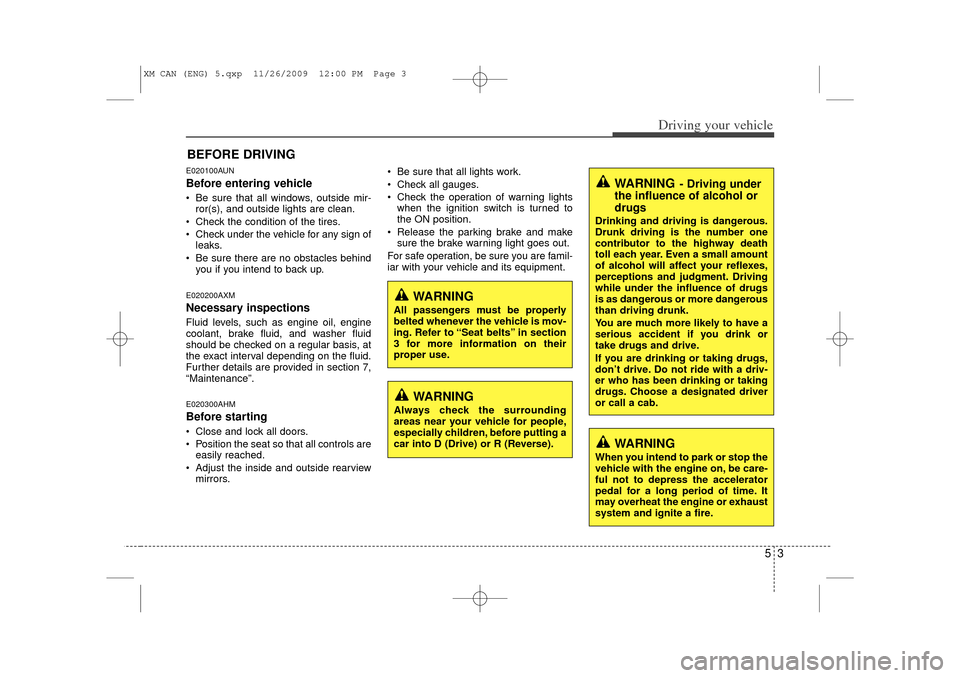
E020100AUNBefore entering vehicle• Be sure that all windows, outside mir-ror(s), and outside lights are clean.
Check the condition of the tires.
Check under the vehicle for any sign of leaks.
Be sure there are no obstacles behind you if you intend to back up.E020200AXMNecessary inspectionsFluid levels, such as engine oil, engine
coolant, brake fluid, and washer fluid
should be checked on a regular basis, at
the exact interval depending on the fluid.
Further details are provided in section 7,
“Maintenance”.E020300AHMBefore starting Close and lock all doors.
Position the seat so that all controls areeasily reached.
Adjust the inside and outside rearview mirrors. Be sure that all lights work.
Check all gauges.
Check the operation of warning lights
when the ignition switch is turned to
the ON position.
Release the parking brake and make sure the brake warning light goes out.
For safe operation, be sure you are famil-
iar with your vehicle and its equipment.BEFORE DRIVING
WARNING
All passengers must be properly
belted whenever the vehicle is mov-
ing. Refer to “Seat belts” in section
3 for more information on their
proper use.
WARNING
Always check the surrounding
areas near your vehicle for people,
especially children, before putting a
car into D (Drive) or R (Reverse).
WARNING
- Driving under
the influence of alcohol or
drugs
Drinking and driving is dangerous.
Drunk driving is the number one
contributor to the highway death
toll each year. Even a small amount
of alcohol will affect your reflexes,
perceptions and judgment. Driving
while under the influence of drugs
is as dangerous or more dangerous
than driving drunk.
You are much more likely to have a
serious accident if you drink or
take drugs and drive.
If you are drinking or taking drugs,
don’t drive. Do not ride with a driv-
er who has been drinking or taking
drugs. Choose a designated driver
or call a cab.
WARNING
When you intend to park or stop the
vehicle with the engine on, be care-
ful not to depress the accelerator
pedal for a long period of time. It
may overheat the engine or exhaust
system and ignite a fire.
XM CAN (ENG) 5.qxp 11/26/2009 12:00 PM Page 3
Page 215 of 377
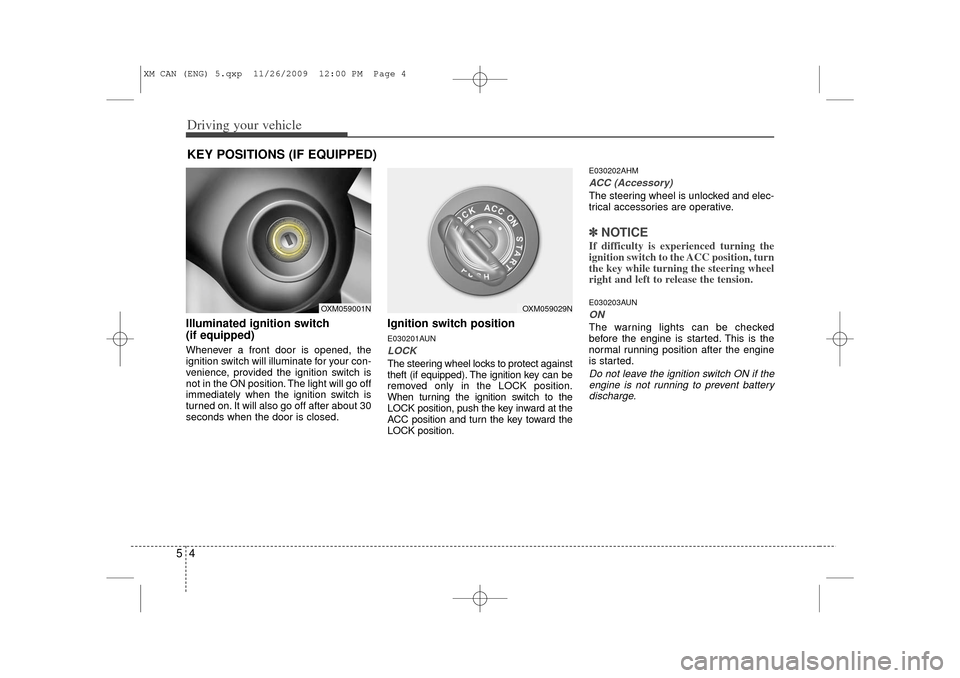
Driving your vehicle45Illuminated ignition switch
(if equipped)Whenever a front door is opened, the
ignition switch will illuminate for your con-
venience, provided the ignition switch is
not in the ON position. The light will go off
immediately when the ignition switch is
turned on. It will also go off after about 30
seconds when the door is closed.
Ignition switch positionE030201AUNLOCKThe steering wheel locks to protect against
theft (if equipped). The ignition key can be
removed only in the LOCK position.
When turning the ignition switch to the
LOCK position, push the key inward at the
ACC position and turn the key toward the
LOCK position.
E030202AHMACC (Accessory)The steering wheel is unlocked and elec-
trical accessories are operative.✽ ✽NOTICEIf difficulty is experienced turning the
ignition switch to the ACC position, turn
the key while turning the steering wheel
right and left to release the tension.E030203AUNONThe warning lights can be checked
before the engine is started. This is the
normal running position after the engine
is started.Do not leave the ignition switch ON if the
engine is not running to prevent battery discharge.
KEY POSITIONS (IF EQUIPPED)
OXM059029N
OXM059001N
XM CAN (ENG) 5.qxp 11/26/2009 12:00 PM Page 4