mirror KIA Sorento 2011 2.G Owner's Manual
[x] Cancel search | Manufacturer: KIA, Model Year: 2011, Model line: Sorento, Model: KIA Sorento 2011 2.GPages: 377, PDF Size: 7.51 MB
Page 11 of 377
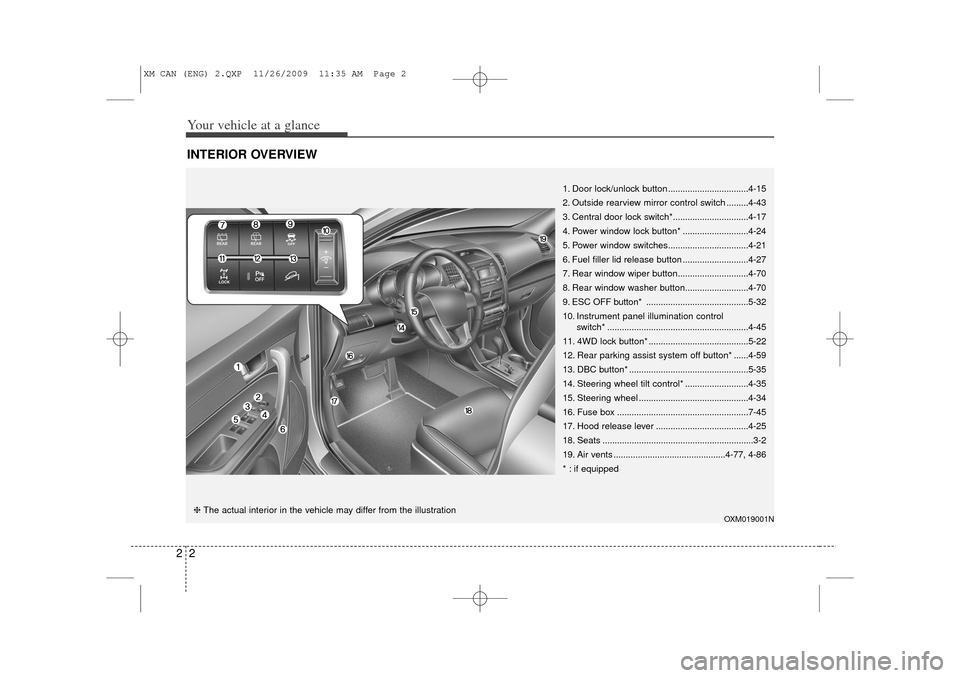
Your vehicle at a glance22INTERIOR OVERVIEW
OXM019001N
1. Door lock/unlock button.................................4-15
2. Outside rearview mirror control switch .........4-43
3. Central door lock switch* ...............................4-17
4. Power window lock button* ...........................4-24
5. Power window switches .................................4-21
6. Fuel filler lid release button ...........................4-27
7. Rear window wiper button .............................4-70
8. Rear window washer button ..........................4-70
9. ESC OFF button* ..........................................5-32
10. Instrument panel illumination control switch* ..........................................................4-45
11. 4WD lock button* .........................................5-22
12. Rear parking assist system off button* ......4-59
13. DBC button* .................................................5-35
14. Steering wheel tilt control* ..........................4-35
15. Steering wheel .............................................4-34
16. Fuse box ......................................................7-45
17. Hood release lever ......................................4-25
18. Seats ..............................................................3-2
19. Air vents ..............................................4-77, 4-86
* : if equipped
❈ The actual interior in the vehicle may differ from the illustration
XM CAN (ENG) 2.QXP 11/26/2009 11:35 AM Page 2
Page 79 of 377
4
Keys / 4-2
Remote keyless entry / 4-6
Smart key / 4-9
Theft-alarm system / 4-13
Door locks / 4-15
Tailgate / 4-19
Windows / 4-21
Hood / 4-25
Fuel filler lid / 4-27
Panoramic Sunroof / 4-30
Steering wheel / 4-34
Mirrors / 4-36
Instrument cluster / 4-44
Rear parking assist system / 4-59
Rearview camera / 4-62
Hazard warning flasher / 4-62
Lighting / 4-63
Wipers and washers / 4-68
Interior lights / 4-71
Defroster / 4-73
Manual climate control system / 4-74
Automatic climate control system / 4-83
Windshield defrosting and defogging / 4-91
Storage compartments / 4-94
Interior features / 4-96
Exterior feature / 4-101
Audio system / 4-102
Features of your vehicle
XM CAN (ENG) 4(~101).QXP 4/14/2010 10:37 AM Page 1
Page 114 of 377
Features of your vehicle36
4D140100AHMInside rearview mirrorAdjust the rearview mirror so that the
center view through the rear window is
seen. Make this adjustment before you
start driving.
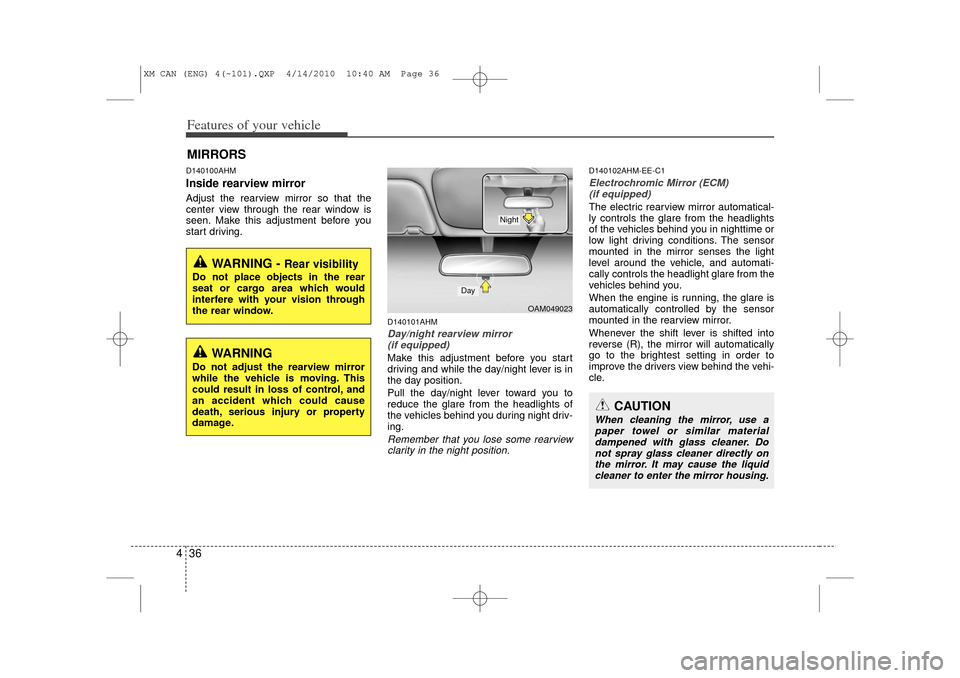
D140101AHMDay/night rearview mirror
(if equipped)Make this adjustment before you start
driving and while the day/night lever is in
the day position.
Pull the day/night lever toward you to
reduce the glare from the headlights of
the vehicles behind you during night driv-
ing.Remember that you lose some rearviewclarity in the night position.
D140102AHM-EE-C1Electrochromic Mirror (ECM)(if equipped)The electric rearview mirror automatical-
ly controls the glare from the headlights
of the vehicles behind you in nighttime or
low light driving conditions. The sensor
mounted in the mirror senses the light
level around the vehicle, and automati-
cally controls the headlight glare from the
vehicles behind you.
When the engine is running, the glare is
automatically controlled by the sensor
mounted in the rearview mirror.
Whenever the shift lever is shifted into
reverse (R), the mirror will automatically
go to the brightest setting in order to
improve the drivers view behind the vehi-
cle.
MIRRORS
WARNING -
Rear visibility
Do not place objects in the rear
seat or cargo area which would
interfere with your vision through
the rear window.
CAUTION
When cleaning the mirror, use a paper towel or similar materialdampened with glass cleaner. Do not spray glass cleaner directly onthe mirror. It may cause the liquid cleaner to enter the mirror housing.
WARNING
Do not adjust the rearview mirror
while the vehicle is moving. This
could result in loss of control, and
an accident which could cause
death, serious injury or property
damage.
OAM049023
Day
Night
XM CAN (ENG) 4(~101).QXP 4/14/2010 10:40 AM Page 36
Page 115 of 377
437
Features of your vehicle
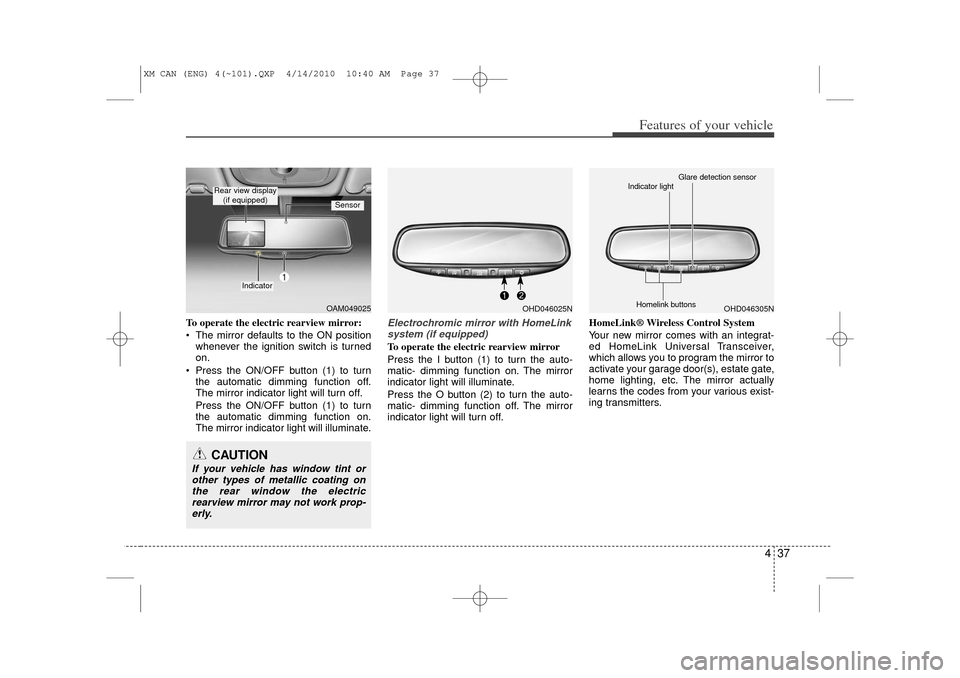
To operate the electric rearview mirror:
The mirror defaults to the ON positionwhenever the ignition switch is turned
on.
Press the ON/OFF button (1) to turn the automatic dimming function off.
The mirror indicator light will turn off.
Press the ON/OFF button (1) to turn
the automatic dimming function on.
The mirror indicator light will illuminate.
Electrochromic mirror with HomeLinksystem (if equipped)To operate the electric rearview mirror
Press the I button (1) to turn the auto-
matic- dimming function on. The mirror
indicator light will illuminate.
Press the O button (2) to turn the auto-
matic- dimming function off. The mirror
indicator light will turn off. HomeLink® Wireless Control System
Your new mirror comes with an integrat-
ed HomeLink Universal Transceiver,
which allows you to program the mirror to
activate your garage door(s), estate gate,
home lighting, etc. The mirror actually
learns the codes from your various exist-
ing transmitters.
OAM049025
Indicator
Sensor
Rear view display
(if equipped)CAUTION
If your vehicle has window tint orother types of metallic coating onthe rear window the electricrearview mirror may not work prop- erly.
OHD046025N
OHD046305N
Glare detection sensor
Indicator light
Homelink buttons
XM CAN (ENG) 4(~101).QXP 4/14/2010 10:40 AM Page 37
Page 116 of 377
Features of your vehicle38
4
Retain the original transmitter for future
programming procedures (i.e., new vehi-
cle purchase). It is also suggested that
upon the sale of the vehicle, the pro-
grammed HomeLink buttons be erased
for security purposes (follow step 1 in the
“Programming” portion of this text).
Programming
Your vehicle may require the ignition
switch to be turned to the ACC position
for programming and/or operation of
HomeLink. It is also recommended that a
new battery be replaced in the hand-held
transmitter of the device being pro-
grammed to HomeLink for quicker train-
ing and accurate transmission of the
radio-frequency.
Follow these steps to train your
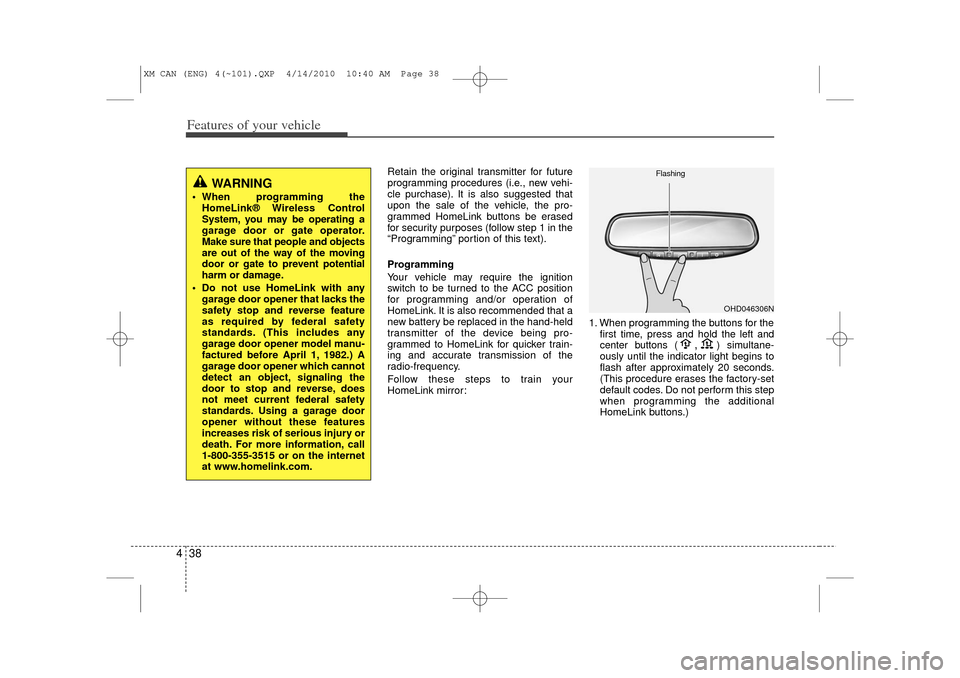
HomeLink mirror: 1. When programming the buttons for the
first time, press and hold
the left and
center buttons (
,
)simultane-
ously until the indicator light begins to
flash after approximately 20 seconds.
(This procedure erases the factory-set
default codes. Do not perform this step
when programming the additional
HomeLink buttons.)
WARNING
When programming the HomeLink® Wireless Control
System, you may be operating a
garage door or gate operator.
Make sure that people and objects
are out of the way of the moving
door or gate to prevent potential
harm or damage.
Do not use HomeLink with any garage door opener that lacks the
safety stop and reverse feature
as required by federal safety
standards. (This includes any
garage door opener model manu-
factured before April 1, 1982.) A
garage door opener which cannot
detect an object, signaling the
door to stop and reverse, does
not meet current federal safety
standards. Using a garage door
opener without these features
increases risk of serious injury or
death. For more information, call
1-800-355-3515 or on the internet
at www.homelink.com.
OHD046306N
Flashing
XM CAN (ENG) 4(~101).QXP 4/14/2010 10:40 AM Page 38
Page 117 of 377
439
Features of your vehicle
✽
✽NOTICEFor non rolling code garage door open-
ers, follow steps 2 - 3.
For rolling code garage door openers,
follow steps 2 - 6.
For Canadian Programming, please fol-
low the Canadian Programming section.
For help with determining whether your
garage is non-rolling code or rolling
code, please refer to the garage door
openers owner’s manual or contact
HomeLink customer service at 1-800-
355-3515.
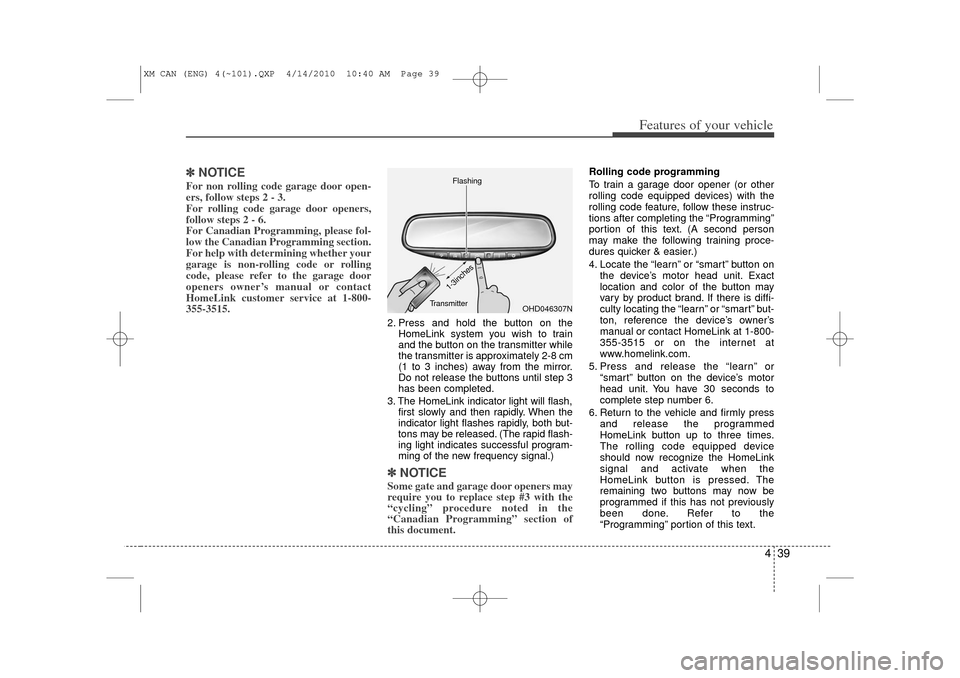
2. Press and hold the button on the
HomeLink system you wish to train
and the button on the transmitter while
the transmitter is approximately 2-8 cm
(1 to 3 inches) away from the mirror.
Do not release the buttons until step 3
has been completed.
3. The HomeLink indicator light will flash, first slowly and then rapidly. When the
indicator light flashes rapidly, both but-
tons may be released. (The rapid flash-
ing light indicates successful program-
ming of the new frequency signal.)✽ ✽NOTICESome gate and garage door openers may
require you to replace step #3 with the
“cycling” procedure noted in the
“Canadian Programming” section of
this document.
Rolling code programming
To train a garage door opener (or other
rolling code equipped devices) with the
rolling code feature, follow these instruc-
tions after completing the “Programming”
portion of this text. (A second person
may make the following training proce-
dures quicker & easier.)
4. Locate the “learn” or “smart” button on
the device’s motor head unit. Exact
location and color of the button may
vary by product brand. If there is diffi-
culty locating the “learn” or “smart” but-
ton, reference the device’s owner’s
manual or contact HomeLink at 1-800-
355-3515 or on the internet at
www.homelink.com.
5. Press and release the “learn” or “smart” button on the device’s motor
head unit. You have 30 seconds to
complete step number 6.
6. Return to the vehicle and firmly press and release the programmed
HomeLink button up to three times.
The rolling code equipped device
should now recognize the HomeLink
signal and activate when the
HomeLink button is pressed. The
remaining two buttons may now be
programmed if this has not previously
been done. Refer to the
“Programming” portion of this text.
OHD046307N
Flashing
1-3inches
Transmitter
XM CAN (ENG) 4(~101).QXP 4/14/2010 10:40 AM Page 39
Page 120 of 377
Features of your vehicle42
4D140200AHM-EUOutside rearview mirror Be sure to adjust the mirror angles
before driving.
Your vehicle is equipped with both left-
hand and right-hand outside rearview
mirrors. The mirrors can be adjusted
remotely with the remote switch. The mir-
ror heads can be folded back to prevent
damage during an automatic car wash or
when passing through a narrow street.
WARNING -
Rearview mir-
rors
The right outside rearview mirror
is convex. Objects seen in the
mirror are closer than they
appear.
Use your interior rearview mirror or direct observation to deter-
mine the actual distance of fol-
lowing vehicles when changing
lanes.
CAUTION
Do not scrape ice off the mirrorface; this may damage the surfaceof the glass. If ice should restrictthe movement of the mirror, do not force the mirror for adjustment. Toremove ice, use a deicer spray, or asponge or soft cloth with very warmwater.
CAUTION
If the mirror is jammed with ice, donot adjust the mirror by force. Use an approved spray de-icer (not radi-ator antifreeze) to release the frozen mechanism or move thevehicle to a warm place and allow the ice to melt.
WARNING
Do not adjust or fold the outside
rearview mirrors while the vehicle
is moving. This could result in loss
of control, and an accident which
could cause death, serious injury
or property damage.
XM CAN (ENG) 4(~101).QXP 4/14/2010 10:40 AM Page 42
Page 121 of 377
443
Features of your vehicle
D140201AHM-EERemote controlElectric type (if equipped)
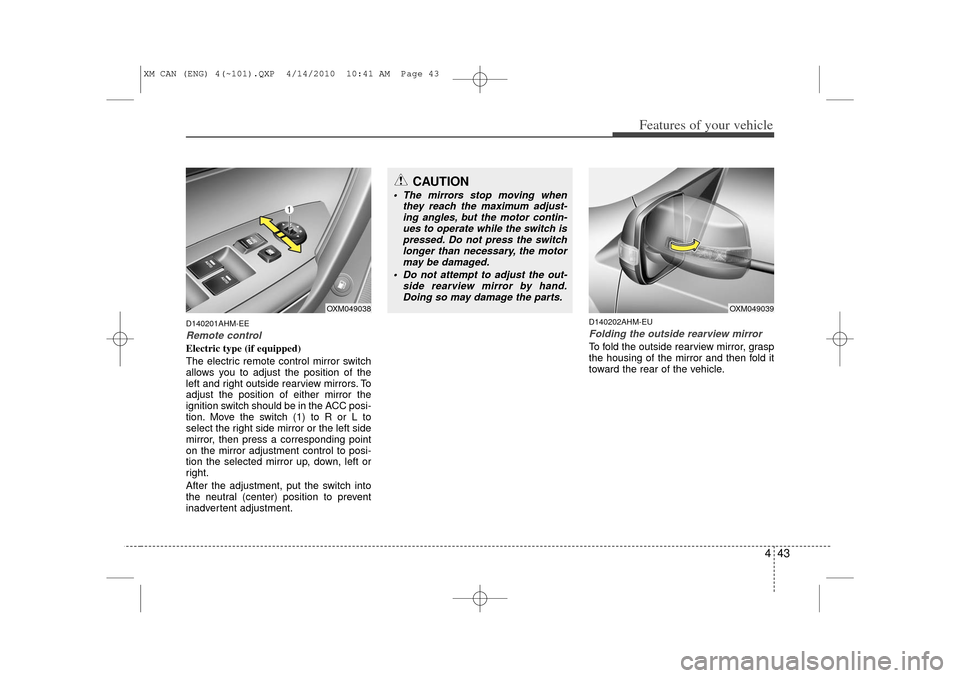
The electric remote control mirror switch
allows you to adjust the position of the
left and right outside rearview mirrors. To
adjust the position of either mirror the
ignition switch should be in the ACC posi-
tion. Move the switch (1) to R or L to
select the right side mirror or the left side
mirror, then press a corresponding point
on the mirror adjustment control to posi-
tion the selected mirror up, down, left or
right.
After the adjustment, put the switch into
the neutral (center) position to prevent
inadvertent adjustment.
D140202AHM-EUFolding the outside rearview mirrorTo fold the outside rearview mirror, grasp
the housing of the mirror and then fold it
toward the rear of the vehicle.
OXM049038
CAUTION
The mirrors stop moving whenthey reach the maximum adjust-ing angles, but the motor contin- ues to operate while the switch ispressed. Do not press the switchlonger than necessary, the motor may be damaged.
Do not attempt to adjust the out- side rearview mirror by hand.Doing so may damage the parts.
OXM049039
XM CAN (ENG) 4(~101).QXP 4/14/2010 10:41 AM Page 43
Page 140 of 377
Features of your vehicle62
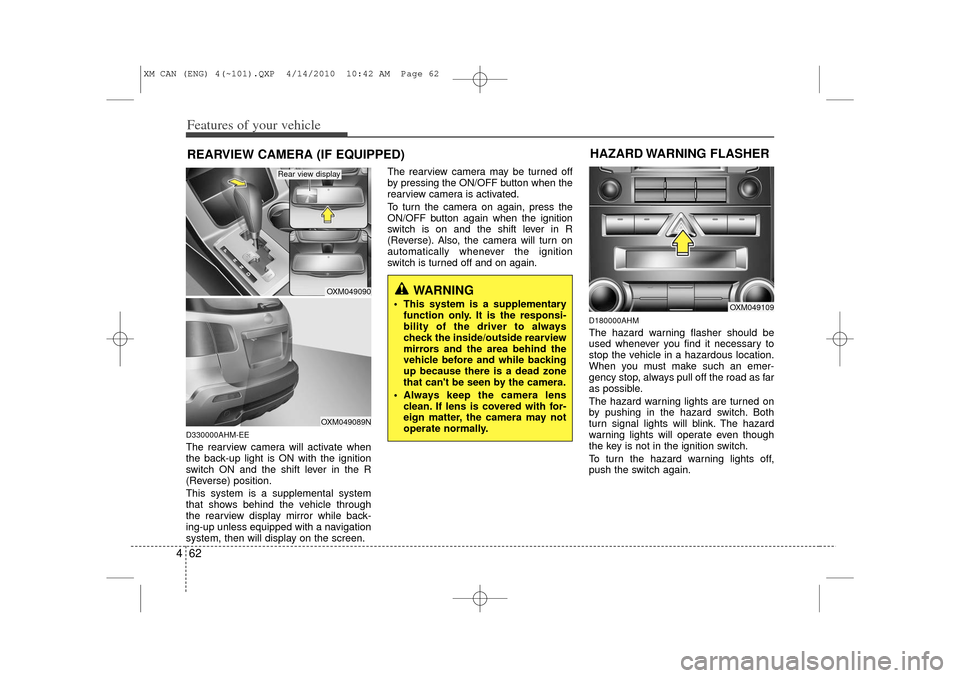
4D330000AHM-EEThe rearview camera will activate when
the back-up light is ON with the ignition
switch ON and the shift lever in the R
(Reverse) position.
This system is a supplemental system
that shows behind the vehicle through
the rearview display mirror while back-
ing-up unless equipped with a navigation
system, then will display on the screen. The rearview camera may be turned off
by pressing the ON/OFF button when the
rearview camera is activated.
To turn the camera on again, press the
ON/OFF button again when the ignition
switch is on and the shift lever in R
(Reverse). Also, the camera will turn on
automatically whenever the ignition
switch is turned off and on again.
D180000AHMThe hazard warning flasher should be
used whenever you find it necessary to
stop the vehicle in a hazardous location.
When you must make such an emer-
gency stop, always pull off the road as far
as possible.
The hazard warning lights are turned on
by pushing in the hazard switch. Both
turn signal lights will blink. The hazard
warning lights will operate even though
the key is not in the ignition switch.
To turn the hazard warning lights off,
push the switch again.
WARNING
This system is a supplementary
function only. It is the responsi-
bility of the driver to always
check the inside/outside rearview
mirrors and the area behind the
vehicle before and while backing
up because there is a dead zone
that can't be seen by the camera.
Always keep the camera lens clean. If lens is covered with for-
eign matter, the camera may not
operate normally.
REARVIEW CAMERA (IF EQUIPPED)
OXM049090OXM049089N
Rear view display
OXM049109
HAZARD WARNING FLASHER
XM CAN (ENG) 4(~101).QXP 4/14/2010 10:42 AM Page 62
Page 150 of 377
Features of your vehicle72
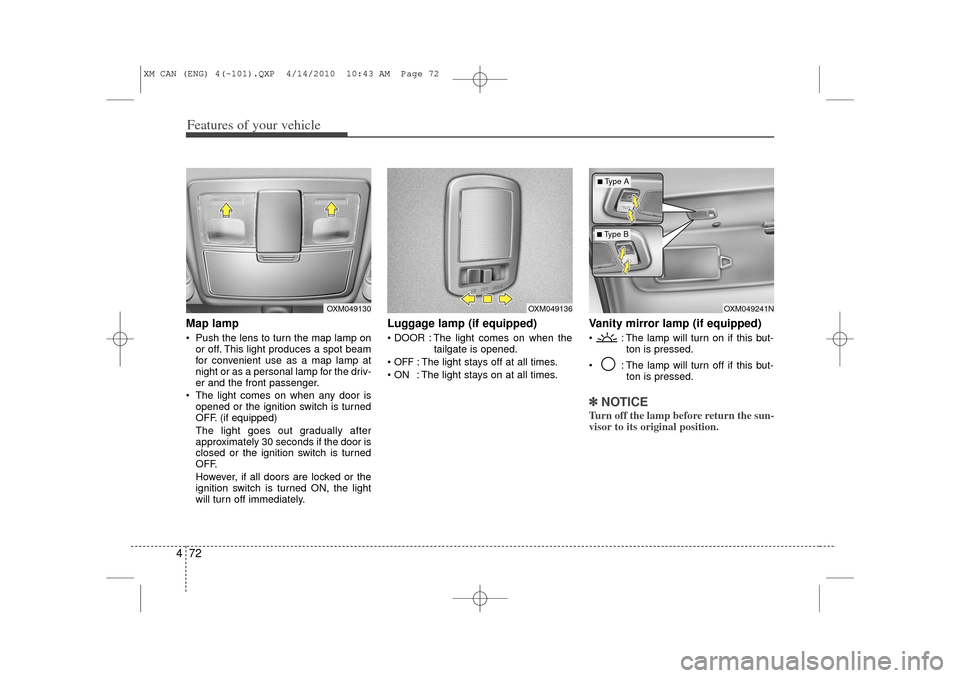
4Map lamp Push the lens to turn the map lamp on
or off. This light produces a spot beam
for convenient use as a map lamp at
night or as a personal lamp for the driv-
er and the front passenger.
The light comes on when any door is opened or the ignition switch is turned
OFF. (if equipped)
The light goes out gradually after
approximately 30 seconds if the door is
closed or the ignition switch is turned
OFF.
However, if all doors are locked or the
ignition switch is turned ON, the light
will turn off immediately.
Luggage lamp (if equipped) DOOR : The light comes on when the tailgate is opened.
OFF
: The light stays off at all times.
ON : The light stays on at all times.
Vanity mirror lamp (if equipped) : The lamp will turn on if this but- ton is pressed.
: The lamp will turn off if this but- ton is pressed.✽ ✽NOTICETurn off the lamp before return the sun-
visor to its original position.
OXM049136
OXM049130
OXM049241N
■ Type B■Type A
XM CAN (ENG) 4(~101).QXP 4/14/2010 10:43 AM Page 72