warning KIA Sorento 2012 2.G Owner's Manual
[x] Cancel search | Manufacturer: KIA, Model Year: 2012, Model line: Sorento, Model: KIA Sorento 2012 2.GPages: 388, PDF Size: 7.56 MB
Page 176 of 388
Features of your vehicle86
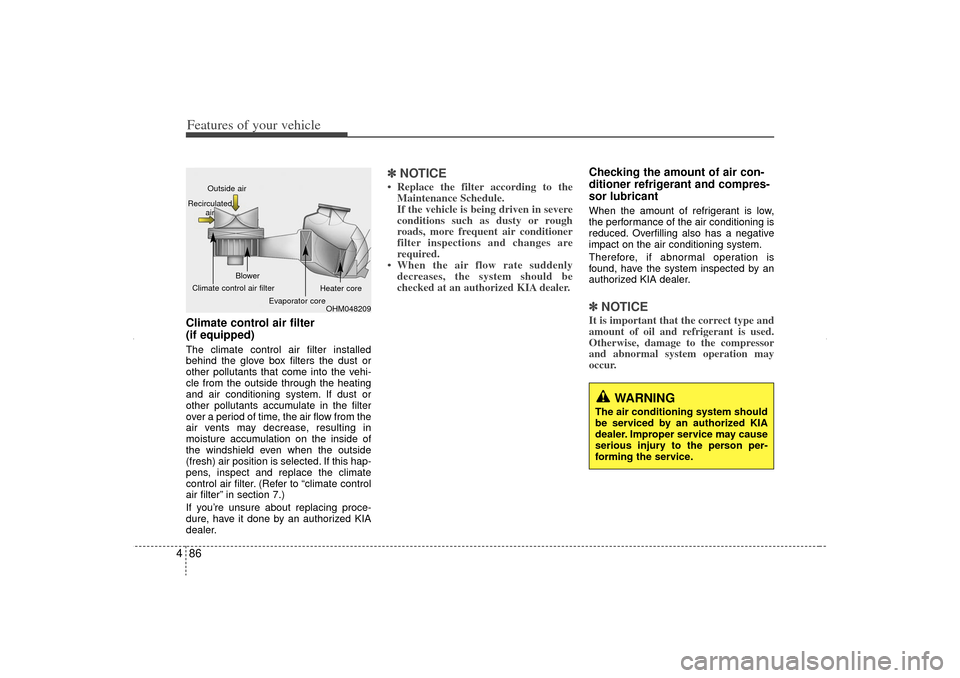
4Climate control air filter
(if equipped)The climate control air filter installed
behind the glove box filters the dust or
other pollutants that come into the vehi-
cle from the outside through the heating
and air conditioning system. If dust or
other pollutants accumulate in the filter
over a period of time, the air flow from the
air vents may decrease, resulting in
moisture accumulation on the inside of
the windshield even when the outside
(fresh) air position is selected. If this hap-
pens, inspect and replace the climate
control air filter. (Refer to “climate control
air filter” in section 7.)
If you’re unsure about replacing proce-
dure, have it done by an authorized KIA
dealer.
✽ ✽
NOTICE• Replace the filter according to the
Maintenance Schedule.
If the vehicle is being driven in severe
conditions such as dusty or rough
roads, more frequent air conditioner
filter inspections and changes are
required.
• When the air flow rate suddenly decreases, the system should be
checked at an authorized KIA dealer.
Checking the amount of air con-
ditioner refrigerant and compres-
sor lubricantWhen the amount of refrigerant is low,
the performance of the air conditioning is
reduced. Overfilling also has a negative
impact on the air conditioning system.
Therefore, if abnormal operation is
found, have the system inspected by an
authorized KIA dealer.✽ ✽ NOTICEIt is important that the correct type and
amount of oil and refrigerant is used.
Otherwise, damage to the compressor
and abnormal system operation may
occur.
WARNING
The air conditioning system should
be serviced by an authorized KIA
dealer. Improper service may cause
serious injury to the person per-
forming the service.
OHM048209
Outside air
Recirculated air
Climate control air filter Blower
Evaporator core Heater core
XM CAN (ENG) 4(~105).QXP 4/19/2011 10:40 AM Page 86
Page 183 of 388
493
Features of your vehicle
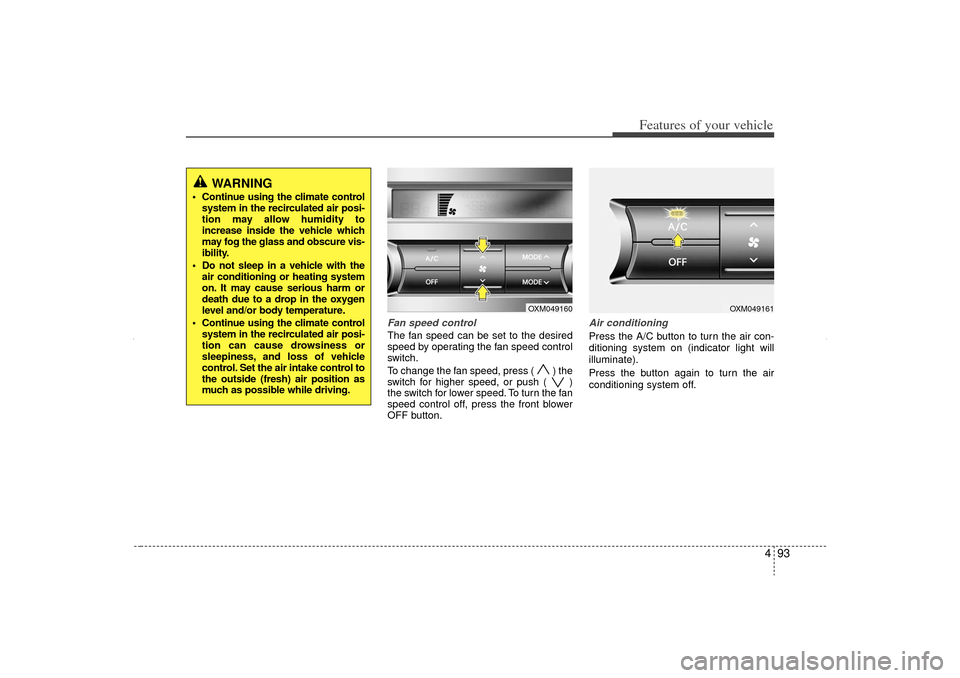
Fan speed controlThe fan speed can be set to the desired
speed by operating the fan speed control
switch.
To change the fan speed, press ( ) the
switch for higher speed, or push ( )
the switch for lower speed. To turn the fan
speed control off, press the front blower
OFF button.
Air conditioningPress the A/C button to turn the air con-
ditioning system on (indicator light will
illuminate).
Press the button again to turn the air
conditioning system off.
OXM049160
OXM049161
WARNING
Continue using the climate controlsystem in the recirculated air posi-
tion may allow humidity to
increase inside the vehicle which
may fog the glass and obscure vis-
ibility.
Do not sleep in a vehicle with the air conditioning or heating system
on. It may cause serious harm or
death due to a drop in the oxygen
level and/or body temperature.
Continue using the climate control system in the recirculated air posi-
tion can cause drowsiness or
sleepiness, and loss of vehicle
control. Set the air intake control to
the outside (fresh) air position as
much as possible while driving.
XM CAN (ENG) 4(~105).QXP 4/19/2011 10:41 AM Page 93
Page 185 of 388
495
Features of your vehicle
For maximum defrosting, set the tem-perature control to the extreme
right/hot position and the fan speed
control to the highest speed.
If warm air to the floor is desired while defrosting or defogging, set the mode
to the floor-defrost position.
Before driving, clear all snow and ice from the windshield, rear window, out-
side rear view mirrors, and all side win-
dows.
Clear all snow and ice from the hood and air inlet in the cowl grill to improve
heater and defroster efficiency and to
reduce the probability of fogging up the
inside of the windshield.
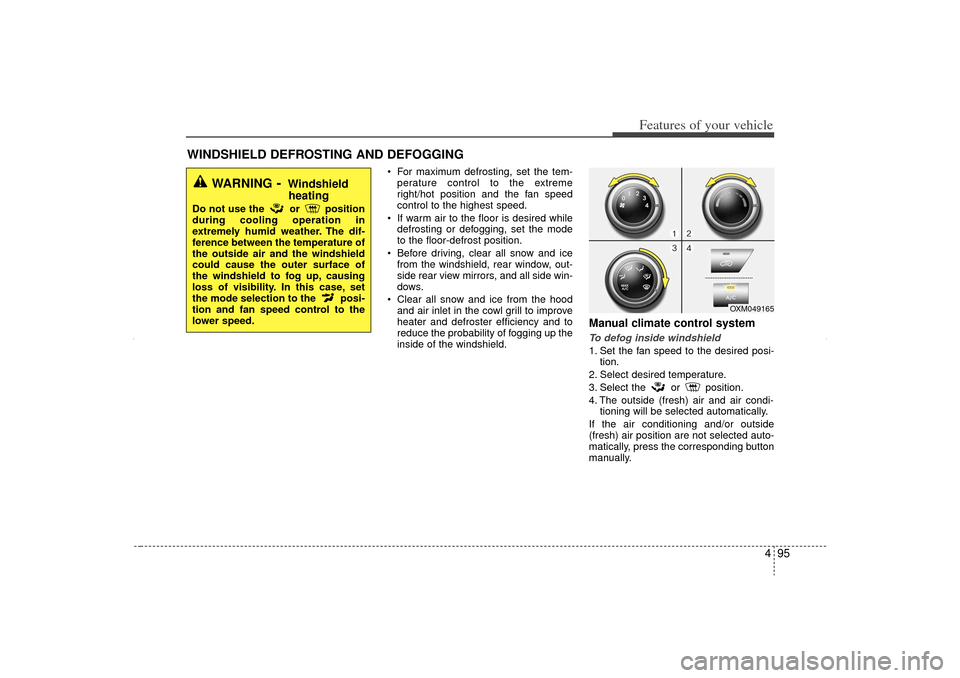
Manual climate control systemTo defog inside windshield 1. Set the fan speed to the desired posi- tion.
2. Select desired temperature.
3. Select the or position.
4. The outside (fresh) air and air condi- tioning will be selected automatically.
If the air conditioning and/or outside
(fresh) air position are not selected auto-
matically, press the corresponding button
manually.
WINDSHIELD DEFROSTING AND DEFOGGING
OXM049165
WARNING
- Windshield heating
Do not use the or position
during cooling operation in
extremely humid weather. The dif-
ference between the temperature of
the outside air and the windshield
could cause the outer surface of
the windshield to fog up, causing
loss of visibility. In this case, set
the mode selection to the posi-
tion and fan speed control to the
lower speed.
XM CAN (ENG) 4(~105).QXP 4/19/2011 10:42 AM Page 95
Page 188 of 388
Features of your vehicle98
4D270000AHMThese compartments can be used to
store small items.
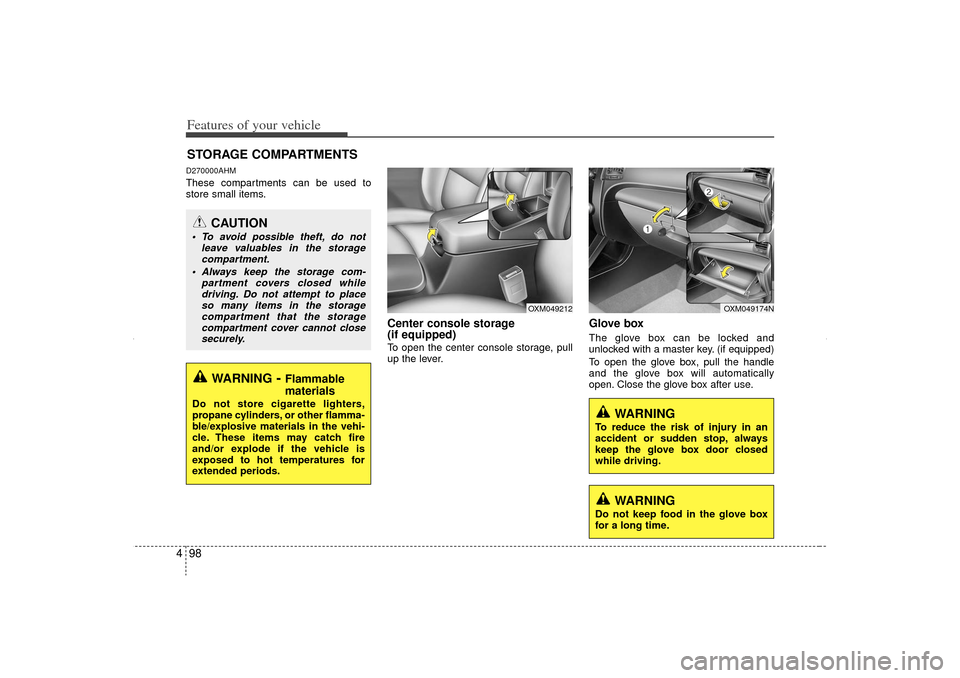
Center console storage
(if equipped)To open the center console storage, pull
up the lever.
Glove boxThe glove box can be locked and
unlocked with a master key. (if equipped)
To open the glove box, pull the handle
and the glove box will automatically
open. Close the glove box after use.
STORAGE COMPARTMENTS
WARNING
- Flammable
materials
Do not store cigarette lighters,
propane cylinders, or other flamma-
ble/explosive materials in the vehi-
cle. These items may catch fire
and/or explode if the vehicle is
exposed to hot temperatures for
extended periods.
CAUTION
To avoid possible theft, do not
leave valuables in the storagecompartment.
Always keep the storage com- partment covers closed whiledriving. Do not attempt to placeso many items in the storage compartment that the storagecompartment cover cannot closesecurely.
WARNING
To reduce the risk of injury in an
accident or sudden stop, always
keep the glove box door closed
while driving.
OXM049212
OXM049174N
WARNING
Do not keep food in the glove box
for a long time.
XM CAN (ENG) 4(~105).QXP 4/19/2011 10:42 AM Page 98
Page 189 of 388
499
Features of your vehicle
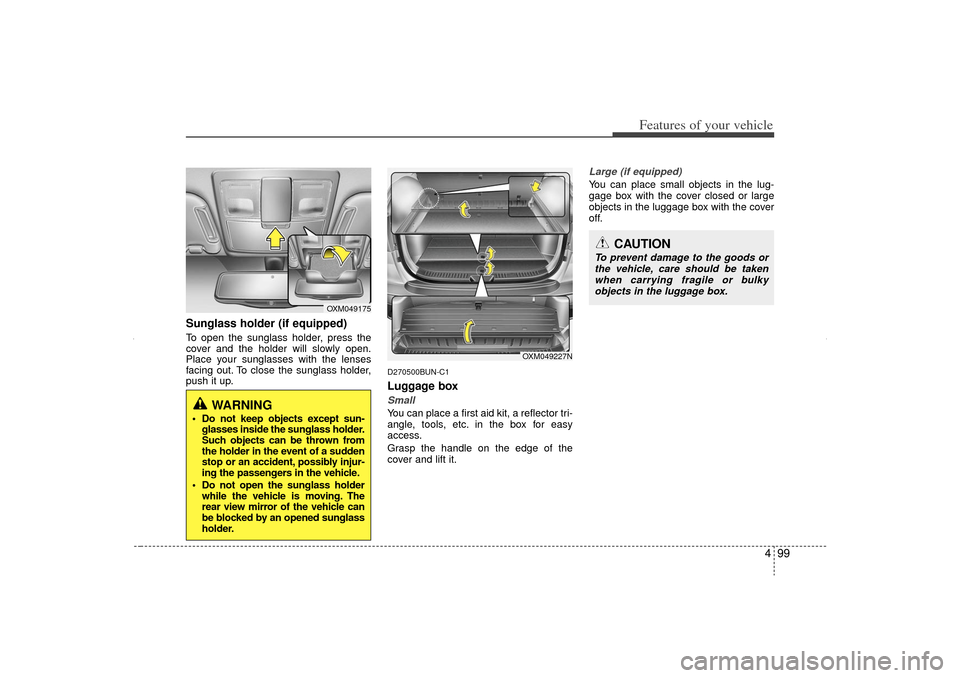
Sunglass holder (if equipped)To open the sunglass holder, press the
cover and the holder will slowly open.
Place your sunglasses with the lenses
facing out. To close the sunglass holder,
push it up.
D270500BUN-C1Luggage boxSmallYou can place a first aid kit, a reflector tri-
angle, tools, etc. in the box for easy
access.
Grasp the handle on the edge of the
cover and lift it.
Large (if equipped)You can place small objects in the lug-
gage box with the cover closed or large
objects in the luggage box with the cover
off.
OXM049175
WARNING
Do not keep objects except sun-glasses inside the sunglass holder.
Such objects can be thrown from
the holder in the event of a sudden
stop or an accident, possibly injur-
ing the passengers in the vehicle.
Do not open the sunglass holder while the vehicle is moving. The
rear view mirror of the vehicle can
be blocked by an opened sunglass
holder.
CAUTION
To prevent damage to the goods or
the vehicle, care should be taken when carrying fragile or bulkyobjects in the luggage box.
OXM049227N
XM CAN (ENG) 4(~105).QXP 4/19/2011 10:42 AM Page 99
Page 190 of 388
Features of your vehicle100
4D280300AXMCup holderINTERIOR FEATURES
WARNING
- Hot liquids
Do not place uncovered cups
with hot liquid in the cup holder
while the vehicle is in motion. If
the hot liquid spills, you may burn
yourself. Such a burn to the driv-
er could lead to loss of control of
the vehicle.
To reduce the risk of personal injury in the event of sudden stop
or collision, do not place uncov-
ered or unsecured bottles, glass-
es, cans, etc., in the cup holder
while the vehicle is in motion.
OXM049180OXM049240N
OXM049214OXM049215N
■Front
Type AType B
■Center (if equipped)■Rear (if equipped)
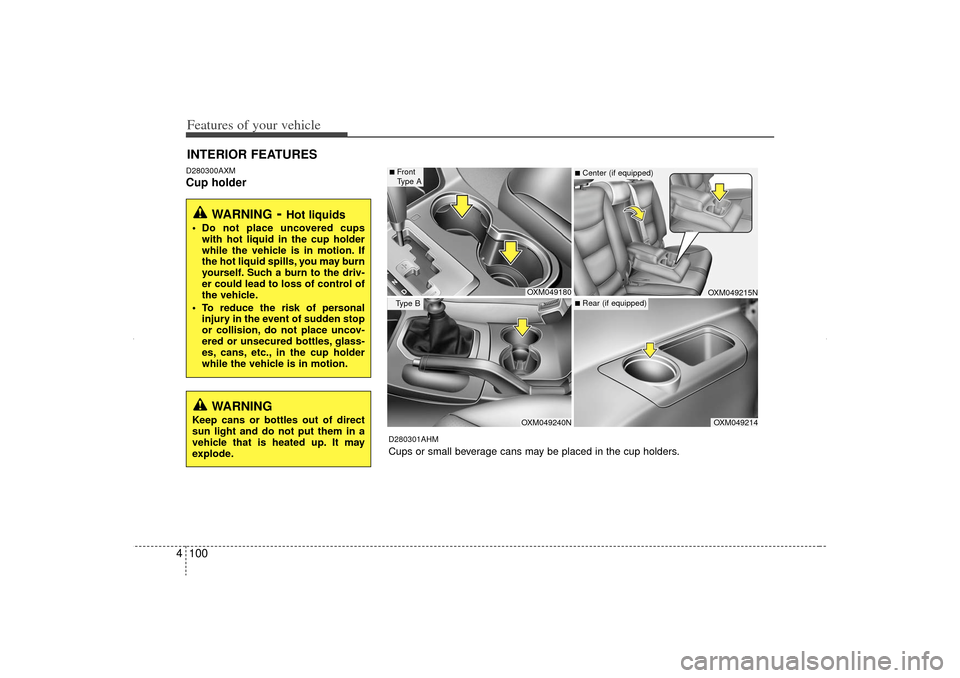
D280301AHMCups or small beverage cans may be placed in the cup holders.
WARNING
Keep cans or bottles out of direct
sun light and do not put them in a
vehicle that is heated up. It may
explode.
XM CAN (ENG) 4(~105).QXP 4/19/2011 10:43 AM Page 100
Page 191 of 388
4 101
Features of your vehicle
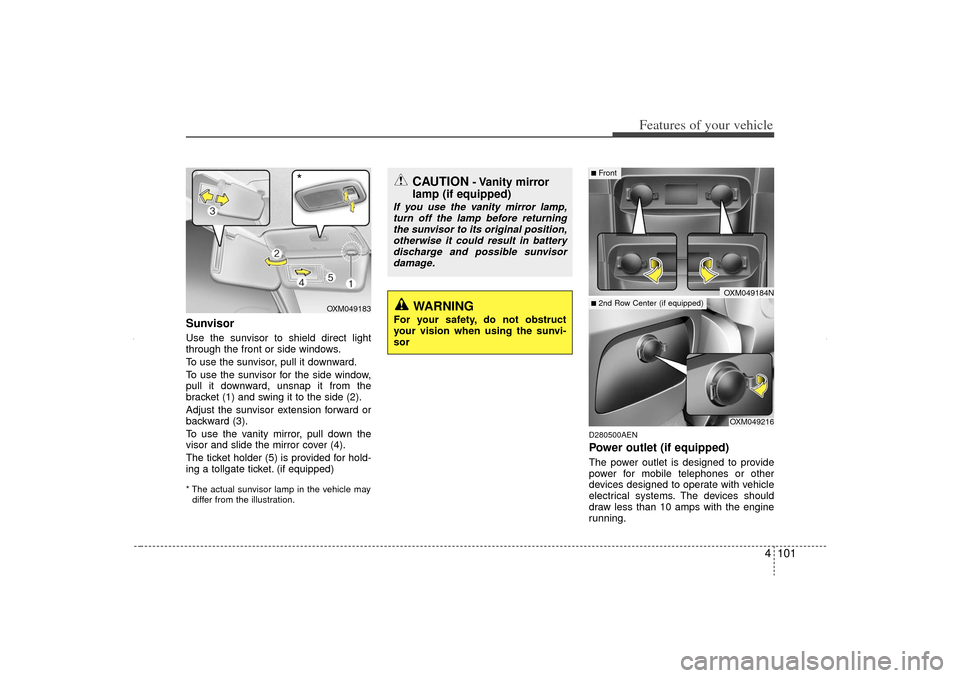
SunvisorUse the sunvisor to shield direct light
through the front or side windows.
To use the sunvisor, pull it downward.
To use the sunvisor for the side window,
pull it downward, unsnap it from the
bracket (1) and swing it to the side (2).
Adjust the sunvisor extension forward or
backward (3).
To use the vanity mirror, pull down the
visor and slide the mirror cover (4).
The ticket holder (5) is provided for hold-
ing a tollgate ticket. (if equipped)* The actual sunvisor lamp in the vehicle maydiffer from the illustration.
D280500AENPower outlet (if equipped)The power outlet is designed to provide
power for mobile telephones or other
devices designed to operate with vehicle
electrical systems. The devices should
draw less than 10 amps with the engine
running.
CAUTION
- Vanity mirror
lamp (if equipped)
If you use the vanity mirror lamp,
turn off the lamp before returningthe sunvisor to its original position, otherwise it could result in batterydischarge and possible sunvisor damage.
OXM049216
■Front■2nd Row Center (if equipped)
OXM049184N
OXM049183
*
WARNING
For your safety, do not obstruct
your vision when using the sunvi-
sor
XM CAN (ENG) 4(~105).QXP 4/19/2011 10:43 AM Page 101
Page 192 of 388
Features of your vehicle102
4
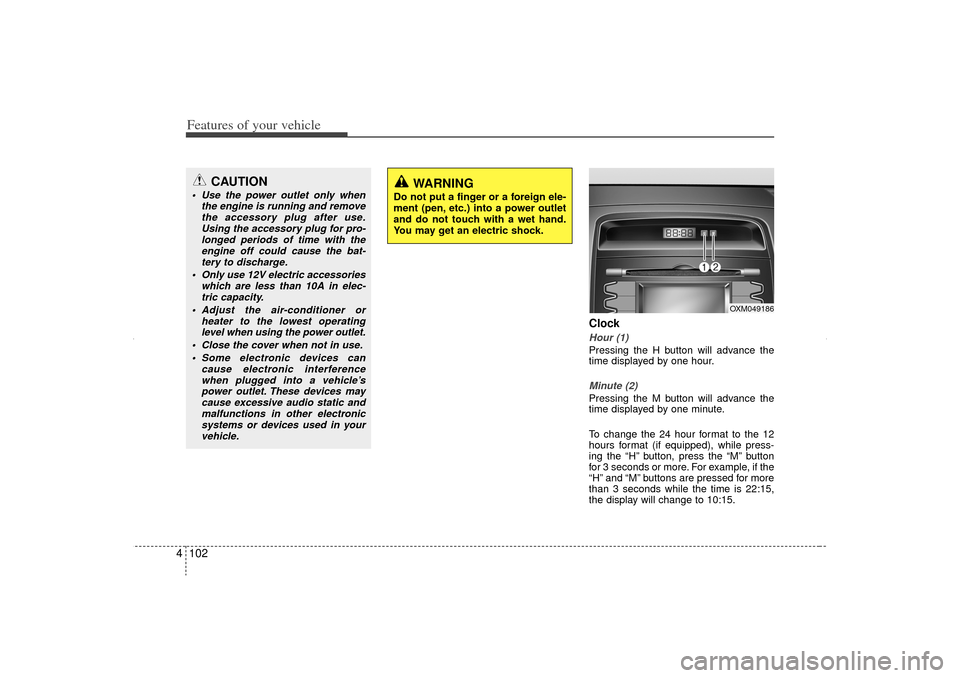
ClockHour (1)Pressing the H button will advance the
time displayed by one hour.Minute (2)Pressing the M button will advance the
time displayed by one minute.
To change the 24 hour format to the 12
hours format (if equipped), while press-
ing the “H” button, press the “M” button
for 3 seconds or more. For example, if the
“H” and “M” buttons are pressed for more
than 3 seconds while the time is 22:15,
the display will change to 10:15.
CAUTION
Use the power outlet only when
the engine is running and removethe accessory plug after use.Using the accessory plug for pro-longed periods of time with the engine off could cause the bat-tery to discharge.
Only use 12V electric accessories which are less than 10A in elec-tric capacity.
Adjust the air-conditioner or heater to the lowest operatinglevel when using the power outlet.
Close the cover when not in use. Some electronic devices can cause electronic interferencewhen plugged into a vehicle’spower outlet. These devices maycause excessive audio static and malfunctions in other electronicsystems or devices used in yourvehicle.
WARNING
Do not put a finger or a foreign ele-
ment (pen, etc.) into a power outlet
and do not touch with a wet hand.
You may get an electric shock.
OXM049186
XM CAN (ENG) 4(~105).QXP 4/19/2011 10:43 AM Page 102
Page 193 of 388
4 103
Features of your vehicle
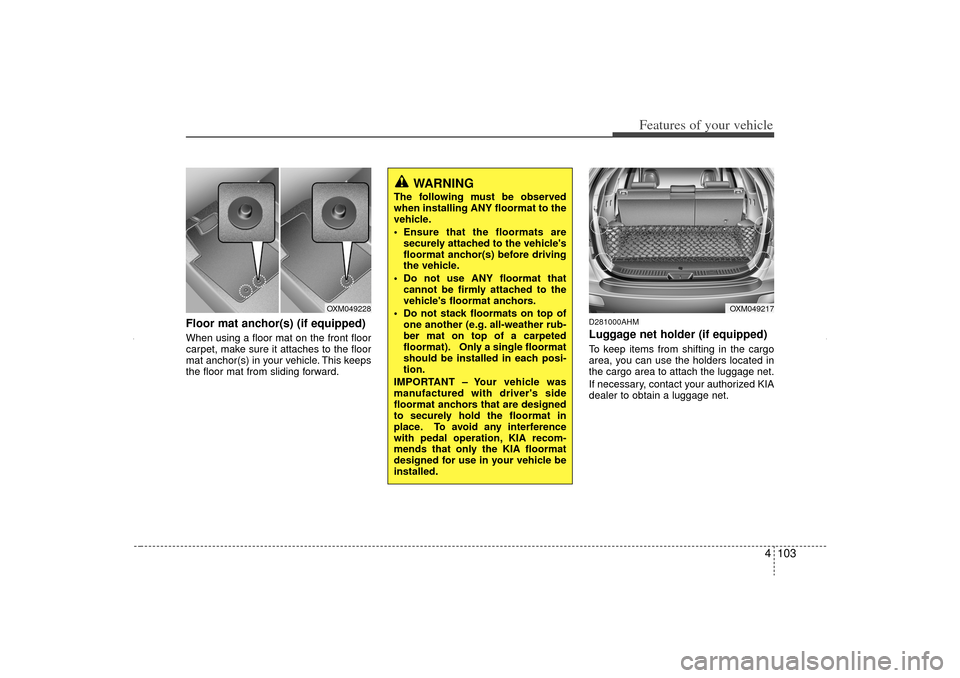
Floor mat anchor(s) (if equipped)When using a floor mat on the front floor
carpet, make sure it attaches to the floor
mat anchor(s) in your vehicle. This keeps
the floor mat from sliding forward.
D281000AHMLuggage net holder (if equipped)To keep items from shifting in the cargo
area, you can use the holders located in
the cargo area to attach the luggage net.
If necessary, contact your authorized KIA
dealer to obtain a luggage net.
OXM049217
OXM049228
WARNING
The following must be observed
when installing ANY floormat to the
vehicle.
Ensure that the floormats aresecurely attached to the vehicle's
floormat anchor(s) before driving
the vehicle.
Do not use ANY floormat that cannot be firmly attached to the
vehicle's floormat anchors.
Do not stack floormats on top of one another (e.g. all-weather rub-
ber mat on top of a carpeted
floormat). Only a single floormat
should be installed in each posi-
tion.
IMPORTANT – Your vehicle was
manufactured with driver's side
floormat anchors that are designed
to securely hold the floormat in
place. To avoid any interference
with pedal operation, KIA recom-
mends that only the KIA floormat
designed for use in your vehicle be
installed.
XM CAN (ENG) 4(~105).QXP 4/19/2011 10:43 AM Page 103
Page 194 of 388
Features of your vehicle104
4
CAUTION
To prevent damage to the goods or
the vehicle, care should be taken when carrying fragile or bulkyobjects in the luggage compart-ment.
WARNING
To avoid eye injury, DO NOT over-
stretch the luggage net. ALWAYS
keep your face and body out of the
luggage net’s recoil path. DO NOT
use the luggage net when the strap
has visible signs of wear or dam-
age.
XM CAN (ENG) 4(~105).QXP 4/19/2011 10:43 AM Page 104