tow KIA Sorento 2012 2.G User Guide
[x] Cancel search | Manufacturer: KIA, Model Year: 2012, Model line: Sorento, Model: KIA Sorento 2012 2.GPages: 388, PDF Size: 7.56 MB
Page 85 of 388
Safety features of your vehicle62
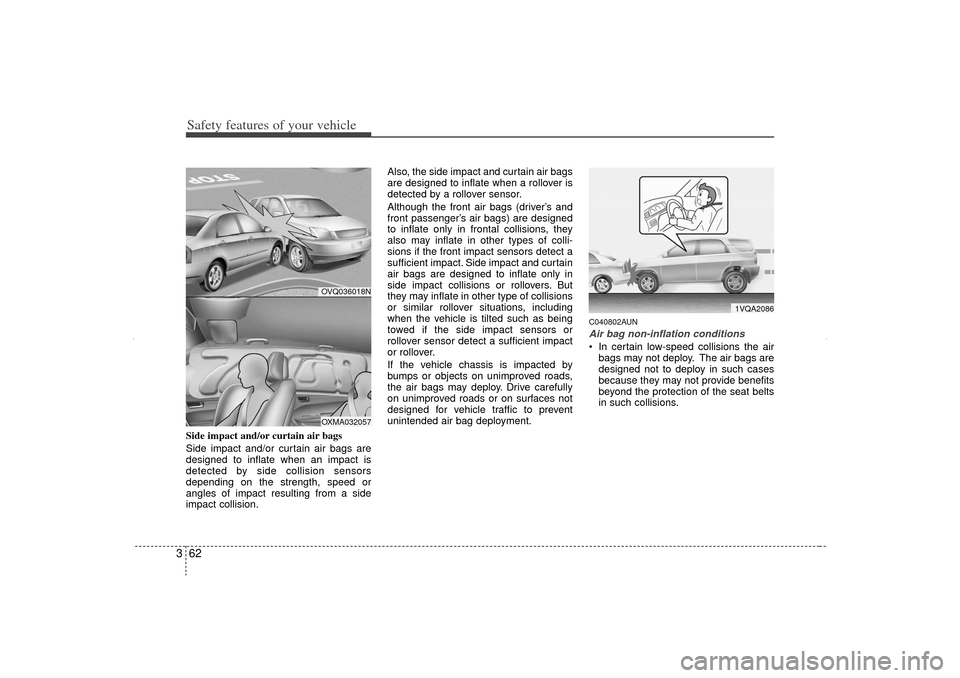
3Side impact and/or curtain air bags
Side impact and/or curtain air bags are
designed to inflate when an impact is
detected by side collision sensors
depending on the strength, speed or
angles of impact resulting from a side
impact collision. Also, the side impact and curtain air bags
are designed to inflate when a rollover is
detected by a rollover sensor.
Although the front air bags (driver’s and
front passenger’s air bags) are designed
to inflate only in frontal collisions, they
also may inflate in other types of colli-
sions if the front impact sensors detect a
sufficient impact. Side impact and curtain
air bags are designed to inflate only in
side impact collisions or rollovers. But
they may inflate in other type of collisions
or similar rollover situations, including
when the vehicle is tilted such as being
towed if the side impact sensors or
rollover sensor detect a sufficient impact
or rollover.
If the vehicle chassis is impacted by
bumps or objects on unimproved roads,
the air bags may deploy. Drive carefully
on unimproved roads or on surfaces not
designed for vehicle traffic to prevent
unintended air bag deployment.
C040802AUNAir bag non-inflation conditions In certain low-speed collisions the air
bags may not deploy. The air bags are
designed not to deploy in such cases
because they may not provide benefits
beyond the protection of the seat belts
in such collisions.
1VQA2086
OVQ036018NOXMA032057
XM CAN (ENG) 3.QXP 4/19/2011 10:30 AM Page 62
Page 88 of 388
365
Safety features of your vehicle
C041100AUNSRS CareThe SRS is virtually maintenance-free
and so there are no parts you can safely
service by yourself. If the SRS air bag
warning light does not illuminate, or con-
tinuously remains on, have your vehicle
immediately inspected by an authorized
KIA dealer.
Any work on the SRS system, such as
removing, installing, repairing, or any
work on the steering wheel, the front
passenger’s panel, front seats and roof
rails must be performed by an authorized
KIA dealer. Improper handling of the SRS
system may result in serious personal
injury.
WARNING
Modification to SRS componentsor wiring, including the addition
of any kind of badges to the pad
covers or modifications to the
body structure, can adversely
affect SRS performance and lead
to possible injury.
For cleaning the air bag pad cov- ers, use only a soft, dry cloth or
one which has been moistened
with plain water. Solvents or
cleaners could adversely affect
the air bag covers and proper
deployment of the system.
No objects should be placed over
or near the air bag modules on the
steering wheel, instrument panel,
and the front passenger's panel
above the glove box, because any
such object could cause harm if the
vehicle is in a crash severe enough
to cause the air bags to inflate.
(Continued)
(Continued)
If the air bags inflate, they must be replaced by an authorized KIA
dealer.
Do not tamper with or disconnect SRS wiring, or other components
of the SRS system. Doing so
could result in injury, due to acci-
dental inflation of the air bags or
by rendering the SRS inopera-
tive.
If components of the air bag sys- tem must be discarded, or if the
vehicle must be scrapped, certain
safety precautions must be
observed. An authorized KIA
dealer knows these precautions
and can give you the necessary
information. Failure to follow
these precautions and proce-
dures could increase the risk of
personal injury.
If your car was flooded and has soaked carpeting or water on
flooring, you shouldn't try to start
the engine; have the car towed to
an authorized KIA dealer.
XM CAN (ENG) 3.QXP 4/19/2011 10:30 AM Page 65
Page 89 of 388
Safety features of your vehicle66
3C041300AUNAdditional safety precautions Never let passengers ride in the
cargo area or on top of a folded-
down back seat. All occupants should
sit upright, fully back in their seats with
their seat belts on and their feet on the
floor.
Passengers should not move out of
or change seats while the vehicle is
moving. A passenger who is not wear-
ing a seat belt during a crash or emer-
gency stop can be thrown against the
inside of the vehicle, against other
occupants, or out of the vehicle.
Each seat belt is designed to
restrain one occupant. If more than
one person uses the same seat belt,
they could be seriously injured or killed
in a collision.
Do not use any accessories on seat
belts. Devices claiming to improve
occupant comfort or reposition the seat
belt can reduce the protection provided
by the seat belt and increase the
chance of serious injury in a crash.
Passengers should not place hard
or sharp objects between them-
selves and the air bags. Carrying
hard or sharp objects on your lap or in
your mouth can result in injuries if an
air bag inflates.
Keep occupants away from the air
bag covers. All occupants should sit
upright, fully back in their seats with
their seat belts on and their feet on the
floor. If occupants are too close to the
air bag covers, they could be injured if
the air bags inflate.
Do not attach or place objects on or
near the air bag covers. Any object
attached to or placed on the front or
side air bag covers could interfere with
the proper operation of the air bags.
Do not modify the front seats.
Modification of the front seats could
interfere with the operation of the sup-
plemental restraint system sensing
components or side air bags.
Do not place items under the front
seats. Placing items under the front
seats could interfere with the operation
of the supplemental restraint system
sensing components and wiring har-
nesses.
Never hold an infant or child on your
lap. The infant or child could be seri-
ously injured or killed in the event of a
crash. All infants and children should
be properly restrained in appropriate
child safety seats or seat belts in the
rear seat.
WARNING
Sitting improperly or out of posi- tion can cause occupants to be
shifted too close to a deploying
air bag, strike the interior struc-
ture or be thrown from the vehicle
resulting in serious injury or
death.
Always sit upright with the seat- back in an upright position, cen-
tered on the seat cushion with
your seat belt on, legs comfort-
ably extended and your feet on
the floor.
Always have the ignition OFF in an abnormal situation. The side
air bags may inflate if the vehicle
is tilted such as when being
towed because the rollover sen-
sor detects it as a rollover situa-
tion.
Be careful not to cause impact to the doors when the ignition is
ON. The air bags may inflate.
XM CAN (ENG) 3.QXP 4/19/2011 10:30 AM Page 66
Page 101 of 388
411
Features of your vehicle
D040300AHM-ECSmart key precautions✽
✽NOTICE• If, for some reason, you happen to lose
your smart key, you will not be able to
start the engine. Tow the vehicle, if
necessary, and contact an authorized
KIA dealer.
• A maximum of 2 smart keys can be registered to a single vehicle. If you
lose a smart key, you should immedi-
ately take the vehicle and key to your
authorized KIA dealer to protect it
from potential theft.
• The smart key will not work if any of the following occurs:
- The smart key is close to a radiotransmitter such as a radio station or
an airport which can interfere with
normal operation of the smart key.
- The smart key is near a mobile two- way radio system or a cellular
phone.
- Another vehicle’s smart key is being operated close to your vehicle.
When the smart key does not work
properly, open and close the door with
the mechanical key. If you have a
problem with the smart key, contact
an authorized KIA dealer.
This device complies with Industry
Canada Standard RSS-210.
Operation is subject to the following two
conditions:
1. This device may not cause harmful
interference, and
2. This device must accept any interfer- ence received, including interference
that may cause undesired operation.
D040400AHMRestrictions in handling keysWhen leaving keys with parking lot and
valet attendants, the following proce-
dures will ensure that your vehicle’s
glove box compartment can not be
opened in your absence.
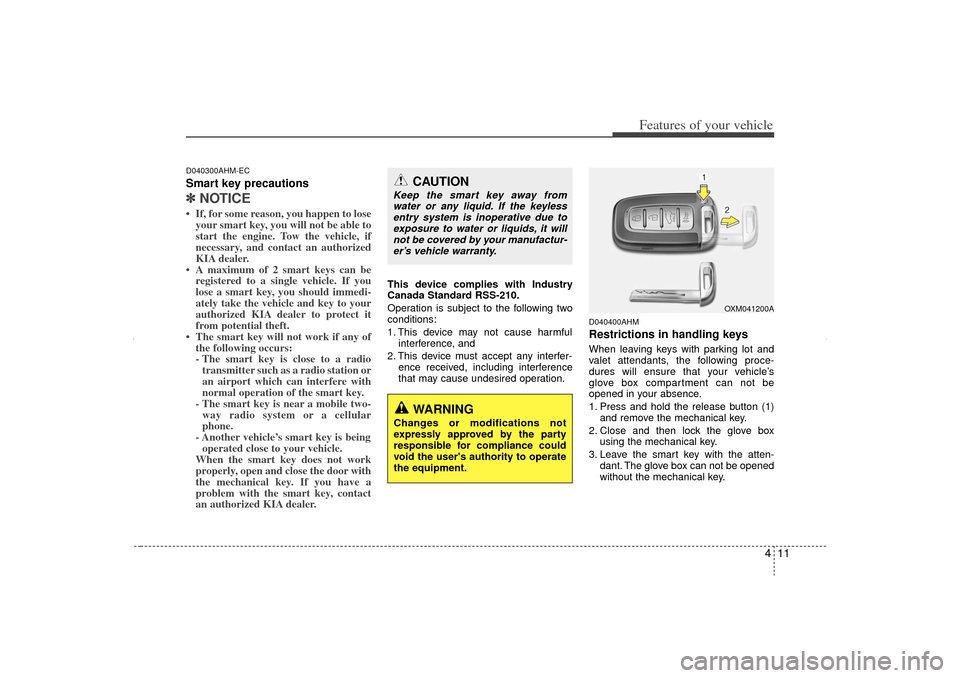
1. Press and hold the release button (1)and remove the mechanical key.
2. Close and then lock the glove box using the mechanical key.
3. Leave the smart key with the atten- dant. The glove box can not be opened
without the mechanical key.
CAUTION
Keep the smart key away fromwater or any liquid. If the keylessentry system is inoperative due toexposure to water or liquids, it will not be covered by your manufactur-er’s vehicle warranty.
WARNING
Changes or modifications not
expressly approved by the party
responsible for compliance could
void the user's authority to operate
the equipment.
OXM041200A
XM CAN (ENG) 4(~105).QXP 4/19/2011 10:35 AM Page 11
Page 129 of 388
439
Features of your vehicle
D140100AHMInside rearview mirrorAdjust the rearview mirror so that the
center view through the rear window is
seen. Make this adjustment before you
start driving.
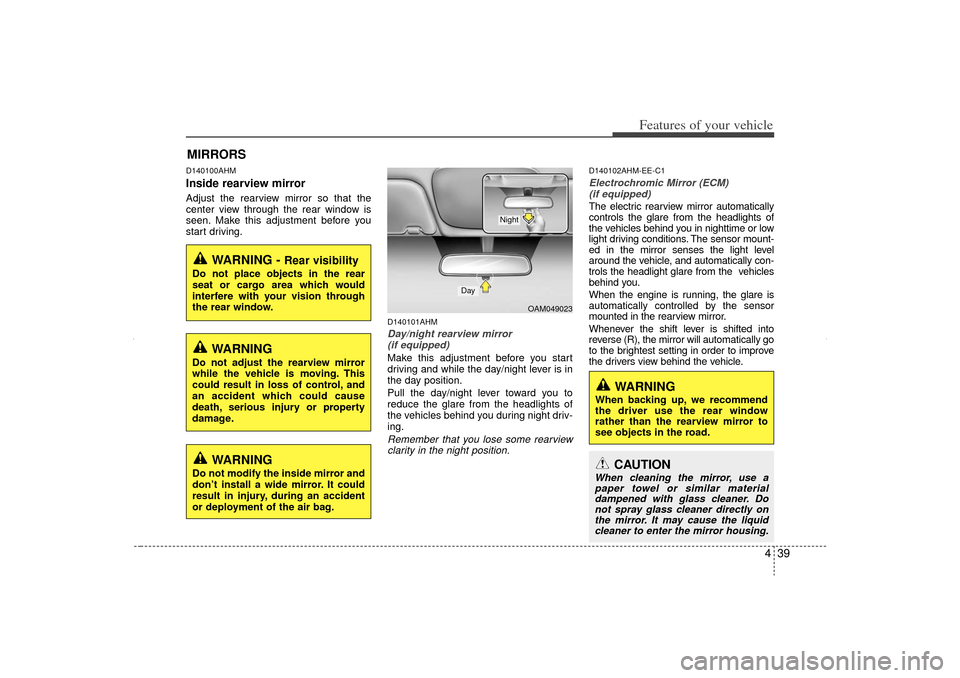
D140101AHMDay/night rearview mirror (if equipped)Make this adjustment before you start
driving and while the day/night lever is in
the day position.
Pull the day/night lever toward you to
reduce the glare from the headlights of
the vehicles behind you during night driv-
ing.Remember that you lose some rearviewclarity in the night position.
D140102AHM-EE-C1Electrochromic Mirror (ECM)(if equipped)The electric rearview mirror automatically
controls the glare from the headlights of
the vehicles behind you in nighttime or low
light driving conditions. The sensor mount-
ed in the mirror senses the light level
around the vehicle, and automatically con-
trols the headlight glare from the vehicles
behind you.
When the engine is running, the glare is
automatically controlled by the sensor
mounted in the rearview mirror.
Whenever the shift lever is shifted into
reverse (R), the mirror will automatically go
to the brightest setting in order to improve
the drivers view behind the vehicle.
MIRRORS
WARNING -
Rear visibility
Do not place objects in the rear
seat or cargo area which would
interfere with your vision through
the rear window.
WARNING
Do not adjust the rearview mirror
while the vehicle is moving. This
could result in loss of control, and
an accident which could cause
death, serious injury or property
damage.
OAM049023
Day
Night
CAUTION
When cleaning the mirror, use apaper towel or similar materialdampened with glass cleaner. Donot spray glass cleaner directly onthe mirror. It may cause the liquidcleaner to enter the mirror housing.
WARNING
When backing up, we recommend
the driver use the rear window
rather than the rearview mirror to
see objects in the road.
WARNING
Do not modify the inside mirror and
don’t install a wide mirror. It could
result in injury, during an accident
or deployment of the air bag.
XM CAN (ENG) 4(~105).QXP 4/19/2011 10:37 AM Page 39
Page 136 of 388
Features of your vehicle46
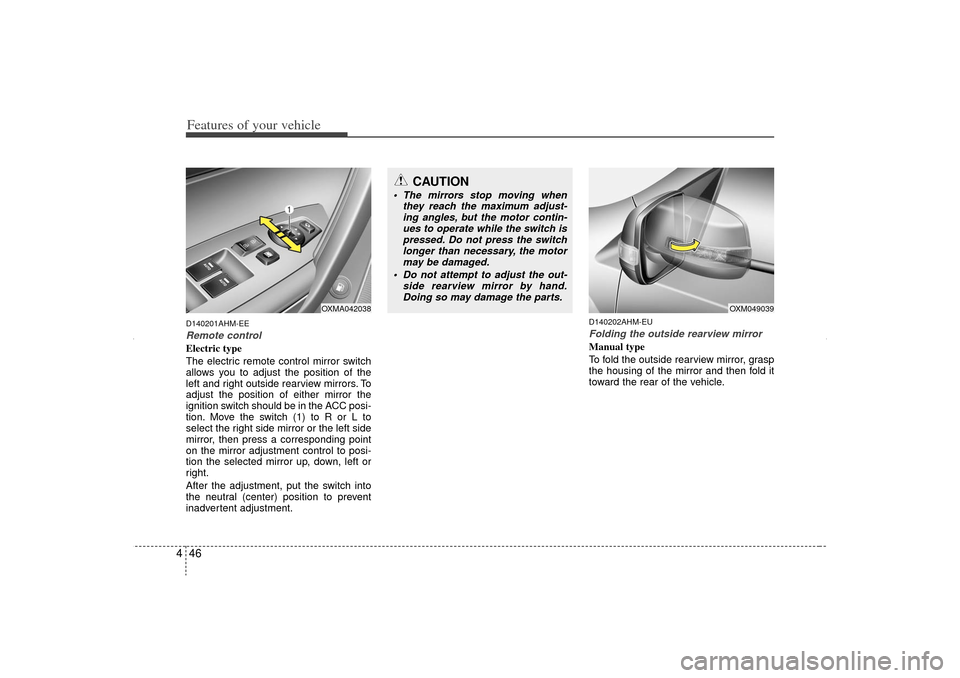
4D140201AHM-EERemote controlElectric type
The electric remote control mirror switch
allows you to adjust the position of the
left and right outside rearview mirrors. To
adjust the position of either mirror the
ignition switch should be in the ACC posi-
tion. Move the switch (1) to R or L to
select the right side mirror or the left side
mirror, then press a corresponding point
on the mirror adjustment control to posi-
tion the selected mirror up, down, left or
right.
After the adjustment, put the switch into
the neutral (center) position to prevent
inadvertent adjustment.
D140202AHM-EUFolding the outside rearview mirrorManual type
To fold the outside rearview mirror, grasp
the housing of the mirror and then fold it
toward the rear of the vehicle.
CAUTION
The mirrors stop moving when
they reach the maximum adjust-ing angles, but the motor contin- ues to operate while the switch ispressed. Do not press the switchlonger than necessary, the motor may be damaged.
Do not attempt to adjust the out- side rearview mirror by hand.Doing so may damage the parts.
OXM049039
OXMA042038
XM CAN (ENG) 4(~105).QXP 4/19/2011 10:37 AM Page 46
Page 140 of 388
Features of your vehicle50
4When the door is opened, or if the engine
is not started within 1 minute, the
tachometer pointer may move slightly in
the ON position with the engine OFF.
This movement is normal and will not
affect the accuracy of the tachometer
once the engine is running.
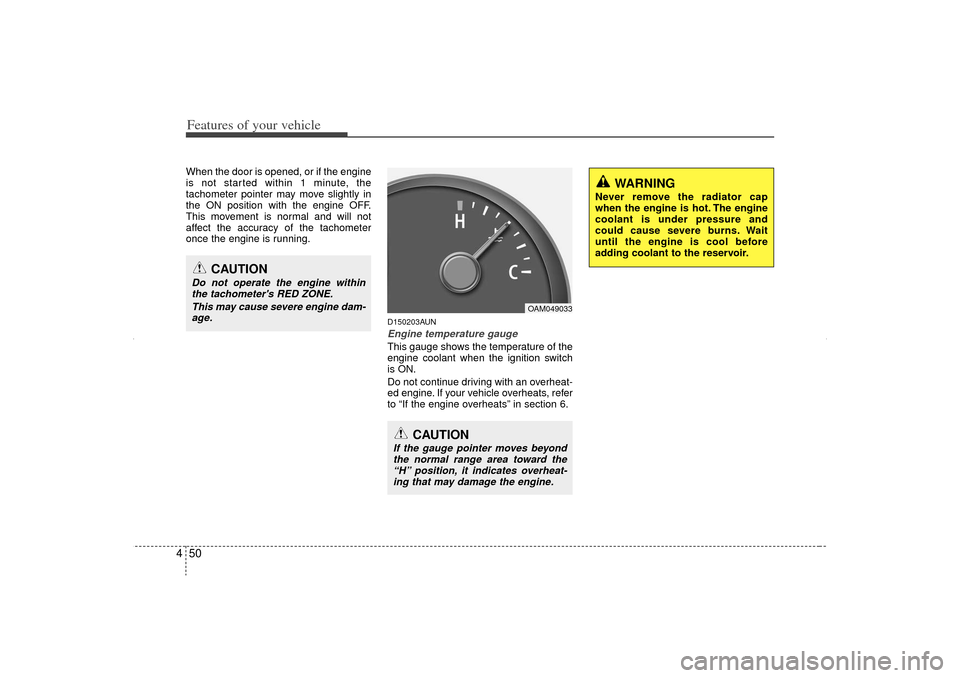
D150203AUNEngine temperature gauge This gauge shows the temperature of the
engine coolant when the ignition switch
is ON.
Do not continue driving with an overheat-
ed engine. If your vehicle overheats, refer
to “If the engine overheats” in section 6.
OAM049033
CAUTION
If the gauge pointer moves beyond
the normal range area toward the“H” position, it indicates overheat- ing that may damage the engine.
CAUTION
Do not operate the engine withinthe tachometer's RED ZONE.
This may cause severe engine dam-age.
WARNING
Never remove the radiator cap
when the engine is hot. The engine
coolant is under pressure and
could cause severe burns. Wait
until the engine is cool before
adding coolant to the reservoir.
XM CAN (ENG) 4(~105).QXP 4/19/2011 10:38 AM Page 50
Page 148 of 388
Features of your vehicle58
4
D150308AHM-EEParking brake & brake
fluid warning lightParking brake warning
This light is illuminated when the parking
brake is applied with the ignition switch in
the START or ON position. The warning
light should go off after a few seconds
when the parking brake is released.
Parking brake warning chime
(if equipped)
The parking brake warning chime will
sound to remind you that the parking
brake is applied when you are driving
above 3 mph (5 km/h). Always release
the parking brake before you drive. Low brake fluid level warning
If the warning light remains on, it may
indicate that the brake fluid level in the
reservoir is low.
If the warning light remains on:
1. Drive carefully to the nearest safe
location and stop your vehicle.
2. With the engine stopped, check the brake fluid level immediately and add
fluid as required. Then check all brake
components for fluid leaks.
3. Do not drive the vehicle if leaks are found, the warning light remains on or
the brakes do not operate properly.
Have the vehicle towed to any author-
ized KIA dealer for a brake system
inspection and necessary repairs.
CAUTION
If the oil pressure warning lightstays on while the engine is run- ning, serious engine damage mayresult. The oil pressure warninglight comes on whenever there is insufficient oil pressure. In normaloperation, it should come on whenthe ignition switch is turned on,then go out when the engine is started. If the oil pressure warninglight stays on while the engine isrunning, there is a serious malfunc-tion.
If this happens, stop the vehicle assoon as it is safe to do so, turn offthe engine and check the oil level. Ifthe oil level is low, fill the engine oil to the proper level and start theengine again. If the light stays onwith the engine running, turn theengine off immediately. In any instance where the oil light stays onwhen the engine is running, theengine should be checked by an authorized KIA dealer before thevehicle is driven again.
XM CAN (ENG) 4(~105).QXP 4/19/2011 10:38 AM Page 58
Page 154 of 388
Features of your vehicle64
4 When more than two objects are
sensed at the same time, the closest
one will be recognized first.Types of warning sound When an object is 120 cm to 81 cm (47in. to 32 in.) from the rear bumper:
Buzzer beeps intermittently.
When an object is 80 cm to 41 cm (31 in. to 16 in.) from the rear bumper:
Buzzer beeps more frequently.
When an object is within 40 cm (15 in.) of the rear bumper:
Buzzer sounds continuously.
Non-operational conditions of
rear parking assist systemThe rear parking assist system may
not operate properly when:
1. Moisture is frozen to the sensor. (It will operate normally when the moisture
has been cleared.)
2. The sensor is covered with foreign matter, such as snow or water, or the
sensor cover is blocked. (It will operate
normally when the material is removed
or the sensor is no longer blocked.)
3. Driving on uneven road surfaces (unpaved roads, gravel, bumps, gradi-
ent).
4. Objects generating excessive noise (vehicle horns, loud motorcycle
engines, or truck air brakes) are within
range of the sensor.
5. Heavy rain or water spray exists.
6. Wireless transmitters or mobile phones are within range of the sensor.
7. The sensor is covered with snow.
8. Trailer towing The detecting range may decrease
when:
1. The sensor is stained with foreign mat-
ter such as snow or water. (The sens-
ing range will return to normal when
removed.)
2. Outside air temperature is extremely hot or cold.
The following objects may not be rec-
ognized by the sensor:
1. Sharp or slim objects such as ropes, chains or small poles.
2. Objects which tend to absorb the sen- sor frequency such as clothes, spongy
material or snow.
3. Undetectable objects smaller than 1 m (40 in.) in height and narrower than 14
cm (6 in.) in diameter.
XM CAN (ENG) 4(~105).QXP 4/19/2011 10:38 AM Page 64
Page 160 of 388
Features of your vehicle70
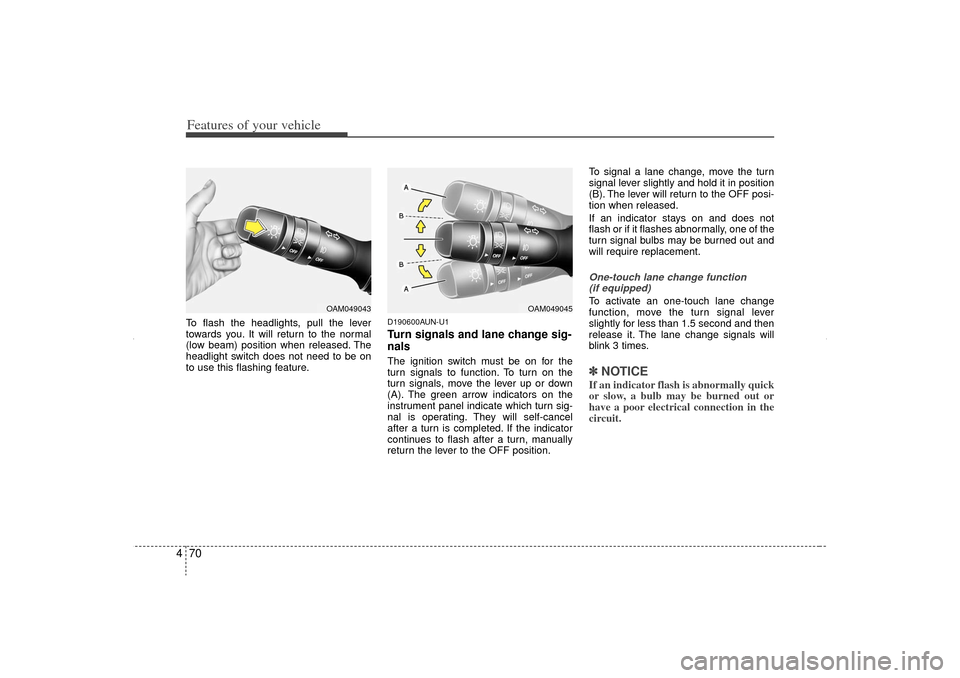
4To flash the headlights, pull the lever
towards you. It will return to the normal
(low beam) position when released. The
headlight switch does not need to be on
to use this flashing feature.
D190600AUN-U1Turn signals and lane change sig-
nalsThe ignition switch must be on for the
turn signals to function. To turn on the
turn signals, move the lever up or down
(A). The green arrow indicators on the
instrument panel indicate which turn sig-
nal is operating. They will self-cancel
after a turn is completed. If the indicator
continues to flash after a turn, manually
return the lever to the OFF position. To signal a lane change, move the turn
signal lever slightly and hold it in position
(B). The lever will return to the OFF posi-
tion when released.
If an indicator stays on and does not
flash or if it flashes abnormally, one of the
turn signal bulbs may be burned out and
will require replacement.
One-touch lane change function
(if equipped)To activate an one-touch lane change
function, move the turn signal lever
slightly for less than 1.5 second and then
release it. The lane change signals will
blink 3 times.✽ ✽ NOTICEIf an indicator flash is abnormally quick
or slow, a bulb may be burned out or
have a poor electrical connection in the
circuit.
OAM049045
OAM049043
XM CAN (ENG) 4(~105).QXP 4/19/2011 10:39 AM Page 70