lock KIA SORENTO 2014 Features and Functions Guide
[x] Cancel search | Manufacturer: KIA, Model Year: 2014, Model line: SORENTO, Model: KIA SORENTO 2014Pages: 42, PDF Size: 8.74 MB
Page 31 of 42
29ALWAYS CHECK THE OWNER’S MANUAL FOR COMPLETE OPERATING INFORMATION AND SAFET Y WARNINGS *IF EQUIPPED
OTHER KEY FEATURES
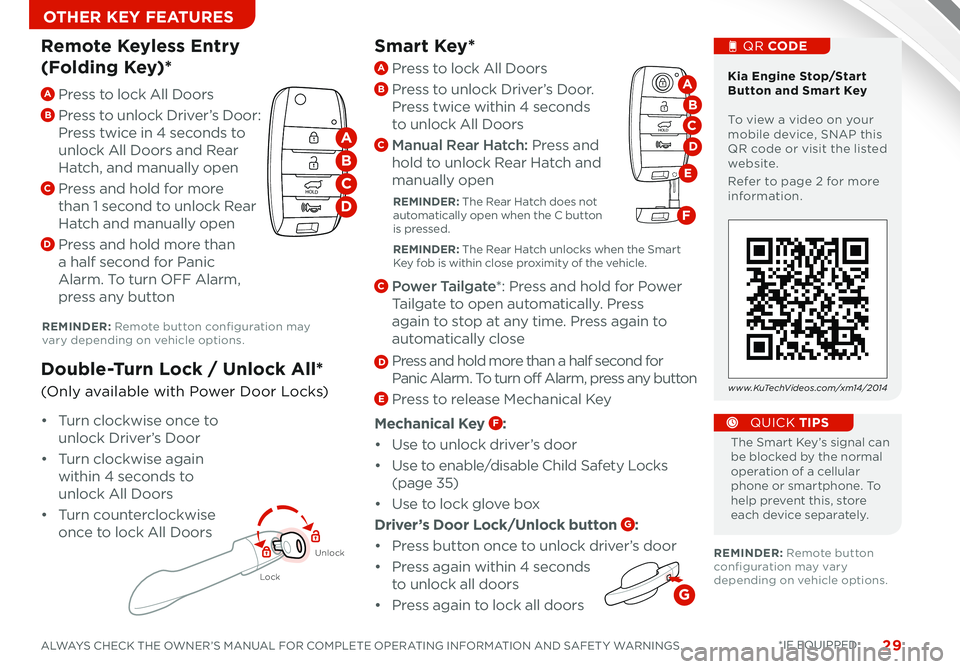
Smart Key*
The Smart Key’s signal can be blocked by the normal operation of a cellular phone or smartphone To help prevent this, store each device separately
QUICK TIPS
REMINDER: Remote button configuration may vary depending on vehicle options
REMINDER: Remote button configuration may vary depending on vehicle options
A Press to lock All Doors
B
Press to unlock Driver’s Door:
Press twice in 4 seconds to
unlock All Doors and Rear
Hatch, and manually open
C Press and hold for more
than 1 second to unlock Rear
Hatch and manually open
D Press and hold more than
a half second for Panic
Alarm To turn OFF Alarm,
press any button
Remote Keyless Entry
(Folding Key)*
Lock
Unlock
• Turn clockwise once to
unlock Driver’s Door
• Turn clockwise again
within 4 seconds to
unlock All Doors
• Turn counterclockwise
once to lock All Doors
Double-Turn Lock / Unlock All*
(Only available with Power Door Locks)
Kia Engine Stop/Start Button and Smart Key To view a video on your mobile device, SNAP this QR code or visit the listed website
Refer to page 2 for more information
QR CODE
www.KuTechVideos.com/xm14/2014
HOLD
HOLD
A
B
C
D
A Press to lock All Doors
B Press to unlock Driver’s Door
Press twice within 4 seconds
to unlock All Doors
C Manual Rear Hatch: Press and
hold to unlock Rear Hatch and
manually open
REMINDER: The Rear Hatch does not automatically open when the C button is pressed
REMINDER: The Rear Hatch unlocks when the Smart Key fob is within close proximity of the vehicle
C Power Tailgate*: Press and hold for Power
Tailgate to open automatically Press
again to stop at any time Press again to
automatically close
D Press and hold more than a half second for
Panic Alarm To turn off Alarm, press any button
E Press to release Mechanical Key
Mechanical Key F:
• Use to unlock driver’s door
• Use to enable/disable Child Safety Locks
(page 35)
• Use to lock glove box
Driver’s Door Lock/Unlock button G:
• Press button once to unlock driver’s door
• Press again within 4 seconds
to unlock all doors
•
Press again to lock all doors
HOLD
HOLD
D
A
B
E
C
F
G
Page 33 of 42
31ALWAYS CHECK THE OWNER’S MANUAL FOR COMPLETE OPERATING INFORMATION AND SAFET Y WARNINGS *IF EQUIPPED
OTHER KEY FEATURES
CLICK!
Fuel Cap/Malfunction
Indicator (Check
Engine Light)
Tighten for ONE
CLICK to prevent
Malfunction
Indicator
from illuminating
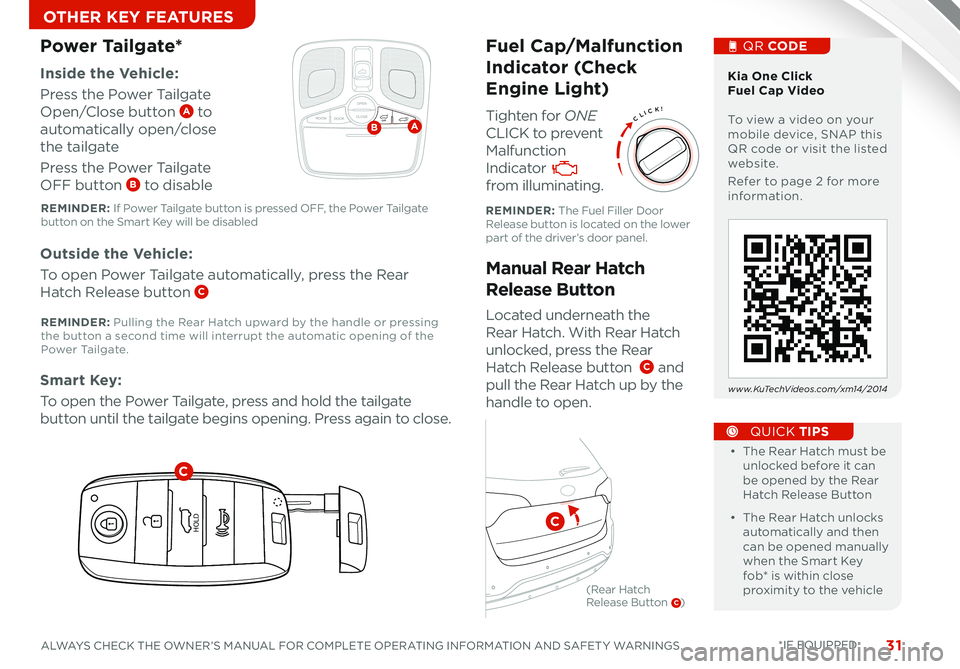
Located underneath the
Rear Hatch With Rear Hatch
unlocked, press the Rear
Hatch Release button C and
pull the Rear Hatch up by the
handle to open
Inside the Vehicle:
Press the Power Tailgate
Open/Close button A to
automatically open/close
the tailgate
Press the Power Tailgate
OFF button B to disable
Manual Rear Hatch
Release Button
Power Tailgate*
Outside the Vehicle:
To open Power Tailgate automatically, press the Rear
Hatch Release button C
Smart Key:
To open the Power Tailgate, press and hold the tailgate
button until the tailgate begins opening Press again to close •
• The Rear Hatch must be unlocked before it can be opened by the Rear Hatch Release Button
• The Rear Hatch unlocks automatically and then can be opened manually when the Smart Key fob* is within close proximity to the vehicle
QUICK TIPS
Kia One Click Fuel Cap Video To view a video on your mobile device, SNAP this QR code or visit the listed website
Refer to page 2 for more information
QR CODE
www.KuTechVideos.com/xm14/2014
How to Sync Transmitter with HomeLink®*
REMINDER: The Fuel Filler Door Release button is located on the lower part of the driver’s door panel
REMINDER: If Power Tailgate button is pressed OFF, the Power Tailgate button on the Smart Key will be disabled
REMINDER: Pulling the Rear Hatch upward by the handle or pressing the button a second time will interrupt the automatic opening of the Power Ta i l g a t e
OPEN
CLOSEROOM DOOROFFAB
HOLD
HOLD
C
C
(Rear Hatch Release Button C)
Page 34 of 42
SORENTO FEATURES & FUNCTIONS GUIDE32*IF EQUIPPED
OTHER KEY FEATURES
OPEN
CLOSE
ROOM DOOROFF
OPEN
CLOSE
ROOM DOOROFF
OPEN
CLOSE
DOOR ON
OPEN
CLOSE
ROOM DOOROFF
OPEN
CLOSE
ROOM DOOROFF
OPEN
CLOSE
DOOR ON
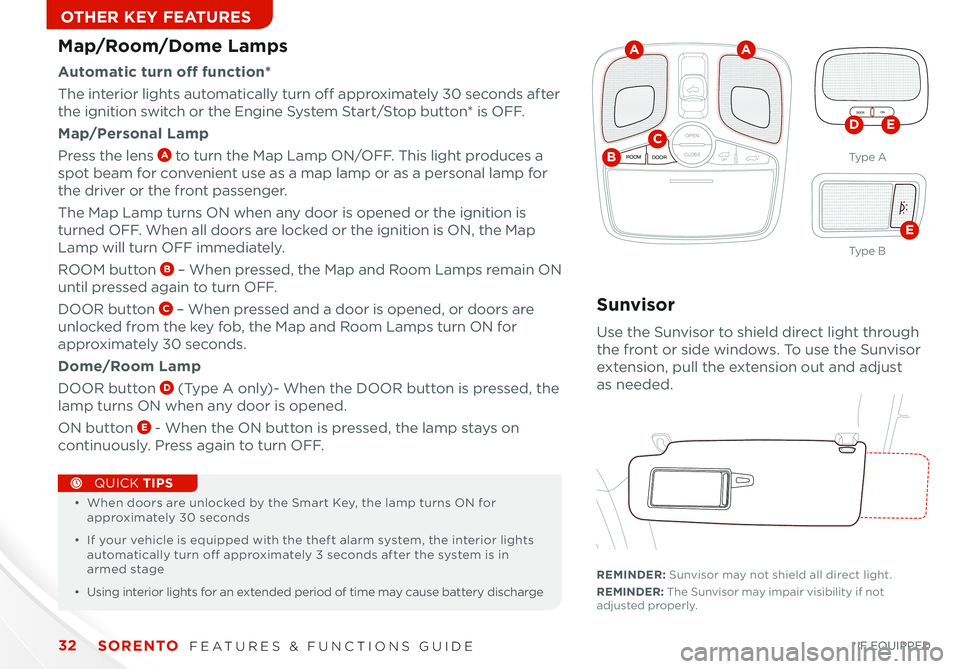
Map/Room/Dome Lamps
Automatic turn off function*
The interior lights automatically turn off approximately 30 seconds after
the ignition switch or the Engine System Start/Stop button* is OFF
Map/Personal Lamp
Press the lens A to turn the Map Lamp ON/OFF This light produces a
spot beam for convenient use as a map lamp or as a personal lamp for
the driver or the front passenger
The Map Lamp turns ON when any door is opened or the ignition is
turned OFF When all doors are locked or the ignition is ON, the Map
Lamp will turn OFF immediately
ROOM button B – When pressed, the Map and Room Lamps remain ON
until pressed again to turn OFF
DOOR button C – When pressed and a door is opened, or doors are
unlocked from the key fob, the Map and Room Lamps turn ON for
approximately 30 seconds
Dome/Room Lamp
DOOR button D (Type A only)- When the DOOR button is pressed, the
lamp turns ON when any door is opened
ON button E - When the ON button is pressed, the lamp stays on
continuously Press again to turn OFF
•
• When doors are unlocked by the Smart Key, the lamp turns ON for approximately 30 seconds
• If your vehicle is equipped with the theft alarm system, the interior lights automatically turn off approximately 3 seconds after the system is in armed stage
• Using interior lights for an extended period of time may cause battery discharge
QUICK TIPS
A
B
CDE
E
A
Sunvisor
Use the Sunvisor to shield direct light through
the front or side windows To use the Sunvisor
extension, pull the extension out and adjust
as needed
REMINDER: Sunvisor may not shield all direct light
REMINDER: The Sunvisor may impair visibility if not adjusted properly
Ty p e A
Ty p e B
Page 37 of 42

35ALWAYS CHECK THE OWNER’S MANUAL FOR COMPLETE OPERATING INFORMATION AND SAFET Y WARNINGS *IF EQUIPPED
SAFETY
Child Safety Locks
Located on the rear edge of the rear
passenger doors, push the Child Safety
Lock to the lock position to disable the
inner door handles from opening the
rear doors
Please refer to your Owner’s Manual and the separate brochure titled “ Understanding Your Safety Belt & Supplemental Restraint System” for more detailed information regarding your vehicle’s air bags.PASSENGER
AIR BAG
Kia Occupant Detection System Video To view a video on your mobile device, SNAP this QR code or visit the listed website
Refer to page 2 for more information
QR CODE
www.KuTechVideos.com/xm14/2014
ODS detects the presence of the front passenger
Depending on the situation and type of accident, the system may:
• Deploy air bag (Adult)
• Not deploy the airbag (Unoccupied)
If the system determines that the air bag should not be deployed, the “PASSENGER AIR BAG
OFF” light will illuminate
Occupant Detection System (ODS)/
PASSENGER AIR BAG OFF Indicator
REMINDER: Child Safety Lock is located on rear passenger’s door jamb
Page 38 of 42

SORENTO FEATURES & FUNCTIONS GUIDE36*IF EQUIPPED
SAFETY
PRESS
Safety Belts
To properly fasten your safety belts:
1
Insert the tongue belt plate A into the buckle B until it clicks
2
Position the lap portion of the belt across your lap
as LOW ON THE HIPS as possible C Adjust the
belt to a SNUG FIT by pulling up on the shoulder
portion D
Safety Belt Retractor Inertial Locks
•
Inertial locks allow lap/shoulder safety belts to remain
unlocked during normal vehicle operation, for freedom of
movement and increased comfort
•
During a STRONG STOP, SUDDEN TURN OR CERTAIN
COLLISIONS, safety belt retractors will automatically lock
the belts
D
C
A
B
For more detailed information regarding your vehicle’s safety belts, please refer to your Owner’s Manual and the separate brochure titled “ Understanding Your Safety Belt & Supplemental Restraint System.”The Safety Belt warning chime operates for driver’s seat only
QUICK TIPS
REMINDER: For maximum protection, always wear your seat belt
Page 41 of 42

A/C
A /CR EA R
0 1
2
3
4
A/C
A /C
O
FFM O
DE D
UALREA R
AUTOP
U SH P
U SH
FR O NT
REA R
AUTO
A UTOD UAL
KEY FEATURE WALKTHROUGHBEFORE DELIVERYOwner’s Name:
_________________________________
VIN:
________________________
Mileage:
________________
Dealership Name:
_______________________________
Sales Consultant:
___________
Date:
___________________
Confirm “Good Battery” with Kia GR8-1299 battery tester Verify all tire pressures are to spec (see driver’s door label)
LF_______
LR_______
RF_______
RR_______
Verify proper operation of Remote Keyless Entry and Smart Key* lock/unlock Ensure floormats are snapped into place (if applicable) Verify vehicle is clean (interior and exterior), in good condition, free of chips and scratches Ensure all key documents are in the vehicle (Owner’s Manual, Warranty and Consumer Information booklet, Tire Warranty booklet, Features & Functions Guide and any supplemental audio user’s guides) Air Conditioning / Climate Control -
pages 22-23
- Demonstrate Air Flow Modes, Defog and Defrosting Windshield
Fan Speed
Windshield/Rear Wipers & Washers* -
p a g e 11
*IF EQUIPPED
Front Active Headrests -
page 28
Moves for ward in the event of certain impact collisions to help protect the driver’s and front passen
-
ger’s heads from moving backward, thus helping to minimize neck injuries. Front Seat Headrest Adjustment
- page 28
SORENTO
CUSTOMER DELIVERY CHECKLIST
3rd Row Air Conditioning Control*
A /C
A /CR EA R
0 1
2
3
4
A/C
A /C
O
FFM O
DE D
UALREA R
AUTOP
U SH P
U SH
FR O NT
REA R
AUTO
A UTOD UAL
OFF
Automatic*
Manual*
Move lever Up/Down to Change Wiper modesPush to spray and wipe.
Rotate Rear Wiper switch to change Wiper modes.M I S T:
Single wipe
ON:
Normal Wipe
FasterSlower
I N T:
Intermittent wipe
LO: Slow wipeHI: Fast wipeOFF:
Wiper off
Page 42 of 42
Tire Pressure Monitoring System (TPMS) – page 5 Engine Star t/Stop But ton* – page 8 Digital Clock – page 21 Seat Warmers/ Ventilators* – page 25 Folding 2
nd & 3
rd Row Seats* – page 27
Front Active Headrests – page 28 Smar t Key* – page 29 HomeLink
® with Auto-Dimming Rear view Mirror* – page 30
Sunvisor – page 32 Sunroof Operation* – page 33 Roof Rack* – page 33 Rear-Camera Display* – page 34 Backup Warning System* – page 34 PASSENGER AIR BAG OFF Indicator - page 35Demonstrate the following with the customer
DURING DELIVERY
*if equipped
E xplain first ser vice process and schedule first ser vice appointment Tour Par ts & Ser vice depar tments, introduce staff and explain value of Kia Par ts and Ser vice Review recommended maintenance schedule and maintenance requirements to validate warrant y Review business hours and Customer 360° Care Review the Kia 10-year/100,000-mile warrant y program Ensure 100% satisfaction with sales and deliver y process and no problems with the vehicle Confirm time and best contact number for initial dealer follow-up Standard Audio System
Overview/Operation*
– p a g e s 16 -18
Sales Consultant:
___________________________________________________
Date:
_________________
Sales Manager:
_____________________________________________________
Date:
_________________
Customer:
__________________________________________________________
Date:
_________________
Cruise Control
– page 14
Demonstrate operation
SCAN
SETUP
MENU
MEDIA
RADIO
PHONE
VOL
POWER
PUSH
DISP
SEEK
TRACK1 2 3
4 5 6
TUNE
FILE
ENTER
RPT RDM
CAT
FOLDER
VOL
POWERPUSH
TUNE
FILE
MEDIA
FM/AM
PHONE SAT
SEEK
TRACK MAP
VOICE DEST
ROUTE
CD-IN
Loading...Smart ITself
CANCEL CRUISE
RES
SET
VOLVOLMUTE
MODE
CANCELCRUISE
RES
SET
VOLVOLMUTE
MODE
CANCELCRUISE
RES
SET
VOLVOLMUTE
MODE
Navigation System*
– page 20
For further navigation system operation, refer to the K ia U VO/ Digi tal Navigation System Owner’s Manual.
SCAN
SETUP
MENU
MEDIA
RADIO
PHONE
VOL
POWER
PUSH
DISP
SEEK
TRACK 1
2 3
4 5 6
TUNE
FILE
ENTER
RPT RDM
CAT
FOLDER
SETUP
eServices
MEDIA SAT
FM/AM
PHONE
VOL
POWER
PUSH
DISPTUNE
FILE
ENTER
SEEK
TRACK CATEGORY
VOL
POWERPUSH
TUNE
FILE
MEDIA
FM/AM
PHONE SAT
SEEK
TRACK MAP
VOICE DEST
ROUTE
CD-IN
Loading...Smart ITself
SCAN
SETUP
MENU
MEDIA
RADIO
PHONE
VOL
POWER
PUSH
DISP
SEEK
TRACK 1
2 3
4 5 6
TUNE
FILE
ENTER
RPT RDM
CAT
FOLDER
SETUP
eServices
MEDIA SAT
FM/AM
PHONE
VOL
POWER
PUSH
DISPTUNE
FILE
ENTER
SEEK
TRACK CATEGORY
VOL
POWERPUSH
TUNE
FILE
MEDIA
FM/AM
PHONE SAT
SEEK
TRACK MAP
VOICE DEST
ROUTE
CD-IN
Loading...Smart ITself
AUX/USB/iPod
® Port
– page 21
The iPod
® connector cable provided wi th
your iPod
® uni t is used to normally suppor t
operation of an iPod
®, detecting the device
and recharging the bat ter y wi th the U VO system
12VMAX
120W
12VMAX
120W
AUX USB
CANCELCRUISERES
SET
VOLVOLMUTE
MODE
CANCELCRUISERES
SET
VOLVOLMUTE
MODE
CANCELCRUISERES
SET
VOLVOLMUTEMODE
Bluetooth
® W ireless
Technology
– p a g e s 12-13
Demonstrate operation
KEY FEATURE WALKTHROUGH
UVO System*
– p ages 19
F or fur ther U VO S ys tem information,
refer to the K ia U VO S ys tem User ’s Manual.
SORENTO
CUSTOMER DELIVERY CHECKLIST