Ac system KIA SORENTO 2015 Navigation System Quick Reference Guide
[x] Cancel search | Manufacturer: KIA, Model Year: 2015, Model line: SORENTO, Model: KIA SORENTO 2015Pages: 77, PDF Size: 6.92 MB
Page 1 of 77
CAR MULTIMEDIA SYSTEM
QUICK REFERENCE GUIDE
1UEND12
Page 2 of 77
LOOKING FOR MORE INFORMATION?
This Quick Reference Guide does not replace your System
Owner's Manual.
If you require additional information or are unsure of a specific
issue, refer to the System User's Manual for additional information.
iPod®
iPod® is a registered trademark of Apple Inc.
Bluetooth® Wireless Technology
The Bluetooth® Wireless Technology word mark and logos are registered
trademarks owned by
Bluetooth® Wireless Technology SIG, Inc. and any
use of such marks by Kia is under license.
A
Bluetooth® Wireless Technology enabled cell phone is required to use
Bluetooth® Wireless Technology.
HD Radio™ Technology
HD Radio Technology manufactured under license from iBiquity Digital
Corporation. U.S. and Foreign Patents.
HD Radio™ and the HD, HD Radio, and “Arc” logos are proprietary trade -
marks of iBiquity Digital Corp.
All Map Database cannot be copied without permission.
Important Notice: This is protected by U.S. copyright laws. All rights n\
ot expressly
granted are reserved.
You may not otherwise reproduce, modify and distribute the content without HYUNDAI
MnSoft, Inc's prior written consent.
• SiriusXM service requires a subscription, sold separately, after 3-month\
trial
included with vehicle purchase. If you decide to continue your SiriusXM\
ser -
vice at the end of your trial subscription, the plan you choose will automatically
renew and bill at then-current rates until you call Sirius XM at 1-866-6\
35-2349 to
cancel. See our Customer Agreement for complete terms at www.siriusxm.co\
m.
Programming subject to change. Sirius satellite service is available onl\
y to those
at least 18 and older in the 48 contiguous USA, D.C., and PR (with cove\
rage
limitations). Traffic information not available in all markets. See sir\
iusxm.com/traf -
fic for details. Sirius, XM and all related marks and logos are trademarks of Sirius
XM Radio Inc.
WARNING
• Driving while distracted can result in a loss of vehicle control that ma\
y lead to an
accident, severe personal injury, and death. The driver’s primary responsibility
is in the safe and legal operation of a vehicle, and use of any handheld\
devices,
other equipment, or vehicle systems which take the driver’s eyes, attention and
focus away from the safe operation of a vehicle or which are not permissible by
law should never be used during operation of the vehicle.”
• Infinity is a trademark of Harman International Industries, Inc.
• UVO eServices is compatible with many popular smartphone devices. Please
see MyUVO.com for phone compatibility.
• App Store and Google Play are service marks of Apple Inc. and Google Inc\
.
respectively. No charge for the UVO eServices App. App runs on your smart -
phone cellular data service. Normal data rates will apply.
• HD Radio and the HD Radio logo are proprietary trademarks of iBiquity Digital
Corporation.
• 24-hour Roadside Assistance is a service plan provided by Kia Motors America,
Inc. Certain limitations apply. Coverage details are available in the Kia Warranty
and Consumer Information Manual. For access to Enhanced Roadside
Assistance, a connected mobile phone via Bluetooth within the cellular service
coverage area is required.
• Vehicle Diagnostics do not take the place of regularly scheduled mainten\
ance.
Feature checks powertrain, chassis, and airbag systems only. For factory\
-recom -
mended maintenance schedule, see the Maintenance Feature of UVO eService\
s
or the Owner’s Manual.
• 911 Connect activates after an airbag deployment. Feature requires a con\
nected
mobile phone via Bluetooth. Dependant on cellular service coverage.
• The rear-camera display is not a substitute for proper and safe backing-up proce -
dures. The rear-camera display may not display every object behind the v\
ehicle.
Always drive safely and use caution when backing up.
Page 3 of 77
LOOKING FOR MORE INFORMATION?
This Quick Reference Guide does not replace your System
Owner's Manual.
If you require additional information or are unsure of a specific
issue, refer to the System User's Manual for additional information.
iPod®
iPod® is a registered trademark of Apple Inc.
Bluetooth® Wireless Technology
The Bluetooth® Wireless Technology word mark and logos are registered
trademarks owned by
Bluetooth® Wireless Technology SIG, Inc. and any
use of such marks by Kia is under license.
A
Bluetooth® Wireless Technology enabled cell phone is required to use
Bluetooth® Wireless Technology.
HD Radio™ Technology
HD Radio Technology manufactured under license from iBiquity Digital
Corporation. U.S. and Foreign Patents.
HD Radio™ and the HD, HD Radio, and “Arc” logos are proprietary trade -
marks of iBiquity Digital Corp.
All Map Database cannot be copied without permission.
Important Notice: This is protected by U.S. copyright laws. All rights n\
ot expressly
granted are reserved.
You may not otherwise reproduce, modify and distribute the content without HYUNDAI
MnSoft, Inc's prior written consent.
• SiriusXM service requires a subscription, sold separately, after 3-month\
trial
included with vehicle purchase. If you decide to continue your SiriusXM\
ser -
vice at the end of your trial subscription, the plan you choose will automatically
renew and bill at then-current rates until you call Sirius XM at 1-866-6\
35-2349 to
cancel. See our Customer Agreement for complete terms at www.siriusxm.co\
m.
Programming subject to change. Sirius satellite service is available onl\
y to those
at least 18 and older in the 48 contiguous USA, D.C., and PR (with cove\
rage
limitations). Traffic information not available in all markets. See sir\
iusxm.com/traf -
fic for details. Sirius, XM and all related marks and logos are trademarks of Sirius
XM Radio Inc.
WARNING
• Driving while distracted can result in a loss of vehicle control that ma\
y lead to an
accident, severe personal injury, and death. The driver’s primary responsibility
is in the safe and legal operation of a vehicle, and use of any handheld\
devices,
other equipment, or vehicle systems which take the driver’s eyes, attention and
focus away from the safe operation of a vehicle or which are not permissible by
law should never be used during operation of the vehicle.”
• Infinity is a trademark of Harman International Industries, Inc.
• UVO eServices is compatible with many popular smartphone devices. Please
see MyUVO.com for phone compatibility.
• App Store and Google Play are service marks of Apple Inc. and Google Inc\
.
respectively. No charge for the UVO eServices App. App runs on your smart -
phone cellular data service. Normal data rates will apply.
• HD Radio and the HD Radio logo are proprietary trademarks of iBiquity Digital
Corporation.
• 24-hour Roadside Assistance is a service plan provided by Kia Motors America,
Inc. Certain limitations apply. Coverage details are available in the Kia Warranty
and Consumer Information Manual. For access to Enhanced Roadside
Assistance, a connected mobile phone via Bluetooth within the cellular service
coverage area is required.
• Vehicle Diagnostics do not take the place of regularly scheduled mainten\
ance.
Feature checks powertrain, chassis, and airbag systems only. For factory\
-recom -
mended maintenance schedule, see the Maintenance Feature of UVO eService\
s
or the Owner’s Manual.
• 911 Connect activates after an airbag deployment. Feature requires a con\
nected
mobile phone via Bluetooth. Dependant on cellular service coverage.
• The rear-camera display is not a substitute for proper and safe backing-up proce -
dures. The rear-camera display may not display every object behind the v\
ehicle.
Always drive safely and use caution when backing up.
Page 6 of 77
3
9
10
12
14
8
11
6
13
Controls and Functions
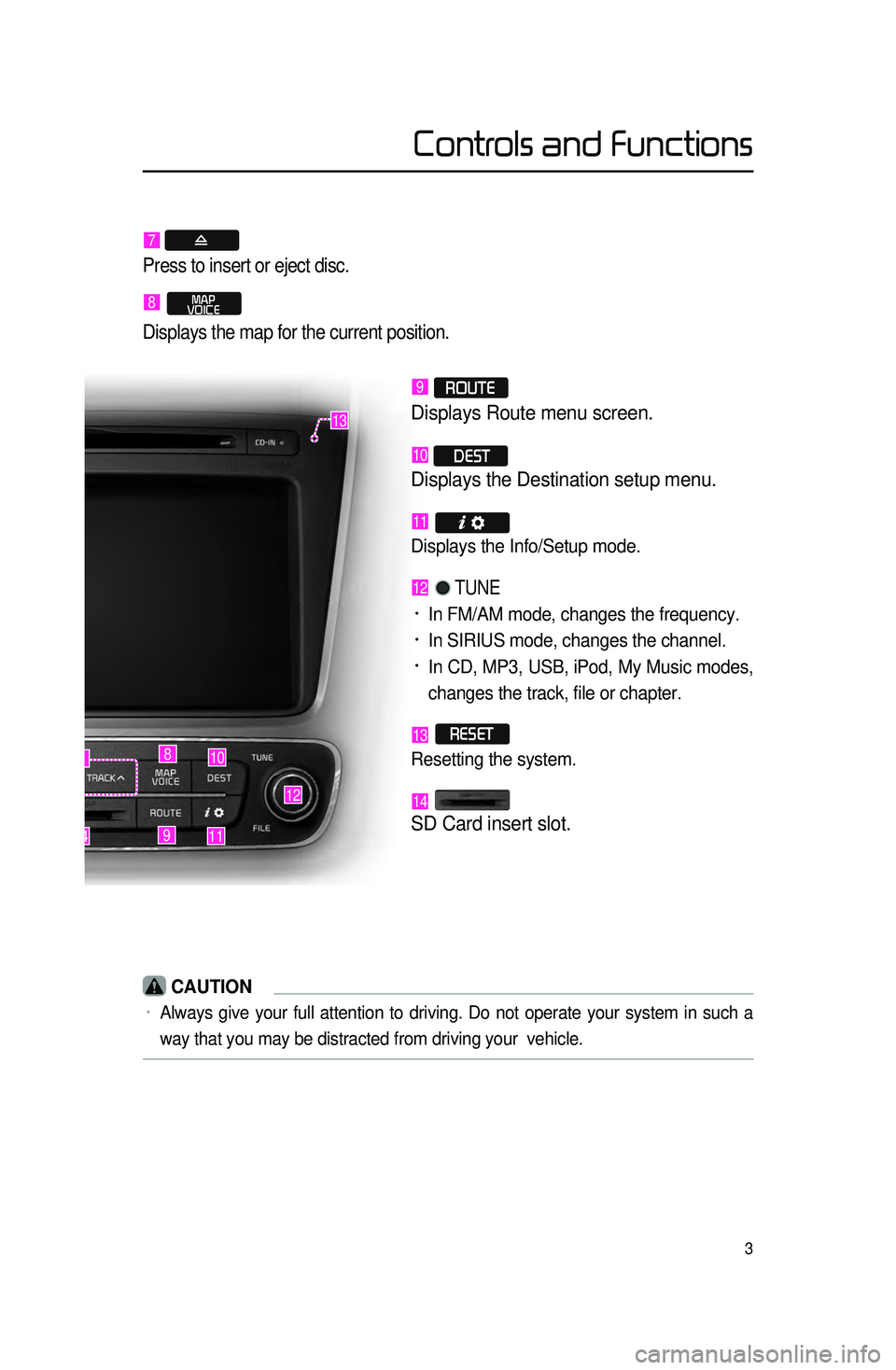
7
Press to insert or eject disc.
8 MAP
VOICE
Displays the map for the current position.
9 ROUTE
Displays Route menu screen.
10 DEST
Displays the Destination setup menu.
11
Displays the Info/Setup mode.
12 TUNE
• In FM/AM mode, changes the frequency.
• In SIRIUS mode, changes the channel.
• In CD, MP3, USB, iPod, My Music modes,
changes the track, file or chapter.
13 RESET
Resetting the system.
14
SD Card insert slot.
CAUTION
• Always give your full attention to driving. Do not operate your system i\
n such a
way that you may be distracted from driving your vehicle.
Page 7 of 77
4
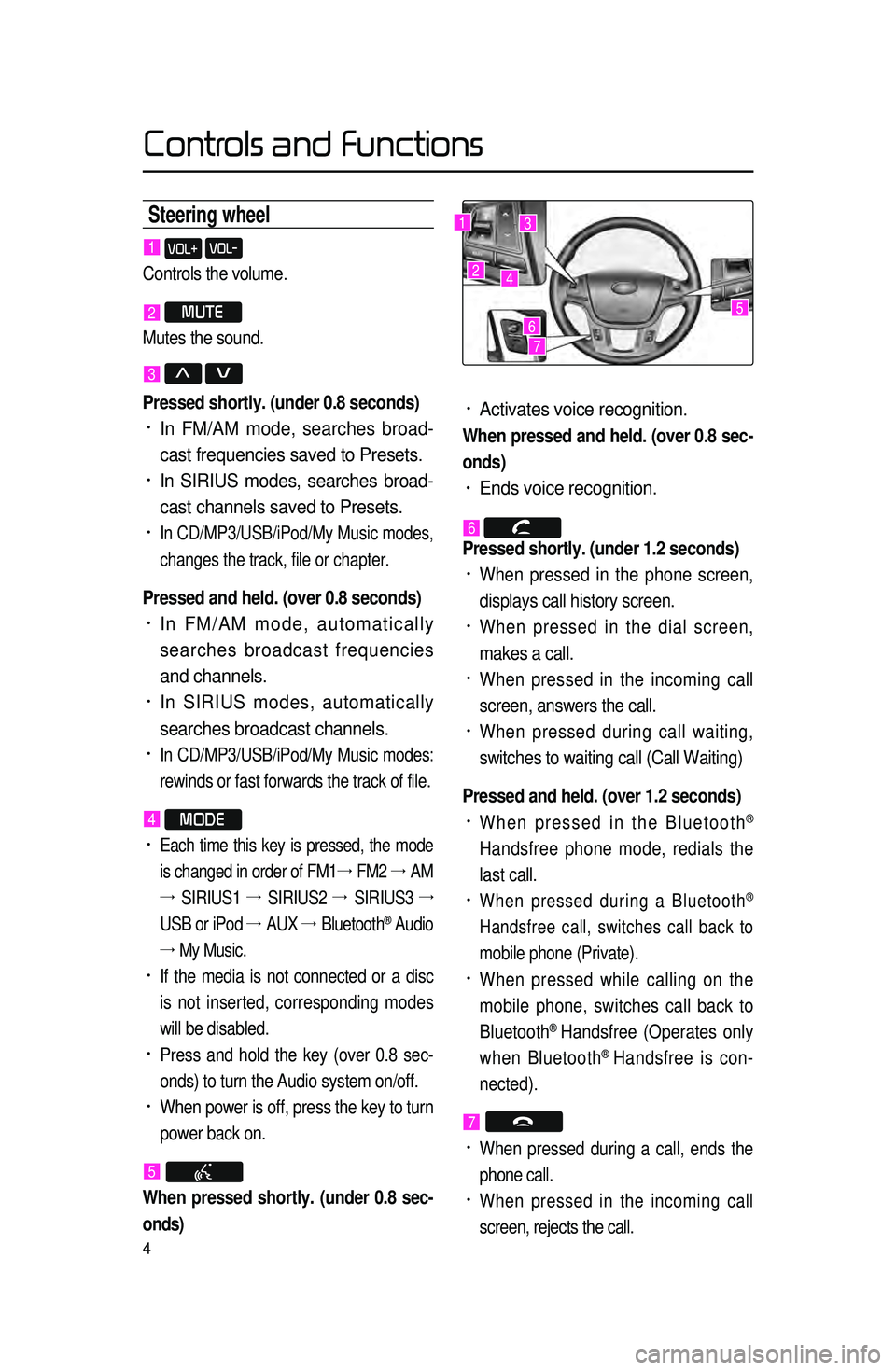
Steering wheel
• Activates voice recognition.
When pressed and held. (over 0.8 sec-
onds)
• Ends voice recognition.
6 Pressed shortly. (under 1.2 seconds)
• When pressed in the phone screen,
displays call history screen.
• When pressed in the dial screen,
makes a call.
• When pressed in the incoming call
screen, answers the call.
• When pressed during call waiting,
switches to waiting call (Call Waiting)
Pressed and held. (over 1.2 seconds)
• When pressed in the Bluetooth®
Handsfree phone mode, redials the
last call.
• When pressed during a Bluetooth®
Handsfree call, switches call back to
mobile phone (Private).
• When pressed while calling on the
mobile phone, switches call back to
Bluetooth
® Handsfree (Operates only
when Bluetooth® Handsfree is con-
nected).
7
• When pressed during a call, ends the
phone call.
• When pressed in the incoming call
screen, rejects the call.
1 VOL+ VOL-
Controls the volume.
2 MUTE
Mutes the sound.
3 Λ V
Pressed shortly. (under 0.8 seconds)
• In FM/AM mode, searches broad -
cast frequencies saved to Presets.
• In SIRIUS modes, searches broad -
cast channels saved to Presets.
• In CD/MP3/USB/iPod/My Music modes,
changes the track, file or chapter.
Pressed and held. (over 0.8 seconds)
• In FM/AM mode, automatically
searches broadcast frequencies
and channels.
• In SIRIUS modes, automatically
searches broadcast channels.
• In CD/MP3/USB/iPod/My Music modes:
rewinds or fast forwards the track of file.
4 MODE
• Each time this key is pressed, the mode
is changed in order of FM1 →
FM2 →
AM
→ SIRIUS1 →
SIRIUS2 →
SIRIUS3 →
USB or iPod →
AUX →
Bluetooth
® Audio
→ My Music.
• If the media is not connected or a disc
is not inserted, corresponding modes
will be disabled.
• Press and hold the key (over 0.8 sec -
onds) to turn the Audio system on/off.
• When power is off, press the key to turn
power back on.
5
When pressed shortly. (under 0.8 sec -
onds)
1
2
3
4
567
Controls and Functions
Page 54 of 77
51
Contacts
Downloading Mobile Phone
Contacts
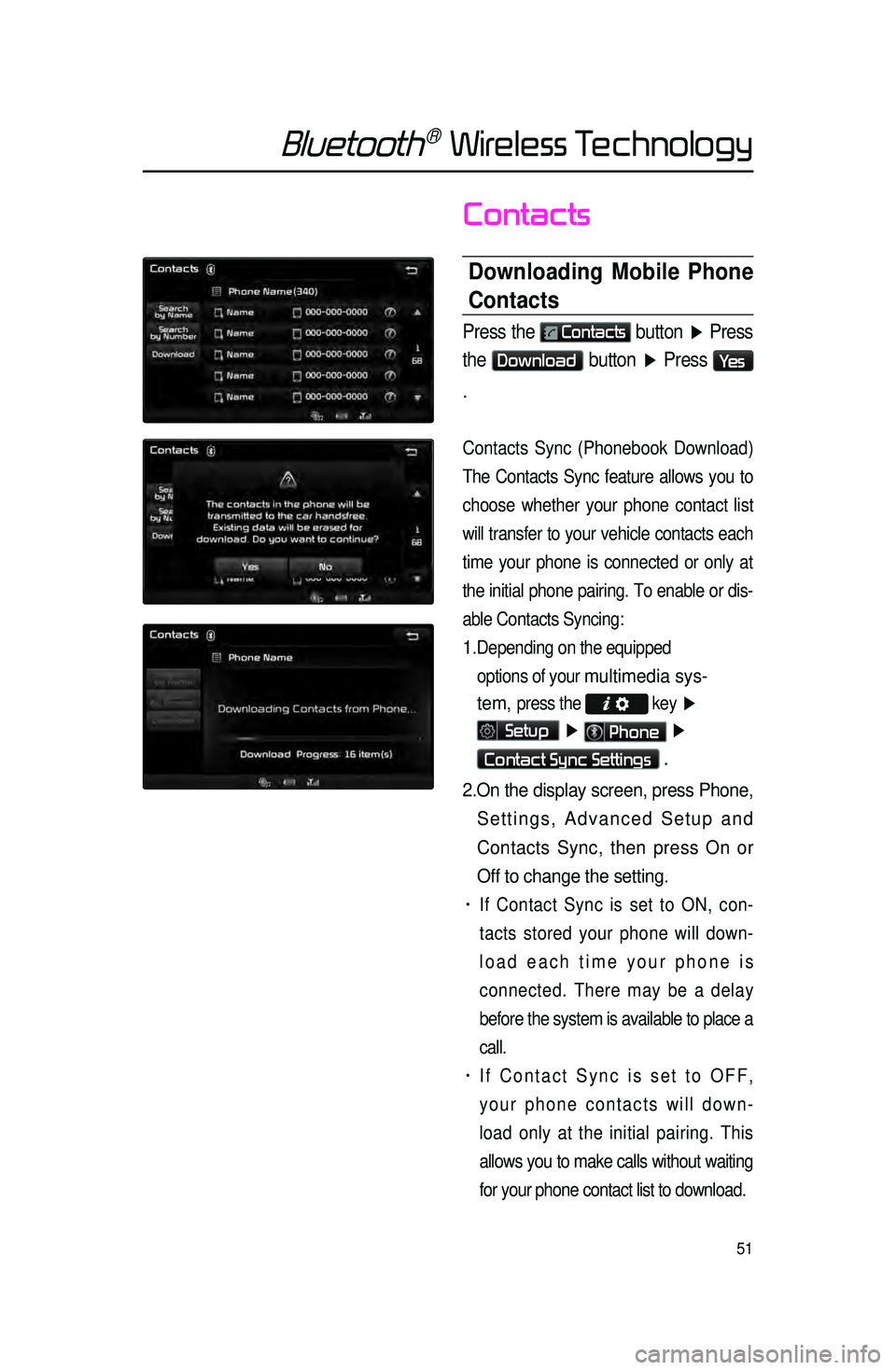
Press the Contacts button ▶ Press
the
Download button ▶ Press Ye s
.
Contacts Sync (Phonebook Download)
The Contacts Sync feature allows you to
choose whet
her your phone contact list
will transfer to your vehicle contacts each
time your phone is connected or only at
the initial phone pairing. To enable or dis -
able Contacts Syncing:
1. Depending on the equipped options of your
multimedia sys-
tem,
press the key ▶
Setup ▶ Phone ▶
Contact Sync Settings .
2. On the display screen, press Phone,
Settings, Advanced Setup and
Contacts Sync, then press On or
Off to change the setting.
• If Contact Sync is set to ON, con -
tacts stored your phone will down -
load each time your phone is
connected. There may be a delay
before the system is available to place a
call.
• If Contact Sync is set to OFF,
your phone contacts will down -
load only at the initial pairing. This
allows you to make calls without waiting
for your phone contact list to download.
Bluetooth® Wireless Technology
Page 62 of 77
59
Starting Voice
Recognition
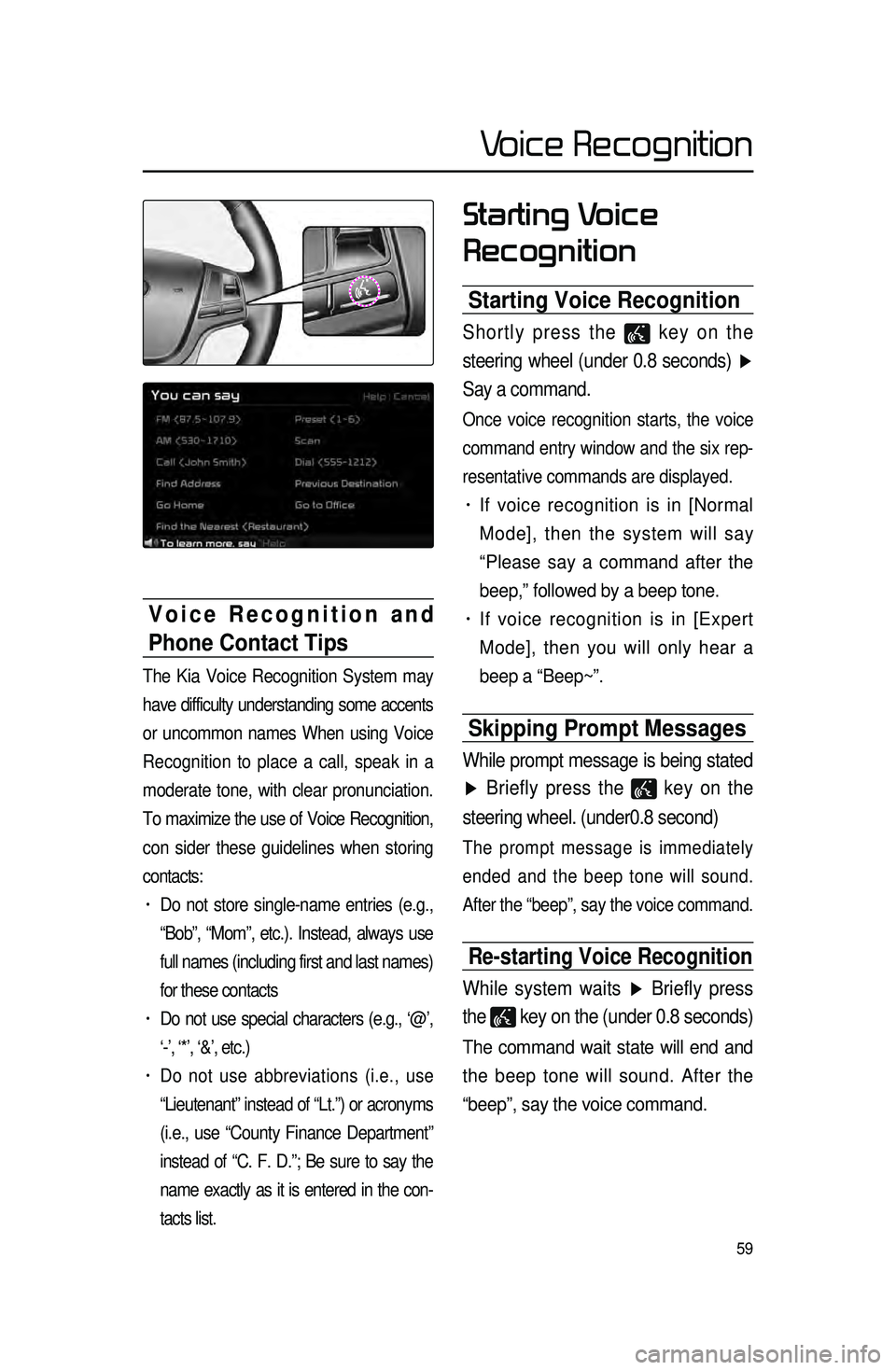
Starting Voice Recognition
Shortly press the key on the
steering wheel (under 0.8 seconds) ▶
Say a command.
Once voice recognition starts, the voice
command entry window and the six rep -
resentative commands are displayed.
• If voice recognition is in [Normal
Mode], then the system will say
“Please say a command after the
beep,” followed by a beep tone.
• If voice recognition is in [Expert
Mode], then you will only hear a
beep a “Beep~”.
Skipping Prompt Messages
While prompt message is being stated
▶ Briefly press the
key on the
steering wheel. (under0.8 second)
The prompt message is immediately
ended and the beep tone will sound.
After the “beep”, say the voice command.
Re-starting Voice Recognition
While system waits ▶ Briefly press
the
key on the (under 0.8 seconds)
The command wait state will end and
the beep tone will sound. After the
“beep”, say the voice command.
Voice Recognition and
Phone Contact Tips
The Kia Voice Recognition System may
have difficulty understanding some accents
or uncommon names When using Voice
Recognition to place a call, speak in a
moderate tone, with clear pronunciation.
To maximize the use of Voice Recognition,
con sider t
hese guidelines when storing
contacts:
• Do not store single-name entries (e.g.,
“Bob”, “Mom”, etc.). Instead, always use
full names (including first and last names)
for these contacts
• Do not use special characters (e.g., ‘@’,
‘-’, ‘*’, ‘&’, etc.)
• Do not use abbreviations (i.e., use
“Lieutenant” instead of “Lt.”) or acronyms
(i.e., use “County Finance Department”
instead of “C. F. D.”; Be sure to say the
name exactly as it is entered in the con -
tacts list.
Voice Recognition
Page 63 of 77

60
Ending Voice
Recognition
While Voice Recognition is operating
▶ Press and hold the
key on the
steering wheel. (over 0.8 seconds)
While using voice recognition, press -
ing a steering wheel remote control or
a different key will end voice recogni -
tion.
Illustration on Using
Voice
Recognition
(Setting Home as the
Destination)
Press the key. (under 0.8 sec -
onds) The system awaits for your
command and display a list of acces -
sible commands on the screen.
Destination
Please say a command after the beep
BEEP
Destination
Please say a command after the beep
Go Home
BEEP
Voice Recognition
Page 64 of 77
 : commands that can be used in all situations.
â€")
61
Voice Command List
Voice commands within this system are categorized into “Common Commands”\
and “Mode Commands.”
• Common Commands () : commands that can be used in all situations.
• Mode Commands () : commands that can be used in specific multimedia/
navigation/Bluetooth
® mode states.
Command Operation
Help Displays the main Help screen
Destination Help Displays the Destination related command list
Map Help Displays the Map related command list
Radio Help Displays the FM/AM radio related command list
SIRIUS Help Displays the SIRIUS radio related command list
Disc Help Displays the DISC mode related command list for the disc
inserted in the CD Player
iPod Help
Displays the iPod related command list
USB HelpDisplays the USB related command list
Phone HelpDisplays the Phone related comand list
UVO eServices
Help(Optional)Display the UVO eServices releated command list
Voice Recognition
Page 65 of 77
62
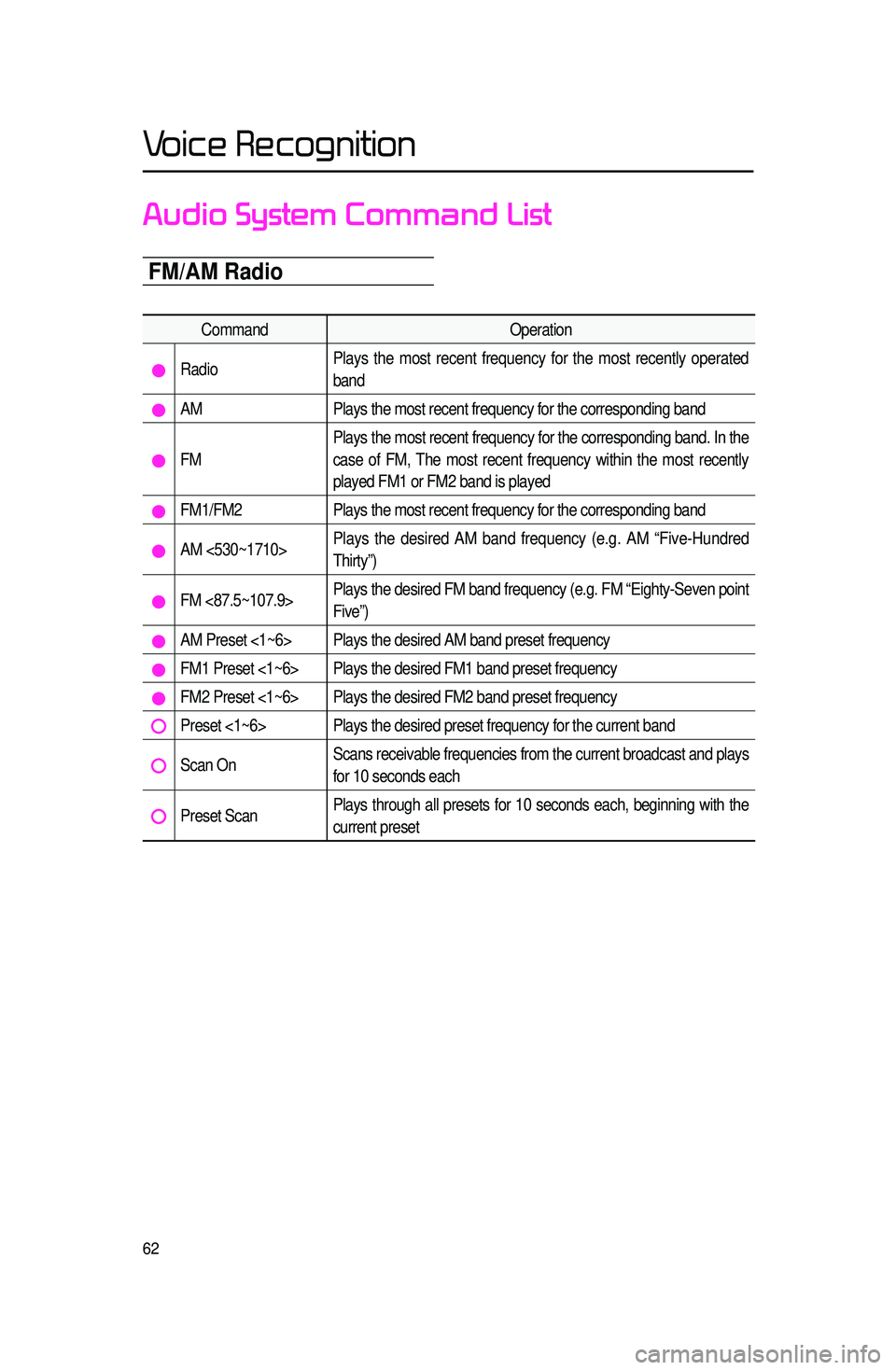
Audio System Command List
FM/AM Radio
CommandOperation
RadioPlays the most recent frequency for the most recently operated
band
AM
Plays the most recent frequency for the corresponding band
FMPlays the most recent frequency for the corresponding band. In the
case of FM, The most recent frequency within the most recently
played FM1 or FM2 band is played
FM1/FM2
Plays the most recent frequency for the corresponding band
AM <530~1710>Plays the desired AM band frequency (e.g. AM “Five-Hundred
Thirty”)
FM <87.5~107.9>Plays the desired FM band frequency (e.g. FM “Eighty-Seven point
Five”)
AM Preset <1~6> Plays the desired AM band preset frequency
FM1 Preset <1~6> Plays the desired FM1 band preset frequency
FM2 Preset <1~6> Plays the desired FM2 band preset frequency
Preset <1~6> Plays the desired preset frequency for the current band
Scan OnScans receivable frequencies from the current broadcast and plays
for 10 seconds each
Preset ScanPlays through all presets for 10 seconds each, beginning with the
current preset
Voice Recognition