warning KIA Sorento 2017 3.G Owner's Manual
[x] Cancel search | Manufacturer: KIA, Model Year: 2017, Model line: Sorento, Model: KIA Sorento 2017 3.GPages: 576, PDF Size: 7.82 MB
Page 357 of 576
Driving your vehicle
44
5
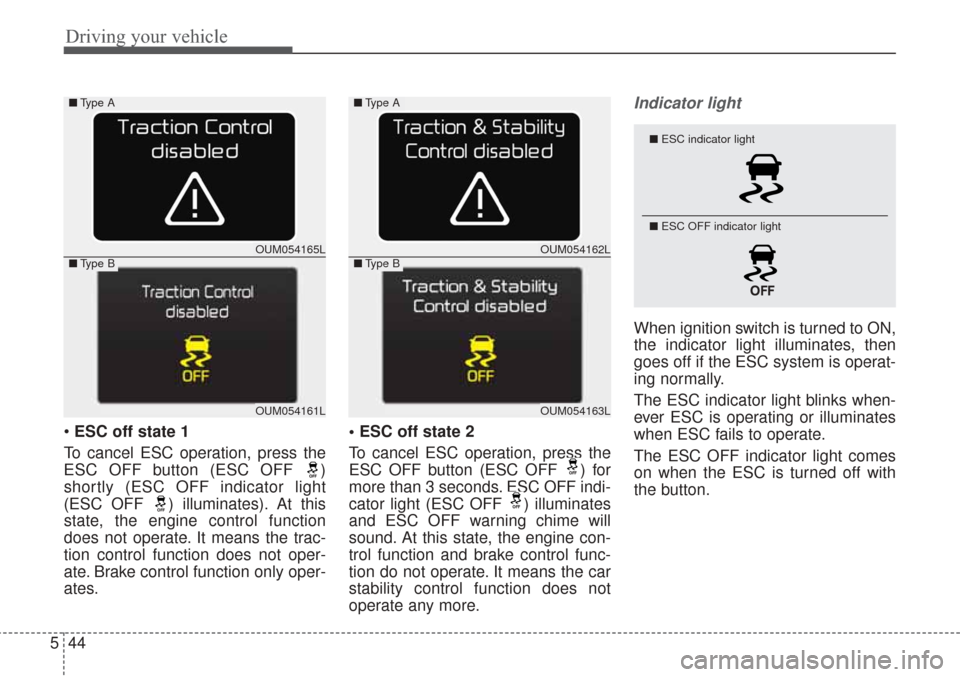
ESC off state 1
To cancel ESC operation, press the
ESC OFF button (ESC OFF )
shortly (ESC OFF indicator light
(ESC OFF ) illuminates). At this
state, the engine control function
does not operate. It means the trac-
tion control function does not oper-
ate. Brake control function only oper-
ates.
To cancel ESC operation, press the
ESC OFF button (ESC OFF ) for
more than 3 seconds. ESC OFF indi-
cator light (ESC OFF ) illuminates
and ESC OFF warning chime will
sound. At this state, the engine con-
trol function and brake control func-
tion do not operate. It means the car
stability control function does not
operate any more.
Indicator light
When ignition switch is turned to ON,
the indicator light illuminates, then
goes off if the ESC system is operat-
ing normally.
The ESC indicator light blinks when-
ever ESC is operating or illuminates
when ESC fails to operate.
The ESC OFF indicator light comes
on when the ESC is turned off with
the button.
OUM054165L
OUM054161L
■
Type A
■Type BOUM054162L
OUM054163L
■Type A
■Type B
■ ESC indicator light
■ ESC OFF indicator light
Page 358 of 576
545
Driving your vehicle
ESC OFF usage
When driving
ESC should be turned on for dailydriving whenever possible.
To turn ESC off while driving, press the ESC OFF button while driving
on a flat road surface.
✽ ✽ NOTICE
• When operating the vehicle on a
dynamometer, ensure that the
ESC is turned off (ESC OFF light
illuminated). If the ESC is left on,
it may prevent the vehicle speed
from increasing, and result in false
diagnosis.
• Turning the ESC off does not affect ABS or brake system opera-
tion.
WARNING- Operating
ESC
Never press the ESC OFF but-
ton while ESC is operating (ESC
indicator light blinks).
If ESC is turned off while ESC is
operating, the vehicle may slip
out of control.
WARNING- Electronic sta- bility control
Drive carefully even though
your vehicle has Electronic
Stability Control. It can only
assist you in maintaining con-
trol under certain circum-
stances.
Page 359 of 576
Driving your vehicle
46
5
Vehicle stability management
(VSM) (if equipped)
This system provides further
enhancements to vehicle stability
and steering responses when a vehi-
cle is driving on a slippery road or a
vehicle detects changes in coeffi-
cient of friction between right wheels
and left wheels when braking.
VSM operation
When the VSM is in operation, ESC
indicator light ( ) blinks.
When the vehicle stability manage-
ment is operating properly, you can
feel a slight pulsation in the vehicle
and/or abnormal steering responses
(EPS). This is only the effect of brake
and EPS control and indicates noth-
ing unusual.
The VSM does not operate when:
Driving on bank road such as gra-
dient or incline
Driving in reverse
ESC OFF indicator light ( ) remains on the instrument cluster
EPS indicator light remains on the instrument cluster
VSM operation off
If you press the ESC OFF button to
turn off the ESC, the VSM will also
cancel and the ESC OFF indicator
light ( ) illuminates.
To turn on the VSM, press the button
again. The ESC OFF indicator light
goes out.
WARNING- Tire/
Wheel size
When replacing tires and
wheels, make sure they are the
same size as the original tires
and wheels installed. Driving
with varying tire or wheel sizes
may diminish any supplemental
safety benefits of the VSM sys-
tem.
Page 360 of 576
547
Driving your vehicle
Malfunction indicator
The VSM can be deactivated even if
you don’t cancel the VSM operation
by pressing the ESC OFF button. It
indicates that a malfunction has
been detected somewhere in the
Electric Power Steering system or
VSM system. If the ESC indicator
light ( ) or EPS warning light
remains on, take your vehicle to an
authorized Kia dealer and have the
system checked.
✽ ✽NOTICE
• The VSM is designed to function
above approximately 22 km/h (13
mph) on curves.
• The VSM is designed to function above approximately 10 km/h (6
mph) when a vehicle is braking on
a split-mu road. The split-mu road
is made of surfaces which have dif-
ferent friction forces.
The Vehicle Stability Management
system is not a substitute for safe
driving practices but a supplemen-
tary function only. It is the respon-
sibility of the driver to always check
the speed and the distance to the
vehicle ahead. Always hold the
steering wheel firmly while driving.
Your vehicle is designed to activate according to the driver’s intention,
even with installed VSM. Always
follow all the normal precautions
for driving at safe speeds for the
conditions – including driving in
clement weather and on a slippery
road.Hill-start assist control (HAC)
A vehicle has the tendency to roll
back on a steep hill when it starts to
go after stopping. The Hill-start
Assist Control (HAC) prevents the
vehicle from rolling back by applying
the brakes automatically for about 2
seconds. The brakes are released
when the accelerator pedal is
depressed or after about 2 seconds.
The HAC is activated only for about 2
seconds, so when the vehicle is
starting off always depress the accel-
erator pedal.
WARNING- Maintaining
Brake Pressure on Incline
HAC does not replace the need
to apply brakes while stopped
on an incline. While stopped,
make sure you maintain brake
pressure sufficient to prevent
your vehicle from rolling back-
ward and causing an accident.
Don’t release the brake pedal
until you are ready to accelerate
forward.
Page 363 of 576
Driving your vehicle
50
5
The AEB system is to reduce or to
avoid accident risk. It recognizes the
distance from the vehicle ahead or
the pedestrian through the sensors
(i.e. radar and camera), and, if nec-
essary, warns the driver of accident
risk with the warning message or the
warning alarms.✽ ✽
NOTICE
Take the following precautions when
using the Autonomous Emergency
Braking (AEB):
• This system is only a supplemental
system and it is not intended to,
nor does it replace the need for
extreme care and attention of the
driver. The sensing range and
objects detectable by the sensors
are limited. Pay attention to the
road conditions at all times.
• NEVER drive too fast in accor- dance with the road conditions or
while cornering.
• Always drive cautiously to prevent unexpected and sudden situations
from occurring. AEB does not stop
the vehicle completely and does
not avoid collisions.
System setting and activation
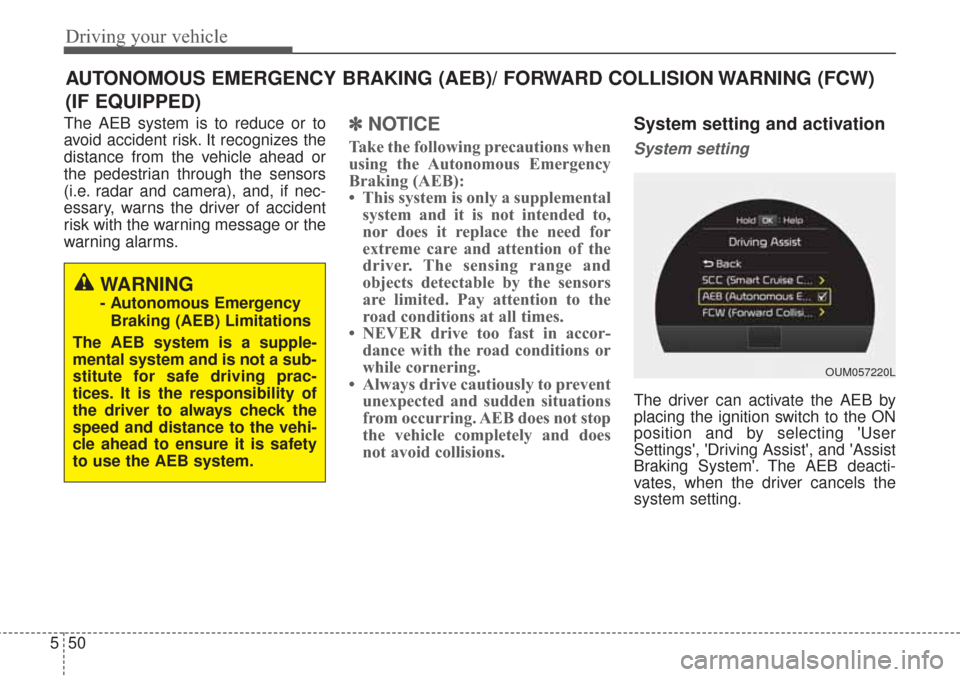
System setting
The driver can activate the AEB by
placing the ignition switch to the ON
position and by selecting 'User
Settings', 'Driving Assist', and 'Assist
Braking System'. The AEB deacti-
vates, when the driver cancels the
system setting.
WARNING
- Autonomous Emergency
Braking (AEB) Limitations
The AEB system is a supple-
mental system and is not a sub-
stitute for safe driving prac-
tices. It is the responsibility of
the driver to always check the
speed and distance to the vehi-
cle ahead to ensure it is safety
to use the AEB system.
AUTONOMOUS EMERGENCY BRAKING (AEB)/ FORWARD COLLISION WARNING (FCW)
(IF EQUIPPED)
OUM057220L
Page 364 of 576
551
Driving your vehicle
The warning light illumi-
nates on the LCD display,
when you cancel the AEB
system. The driver can
monitor the AEB ON/OFF status on
the LCD display. When the warning
light remains ON with the AEB acti-
vated, we recommend you to have
the system checked by an authorized
Kia dealer.
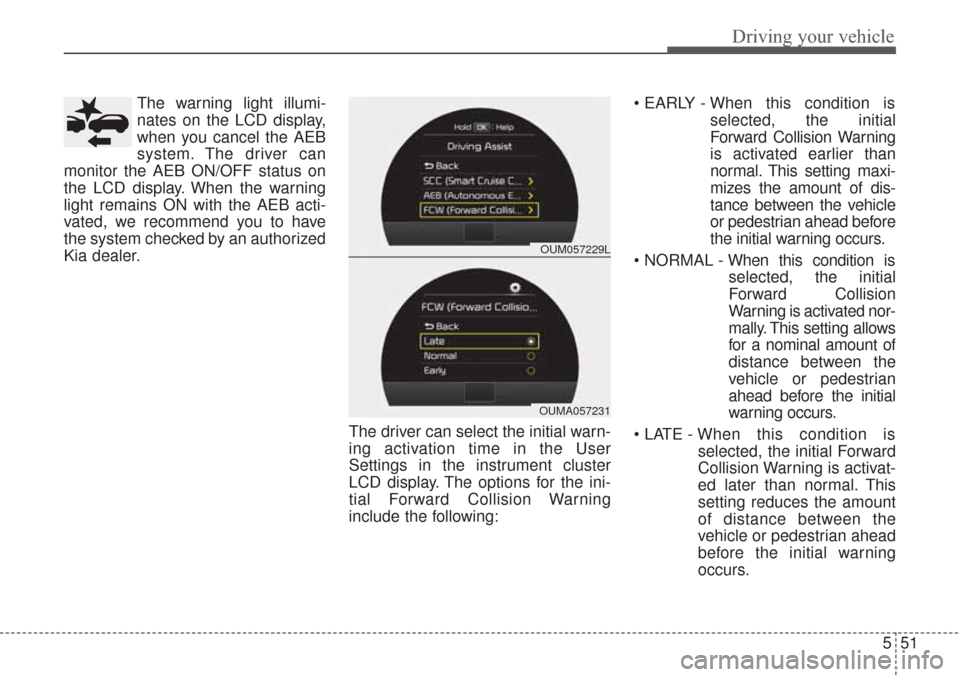
The driver can select the initial warn-
ing activation time in the User
Settings in the instrument cluster
LCD display. The options for the ini-
tial Forward Collision Warning
include the following:
selected, the initial
Forward Collision Warning
is activated earlier than
normal. This setting maxi-
mizes the amount of dis-
tance between the vehicle
or pedestrian ahead before
the initial warning occurs.
selected, the initial
Forward Collision
Warning is activated nor-
mally. This setting allows
for a nominal amount of
distance between the
vehicle or pedestrian
ahead before the initial
warning occurs.
selected, the initial Forward
Collision Warning is activat-
ed later than normal. This
setting reduces the amount
of distance between the
vehicle or pedestrian ahead
before the initial warning
occurs.
OUM057229L
OUMA057231
Page 365 of 576
Driving your vehicle
52
5
Prerequisite for activation
The AEB will activate when the AEB
is selected on the LCD display, and
when the following prerequisites are
satisfied:
- The ESC (Electronic Stability
Control) is activated.
- The driving speed is over 6 mph. (The AEB only works within a cer-
tain range of vehicle speeds)
- When the AEB recognizes a vehi- cle or the pedestrian in front. (The
AEB may not recognize every
obstacle or provide warnings and
braking in every situation, so do
not rely on the AEB to stop the
vehicle in instances where the driv-
er sees an obstacle and has the
ability to apply the brakes) The AEB automatically activates
when you turn the vehicle on.
The driver can deactivate the AEB
by canceling it the system setting on
the LCD display.
Even when the Autonomous Emergency Braking (AEB) may be
set to "Use AEB" setting, if the
Traction Control System (TCS) or
Electronic Stability Control (ESC)
features are deselected, AEB func-
tion will be turned off automatically.
In this case, the AEB feature can-
not be turned on manually as well.
AEB warning message and
system control
Warning text may appear or warning
sound may sound when the vehicle in
front brakes suddenly or the distance
with the vehicle in front is short. Also,
the brake system will control the
brakes depending on the collision
possibility.
Depending on the vehicle condition
and traffic conditions in front of the
vehicle, some warning features may
activate or not activate at all.
WARNING
Set or cancel AEB with control-
ling switches on steering wheel
after stopping the vehicle in the
safe place for your safety.
Do not attempt to set or cancel
the AEB while your vehicle is
moving.
Page 366 of 576
553
Driving your vehicle
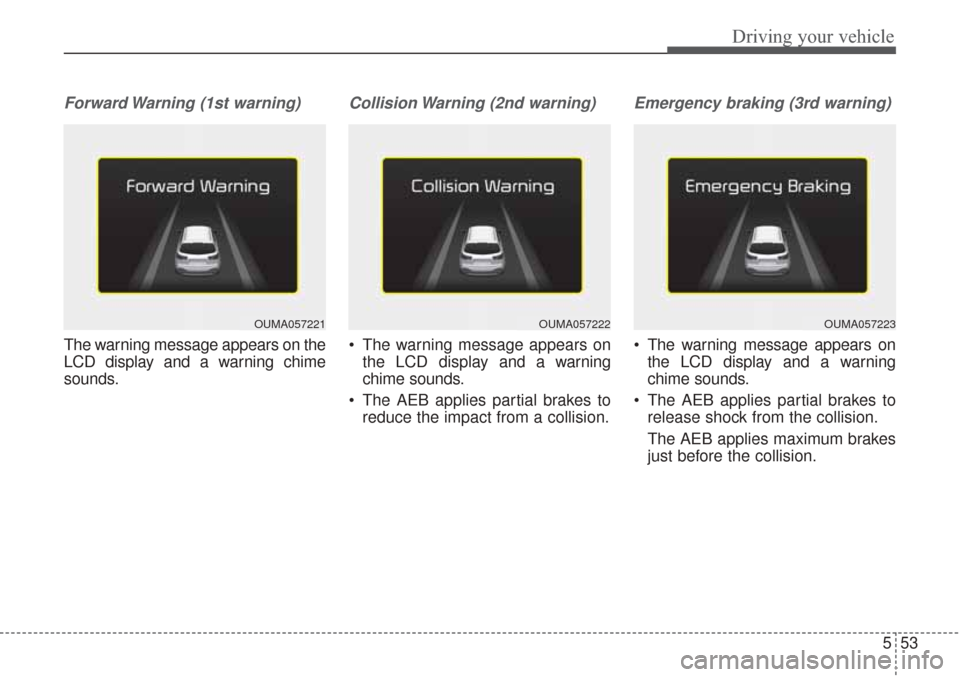
Forward Warning (1st warning)
The warning message appears on the
LCD display and a warning chime
sounds.
Collision Warning (2nd warning)
The warning message appears onthe LCD display and a warning
chime sounds.
The AEB applies partial brakes to reduce the impact from a collision.
Emergency braking (3rd warning)
The warning message appears onthe LCD display and a warning
chime sounds.
The AEB applies partial brakes to release shock from the collision.
The AEB applies maximum brakes
just before the collision.
OUMA057221OUMA057222OUMA057223
Page 367 of 576
Driving your vehicle
54
5
Brake operation
In an urgent situation, the braking
system enters into the ready status
for prompt reaction against the dri-
ver’s depressing the brake pedal.
The AEB provides additional brak- ing power for optimum braking per-
formance, when the driver
depresses the brake pedal.
The braking control is automatical- ly deactivated, when the driver
sharply depresses the brake pedal,
or when the driver abruptly turns
the steering wheel.
The braking control is automatical- ly canceled, when risk factors dis-
appear.
The driver should always exercise
caution when operating the vehicle,
even though there is no warning
message or warning alarm.
✽ ✽ NOTICE
The AEB operates in accordance
with the risk levels, such as the dis-
tance from the vehicle/passer-by in
front, the speed of the vehicle/pass-
er-by in front, and the driver's vehi-
cle operation. Do not drive danger-
ously in order to activate to system.
Sensor to detect the distance
from the vehicle in front
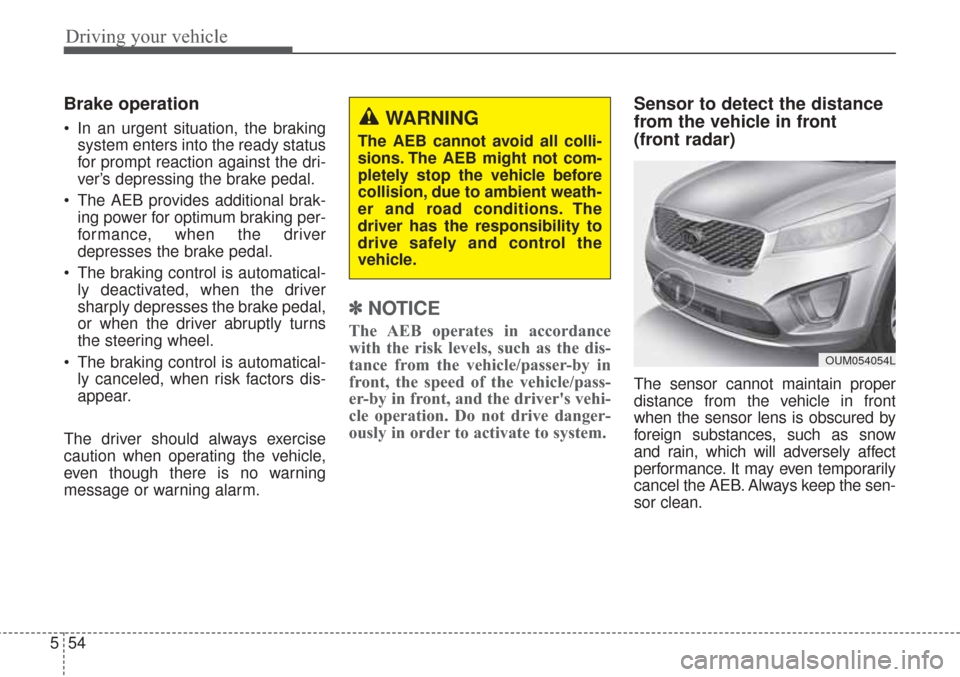
(front radar)
The sensor cannot maintain proper
distance from the vehicle in front
when the sensor lens is obscured by
foreign substances, such as snow
and rain, which will adversely affect
performance. It may even temporarily
cancel the AEB. Always keep the sen-
sor clean.
WARNING
The AEB cannot avoid all colli-
sions. The AEB might not com-
pletely stop the vehicle before
collision, due to ambient weath-
er and road conditions. The
driver has the responsibility to
drive safely and control the
vehicle.
OUM054054L
Page 368 of 576
555
Driving your vehicle
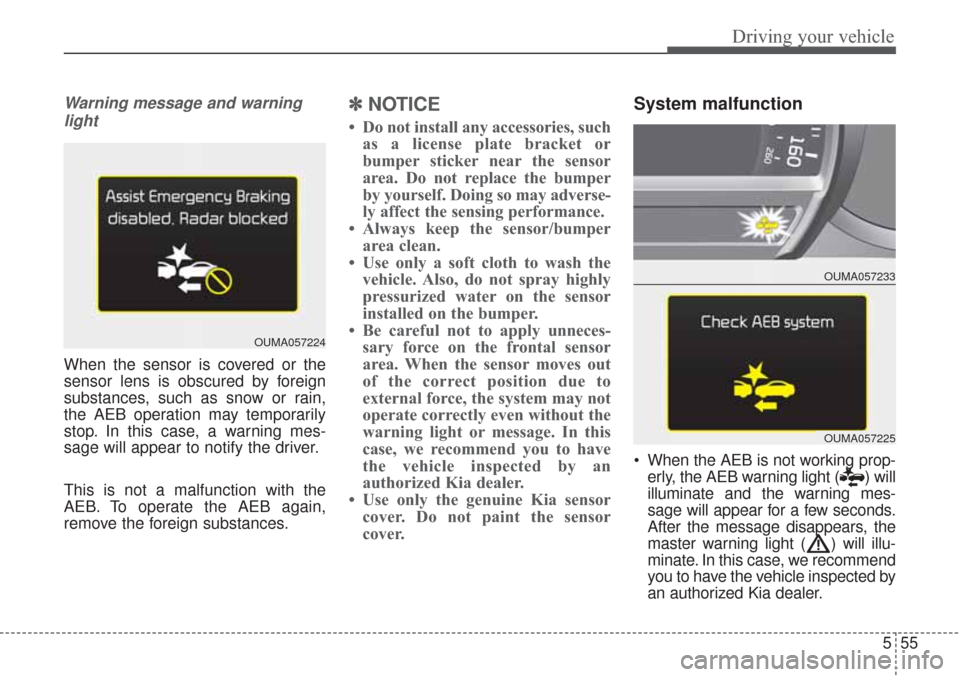
Warning message and warninglight
When the sensor is covered or the
sensor lens is obscured by foreign
substances, such as snow or rain,
the AEB operation may temporarily
stop. In this case, a warning mes-
sage will appear to notify the driver.
This is not a malfunction with the
AEB. To operate the AEB again,
remove the foreign substances.
✽ ✽ NOTICE
• Do not install any accessories, such
as a license plate bracket or
bumper sticker near the sensor
area. Do not replace the bumper
by yourself. Doing so may adverse-
ly affect the sensing performance.
• Always keep the sensor/bumper area clean.
• Use only a soft cloth to wash the vehicle. Also, do not spray highly
pressurized water on the sensor
installed on the bumper.
• Be careful not to apply unneces- sary force on the frontal sensor
area. When the sensor moves out
of the correct position due to
external force, the system may not
operate correctly even without the
warning light or message. In this
case, we recommend you to have
the vehicle inspected by an
authorized Kia dealer.
• Use only the genuine Kia sensor cover. Do not paint the sensor
cover.
System malfunction
When the AEB is not working prop-
erly, the AEB warning light ( ) will
illuminate and the warning mes-
sage will appear for a few seconds.
After the message disappears, the
master warning light ( ) will illu-
minate. In this case, we recommend
you to have the vehicle inspected by
an authorized Kia dealer.
OUMA057224
OUMA057233
OUMA057225