USB KIA Sorento 2017 3.G User Guide
[x] Cancel search | Manufacturer: KIA, Model Year: 2017, Model line: Sorento, Model: KIA Sorento 2017 3.GPages: 576, PDF Size: 7.82 MB
Page 281 of 576
Features of your vehicle
196 4
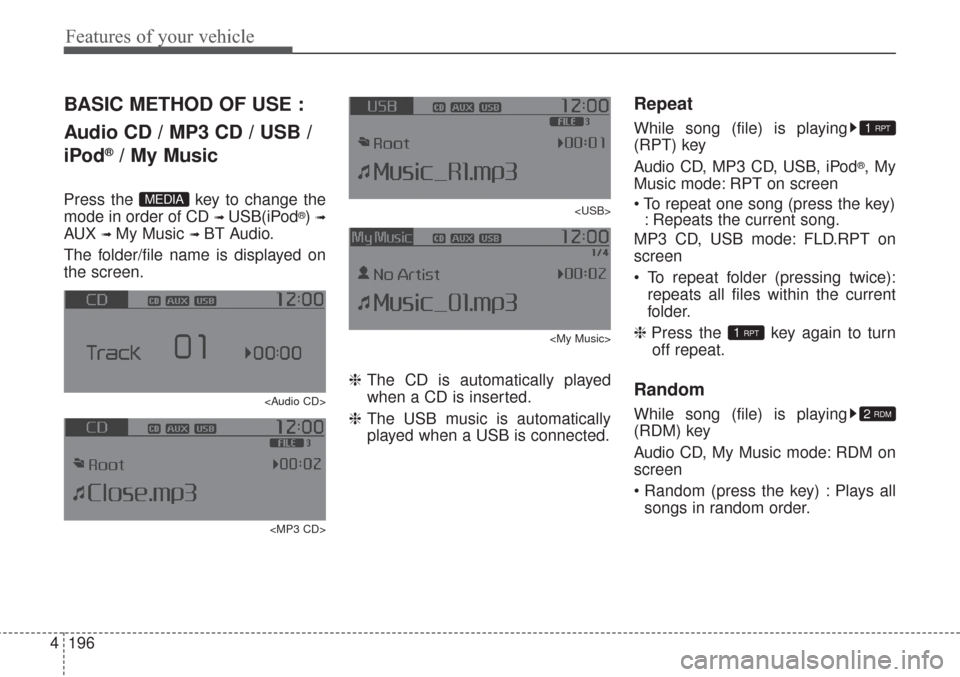
BASIC METHOD OF USE :
Audio CD / MP3 CD / USB /
iPod
®/ My Music
Press the key to change the
mode in order of CD
➟ USB(iPod®) ➟
AUX ➟ My Music ➟ BT Audio.
The folder/file name is displayed on
the screen.
Page 282 of 576
4197
Features of your vehicle
MP3 CD, USB mode: FLD.RDM on
screen
Folder Random (press the key) :
Plays all files within the current fold-
er in random order.
iPod
®mode: ALL RDM on screen
All Random (press the key) : Plays
all files in random order.
MP3 CD, USB : ALL RDM on screen
All Random (pressing twice): Plays
all files in random order.
❈ Press the key again to turn
off repeat.
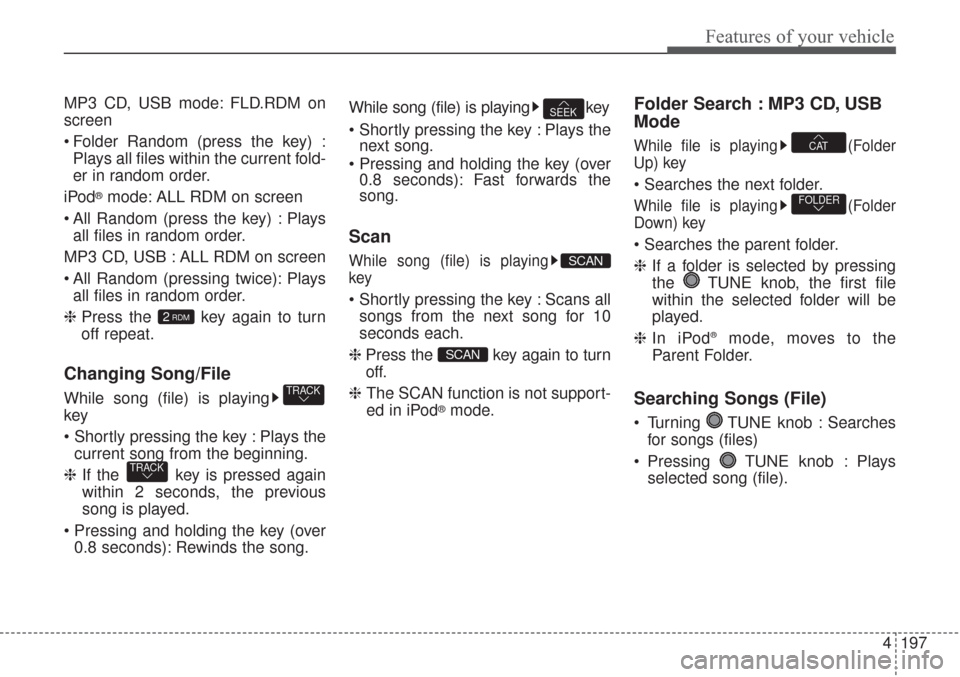
Changing Song/File
While song (file) is playing
key
Plays the
current song from the beginning.
❈If the key is pressed again
within 2 seconds, the previous
song is played.
0.8 seconds): Rewinds the song.While song (file) is playing key
Plays the
next song.
0.8 seconds): Fast forwards the
song.
Scan
While song (file) is playing
key
Scans all
songs from the next song for 10
seconds each.
❈ Press the key again to turn
off.
❈ The SCAN function is not support-
ed in iPod
®mode.
Folder Search : MP3 CD, USB
Mode
While file is playing (Folder
Up) key
While file is playing (Folder
Down) key
❈If a folder is selected by pressing
the TUNE knob, the first file
within the selected folder will be
played.
❈In iPod
®mode, moves to the
Parent Folder.
Searching Songs (File)
Turning TUNE knob : Searches
for songs (files)
Pressing TUNE knob : Plays
selected song (file).
FOLDER
CAT
SCAN
SCAN
SEEK
TRACK
TRACK
2RDM
Page 283 of 576
![KIA Sorento 2017 3.G User Guide Features of your vehicle
198 4
MENU : Audio CD
Press the Audio CD mode
key to set the Repeat, Random,
Information features.
Repeat
Press the key Set [ RPT]
through the TUNE knob or
key to repeat t](/img/2/2983/w960_2983-282.png "KIA Sorento 2017 3.G User Guide Features of your vehicle
198 4
MENU : Audio CD
Press the Audio CD mode
key to set the Repeat, Random,
Information features.
Repeat
Press the key Set [ RPT]
through the TUNE knob or
key to repeat t")
Features of your vehicle
198 4
MENU : Audio CD
Press the Audio CD mode
key to set the Repeat, Random,
Information features.
Repeat
Press the key Set [ RPT]
through the TUNE knob or
key to repeat the current song.
❈Press RPT again to turn off.
Random
Press the key Set [ RDM]
through the TUNE knob or
key to randomly play songs within
the current CD.
❈Press RDM again to turn off.
Information
Press the key Set [ Info]
through the
TUNEknob or
key to display information of the cur-
rent song.
❈Press the key to turn off
info display.
MENU : MP3 CD / USB
Press the MP3 CD/USB mode
key to set the Repeat, Folder
Random, Folder Repeat, All
Random, Information, and Copy fea-
tures.
Repeat
Press the key Set [ RPT]
through the
TUNEknob or
key to repeat the current song.
❈ Press RPT again to turn off.1 RPTMENU
MENU
MENU
3
MENU
2 RDM
MENU
1 RPT
MENU
MENU
Page 284 of 576
![KIA Sorento 2017 3.G User Guide 4199
Features of your vehicle
Folder Random
Press the key Set [ F.RDM]
through the
TUNEknob or
key to randomly play songs within the
current folder.
❈ Press F.RDM again to turn off.
Folder Repeat](/img/2/2983/w960_2983-283.png "KIA Sorento 2017 3.G User Guide 4199
Features of your vehicle
Folder Random
Press the key Set [ F.RDM]
through the
TUNEknob or
key to randomly play songs within the
current folder.
❈ Press F.RDM again to turn off.
Folder Repeat")
4199
Features of your vehicle
Folder Random
Press the key Set [ F.RDM]
through the
TUNEknob or
key to randomly play songs within the
current folder.
❈ Press F.RDM again to turn off.
Folder Repeat
Press the key Set [ F.RPT]
through the
TUNEknob or
key to repeat songs within the cur-
rent folder.
❈ Press F.RPT again to turn off.
All Random
Press the key Set [ A.RDM]
through the
TUNEknob or key
to randomly play all songs within the
CD/USB.
❈ Press A.RDM again to turn off.
Information
Press the key Set [ Info]
through the
TUNEknob or
key to display information of the cur-
rent song.
❈Press the key to turn off
info display.
Copy
Press the key Set [ Copy]
through the TUNE knob or
key.
This is used to copy the current song
into My Music. You can play the
copied Music in My Music mode.
❈If another key is pressed while
copying is in progress, a pop up
asking you whether to cancel
copying is displayed.
❈If another media is connected or
inserted (USB, CD, iPod®, AUX)
while copying is in progress, copy-
ing is canceled.
❈Music will not be played while
copying is in progress.
6
MENU
MENU
5
MENU
4
MENU
3
MENU
2 RDM
MENU
Page 289 of 576
Features of your vehicle
204 4
Starting Bluetooth®Wireless
Technology Audio
key to change the
mode in order of CD ➟ USB ➟ AUX
➟ My Music ➟ BT Audio.
Bluetooth®
Wireless Technology audio will start
playing.
❈Audio may not automatically start
playing in some mobile phones.
Using the Bluetooth®Wireless
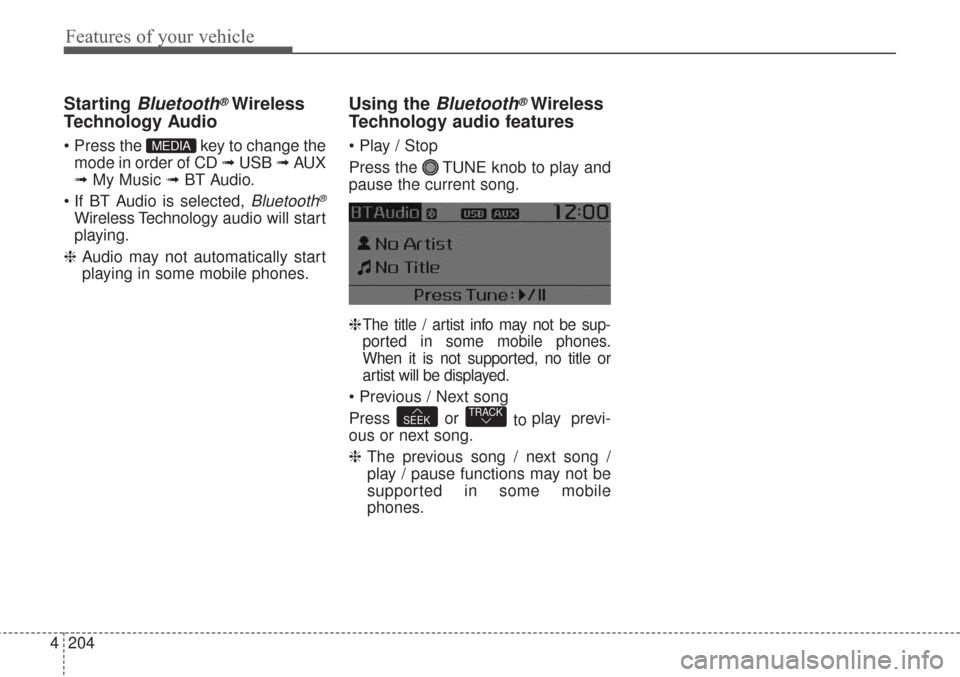
Technology audio features
Press the TUNE knob to play and
pause the current song.
❈
The title / artist info may not be sup-
ported in some mobile phones.
When it is not supported, no title or
artist will be displayed.
Press or
to play previ-
ous or next song.
❈The previous song / next song /
play / pause functions may not be
supported in some mobile
phones.TRACKSEEK
MEDIA
Page 306 of 576
4221
Features of your vehicle
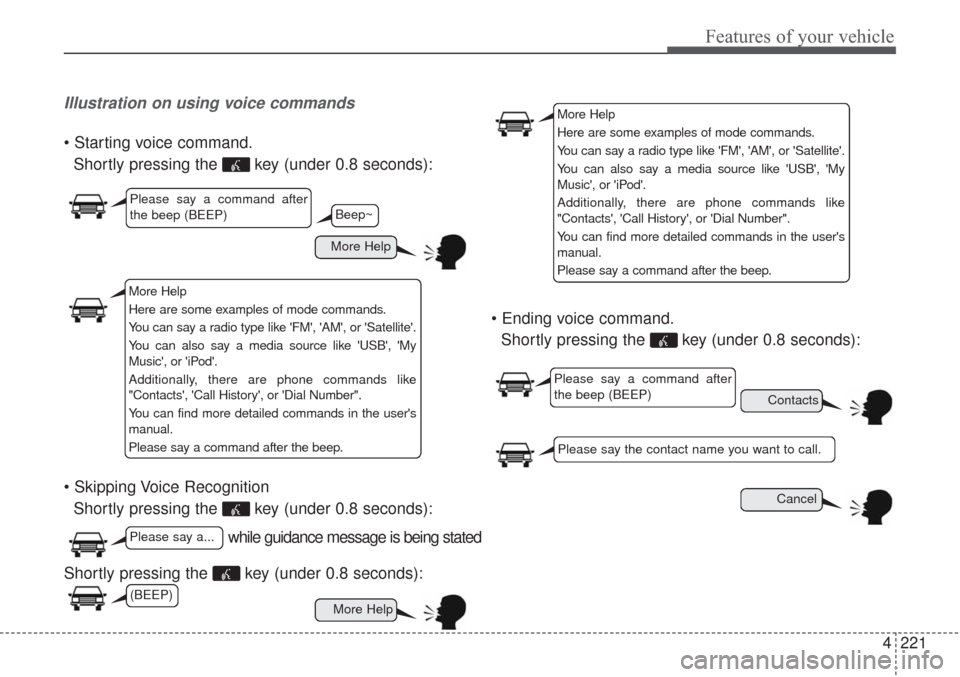
Illustration on using voice commands
Shortly pressing the key (under 0.8 seconds):
Shortly pressing the key (under 0.8 seconds):
Shortly pressing the key (under 0.8 seconds):
Shortly pressing the key (under 0.8 seconds):
while guidance message is being stated
More Help
Contacts
Cancel
More Help
Please say a command after
the beep (BEEP)
Please say a...
Please say the contact name you want to call.
Beep~
More Help
Here are some examples of mode commands.
You can say a radio type like 'FM', 'AM', or 'Satellite'.
You can also say a media source like 'USB', 'My
Music', or 'iPod'.
Additionally, there are phone commands like
"Contacts', 'Call History', or 'Dial Number".
You can find more detailed commands in the user's
manual.
Please say a command after the beep.
More Help
Here are some examples of mode commands.
You can say a radio type like 'FM', 'AM', or 'Satellite'.
You can also say a media source like 'USB', 'My
Music', or 'iPod'.
Additionally, there are phone commands like
"Contacts', 'Call History', or 'Dial Number".
You can find more detailed commands in the user's
manual.
Please say a command after the beep.
Please say a command after
the beep (BEEP)
(BEEP)
Page 308 of 576
4223
Features of your vehicle
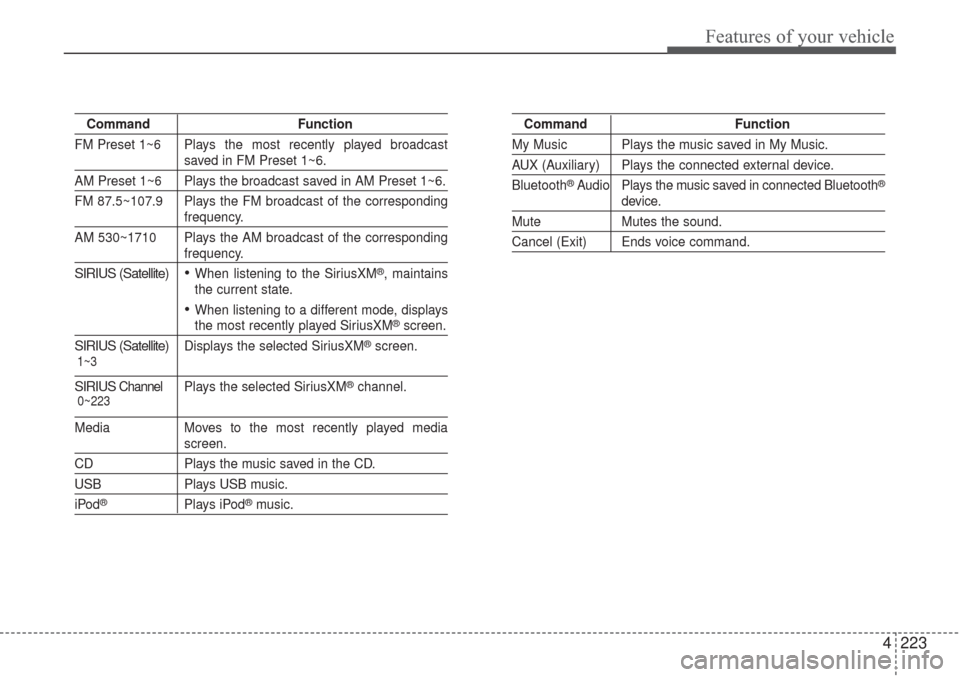
Command Function
FM Preset 1~6 Plays the most recently played broadcast
saved in FM Preset 1~6.
AM Preset 1~6 Plays the broadcast saved in AM Preset 1~6.
FM 87.5~107.9 Plays the FM broadcast of the corresponding
frequency.
AM 530~1710 Plays the AM broadcast of the corresponding
frequency.
SIRIUS (Satellite)When listening to the SiriusXM®, maintains
the current state.
When listening to a different mode, displaysthe most recently played SiriusXM®screen.
SIRIUS (Satellite)Displays the selected SiriusXM®screen.
SIRIUSChannel P l ay s the selected SiriusXM®channel.
Media Moves to the most recently played mediascreen.
CD Plays the music saved in the CD.
USB Plays USB music.
iPod®Plays iPod®music.
Command Function
My Music Plays the music saved in My Music.
AUX (Auxiliary) Plays the connected external device.
Bluetooth
®Audio Plays the music saved in connected Bluetooth®
device.
Mute Mutes the sound.
Cancel (Exit) Ends voice command.
0~223 1~3
Page 310 of 576
4225
Features of your vehicle
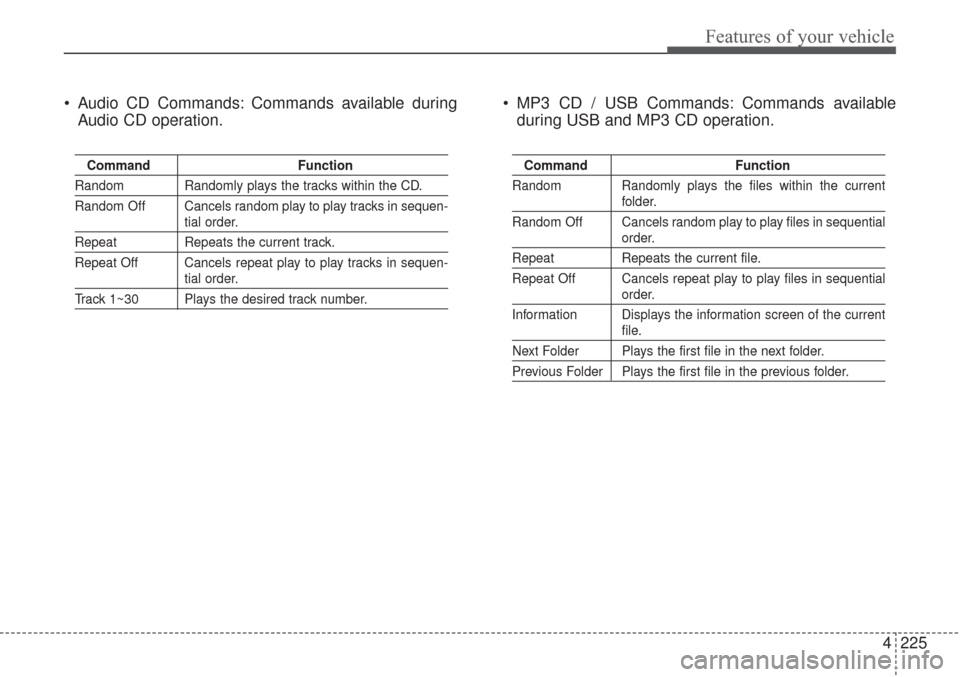
Audio CD Commands: Commands available during
Audio CD operation. MP3 CD / USB Commands: Commands available
during USB and MP3 CD operation.
Command Function
Random Randomly plays the tracks within the CD.
Random Off Cancels random play to play tracks in sequen-
tial order.
Repeat Repeats the current track.
Repeat Off Cancels repeat play to play tracks in sequen-
tial order.
Track 1~30 Plays the desired track number.
Command Function
Random Randomly plays the files within the current
folder.
Random Off Cancels random play to play files in sequential
order.
Repeat Repeats the current file.
Repeat Off Cancels repeat play to play files in sequential
order.
Information Displays the information screen of the current
file.
Next Folder Plays the first file in the next folder.
Previous Folder Plays the first file in the previous folder.
Page 524 of 576
Maintenance
72
7
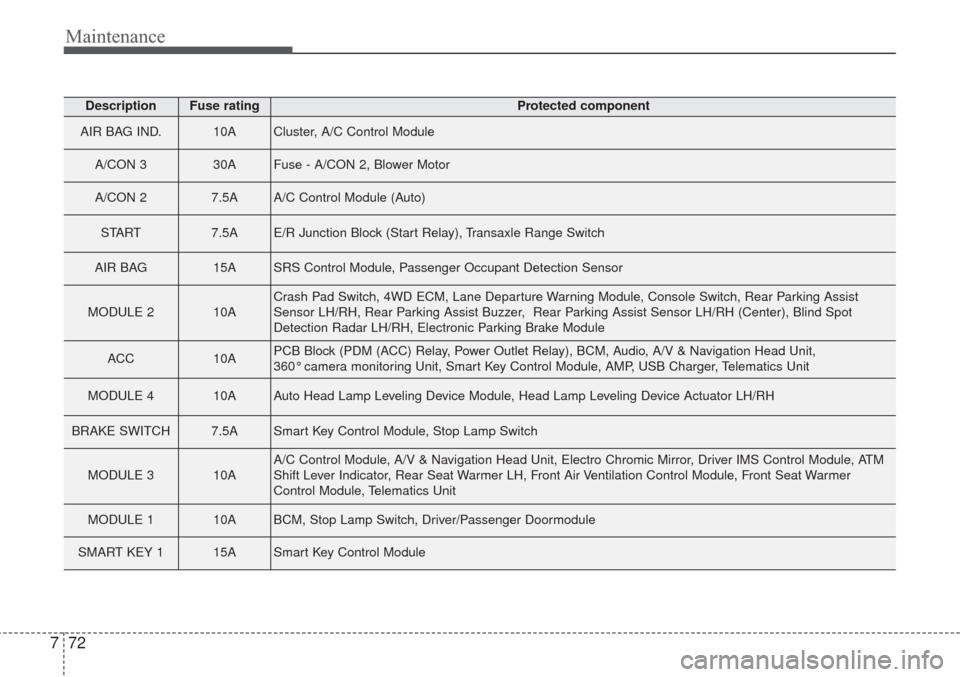
DescriptionFuse ratingProtected component
AIR BAG IND.10ACluster, A/C Control Module
A/CON 3 30AFuse - A/CON 2, Blower Motor
A/CON 2 7.5AA/C Control Module (Auto)
START 7.5AE/R Junction Block (Start Relay), Transaxle Range Switch
AIR BAG 15ASRS Control Module, Passenger Occupant Detection Sensor
MODULE 2 10ACrash Pad Switch, 4WD ECM, Lane Departure Warning Module, Console Switch, Rear Parking Assist
Sensor LH/RH, Rear Parking Assist Buzzer, Rear Parking Assist Sensor LH/RH (Center), Blind Spot
Detection Radar LH/RH, Electronic Parking Brake Module
ACC 10APCB Block (PDM (ACC) Relay, Power Outlet Relay), BCM, Audio, A/V & Navigation Head Unit,
360° camera monitoring Unit, Smart Key Control Module, AMP, USB Charger, Telematics Unit
MODULE 4 10AAuto Head Lamp Leveling Device Module, Head Lamp Leveling Device Actuator LH/RH
BRAKE SWITCH 7.5ASmart Key Control Module, Stop Lamp Switch
MODULE 3 10AA/C Control Module, A/V & Navigation Head Unit, Electro Chromic Mirror, Driver IMS Control Module, ATM
Shift Lever Indicator, Rear Seat Warmer LH, Front Air Ventilation Control Module, Front Seat Warmer
Control Module, Telematics Unit
MODULE 1 10ABCM, Stop Lamp Switch, Driver/Passenger Doormodule
SMART KEY 1 15ASmart Key Control Module
Page 525 of 576
773
Maintenance
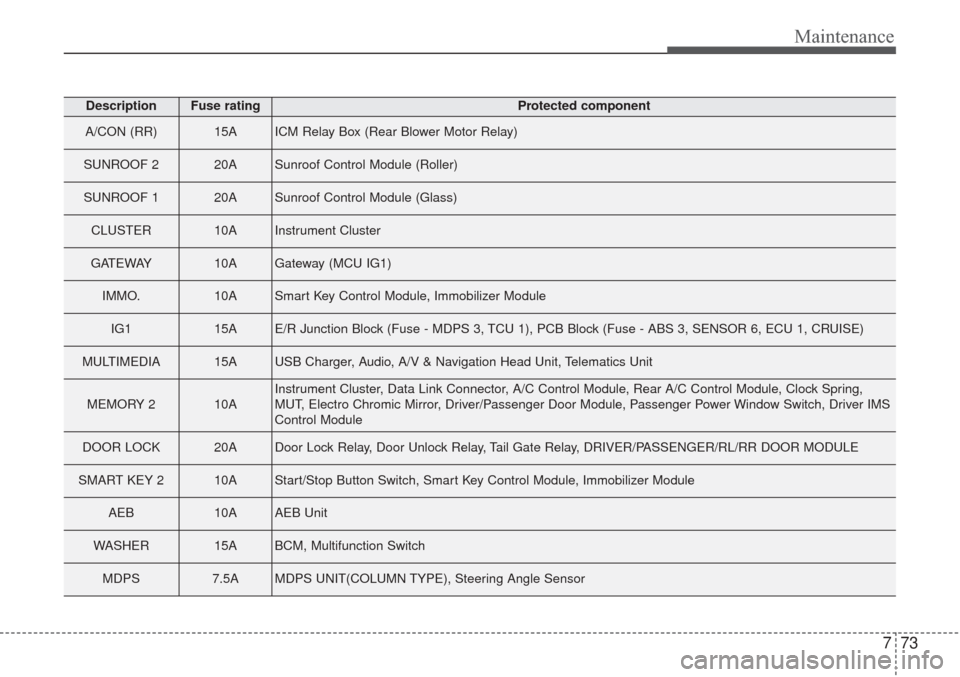
DescriptionFuse ratingProtected component
A/CON (RR) 15AICM Relay Box (Rear Blower Motor Relay)
SUNROOF 2 20ASunroof Control Module (Roller)
SUNROOF 1 20ASunroof Control Module (Glass)
CLUSTER 10AInstrument Cluster
GATEWAY10AGateway (MCU IG1)
IMMO.10ASmart Key Control Module, Immobilizer Module
IG1 15AE/R Junction Block (Fuse - MDPS 3, TCU 1), PCB Block (Fuse - ABS 3, SENSOR 6, ECU 1, CRUISE)
MULTIMEDIA 15AUSB Charger, Audio, A/V & Navigation Head Unit, Telematics Unit
MEMORY 2 10AInstrument Cluster, Data Link Connector, A/C Control Module, Rear A/C Control Module, Clock Spring,
MUT, Electro Chromic Mirror, Driver/Passenger Door Module, Passenger Power Window Switch, Driver IMS
Control Module
DOOR LOCK 20ADoor Lock Relay, Door Unlock Relay, Tail Gate Relay, DRIVER/PASSENGER/RL/RR DOOR MODULE
SMART KEY 2 10AStart/Stop Button Switch, Smart Key Control Module, Immobilizer Module
AEB10AAEB Unit
WASHER 15ABCM, Multifunction Switch
MDPS 7.5AMDPS UNIT(COLUMN TYPE), Steering Angle Sensor