clock KIA Sorento 2017 3.G User Guide
[x] Cancel search | Manufacturer: KIA, Model Year: 2017, Model line: Sorento, Model: KIA Sorento 2017 3.GPages: 576, PDF Size: 7.82 MB
Page 296 of 576
4211
Features of your vehicle
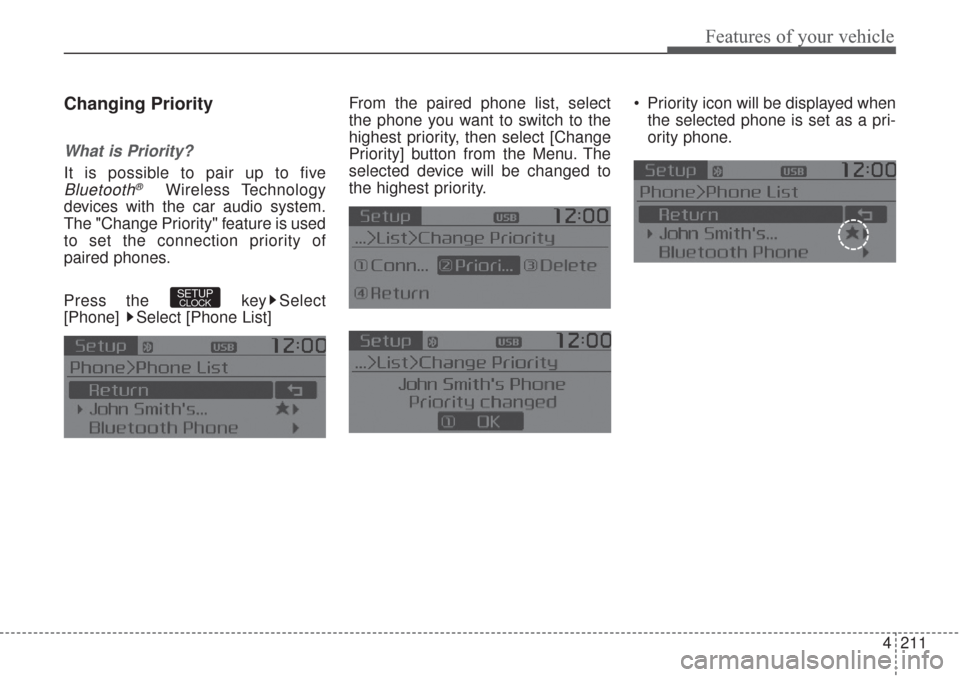
Changing Priority
What is Priority?
It is possible to pair up to five
Bluetooth®Wireless Technology
devices with the car audio system.
The "Change Priority" feature is used
to set the connection priority of
paired phones.
Press the key Select
[Phone] Select [Phone List]From the paired phone list, select
the phone you want to switch to the
highest priority, then select [Change
Priority] button from the Menu. The
selected device will be changed to
the highest priority. Priority icon will be displayed when
the selected phone is set as a pri-
ority phone.
SETUPCLOCK
Page 297 of 576
![KIA Sorento 2017 3.G User Guide Features of your vehicle
212 4
Disconnecting a Device
Press the key Select
[Phone] Select [Phone List]
From the paired phone list, select the
currently connected device and
select [Disconnect] button](/img/2/2983/w960_2983-296.png "KIA Sorento 2017 3.G User Guide Features of your vehicle
212 4
Disconnecting a Device
Press the key Select
[Phone] Select [Phone List]
From the paired phone list, select the
currently connected device and
select [Disconnect] button")
Features of your vehicle
212 4
Disconnecting a Device
Press the key Select
[Phone] Select [Phone List]
From the paired phone list, select the
currently connected device and
select [Disconnect] button.
Deleting a Device
Press the key Select
[Phone] Select [Phone List]
From the paired phone list, select the
device you want to delete and select
[Delete] button. When deleting the currently con-
nected device, the device will auto-
matically be disconnected to pro-
ceed with the deleting process.
If a paired
Bluetooth®Wireless
Technology device is deleted, the
device’s call history and contacts
data will also be deleted.
To re-use a deleted device, you
must pair the device again.
SETUPCLOCKSETUPCLOCK
Page 298 of 576
4213
Features of your vehicle
USING Bluetooth®Wireless
Technology
Phone Menu Screen
Phone Menus
With a Bluetooth®Wireless
Technology device connected, press
the key to display the Phone
menu screen.
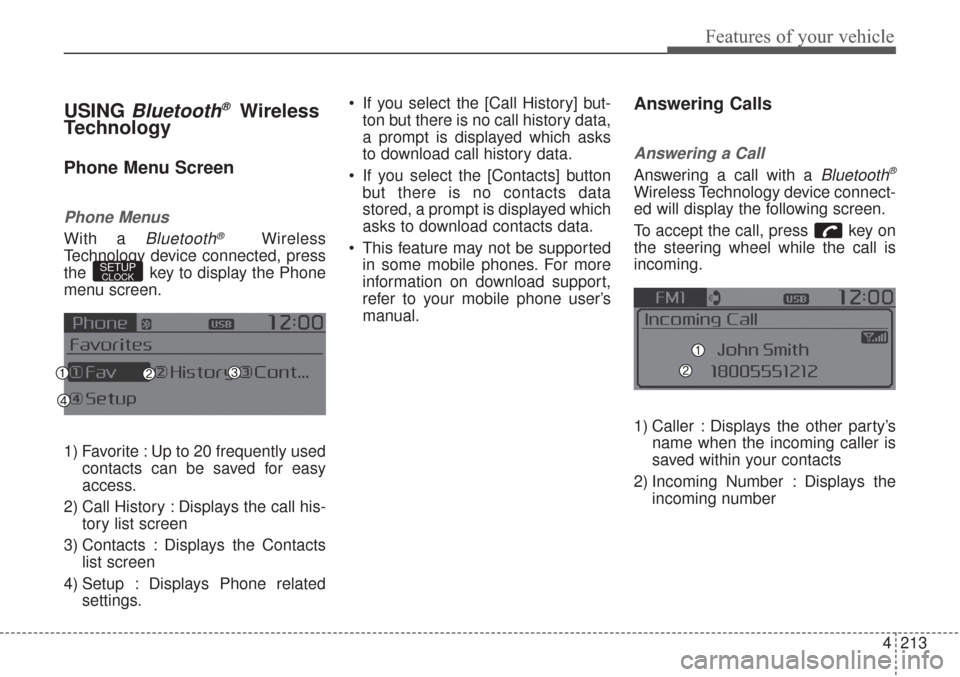
1) Favorite : Up to 20 frequently used
contacts can be saved for easy
access.
2) Call History : Displays the call his-
tory list screen
3) Contacts : Displays the Contacts
list screen
4) Setup : Displays Phone related
settings. If you select the [Call History] but-
ton but there is no call history data,
a prompt is displayed which asks
to download call history data.
If you select the [Contacts] button
but there is no contacts data
stored, a prompt is displayed which
asks to download contacts data.
This feature may not be supported
in some mobile phones. For more
information on download support,
refer to your mobile phone user’s
manual.
Answering Calls
Answering a Call
Answering a call with a Bluetooth®
Wireless Technology device connect-
ed will display the following screen.
To accept the call, press key on
the steering wheel while the call is
incoming.
1) Caller : Displays the other party’s
name when the incoming caller is
saved within your contacts
2) Incoming Number : Displays the
incoming number
SETUPCLOCK
Page 301 of 576
Features of your vehicle
216 4
Bluetooth®Wireless Technology
Setting
The Bluetooth®word mark and logos
are registered trademarks owned by
Bluetooth
®SIG, Inc. and any use of
such marks by Kia is under license.
Other trademarks and trade names
are those of their respective owners.
A Bluetooth
®enabled cell phone is
required to use
Bluetooth®Wireless
Technology
Pairing a New Device
Press the key Select
[Phone] Select [Pair Phone]
Bluetooth®Wireless Technology
devices can be paired with the audio
system.
For more information, refer to the
“Pairing through Phone Setup” sec-
tion within
Bluetooth®Wireless
Technology.
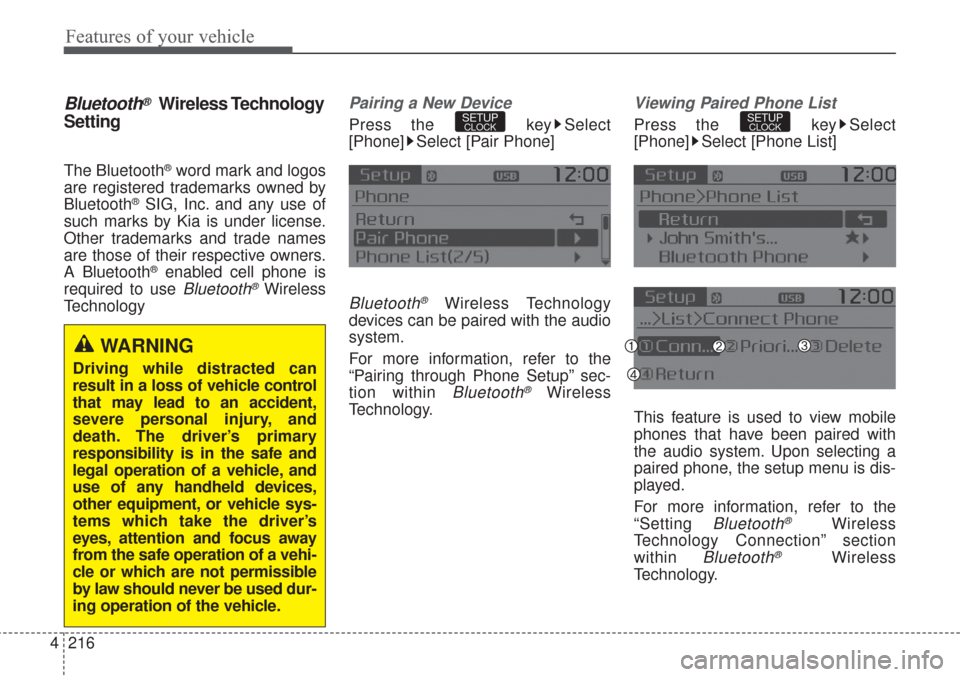
Viewing Paired Phone List
Press the key Select
[Phone] Select [Phone List]
This feature is used to view mobile
phones that have been paired with
the audio system. Upon selecting a
paired phone, the setup menu is dis-
played.
For more information, refer to the
“Setting
Bluetooth®Wireless
Technology Connection” section
within
Bluetooth®Wireless
Technology.
SETUPCLOCKSETUPCLOCK
WARNING
Driving while distracted can
result in a loss of vehicle control
that may lead to an accident,
severe personal injury, and
death. The driver’s primary
responsibility is in the safe and
legal operation of a vehicle, and
use of any handheld devices,
other equipment, or vehicle sys-
tems which take the driver’s
eyes, attention and focus away
from the safe operation of a vehi-
cle or which are not permissible
by law should never be used dur-
ing operation of the vehicle.
Page 302 of 576
4217
Features of your vehicle
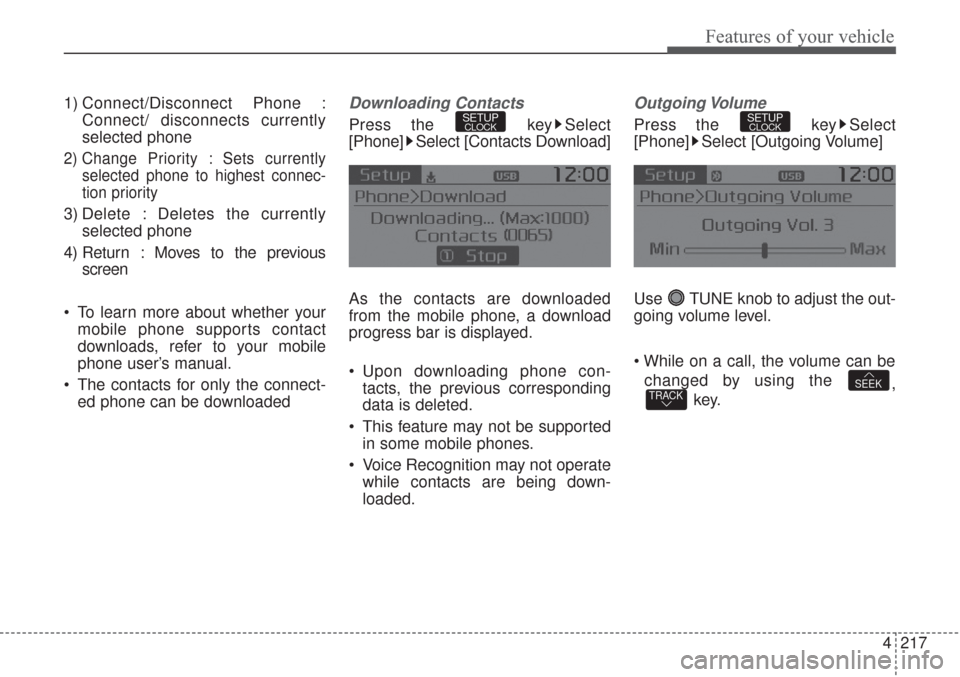
1) Connect/Disconnect Phone :
Connect/ disconnects currently
selected phone
2) Change Priority : Sets currently
selected phone to highest connec-
tion priority
3) Delete : Deletes the currently
selected phone
4) Return : Moves to the previous
screen
To learn more about whether your
mobile phone supports contact
downloads, refer to your mobile
phone user’s manual.
The contacts for only the connect-
ed phone can be downloaded
Downloading Contacts
Press the key Select
[Phone] Select [Contacts Download]
As the contacts are downloaded
from the mobile phone, a download
progress bar is displayed.
Upon downloading phone con-
tacts, the previous corresponding
data is deleted.
This feature may not be supported
in some mobile phones.
Voice Recognition may not operate
while contacts are being down-
loaded.
Outgoing Volume
Press the key Select
[Phone] Select [Outgoing Volume]
Use TUNE knob to adjust the out-
going volume level.
changed by using the
,
key.
TRACKSEEK
SETUPCLOCKSETUPCLOCK
Page 303 of 576
![KIA Sorento 2017 3.G User Guide Features of your vehicle
218 4
Turning Bluetooth System Off
Press the key Select
[Phone] Select [Bluetooth System
Off]
Once
Bluetooth®Wireless
Technology is turned off,
Bluetooth®
Wireless Techno](/img/2/2983/w960_2983-302.png "KIA Sorento 2017 3.G User Guide Features of your vehicle
218 4
Turning Bluetooth System Off
Press the key Select
[Phone] Select [Bluetooth System
Off]
Once
Bluetooth®Wireless
Technology is turned off,
Bluetooth®
Wireless Techno")
Features of your vehicle
218 4
Turning Bluetooth System Off
Press the key Select
[Phone] Select [Bluetooth System
Off]
Once
Bluetooth®Wireless
Technology is turned off,
Bluetooth®
Wireless Technology related features
will not be supported within the audio
system.
To turn
Bluetooth®Wireless
Technology back on, go to
[Phone] and select “Yes”.SETUPCLOCK
SETUPCLOCK
Page 304 of 576
![KIA Sorento 2017 3.G User Guide 4219
Features of your vehicle
VOICE RECOGNITION
Using Voice Recognition
Starting Voice Recognition
Shortly press the key on the
steering wheel. Say a commandIf prompt feedback is in [ON], then
the](/img/2/2983/w960_2983-303.png "KIA Sorento 2017 3.G User Guide 4219
Features of your vehicle
VOICE RECOGNITION
Using Voice Recognition
Starting Voice Recognition
Shortly press the key on the
steering wheel. Say a commandIf prompt feedback is in [ON], then
the")
4219
Features of your vehicle
VOICE RECOGNITION
Using Voice Recognition
Starting Voice Recognition
Shortly press the key on the
steering wheel. Say a commandIf prompt feedback is in [ON], then
the system will say “Please say a
command after the beep (BEEP)”
If prompt feedback is in [OFF]
mode, then the system will only
say “(BEEP)”
To change Prompt Feedback
[On]/[Off], go to [System]
[Prompt Feedback]
For proper recognition, say the
command after the voice instruc-
tion and beep tone.
Contact List Best Practices
1) Use full names vs. short or single
syllable names (“John Smith” vs.
“Dad”, “Smith Residence” vs.
“Home”)
2) Avoid using special characters or
hyphens (@, &, #, /, -, *, +, etc.)
3) Avoid using acronyms (“In Case
Emergency” vs. “ICE”)
4) Spell words completely, no abbre-
viations (“Doctor Goodman” vs.
“Dr. Goodman”)
SETUPCLOCK
Page 442 of 576
69
What to do in an emergency
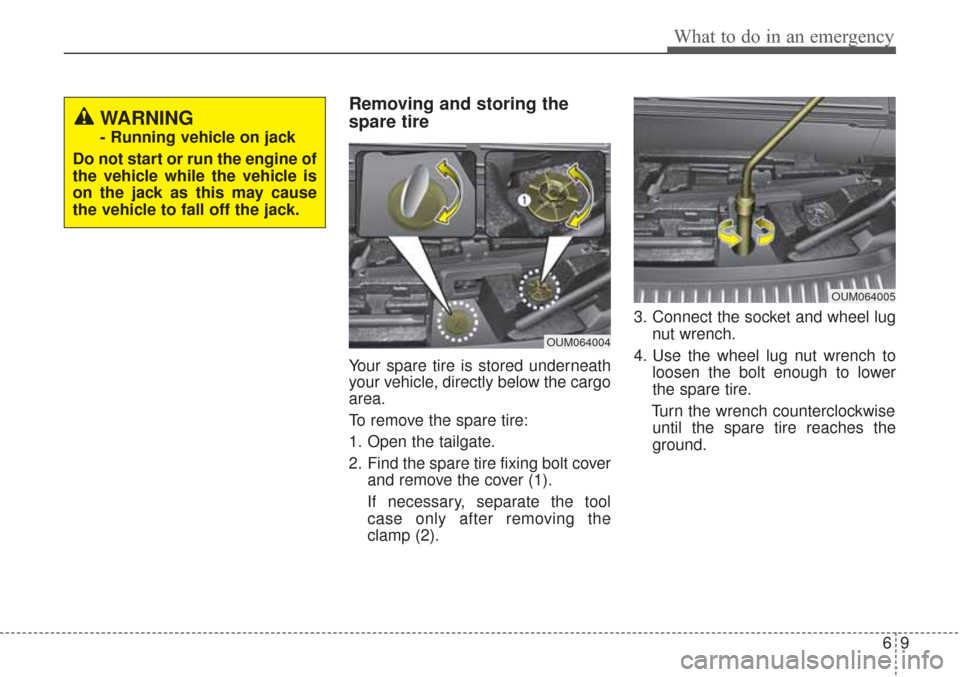
Removing and storing the
spare tire
Your spare tire is stored underneath
your vehicle, directly below the cargo
area.
To remove the spare tire:
1. Open the tailgate.
2. Find the spare tire fixing bolt coverand remove the cover (1).
If necessary, separate the tool
case only after removing the
clamp (2). 3. Connect the socket and wheel lug
nut wrench.
4. Use the wheel lug nut wrench to loosen the bolt enough to lower
the spare tire.
Turn the wrench counterclockwise until the spare tire reaches the
ground.
WARNING
- Running vehicle on jack
Do not start or run the engine of
the vehicle while the vehicle is
on the jack as this may cause
the vehicle to fall off the jack.
OUM064004
OUM064005
Page 443 of 576
What to do in an emergency
10
6
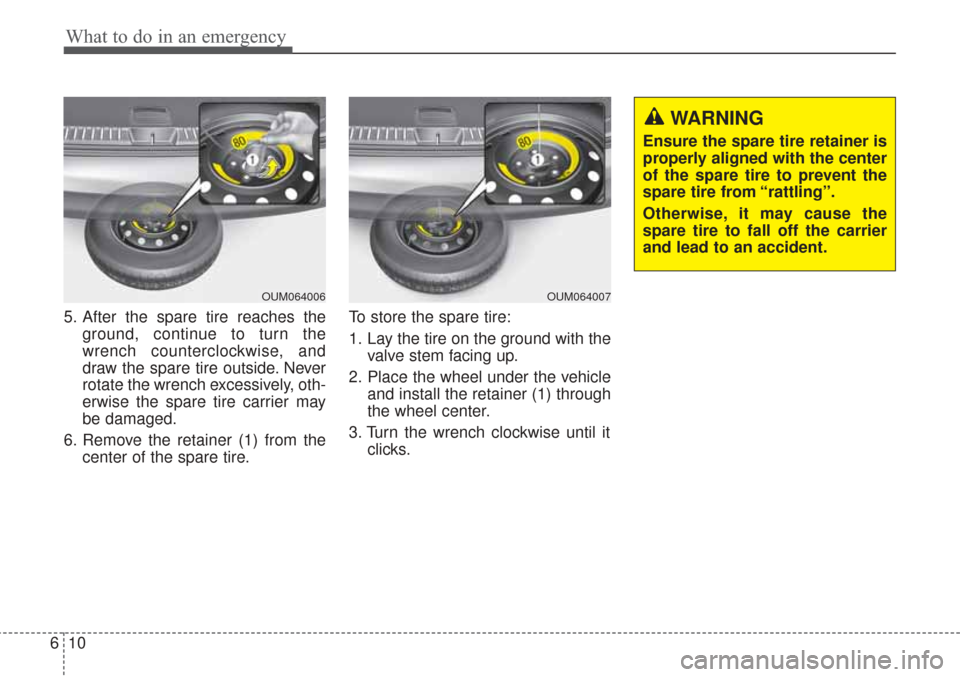
5. After the spare tire reaches the
ground, continue to turn the
wrench counterclockwise, and
draw the spare tire outside. Never
rotate the wrench excessively, oth-
erwise the spare tire carrier may
be damaged.
6. Remove the retainer (1) from the center of the spare tire. To store the spare tire:
1. Lay the tire on the ground with the
valve stem facing up.
2. Place the wheel under the vehicle and install the retainer (1) through
the wheel center.
3. Turn the wrench clockwise until it clicks.
OUM064007
WARNING
Ensure the spare tire retainer is
properly aligned with the center
of the spare tire to prevent the
spare tire from “rattling”.
Otherwise, it may cause the
spare tire to fall off the carrier
and lead to an accident.
OUM064006
Page 445 of 576
What to do in an emergency
12
6
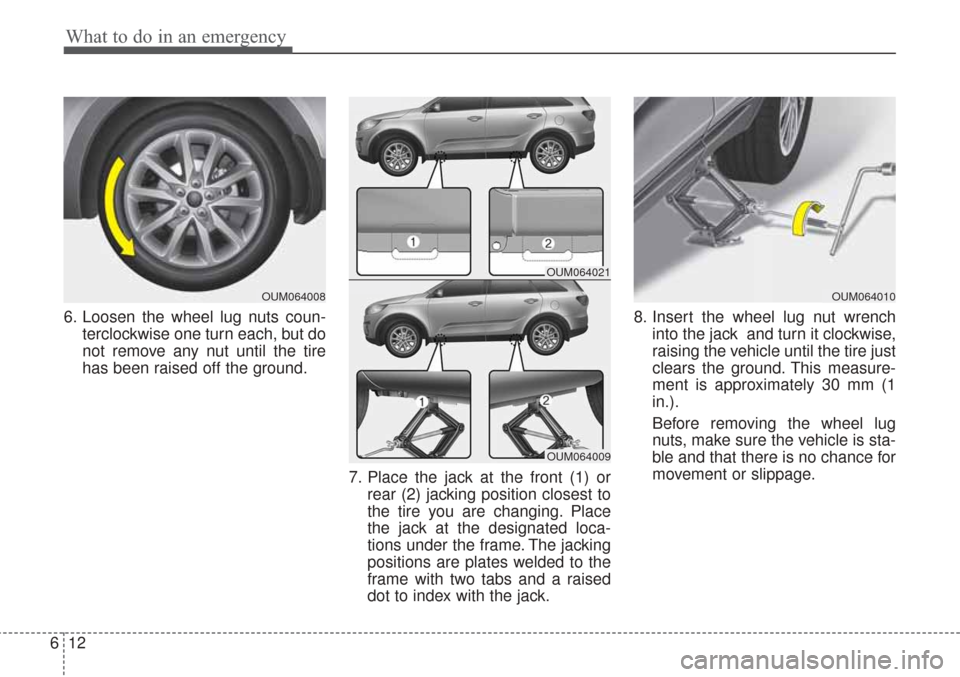
6. Loosen the wheel lug nuts coun-
terclockwise one turn each, but do
not remove any nut until the tire
has been raised off the ground.
7. Place the jack at the front (1) orrear (2) jacking position closest to
the tire you are changing. Place
the jack at the designated loca-
tions under the frame. The jacking
positions are plates welded to the
frame with two tabs and a raised
dot to index with the jack. 8. Insert the wheel lug nut wrench
into the jack and turn it clockwise,
raising the vehicle until the tire just
clears the ground. This measure-
ment is approximately 30 mm (1
in.).
Before removing the wheel lug
nuts, make sure the vehicle is sta-
ble and that there is no chance for
movement or slippage.
OUM064008
OUM064021
OUM064009
OUM064010