Headlight low KIA SORENTO 2018 Features and Functions Guide
[x] Cancel search | Manufacturer: KIA, Model Year: 2018, Model line: SORENTO, Model: KIA SORENTO 2018Pages: 54, PDF Size: 3.7 MB
Page 16 of 54
SORENTO FEATURES & FUNCTIONS GUIDE14*IF EQUIPPED
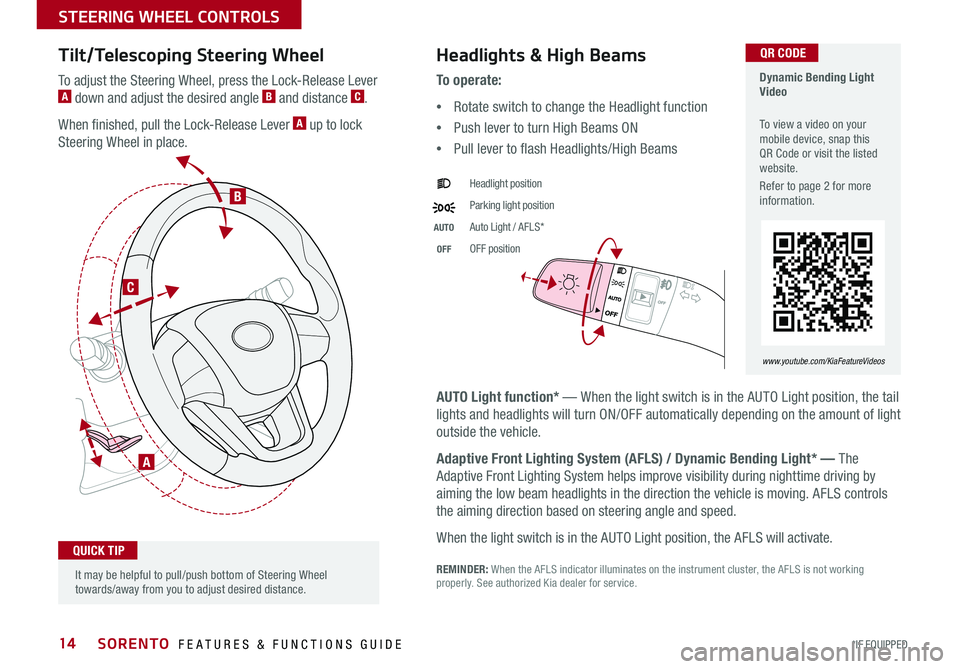
Tilt/Telescoping Steering Wheel
To adjust the Steering Wheel, press the Lock-Release Lever A down and adjust the desired angle B and distance C .
When finished, pull the Lock-Release Lever A up to lock
Steering Wheel in place .
A
C
B
Headlights & High Beams
AUTO Light function* — When the light switch is in the AUTO Light position, the tail
lights and headlights will turn ON/OFF automatically depending on the amount of light
outside the vehicle .
Adaptive Front Lighting System (AFLS) / Dynamic Bending Light* — The
Adaptive Front Lighting System helps improve visibility during nighttime driving by
aiming the low beam headlights in the direction the vehicle is moving . AFLS controls
the aiming direction based on steering angle and speed .
When the light switch is in the AUTO Light position, the AFLS will activate .
REMINDER: When the AFLS indicator illuminates on the instrument cluster, the AFLS is not working properly . See authorized Kia dealer for service .
To o p e r a t e :
•Rotate switch to change the Headlight function
•Push lever to turn High Beams ON
•Pull lever to flash Headlights/High Beams
Headlight position
Parking light position
AUTOAuto Light / AFLS*
OFFOFF position
It may be helpful to pull/push bottom of Steering Wheel towards/away from you to adjust desired distance .
QUICK TIP
Dynamic Bending Light Video
To view a video on your mobile device, snap this QR Code or visit the listed website .
Refer to page 2 for more information .
www.youtube.com/KiaFeatureVideos
QR CODE
STEERING WHEEL CONTROLS
Page 17 of 54
15ALWAYS CHECK THE OWNER’S MANUAL FOR COMPLETE OPER ATING INFORMATION AND SAFET Y WARNINGS . *IF EQUIPPED
Turn Signals & Fog Lights*
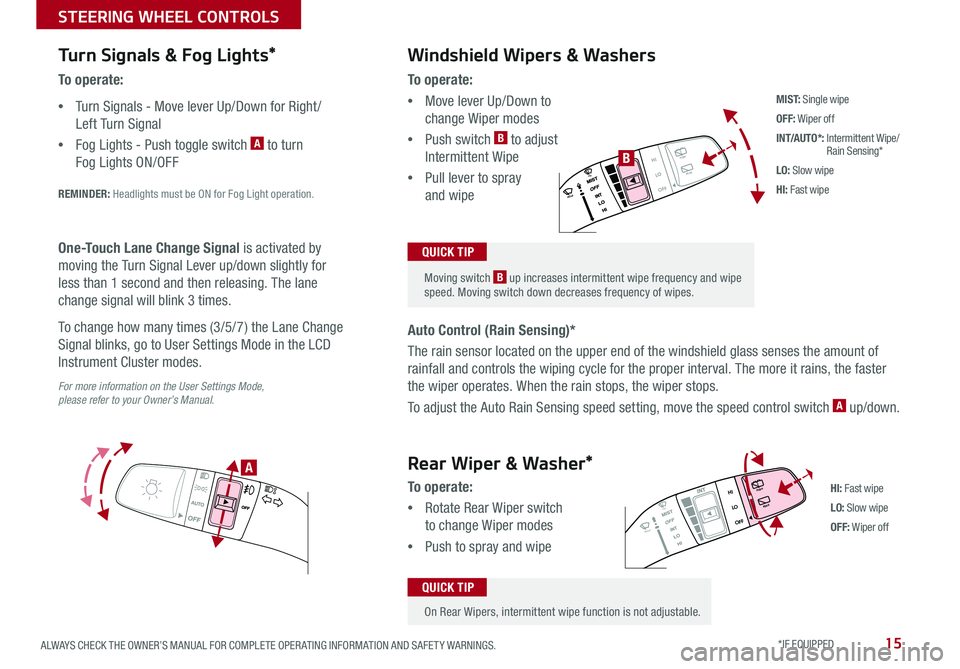
To o p e r a t e :
•Turn Signals - Move lever Up/Down for Right /
Left Turn Signal
•Fog Lights - Push toggle switch A to turn
Fog Lights ON/OFF
REMINDER: Headlights must be ON for Fog Light operation .
For more information on the User Settings Mode, please refer to your Owner’s Manual.
One-Touch Lane Change Signal is activated by
moving the Turn Signal Lever up/down slightly for
less than 1 second and then releasing . The lane
change signal will blink 3 times .
To change how many times (3/5/7) the Lane Change
Signal blinks, go to User Settings Mode in the LCD
Instrument Cluster modes .
To o p e r a t e :
•Move lever Up/Down to
change Wiper modes
•Push switch B to adjust
Intermittent Wipe
•Pull lever to spray
and wipe
Auto Control (Rain Sensing)*
The rain sensor located on the upper end of the windshield glass senses the amount of
rainfall and controls the wiping cycle for the proper interval . The more it rains, the faster
the wiper operates . When the rain stops, the wiper stops .
To adjust the Auto Rain Sensing speed setting, move the speed control switch A up/down .
Windshield Wipers & Washers
M I S T: Single wipe
OFF: Wiper off
INT/AUTO*: Intermittent Wipe/ Rain Sensing*
LO: Slow wipe
HI: Fast wipe
HI
LO
OFFREAR
HI
LO
OFFREAR
PUSH
FRONT
PULL
FRONT
PUSH
PULL
HI
LO
OFFREAR
HI
LO
OFFREAR
PUSH
FRONT
PULL
FRONT
PUSH
PULL
B
A
HI: Fast wipe
LO: Slow wipe
OFF: Wiper off
Moving switch B up increases intermittent wipe frequency and wipe speed . Moving switch down decreases frequency of wipes .
QUICK TIP
On Rear Wipers, intermittent wipe function is not adjustable .
QUICK TIP
Rear Wiper & Washer*
To operate:
•Rotate Rear Wiper switch
to change Wiper modes
•Push to spray and wipe
STEERING WHEEL CONTROLS