instrument cluster KIA SORENTO 2018 User Guide
[x] Cancel search | Manufacturer: KIA, Model Year: 2018, Model line: SORENTO, Model: KIA SORENTO 2018Pages: 536, PDF Size: 13.42 MB
Page 336 of 536
Driving your vehicle
66
5
Speed setting (ASCC)
To set cruise control speed:
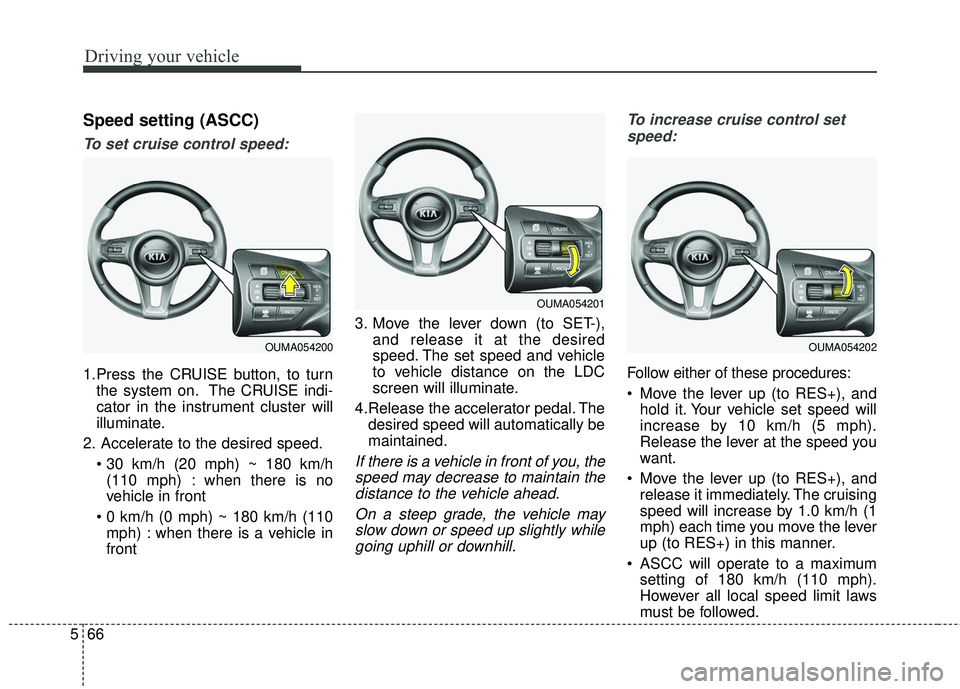
1.Press the CRUISE button, to turn
the system on. The CRUISE indi-
cator in the instrument cluster will
illuminate.
2. Accelerate to the desired speed. (110 mph) : when there is no
vehicle in front
mph) : when there is a vehicle in
front 3. Move the lever down (to SET-),
and release it at the desired
speed. The set speed and vehicle
to vehicle distance on the LDC
screen will illuminate.
4.Release the accelerator pedal. The desired speed will automatically be
maintained.
If there is a vehicle in front of you, thespeed may decrease to maintain thedistance to the vehicle ahead.
On a steep grade, the vehicle mayslow down or speed up slightly whilegoing uphill or downhill. To increase cruise control set
speed:
Follow either of these procedures:
Move the lever up (to RES+), and hold it. Your vehicle set speed will
increase by 10 km/h (5 mph).
Release the lever at the speed you
want.
Move the lever up (to RES+), and release it immediately. The cruising
speed will increase by 1.0 km/h (1
mph) each time you move the lever
up (to RES+) in this manner.
ASCC will operate to a maximum setting of 180 km/h (110 mph).
However all local speed limit laws
must be followed.
OUMA054200
OUMA054201
OUMA054202
Page 339 of 536
569
Driving your vehicle
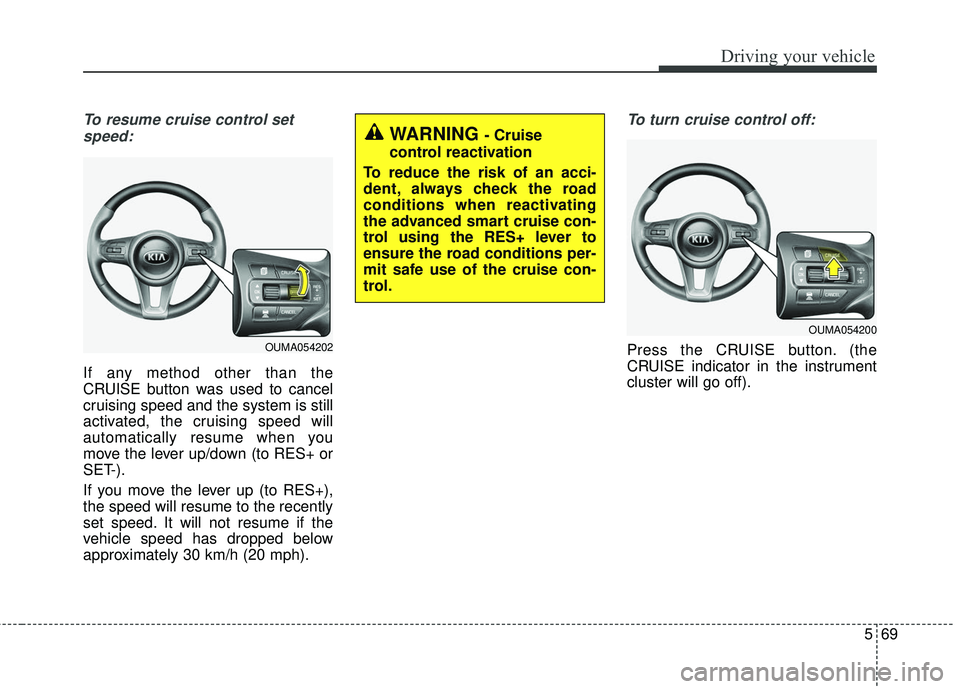
To resume cruise control setspeed:
If any method other than the
CRUISE button was used to cancel
cruising speed and the system is still
activated, the cruising speed will
automatically resume when you
move the lever up/down (to RES+ or
SET-).
If you move the lever up (to RES+),
the speed will resume to the recently
set speed. It will not resume if the
vehicle speed has dropped below
approximately 30 km/h (20 mph).
To turn cruise control off:
Press the CRUISE button. (the
CRUISE indicator in the instrument
cluster will go off).
WARNING - Cruise
control reactivation
To reduce the risk of an acci-
dent, always check the road
conditions when reactivating
the advanced smart cruise con-
trol using the RES+ lever to
ensure the road conditions per-
mit safe use of the cruise con-
trol.
OUMA054202
OUMA054200
Page 358 of 536
Driving your vehicle
88
5
If the system does not work properly,
a warning message will appear and
the light on the switch will turn off.
The system will turn off automatical-
ly.
Have your vehicle inspected by an
authorized Kia dealer.
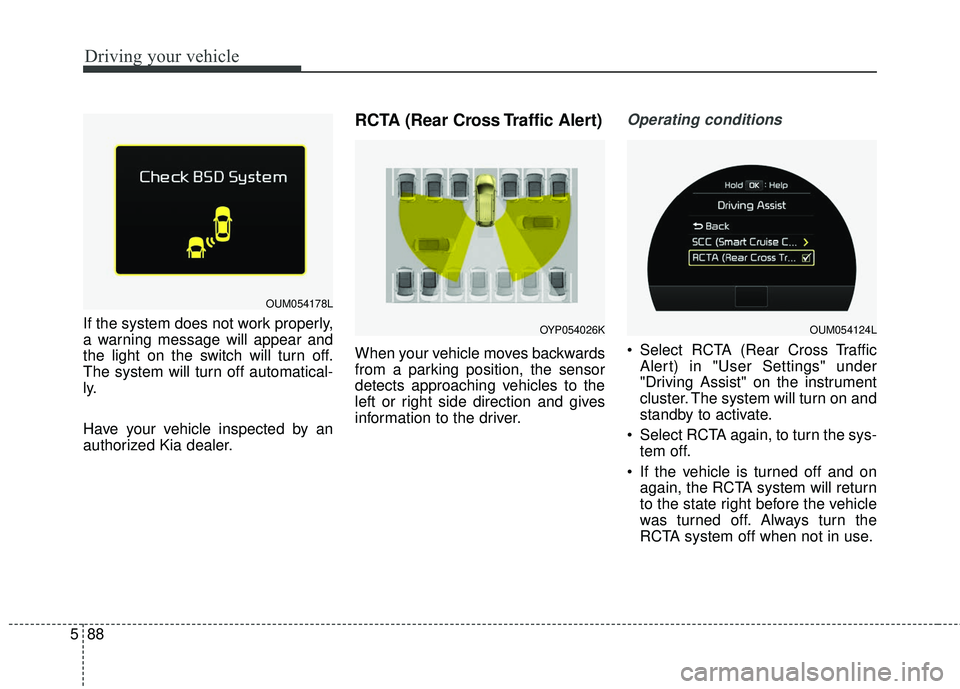
RCTA (Rear Cross Traffic Alert)
When your vehicle moves backwards
from a parking position, the sensor
detects approaching vehicles to the
left or right side direction and gives
information to the driver.
Operating conditions
Select RCTA (Rear Cross Traffic
Alert) in "User Settings" under
"Driving Assist" on the instrument
cluster. The system will turn on and
standby to activate.
Select RCTA again, to turn the sys- tem off.
If the vehicle is turned off and on again, the RCTA system will return
to the state right before the vehicle
was turned off. Always turn the
RCTA system off when not in use.
OUM054178L
OYP054026KOUM054124L
Page 363 of 536
593
Driving your vehicle
LDWS operation
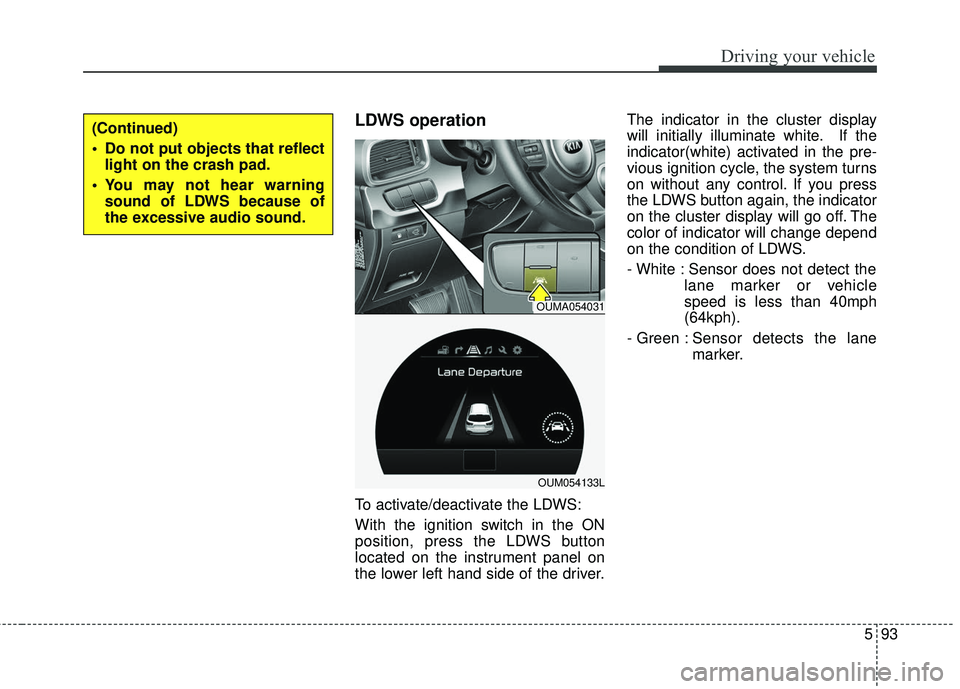
To activate/deactivate the LDWS:
With the ignition switch in the ON
position, press the LDWS button
located on the instrument panel on
the lower left hand side of the driver.The indicator in the cluster display
will initially illuminate white. If the
indicator(white) activated in the pre-
vious ignition cycle, the system turns
on without any control. If you press
the LDWS button again, the indicator
on the cluster display will go off. The
color of indicator will change depend
on the condition of LDWS.
- White : Sensor does not detect the
lane marker or vehicle
speed is less than 40mph
(64kph).
- Green : S ensor detects the lane
marker.
(Continued)
Do not put objects that reflect light on the crash pad.
You may not hear warning sound of LDWS because of
the excessive audio sound.
OUMA054031
OUM054133L
Page 479 of 536
Maintenance
68
7
If you do not have a spare, use a
fuse of the same rating from a circuityou may not need for operating thevehicle, such as the power outletfuse.
If the head lamp, turn signal lamp,
stop signal lamp, fog lamp, DRL, tail
lamp, HMSL do not work and the
fuses are OK, check the fuse panel
in the engine compartment. If a fuse
is blown, it must be replaced.
✽ ✽ NOTICE
If the headlamp, fog lamp, turn sig-
nal lamp, or tail lamp malfunction
even without any problem to the
lamps, have the vehicle checked by
an authorized Kia dealer for assis-
tance.
✽ ✽NOTICE - Fuse Panel Covers
• Put all switches in ON when driv-
ing.
• If the vehicle remains idle for over 1 month, put all switches in OFF
to prevent the batteries from being
discharged.
• Excluding long-term parking for over 1 month, the contact points of
switches may wear out upon
extensive use. Please refrain from
excessive use of switches.
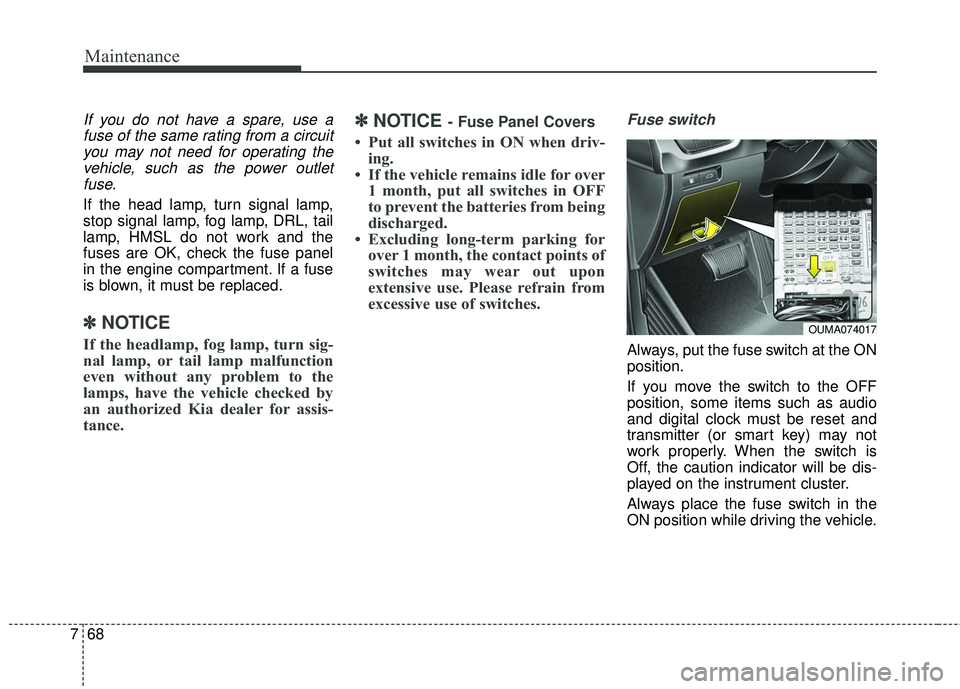
Fuse switch
Always, put the fuse switch at the ON
position.
If you move the switch to the OFF
position, some items such as audio
and digital clock must be reset and
transmitter (or smart key) may not
work properly. When the switch is
Off, the caution indicator will be dis-
played on the instrument cluster.
Always place the fuse switch in the
ON position while driving the vehicle.
OUMA074017
Page 484 of 536
773
Maintenance
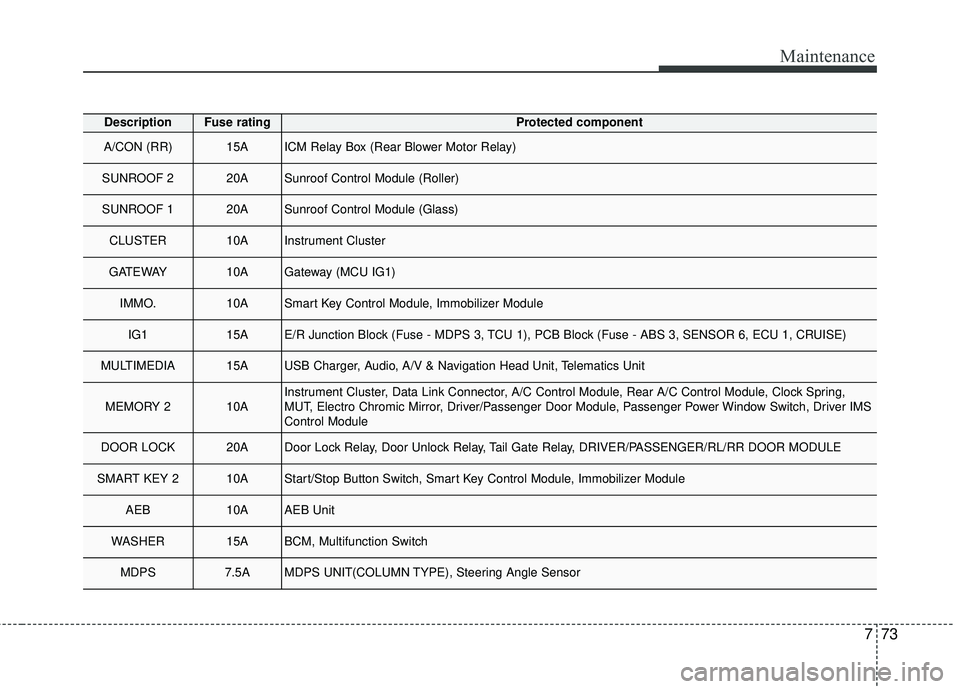
DescriptionFuse ratingProtected component
A/CON (RR) 15AICM Relay Box (Rear Blower Motor Relay)
SUNROOF 2 20ASunroof Control Module (Roller)
SUNROOF 1 20ASunroof Control Module (Glass)
CLUSTER 10AInstrument Cluster
GATEWAY10AGateway (MCU IG1)
IMMO.10ASmart Key Control Module, Immobilizer Module
IG1 15AE/R Junction Block (Fuse - MDPS 3, TCU 1), PCB Block (Fuse - ABS 3, SENSOR 6, ECU 1, CRUISE)
MULTIMEDIA 15AUSB Charger, Audio, A/V & Navigation Head Unit, Telematics Unit
MEMORY 2 10AInstrument Cluster, Data Link Connector, A/C Control Module, Rear A/C Control Module, Clock Spring,
MUT, Electro Chromic Mirror, Driver/Passenger Door Module, Passenger Power Window Switch, Driver IMS
Control Module
DOOR LOCK 20ADoor Lock Relay, Door Unlock Relay, Tail Gate Relay, DRIVER/PASSENGER/RL/RR DOOR MODULE
SMART KEY 2 10AStart/Stop Button Switch, Smart Key Control Module, Immobilizer Module
AEB10AAEB Unit
WASHER 15ABCM, Multifunction Switch
MDPS 7.5AMDPS UNIT(COLUMN TYPE), Steering Angle Sensor
Page 531 of 536
I5
Index
Do not use methanol . . . . . . . . . . . . . . . . . . . . . . . . . 1-4
Fuel Additives . . . . . . . . . . . . . . . . . . . . . . . . . . . . . . 1-4
Gasoline containing alcohol and methanol . . . . . . . . 1-3
Operation in foreign countries . . . . . . . . . . . . . . . . . . 1-5
Fuses . . . . . . . . . . . . . . . . . . . . . . . . . . . . . . . . . . . . \
. . . 7-66 Engine compartment fuse replacement . . . . . . . . . . 7-69
Fuse/relay panel description. . . . . . . . . . . . . . . . . . . 7-71
Inner panel fuse replacement . . . . . . . . . . . . . . . . . . 7-67
Gross vehicle weight . . . . . . . . . . . . . . . . . . . . . . . . . . . 8-6
Hood . . . . . . . . . . . . . . . . . . . . . . . . . . . . . . . . . . . . \
. . . 4-44 Closing the hood . . . . . . . . . . . . . . . . . . . . . . . . . . . 4-45
Opening the hood . . . . . . . . . . . . . . . . . . . . . . . . . . . 4-44
How to use this manual . . . . . . . . . . . . . . . . . . . . . . . . . 1-2
If the engine overheats . . . . . . . . . . . . . . . . . . . . . . . . . . 6-7
If the engine will not start . . . . . . . . . . . . . . . . . . . . . . . 6-4 If engine doesn't turn over or turns over slowly . . . . 6-4
If engine turns over normally but does not start . . . . 6-4
If you have a flat tire . . . . . . . . . . . . . . . . . . . . . . . . . . . 6-8 Changing tires . . . . . . . . . . . . . . . . . . . . . . . . . . . . . 6-11 Jack and tools . . . . . . . . . . . . . . . . . . . . . . . . . . . . . . . 6-8
Removing and storing the spare tire . . . . . . . . . . . . . 6-9
In case of an emergency while driving. . . . . . . . . . . . . . 6-3 If the engine stalls at a crossroad or crossing . . . . . . 6-3
If the engine stalls while driving . . . . . . . . . . . . . . . . 6-3
If you have a flat tire while driving . . . . . . . . . . . . . . 6-3
Instrument cluster . . . . . . . . . . . . . . . . . . . . . . . . . . . . . 4-73 Gauges . . . . . . . . . . . . . . . . . . . . . . . . . . . . . . . . . . . 4-\
75
Icy Road Warning Indicator . . . . . . . . . . . . . . . . . . . 4-78
Instrument cluster control . . . . . . . . . . . . . . . . . . . . 4-74
LCD display control . . . . . . . . . . . . . . . . . . . . . . . . . 4-74
Transaxle shift indicator . . . . . . . . . . . . . . . . . . . . . . 4-78
Instrument panel overview . . . . . . . . . . . . . . . . . . . . . . . 2-5
Interior features. . . . . . . . . . . . . . . . . . . . . . . . . . . . . . 4-163 AC inverter . . . . . . . . . . . . . . . . . . . . . . . . . . . . . . . 4-167
Bottle holder . . . . . . . . . . . . . . . . . . . . . . . . . . . . . . 4-164
Coat hook . . . . . . . . . . . . . . . . . . . . . . . . . . . . . . . . 4-170
Cup holder . . . . . . . . . . . . . . . . . . . . . . . . . . . . . . . 4-163
Floor mat anchor (s) . . . . . . . . . . . . . . . . . . . . . . . . 4-170
Luggage net holder. . . . . . . . . . . . . . . . . . . . . . . . . 4-171
Power outlet . . . . . . . . . . . . . . . . . . . . . . . . . . . . . . 4-166
Seat cooler (air ventilation seat) . . . . . . . . . . . . . . 4-165
Seat warmer . . . . . . . . . . . . . . . . . . . . . . . . . . . . . . 4-164
Side curtain. . . . . . . . . . . . . . . . . . . . . . . . . . . . . . . 4-171
Sunvisor . . . . . . . . . . . . . . . . . . . . . . . . . . . . . . . . . 4-166
USB charger . . . . . . . . . . . . . . . . . . . . . . . . . . . . . . 4-169
Interior lights . . . . . . . . . . . . . . . . . . . . . . . . . . . . . . . 4-125 Automatic turn off function . . . . . . . . . . . . . . . . . . 4-125
I
H
G