air con KIA SORENTO 2018 Owner's Guide
[x] Cancel search | Manufacturer: KIA, Model Year: 2018, Model line: SORENTO, Model: KIA SORENTO 2018Pages: 536, PDF Size: 13.42 MB
Page 107 of 536
Features of your vehicle
22
4
DOOR LOCKS
Operating door locks from
outside the vehicle
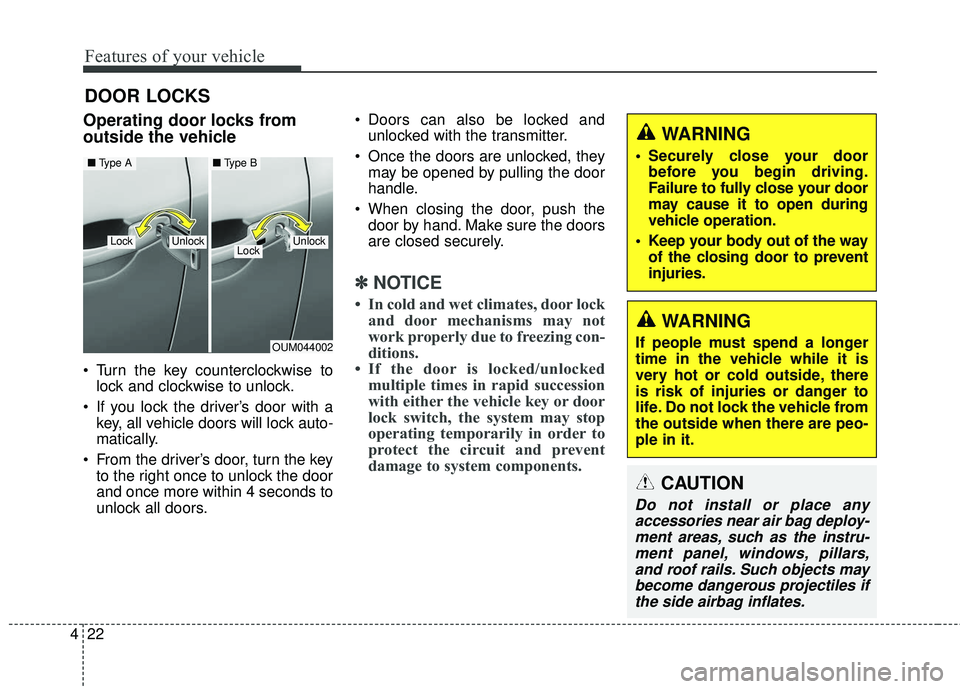
Turn the key counterclockwise to
lock and clockwise to unlock.
If you lock the driver’s door with a key, all vehicle doors will lock auto-
matically.
From the driver’s door, turn the key to the right once to unlock the door
and once more within 4 seconds to
unlock all doors. Doors can also be locked and
unlocked with the transmitter.
Once the doors are unlocked, they may be opened by pulling the door
handle.
When closing the door, push the door by hand. Make sure the doors
are closed securely.
✽ ✽ NOTICE
• In cold and wet climates, door lock
and door mechanisms may not
work properly due to freezing con-
ditions.
• If the door is locked/unlocked multiple times in rapid succession
with either the vehicle key or door
lock switch, the system may stop
operating temporarily in order to
protect the circuit and prevent
damage to system components.
OUM044002
UnlockLockUnlock
■ Type A■ Type B
Lock
WARNING
If people must spend a longer
time in the vehicle while it is
very hot or cold outside, there
is risk of injuries or danger to
life. Do not lock the vehicle from
the outside when there are peo-
ple in it.
WARNING
• Securely close your door
before you begin driving.
Failure to fully close your door
may cause it to open during
vehicle operation.
Keep your body out of the way of the closing door to prevent
injuries.
CAUTION
Do not install or place anyaccessories near air bag deploy-ment areas, such as the instru-ment panel, windows, pillars,and roof rails. Such objects maybecome dangerous projectiles ifthe side airbag inflates.
Page 116 of 536
431
Features of your vehicle
For emergency stop while powerliftgate operating, press the power
liftgate open/close button shortly.
Power liftgate non-opening condi-
tions
The power liftgate will not open auto-
matically, when the vehicle is moving
more than 3km/h (2mph) or the auto-
matic shift lever is not in P(Park)
position. The pow er liftgate will not
open automatically, when the auto-
matic shift lever is not in P(Park) posi-
tion or the manual shift lever is not in
N(Neutral) position.
✽ ✽ NOTICE
The chime will sound continuously if
you drive over 3km/h (2mph) with the
liftgate opened. Stop your vehicle at a
safe place as soon as possible to check
if your liftgate is opened.
✽ ✽NOTICE
• The power liftgate can be operated
when the engine is not running.
However the power liftgate opera-
tion consumes large amounts of
vehicle electric power. To prevent
the battery from being discharged,
do not operate it excessively.
• To prevent the battery from being discharged, do not leave the power
liftgate in the open position for a
long time.
• Do not modify or repair any part of the power liftgate by yourself.
This must be done by an author-
ized Kia dealer.
• When jacking up the vehicle to change a tire or repair the vehicle,
do not operate the power liftgate.
This could cause the power liftgate
to operate improperly. (Continued)
CAUTION
Do not operate the power lift-
gate more than 5 times continu-ously.
It may damage the power lift-gate system. If you operate thepower liftgate more than 5 timescontinuously, the chime willsound 3 times and the powerliftgate will not operate. At thistime, stop operating the liftgateand leave it for more than 1minute.
WARNING
Make sure there are no people
or objects around the liftgate
before opening or closing the
power liftgate. Wait until the lift-
gate is open fully and stopped
before loading or unloading
cargo from the vehicle.
Page 122 of 536
437
Features of your vehicle
✽ ✽NOTICE
• If you press the door unlock but-
ton (2), the Smart Power Liftgate
function will be deactivated tem-
porarily. But, if you do not open
any door for 30 seconds, the smart
Power liftgate function will be
activated again.
• If you press the liftgate open but- ton (3) for more than 1 second, the
liftgate opens.
• If you press the door lock button (1) or liftgate open button (3)
when the Smart Power Liftgate
function is not in the Detect and
Alert stage, the smart Power lift-
gate function will not be deactivat-
ed.
• In case you have deactivated the Smart Power Liftgate function by
pressing the smart key button and
opened a door, the smart Power
liftgate function can be activated
again by closing and locking all
doors.
Detecting area
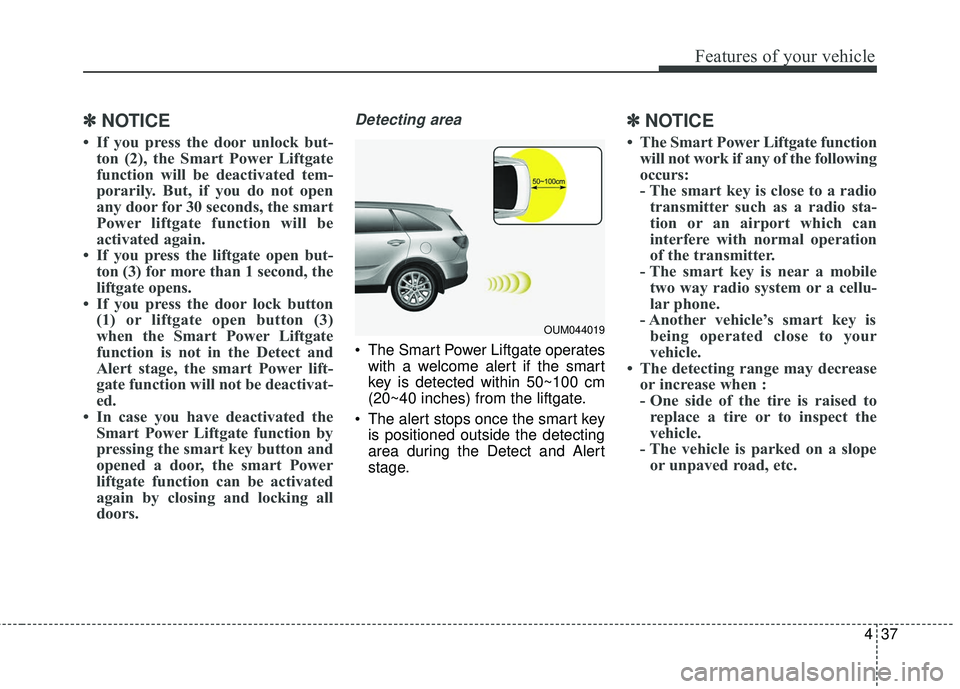
The Smart Power Liftgate operates
with a welcome alert if the smart
key is detected within 50~100 cm
(20~40 inches) from the liftgate.
The alert stops once the smart key is positioned outside the detecting
area during the Detect and Alert
stage.
✽ ✽ NOTICE
• The Smart Power Liftgate function
will not work if any of the following
occurs:
- The smart key is close to a radiotransmitter such as a radio sta-
tion or an airport which can
interfere with normal operation
of the transmitter.
- The smart key is near a mobile two way radio system or a cellu-
lar phone.
- Another vehicle’s smart key is being operated close to your
vehicle.
• The detecting range may decrease or increase when :
- One side of the tire is raised toreplace a tire or to inspect the
vehicle.
- The vehicle is parked on a slope or unpaved road, etc.
OUM044019
Page 144 of 536
459
Features of your vehicle
MIRRORS
Inside rearview mirror
Adjust the rearview mirror so that the
center view through the rear window
is seen. Make this adjustment before
you start driving.
Do not place objects in the rear seat
or cargo area which would interfere
with your vision through the rear win-
dow.
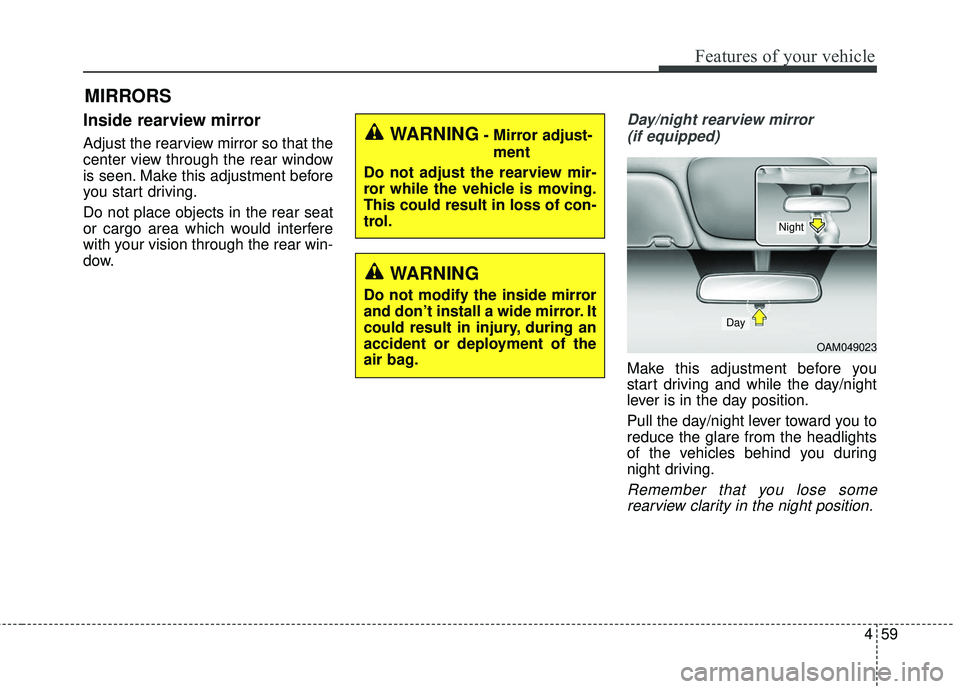
Day/night rearview mirror (if equipped)
Make this adjustment before you
start driving and while the day/night
lever is in the day position.
Pull the day/night lever toward you to
reduce the glare from the headlights
of the vehicles behind you during
night driving.
Remember that you lose somerearview clarity in the night position.
WARNING- Mirror adjust-
ment
Do not adjust the rearview mir-
ror while the vehicle is moving.
This could result in loss of con-
trol.
WARNING
Do not modify the inside mirror
and don’t install a wide mirror. It
could result in injury, during an
accident or deployment of the
air bag.
OAM049023
Day
Night
Page 148 of 536
463
Features of your vehicle
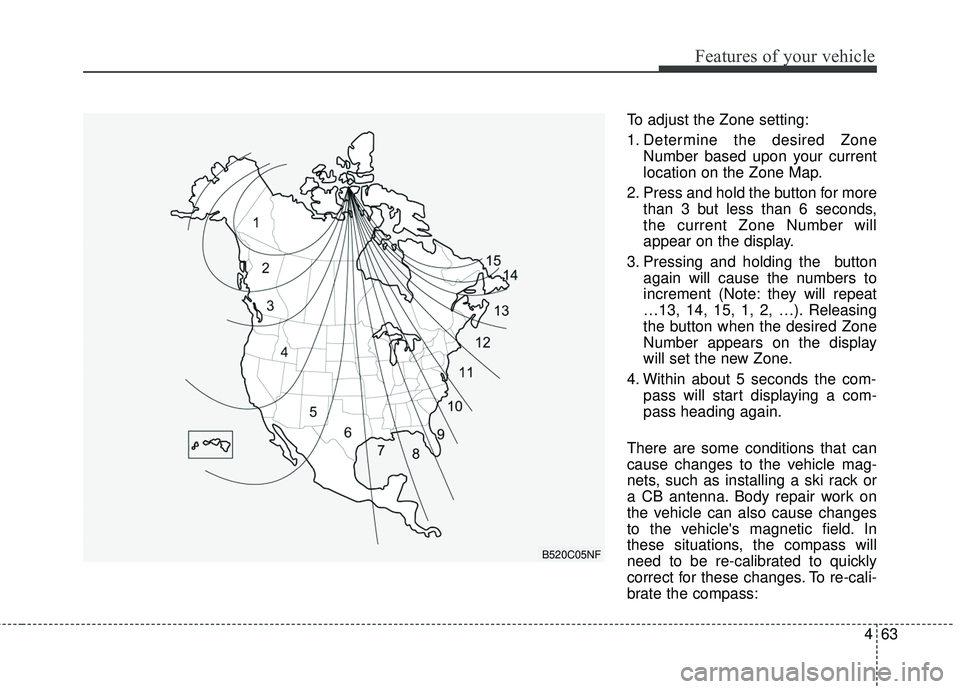
To adjust the Zone setting:
1. Determine the desired ZoneNumber based upon your current
location on the Zone Map.
2. Press and hold the button for more than 3 but less than 6 seconds,
the current Zone Number will
appear on the display.
3. Pressing and holding the button again will cause the numbers to
increment (Note: they will repeat
…13, 14, 15, 1, 2, …). Releasing
the button when the desired Zone
Number appears on the display
will set the new Zone.
4. Within about 5 seconds the com- pass will start displaying a com-
pass heading again.
There are some conditions that can
cause changes to the vehicle mag-
nets, such as installing a ski rack or
a CB antenna. Body repair work on
the vehicle can also cause changes
to the vehicle's magnetic field. In
these situations, the compass will
need to be re-calibrated to quickly
correct for these changes. To re-cali-
brate the compass:
B520C05NF
Page 162 of 536
477
Features of your vehicle
✽ ✽NOTICE
Fuel display may not be accurate if
you are filling in sloping places.
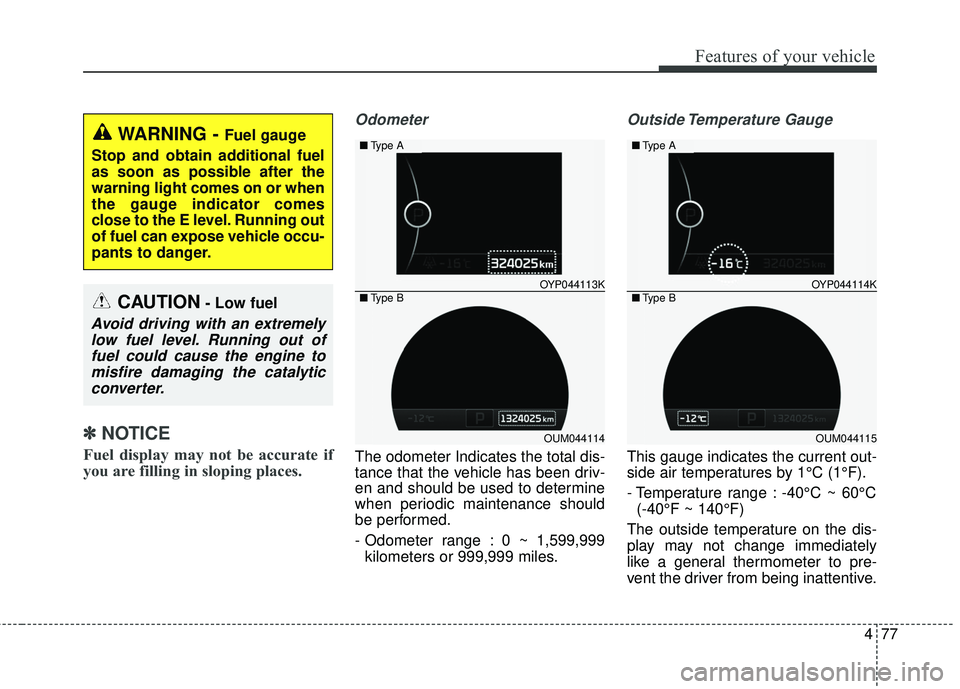
Odometer
The odometer Indicates the total dis-
tance that the vehicle has been driv-
en and should be used to determine
when periodic maintenance should
be performed.
- Odometer range : 0 ~ 1,599,999
kilometers or 999,999 miles.
Outside Temperature Gauge
This gauge indicates the current out-
side air temperatures by 1°C (1°F).
- Temperature range : -40°C ~ 60°C (-40°F ~ 140°F)
The outside temperature on the dis-
play may not change immediately
like a general thermometer to pre-
vent the driver from being inattentive.
WARNING - Fuel gauge
Stop and obtain additional fuel
as soon as possible after the
warning light comes on or when
the gauge indicator comes
close to the E level. Running out
of fuel can expose vehicle occu-
pants to danger.
CAUTION- Low fuel
Avoid driving with an extremely low fuel level. Running out offuel could cause the engine tomisfire damaging the catalyticconverter.
OYP044113K
■ Type A
OUM044114
■Type BOYP044114K
■Type A
OUM044115
■Type B
Page 182 of 536
497
Features of your vehicle
Warning lights
✽ ✽NOTICE - Warning lights
Make sure that all warning lights
are OFF after starting the engine. If
any light is still ON, this indicates a
situation that needs attention.
Air bag Warning Light
This warning light illuminates:
Once you set the ignition switch or
Engine Start/Stop Button to the ON
position.
- It illuminates for approximately 6seconds and then goes off.
When there is a malfunction with the SRS.
In this case, have your vehicle
inspected by an authorized Kia
dealer.
Seat Belt Warning Light
This warning light informs the driver
that the seat belt is not fastened.
For more details, refer to the “Seat
Belts” in chapter 3.
WARNING AND INDICATOR LIGHTS
Page 195 of 536
Features of your vehicle
110
4
This system will activate when
backing up with the ignition switch
ON.
If the vehicle is moving at a speed
over 5 km/h (3 mph), the system
may not be activated correctly.
The sensing distance while the back-up warning system is in oper-
ation is approximately 120 cm (47
in.) at the rear bumper center area,
60 cm (23.5 in.) at the rear bumper
both side area.
When more than two objects are sensed at the same time, the clos-
est one will be recognized first.Types of warning sound
When an object is 120 cm to 61 cm(47 in. to 24 in.) from the rear
bumper: Buzzer beeps intermit-
tently.
When an object is 60 cm to 31 cm (24 in. to 12 in.) from the rear
bumper: Buzzer beeps more fre-
quently.
When an object is within 30 cm (12 in.) of the rear bumper:
Buzzer sounds continuously.
Non-operational conditions of
rear parking assist system
The rear parking assist system
may not operate properly when:
1. Moisture is frozen to the sensor. (It will operate normally when the
moisture has been cleared.)
2. The sensor is covered with foreign matter, such as snow or water, or
the sensor cover is blocked. (It will
operate normally when the materi-
al is removed or the sensor is no
longer blocked.)
3. Driving on uneven road surfaces (unpaved roads, gravel, bumps,
gradient).
4. Objects generating excessive noise (vehicle horns, loud motor-
cycle engines, or truck air brakes)
are within range of the sensor.
5. Heavy rain or water spray exists.
6. Wireless transmitters or mobile phones are within range of the
sensor.
7. The sensor is covered with snow.
8. Trailer towing
Page 196 of 536
4111
Features of your vehicle
The detecting range may decrease
when:
1. The sensor is covered with foreignmatter such as snow or water.
(The sensing range will return to
normal when removed.)
2. Outside air temperature is extremely hot or cold.
The following objects may not be
recognized by the sensor:
1. Sharp or slim objects such as ropes, chains or small poles.
2. Objects which tend to absorb the sensor frequency such as clothes,
spongy material or snow.
3. Undetectable objects smaller than 1 m (40 in.) in height and narrower
than 14 cm (6 in.) in diameter.Rear parking assist system
precautions
The rear parking assist systemmay not sound consistently
depending on the speed and
shapes of the objects detected.
The rear parking assist system may malfunction if the vehicle bumper
height or sensor installation has
been modified or damaged. Any
non-factory installed equipment or
accessories may also interfere with
the sensor performance.
The sensor may not recognize objects less than 40 cm (15 in.)
from the sensor, or it may sense an
incorrect distance. Use caution.
When the sensor is frozen or cov- ered with snow, dirt, or water, the
sensor may be inoperative until the
material is removed using a soft
cloth.
Do not push, scratch or strike the sensor. Sensor damage could
occur.
✽ ✽ NOTICE
This system can only sense objects
within the range and location of the
sensors. It cannot detect objects in
other areas where sensors are not
installed. Also, small or slim objects,
such as poles or objects located
between sensors may not be detected
by the sensors.
Always visually check behind the
vehicle when backing up.
Be sure to inform any drivers of the
vehicle that may be unfamiliar with
the system regarding the systems
capabilities and limitations.
Page 215 of 536
Features of your vehicle
130
4
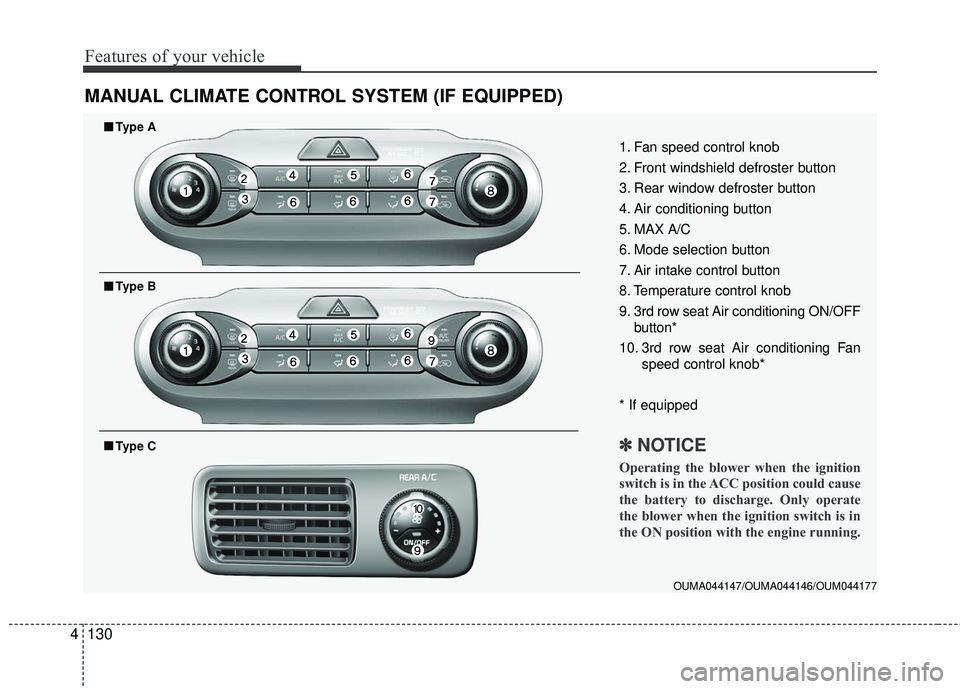
MANUAL CLIMATE CONTROL SYSTEM (IF EQUIPPED)
OUMA044147/OUMA044146/OUM044177
1. Fan speed control knob
2. Front windshield defroster button
3. Rear window defroster button
4. Air conditioning button
5. MAX A/C
6. Mode selection button
7. Air intake control button
8. Temperature control knob
9. 3rd row seat Air conditioning ON/OFF
button*
10. 3rd row seat Air conditioning Fan speed control knob*
* If equipped
✽ ✽ NOTICE
Operating the blower when the ignition
switch is in the ACC position could cause
the battery to discharge. Only operate
the blower when the ignition switch is in
the ON position with the engine running.
■ ■Type A
■ ■Type B
■ ■Type C