steering KIA SORENTO 2018 Service Manual
[x] Cancel search | Manufacturer: KIA, Model Year: 2018, Model line: SORENTO, Model: KIA SORENTO 2018Pages: 536, PDF Size: 13.42 MB
Page 348 of 536
Driving your vehicle
78
5
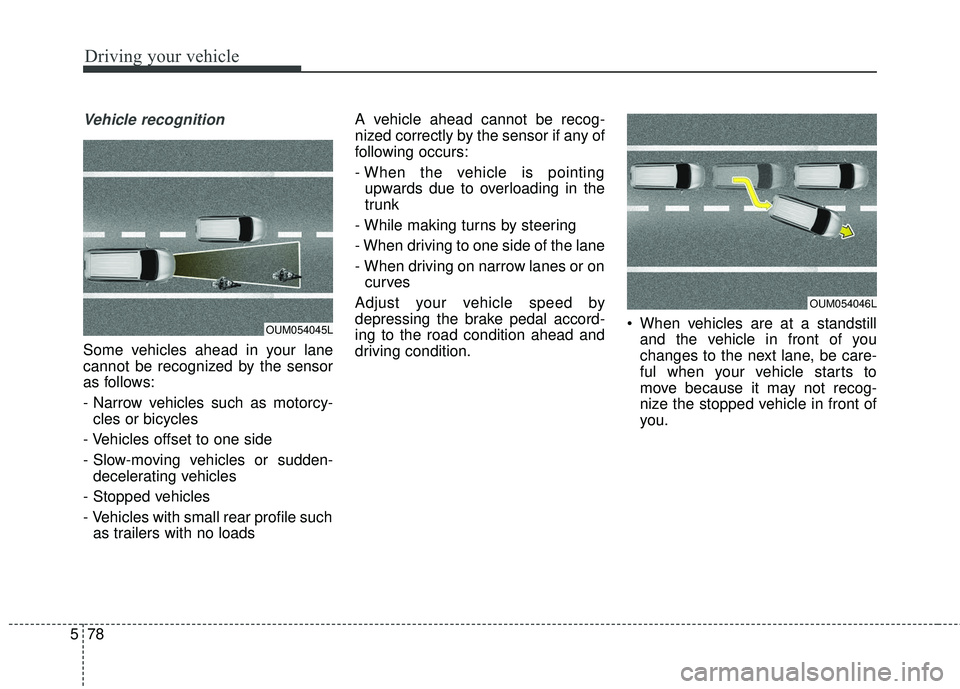
Vehicle recognition
Some vehicles ahead in your lane
cannot be recognized by the sensor
as follows:
- Narrow vehicles such as motorcy-
cles or bicycles
- Vehicles offset to one side
- Slow-moving vehicles or sudden- decelerating vehicles
- Stopped vehicles
- Vehicles with small rear profile such as trailers with no loads A vehicle ahead cannot be recog-
nized correctly by the sensor if any of
following occurs:
- When the vehicle is pointing
upwards due to overloading in the
trunk
- While making turns by steering
- When driving to one side of the lane
- When driving on narrow lanes or on curves
Adjust your vehicle speed by
depressing the brake pedal accord-
ing to the road condition ahead and
driving condition. When vehicles are at a standstill
and the vehicle in front of you
changes to the next lane, be care-
ful when your vehicle starts to
move because it may not recog-
nize the stopped vehicle in front of
you.
OUM054045L
OUM054046L
Page 352 of 536
Driving your vehicle
82
5
When Active ECO is activated:
The acceleration may slightly be
reduced even though you depress
the accelerator fully.
The air conditioner performance may be limited
The shift pattern of the automatic transaxle may change.
The engine noise may get louder.
The above situations are normal
conditions when the Active Eco
System is activated to improve fuel
efficiency. Limitation of Active ECO opera-
tion:
If the following conditions occur while
Active ECO is operating, the system
operation is limited even though
there is no change in the ECO indi-
cator.
When the coolant temperature is
low:
The system will be limited until
engine performance becomes nor-
mal.
When driving up a hill: The system will be limited to gain
power when driving uphill because
the engine torque is restricted.
When using manual mode: The system will be limited accord-
ing to the shift location.
When the accelerator pedal is deeply depressed for a few sec-
onds:
The system will be limited, judging
that the driver wants to speed up.SPORT mode
SPORT mode focuses on
dynamic driving by auto-
matically adjusting the
steering wheel, engine
and transaxle system.
button is pressed and
the SPORT mode is
selected, the SPORT
indicator (yellow) will illu-
minate.
is activated, and the
engine start/stop button
is turned off and on it will
change to NORMAL
mode. To turn on the
SPORT mode press
DRIVE MODE button
again.
SPORT
Page 362 of 536
Driving your vehicle
92
5
LANE DEPARTURE WARNING SYSTEM (LDWS) (IF EQUIPPED)
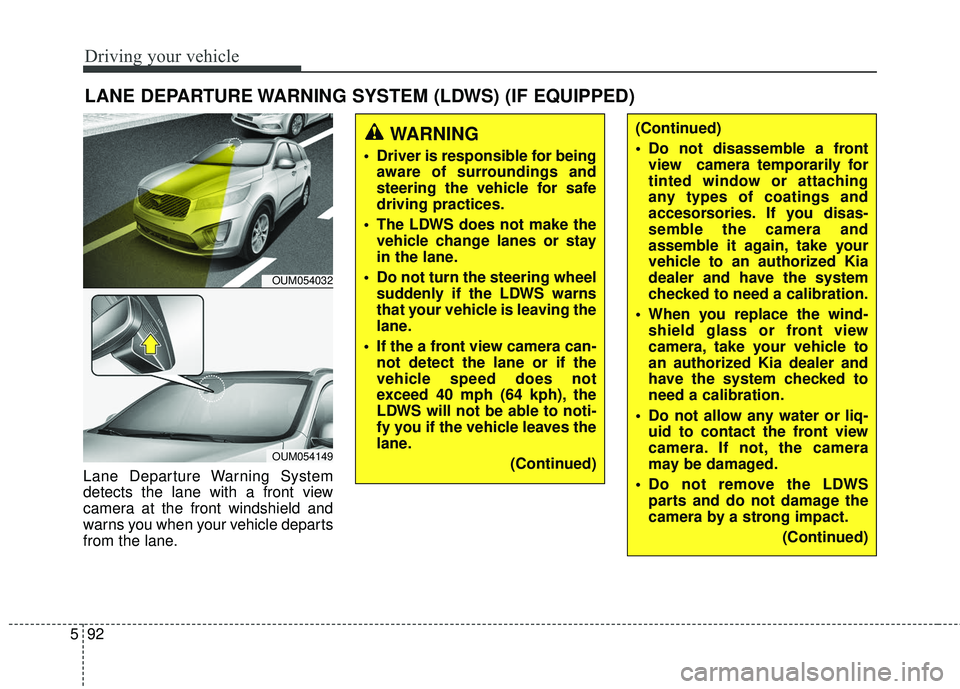
Lane Departure Warning System
detects the lane with a front view
camera at the front windshield and
warns you when your vehicle departs
from the lane.
OUM054032
OUM054149
WARNING
Driver is responsible for being
aware of surroundings and
steering the vehicle for safe
driving practices.
The LDWS does not make the vehicle change lanes or stay
in the lane.
Do not turn the steering wheel suddenly if the LDWS warns
that your vehicle is leaving the
lane.
If the a front view camera can- not detect the lane or if the
vehicle speed does not
exceed 40 mph (64 kph), the
LDWS will not be able to noti-
fy you if the vehicle leaves the
lane.
(Continued)
(Continued)
Do not disassemble a frontview camera temporarily for
tinted window or attaching
any types of coatings and
accesorsories. If you disas-
semble the camera and
assemble it again, take your
vehicle to an authorized Kia
dealer and have the system
checked to need a calibration.
When you replace the wind- shield glass or front view
camera, take your vehicle to
an authorized Kia dealer and
have the system checked to
need a calibration.
Do not allow any water or liq- uid to contact the front view
camera. If not, the camera
may be damaged.
Do not remove the LDWS parts and do not damage the
camera by a strong impact.
(Continued)
Page 368 of 536
Driving your vehicle
98
5
Remember, your vehicle does not
require extended warm-up. After
the engine has started, allow the
engine to run for 10 to 20 seconds
prior to placing the vehicle in gear.
In very cold weather, however, give
your engine a slightly longer warm-
up period.
Don't "lug" or "over-rev" the engine. Lugging is driving too slowly in a
very high gear resulting in engine
bucking. If this happens, shift to a
lower gear. Over-revving is racing
the engine beyond its safe limit.
This can be avoided by shifting at
the recommended speed. Use your air conditioning sparingly.
The air conditioning system is
operated by engine power so your
fuel economy is reduced when you
use it.
Open windows at high speeds can reduce fuel economy.
Fuel economy is less in crosswinds and headwinds. To help offset
some of this loss, slow down when
driving in these conditions.
Keeping a vehicle in good operating
condition is important both for econ-
omy and safety. Therefore, have an
authorized Kia dealer perform
scheduled inspections and mainte-
nance.
WARNING - Engine off
during motion
Never turn the engine off to
coast down hills or anytime the
vehicle is in motion. The power
steering and power brakes will
not function properly without
the engine running. In addition,
turning off the ignition while
driving could engage the steer-
ing wheel lock resulting in loss
of vehicle steering. Keep the
engine on and downshift to an
appropriate gear for engine
braking effect.
Page 369 of 536
599
Driving your vehicle
Hazardous driving conditions
When hazardous driving conditions
are encountered such as water,
snow, ice, mud, sand, or similar haz-
ards, follow these suggestions:
• Drive cautiously and allow extradistance for braking.
Avoid sudden braking or steering.
When braking with non-ABS brakes pump the brake pedal with
a light up-and-down motion until
the vehicle is stopped.
Do not pump the brake pedal on a
vehicle equipped with ABS. If stalled in snow, mud, or sand,
use second gear. Accelerate slow-
ly to avoid spinning the drive
wheels.
Use sand, rock salt, or other non- slip material under the drive
wheels to provide traction when
stalled in ice, snow, or mud.
Reducing the risk of a rollover
This multi-purpose passenger vehi-
cle is defined as a Sports Utility
Vehicle (SUV). Utility vehicles have a
significantly higher rollover rate than
other types of vehicles. SUV's have
higher ground clearance and a nar-
rower track to make them capable of
performing in a wide variety of off-
road applications. Specific design
characteristics give them a higher
center of gravity than ordinary vehi-
cles. An advantage of the higher
ground clearance is a better view of
the road, which allows you to antici-
pate problems. They are not
designed for cornering at the same
speeds as conventional passenger
vehicles, any more than low-slung
sports vehicles are designed to per-
form satisfactorily in off-road condi-
tions. Due to this risk, driver and pas-
sengers are strongly recommended
to buckle their seat belts. In a rollover
crash, an unbelted person is signifi-
cantly more likely to die than a per-
son wearing a seat belt. There are
steps that a driver can make to
reduce the risk of a rollover.
SPECIAL DRIVING CONDITIONS
WARNING- Downshifting
Do not downshift with an auto-
matic transaxle while driving on
slippery surfaces. The sudden
change in tire speed could
cause the tires to skid and
result in an accident.
Page 370 of 536
Driving your vehicle
100
5
If at all possible, avoid sharp turns or
abrupt maneuvers, do not load your
roof rack with heavy cargo, and
never modify your vehicle in any way.
WARNING- Rollover
As with other Sports Utility
Vehicle (SUV), failure to operate
this vehicle correctly may result
in loss of control, an accident or
vehicle rollover.
Utility vehicles have a signifi- cantly higher rollover rate
than other types of vehicles.
Specific design characteris- tics (higher ground clearance,
narrower track, etc.) give this
vehicle a higher center of
gravity than ordinary vehicles.
A SUV is not designed for cor- nering at the same speeds as
conventional vehicles.
Avoid sharp turns or abrupt maneuvers.
(Continued)
WARNING
Your vehicle is equipped with
tires designed to provide safe
ride and handling capability. Do
not use a size and type of tire
and wheel that is different from
the one that is originally
installed on your vehicle. It can
affect the safety and perform-
ance of your vehicle, which
could lead to steering failure or
rollover and serious injury.
When replacing the tires, be
sure to equip all four tires with
the tire and wheel of the same
size, type, tread, brand and
load-carrying capacity. If you
nevertheless decide to equip
your vehicle with any tire/wheel
combination not recommended
by Kia for off road driving, you
should not use these tires for
highway driving.
(Continued)
In a rollover crash, an unbelt-ed person is significantly
more likely to die than a per-
son wearing a seat belt. Make
sure everyone in the vehicle is
properly buckled up.
Page 371 of 536
5101
Driving your vehicle
Rocking the vehicle
If it is necessary to rock the vehicle
to free it from snow, sand, or mud,
first turn the steering wheel right and
left to clear the area around your
front wheels. Then, shift back and
forth between R (Reverse) and any
forward gear in vehicles equipped
with an automatic transaxle. Do not
race the engine, and spin the wheels
as little as possible. If you are still
stuck after a few tries, have the vehi-
cle pulled out by a tow vehicle to
avoid engine overheating and possi-
ble damage to the transaxle.The ESC system should be turned
OFF prior to rocking the vehicle.
Smooth cornering
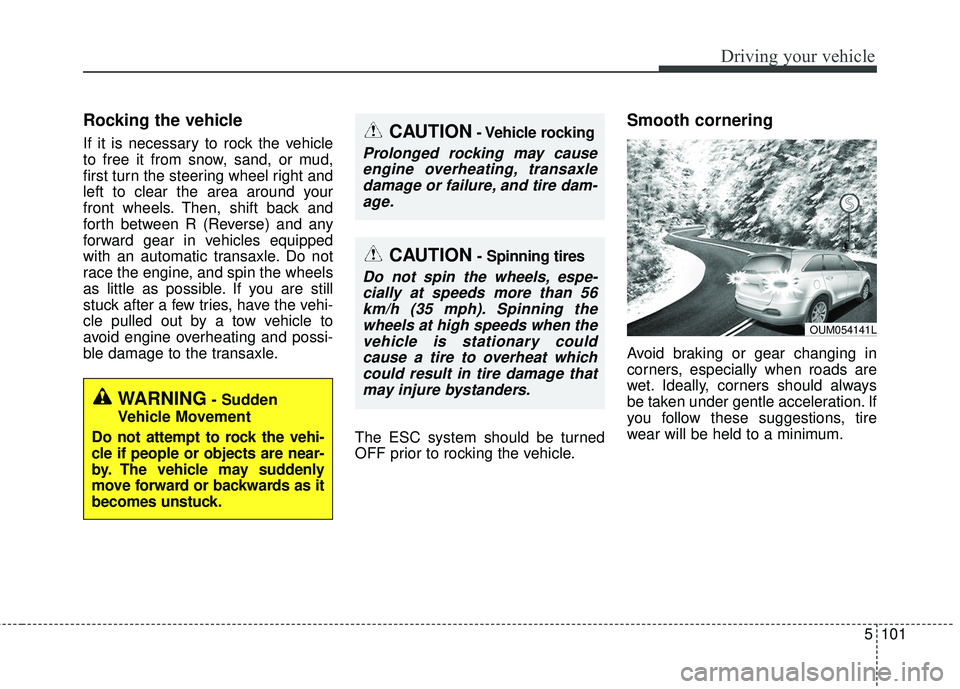
Avoid braking or gear changing in
corners, especially when roads are
wet. Ideally, corners should always
be taken under gentle acceleration. If
you follow these suggestions, tire
wear will be held to a minimum.
CAUTION- Vehicle rocking
Prolonged rocking may causeengine overheating, transaxledamage or failure, and tire dam-age.
CAUTION- Spinning tires
Do not spin the wheels, espe-cially at speeds more than 56km/h (35 mph). Spinning thewheels at high speeds when thevehicle is stationary couldcause a tire to overheat whichcould result in tire damage thatmay injure bystanders.
WARNING- Sudden
Vehicle Movement
Do not attempt to rock the vehi-
cle if people or objects are near-
by. The vehicle may suddenly
move forward or backwards as it
becomes unstuck.
OUM054141L
Page 377 of 536
5107
Driving your vehicle
Don’t let your parking brake
freeze
Under some conditions your parking
brake can freeze in the engaged
position. This is most likely to happen
when there is an accumulation of
snow or ice around or near the rear
brakes or if the brakes are wet. If
there is a risk the parking brake may
freeze, apply it only temporarily while
you put the gear shift lever in P
(Park, automatic transaxle) and
block the rear wheels so the vehicle
cannot roll. Then release the parking
brake.
Don't let ice and snow accu-
mulate underneath
Under some conditions, snow and
ice can build up under the fenders
and interfere with the steering. When
driving in severe winter conditions
where this may happen, you should
periodically check underneath the
vehicle to be sure the movement of
the front wheels and the steering
components are not obstructed.
Carry emergency equipment
Depending on the severity of the
weather, you should carry appropri-
ate emergency equipment. Some of
the items you may want to carry
include tow straps or chains, flash-
light, emergency flares, sand, shov-
el, jumper cables, window scraper,
gloves, ground cloth, coveralls, blan-
ket, etc.
Page 380 of 536
Driving your vehicle
110
5
Driving with a trailer
Towing a trailer requires a certain
amount of experience. Before setting
out for the open road, you must get to
know your trailer. Acquaint yourself
with the feel of handling and braking
with the added weight of the trailer.
And always keep in mind that the
vehicle you are driving is now a good
deal longer and not nearly so respon-
sive as your vehicle is by itself.
Before you start, check the trailer
hitch and platform, safety chains,
electrical connector(s), lights, tires
and mirror adjustment. If the trailer
has electric brakes, start your vehicle
and trailer moving and then apply the
trailer brake controller by hand to be
sure the brakes are working. This lets
you check your electrical connection
at the same time.
During your trip, check occasionally
to be sure that the load is secure,
and that the lights and any trailer
brakes are still working.
Following distance
Stay at least twice as far behind the
vehicle ahead as you would when
driving your vehicle without a trailer.
This can help you avoid situations
that require heavy braking and sud-
den turns.
Passing
You’ll need more passing distance
up ahead when you’re towing a trail-
er. And, because of the increased
vehicle length, you’ll need to go
much farther beyond the passed
vehicle before you can return to your
lane. Due to the added load to the
engine when going uphill the vehicle
may also take longer to pass than it
would on flat ground.
Backing up
Hold the bottom of the steering
wheel with one hand. Then, to move
the trailer to the left, just move your
hand to the left. To move the trailer to
the right, move your hand to the
right. Always back up slowly and, if
possible, have someone guide you.
Making turns
When you’re turning with a trailer,
make wider turns than normal. Do
this so your trailer won’t strike soft
shoulders, curbs, road signs, trees,
or other objects near the edge of the
road. Avoid jerky or sudden maneu-
vers. Signal well in advance before
turning or lane changes.
Page 382 of 536
Driving your vehicle
112
5
Towing up hill
When towing a trailer on steep
grades (in excess of 6%) pay close
attention to the engine coolant
temperature gauge to ensure the
engine does not overheat.
If the needle of the coolant temper-
ature gauge moves across the dial
towards “H” (HOT), pull over and
stop as soon as it is safe to do so,
and allow the engine to idle until it
cools down. You may proceed once
the engine has cooled sufficiently.
You must decide driving speed depending on trailer weight and
uphill grade to reduce the possibil-
ity of engine and transaxle over-
heating.
Parking on hills
Generally, if you have a trailer
attached to your vehicle, you should
not park your vehicle on a hill. People
can be seriously or fatally injured,
and both your vehicle and the trailer
can be damaged if they unexpected-
ly roll downhill.
However, if you ever have to park
your trailer on a hill, here's how to do
it:
1.Pull the vehicle into the parkingspace. Turn the steering wheel in
the direction of the curb (right if
headed downhill, left if headed up
hill).
2.If the vehicle has an automatic transaxle, place the vehicle in P
(Park).
3.Set the parking brake and shut off the engine.
4.Place chocks under the trailer wheels on the down hill side of the
wheels. 5.Start the vehicle, hold the brakes,
shift to neutral, release the parking
brake and slowly release the
brakes until the trailer chocks
absorb the load.
6.Reapply the brakes, reapply the parking brake and shift the vehicle
to P (Park) for automatic transaxle.
7.Shut off the vehicle and release the vehicle brakes but leave the park-
ing brake set.