engine KIA SORENTO 2019 Owners Manual
[x] Cancel search | Manufacturer: KIA, Model Year: 2019, Model line: SORENTO, Model: KIA SORENTO 2019Pages: 573, PDF Size: 10.61 MB
Page 288 of 573
511
Driving your vehicle
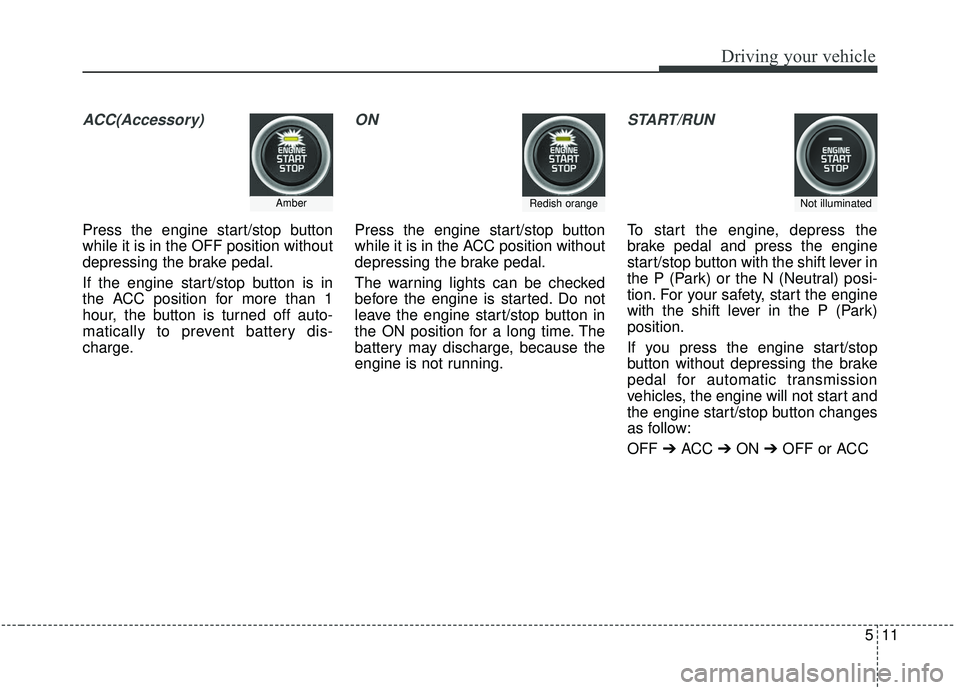
ACC(Accessory)
Press the engine start/stop button
while it is in the OFF position without
depressing the brake pedal.
If the engine start/stop button is in
the ACC position for more than 1
hour, the button is turned off auto-
matically to prevent battery dis-
charge.
ON
Press the engine start/stop button
while it is in the ACC position without
depressing the brake pedal.
The warning lights can be checked
before the engine is started. Do not
leave the engine start/stop button in
the ON position for a long time. The
battery may discharge, because the
engine is not running.
START/RUN
To start the engine, depress the
brake pedal and press the engine
start/stop button with the shift lever in
the P (Park) or the N (Neutral) posi-
tion. For your safety, start the engine
with the shift lever in the P (Park)
position.
If you press the engine start/stop
button without depressing the brake
pedal for automatic transmission
vehicles, the engine will not start and
the engine start/stop button changes
as follow:
OFF ➔ACC ➔ON ➔OFF or ACC
AmberRedish orangeNot illuminated
Page 289 of 573
Driving your vehicle
12
5
✽ ✽
NOTICE
If you leave the engine start/stop
button in the ACC or ON position
for a long time, the battery will dis-
charge.
Starting the engine with a
smart key
1.Carry the smart key or leave it
inside the vehicle.
2.Make sure the parking brake is firmly applied
3.Place the transmission shift lever in P (Park). Depress the brake pedal
fully.
You can also start the engine whenthe shift lever is in the N (Neutral)position.
4.Press the engine start/stop button while depressing the brake pedal.
It should be started withoutdepressing the accelerator.
5.Do not wait for the engine to warm up while the vehicle remains sta-
tionary.
Start driving at moderate engine
speeds. (Rapid accelerating and
decelerating should be avoided.) Even if the smart key is in the vehi-
cle, if it is far away from you, the
engine may not start.
When the engine start/stop button is in the ACC position or above, if
any door is opened, the system
checks for the smart key. If the
smart key is not in the vehicle, a
message “key is not in the vehicle”
will appear on the LCD display. And
if all doors are closed, the chime
will sound for 5 seconds. The indi-
cator or warning will turn off while
the vehicle is moving. Always have
the smart key with you.
WARNING- Starting
vehicle
Never press the engine
start/stop button while the vehi-
cle is in motion except in an
emergency. This would result in
loss of directional control and
braking function, which could
cause an accident.
Page 290 of 573
513
Driving your vehicle
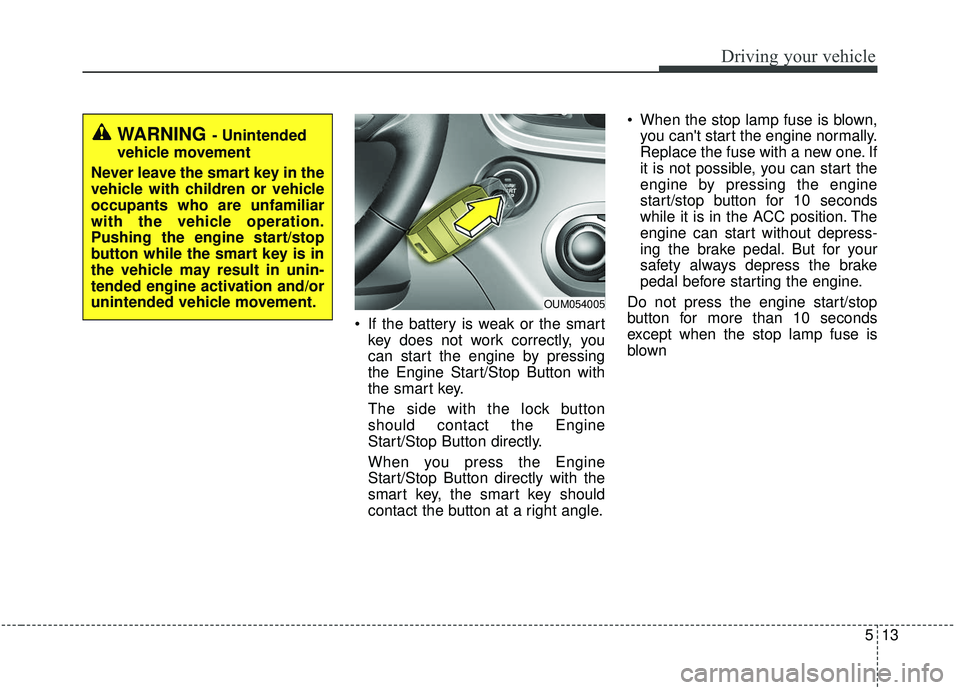
If the battery is weak or the smartkey does not work correctly, you
can start the engine by pressing
the Engine Start/Stop Button with
the smart key.
The side with the lock button
should contact the Engine
Start/Stop Button directly.
When you press the Engine
Start/Stop Button directly with the
smart key, the smart key should
contact the button at a right angle. When the stop lamp fuse is blown,
you can't start the engine normally.
Replace the fuse with a new one. If
it is not possible, you can start the
engine by pressing the engine
start/stop button for 10 seconds
while it is in the ACC position. The
engine can start without depress-
ing the brake pedal. But for your
safety always depress the brake
pedal before starting the engine.
Do not press the engine start/stop
button for more than 10 seconds
except when the stop lamp fuse is
blown
WARNING - Unintended
vehicle movement
Never leave the smart key in the
vehicle with children or vehicle
occupants who are unfamiliar
with the vehicle operation.
Pushing the engine start/stop
button while the smart key is in
the vehicle may result in unin-
tended engine activation and/or
unintended vehicle movement.
OUM054005
Page 292 of 573
515
Driving your vehicle
For smooth operation, depress thebrake pedal and the lock release but-ton when shifting from N (Neutral) toa forward or reverse gear.
When stopped on an incline, do not
hold the vehicle with the engine
power. Use the service brake or the
parking brake.
Transmission ranges
The indicator in the instrument clus-
ter displays the shift lever position
when the ignition switch is in the ON
position. P (Park)
Always come to a complete stop
before shifting into P (Park). This
position locks the transmission and
prevents the drive wheels from rotat-
ing.
Shifting into P (Park) while the vehi-
cle is in motion will cause the drive
wheels to lock which will cause you
to lose control of the vehicle.
R (Reverse)
Use this position to drive the vehicle
backward.
WARNING- Leaving
Vehicle
Before leaving the driver’s seat,
always make sure the shift lever
is in the P (Park) position; then
set the parking brake fully and
shut the engine off. Do not use
the P position in place of the
parking brake. Always make
sure the shift lever is latched in
the P position and set the park-
ing brake fully. Unexpected and
sudden vehicle movement can
occur if these precautions are
not followed.
CAUTION- Transmission
To avoid damage to your trans- mission, do not accelerate theengine in R (Reverse) or any for-ward gear position with thebrakes on. The transmissionmay be damaged if you shiftinto P (Park) while the vehicle isin motion.
CAUTION- Shifting
Always come to a complete stopbefore shifting into or out of R(Reverse); you may damage thetransmission if you shift into R(Reverse) while the vehicle is inmotion, except when “Rockingthe vehicle” explained in thissection.
Page 293 of 573
Driving your vehicle
16
5
N (Neutral)
The wheels and transmission are not
engaged. The vehicle will roll freely
even on the slightest incline unless
the parking brake or service brakes
are applied.
- Parking in N (Neutral) gear
Follow below steps when parking
and you want the vehicle to move
when pushed.
1. After parking your vehicle, depress
the brake pedal and move the trans-
mission shift lever to [P] with the
ignition button in [ON] or while the
engine is running.
2. If the parking brake is applied release the parking brake.
- For EPB (Electronic ParkingBrake) equipped vehicles, push
the brake pedal with the ignition
button in [ON] or while the engine
is running to reapply the parking
brake. If [AUTO HOLD] function
is used while driving (If [AUTO
HOLD] indicator is on in the clus-
ter), press [AUTO HOLD] switch
and [AUTO HOLD] function
should be turn off. 3. While pressing the brake pedal,
turn the ignition button [OFF].
- For smart key equipped vehicles,the ignition switch can be moved
to [OFF] only when the shift lever
is in [P].
4. Change the gear shift lever to [N] (Neutral) while pressing the brake
pedal and pressing down a tool
(e.g. flathead screw-driver) into the
[SHIFT LOCK RELEASE] access
hole at the same time. Then, the
vehicle will move when external
force is applied.
WARNING- Parking In
Neutral
With the exception of parking in neutral gear, always park
the vehicle in [P] (Park) for
safety and apply the parking
brake.
Before parking in [N] (Neutral) gear, make sure the parking
ground is level and flat. Do not
park in [N] gear on any slopes
or gradients. If parked and left
in [N], the vehicle may move
and cause serious damage or
injury.
Page 295 of 573
Driving your vehicle
18
5
In manual mode, the driver must
execute upshifts in accordance
with road conditions, taking care to
keep the engine speed below the
red zone.
In manual mode, only the 6 or 8 forward gears can be selected. To
reverse or park the vehicle, move
the shift lever to the R (Reverse) or
P (Park) position as required.
In manual mode, downshifts are made automatically when the vehi-
cle slows down. When the vehicle
stops, 1st gear is automatically
selected.
In manual mode, when the engine rpm approaches the red zone shift
points are varied to upshift auto-
matically. To maintain the required levels of
vehicle performance and safety,
the system may not execute cer-
tain gearshifts when the shift lever
is operated.
When driving on a slippery road, push the shift lever forward into the
+(up) position. This causes the
transmission to shift into the 2nd
gear which is better for smooth
driving on a slippery road. Push
the shift lever to the -(down) side to
shift back to the 1st gear.Shift lock system
For your safety, the automatic trans-
mission has a shift lock system
which prevents shifting the transmis-
sion from P (Park) into R (Reverse)
unless the brake pedal is depressed.
To shift the transmission from P
(Park) into R (Reverse):
1.Depress and hold the brake pedal.
2.Start the engine or turn the ignitionswitch to the ON position.
3.Move the shift lever.
If the brake pedal is repeatedly
depressed and released with the
shift lever in the P (Park) position, a
chattering noise near the shift lever
may be heard. It is a normal condi-
tion.
Page 296 of 573
519
Driving your vehicle
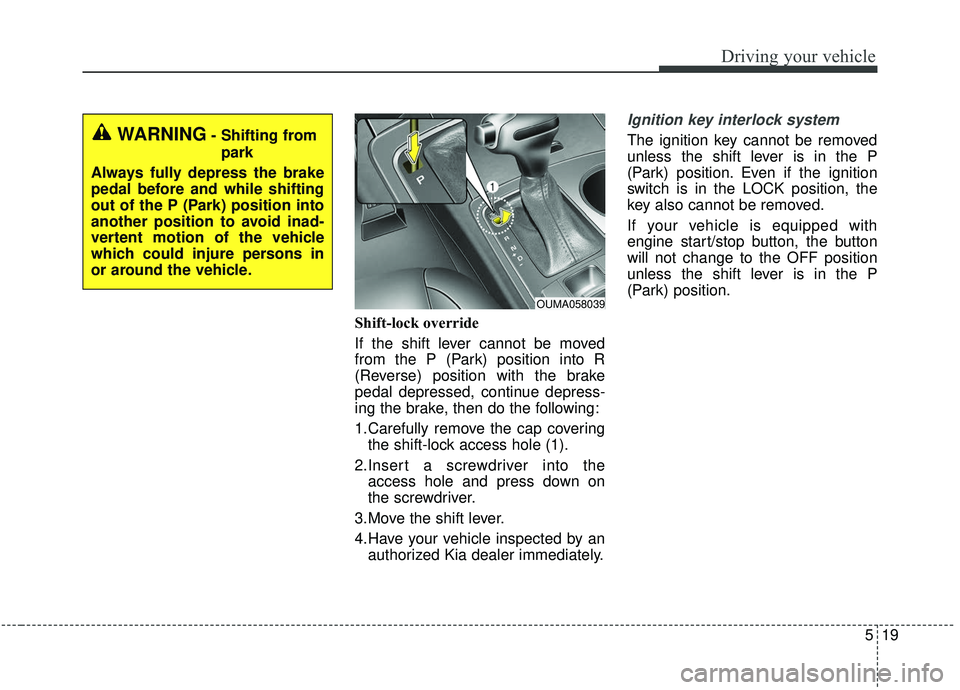
Shift-lock override
If the shift lever cannot be moved
from the P (Park) position into R
(Reverse) position with the brake
pedal depressed, continue depress-
ing the brake, then do the following:
1.Carefully remove the cap coveringthe shift-lock access hole (1).
2.Insert a screwdriver into the access hole and press down on
the screwdriver.
3.Move the shift lever.
4.Have your vehicle inspected by an authorized Kia dealer immediately.
Ignition key interlock system
The ignition key cannot be removed
unless the shift lever is in the P
(Park) position. Even if the ignition
switch is in the LOCK position, the
key also cannot be removed.
If your vehicle is equipped with
engine start/stop button, the button
will not change to the OFF position
unless the shift lever is in the P
(Park) position.
OUMA058039
WARNING- Shifting from
park
Always fully depress the brake
pedal before and while shifting
out of the P (Park) position into
another position to avoid inad-
vertent motion of the vehicle
which could injure persons in
or around the vehicle.
Page 298 of 573
521
Driving your vehicle
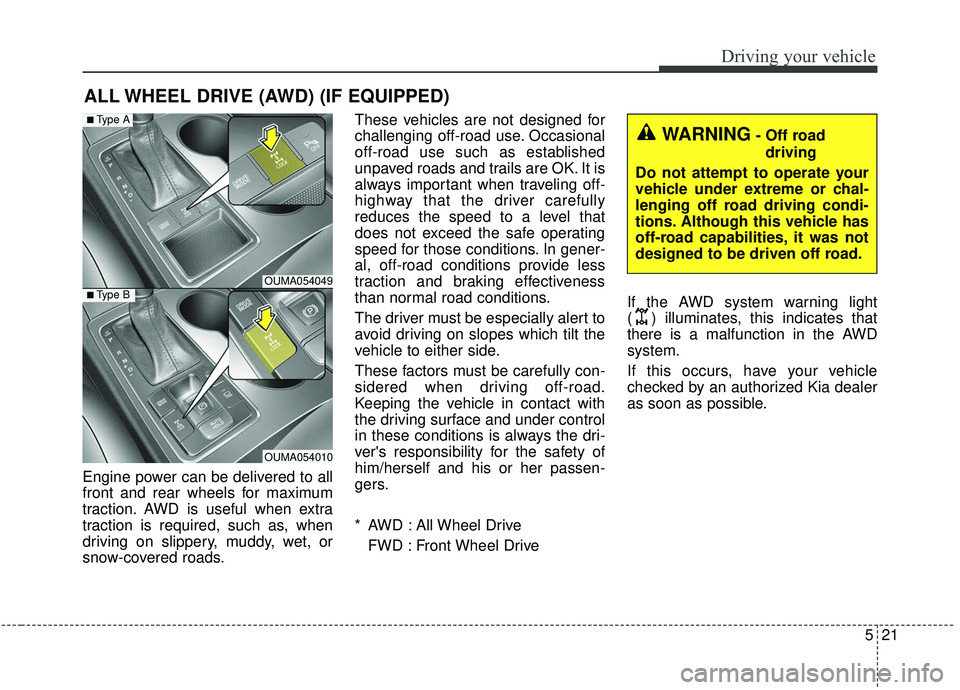
Engine power can be delivered to all
front and rear wheels for maximum
traction. AWD is useful when extra
traction is required, such as, when
driving on slippery, muddy, wet, or
snow-covered roads.These vehicles are not designed for
challenging off-road use. Occasional
off-road use such as established
unpaved roads and trails are OK. It is
always important when traveling off-
highway that the driver carefully
reduces the speed to a level that
does not exceed the safe operating
speed for those conditions. In gener-
al, off-road conditions provide less
traction and braking effectiveness
than normal road conditions.
The driver must be especially alert to
avoid driving on slopes which tilt the
vehicle to either side.
These factors must be carefully con-
sidered when driving off-road.
Keeping the vehicle in contact with
the driving surface and under control
in these conditions is always the dri-
ver's responsibility for the safety of
him/herself and his or her passen-
gers.
* AWD : All Wheel Drive
FWD : Front Wheel Drive If the AWD system warning light
( ) illuminates, this indicates that
there is a malfunction in the AWD
system.
If this occurs, have your vehicle
checked by an authorized Kia dealer
as soon as possible.
ALL WHEEL DRIVE (AWD) (IF EQUIPPED)
OUMA054049
OUMA054010
■Type A
■Type B
WARNING- Off road
driving
Do not attempt to operate your
vehicle under extreme or chal-
lenging off road driving condi-
tions. Although this vehicle has
off-road capabilities, it was not
designed to be driven off road.
Page 300 of 573
523
Driving your vehicle
For safe all wheel drive opera-
tion
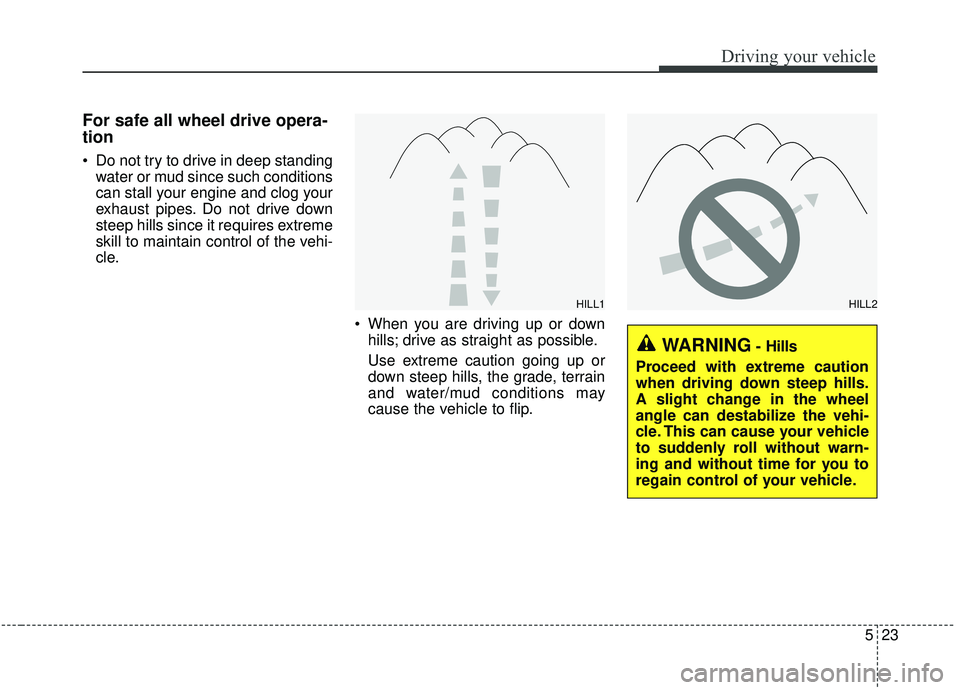
Do not try to drive in deep standingwater or mud since such conditions
can stall your engine and clog your
exhaust pipes. Do not drive down
steep hills since it requires extreme
skill to maintain control of the vehi-
cle.
When you are driving up or downhills; drive as straight as possible.
Use extreme caution going up or
down steep hills, the grade, terrain
and water/mud conditions may
cause the vehicle to flip.
HILL1HILL2
WARNING- Hills
Proceed with extreme caution
when driving down steep hills.
A slight change in the wheel
angle can destabilize the vehi-
cle. This can cause your vehicle
to suddenly roll without warn-
ing and without time for you to
regain control of your vehicle.
Page 302 of 573
525
Driving your vehicle
✽ ✽NOTICE
• Shorten your scheduled mainte-
nance interval if you drive in off-
road conditions such as sand, mud
or water (see “Maintenance under
severe usage conditions” in section
7). Always wash your vehicle thor-
oughly after off-road use, especial-
ly cleaning the bottom of the vehi-
cle.
• A full time all wheel drive vehicle cannot be towed by an ordinary
tow truck. Make sure that the
vehicle is placed on a flat bed
truck for moving.
Do not use a tire and wheel package
with a different size and type from
the one originally installed on your
vehicle. It can affect the safety and
performance of your vehicle, which
could lead to steering failure or
rollover causing serious injury.
When replacing the tires, be sure to
equip all four tires with the tire and
wheel of the same size, type, tread,
brand and load-carrying capacity. If
you equip your vehicle with any
tire/wheel combination not recom-
mended by Kia for off-road driving,
ou should not use thesetires for high
way driving.
CAUTION- Mud or snow
Do not run the engine continu-
ously at high RPMs to free thevehicle from snow or mud. Doingso could damage the AWD sys-tem in your vehicle.
WARNING- AWD driving
Do not attempt quick steering
maneuvers or sharp turns in
AWD mode. Such maneuvers
increase the risk of rollover
accidents. Rollover accidents
are extremely violent and
unpredictable.WARNING- Driving through water
Drive slowly. If you are driving
too fast in water, the water can
get into the engine compartment
and wet the ignition system,
causing your vehicle to sudden-
ly stop. If this happens and your
vehicle is in a tilted position,
your vehicle may roll over.