instrument cluster KIA SORENTO 2019 User Guide
[x] Cancel search | Manufacturer: KIA, Model Year: 2019, Model line: SORENTO, Model: KIA SORENTO 2019Pages: 573, PDF Size: 10.61 MB
Page 343 of 573
Driving your vehicle
66
5
Each of these actions will cancel
cruise control operation (The setspeed in the instrument cluster willgo off), but it will not turn the systemoff. If you wish to resume cruise con-trol operation, move the lever up (toRES+). You will return to your previ-ously preset speed.To resume cruising speed at
more than approximately 30
km/h (20 mph):
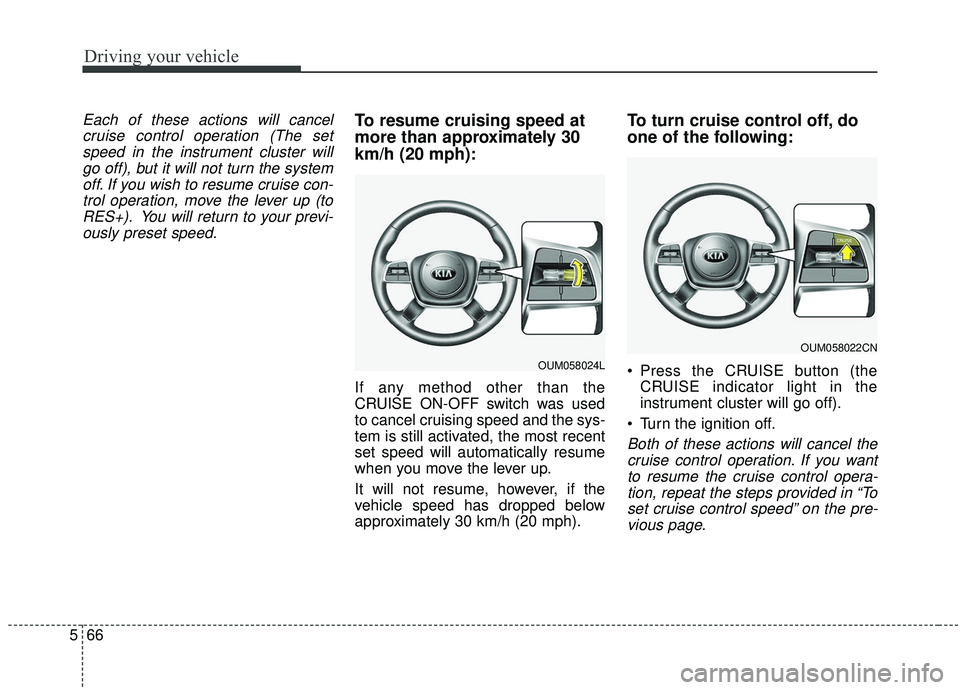
If any method other than the
CRUISE ON-OFF switch was used
to cancel cruising speed and the sys-
tem is still activated, the most recent
set speed will automatically resume
when you move the lever up.
It will not resume, however, if the
vehicle speed has dropped below
approximately 30 km/h (20 mph).
To turn cruise control off, do
one of the following:
Press the CRUISE button (the CRUISE indicator light in the
instrument cluster will go off).
Turn the ignition off.
Both of these actions will cancel the cruise control operation. If you wantto resume the cruise control opera-tion, repeat the steps provided in “Toset cruise control speed” on the pre-vious page.
OUM058024L
OUM058022CN
Page 344 of 573
567
Driving your vehicle
SMART CRUISE CONTROL WITH STOP & GO SYSTEM (IF EQUIPPED)
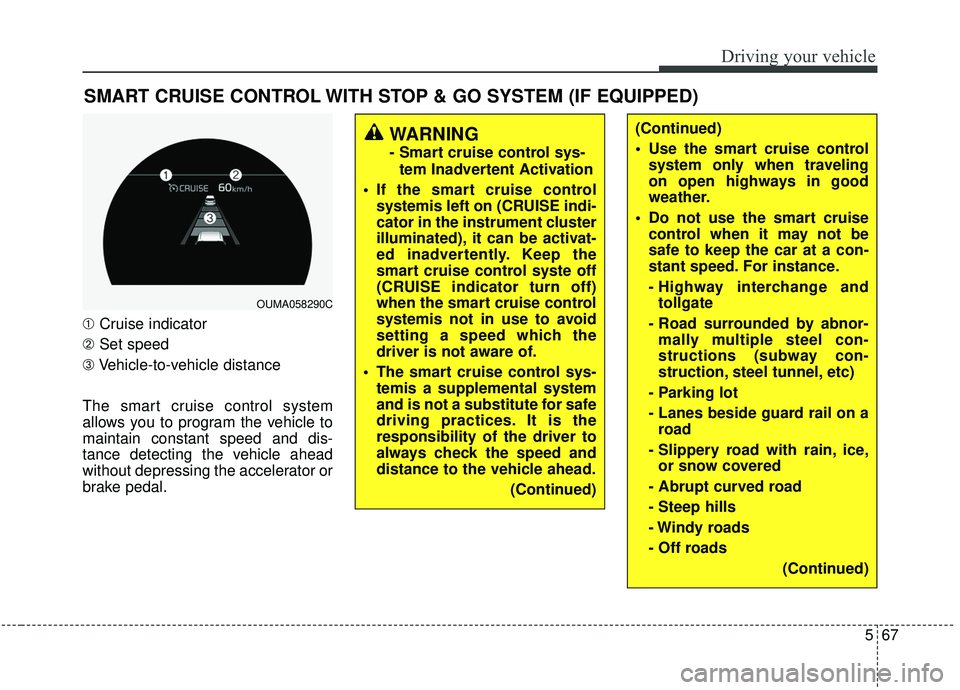
➀Cruise indicator
➁ Set speed
➂ Vehicle-to-vehicle distance
The smart cruise control system
allows you to program the vehicle to
maintain constant speed and dis-
tance detecting the vehicle ahead
without depressing the accelerator or
brake pedal.
WARNING
- Smart cruise control sys- tem Inadvertent Activation
If the smart cruise control systemis left on (CRUISE indi-
cator in the instrument cluster
illuminated), it can be activat-
ed inadvertently. Keep the
smart cruise control syste off
(CRUISE indicator turn off)
when the smart cruise control
systemis not in use to avoid
setting a speed which the
driver is not aware of.
The smart cruise control sys- temis a supplemental system
and is not a substitute for safe
driving practices. It is the
responsibility of the driver to
always check the speed and
distance to the vehicle ahead.
(Continued)
OUMA058290C
(Continued)
Use the smart cruise controlsystem only when traveling
on open highways in good
weather.
Do not use the smart cruise control when it may not be
safe to keep the car at a con-
stant speed. For instance.
- Highway interchange andtollgate
- Road surrounded by abnor- mally multiple steel con-
structions (subway con-
struction, steel tunnel, etc)
- Parking lot
- Lanes beside guard rail on a road
- Slippery road with rain, ice, or snow covered
- Abrupt curved road
- Steep hills
- Windy roads
- Off roads (Continued)
Page 346 of 573
569
Driving your vehicle
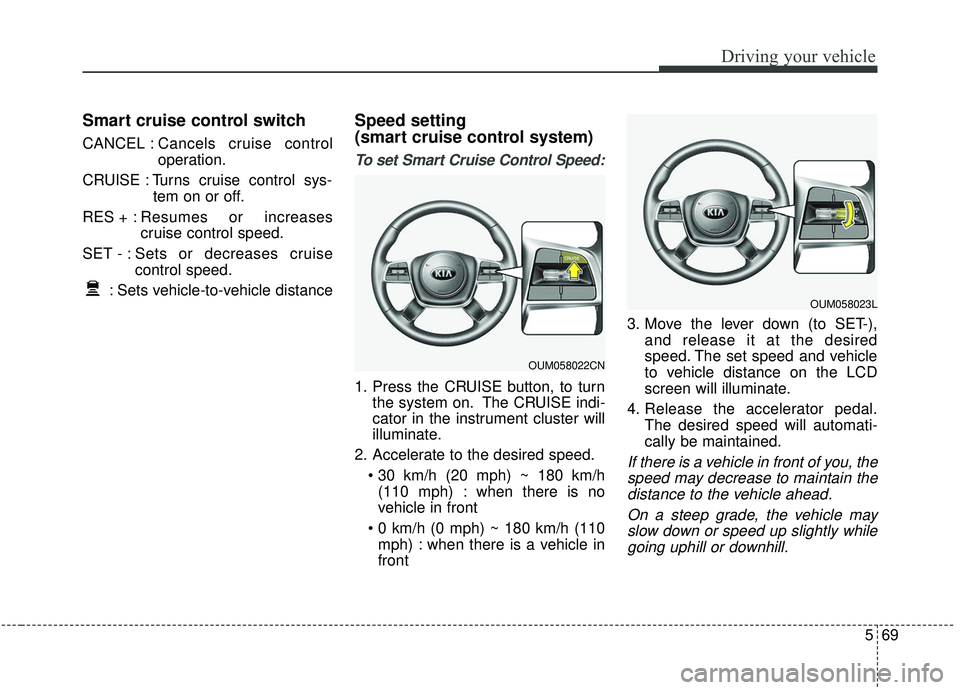
Smart cruise control switch
CANCEL :Cancels cruise control
operation.
CRUISE : Turns cruise control sys- tem on or off.
RES + : Resumes or increases
cruise control speed.
SET - : Sets or decreases cruise control speed.
: Sets vehicle-to-vehicle distance
Speed setting
(smart cruise control system)
To set Smart Cruise Control Speed:
1. Press the CRUISE button, to turn the system on. The CRUISE indi-
cator in the instrument cluster will
illuminate.
2. Accelerate to the desired speed. (110 mph) : when there is no
vehicle in front
mph) : when there is a vehicle in
front 3. Move the lever down (to SET-),
and release it at the desired
speed. The set speed and vehicle
to vehicle distance on the LCD
screen will illuminate.
4. Release the accelerator pedal. The desired speed will automati-
cally be maintained.
If there is a vehicle in front of you, thespeed may decrease to maintain thedistance to the vehicle ahead.
On a steep grade, the vehicle mayslow down or speed up slightly whilegoing uphill or downhill.
OUM058023L
OUM058022CN
Page 350 of 573
573
Driving your vehicle
To resume cruise control setspeed:
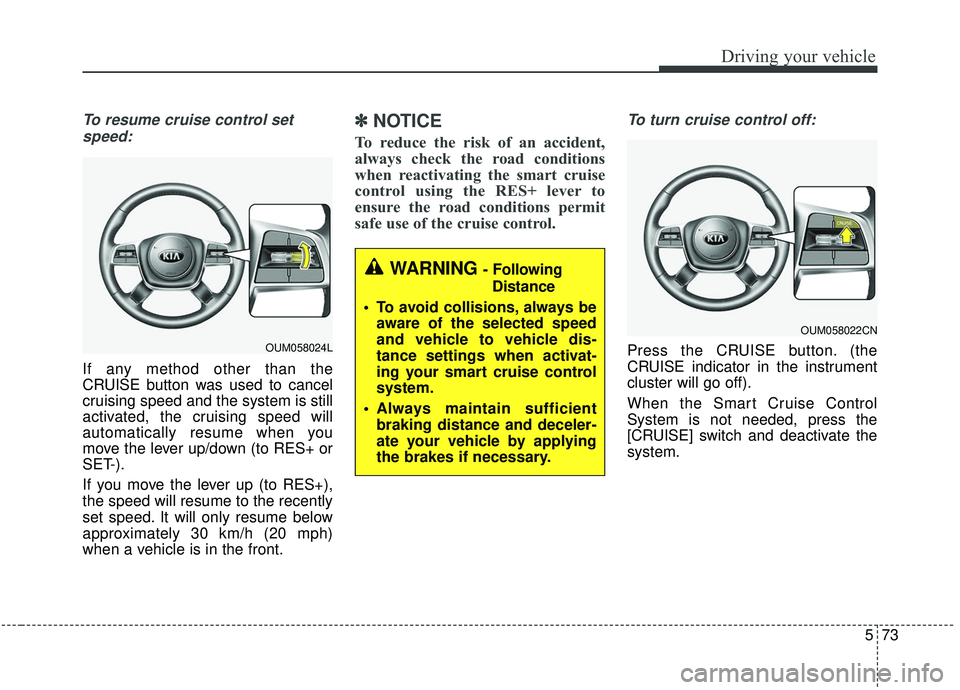
If any method other than the
CRUISE button was used to cancel
cruising speed and the system is still
activated, the cruising speed will
automatically resume when you
move the lever up/down (to RES+ or
SET-).
If you move the lever up (to RES+),
the speed will resume to the recently
set speed. It will only resume below
approximately 30 km/h (20 mph)
when a vehicle is in the front.
✽ ✽ NOTICE
To reduce the risk of an accident,
always check the road conditions
when reactivating the smart cruise
control using the RES+ lever to
ensure the road conditions permit
safe use of the cruise control.
To turn cruise control off:
Press the CRUISE button. (the
CRUISE indicator in the instrument
cluster will go off).
When the Smart Cruise Control
System is not needed, press the
[CRUISE] switch and deactivate the
system.
WARNING - Following
Distance
To avoid collisions, always be aware of the selected speed
and vehicle to vehicle dis-
tance settings when activat-
ing your smart cruise control
system.
Always maintain sufficient braking distance and deceler-
ate your vehicle by applying
the brakes if necessary.
OUM058022CN
OUM058024L
Page 370 of 573

593
Driving your vehicle
LKA SYSTEM operation
To activate/deactivate the LKA SYS-
TEM:
With the ignition switch in the ON
position, press the LKA SYSTEM
button located on the instrument
panel on the lower left hand side of
the driver.
The indicator in the cluster display
will initially illuminate white.
When the indicator (white) activated
in the previous ignition cycle, the
system turns on without any control.If you press the LKA SYSTEM button
again, the indicator on the cluster
display will go off.
The color of indicator will change
depend on the condition of LKA
SYSTEM.
- White : Sensor does not detect the
lane marker or vehicle
speed is less than 64 km/h
(40 mph).
- Green : S ensor detects the lane
marker and system is able
to control the steering.
LKA SYSTEM activation
To see the LKA SYSTEM screen on the LCD display in the cluster,
Tab to the Assist mode ( ).
For further details, refer to [menu settings] in chapter 4, [crash pad].
After LKA SYSTEM is activated, if both lane markers are detected,
vehicle speed is over 64 km/h (40
mph) and all the activation condi-
tions are satisfied, a green steering
wheel indicator will illuminate and
the steering wheel will be controlled.
OUMA058031
WARNING
The Lane Keeping Assist
System is a system to help pre-
vent the driver from leaving the
lane. However, the driver should
not solely rely on the system
but always check the road con-
ditions when driving.
Page 382 of 573
5105
Driving your vehicle
Operating conditions
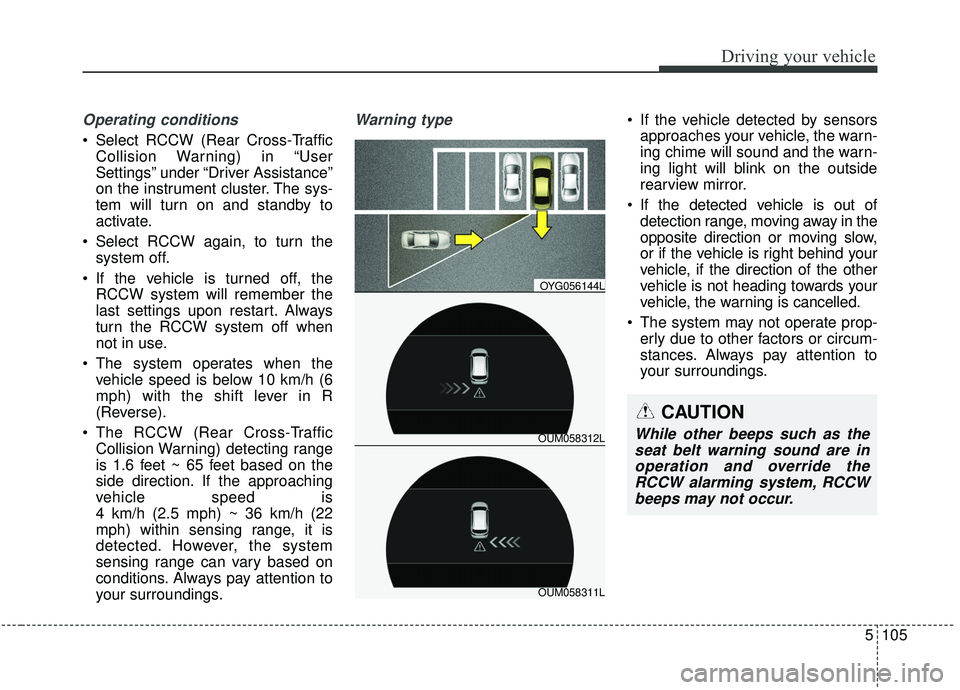
Select RCCW (Rear Cross-TrafficCollision Warning) in “User
Settings” under “Driver Assistance”
on the instrument cluster. The sys-
tem will turn on and standby to
activate.
Select RCCW again, to turn the system off.
If the vehicle is turned off, the RCCW system will remember the
last settings upon restart. Always
turn the RCCW system off when
not in use.
The system operates when the vehicle speed is below 10 km/h (6
mph) with the shift lever in R
(Reverse).
The RCCW (Rear Cross-Traffic Collision Warning) detecting range
is 1.6 feet ~ 65 feet based on the
side direction. If the approaching
vehicle speed is
4 km/h (2.5 mph) ~ 36 km/h (22
mph) within sensing range, it is
detected. However, the system
sensing range can vary based on
conditions. Always pay attention to
your surroundings.
Warning type If the vehicle detected by sensorsapproaches your vehicle, the warn-
ing chime will sound and the warn-
ing light will blink on the outside
rearview mirror.
If the detected vehicle is out of detection range, moving away in the
opposite direction or moving slow,
or if the vehicle is right behind your
vehicle, if the direction of the other
vehicle is not heading towards your
vehicle, the warning is cancelled.
The system may not operate prop- erly due to other factors or circum-
stances. Always pay attention to
your surroundings.
OUM058312L
OYG056144L
OUM058311L
CAUTION
While other beeps such as theseat belt warning sound are inoperation and override theRCCW alarming system, RCCWbeeps may not occur.
Page 497 of 573
Maintenance
54
7
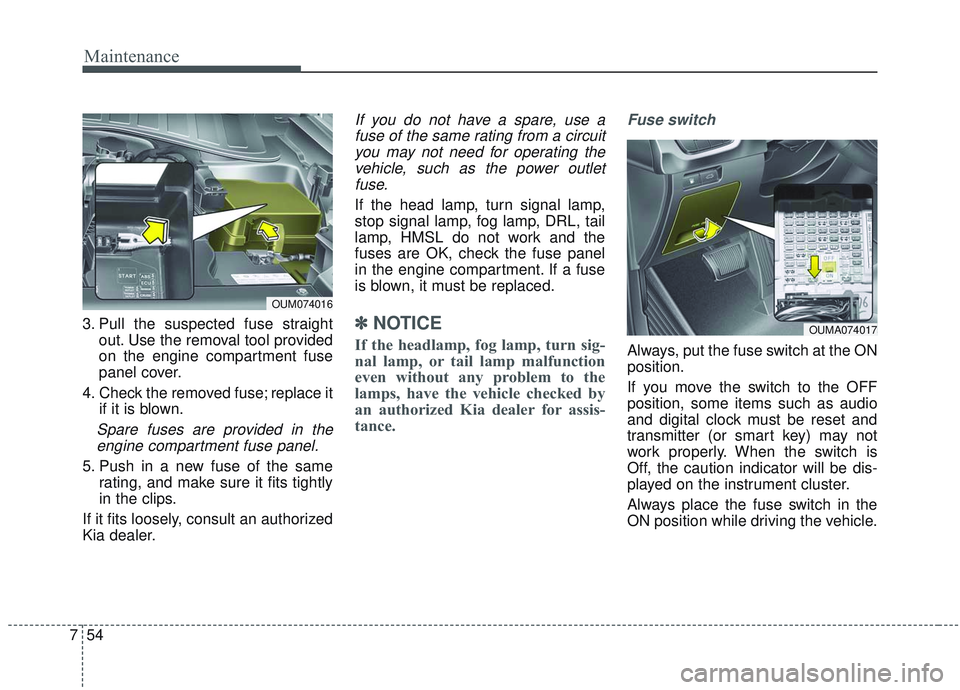
3. Pull the suspected fuse straight
out. Use the removal tool provided
on the engine compartment fuse
panel cover.
4. Check the removed fuse; replace it if it is blown.
Spare fuses are provided in theengine compartment fuse panel.
5. Push in a new fuse of the same rating, and make sure it fits tightly
in the clips.
If it fits loosely, consult an authorized
Kia dealer.
If you do not have a spare, use a fuse of the same rating from a circuityou may not need for operating thevehicle, such as the power outletfuse.
If the head lamp, turn signal lamp,
stop signal lamp, fog lamp, DRL, tail
lamp, HMSL do not work and the
fuses are OK, check the fuse panel
in the engine compartment. If a fuse
is blown, it must be replaced.
✽ ✽ NOTICE
If the headlamp, fog lamp, turn sig-
nal lamp, or tail lamp malfunction
even without any problem to the
lamps, have the vehicle checked by
an authorized Kia dealer for assis-
tance.
Fuse switch
Always, put the fuse switch at the ON
position.
If you move the switch to the OFF
position, some items such as audio
and digital clock must be reset and
transmitter (or smart key) may not
work properly. When the switch is
Off, the caution indicator will be dis-
played on the instrument cluster.
Always place the fuse switch in the
ON position while driving the vehicle.
OUM074016
OUMA074017
Page 503 of 573
Maintenance
60
7
DescriptionFuse ratingProtected component
A/CON (RR) 15AICM Relay Box (Rear Blower Motor Relay)
SUNROOF 2 20ASunroof Control Module (Roller)
SUNROOF 1 20ASunroof Control Module (Glass)
CLUSTER 10AInstrument Cluster
GATEWAY10AGateway (MCU IG1)
IMMO.10ASmart Key Control Module, Immobilizer Module
IG1 15AE/R Junction Block (Fuse - MDPS 3, MODULE, TCU 1), PCB Block (Fuse - ABS 3, SENSOR 6, ECU 1)
MULTIMEDIA 15AUSB Charger, Audio, A/V & Navigation Head Unit
MEMORY 2 10AInstrument Cluster, A/C Control Module, Rear A/C Control Module, Electro Chromic Mirror,
Driver/Passenger Door Module, Passenger Power Window Switch, Driver IMS Control Module
DOOR LOCK 20ADoor Lock Relay, Door Unlock Relay, Tail Gate Relay, DRIVER/PASSENGER/RL/RR DOOR MODULE
MODULE 910AStart/Stop Button Switch, Smart Key Control Module
WASHER 15ABCM, Multifunction Switch
AEB10AFCA (Forward Collision-Avoidance Assist) Unit
MDPS 7.5AMDPS UNIT (COLUMN TYPE), Steering Angle Sensor
Page 561 of 573
Index
4I
Child restraint system . . . . . . . . . . . . . . . . . . . . . . . . . . 3-38Using a child restraint system . . . . . . . . . . . . . . . . . 3-39
Placing a passenger seat belt into the auto lock mode . . . . . . . . . . . . . . . . . . . . . . . . . . . . . . . . . . . . \
3-40
Securing a child restraint seat with tether anchor system. . . . . . . . . . . . . . . . . . . . . . . . . . . . . 3-43
Securing a child restraint seat with child seat lower anchor system. . . . . . . . . . . . . . . . . . . . . . . . . . . . . 3-44
Child-protector rear door lock . . . . . . . . . . . . . . . . . . . 4-25
Climate control air filter . . . . . . . . . . . . . . . . . . . . . . . . 7-29 Filter inspection . . . . . . . . . . . . . . . . . . . . . . . . . . . . 7-29
Closing the sunroof. . . . . . . . . . . . . . . . . . . . . . . . . . . . 4-55
Coat hook . . . . . . . . . . . . . . . . . . . . . . . . . . . . . . . . . . 4-18\
2
Combined instrument, see instrument cluster . . . . . . . 4-75
Consumer assistance . . . . . . . . . . . . . . . . . . . . . . . . . . . 8-12
Coolant . . . . . . . . . . . . . . . . . . . . . . . . . . . . . . . . . . . . \
. 7-21
Cooling fluid, see engine coolant . . . . . . . . . . . . . . . . . 7-21
Crankcase emission control system . . . . . . . . . . . . . . 7-100
Cruise control system . . . . . . . . . . . . . . . . . . . . . . . . . . 5-63 To set cruise control speed . . . . . . . . . . . . . . . . . . . . 5-63
To increase cruise control set speed. . . . . . . . . . . . . 5-64
To decrease the cruising speed. . . . . . . . . . . . . . . . . 5-65
To temporarily accelerate with the cruise control on5-65
To cancel cruise control . . . . . . . . . . . . . . . . . . . . . . 5-65
To resume cruising speed at more than approximately 30 km/h (20mph) . . . . . . . . . . . . . . . . . . . . . . . . . . 5-66
To turn cruise control off . . . . . . . . . . . . . . . . . . . . . 5-66 Cup holder . . . . . . . . . . . . . . . . . . . . . . . . . . . . . . . . . 4-172
Curtain air bag . . . . . . . . . . . . . . . . . . . . . . . . . . . . . . . 3-63
Dashboard illumination, see instrument panel
illumination . . . . . . . . . . . . . . . . . . . . . . . . . . . . . . 4-76
Dashboard, see instrument cluster . . . . . . . . . . . . . . . . 4-75
Day/Night rearview mirror . . . . . . . . . . . . . . . . . . . . . . 4-61
Daytime running light. . . . . . . . . . . . . . . . . . . . . . . . . 4-123
Defogging (Windshield) . . . . . . . . . . . . . . . . . . . . . . . 4-164
Defroster (Rear window) . . . . . . . . . . . . . . . . . . . . . . 4-140
Defrosting (Windshield) . . . . . . . . . . . . . . . . . . . . . . . 4-164
Digital speedometer . . . . . . . . . . . . . . . . . . . . . . . . . . . 4-86
Dimensions . . . . . . . . . . . . . . . . . . . . . . . . . . . . . . . . . . . 8-\
2
Display illumination, see instrument panel illumination . . . . . . . . . . . . . . . . . . . . . . . . . . . . . . . 4-76
Displays, see instrument cluster . . . . . . . . . . . . . . . . . . 4-75
Distance to empty . . . . . . . . . . . . . . . . . . . . . . . . . . . . . 4-89
Do not use methanol . . . . . . . . . . . . . . . . . . . . . . . . . . . . 1-4
Door lock button . . . . . . . . . . . . . . . . . . . . . . . . . . . . . . 4-23
Door locks. . . . . . . . . . . . . . . . . . . . . . . . . . . . . . . . . . . 4-\
22 From outside the vehicle . . . . . . . . . . . . . . . . . . . . . 4-22
From inside the vehicle . . . . . . . . . . . . . . . . . . . . . . 4-23
Door lock button . . . . . . . . . . . . . . . . . . . . . . . . . . . 4-23
Central door lock switch . . . . . . . . . . . . . . . . . . . . . 4-24
Child-protector rear door lock . . . . . . . . . . . . . . . . . 4-25
Drinks holders, see cup holders . . . . . . . . . . . . . . . . . 4-172
D
Page 565 of 573
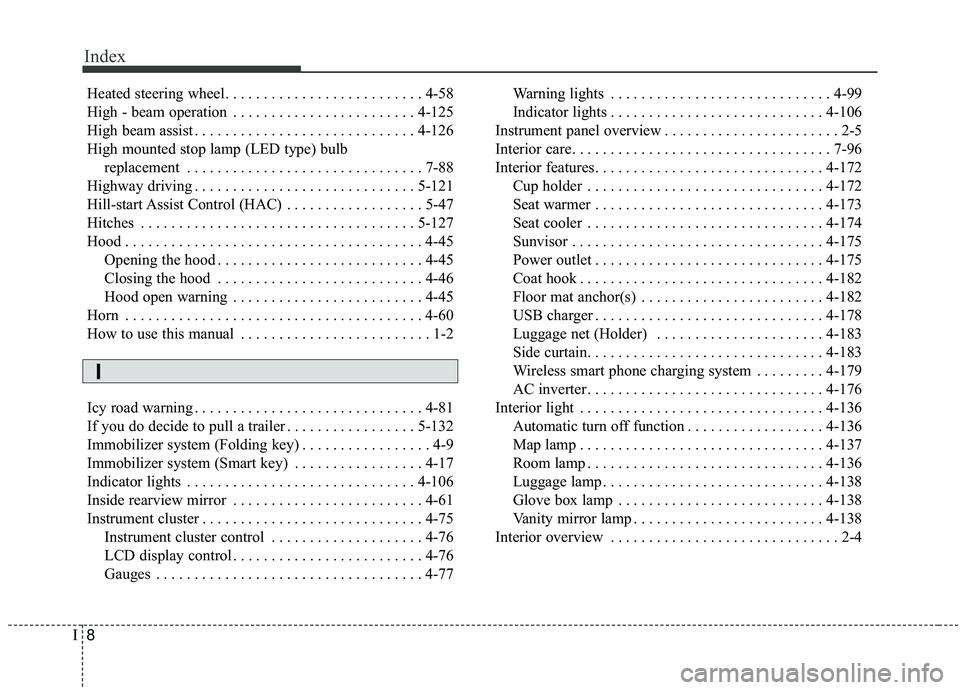
Index
8I
Heated steering wheel. . . . . . . . . . . . . . . . . . . . . . . . . . 4-58
High - beam operation . . . . . . . . . . . . . . . . . . . . . . . . 4-125
High beam assist . . . . . . . . . . . . . . . . . . . . . . . . . . . . . 4-126
High mounted stop lamp (LED type) bulb replacement . . . . . . . . . . . . . . . . . . . . . . . . . . . . . . . 7-88
Highway driving . . . . . . . . . . . . . . . . . . . . . . . . . . . . . 5-121
Hill-start Assist Control (HAC) . . . . . . . . . . . . . . . . . . 5-47
Hitches . . . . . . . . . . . . . . . . . . . . . . . . . . . . . . . . . . . . \
5-127
Hood . . . . . . . . . . . . . . . . . . . . . . . . . . . . . . . . . . . . \
. . . 4-45 Opening the hood . . . . . . . . . . . . . . . . . . . . . . . . . . . 4-45
Closing the hood . . . . . . . . . . . . . . . . . . . . . . . . . . . 4-46
Hood open warning . . . . . . . . . . . . . . . . . . . . . . . . . 4-45
Horn . . . . . . . . . . . . . . . . . . . . . . . . . . . . . . . . . . . . \
. . . 4-60
How to use this manual . . . . . . . . . . . . . . . . . . . . . . . . . 1-2
Icy road warning . . . . . . . . . . . . . . . . . . . . . . . . . . . . . . 4-81
If you do decide to pull a trailer . . . . . . . . . . . . . . . . . 5-132
Immobilizer system (Folding key) . . . . . . . . . . . . . . . . . 4-9
Immobilizer system (Smart key) . . . . . . . . . . . . . . . . . 4-17
Indicator lights . . . . . . . . . . . . . . . . . . . . . . . . . . . . . . 4-106
Inside rearview mirror . . . . . . . . . . . . . . . . . . . . . . . . . 4-61
Instrument cluster . . . . . . . . . . . . . . . . . . . . . . . . . . . . . 4-75 Instrument cluster control . . . . . . . . . . . . . . . . . . . . 4-76
LCD display control . . . . . . . . . . . . . . . . . . . . . . . . . 4-76
Gauges . . . . . . . . . . . . . . . . . . . . . . . . . . . . . . . . . . . 4-\
77 Warning lights . . . . . . . . . . . . . . . . . . . . . . . . . . . . . 4-99
Indicator lights . . . . . . . . . . . . . . . . . . . . . . . . . . . . 4-106
Instrument panel overview . . . . . . . . . . . . . . . . . . . . . . . 2-5
Interior care. . . . . . . . . . . . . . . . . . . . . . . . . . . . . . . . . . 7-96\
Interior features. . . . . . . . . . . . . . . . . . . . . . . . . . . . . . 4-172 Cup holder . . . . . . . . . . . . . . . . . . . . . . . . . . . . . . . 4-172
Seat warmer . . . . . . . . . . . . . . . . . . . . . . . . . . . . . . 4-173
Seat cooler . . . . . . . . . . . . . . . . . . . . . . . . . . . . . . . 4-174
Sunvisor . . . . . . . . . . . . . . . . . . . . . . . . . . . . . . . . . 4-175
Power outlet . . . . . . . . . . . . . . . . . . . . . . . . . . . . . . 4-175
Coat hook . . . . . . . . . . . . . . . . . . . . . . . . . . . . . . . . 4-182
Floor mat anchor(s) . . . . . . . . . . . . . . . . . . . . . . . . 4-182
USB charger . . . . . . . . . . . . . . . . . . . . . . . . . . . . . . 4-178
Luggage net (Holder) . . . . . . . . . . . . . . . . . . . . . . 4-183
Side curtain. . . . . . . . . . . . . . . . . . . . . . . . . . . . . . . 4-183
Wireless smart phone charging system . . . . . . . . . 4-179
AC inverter . . . . . . . . . . . . . . . . . . . . . . . . . . . . . . . 4-176
Interior light . . . . . . . . . . . . . . . . . . . . . . . . . . . . . . . . 4-136 Automatic turn off function . . . . . . . . . . . . . . . . . . 4-136
Map lamp . . . . . . . . . . . . . . . . . . . . . . . . . . . . . . . . 4-137
Room lamp . . . . . . . . . . . . . . . . . . . . . . . . . . . . . . . 4-136
Luggage lamp . . . . . . . . . . . . . . . . . . . . . . . . . . . . . 4-138
Glove box lamp . . . . . . . . . . . . . . . . . . . . . . . . . . . 4-138
Vanity mirror lamp . . . . . . . . . . . . . . . . . . . . . . . . . 4-138
Interior overview . . . . . . . . . . . . . . . . . . . . . . . . . . . . . . 2-4
I