ac control KIA SORENTO 2019 Owner's Manual
[x] Cancel search | Manufacturer: KIA, Model Year: 2019, Model line: SORENTO, Model: KIA SORENTO 2019Pages: 573, PDF Size: 10.61 MB
Page 91 of 573
• High beam assist . . . . . . . . . . . . . . . . . . . . . . . . . . . . 4-126
• Turn signals and lane change signals . . . . . . . . . . . 4-128
• Front fog light . . . . . . . . . . . . . . . . . . . . . . . . . . . . . . 4-129
• Check headlight . . . . . . . . . . . . . . . . . . . . . . . . . . . . 4-129
• Headlight leveling device . . . . . . . . . . . . . . . . . . . . . 4-129
• Dynamic Bending Light (DBL) . . . . . . . . . . . . . . . . 4-130
Wipers and washers . . . . . . . . . . . . . . . . . . . . . . . 4-131
• Windshield wipers . . . . . . . . . . . . . . . . . . . . . . . . . . . 4-131
• Front windshield washers . . . . . . . . . . . . . . . . . . . . . 4-133
• Rear window wiper and washer switch. . . . . . . . . . 4-134
Interior lights . . . . . . . . . . . . . . . . . . . . . . . . . . . . 4-136
• Automatic turn off function . . . . . . . . . . . . . . . . . . . 4-136
• Room lamp . . . . . . . . . . . . . . . . . . . . . . . . . . . . . . . . . 4-136
• Map lamp . . . . . . . . . . . . . . . . . . . . . . . . . . . . . . . . . . 4-13\
7
• Luggage lamp. . . . . . . . . . . . . . . . . . . . . . . . . . . . . . . 4-138
• Vanity mirror lamp . . . . . . . . . . . . . . . . . . . . . . . . . . 4-138
• Glove box lamp . . . . . . . . . . . . . . . . . . . . . . . . . . . . . 4-138
Welcome system . . . . . . . . . . . . . . . . . . . . . . . . . . 4-139
• Headlight (Headlamp) escort function . . . . . . . . . . 4-139
• Interior light . . . . . . . . . . . . . . . . . . . . . . . . . . . . . . . 4-139
• Pocket lamp . . . . . . . . . . . . . . . . . . . . . . . . . . . . . . . . 4-139
Defroster . . . . . . . . . . . . . . . . . . . . . . . . . . . . . . . . 4-140
• Rear window defroster . . . . . . . . . . . . . . . . . . . . . . . 4-140
Manual climate control system . . . . . . . . . . . . . . 4-141
• Heating and air conditioning . . . . . . . . . . . . . . . . . . 4-142
• 3rd row air conditioning . . . . . . . . . . . . . . . . . . . . . . 4-147
• System operation . . . . . . . . . . . . . . . . . . . . . . . . . . . . 4-148
• Climate control air filter . . . . . . . . . . . . . . . . . . . . . . 4-150
• Checking the amount of air conditioner refrigerant and compressor lubricant . . . . . . . . . . . . . . . . . . . . . . . 4-151
Automatic climate control system . . . . . . . . . . . 4-152
• Automatic heating and air conditioning . . . . . . . . . 4-153
• Manual heating and air conditioning . . . . . . . . . . . 4-154
• To cancel or reset the automatic ventilation . . . . . . 4-159
• 3rd row air conditioning . . . . . . . . . . . . . . . . . . . . . . 4-160
• System operation . . . . . . . . . . . . . . . . . . . . . . . . . . . . 4-160
• Climate control air filter . . . . . . . . . . . . . . . . . . . . . . 4-162
• Checking the amount of air conditioner refrigerant and compressor lubricant . . . . . . . . . . . . . . . . . . . . . . . 4-163
Windshield defrosting and defogging . . . . . . . . . 4-164
• Manual climate control system . . . . . . . . . . . . . . . . 4-164
• Automatic climate control system . . . . . . . . . . . . . . 4-165
• Defogging logic. . . . . . . . . . . . . . . . . . . . . . . . . . . . . . 4-166
Storage compartments . . . . . . . . . . . . . . . . . . . . . 4-169
• Center console storage . . . . . . . . . . . . . . . . . . . . . . . 4-169
• Glove box . . . . . . . . . . . . . . . . . . . . . . . . . . . . . . . . . . 4-16\
9
• Sunglass holder . . . . . . . . . . . . . . . . . . . . . . . . . . . . . 4-170
• Luggage box . . . . . . . . . . . . . . . . . . . . . . . . . . . . . . . . 4-171
4
Page 92 of 573
Interior features . . . . . . . . . . . . . . . . . . . . . . . . . . 4-172
• Cup holder . . . . . . . . . . . . . . . . . . . . . . . . . . . . . . . . . 4-172
• Bottle holder. . . . . . . . . . . . . . . . . . . . . . . . . . . . . . . . 4-173
• Seat warmer . . . . . . . . . . . . . . . . . . . . . . . . . . . . . . . . 4-173
• Seat cooler (Air ventilation seat) . . . . . . . . . . . . . . . 4-174
• Sunvisor . . . . . . . . . . . . . . . . . . . . . . . . . . . . . . . . . . . 4-\
175
• Power outlet . . . . . . . . . . . . . . . . . . . . . . . . . . . . . . . . 4-175
• AC inverter. . . . . . . . . . . . . . . . . . . . . . . . . . . . . . . . . 4-176
• USB charger . . . . . . . . . . . . . . . . . . . . . . . . . . . . . . . . 4-178
• Wireless smart phone charging system . . . . . . . . . . 4-179
• Coat hook . . . . . . . . . . . . . . . . . . . . . . . . . . . . . . . . . . 4-18\
2
• Floor mat anchor (s) . . . . . . . . . . . . . . . . . . . . . . . . . 4-182
• Side curtain . . . . . . . . . . . . . . . . . . . . . . . . . . . . . . . . 4-183
• Luggage net holder . . . . . . . . . . . . . . . . . . . . . . . . . . 4-183
Exterior features . . . . . . . . . . . . . . . . . . . . . . . . . . 4-185
• Roof rack . . . . . . . . . . . . . . . . . . . . . . . . . . . . . . . . . . 4-18\
5
Audio system . . . . . . . . . . . . . . . . . . . . . . . . . . . . . 4-186
• Antenna. . . . . . . . . . . . . . . . . . . . . . . . . . . . . . . . .\
. . . 4-186
• Pole antenna . . . . . . . . . . . . . . . . . . . . . . . . . . . . . . . . 4-186
• Steering wheel remote controller . . . . . . . . . . . . . . . 4-187
• AUX, USB port . . . . . . . . . . . . . . . . . . . . . . . . . . . . . 4-188
4
Page 94 of 573
Features of your vehicle
64
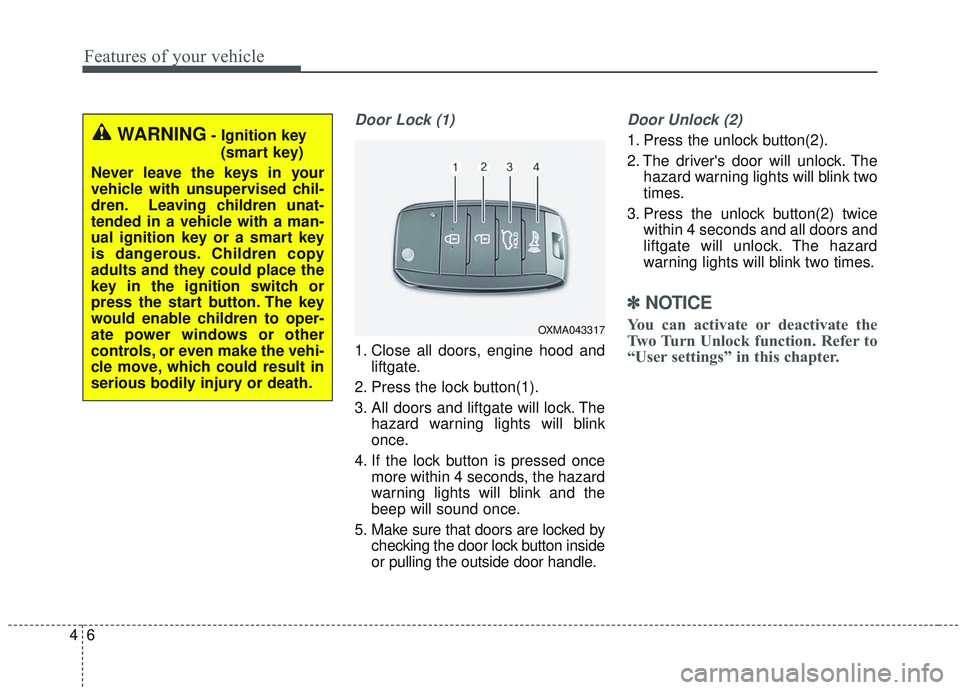
Door Lock (1)
1. Close all doors, engine hood andliftgate.
2. Press the lock button(1).
3. All doors and liftgate will lock. The hazard warning lights will blink
once.
4. If the lock button is pressed once more within 4 seconds, the hazard
warning lights will blink and the
beep will sound once.
5. Make sure that doors are locked by checking the door lock button inside
or pulling the outside door handle.
Door Unlock (2)
1. Press the unlock button(2).
2. The driver's door will unlock. Thehazard warning lights will blink two
times.
3. Press the unlock button(2) twice within 4 seconds and all doors and
liftgate will unlock. The hazard
warning lights will blink two times.
✽ ✽NOTICE
You can activate or deactivate the
Two Turn Unlock function. Refer to
“User settings” in this chapter.
WARNING- Ignition key
(smart key)
Never leave the keys in your
vehicle with unsupervised chil-
dren. Leaving children unat-
tended in a vehicle with a man-
ual ignition key or a smart key
is dangerous. Children copy
adults and they could place the
key in the ignition switch or
press the start button. The key
would enable children to oper-
ate power windows or other
controls, or even make the vehi-
cle move, which could result in
serious bodily injury or death.
OXMA043317
Page 100 of 573
Features of your vehicle
12
4
Record your key number
The key code number
is stamped on the bar
code tag attached to
the key set. Should
you lose your keys,
this number will enable an author-
ized Kia dealer to duplicate the keys
easily. Remove the bar code tag and
store it in a safe place. Also, record
the code number and keep it in a
safe and handy place, but not in the
vehicle.
Smart key function
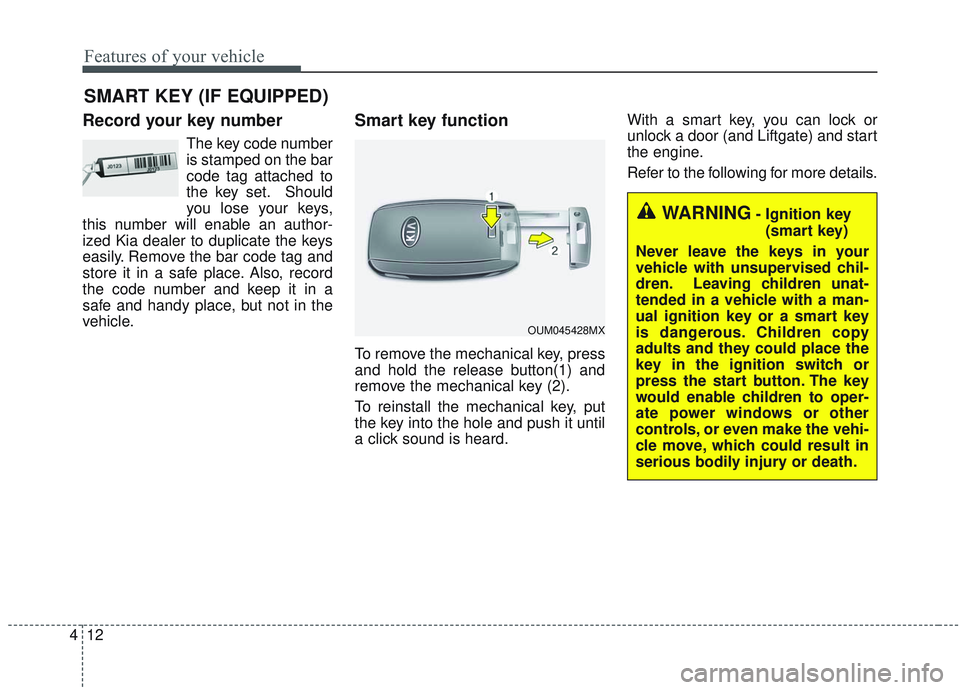
To remove the mechanical key, press
and hold the release button(1) and
remove the mechanical key (2).
To reinstall the mechanical key, put
the key into the hole and push it until
a click sound is heard. With a smart key, you can lock or
unlock a door (and Liftgate) and start
the engine.
Refer to the following for more details.
SMART KEY (IF EQUIPPED)
OUM045428MX
WARNING- Ignition key
(smart key)
Never leave the keys in your
vehicle with unsupervised chil-
dren. Leaving children unat-
tended in a vehicle with a man-
ual ignition key or a smart key
is dangerous. Children copy
adults and they could place the
key in the ignition switch or
press the start button. The key
would enable children to oper-
ate power windows or other
controls, or even make the vehi-
cle move, which could result in
serious bodily injury or death.
Page 129 of 573
441
Features of your vehicle
Power windows
The ignition switch must be in the ON
position for power windows to operate.
Each door has a power window
switch that controls the door's win-
dow. The driver has a power window
lock button which can block the oper-
ation of rear passenger windows.
The power windows can be operated
for approximately 30 seconds after
the ignition key is removed or turned
to the ACC or LOCK (or OFF) posi-
tion. However, if the front doors are
opened, the power windows cannot
be operated even within the 30 sec-
ond period.
If the window cannot be closed
because it is blocked by objects,
remove the objects and close the
window.
✽ ✽NOTICE
While driving with the rear windows
down or with the sunroof (if
equipped) in an open (or partially
open) position, your vehicle may
demonstrate a wind buffeting or
pulsation noise. This noise is a nor-
mal occurrence and can be reduced
or eliminated by taking the follow-
ing actions. If the noise occurs with
one or both of the rear windows
down, partially lower both front
windows approximately 2.5 cm (1
in.). If you experience the noise with
the sunroof open, slightly reduce the
size of the sunroof opening.
Window opening and closing
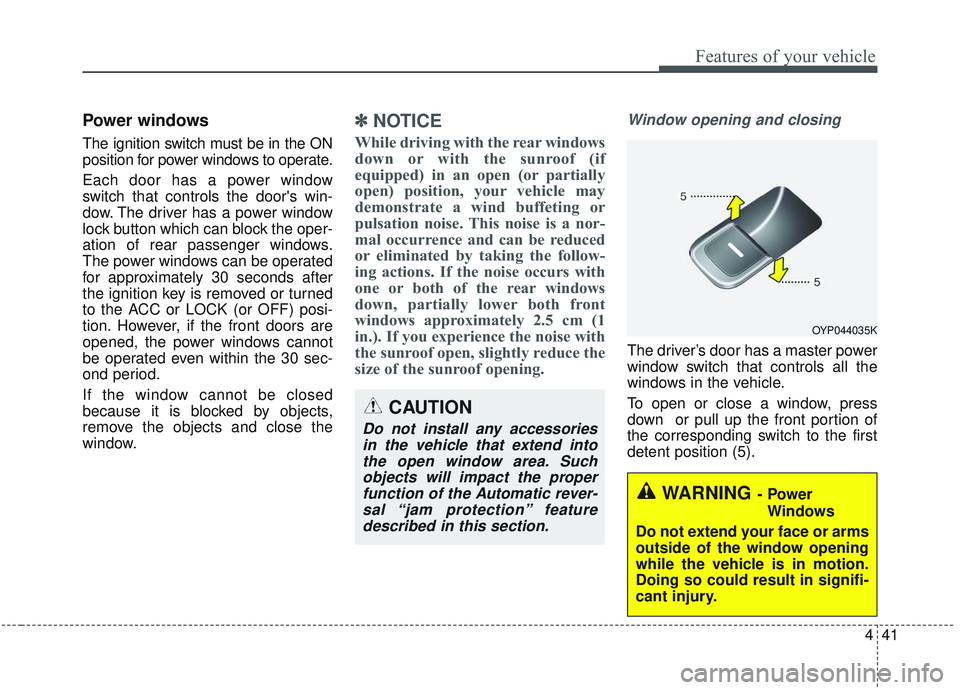
The driver’s door has a master power
window switch that controls all the
windows in the vehicle.
To open or close a window, press
down or pull up the front portion of
the corresponding switch to the first
detent position (5).
OYP044035K
CAUTION
Do not install any accessories
in the vehicle that extend intothe open window area. Suchobjects will impact the properfunction of the Automatic rever-sal “jam protection” featuredescribed in this section.
WARNING- Power
Windows
Do not extend your face or arms
outside of the window opening
while the vehicle is in motion.
Doing so could result in signifi-
cant injury.
Page 131 of 573
443
Features of your vehicle
And if the power window switch is
pulled up continuously again within 5
seconds after the window is lowered
by the automatic window reversal
feature, the automatic window rever-
sal will not operate.
The automatic reverse feature for the
driver’s window is only active when
the “auto up” feature is used by fully
pulling up the switch. The automatic
reverse feature will not operate if the
window is raised using the halfway
position on the power window switch.
Always check for obstructions before
raising any window to avoid injuries
or vehicle damage. If an object less
than 0.16 in. (4 mm) in diameter is
caught between the window glass
and the upper window channel, the
automatic reverse window may not
detect the resistance and will not
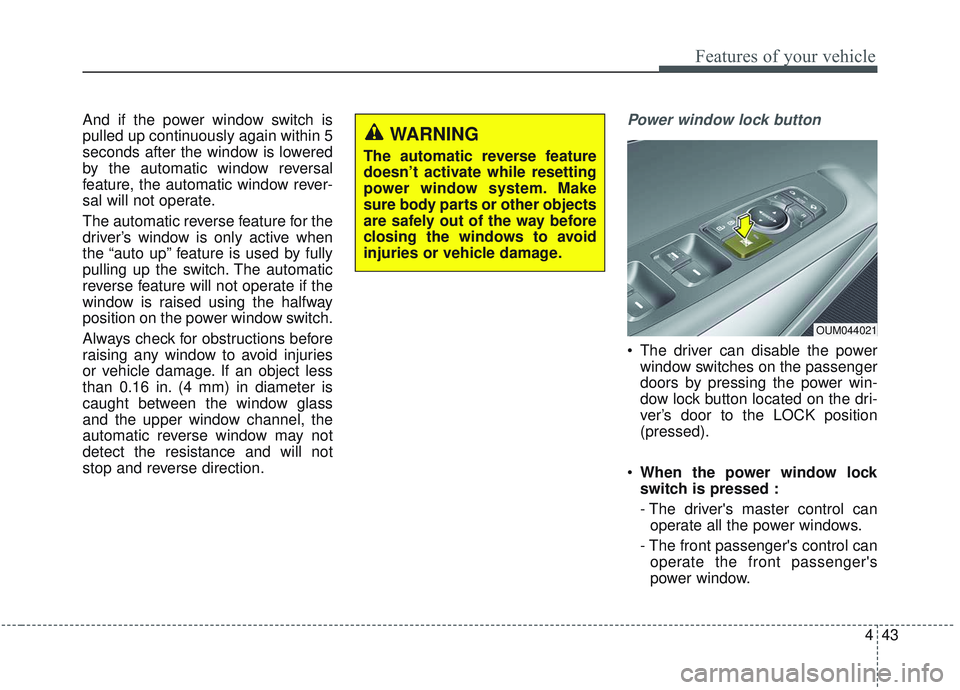
stop and reverse direction.Power window lock button
The driver can disable the powerwindow switches on the passenger
doors by pressing the power win-
dow lock button located on the dri-
ver’s door to the LOCK position
(pressed).
When the power window lock
switch is pressed :
- The driver's master control can
operate all the power windows.
- The front passenger's control can operate the front passenger's
power window.
OUM044021
WARNING
The automatic reverse feature
doesn’t activate while resetting
power window system. Make
sure body parts or other objects
are safely out of the way before
closing the windows to avoid
injuries or vehicle damage.
Page 132 of 573
Features of your vehicle
44
4
- The rear passenger's control can-
not operate the rear passenger's
power window.
Always double check to make sure
all arms, hands, head and other
obstructions are safely out of the way
before closing a window.
CAUTION
- Opening/Closing Window
To prevent possible damage to the power window system, donot open or close two windowsor more at the same time. Thiswill also ensure the longevity ofthe fuse.
WARNING- Power win-
dows
Do not allow children to play with the power windows. Keep
the power window lock button
(on the driver's door) in the
LOCK (pressed) position.
Do not extend a face or arms outside through the window
opening while driving.
Page 137 of 573
449
Features of your vehicle
Make sure to refuel your vehicle
according to the “Fuel requirements”
suggested in chapter 1.
If the fuel filler cap requires replace-
ment, use only a genuine Kia cap or
the equivalent specified for your vehi-
cle. An incorrect fuel filler cap can
result in a serious malfunction of the
fuel system or emission control sys-
tem.
WARNING- Cell phonefires
Do not use cellular phones
while refueling. Electric current
and/or electronic interference
from cellular phones can poten-
tially ignite fuel vapors causing
a fire.
WARNING- Portable fuel container
When using an approved portable
fuel container, be sure to place
the container on the ground prior
to refueling. Static electricity dis-
charge from the container can
ignite fuel vapors causing a fire.
Once refueling has begun, con-
tact with the vehicle should be
maintained until the filling is com-
plete. Use only approved portable
plastic fuel containers designed
to carry and store gasoline.WARNING- Smoking
DO NOT use matches or a lighter
and DO NOT SMOKE or leave a lit
cigarette in your vehicle while at
a gas station especially during
refueling. Automotive fuel is
highly flammable and can, when
ignited, result in fire.
WARNING- Refueling & Vehicle fires
When refueling, always shut the
engine off. Sparks produced by
electrical components related
to the engine can ignite fuel
vapors causing a fire. Once
refueling is complete, check to
make sure the filler cap and
filler door are securely closed,
before starting the engine.CAUTION- Exterior paint
Do not spill fuel on the exterior surfaces of the vehicle. Anytype of fuel spilled on paintedsurfaces may damage the paint.
Page 139 of 573
451
Features of your vehicle
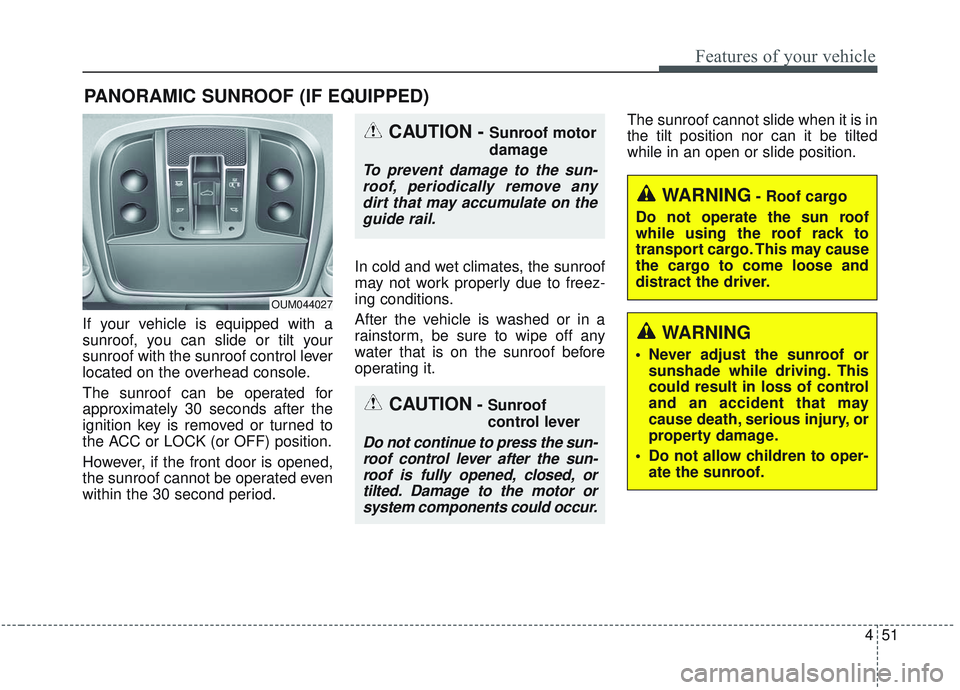
If your vehicle is equipped with a
sunroof, you can slide or tilt your
sunroof with the sunroof control lever
located on the overhead console.
The sunroof can be operated for
approximately 30 seconds after the
ignition key is removed or turned to
the ACC or LOCK (or OFF) position.
However, if the front door is opened,
the sunroof cannot be operated even
within the 30 second period.In cold and wet climates, the sunroof
may not work properly due to freez-
ing conditions.
After the vehicle is washed or in a
rainstorm, be sure to wipe off any
water that is on the sunroof before
operating it.The sunroof cannot slide when it is in
the tilt position nor can it be tilted
while in an open or slide position.
PANORAMIC SUNROOF (IF EQUIPPED)
CAUTION- Sunroof
control lever
Do not continue to press the sun-
roof control lever after the sun-roof is fully opened, closed, ortilted. Damage to the motor orsystem components could occur.
CAUTION - Sunroof motor
damage
To prevent damage to the sun-roof, periodically remove anydirt that may accumulate on theguide rail.
OUM044027
WARNING- Roof cargo
Do not operate the sun roof
while using the roof rack to
transport cargo. This may cause
the cargo to come loose and
distract the driver.
WARNING
Never adjust the sunroof or sunshade while driving. This
could result in loss of control
and an accident that may
cause death, serious injury, or
property damage.
Do not allow children to oper- ate the sunroof.
Page 141 of 573
453
Features of your vehicle
Sunshade
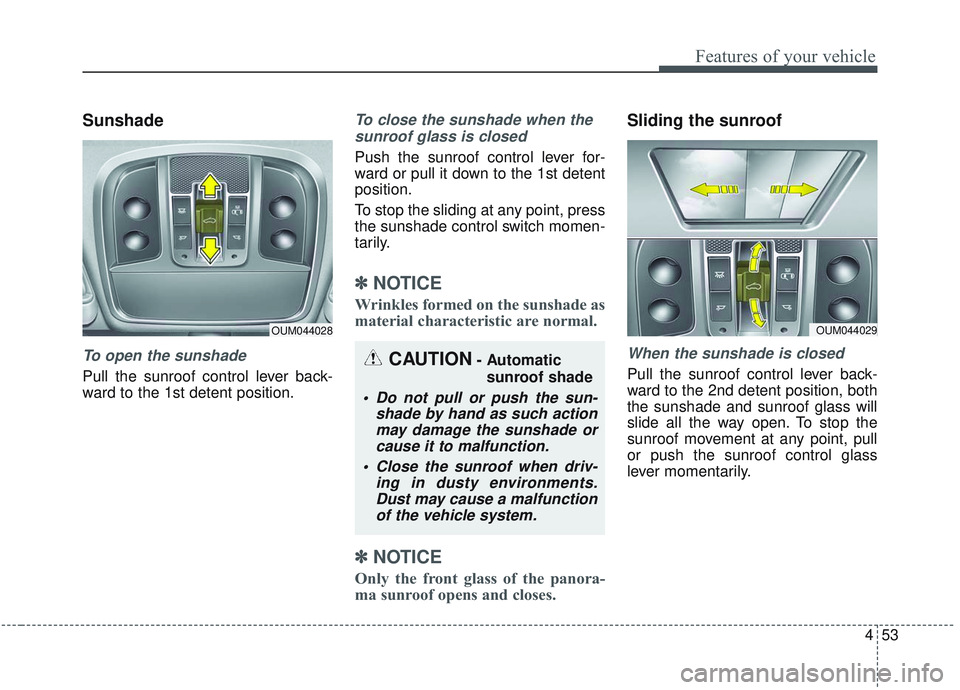
To open the sunshade
Pull the sunroof control lever back-
ward to the 1st detent position.
To close the sunshade when thesunroof glass is closed
Push the sunroof control lever for-
ward or pull it down to the 1st detent
position.
To stop the sliding at any point, press
the sunshade control switch momen-
tarily.
✽ ✽ NOTICE
Wrinkles formed on the sunshade as
material characteristic are normal.
✽ ✽NOTICE
Only the front glass of the panora-
ma sunroof opens and closes.
Sliding the sunroof
When the sunshade is closed
Pull the sunroof control lever back-
ward to the 2nd detent position, both
the sunshade and sunroof glass will
slide all the way open. To stop the
sunroof movement at any point, pull
or push the sunroof control glass
lever momentarily.
OUM044028
CAUTION- Automatic
sunroof shade
Do not pull or push the sun- shade by hand as such actionmay damage the sunshade orcause it to malfunction.
Close the sunroof when driv- ing in dusty environments.Dust may cause a malfunctionof the vehicle system.
OUM044029