charging KIA SORENTO 2019 Owners Manual
[x] Cancel search | Manufacturer: KIA, Model Year: 2019, Model line: SORENTO, Model: KIA SORENTO 2019Pages: 573, PDF Size: 10.61 MB
Page 24 of 573
37
Safety features of your vehicle
Front seat adjustment - power
(if equipped)
The front seat can be adjusted by
using the control switches located on
the outside of the seat cushion.
Before driving, adjust the seat to the
proper position so you can easily con-
trol the steering wheel, pedals and
switches on the instrument panel.When in operation, the power seat-
consumes a large amount of electri-
cal power. To prevent unnecessary
charging system drain, don’t adjust
the power seat longer than neces-
sary while the engine is not running.
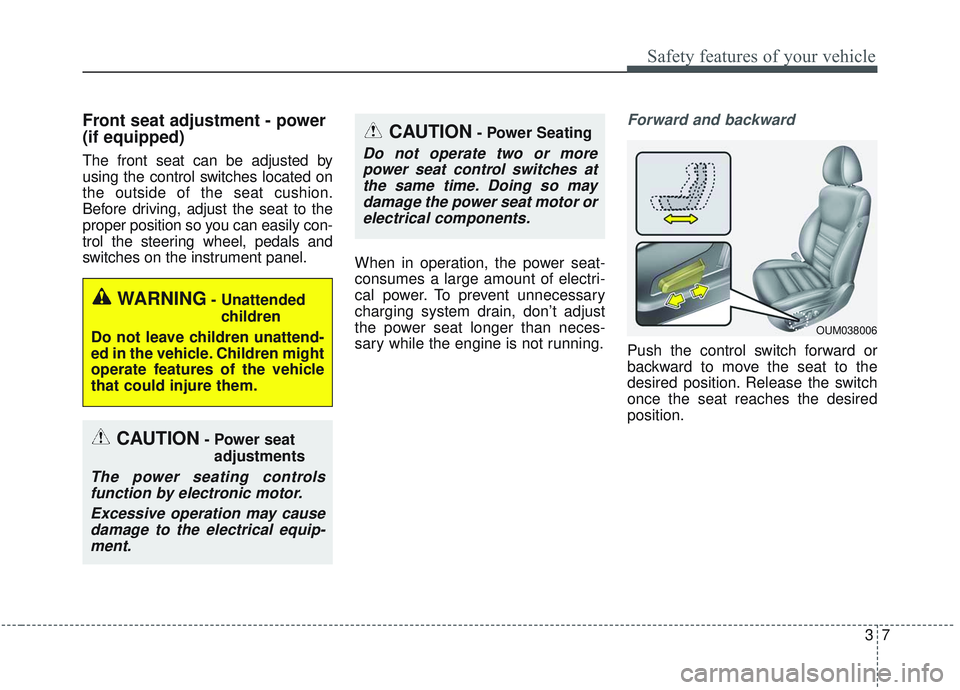
Forward and backward
Push the control switch forward or
backward to move the seat to the
desired position. Release the switch
once the seat reaches the desired
position.
CAUTION- Power seat
adjustments
The power seating controlsfunction by electronic motor.
Excessive operation may causedamage to the electrical equip-ment.
CAUTION- Power Seating
Do not operate two or morepower seat control switches atthe same time. Doing so maydamage the power seat motor orelectrical components.
WARNING- Unattended
children
Do not leave children unattend-
ed in the vehicle. Children might
operate features of the vehicle
that could injure them.
OUM038006
Page 92 of 573
Interior features . . . . . . . . . . . . . . . . . . . . . . . . . . 4-172
• Cup holder . . . . . . . . . . . . . . . . . . . . . . . . . . . . . . . . . 4-172
• Bottle holder. . . . . . . . . . . . . . . . . . . . . . . . . . . . . . . . 4-173
• Seat warmer . . . . . . . . . . . . . . . . . . . . . . . . . . . . . . . . 4-173
• Seat cooler (Air ventilation seat) . . . . . . . . . . . . . . . 4-174
• Sunvisor . . . . . . . . . . . . . . . . . . . . . . . . . . . . . . . . . . . 4-\
175
• Power outlet . . . . . . . . . . . . . . . . . . . . . . . . . . . . . . . . 4-175
• AC inverter. . . . . . . . . . . . . . . . . . . . . . . . . . . . . . . . . 4-176
• USB charger . . . . . . . . . . . . . . . . . . . . . . . . . . . . . . . . 4-178
• Wireless smart phone charging system . . . . . . . . . . 4-179
• Coat hook . . . . . . . . . . . . . . . . . . . . . . . . . . . . . . . . . . 4-18\
2
• Floor mat anchor (s) . . . . . . . . . . . . . . . . . . . . . . . . . 4-182
• Side curtain . . . . . . . . . . . . . . . . . . . . . . . . . . . . . . . . 4-183
• Luggage net holder . . . . . . . . . . . . . . . . . . . . . . . . . . 4-183
Exterior features . . . . . . . . . . . . . . . . . . . . . . . . . . 4-185
• Roof rack . . . . . . . . . . . . . . . . . . . . . . . . . . . . . . . . . . 4-18\
5
Audio system . . . . . . . . . . . . . . . . . . . . . . . . . . . . . 4-186
• Antenna. . . . . . . . . . . . . . . . . . . . . . . . . . . . . . . . .\
. . . 4-186
• Pole antenna . . . . . . . . . . . . . . . . . . . . . . . . . . . . . . . . 4-186
• Steering wheel remote controller . . . . . . . . . . . . . . . 4-187
• AUX, USB port . . . . . . . . . . . . . . . . . . . . . . . . . . . . . 4-188
4
Page 146 of 573
Features of your vehicle
58
4
(Continued)
• When you operate the steering
wheel in low temperature, abnor-
mal noise may occur. If tempera-
ture rises, the noise will likely dis-
appear. This is a normal condition.
• When the charging system warning light comes on due to the low volt-
age (When the alternator or bat-
tery) does not operate normally or
malfunctions), the steering wheel
may require increased steering
effort.Tilt and telescopic steering
Tilt and telescopic steering allows
you to adjust the steering wheel
before you drive. You can also raise it
to give your legs more room when
you exit and enter the vehicle.
The steering wheel should be posi-
tioned so that it is comfortable for
you to drive, while permitting you to
see the instrument panel warning
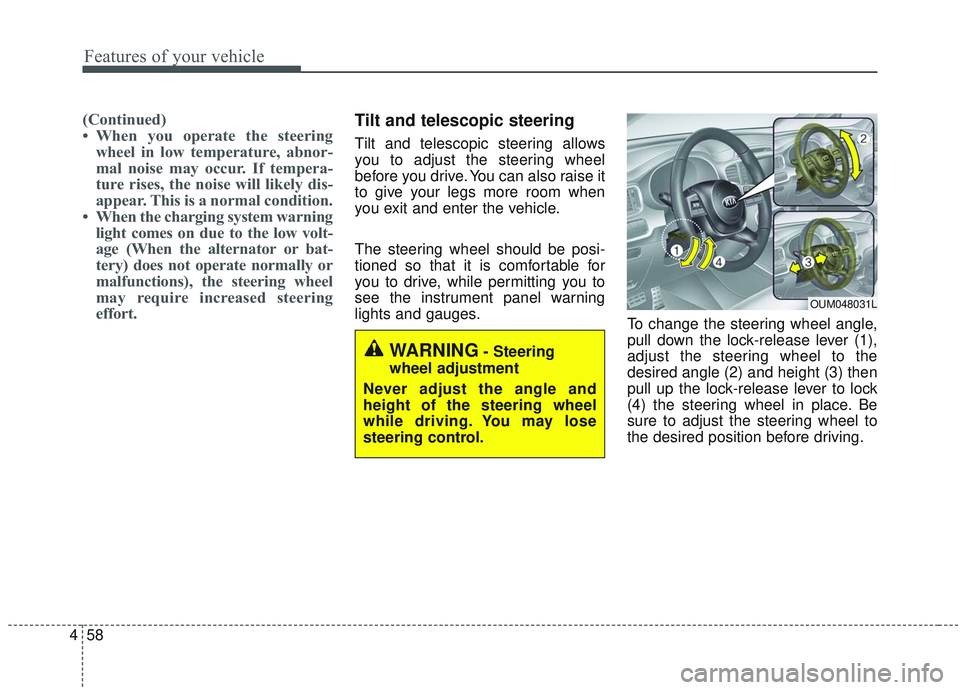
lights and gauges. To change the steering wheel angle,
pull down the lock-release lever (1),
adjust the steering wheel to the
desired angle (2) and height (3) then
pull up the lock-release lever to lock
(4) the steering wheel in place. Be
sure to adjust the steering wheel to
the desired position before driving.
OUM048031L
WARNING- Steering
wheel adjustment
Never adjust the angle and
height of the steering wheel
while driving. You may lose
steering control.
Page 181 of 573
493
Features of your vehicle
Welcome Mirror/Light (if equipped) :- If this item checked, the welcomeMirror/light function will be activat-
ed.
Wireless Charging System (if equipped) :
- If this item checked, the wirelesscharging system function will be
activated.
Wiper/Light Display (if equipped) : - If this item checked, theWiper/Light Display will be acti-
vated.
Gear Position Pop-up (if equipped) : - If this item checked, the gear posi-tion pop-up display will be activat-
ed. Service interval
Enable Service Interval
To activate or deactivate the serv-
ice interval function.
Adjust Interval To adjust the interval by mileage-
and period.
Reset To reset the service interval func-
tion. Other features
Fuel Economy Auto Reset
- Off : The average fuel economywill not reset automatically when-
ever refueling.
- After Ignition : The average fuel economy will reset automatically
whenever it has passed 4 hours
after turning OFF the engine.
- After Refueling : The average fuel economy will reset automatically
when refueling.
❈ For more information, refer to “Trip
Computer” in this chapter.
Speedometer subscale (for Type B cluster) : If this item checked,
speedometer subscale will be dis-
played.
Fuel Economy Unit - Choose the fuel economy unit.(US gallon/UK gallon)
Temperature Unit - Choose the temperature u (°C,°F)
Tire Pressure Unit (if equipped) - Choose the tire pressure u (psi,kPa, bar)
Page 191 of 573
4103
Features of your vehicle
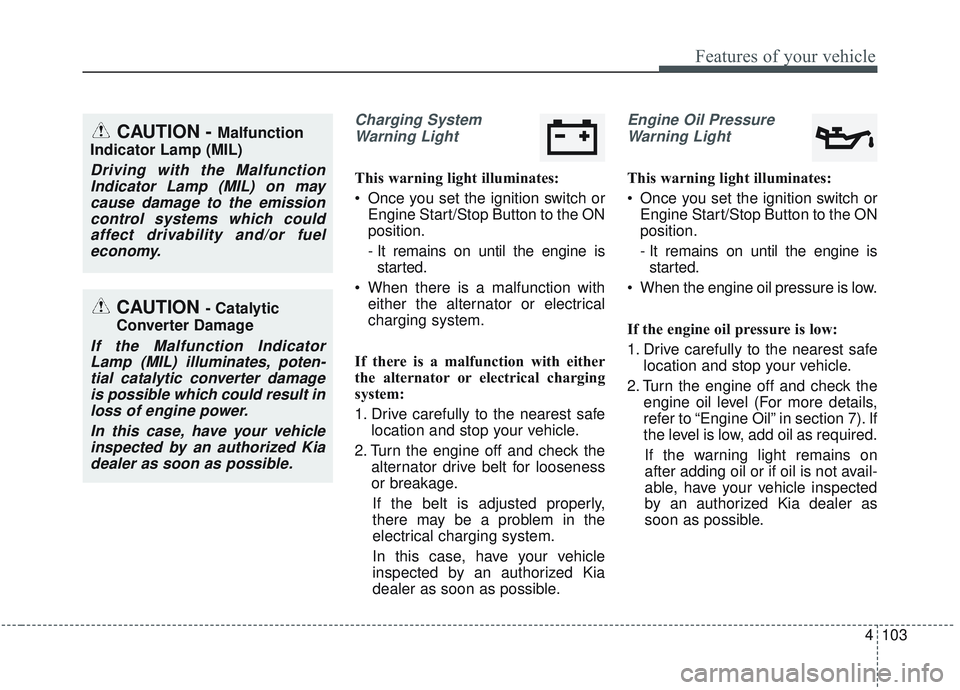
Charging SystemWarning Light
This warning light illuminates:
Once you set the ignition switch or Engine Start/Stop Button to the ON
position.
- It remains on until the engine isstarted.
When there is a malfunction with either the alternator or electrical
charging system.
If there is a malfunction with either
the alternator or electrical charging
system:
1. Drive carefully to the nearest safe location and stop your vehicle.
2. Turn the engine off and check the alternator drive belt for looseness
or breakage.
If the belt is adjusted properly,
there may be a problem in the
electrical charging system.
In this case, have your vehicle
inspected by an authorized Kia
dealer as soon as possible.
Engine Oil Pressure Warning Light
This warning light illuminates:
Once you set the ignition switch or Engine Start/Stop Button to the ON
position.
- It remains on until the engine isstarted.
When the engine oil pressure is low.
If the engine oil pressure is low:
1. Drive carefully to the nearest safe location and stop your vehicle.
2. Turn the engine off and check the engine oil level (For more details,
refer to “Engine Oil” in section 7). If
the level is low, add oil as required.
If the warning light remains on
after adding oil or if oil is not avail-
able, have your vehicle inspected
by an authorized Kia dealer as
soon as possible.
CAUTION - Catalytic
Converter Damage
If the Malfunction Indicator Lamp (MIL) illuminates, poten-tial catalytic converter damageis possible which could result inloss of engine power.
In this case, have your vehicleinspected by an authorized Kiadealer as soon as possible.
CAUTION - Malfunction
Indicator Lamp (MIL)
Driving with the Malfunction Indicator Lamp (MIL) on maycause damage to the emissioncontrol systems which couldaffect drivability and/or fueleconomy.
Page 226 of 573
Features of your vehicle
138
4
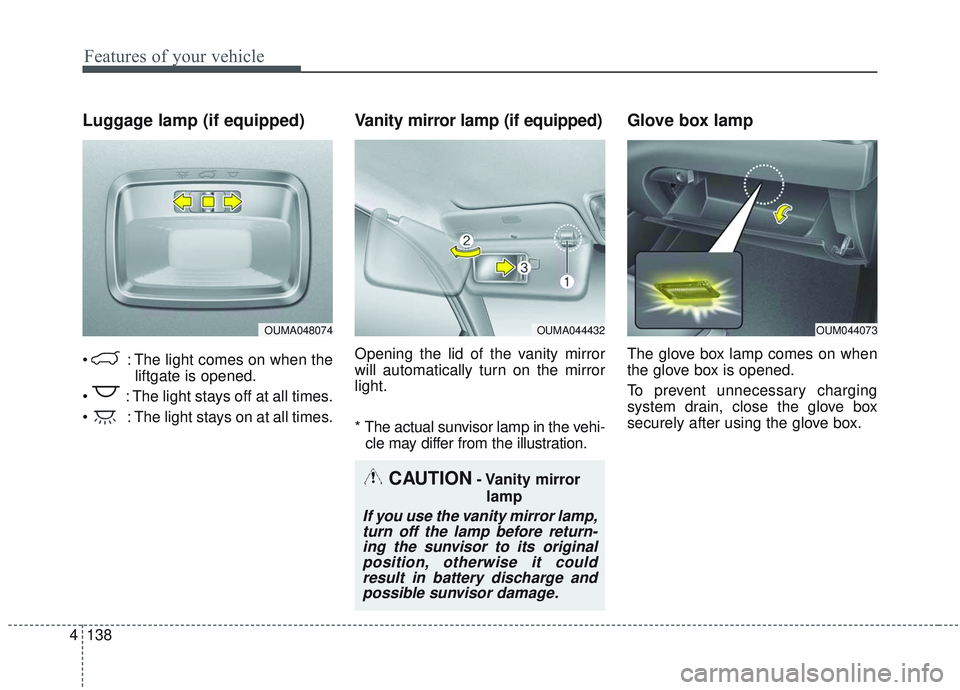
Luggage lamp (if equipped)
: The light comes on when the
liftgate is opened.
: The light stays off at all times.
: The light stays on at all times.
Vanity mirror lamp (if equipped)
Opening the lid of the vanity mirror
will automatically turn on the mirror
light.
* The actual sunvisor lamp in the vehi- cle may differ from the illustration.
Glove box lamp
The glove box lamp comes on when
the glove box is opened.
To prevent unnecessary charging
system drain, close the glove box
securely after using the glove box.
OUMA048074OUMA044432OUM044073
CAUTION- Vanity mirror
lamp
If you use the vanity mirror lamp,turn off the lamp before return-ing the sunvisor to its originalposition, otherwise it couldresult in battery discharge andpossible sunvisor damage.
Page 266 of 573
Features of your vehicle
178
4
While the power consumption of
some electrical devices/appliances
may be within the AC inverter’s
electric power range, it may mal-
function in below cases.
- If the device/appliance requireshigh electric power for initial start
up
- If the device/appliance processes precise/very accurate data
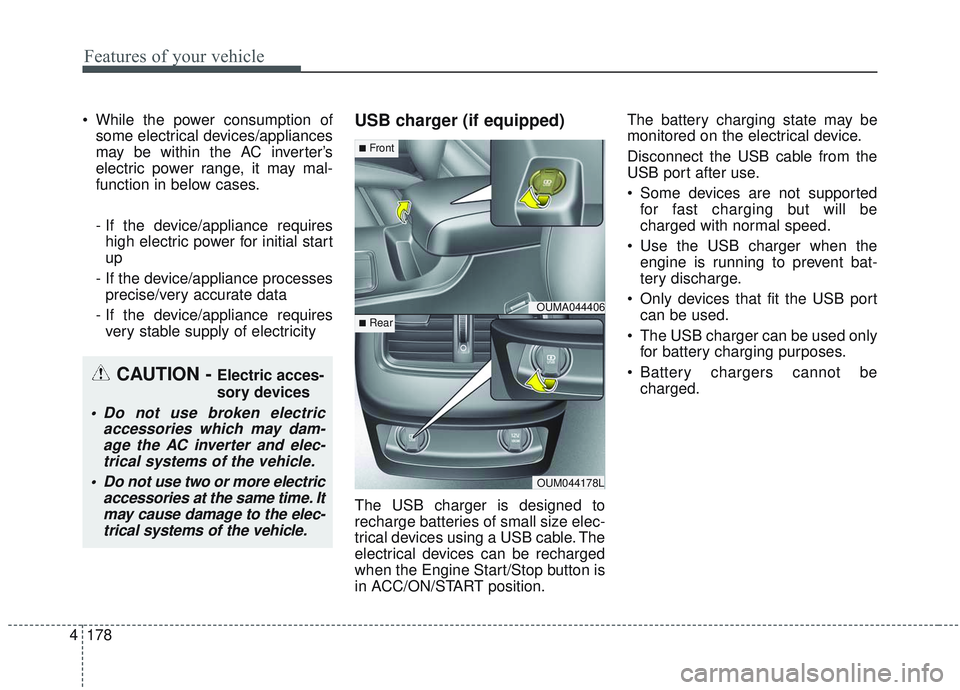
- If the device/appliance requires very stable supply of electricityUSB charger (if equipped)
The USB charger is designed to
recharge batteries of small size elec-
trical devices using a USB cable. The
electrical devices can be recharged
when the Engine Start/Stop button is
in ACC/ON/START position. The battery charging state may be
monitored on the electrical device.
Disconnect the USB cable from the
USB port after use.
Some devices are not supported
for fast charging but will be
charged with normal speed.
Use the USB charger when the engine is running to prevent bat-
tery discharge.
Only devices that fit the USB port can be used.
The USB charger can be used only for battery charging purposes.
Battery chargers cannot be charged.
CAUTION - Electric acces-
sory devices
Do not use broken electric accessories which may dam-age the AC inverter and elec-trical systems of the vehicle.
Do not use two or more electric accessories at the same time. Itmay cause damage to the elec-trical systems of the vehicle.
OUMA044406
OUM044178L
■Front
■Rear
Page 267 of 573
4179
Features of your vehicle
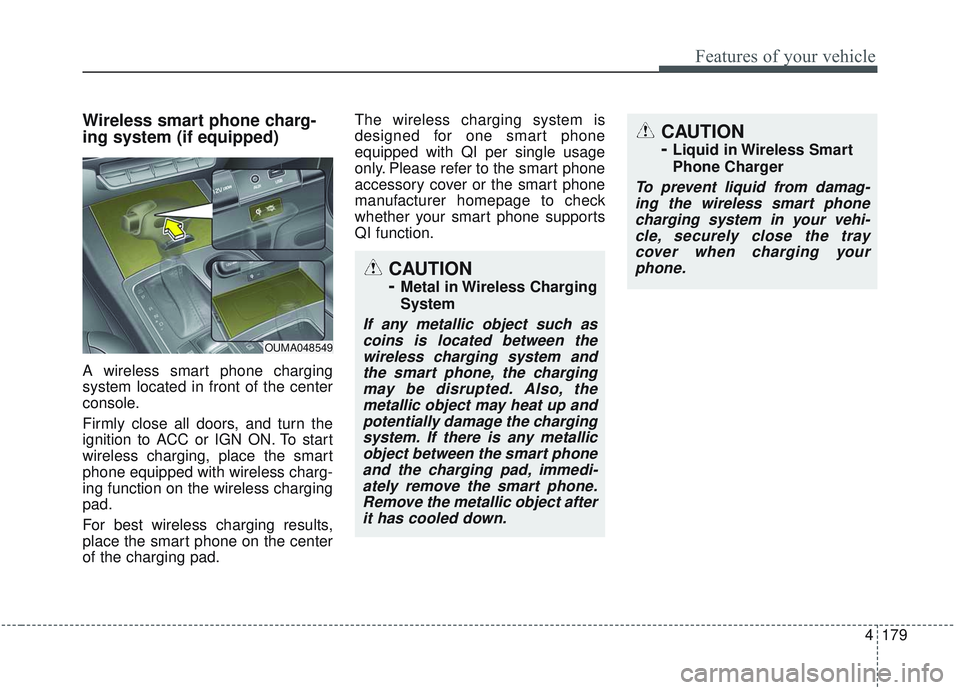
Wireless smart phone charg-
ing system (if equipped)
A wireless smart phone charging
system located in front of the center
console.
Firmly close all doors, and turn the
ignition to ACC or IGN ON. To start
wireless charging, place the smart
phone equipped with wireless charg-
ing function on the wireless charging
pad.
For best wireless charging results,
place the smart phone on the center
of the charging pad.The wireless charging system is
designed for one smart phone
equipped with QI per single usage
only. Please refer to the smart phone
accessory cover or the smart phone
manufacturer homepage to check
whether your smart phone supports
QI function.
OUMA048549
CAUTION
-
Metal in Wireless Charging
System
If any metallic object such as
coins is located between thewireless charging system andthe smart phone, the chargingmay be disrupted. Also, themetallic object may heat up andpotentially damage the chargingsystem. If there is any metallicobject between the smart phoneand the charging pad, immedi-ately remove the smart phone.Remove the metallic object afterit has cooled down.
CAUTION
-
Liquid in Wireless Smart
Phone Charger
To prevent liquid from damag-ing the wireless smart phonecharging system in your vehi-cle, securely close the traycover when charging yourphone.
Page 268 of 573
Features of your vehicle
180
4
Wireless smart phone charging
1. Remove any object on the smart
phone charging pad including the
smart key. If there is any foreign
object on the pad other than a
smart phone, the wireless charging
function may not operate properly.
2. Place the smart phone on the cen- ter of the wireless charging pad.
3. The indicator light will change to orange once the wireless charging
begins. After the charging is com-
plete, the orange light will change
to green.
4. You can choose to turn the wireless charging function to either ON or
OFF by selecting the USM on the
instrument cluster. (Please refer to
“Instrument Cluster” for details).
If the wireless charging is not func-
tioning properly, the orange light will
blink and flash for ten seconds then
turn off. In such cases, remove the
smart phone from the pad and
replace it on the pad again, or double
check the charging status. If you leave the smart phone on the
charging pad when the vehicle igni-
tion is in OFF, the vehicle will alert
you through warning messages and
sound (applicable for vehicles with
voice guidance function).
✽ ✽
NOTICE
• Securely close the tray cover when
using the wireless smart phone
charge function.
• Close the tray cover when the smart phone is placed in it at all
times. If the vehicle is in motion
without the tray cover closed, it is
more likely that the driver may
use the smart phone. The use of
smart phones while driving may
lead to possible injuries and acci-
dents.
• If it is not possible to close the tray cover due to the size of the smart
phone, do not use the wireless smart
phone charging function at all.
• When the tray cover is broken, do not use the wireless charging func-
tion before the tray cover is
repaired. (Continued)(Continued)
• When the interior temperature of
the wireless charging system rises
above a set temperature, the wire-
less charging will cease to func-
tion. After the interior tempera-
ture drops below the threshold,
the wireless charging function will
resume.
• The wireless charging may not function properly when there is a
heavy accessory cover on the
smart phone.
The wireless charging will stop
when the smart phone is not in
complete contact with the wireless
charging pad.
• The smart key detection feature in operation could temporarily stop
charging.
(When turning on ignition, open-
ing doors, or closing doors)
• The wireless charging will stop when the vehicle is turned OFF. (Continued)
Page 269 of 573
4181
Features of your vehicle
(Continued)
• Items equipped with magneticcomponents such as credit card,
telephone card, bankbook, any
transportation ticket and such
may become damaged during
wireless charging.
• Place the smart phone on the cen- ter of the charge pad for best
results. The smart phone may not
charge when placed near the rim
of the charging pad. When the
smart phone does get charged, it
may heat up excessively.
• For smart phones without built-in wireless charging system, an
appropriate accessory has to be
equipped.
• Cellphones without the certifica- tion for wireless charging ( )
could fail to charge.
• The self-protection feature equipped in some mobile phones
could slow down or stop charging. (Continued)(Continued)
• The indicator light of some manu-
facturers’ smart phones may still
be yellow after the smart phone is
fully charged. This is due to the
particular characteristic of the
smart phone and not a malfunc-
tion of the wireless charging.
• When any smart phone without a wireless charging function or a
metallic object is placed on the
charging pad, a small noise may
sound. This small sound is due to
the vehicle discerning compatibili-
ty of the object placed on the
charging pad. It does not affect
your vehicle or the smart phone in
any way. This device complies with
Industry Canada licence-exempt
RSS standard(s).
Operation is subject to the following
two conditions:
(1) This device may not cause inter-
ference, and
(2) This device must accept any
interference, including interfer-
ence that may cause undesired
operation of the device.