lock KIA SORENTO 2021 Features and Functions Guide
[x] Cancel search | Manufacturer: KIA, Model Year: 2021, Model line: SORENTO, Model: KIA SORENTO 2021Pages: 70, PDF Size: 5.67 MB
Page 35 of 70
ALWAYS CHECK THE OWNER’S MANUAL FOR COMPLETE OPER ATING INFORMATION AND SAFET Y WARNINGS. *IF EQUIPPED33
AUDIO SYSTEMS
AUDIOSYSTEMS
Kia Access with UVO link App DownloadQR CODES
Kia Access with UVO link App Features Guide. Click this dynamic QR code to access the guide. Some phone’s operating systems may need to be updated to scan dynamic QR codes
Download the Kia Access with UVO link App by clicking this dynamic QR code. Some phone’s operating systems may need to be updated to scan dynamic QR codes.
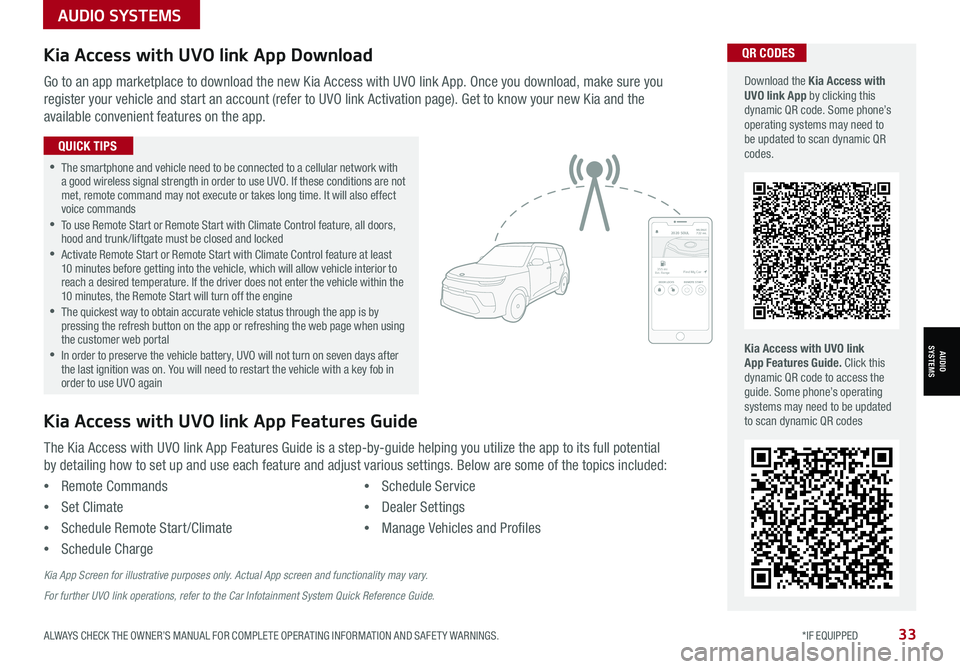
Go to an app marketplace to download the new Kia Access with UVO link App. Once you download, make sure you
register your vehicle and start an account (refer to UVO link Activation page). Get to know your new Kia and the
available convenient features on the app.
2020 SOULMILEAGE722 mi.
355 miEst. RangeDOOR LOCKSREMOTE STARTFind My Car
•The smartphone and vehicle need to be connected to a cellular network with a good wireless signal strength in order to use UVO. If these conditions are not met, remote command may not execute or takes long time. It will also effect voice commands •
To use Remote Start or Remote Start with Climate Control feature, all doors, hood and trunk /liftgate must be closed and locked •
Activate Remote Start or Remote Start with Climate Control feature at least 10 minutes before getting into the vehicle, which will allow vehicle interior to reach a desired temperature. If the driver does not enter the vehicle within the 10 minutes, the Remote Start will turn off the engine •
The quickest way to obtain accurate vehicle status through the app is by pressing the refresh button on the app or refreshing the web page when using the customer web portal •In order to preserve the vehicle battery, UVO will not turn on seven days after the last ignition was on. You will need to restart the vehicle with a key fob in order to use UVO again
QUICK TIPS
The Kia Access with UVO link App Features Guide is a step-by-guide helping you utilize the app to its full potential
by detailing how to set up and use each feature and adjust various settings. Below are some of the topics included:
•Remote Commands
•Set Climate
•Schedule Remote Start /Climate
•Schedule Charge
•Schedule Service
•Dealer Settings
•Manage Vehicles and Profiles
Kia Access with UVO link App Features Guide
Kia App Screen for illustrative purposes only. Actual App screen and functionality may vary.
For further UVO link operations, refer to the Car Infotainment System Quick Reference Guide.
Page 38 of 70
*IF EQUIPPED36SORENTO FEATURES & FUNCTIONS GUIDE
Multimedia USB Ports, Power Outlets, & USB Charger Ports* Digital Clock
Press SETUP, then select General, scroll
down and select Date/ Time from the menu
to adjust.
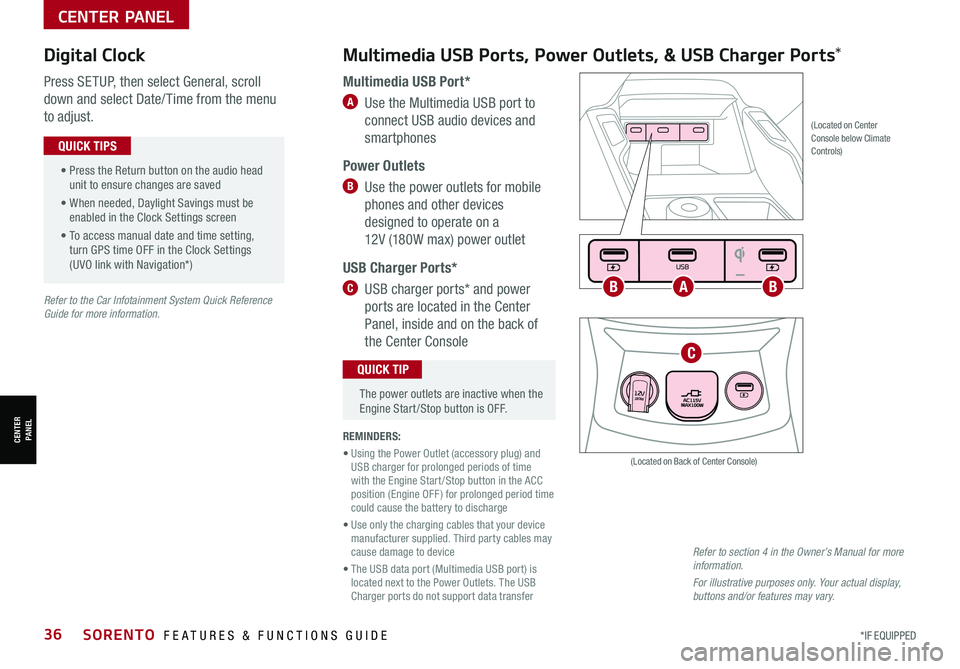
Multimedia USB Port*
A Use the Multimedia USB port to
connect USB audio devices and
smartphones
Power Outlets
B Use the power outlets for mobile
phones and other devices
designed to operate on a
12V (180W max) power outlet
USB Charger Ports*
C USB charger ports* and power
ports are located in the Center
Panel, inside and on the back of
the Center Console
(Located on Center Console below Climate Controls)
REMINDERS:
• Using the Power Outlet (accessory plug) and USB charger for prolonged periods of time with the Engine Start /Stop button in the ACC position (Engine OFF ) for prolonged period time could cause the battery to discharge
• Use only the charging cables that your device manufacturer supplied. Third party cables may cause damage to device
• The USB data port (Multimedia USB port) is located next to the Power Outlets. The USB Charger ports do not support data transfer
Refer to section 4 in the Owner’s Manual for more information.
For illustrative purposes only. Your actual display, buttons and/or features may vary.
(Located on Back of Center Console)
• Press the Return button on the audio head unit to ensure changes are saved
• When needed, Daylight Savings must be enabled in the Clock Settings screen
• To access manual date and time setting, turn GPS time OFF in the Clock Settings (UVO link with Navigation*)
QUICK TIPS
The power outlets are inactive when the Engine Start /Stop button is OFF.
QUICK TIP
Seat warmers / ventilation Wireless charge center console, back seat
USB / Multimedia
USB
180W12V
Seat warmers / ventilationWireless charge center console, back seat
USB / Multimedia
USB
180W12V
Seat warmers / ventilationWireless charge center console, back seat
USB / Multimedia
USB
180W12V
ABB
C
Refer to the Car Infotainment System Quick Reference Guide for more information.
CENTER PANEL
CENTER PANEL
Page 43 of 70
ALWAYS CHECK THE OWNER’S MANUAL FOR COMPLETE OPER ATING INFORMATION AND SAFET Y WARNINGS. *IF EQUIPPED †LEGAL DISCL AIMERS ON BACK INSIDE COVER41
Automatic Gear Shift with Sportmatic®†2 2 Shifting
•Press the brake pedal and depress release button to move the gearshift from N to P, N to R or from P to any gear
•Manual mode downshifts are made automatically when the vehicle slows down. When the vehicle stops, 1st gear is automatically selected
QUICK TIPS
(Center Console)
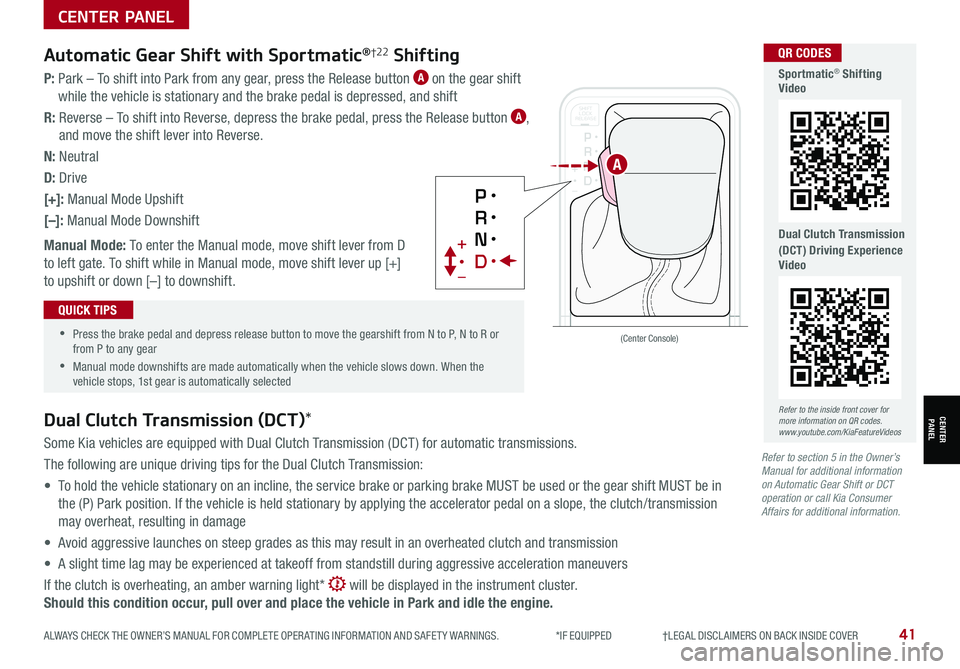
P: Park – To shift into Park from any gear, press the Release button A on the gear shift
while the vehicle is stationary and the brake pedal is depressed, and shift
R: Reverse – To shift into Reverse, depress the brake pedal, press the Release button A,
and move the shift lever into Reverse.
N: Neutral
D: Drive
[+]: Manual Mode Upshift
[–]: Manual Mode Downshift
Manual Mode: To enter the Manual mode, move shift lever from D
to left gate. To shift while in Manual mode, move shift lever up [+]
to upshift or down [–] to downshift.
Dual Clutch Transmission (DCT)*
Some Kia vehicles are equipped with Dual Clutch Transmission (DCT ) for automatic transmissions.
The following are unique driving tips for the Dual Clutch Transmission:
• To hold the vehicle stationary on an incline, the service brake or parking brake MUST be used or the gear shift MUST be in
the (P) Park position. If the vehicle is held stationary by applying the accelerator pedal on a slope, the clutch/transmission
may overheat, resulting in damage
• Avoid aggressive launches on steep grades as this may result in an overheated clutch and transmission
• A slight time lag may be experienced at takeoff from standstill during aggressive acceleration maneuvers
If the clutch is overheating, an amber warning light* will be displayed in the instrument cluster.
Should this condition occur, pull over and place the vehicle in Park and idle the engine.
Refer to section 5 in the Owner’s Manual for additional information on Automatic Gear Shift or DCT operation or call Kia Consumer Affairs for additional information.
SPORT
SMARTLOCK
ECOCOMFORT
P
R
N D
SHIFT
LOCK
RELEASE
SNOW
OFF
•
•
•
•
+
•
–
P
R
N D •
•
•
•
+
•
–
OFF
SPORT
SMARTLOCK
ECOCOMFORT
P
R
N D
SHIFT
LOCK
RELEASE
SNOW
OFF
•
•
•
•
+
•
–
P
R
N D •
•
•
•
+
•
–
OFF
A
Refer to the inside front cover for more information on QR codes.www.youtube.com/KiaFeatureVideos
QR CODES
Sportmatic® Shifting Video
Dual Clutch Transmission (DCT) Driving Experience Video
CENTER PANEL
CENTER PANEL
Page 44 of 70
*IF EQUIPPED 42SORENTO FEATURES & FUNCTIONS GUIDE
CENTER PANEL
CENTER PANEL
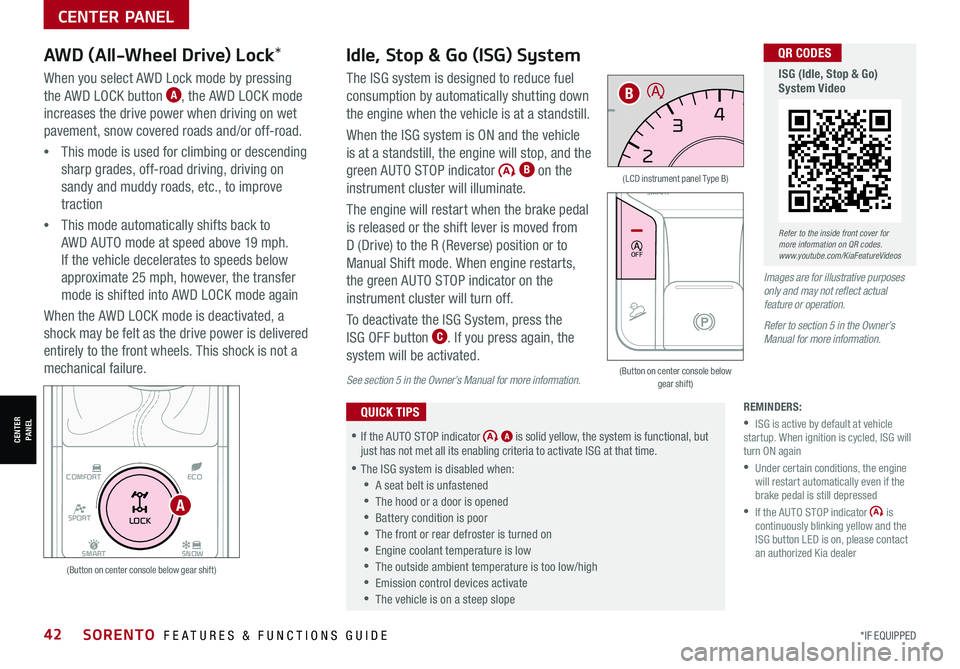
When you select AWD Lock mode by pressing
the AWD LOCK button A, the AWD LOCK mode
increases the drive power when driving on wet
pavement, snow covered roads and/or off-road.
•This mode is used for climbing or descending
sharp grades, off-road driving, driving on
sandy and muddy roads, etc., to improve
traction
•This mode automatically shifts back to
AWD AUTO mode at speed above 19 mph.
If the vehicle decelerates to speeds below
approximate 25 mph, however, the transfer
mode is shifted into AWD LOCK mode again
When the AWD LOCK mode is deactivated, a
shock may be felt as the drive power is delivered
entirely to the front wheels. This shock is not a
mechanical failure.
AWD (All-Wheel Drive) Lock*Idle, Stop & Go (ISG) System
The ISG system is designed to reduce fuel
consumption by automatically shutting down
the engine when the vehicle is at a standstill.
When the ISG system is ON and the vehicle
is at a standstill, the engine will stop, and the
green AUTO STOP indicator B on the
instrument cluster will illuminate.
The engine will restart when the brake pedal
is released or the shift lever is moved from
D (Drive) to the R (Reverse) position or to
Manual Shift mode. When engine restarts,
the green AUTO STOP indicator on the
instrument cluster will turn off.
To deactivate the ISG System, press the
ISG OFF button C. If you press again, the
system will be activated.
REMINDERS:
•ISG is active by default at vehicle startup. When ignition is cycled, ISG will turn ON again
•
Under certain conditions, the engine will restart automatically even if the brake pedal is still depressed
•
If the AUTO STOP indicator is continuously blinking yellow and the ISG button LED is on, please contact an authorized Kia dealer
•If the AUTO STOP indicator A is solid yellow, the system is functional, but just has not met all its enabling criteria to activate ISG at that time.
•
The ISG system is disabled when:
•A seat belt is unfastened
•The hood or a door is opened
•Battery condition is poor
•
The front or rear defroster is turned on
•
Engine coolant temperature is low
•
The outside ambient temperature is too low/high
•
Emission control devices activate
•
The vehicle is on a steep slope
QUICK TIPS
Images are for illustrative purposes only and may not reflect actual feature or operation.
Refer to section 5 in the Owner’s Manual for more information.
(Button on center console below gear shift)
(LCD instrument panel Type B)
(Button on center console below gear shift)
SPORT
SMART
LOCK
ECOCOMFORT
P
R
N D
SHIFT
LOCK
RELEASE
SNOW
OFF
•
•
•
•
+
•
–
OFF
EPB
AUTO
0 6
CH
1 5
2
D
4
3x1
000 rpm
E F
MPH
km/h0 160
20
140
40
120
60
100
80
20
40 60
200
2 40
2 80
300
80
180
1
00 160
1
20 140
0
1 7
8
26
3 45
E
F CH
160
20
140
40
120
60
100
80
MPH
526mi miF°25.7MPG
x1 000 rpm
SPORT
SMARTLOCK
ECOCOMFORT
P
R
N D
SHIFT
LOCK
RELEASE
SNOW
OFF
•
•
•
•
+
•
–
OFF
B
A
See section 5 in the Owner’s Manual for more information.
Refer to the inside front cover for more information on QR codes.www.youtube.com/KiaFeatureVideos
QR CODES
ISG (Idle, Stop & Go) System Video
Page 48 of 70
*IF EQUIPPED †LEGAL DISCL AIMERS ON BACK INSIDE COVER46SORENTO FEATURES & FUNCTIONS GUIDE
SEATING
SEATING
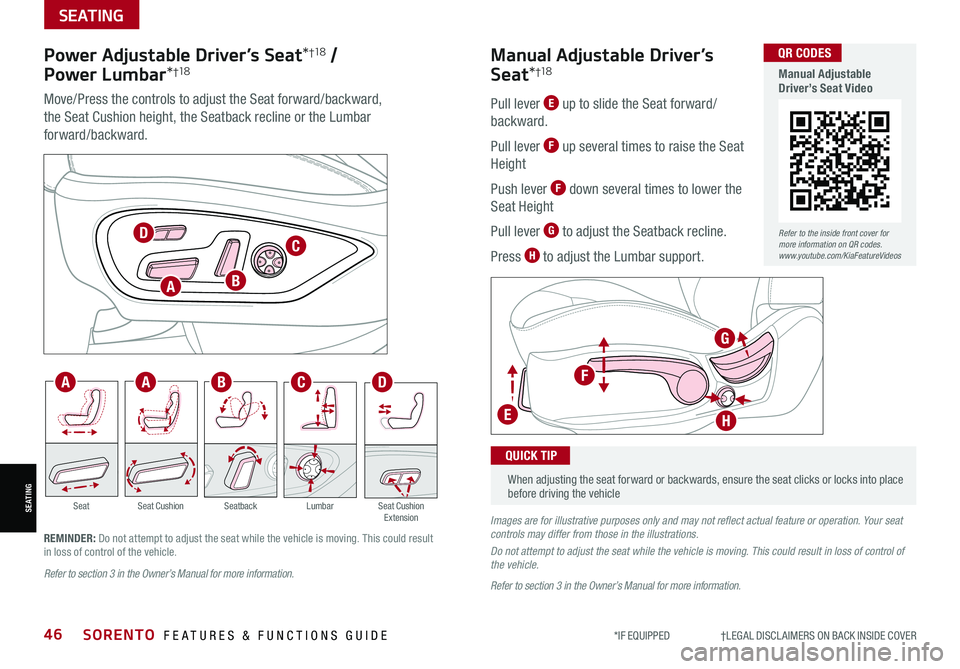
Power Adjustable Driver’s Seat*†1 8 /
Power Lumbar*†1 8
Move/Press the controls to adjust the Seat forward/backward,
the Seat Cushion height, the Seatback recline or the Lumbar
forward/backward.
SeatbackLumbarSeat Cushion ExtensionSeatSeat Cushion
Pull lever E up to slide the Seat forward/
backward.
Pull lever F up several times to raise the Seat
Height
Push lever F down several times to lower the
Seat Height
Pull lever G to adjust the Seatback recline.
Press H to adjust the Lumbar support.
Manual Adjustable Driver’s
Seat*†1 8
When adjusting the seat forward or backwards, ensure the seat clicks or locks into place before driving the vehicle
QUICK TIP
Refer to section 3 in the Owner’s Manual for more information.
Images are for illustrative purposes only and may not reflect actual feature or operation. Your seat controls may differ from those in the illustrations.
Do not attempt to adjust the seat while the vehicle is moving. This could result in loss of control of the vehicle.
Refer to section 3 in the Owner’s Manual for more information.
REMINDER: Do not attempt to adjust the seat while the vehicle is moving. This could result in loss of control of the vehicle.
C
C
D
DF
G
HE
A
AA
B
B
Refer to the inside front cover for more information on QR codes.www.youtube.com/KiaFeatureVideos
QR CODES
Manual Adjustable Driver’s Seat Video
Page 49 of 70

ALWAYS CHECK THE OWNER’S MANUAL FOR COMPLETE OPER ATING INFORMATION AND SAFET Y WARNINGS. *IF EQUIPPED †LEGAL DISCL AIMERS ON BACK INSIDE COVER47
SEATING
SEATING
Rear Occupant Alert (ROA) with Ultrasonic Sensors*†6
Rear Occupant Alert (ROA) with Ultrasonic Sensors can help alert the driver when rear
passenger(s) are left in the rear seats using the ultrasonic sensors and door monitoring.
The system is designed to provide three separate alerts:
• The 1st alert is a message on the Instrument Cluster, “Check Rear Seats” A, and a
chime will sound
After the 1st alert, when the doors are locked and there is movement detected in the rear
seats, the horn will sound for about 25 seconds. This alert may activate up to eight times
within 24 hours, if movement is still detected and system has not been disabled
• If you have installed the Kia Access with UVO Link app on your smartphone, logged in
and activated the Rear Occupant Alert notification, a third alert (notification) will be sent
to your phone
To turn the system on or off, in the Instrument Cluster, go to User Settings, select
Convenience, and then Rear Occupant Alert.
Rear Occupant with Ultrasonic Sensors activates under the following conditions:
• A rear passenger door is opened and closed
• The ignition has been turned off
• The driver’s door has been opened, then closed
• The doors are locked with the Smart Key or the door lock
button on the door handle
MODE
OK
CRUISE
ROA
This system is not a substitute for one’s attention and may not detect all movement within the vehicle. Always check the vehicle’s interior before exiting.
See section 4 in the Owner’s Manual for more information.
Check rear seats
: Alarm OffOK
A
B
REMINDERS: •
To avoid false alerts, make sure the vehicle’s windows are rolled up •
If objects such as boxes are stacked in front of the ultrasonic sensors, the system may not detect any movement •
The ultrasonic sensors may occasionally detect movement in the vehicle and cause false alerts, when there are no rear occupants present. False alerts can occur due to:– The presence of insects near the system sensor– Rushing air from a window that is rolled down– Movement around the exterior of the vehicle– Surrounding noise or vibration– Vehicle passing through a car wash– Movement in the driver or front passenger seat is detected •
The Rear Occupant Alert with Ultrasonic Sensors system may fail to detect movement and activate an alarm if: – Movement is subtle or does not continue – A small child sits directly in a seat without a car seat–
A rear passenger is covered with an object such as a blanket, obstructing the sensor’s view
•
The 1st alert message will not display on Instrument Cluster if the rear doors are never opened. Either rear doors must be opened after unlocking the vehicle before the system will activate.
•
To temporarily disable alerts, press the OK button B on the Steering Wheel while the message is displayed
•
To turn the alert off while sounding, press the unlock button on the Smart Key or press the door lock button on the door handle
•
Must be enrolled in UVO services and Kia Access app installed on the phone to receive ROA alert notifications on your smartphone
QUICK TIPS
Refer to the inside front cover for more information on QR codes.www.youtube.com/KiaFeatureVideos
QR CODES
Rear Occupant Alert (ROA) with Ultrasonic Sensors Video
Images are for illustrative purposes only and may not reflect actual feature or operation.
Page 50 of 70
*IF EQUIPPED †LEGAL DISCL AIMERS ON BACK INSIDE COVER48SORENTO FEATURES & FUNCTIONS GUIDE
SEATING
SEATING
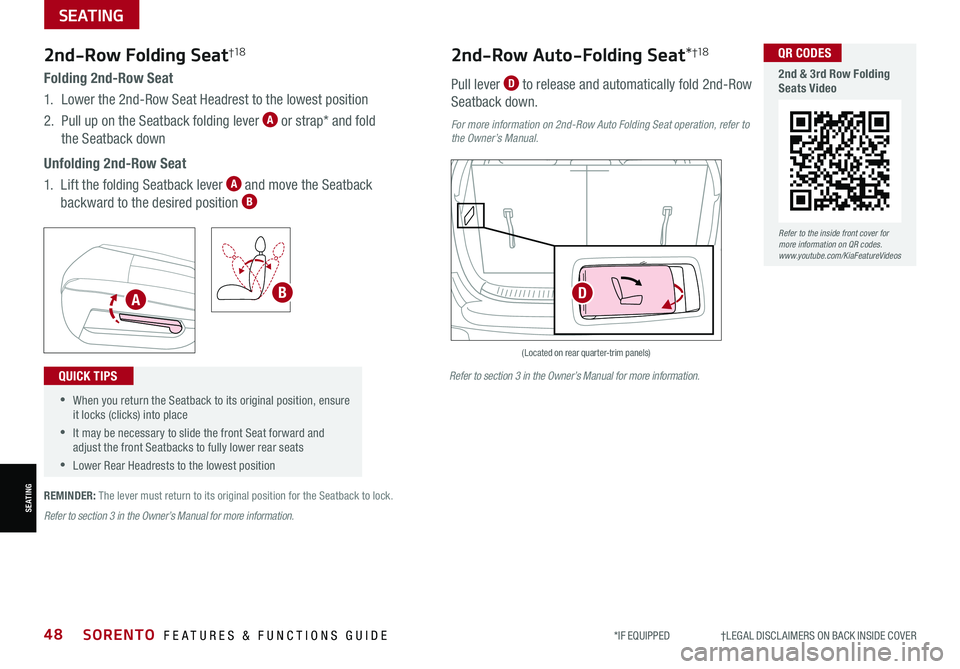
Folding 2nd-Row Seat
1. Lower the 2nd-Row Seat Headrest to the lowest position
2. Pull up on the Seatback folding lever A or strap* and fold
the Seatback down
Unfolding 2nd-Row Seat
1. Lift the folding Seatback lever A and move the Seatback
backward to the desired position B
2nd-Row Folding Seat†1 8
•When you return the Seatback to its original position, ensure it locks (clicks) into place
•It may be necessary to slide the front Seat forward and adjust the front Seatbacks to fully lower rear seats
•Lower Rear Headrests to the lowest position
QUICK TIPS
(Located on rear quarter-trim panels)
Pull lever D to release and automatically fold 2nd-Row
Seatback down.
2nd-Row Auto-Folding Seat*†1 8
For more information on 2nd-Row Auto Folding Seat operation, refer to the Owner’s Manual.
REMINDER: The lever must return to its original position for the Seatback to lock.
ABD
Refer to the inside front cover for more information on QR codes.www.youtube.com/KiaFeatureVideos
QR CODES
2nd & 3rd Row Folding Seats Video
Refer to section 3 in the Owner’s Manual for more information.
Refer to section 3 in the Owner’s Manual for more information.
Page 52 of 70

*IF EQUIPPED †LEGAL DISCL AIMERS ON BACK INSIDE COVER50SORENTO FEATURES & FUNCTIONS GUIDE
Remote button configuration may vary depending on vehicle options.
A Press the release button to unfold the key
B Press to lock All Doors
C Press to unlock Driver’s
Door: Press twice in 4
seconds to unlock All
Doors and Rear Hatch
D Press and hold for more
than a half second for the
Panic Alarm. To turn OFF
the Alarm, press any button
Remote Keyless Entry (Folding Key)* Sunvisor†24
Use the Sunvisor to shield from direct light through the front
or side windows. Slide or swing the Sunvisor out and adjust
as needed.
REMINDERS:
•Sunvisor may not shield from all direct light
•The Sunvisor may impair visibility if not adjusted properly
•Do not operate the vehicle if the Sunvisor is impairing your visibility
•
Be aware of the seating position when adjusting or swinging Sunvisor around to and from the front or side windows
Mechanical Key shown.
HOLD
HOLD
HOLD
•Turn clockwise once to unlock the Driver’s Door
•Turn clockwise again within 4 seconds
to unlock All Doors
•Turn counterclockwise
once to lock All Doors
Double-Turn Lock/Unlock All
A
B
C
D
OTHER KEY FEATURES
OTHER KEY FEATURES
Refer to the inside front cover for more information on QR codes.www.youtube.com/KiaFeatureVideos
QR CODES
Kia Smart & Folding Key Fobs Video
Refer to section 4 in the Owner’s Manual for more information.
Refer to section 4 in the Owner’s Manual for more information.
Refer to section 4 in the Owner’s Manual for more information.
Page 53 of 70
ALWAYS CHECK THE OWNER’S MANUAL FOR COMPLETE OPER ATING INFORMATION AND SAFET Y WARNINGS. *IF EQUIPPED †LEGAL DISCL AIMERS ON BACK INSIDE COVER51
HOLD
HOLD
HOLDHOLD
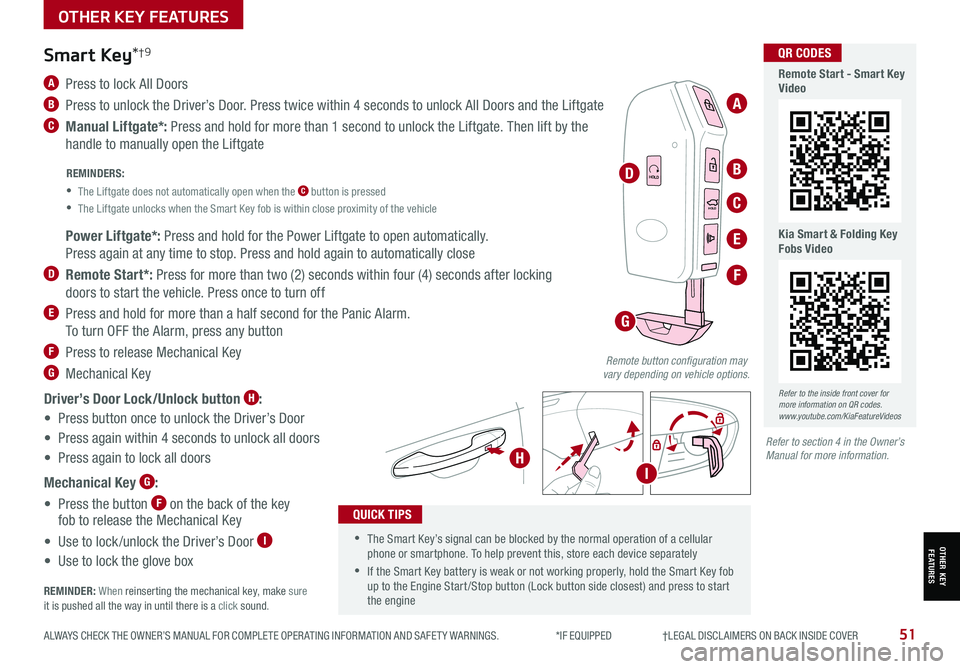
A Press to lock All Doors
B Press to unlock the Driver’s Door. Press twice within 4 seconds to unlock All Doors and the Liftgate
C Manual Liftgate*: Press and hold for more than 1 second to unlock the Liftgate. Then lift by the
handle to manually open the Liftgate
Smart Key*†9
REMINDERS:
•
The Liftgate does not automatically open when the C button is pressed
•
The Liftgate unlocks when the Smart Key fob is within close proximity of the vehicle
•The Smart Key’s signal can be blocked by the normal operation of a cellular phone or smartphone. To help prevent this, store each device separately
•If the Smart Key battery is weak or not working properly, hold the Smart Key fob up to the Engine Start /Stop button (Lock button side closest) and press to start the engine
QUICK TIPS
Remote button configuration may vary depending on vehicle options.
A
B
C
D
F
G
H
E Power Liftgate*: Press and hold for the Power Liftgate to open automatically.
Press again at any time to stop. Press and hold again to automatically close
D Remote Start*: Press for more than two (2) seconds within four (4) seconds after locking
doors to start the vehicle. Press once to turn off
E Press and hold for more than a half second for the Panic Alarm.
To turn OFF the Alarm, press any button
F Press to release Mechanical Key
G Mechanical Key
Driver’s Door Lock/Unlock button H:
• Press button once to unlock the Driver’s Door
• Press again within 4 seconds to unlock all doors
• Press again to lock all doors
Mechanical Key G:
• Press the button F on the back of the key fob to release the Mechanical Key
• Use to lock /unlock the Driver’s Door I
• Use to lock the glove box
REMINDER: When reinserting the mechanical key, make sure it is pushed all the way in until there is a click sound.
I
Refer to the inside front cover for more information on QR codes.www.youtube.com/KiaFeatureVideos
QR CODES
Remote Start - Smart Key Video
Kia Smart & Folding Key Fobs Video
Refer to section 4 in the Owner’s Manual for more information.
OTHER KEY FEATURES
OTHER KEY FEATURES
Page 55 of 70
ALWAYS CHECK THE OWNER’S MANUAL FOR COMPLETE OPER ATING INFORMATION AND SAFET Y WARNINGS. *IF EQUIPPED †LEGAL DISCL AIMERS ON BACK INSIDE COVER53
See section 4 in the Owner’s Manual for more information.
OTHER KEY FEATURES
OTHER KEY FEATURES
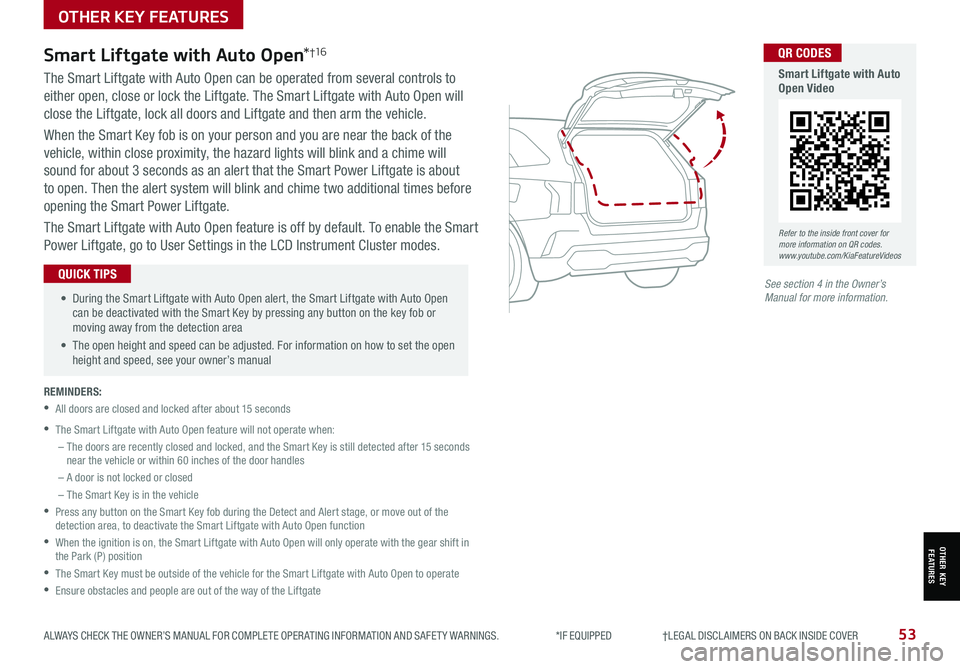
The Smart Liftgate with Auto Open can be operated from several controls to
either open, close or lock the Liftgate. The Smart Liftgate with Auto Open will
close the Liftgate, lock all doors and Liftgate and then arm the vehicle.
When the Smart Key fob is on your person and you are near the back of the
vehicle, within close proximity, the hazard lights will blink and a chime will
sound for about 3 seconds as an alert that the Smart Power Liftgate is about
to open. Then the alert system will blink and chime two additional times before
opening the Smart Power Liftgate.
The Smart Liftgate with Auto Open feature is off by default. To enable the Smart
Power Liftgate, go to User Settings in the LCD Instrument Cluster modes.
REMINDERS:
•All doors are closed and locked after about 15 seconds
•The Smart Liftgate with Auto Open feature will not operate when:
– The doors are recently closed and locked, and the Smart Key is still detected after 15 seconds near the vehicle or within 60 inches of the door handles
– A door is not locked or closed
– The Smart Key is in the vehicle
•
Press any button on the Smart Key fob during the Detect and Alert stage, or move out of the detection area, to deactivate the Smart Liftgate with Auto Open function
•
When the ignition is on, the Smart Liftgate with Auto Open will only operate with the gear shift in the Park (P) position
•The Smart Key must be outside of the vehicle for the Smart Liftgate with Auto Open to operate
•Ensure obstacles and people are out of the way of the Liftgate
Smart Liftgate with Auto Open*†1 6
• During the Smart Liftgate with Auto Open alert, the Smart Liftgate with Auto Open can be deactivated with the Smart Key by pressing any button on the key fob or moving away from the detection area
• The open height and speed can be adjusted. For information on how to set the open height and speed, see your owner’s manual
QUICK TIPS
Refer to the inside front cover for more information on QR codes.www.youtube.com/KiaFeatureVideos
QR CODES
Smart Liftgate with Auto Open Video