light KIA SORENTO HYBRID 2021 Features and Functions Guide
[x] Cancel search | Manufacturer: KIA, Model Year: 2021, Model line: SORENTO HYBRID, Model: KIA SORENTO HYBRID 2021Pages: 66, PDF Size: 6.25 MB
Page 19 of 66
ALWAYS CHECK THE OWNER’S MANUAL FOR COMPLETE OPER ATING INFORMATION AND SAFET Y WARNINGS. *IF EQUIPPED †LEGAL DISCL AIMERS ON BACK INSIDE COVER17
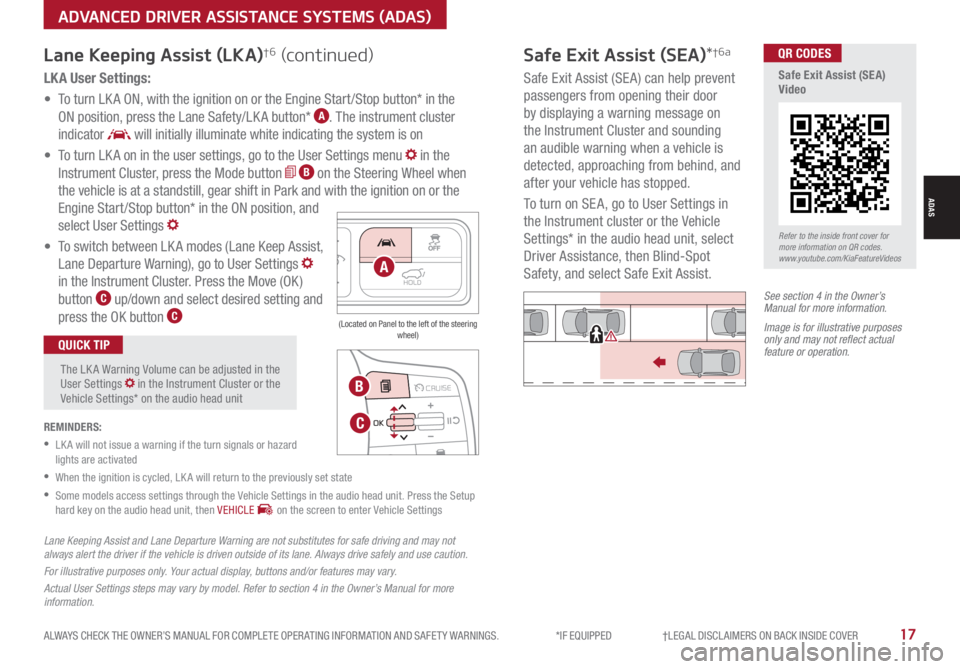
LK A User Settings:
• To turn LK A ON, with the ignition on or the Engine Start /Stop button* in the
ON position, press the Lane Safety/LK A button* A. The instrument cluster
indicator will initially illuminate white indicating the system is on
• To turn LK A on in the user settings, go to the User Settings menu in the
Instrument Cluster, press the Mode button B on the Steering Wheel when
the vehicle is at a standstill, gear shift in Park and with the ignition on or the
Engine Start /Stop button* in the ON position, and
select User Settings
• To switch between LK A modes (Lane Keep Assist,
Lane Departure Warning), go to User Settings
in the Instrument Cluster. Press the Move (OK )
button C up/down and select desired setting and
press the OK button C
REMINDERS:
•
LK A will not issue a warning if the turn signals or hazard lights are activated
•
When the ignition is cycled, LK A will return to the previously set state
•
Some models access settings through the Vehicle Settings in the audio head unit. Press the Setup hard key on the audio head unit, then VEHICLE on the screen to enter Vehicle Settings
The LK A Warning Volume can be adjusted in the User Settings in the Instrument Cluster or the Vehicle Settings* on the audio head unit
QUICK TIP
Lane Keeping Assist (LKA)†6 (continued)
MODE MODE
MODE
MODE MODE
OK
CRUISE
Smart Cruise Control
OK
Cruise Control
OK
CRUISE
Bluetooth Eco
OK
CRUISE
L FA
OK
CRUISE
User Settings
Trip Modes
Fuel Econ
OK
CRUISE
HDA
MODE
OK
CRUISE
Audio LV DA MSLA - ISLA
MODE
OK
MODE CRUISE
CRUISE
B
C
HOLDA
(Located on Panel to the left of the steering wheel)
Lane Keeping Assist and Lane Departure Warning are not substitutes for safe driving and may not always alert the driver if the vehicle is driven outside of its lane. Always drive safely and use caution.
For illustrative purposes only. Your actual display, buttons and/or features may vary.
Actual User Settings steps may vary by model. Refer to section 4 in the Owner’s Manual for more information.
Refer to the inside front cover for more information on QR codes.www.youtube.com/KiaFeatureVideos
QR CODES
Safe Exit Assist (SEA) Video
Safe Exit Assist (SEA)*†6a
Safe Exit Assist (SE A) can help prevent
passengers from opening their door
by displaying a warning message on
the Instrument Cluster and sounding
an audible warning when a vehicle is
detected, approaching from behind, and
after your vehicle has stopped.
To turn on SE A, go to User Settings in
the Instrument cluster or the Vehicle
Settings* in the audio head unit, select
Driver Assistance, then Blind-Spot
Safety, and select Safe Exit Assist.
See section 4 in the Owner’s Manual for more information.
Image is for illustrative purposes only and may not reflect actual feature or operation.
Watch for traffic
ADVANCED DRIVER ASSISTANCE SYSTEMS (ADAS)
ADAS
Page 24 of 66
*IF EQUIPPED †LEGAL DISCL AIMERS ON BACK INSIDE COVER22SORENTO HYBRID FEATURES & FUNCTIONS GUIDE
See section 5 in the Owner’s Manual for more information.
The ESC system is designed to help stabilize the vehicle during certain
cornering maneuvers. It is a good idea to keep the ESC turned on for
daily driving whenever possible.
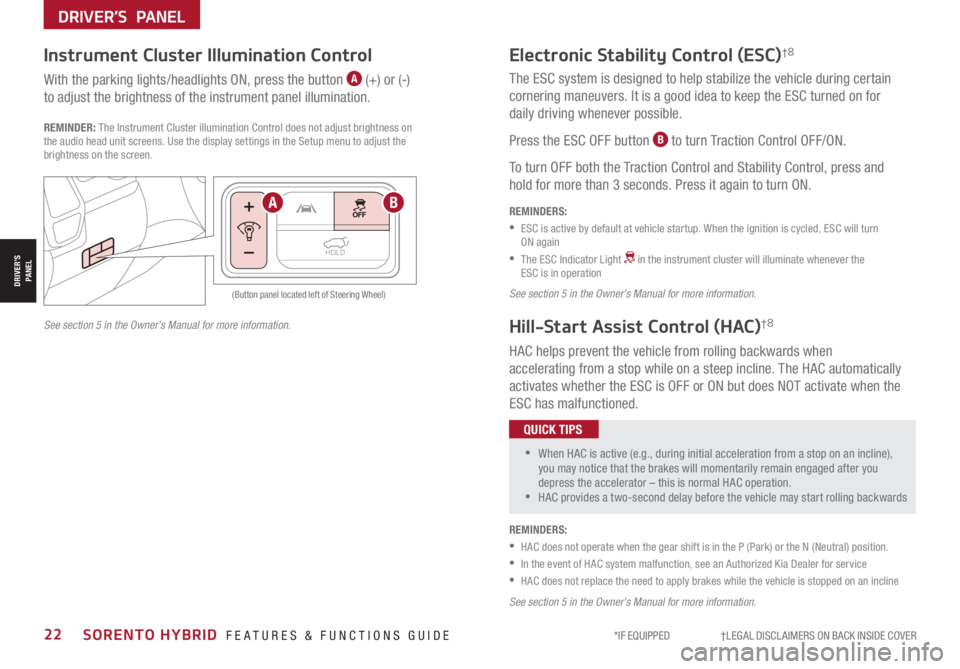
Press the ESC OFF button B to turn Traction Control OFF/ON.
To turn OFF both the Traction Control and Stability Control, press and
hold for more than 3 seconds. Press it again to turn ON.
HAC helps prevent the vehicle from rolling backwards when
accelerating from a stop while on a steep incline. The HAC automatically
activates whether the ESC is OFF or ON but does NOT activate when the
ESC has malfunctioned.
REMINDERS:
•
ESC is active by default at vehicle startup. When the ignition is cycled, ESC will turn ON again
•
The ESC Indicator Light in the instrument cluster will illuminate whenever the ESC is in operation
See section 5 in the Owner’s Manual for more information.
Electronic Stability Control (ESC)†8
Hill-Start Assist Control (HAC)†8
REMINDERS:
•HAC does not operate when the gear shift is in the P (Park) or the N (Neutral) position.
•In the event of HAC system malfunction, see an Authorized Kia Dealer for service
•HAC does not replace the need to apply brakes while the vehicle is stopped on an incline
HOLD
HOLD
(Button panel located left of Steering Wheel)
Instrument Cluster Illumination Control
With the parking lights/headlights ON, press the button A (+) or (-)
to adjust the brightness of the instrument panel illumination.
REMINDER: The Instrument Cluster illumination Control does not adjust brightness on the audio head unit screens. Use the display settings in the Setup menu to adjust the brightness on the screen.
•
•When HAC is active (e.g., during initial acceleration from a stop on an incline), you may notice that the brakes will momentarily remain engaged after you depress the accelerator – this is normal HAC operation. •HAC provides a two-second delay before the vehicle may start rolling backwards
QUICK TIPS
AB
See section 5 in the Owner’s Manual for more information.
DRIVER’S PANEL
DRIVER’SPANEL
Page 25 of 66
ALWAYS CHECK THE OWNER’S MANUAL FOR COMPLETE OPER ATING INFORMATION AND SAFET Y WARNINGS. *IF EQUIPPED †LEGAL DISCL AIMERS ON BACK INSIDE COVER23
LRLRLR
Reverse Parking Aid Function*Engine Start/Stop Button*†9
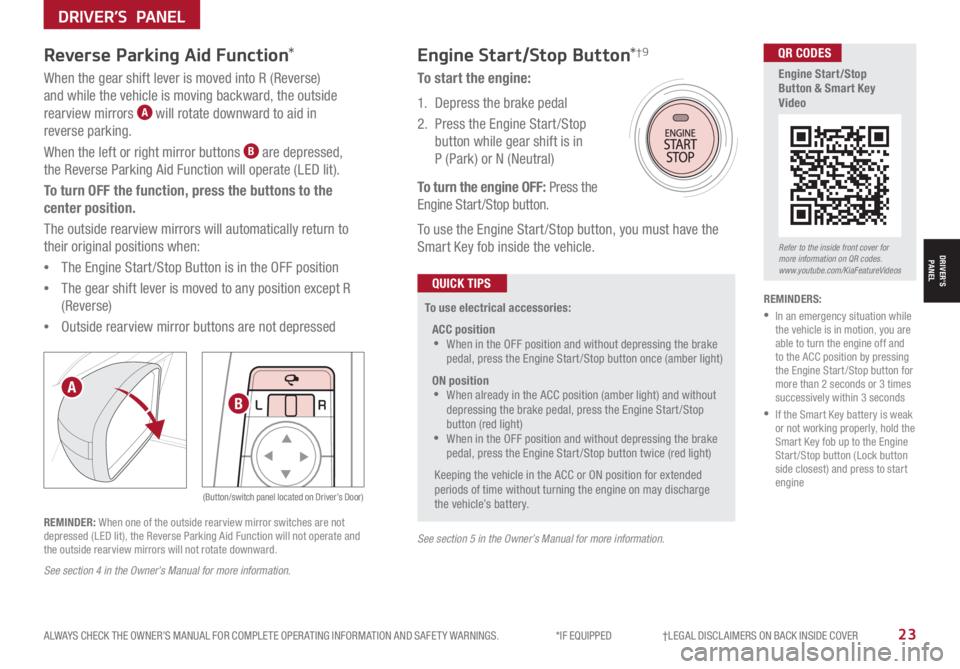
When the gear shift lever is moved into R (Reverse)
and while the vehicle is moving backward, the outside
rearview mirrors A will rotate downward to aid in
reverse parking.
When the left or right mirror buttons B are depressed,
the Reverse Parking Aid Function will operate (LED lit).
To turn OFF the function, press the buttons to the
center position.
The outside rearview mirrors will automatically return to
their original positions when:
•The Engine Start /Stop Button is in the OFF position
•The gear shift lever is moved to any position except R
(Reverse)
•
Outside rearview mirror buttons are not depressed
REMINDER: When one of the outside rearview mirror switches are not depressed (LED lit), the Reverse Parking Aid Function will not operate and the outside rearview mirrors will not rotate downward.
To start the engine:
1. Depress the brake pedal
2.
Press the Engine Start /Stop
button while gear shift is in
P (Park) or N (Neutral)
To turn the engine OFF: Press the
Engine Start /Stop button.
To use the Engine Start /Stop button, you must have the
Smart Key fob inside the vehicle.
REMINDERS:
•
In an emergency situation while the vehicle is in motion, you are able to turn the engine off and to the ACC position by pressing the Engine Start /Stop button for more than 2 seconds or 3 times successively within 3 seconds
•
If the Smart Key battery is weak or not working properly, hold the Smart Key fob up to the Engine Start /Stop button (Lock button side closest) and press to start engine
To use electrical accessories:
ACC position •When in the OFF position and without depressing the brake pedal, press the Engine Start /Stop button once (amber light)
ON position •When already in the ACC position (amber light) and without depressing the brake pedal, press the Engine Start/Stop button (red light) •
When in the OFF position and without depressing the brake pedal, press the Engine Start /Stop button twice (red light)
Keeping the vehicle in the ACC or ON position for extended periods of time without turning the engine on may discharge the vehicle’s battery.
QUICK TIPS
A
B
(Button/switch panel located on Driver’s Door)
Refer to the inside front cover for more information on QR codes.www.youtube.com/KiaFeatureVideos
QR CODES
Engine Start/Stop Button & Smart Key Video
See section 5 in the Owner’s Manual for more information.
See section 4 in the Owner’s Manual for more information.
DRIVER’S PANEL
DRIVER’SPANEL
Page 26 of 66
*IF EQUIPPED24SORENTO HYBRID FEATURES & FUNCTIONS GUIDE
Power Windows, Window Lock
& Central Door Lock
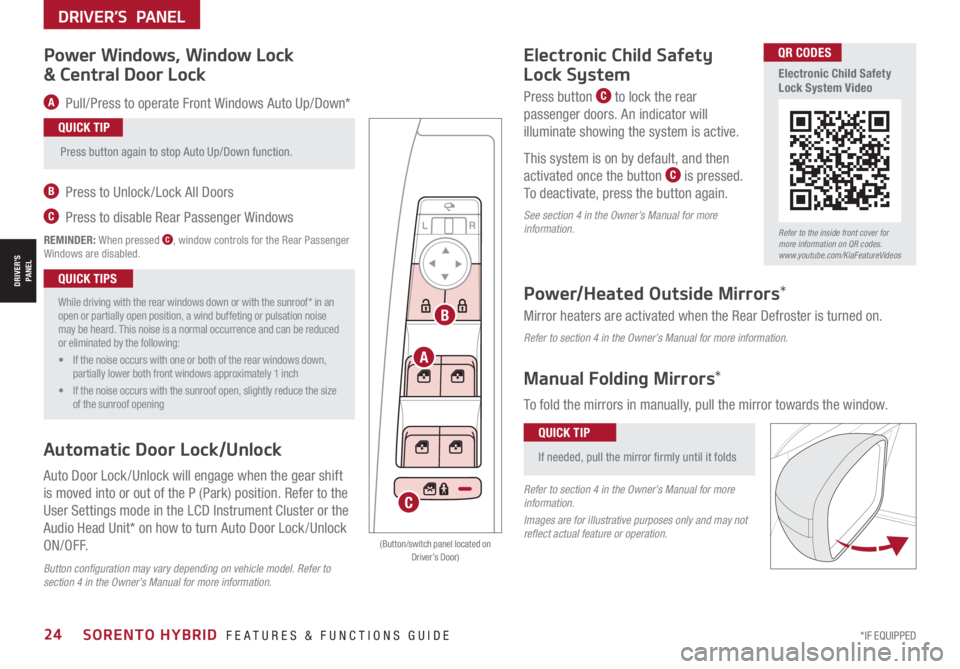
A Pull/Press to operate Front Windows Auto Up/Down*
B Press to Unlock /Lock All Doors
C Press to disable Rear Passenger Windows
REMINDER: When pressed C, window controls for the Rear Passenger Windows are disabled.
Power/Heated Outside Mirrors*
Mirror heaters are activated when the Rear Defroster is turned on.
Refer to section 4 in the Owner’s Manual for more information.
Electronic Child Safety
Lock System
Press button C to lock the rear
passenger doors. An indicator will
illuminate showing the system is active.
This system is on by default, and then
activated once the button C is pressed.
To deactivate, press the button again.
See section 4 in the Owner’s Manual for more information.
Press button again to stop Auto Up/Down function.
QUICK TIP
•
While driving with the rear windows down or with the sunroof* in an open or partially open position, a wind buffeting or pulsation noise may be heard. This noise is a normal occurrence and can be reduced or eliminated by the following:
• If the noise occurs with one or both of the rear windows down, partially lower both front windows approximately 1 inch
• If the noise occurs with the sunroof open, slightly reduce the size of the sunroof opening
QUICK TIPS
Button configuration may vary depending on vehicle model. Refer to section 4 in the Owner’s Manual for more information.
Automatic Door Lock/Unlock
Auto Door Lock /Unlock will engage when the gear shift
is moved into or out of the P (Park) position. Refer to the
User Settings mode in the LCD Instrument Cluster or the
Audio Head Unit* on how to turn Auto Door Lock /Unlock
ON/OFF.
LRLRLR
A
B
C
(Button/switch panel located on Driver’s Door)
Manual Folding Mirrors*
To fold the mirrors in manually, pull the mirror towards the window.
If needed, pull the mirror firmly until it folds
QUICK TIP
Refer to section 4 in the Owner’s Manual for more information.
Images are for illustrative purposes only and may not reflect actual feature or operation.
Refer to the inside front cover for more information on QR codes.www.youtube.com/KiaFeatureVideos
QR CODES
Electronic Child Safety Lock System Video
DRIVER’S PANEL
DRIVER’SPANEL
Page 28 of 66
*IF EQUIPPED26SORENTO HYBRID FEATURES & FUNCTIONS GUIDE
OFFOFF
AUTO
OFFOFF
AUTO
REMINDERS:
•
High Beam Assist does not operate below certain speeds, or in some lighting and driving conditions. Please be aware of your surroundings and exercise proper road etiquette when operating a vehicle using the high beams
•HBA will operate when vehicle speed exceeds 25 mph
•
If the lever is pushed away from you while HBA is operational, HBA will turn off and the high beams will be on continuously. If the lever is pulled toward you while HBA is operational, HBA will turn off
•If the light switch is switched to the headlight position, HBA will turn off and low beams will be on continuously
•
When the HBA indicator illuminates on the instrument cluster, the HBA is not working properly. See an authorized Kia dealer for service
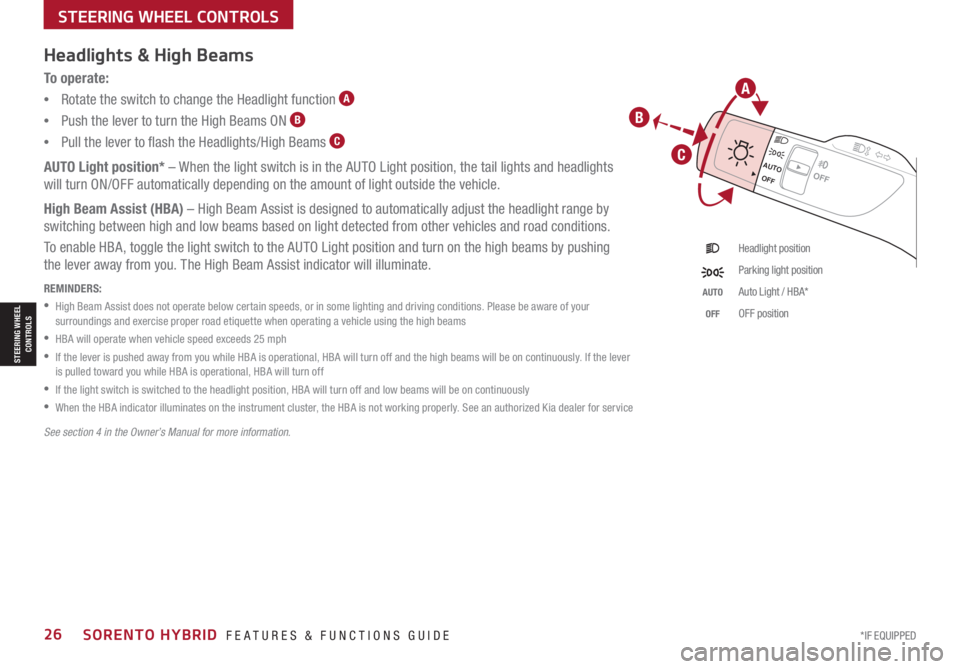
To o p e r a t e :
•Rotate the switch to change the Headlight function A
•Push the lever to turn the High Beams ON B
•Pull the lever to flash the Headlights/High Beams C
AUTO Light position* – When the light switch is in the AUTO Light position, the tail lights and headlights
will turn ON/OFF automatically depending on the amount of light outside the vehicle.
High Beam Assist (HBA) – High Beam Assist is designed to automatically adjust the headlight range by
switching between high and low beams based on light detected from other vehicles and road conditions.
To enable HBA, toggle the light switch to the AUTO Light position and turn on the high beams by pushing
the lever away from you. The High Beam Assist indicator will illuminate.
Headlight position
Parking light position
AUTOAuto Light / HBA*
OFFOFF position
Headlights & High Beams
See section 4 in the Owner’s Manual for more information.
STEERING WHEEL CONTROLS
STEERING WHEEL CONTROLS
A
B
C
Page 29 of 66
ALWAYS CHECK THE OWNER’S MANUAL FOR COMPLETE OPER ATING INFORMATION AND SAFET Y WARNINGS. *IF EQUIPPED 27
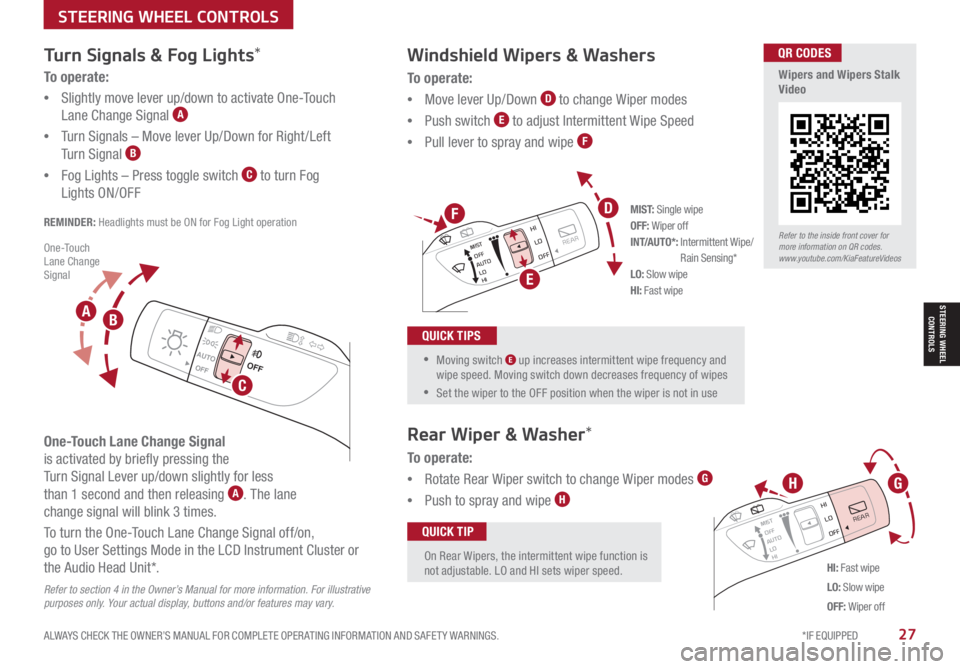
To o p e r a t e :
•Move lever Up/Down D to change Wiper modes
•Push switch E to adjust Intermittent Wipe Speed
•Pull lever to spray and wipe F
Windshield Wipers & Washers
M I S T: Single wipeOFF: Wiper offINT/AUTO*: Intermittent Wipe/ Rain Sensing*LO: Slow wipeHI: Fast wipe
OFFOFF
AUTO
OFFOFF
AUTO
MIST
OFF
AUTO
LO
HI
HIREARLO
OFF
MIST OFF
AUTO
LO
HI
HIREARLO
OFF
MIST OFF
AUTO
LO
HI
HIREARLO
OFF
MIST OFF
AUTO
LO
HI
HIREARLO
OFF
HI: Fast wipe
LO: Slow wipe
OFF: Wiper off
On Rear Wipers, the intermittent wipe function is not adjustable. LO and HI sets wiper speed.
QUICK TIP
Rear Wiper & Washer*
To operate:
•Rotate Rear Wiper switch to change Wiper modes G
•Push to spray and wipe H
•Moving switch E up increases intermittent wipe frequency and wipe speed. Moving switch down decreases frequency of wipes
•Set the wiper to the OFF position when the wiper is not in use
QUICK TIPS
D
E
GH
F
Refer to the inside front cover for more information on QR codes.www.youtube.com/KiaFeatureVideos
QR CODES
Wipers and Wipers Stalk Video
Turn Signals & Fog Lights*
To o p e r a t e :
•Slightly move lever up/down to activate One-Touch
Lane Change Signal A
•Turn Signals – Move lever Up/Down for Right /Left
Turn Signal B
•Fog Lights – Press toggle switch C to turn Fog
Lights ON/OFF
REMINDER: Headlights must be ON for Fog Light operation
One-Touch Lane Change Signal
is activated by briefly pressing the
Turn Signal Lever up/down slightly for less
than 1 second and then releasing A. The lane
change signal will blink 3 times.
To turn the One-Touch Lane Change Signal off/on,
go to User Settings Mode in the LCD Instrument Cluster or
the Audio Head Unit*.
Refer to section 4 in the Owner’s Manual for more information. For illustrative purposes only. Your actual display, buttons and/or features may vary.
O ne -To u ch Lane Change Signal
STEERING WHEEL CONTROLS
STEERING WHEEL CONTROLS
C
AB
Page 30 of 66
*IF EQUIPPED †LEGAL DISCL AIMERS ON BACK INSIDE COVER28SORENTO HYBRID FEATURES & FUNCTIONS GUIDE
The Smart Cruise Control with Stop & Go* system is designed to maintain a predetermined distance from vehicles detected ahead
by automatically adjusting the driving speed as needed. When traffic is detected, the vehicle will automatically slow to maintain a
set distance between traffic without depressing the accelerator or brake pedal.
With the SCC on and activated, the vehicle distance set, and the system detects a vehicle slowing or stopping, the system can bring
the vehicle to a complete stop. When the vehicle ahead starts to move forward, the SCC system re-engages. If the vehicle ahead
stops for more than 3 seconds, the accelerator pedal or the RES+ button must be pressed to start moving the vehicle.
On some models, press the Driving Assist Mode CRUISE button* on the Steering Wheel to activate and the speed will be set to the
current vehicle speed. SCC may decrease the speed to maintain the distance with the vehicle in front.
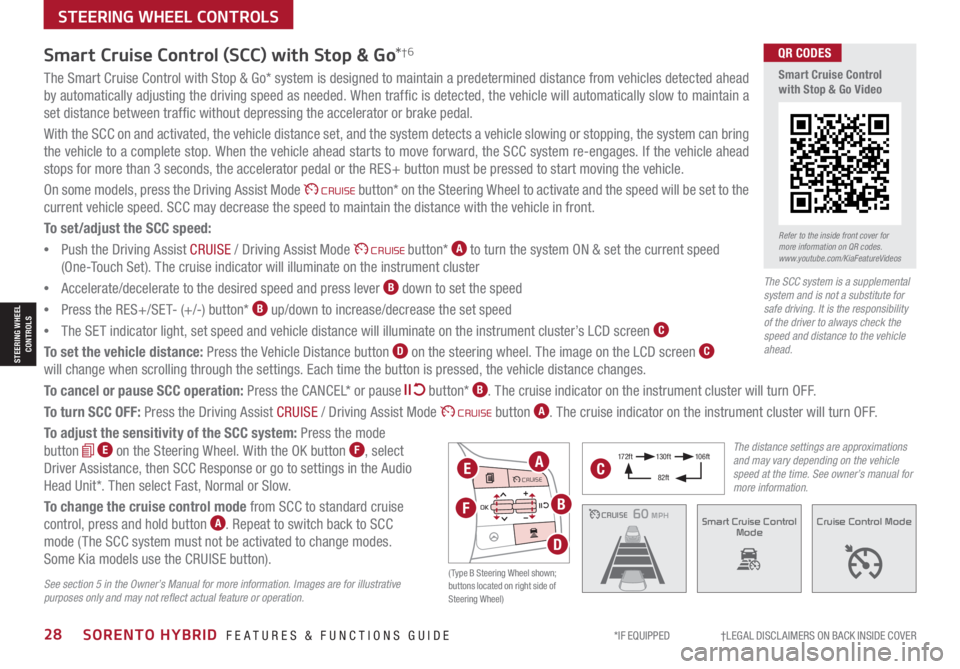
To set/adjust the SCC speed:
•Push the Driving Assist CRUISE / Driving Assist Mode CRUISE button* A to turn the system ON & set the current speed
(One-Touch Set). The cruise indicator will illuminate on the instrument cluster
•Accelerate/decelerate to the desired speed and press lever B down to set the speed
•Press the RES+/SET- (+/-) button* B up/down to increase/decrease the set speed
•The SET indicator light, set speed and vehicle distance will illuminate on the instrument cluster’s LCD screen C
To set the vehicle distance: Press the Vehicle Distance button D on the steering wheel. The image on the LCD screen C
will change when scrolling through the settings. Each time the button is pressed, the vehicle distance changes.
To cancel or pause SCC operation: Press the CANCEL* or pause button* B. The cruise indicator on the instrument cluster will turn OFF.
To turn SCC OFF: Press the Driving Assist CRUISE / Driving Assist Mode CRUISE button A. The cruise indicator on the instrument cluster will turn OFF.
To adjust the sensitivity of the SCC system: Press the mode
button E on the Steering Wheel. With the OK button F, select
Driver Assistance, then SCC Response or go to settings in the Audio
Head Unit*. Then select Fast, Normal or Slow.
To change the cruise control mode from SCC to standard cruise
control, press and hold button A. Repeat to switch back to SCC
mode ( The SCC system must not be activated to change modes.
Some Kia models use the CRUISE button).
Smart Cruise Control (SCC) with Stop & Go*†6
See section 5 in the Owner’s Manual for more information. Images are for illustrative purposes only and may not reflect actual feature or operation.
CRUISE100 MPHCRUISE100 MPH
CRUISE60 MPHCRUISE100 MPHSmart Cruise Control
ModeCruise Control Mode
The distance settings are approximations and may vary depending on the vehicle speed at the time. See owner’s manual for more information.
17 2 f t13 0 f t
82ft
10 6 f t
( Type B Steering Wheel shown; buttons located on right side of Steering Wheel)
MODE MODE
MODE
MODE MODE
OK
CRUISE
Smart Cruise Control
OK
Cruise Control
OK
CRUISE
Bluetooth Eco
OK
CRUISE
L FA
OK
CRUISE
User Settings
Trip Modes
Fuel Econ
OK
CRUISE
HDA
MODE
OK
CRUISE
Audio LV DA MSLA - ISLA
MODE
OK
MODE CRUISE
CRUISEEA
F
D
B
C
Refer to the inside front cover for more information on QR codes.www.youtube.com/KiaFeatureVideos
QR CODES
Smart Cruise Control with Stop & Go Video
STEERING WHEEL CONTROLS
The SCC system is a supplemental system and is not a substitute for safe driving. It is the responsibility of the driver to always check the speed and distance to the vehicle ahead.
STEERING WHEEL CONTROLS
Page 40 of 66
*IF EQUIPPED38SORENTO HYBRID FEATURES & FUNCTIONS GUIDE
CENTER PANEL
Multimedia USB Ports, Power Outlets, & USB Charger Ports* Digital Clock
Press SETUP, then select General, scroll
down and select Date/ Time from the menu
to adjust.
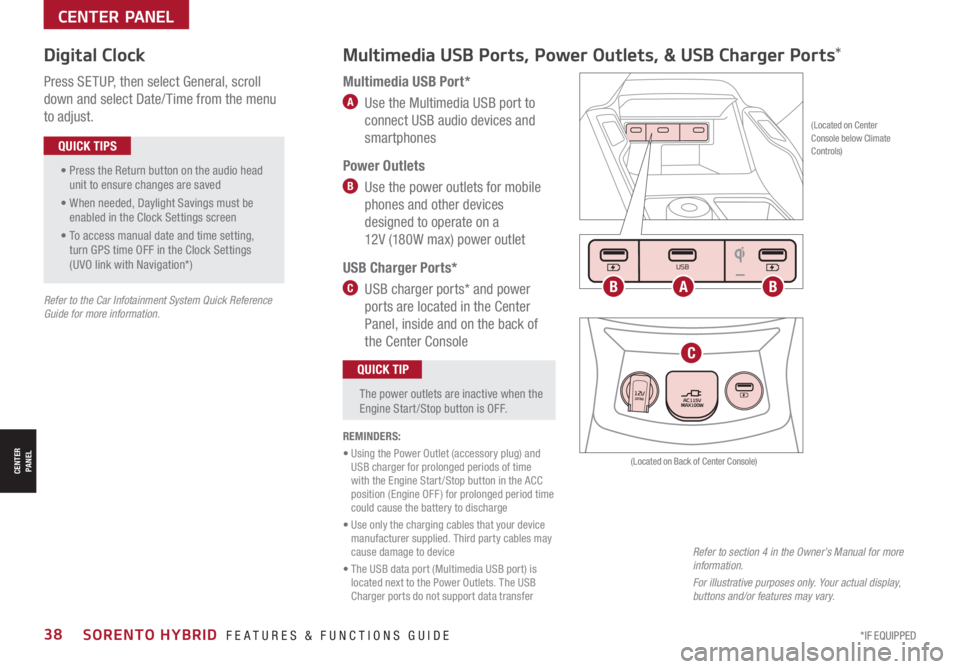
Multimedia USB Port*
A Use the Multimedia USB port to
connect USB audio devices and
smartphones
Power Outlets
B Use the power outlets for mobile
phones and other devices
designed to operate on a
12V (180W max) power outlet
USB Charger Ports*
C USB charger ports* and power
ports are located in the Center
Panel, inside and on the back of
the Center Console
(Located on Center Console below Climate Controls)
REMINDERS:
• Using the Power Outlet (accessory plug) and USB charger for prolonged periods of time with the Engine Start /Stop button in the ACC position (Engine OFF ) for prolonged period time could cause the battery to discharge
• Use only the charging cables that your device manufacturer supplied. Third party cables may cause damage to device
• The USB data port (Multimedia USB port) is located next to the Power Outlets. The USB Charger ports do not support data transfer
Refer to section 4 in the Owner’s Manual for more information.
For illustrative purposes only. Your actual display, buttons and/or features may vary.
(Located on Back of Center Console)
• Press the Return button on the audio head unit to ensure changes are saved
• When needed, Daylight Savings must be enabled in the Clock Settings screen
• To access manual date and time setting, turn GPS time OFF in the Clock Settings (UVO link with Navigation*)
QUICK TIPS
The power outlets are inactive when the Engine Start /Stop button is OFF.
QUICK TIP
Seat warmers / ventilation Wireless charge center console, back seat
USB / Multimedia
USB
180W12V
Seat warmers / ventilationWireless charge center console, back seat
USB / Multimedia
USB
180W12V
Seat warmers / ventilationWireless charge center console, back seat
USB / Multimedia
USB
180W12V
ABB
C
Refer to the Car Infotainment System Quick Reference Guide for more information.
CENTER PANEL
Page 41 of 66
ALWAYS CHECK THE OWNER’S MANUAL FOR COMPLETE OPER ATING INFORMATION AND SAFET Y WARNINGS. *IF EQUIPPED39
CENTER PANEL
CENTER PANEL
REMINDERS:
•
If the driver door is opened, charging will be disabled
•
Wireless charging technology allows for a device to be charged using inductive charging. See your Owner’s Manual for more detailed information and the back page for legal disclaimers
•
Inductive charging systems are less ef ficient than conventional charging through a cable. As a result, higher device operating temperatures may be experienced during use
•
Charging Performance – Device position on the wireless charging system can affect charging performance. Other factor that may affect the charging rate includes foreign objects, such as coins or pens, and phone case thickness
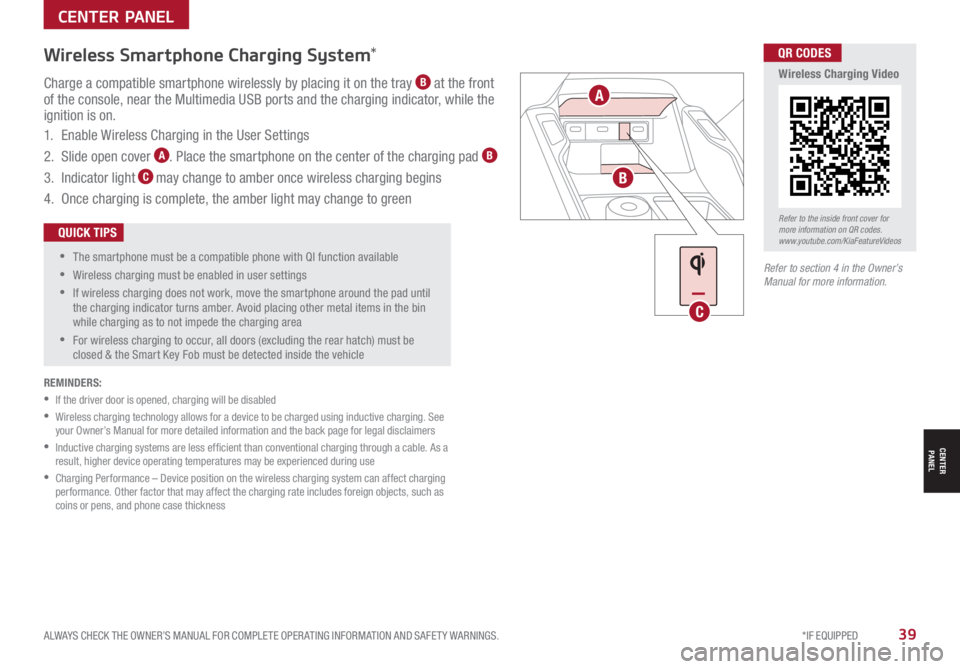
Charge a compatible smartphone wirelessly by placing it on the tray B at the front of the console, near the Multimedia USB ports and the charging indicator, while the ignition is on.
1. Enable Wireless Charging in the User Settings
2. Slide open cover A. Place the smartphone on the center of the charging pad B
3. Indicator light C may change to amber once wireless charging begins
4. Once charging is complete, the amber light may change to green
•
•
The smartphone must be a compatible phone with QI function available
•Wireless charging must be enabled in user settings
•
If wireless charging does not work, move the smartphone around the pad until the charging indicator turns amber. Avoid placing other metal items in the bin while charging as to not impede the charging area
•
For wireless charging to occur, all doors (excluding the rear hatch) must be closed & the Smart Key Fob must be detected inside the vehicle
QUICK TIPS
Wireless Smartphone Charging System*
Seat warmers / ventilation Wireless charge center console, back seat
USB / Multimedia
USB
180W12V
Seat warmers / ventilationWireless charge center console, back seat
USB / Multimedia
USB
180W12V
A
B
C
Refer to the inside front cover for more information on QR codes.www.youtube.com/KiaFeatureVideos
QR CODES
Wireless Charging Video
Refer to section 4 in the Owner’s Manual for more information.
Page 45 of 66
ALWAYS CHECK THE OWNER’S MANUAL FOR COMPLETE OPER ATING INFORMATION AND SAFET Y WARNINGS. *IF EQUIPPED †LEGAL DISCL AIMERS ON BACK INSIDE COVER43
Rotary Dial Shifter Knob – Shift-by-Wire
(Center Console)
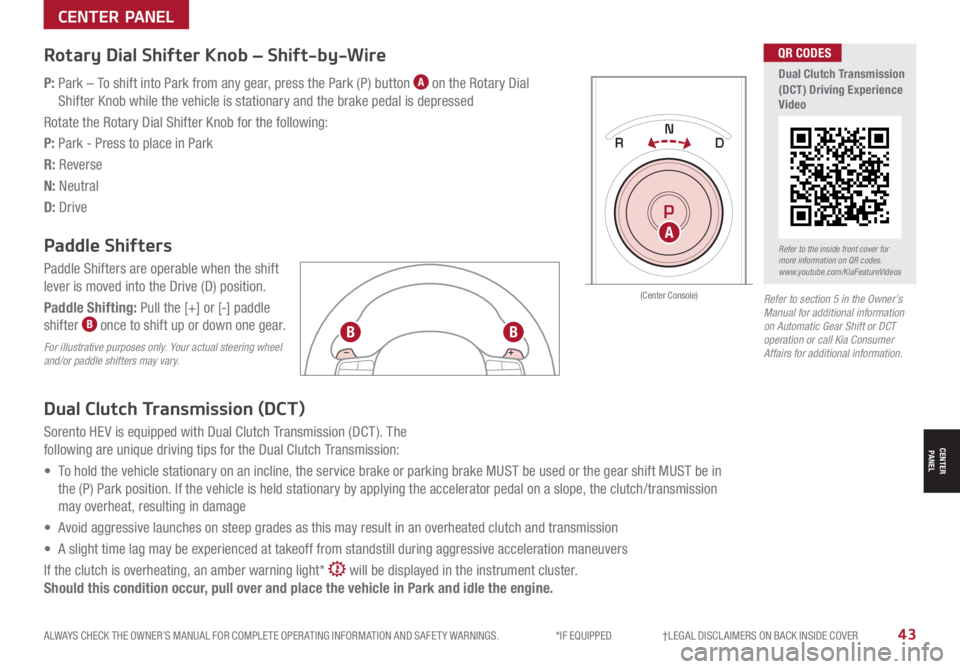
P: Park – To shift into Park from any gear, press the Park (P) button A on the Rotary Dial
Shifter Knob while the vehicle is stationary and the brake pedal is depressed
Rotate the Rotary Dial Shifter Knob for the following:
P: Park - Press to place in Park
R: Reverse
N: Neutral
D: Drive
Paddle Shifters
Paddle Shifters are operable when the shift
lever is moved into the Drive (D) position.
Paddle Shifting: Pull the [+] or [-] paddle
shifter B once to shift up or down one gear.
For illustrative purposes only. Your actual steering wheel and/or paddle shifters may vary.
Dual Clutch Transmission (DCT)
Sorento HEV is equipped with Dual Clutch Transmission (DCT ). The
following are unique driving tips for the Dual Clutch Transmission:
• To hold the vehicle stationary on an incline, the service brake or parking brake MUST be used or the gear shift MUST be in
the (P) Park position. If the vehicle is held stationary by applying the accelerator pedal on a slope, the clutch/transmission
may overheat, resulting in damage
• Avoid aggressive launches on steep grades as this may result in an overheated clutch and transmission
• A slight time lag may be experienced at takeoff from standstill during aggressive acceleration maneuvers
If the clutch is overheating, an amber warning light* will be displayed in the instrument cluster.
Should this condition occur, pull over and place the vehicle in Park and idle the engine.
Refer to section 5 in the Owner’s Manual for additional information on Automatic Gear Shift or DCT operation or call Kia Consumer Affairs for additional information.
DRIVE
SPORT
SMART
ECO
MUD
SAND SNOW
COMFORTTERRAIN
P
R
D
N
AUTO
HOLD
ARefer to the inside front cover for more information on QR codes.www.youtube.com/KiaFeatureVideos
QR CODES
Dual Clutch Transmission (DCT) Driving Experience Video
BB
CENTER PANEL
CENTER PANEL