seat KIA SORENTO PHEV 2022 Navigation System Quick Reference Guide
[x] Cancel search | Manufacturer: KIA, Model Year: 2022, Model line: SORENTO PHEV, Model: KIA SORENTO PHEV 2022Pages: 332, PDF Size: 11.11 MB
Page 19 of 332
7
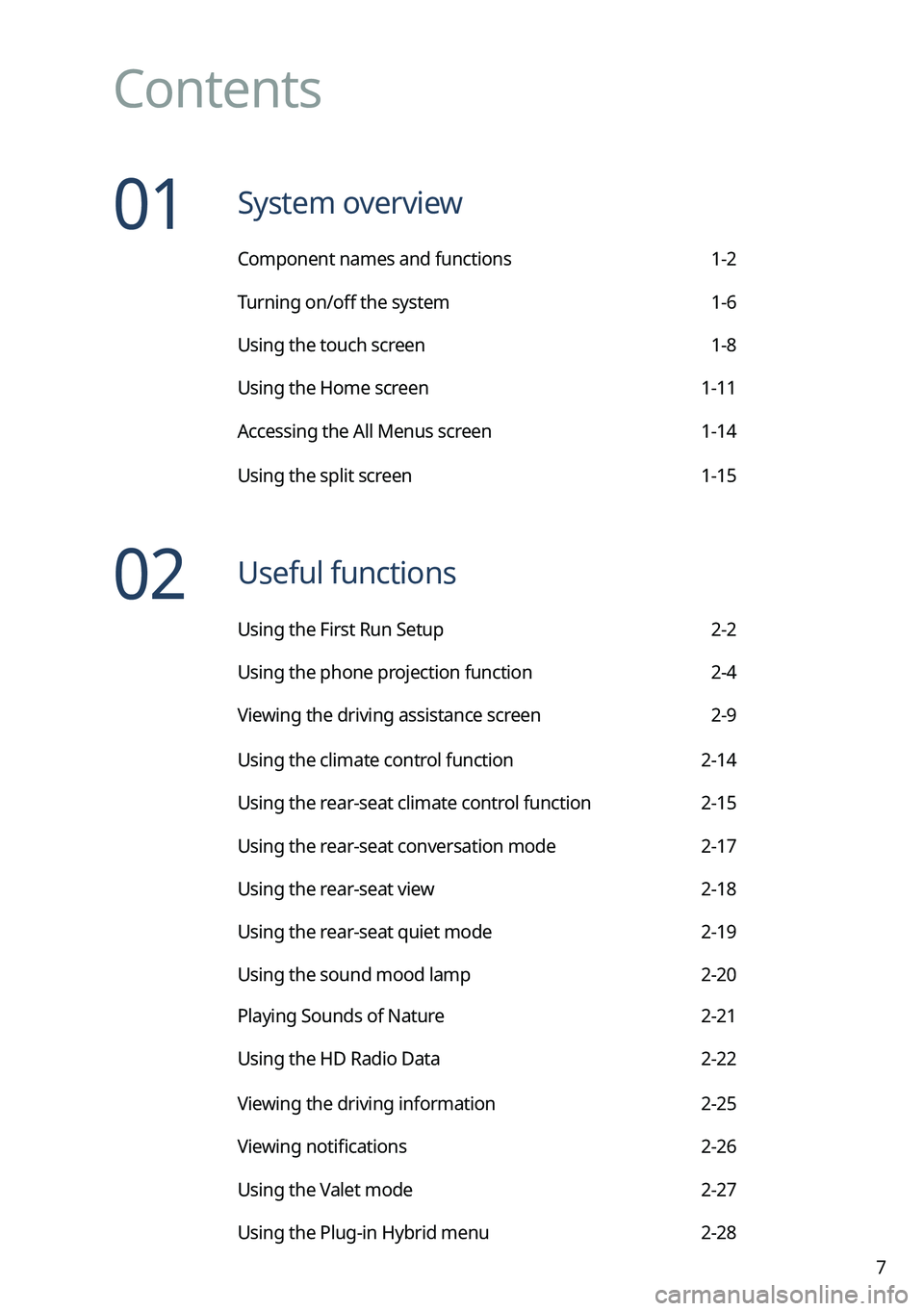
Contents
01 System overview
Component names and functions 1-2
Turning on/off the system 1-6
Using the touch screen 1-8
Using the Home screen 1-11
Accessing the All Menus screen 1-14
Using the split screen 1-15
02 Useful functions
Using the First Run Setup 2-2
Using the phone projection function 2-4
Viewing the driving assistance screen 2-9
Using the climate control function 2-14
Using the rear-seat climate control function 2-15
Using the rear-seat conversation mode 2-17
Using the rear-seat view 2-18
Using the rear-seat quiet mode 2-19
Using the sound mood lamp 2-20
Playing Sounds of Nature 2-21
Using the HD Radio Data 2-22
Viewing the driving information 2-25
Viewing notifications 2-26
Using the Valet mode 2-27
Using the Plug-in Hybrid menu 2-28
Page 39 of 332
Useful functions
Using the First Run Setup
Using the phone projection function
Viewing the driving assistance screen Using the climate control function
Using the rear-seat climate control function Using the rear-seat conversation mode Using the rear-seat view
Using the rear-seat quiet mode Using the sound mood lamp Playing Sounds of NatureUsing the HD Radio Data
Viewing the driving information Viewing notifications
Using the Valet mode
Using the Plug-in Hybrid menu
02
Page 52 of 332

2-14
Using the climate control function (if equipped)
You can check and adjust the climate system settings on the screen.0000
A
For more information about how to use the heater and air conditioner, refer to Owner's
Manual of the vehicle.
0000
A
When you manipulate the climate control system while using the product, the climate
settings appear on the upper part of the screen (if equipped).
0000
A
The screen may differ depending on the vehicle model and specifications.
1 Perform any of the following methods:
\225Press the [
CLIMATE] button on the climate control system.
\225On the All Menus screen, press Climate.
2 Select and then change the settings.
\037
\036
\035
\034
\033
\032\031
\030
\027
\026\025
\037\036\035\034\033\032\031
a a Returns to the previous step.
b b Shows the set temperature for the driver's seat.
c c Shows the set temperature for the passenger seat.
d d Shows the current airflow direction.
e e Shows the current fan speed.
f f Shows whether the automatic temperature control function is on or off.
g g Shows whether the A/C is on or off.
h h Shows whether the SYNC function, which syncs the driver's seat temperature with the
passenger seat temperature, is on or off.
i i Configure specific climate control function settings.
0000
A
Available settings may differ depending on the vehicle model and specifications.
j j Shows the outside temperature of the vehicle.
Page 53 of 332
2-15
k k The list of menu items appears.
\225Display Off
: Turns off the screen. To switch the screen back on, press the screen or
briefly press the power button.
\225 User's Manual on Web (QR Code): Displays the QR code that provides access to
the online user manual for the system.
0000
A
The temperature of the climate system can be adjusted by 1 ℉ increments. When the
temperature is set to the lower limit or upper limit, "LOW" or "HIGH" appears on the
screen.
0000
A
Available settings may differ depending on the vehicle model and specifications.
Using the rear-seat climate control function
(if equipped)
You can check or set the rear-seat climate status on the system screen.
1 Perform any of the following methods:
\225Press the [
REAR] button on the climate control system.
\225On the All Menus screen, press Rear Climate.
Page 55 of 332
2-17
Using the rear-seat conversation mode
(if equipped)
When the driver's voice cannot be delivered well to the rear seat, you can use the microphone
of the driver's seat for smooth communication.
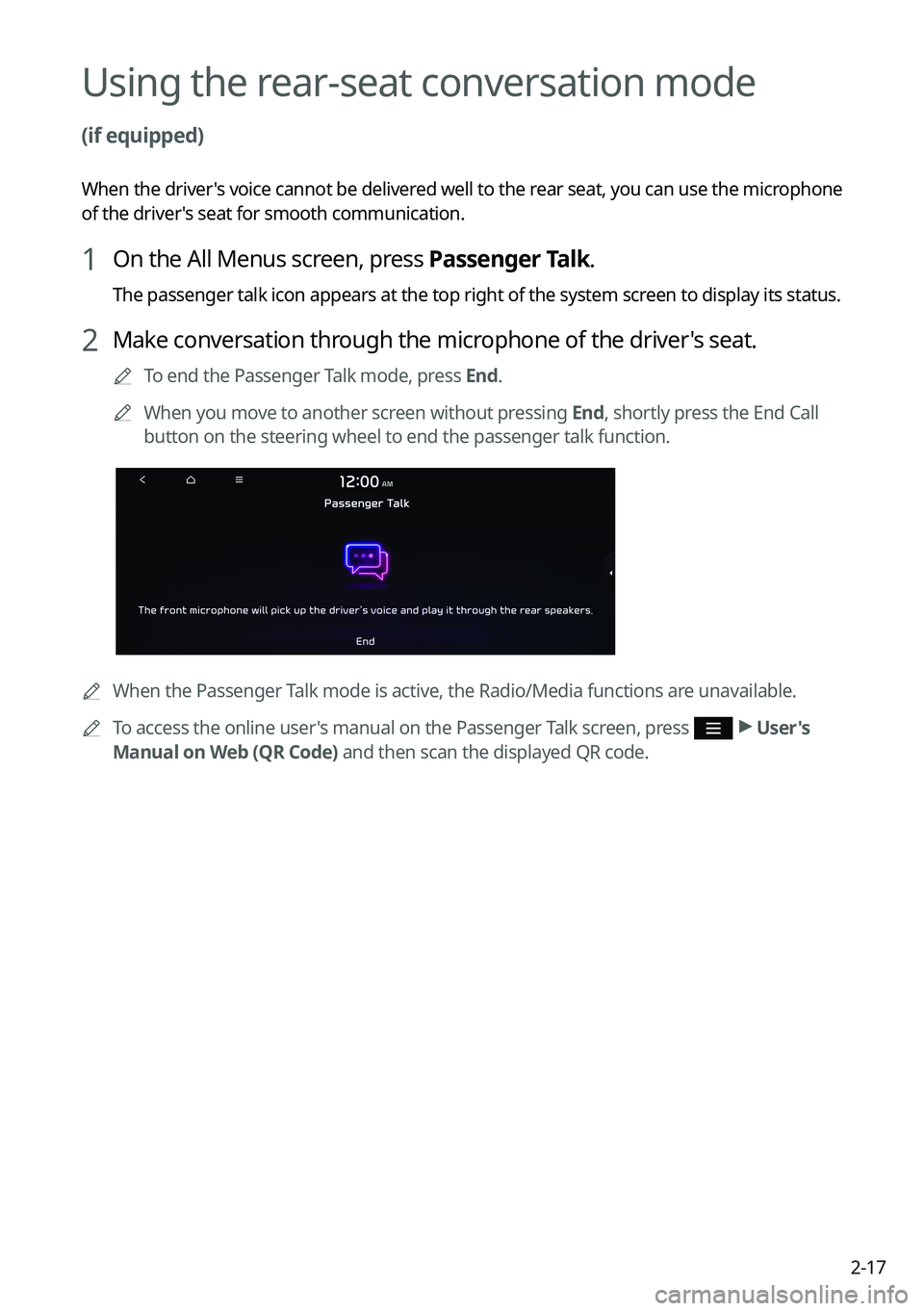
1 On the All Menus screen, press Passenger Talk.
The passenger talk icon appears at the top right of the system screen to display its status.
2 Make conversation through the microphone of the driver's seat.
0000
A
To end the Passenger Talk mode, press End.
0000
A
When you move to another screen without pressing End, shortly press the End Call
button on the steering wheel to end the passenger talk function.
0000
A
When the Passenger Talk mode is active, the Radio/Media functions are unavailable.
0000
A
To access the online user's manual on the Passenger Talk screen, press
>
User's
Manual on Web (QR Code) and then scan the displayed QR code.
Page 56 of 332
2-18
Using the rear-seat view (if equipped)
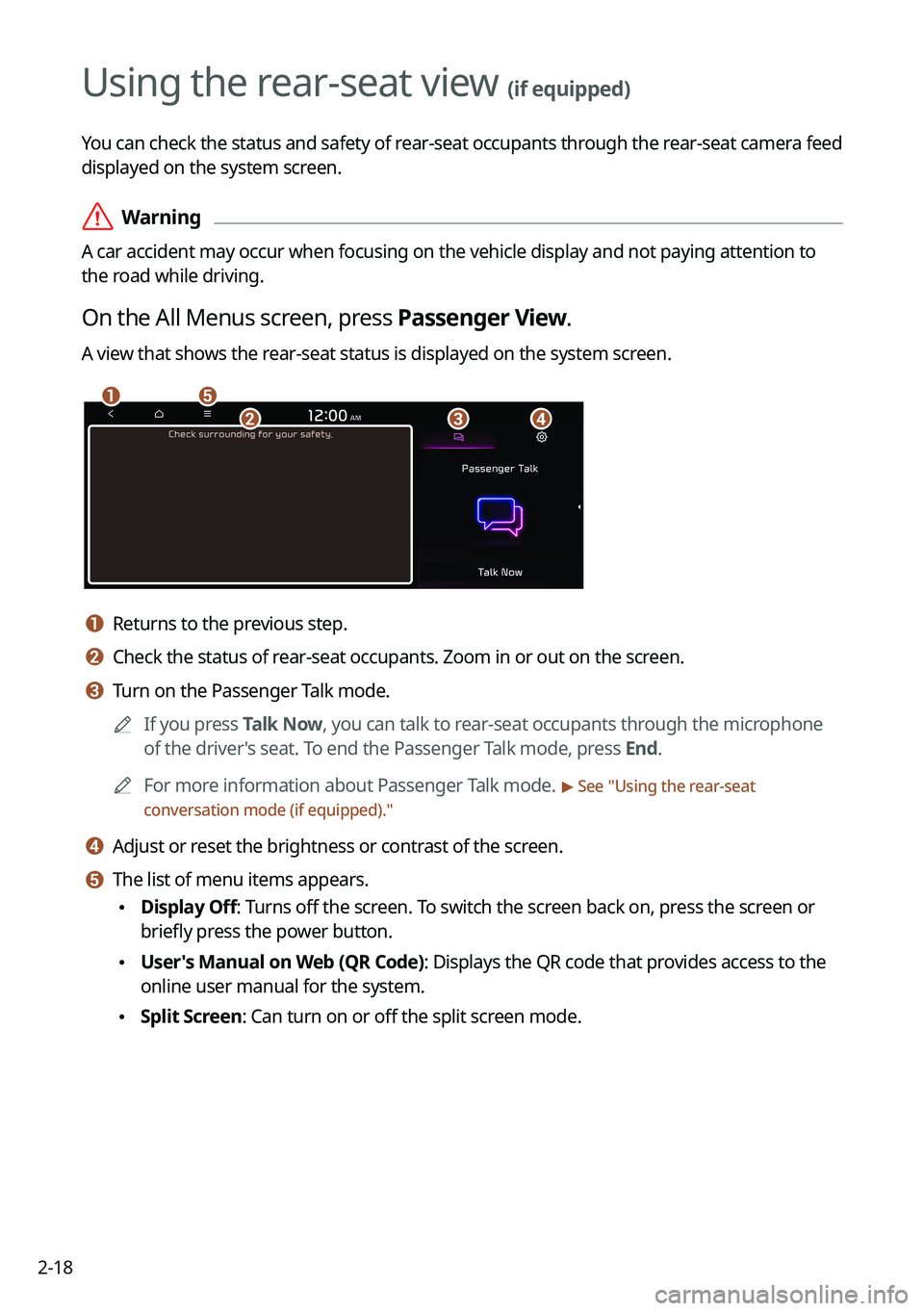
You can check the status and safety of rear-seat occupants through the rear-seat camera feed
displayed on the system screen.
\335Warning
A car accident may occur when focusing on the vehicle display and not pa\
ying attention to
the road while driving.
On the All Menus screen, press Passenger View.
A view that shows the rear-seat status is displayed on the system screen.
\037\036
\035\034\033
a a Returns to the previous step.
b b Check the status of rear-seat occupants. Zoom in or out on the screen.
c c Turn on the Passenger Talk mode.0000
A
If you press Talk Now, you can talk to rear-seat occupants through the microphone
of the driver's seat. To end the Passenger Talk mode, press End.
0000
A
For more information about Passenger Talk mode.
> See "Using the rear-seat
conversation mode (if equipped)."
d d Adjust or reset the brightness or contrast of the screen.
e e The list of menu items appears.
\225 Display Off: Turns off the screen. To switch the screen back on, press the screen or
briefly press the power button.
\225User's Manual on Web (QR Code): Displays the QR code that provides access to the
online user manual for the system.
\225Split Screen: Can turn on or off the split screen mode.
Page 57 of 332
2-19
Using the rear-seat quiet mode (if equipped)
To allow occupants in the rear seat to have rest and sleep, you can set to adjust the system
volume.
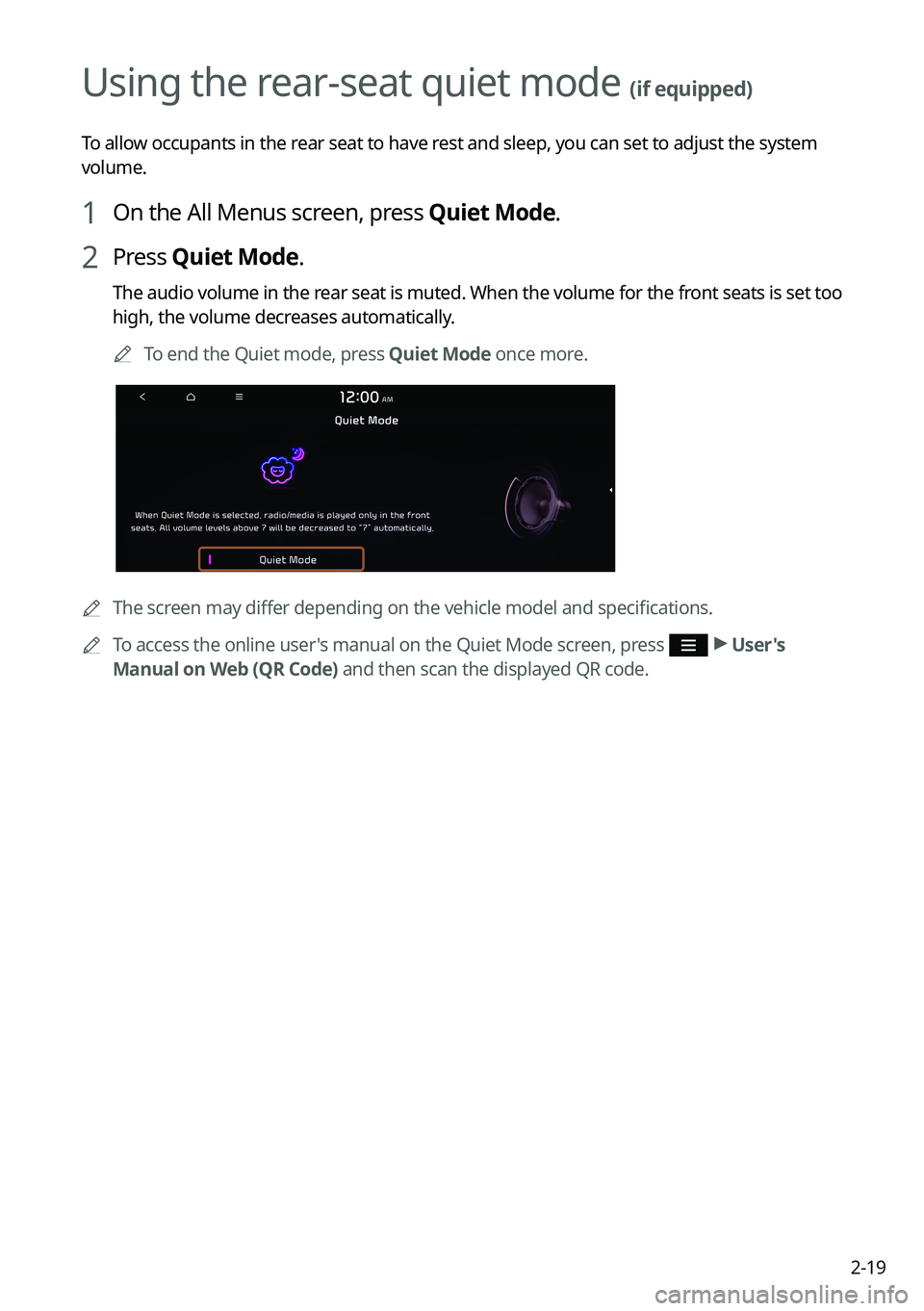
1 On the All Menus screen, press Quiet Mode.
2 Press Quiet Mode.
The audio volume in the rear seat is muted. When the volume for the front seats is set too
high, the volume decreases automatically.
0000
A
To end the Quiet mode, press Quiet Mode once more.
0000AThe screen may differ depending on the vehicle model and specifications.
0000
A
To access the online user's manual on the Quiet Mode screen, press
>
User's
Manual on Web (QR Code) and then scan the displayed QR code.
Page 171 of 332
7-7
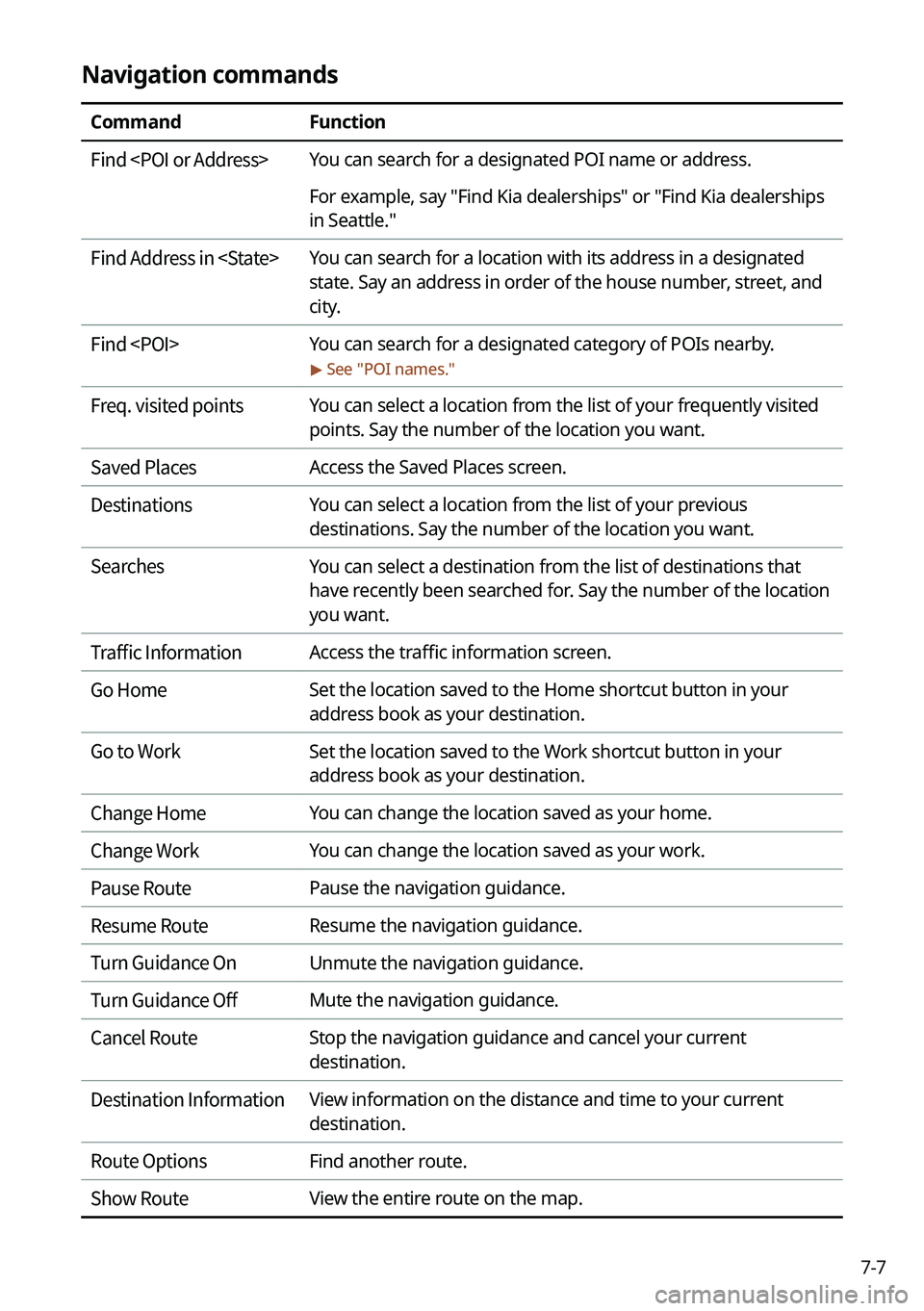
Navigation commands
CommandFunction
Find
For example, say "Find Kia dealerships" or "Find Kia dealerships
in Seattle."
Find Address in
state. Say an address in order of the house number, street, and
city.
Find
> See "
POI names."
Freq. visited points You can select a location from the list of your frequently visited
points. Say the number of the location you want.
Saved Places Access the Saved Places screen.
Destinations You can select a location from the list of your previous
destinations. Say the number of the location you want.
Searches You can select a destination from the list of destinations that
have recently been searched for. Say the number of the location
you want.
Traffic Information Access the traffic information screen.
Go Home Set the location saved to the Home shortcut button in your
address book as your destination.
Go to Work Set the location saved to the Work shortcut button in your
address book as your destination.
Change Home You can change the location saved as your home.
Change Work You can change the location saved as your work.
Pause Route Pause the navigation guidance.
Resume Route Resume the navigation guidance.
Turn Guidance On Unmute the navigation guidance.
Turn Guidance Off Mute the navigation guidance.
Cancel Route Stop the navigation guidance and cancel your current
destination.
Destination Information View information on the distance and time to your current
destination.
Route Options Find another route.
Show Route View the entire route on the map.
Page 173 of 332

7-9
CommandFunction
Open/Close the rear
windows Open or close all rear-seat windows.
Open/Close the sunroof Open or close the sunroof.
Open/Close the
trunk (liftgate) Open or close the trunk (liftgate).
Turn On/Off the heated
steering wheel Turn on or off the steering wheel heater.
Turn On/Off all seat
warmers Turn on or off the heaters for all seats.
Turn On/Off seat warmer Turn on or off the driver's seat heater.
Seat warmer
level 1 to 3 Set the driver's seat heater level in the range of 1 to 3.
Turn On/Off the
passenger seat warmer Turn on or off the passenger seat heater.
Passenger's Seat
Warmer Level 1 to 3 Set the passenger seat heater level in the range of 1 to 3.
Turn On/Off the rear seat
warmer Turn on or off the rear-seat heaters.
Turn On/Off all air
ventilation seats Turn on or off the ventilation for all seats.
Turn On/Off air
ventilation seats Turn on or off the driver's seat ventilation.
Air ventilation seat level
1 to 3 Set the driver's seat ventilation level in the range of 1 to 3.
Turn On/Off the
passenger air ventilation
seats Turn on or off the passenger seat ventilation.
Passenger's Air
Ventilation Seat Level
1 to 3 Set the passenger seat ventilation level in the rage of 1 to 3.
Turn On/Off the rear air
ventilation seat Turn on or off the rear-seat ventilation.
Page 174 of 332

7-100000
A
Vehicle control commands are recognizable in English only.
0000
A
Some commands may not be supported, depending on the vehicle model and f\
unctions.
Rear-seat function commands (if equipped)
Command Function
Passenger Talk Turn on the Passenger Talk.
Quiet Mode
Turn off Quiet Mode Turn on or off the Quiet Mode.
0000
A
Some commands may not be supported, depending on the vehicle model and f\
unctions.
Search commands
Command Function
Search settings for
For example, say "Search settings for Bluetooth" or "Search
settings for Display."
> See "Configuring system settings."
Other commands
Command
Function
Help Move to the help screen.
Line <1 to 4>* Select an item with the designated number on a list. Simple
numbers, such as "One" or "Two," can be recognized.
Yes * Accept a notification asking for your confirmation in an
exceptional situation.
No * Deny a notification asking for your confirmation in an
exceptional situation.
Next * If there are more than five items on a list, scroll to the next page.
Previous * If you scroll to the next page of a list, scroll back to the previous
page.
Manual Input* When using the Dial Number command, open the keypad to
enter a phone number manually.
Go Back * Returns to the previous step.
Exit End voice recognition.
* These commands are available only in certain situations.