Tire KIA SOUL 2009 Owners Manual
[x] Cancel search | Manufacturer: KIA, Model Year: 2009, Model line: SOUL, Model: KIA SOUL 2009Pages: 328, PDF Size: 29.57 MB
Page 5 of 328
Introduction
2
1
A010000AUN
We want to help you get the greatest
possible driving pleasure from your vehi-
cle. Your Owner’s Manual can assist you
in many ways. We strongly recommend
that you read the entire manual. In order
to minimize the chance of death or injury,
you must read the WARNING and CAU-
TION sections in the manual.
Illustrations complement the words in this
manual to best explain how to enjoy your
vehicle. By reading your manual, you
learn about features, important safety
information, and driving tips under vari-
ous road conditions. The general layout of the manual is pro-
vided in the Table of Contents. A good
place to start is the index; it has an alpha-
betical listing of all information in your
manual.
Sections: This manual has eight sections
plus an index. Each section begins with a
brief list of contents so you can tell at a
glance if that section has the information
you want.
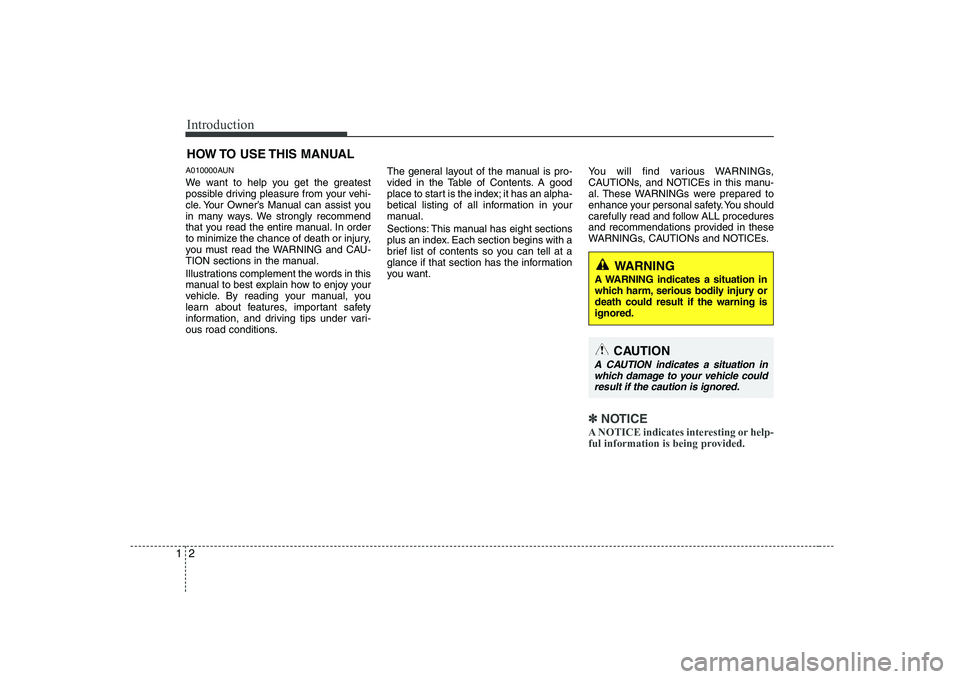
You will find various WARNINGs,
CAUTIONs, and NOTICEs in this manu-
al. These WARNINGs were prepared to
enhance your personal safety. You should
carefully read and follow ALL procedures
and recommendations provided in these
WARNINGs, CAUTIONs and NOTICEs.
✽✽
NOTICE
A NOTICE indicates interesting or help-
ful information is being provided.
HOW TO USE THIS MANUAL
WARNING
A WARNING indicates a situation in
which harm, serious bodily injury ordeath could result if the warning isignored.
CAUTION
A CAUTION indicates a situation in which damage to your vehicle couldresult if the caution is ignored.
Page 9 of 328
Introduction
6
1
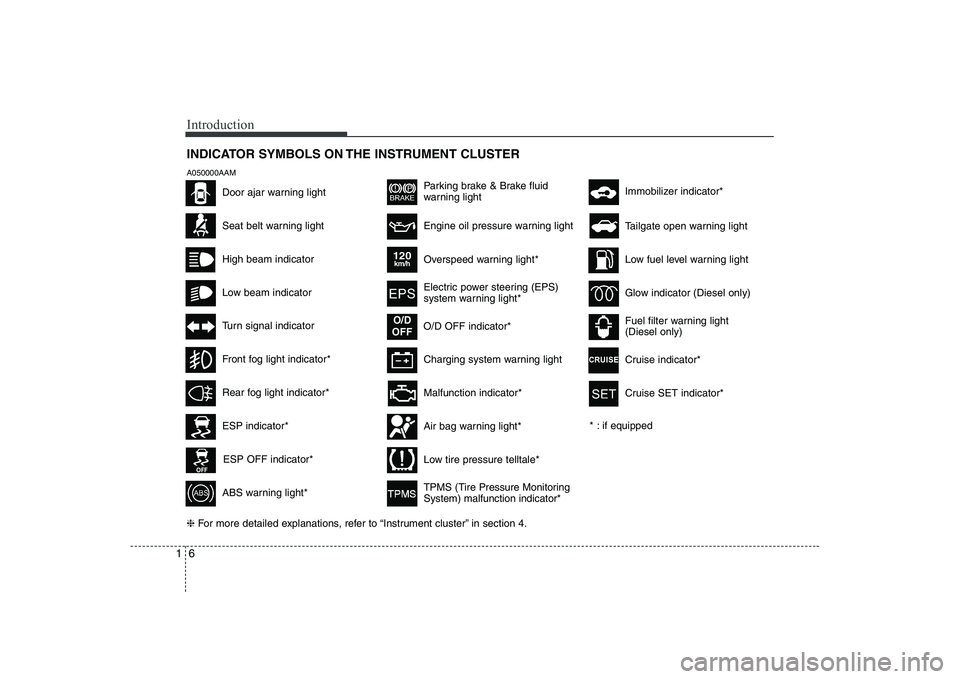
INDICATOR SYMBOLS ON THE INSTRUMENT CLUSTER
Seat belt warning light
High beam indicator
Low beam indicator
Turn signal indicator
ABS warning light*
Parking brake & Brake fluid
warning light
Malfunction indicator*
Immobilizer indicator*
Low fuel level warning light
Glow indicator (Diesel only)
Fuel filter warning light (Diesel only)
* : if equipped Tailgate open warning light
❈ For more detailed explanations, refer to “Instrument cluster” in section 4.
Charging system warning light
Door ajar warning light
A050000AAM
ESP indicator*
ESP OFF indicator*
Front fog light indicator*
Engine oil pressure warning light
Overspeed warning light*
120km/h
Electric power steering (EPS)
system warning light*
O/D OFF indicator*
O/D
OFF
Air bag warning light*
TPMS (Tire Pressure Monitoring System) malfunction indicator*
Low tire pressure telltale*
Rear fog light indicator*
Cruise indicator*
Cruise SET indicator*
Page 27 of 328
Safety features of your vehicle
14
3
C020101AAM
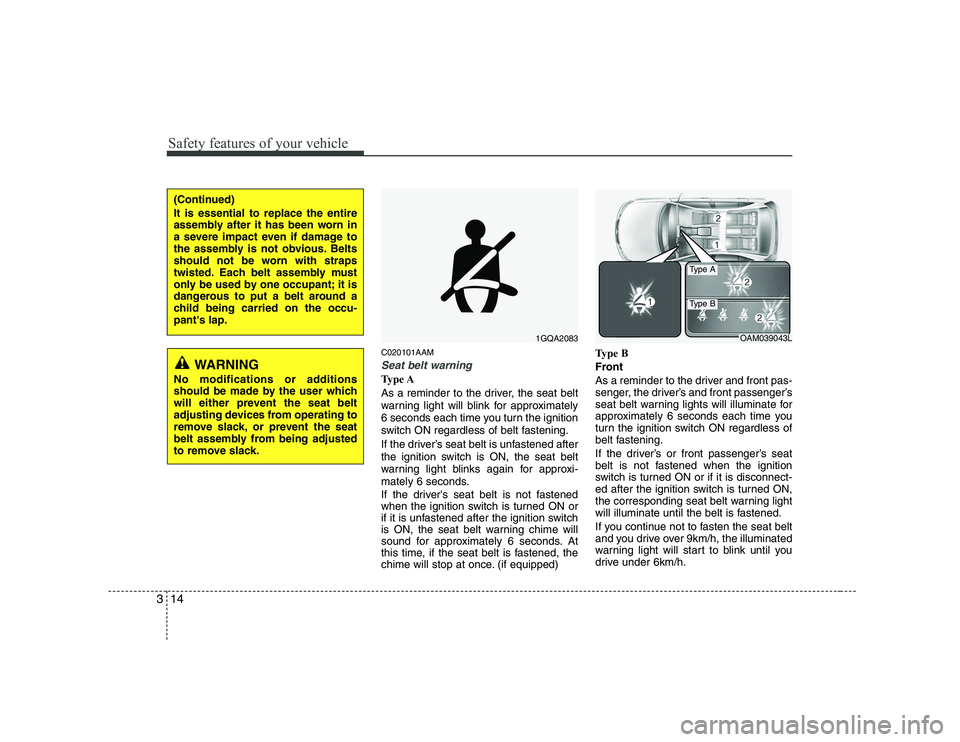
Seat belt warning
Type A
As a reminder to the driver, the seat belt
warning light will blink for approximately
6 seconds each time you turn the ignition
switch ON regardless of belt fastening.
If the driver’s seat belt is unfastened after
the ignition switch is ON, the seat belt
warning light blinks again for approxi-
mately 6 seconds.
If the driver's seat belt is not fastened
when the ignition switch is turned ON or
if it is unfastened after the ignition switch
is ON, the seat belt warning chime will
sound for approximately 6 seconds. At
this time, if the seat belt is fastened, the
chime will stop at once. (if equipped) Type B
Front
As a reminder to the driver and front pas-
senger, the driver’s and front passenger’s
seat belt warning lights will illuminate for
approximately 6 seconds each time you
turn the ignition switch ON regardless of
belt fastening.
If the driver’s or front passenger’s seat
belt is not fastened when the ignition
switch is turned ON or if it is disconnect-
ed after the ignition switch is turned ON,
the corresponding seat belt warning light
will illuminate until the belt is fastened.
If you continue not to fasten the seat belt
and you drive over 9km/h, the illuminated
warning light will start to blink until you
drive under 6km/h.
1GQA2083OAM039043L
Type A
Type B
WARNING
No modifications or additions
should be made by the user which
will either prevent the seat belt
adjusting devices from operating to
remove slack, or prevent the seat
belt assembly from being adjusted
to remove slack.
(Continued) It is essential to replace the entire
assembly after it has been worn in
a severe impact even if damage to
the assembly is not obvious. Belts
should not be worn with straps
twisted. Each belt assembly must
only be used by one occupant; it is
dangerous to put a belt around a
child being carried on the occu-pant's lap.
Page 38 of 328
325
Safety features of your vehicle
C020305AUN-C1
Do not lie down
To reduce the chance of injuries in the
event of an accident and to achieve max-
imum effectiveness of the restraint sys-tem, all passengers should be sitting upand the front and rear seats should be in
an upright position when the car is mov-
ing. A seat belt cannot provide proper
protection if the person is lying down inthe rear seat or if the front and rear seatsare in a reclined position.C020400AUN-EN Care of seat belts
Seat belt systems should never be disas-
sembled or modified. In addition, care
should be taken to assure that seat belts
and belt hardware are not damaged by
seat hinges, doors or other abuse.
C020401AEN
Periodic inspection
All seat belts should be inspected peri-
odically for wear or damage of any kind.
Any damaged parts should be replaced
as soon as possible.
C020402AUN
Keep belts clean and dry
Seat belts should be kept clean and dry.
If belts become dirty, they can be
cleaned by using a mild soap solution
and warm water. Bleach, dye, strong
detergents or abrasives should not be
used because they may damage and
weaken the fabric. C020403ASA
When to replace seat belts
The entire in-use seat belt assembly or
assemblies should be replaced if the
vehicle has been involved in an accident.
This should be done even if no damage
is visible. Additional questions concern-
ing seat belt operation should be directed
by an authorized KIA dealer.
WARNING
When you return the rear seatback to its upright position after the rear
seatback has been folded down, be
careful not to damage the seat belt
webbing or buckle. Be sure that the
webbing or buckle does not get
caught or pinched in the rear seat.
A seat belt with damaged webbing
or buckle could possibly fail during
a collision or sudden stop, result-
ing in serious injury. If the webbing
or buckles are damaged, get them
replaced immediately.
WARNING
Riding with a reclined seatback
increases your chance of serious or
fatal injuries in the event of a colli-
sion or sudden stop. The protection
of your restraint system (seat belts
and air bags) is greatly reduced by
reclining your seat. Seat belts must
be snug against your hips and
chest to work properly. The more
the seatback is reclined, the greater
the chance that an occupant's hipswill slide under the lap belt causingserious internal injuries or the
occupant's neck could strike the
shoulder belt. Drivers and passen-
gers should always sit well back in
their seats, properly belted, andwith the seat backs upright.
Page 115 of 328
443
Features of your vehicle
D150331AAM
Low tire pressure telltale
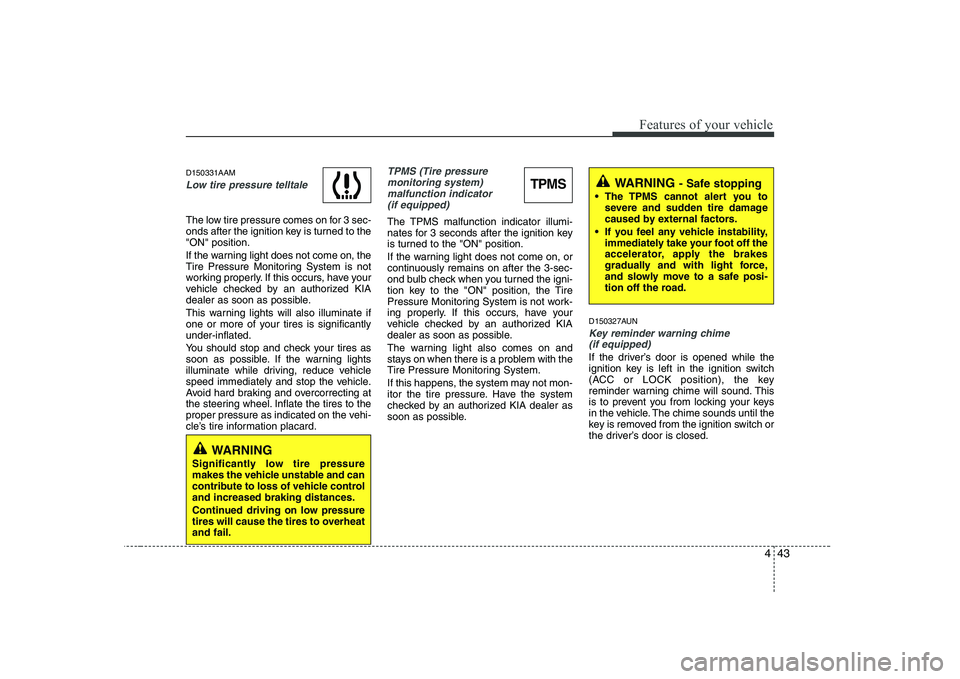
The low tire pressure comes on for 3 sec-
onds after the ignition key is turned to the"ON" position.
If the warning light does not come on, the
Tire Pressure Monitoring System is not
working properly. If this occurs, have your
vehicle checked by an authorized KIA
dealer as soon as possible.
This warning lights will also illuminate if
one or more of your tires is significantlyunder-inflated.
You should stop and check your tires as
soon as possible. If the warning lights
illuminate while driving, reduce vehicle
speed immediately and stop the vehicle.
Avoid hard braking and overcorrecting at
the steering wheel. Inflate the tires to the
proper pressure as indicated on the vehi-
cle’s tire information placard.
TPMS (Tire pressure monitoring system) malfunction indicator
(if equipped)
The TPMS malfunction indicator illumi-
nates for 3 seconds after the ignition key
is turned to the "ON" position.
If the warning light does not come on, or
continuously remains on after the 3-sec-
ond bulb check when you turned the igni-
tion key to the "ON" position, the Tire
Pressure Monitoring System is not work-
ing properly. If this occurs, have your
vehicle checked by an authorized KIA
dealer as soon as possible.
The warning light also comes on and
stays on when there is a problem with the
Tire Pressure Monitoring System.
If this happens, the system may not mon-
itor the tire pressure. Have the system
checked by an authorized KIA dealer as
soon as possible. D150327AUN
Key reminder warning chime
(if equipped)
If the driver’s door is opened while the
ignition key is left in the ignition switch
(ACC or LOCK position), the key
reminder warning chime will sound. This
is to prevent you from locking your keys
in the vehicle. The chime sounds until the
key is removed from the ignition switch or
the driver’s door is closed.
TPMS
WARNING
Significantly low tire pressure
makes the vehicle unstable and can
contribute to loss of vehicle controland increased braking distances.
Continued driving on low pressure
tires will cause the tires to overheatand fail.
WARNING - Safe stopping
The TPMS cannot alert you to severe and sudden tire damage
caused by external factors.
If you feel any vehicle instability, immediately take your foot off the
accelerator, apply the brakes
gradually and with light force,
and slowly move to a safe posi-
tion off the road.
Page 162 of 328
Features of your vehicle
90
4
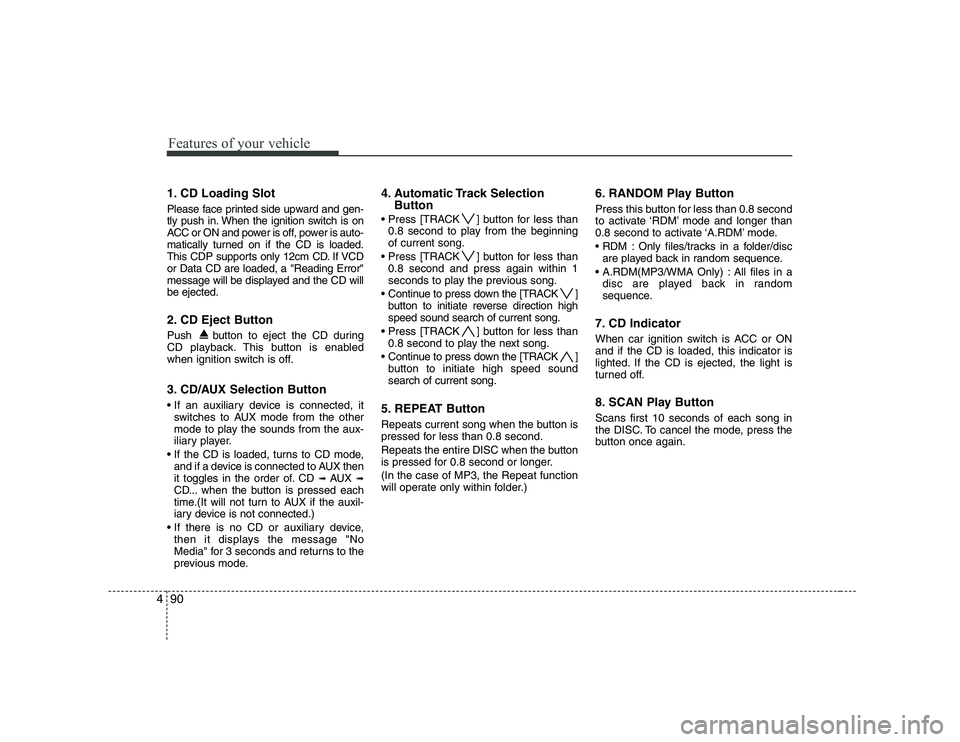
1. CD Loading Slot
Please face printed side upward and gen-
tly push in. When the ignition switch is on
ACC or ON and power is off, power is auto-
matically turned on if the CD is loaded.
This CDP supports only 12cm CD. If VCDor Data CD are loaded, a "Reading Error"
message will be displayed and the CD willbe ejected.
2. CD Eject Button
Push button to eject the CD during
CD playback. This button is enabled
when ignition switch is off.
3. CD/AUX Selection Button
switches to AUX mode from the other
mode to play the sounds from the aux-
iliary player.
If the CD is loaded, turns to CD mode, and if a device is connected to AUX then
it toggles in the order of. CD ➟
AUX ➟
CD... when the button is pressed each
time.(It will not turn to AUX if the auxil-
iary device is not connected.)
then it displays the message "No
Media" for 3 seconds and returns to the
previous mode. 4. Automatic Track Selection
Button
] button for less than 0.8 second to play from the beginningof current song.
] button for less than 0.8 second and press again within 1
seconds to play the previous song.
] button to initiate reverse direction highspeed sound search of current song.
] button for less than 0.8 second to play the next song.
] button to initiate high speed soundsearch of current song.
5. REPEAT Button
Repeats current song when the button is
pressed for less than 0.8 second.
Repeats the entire DISC when the button
is pressed for 0.8 second or longer. (In the case of MP3, the Repeat function
will operate only within folder.) 6. RANDOM Play Button
Press this button for less than 0.8 second
to activate ‘RDM’ mode and longer than
0.8 second to activate ‘A.RDM’ mode.
Only files/tracks in a folder/disc
are played back in random sequence.
All files in a disc are played back in random
sequence.
7. CD Indicator
When car ignition switch is ACC or ON and if the CD is loaded, this indicator is
lighted. If the CD is ejected, the light is
turned off.
8. SCAN Play Button Scans first 10 seconds of each song in
the DISC. To cancel the mode, press the
button once again.
Page 169 of 328
497
Features of your vehicle
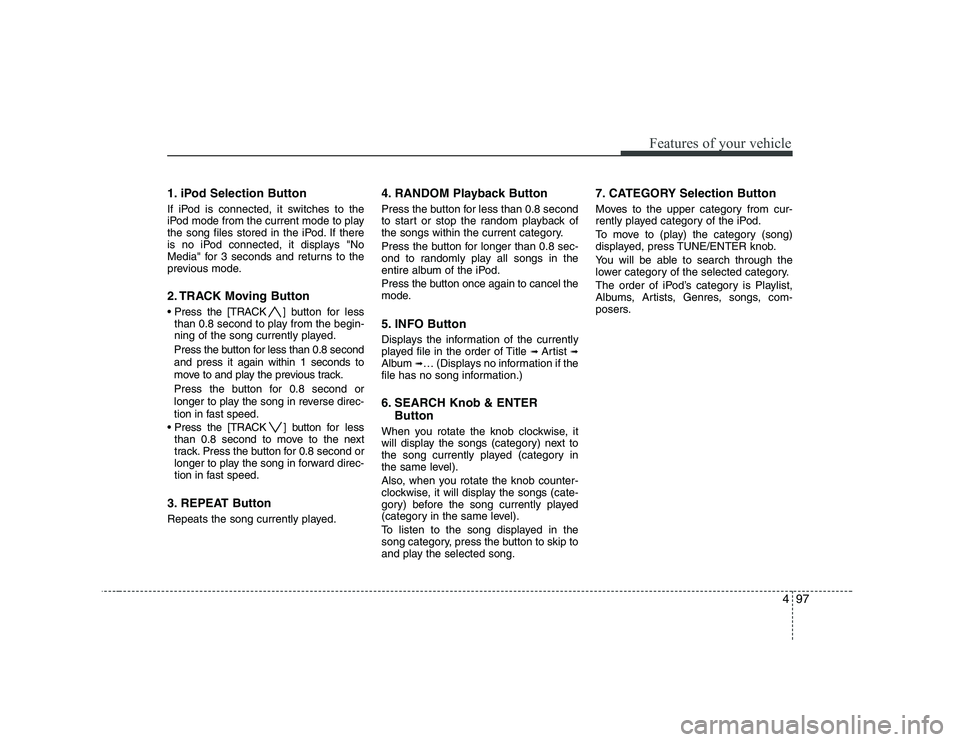
1. iPod Selection Button
If iPod is connected, it switches to the
iPod mode from the current mode to play
the song files stored in the iPod. If there
is no iPod connected, it displays "No
Media" for 3 seconds and returns to the
previous mode.
2. TRACK Moving Button
] button for less
than 0.8 second to play from the begin-
ning of the song currently played.
Press the button for less than 0.8 second and press it again within 1 seconds to
move to and play the previous track.
Press the button for 0.8 second or
longer to play the song in reverse direc-
tion in fast speed.
] button for less
than 0.8 second to move to the next
track. Press the button for 0.8 second or
longer to play the song in forward direc-
tion in fast speed.
3. REPEAT Button
Repeats the song currently played. 4. RANDOM Playback Button
Press the button for less than 0.8 second
to start or stop the random playback of
the songs within the current category.
Press the button for longer than 0.8 sec-
ond to randomly play all songs in the
entire album of the iPod.
Press the button once again to cancel the
mode.
5. INFO Button
Displays the information of the currently
played file in the order of Title
➟ Artist ➟
Album ➟… (Displays no information if the
file has no song information.)
6. SEARCH Knob & ENTER
Button
When you rotate the knob clockwise, it
will display the songs (category) next to
the song currently played (category in
the same level).
Also, when you rotate the knob counter-
clockwise, it will display the songs (cate-
gory) before the song currently played
(category in the same level).
To listen to the song displayed in the
song category, press the button to skip to
and play the selected song. 7. CATEGORY Selection Button
Moves to the upper category from cur-
rently played category of the iPod.
To move to (play) the category (song)
displayed, press TUNE/ENTER knob.
You will be able to search through the
lower category of the selected category.
The order of iPod’s category is Playlist,
Albums, Artists, Genres, songs, com-
posers.
Page 173 of 328
53
Driving your vehicle
E020100AUN
Before entering vehicle
• Be sure that all windows, outside mir-ror(s), and outside lights are clean.
Check the condition of the tires.
Check under the vehicle for any sign of leaks.
Be sure there are no obstacles behind you if you intend to back up.
E020200AUN
Necessary inspections
Fluid levels, such as engine oil, engine
coolant, brake fluid, and washer fluid
should be checked on a regular basis,
with the exact interval depending on the
fluid. Further details are provided in sec-
tion 7, “Maintenance”.
E020300BUN
Before starting
Close and lock all doors.
Position the seat so that all controls are easily reached.
Adjust the inside and outside rearview mirrors. Be sure that all lights work.
Check all gauges.
Check the operation of warning lights
when the ignition switch is turned to the ON position.
Release the parking brake and make sure the brake warning light goes out.
For safe operation, be sure you are famil-
iar with your vehicle and its equipment.
BEFORE DRIVING
WARNING
All passengers must be properly
belted whenever the vehicle is mov-
ing. Refer to “Seat belts” in section
3 for more information on their
proper use.
WARNING
Always check the surrounding
areas near your vehicle for people,
especially children, before putting a
car into D (Drive) or R (Reverse).
WARNING - Driving under
the influence of alcohol or drugs
Drinking and driving is dangerous.
Drunk driving is the number one
contributor to the highway death
toll each year. Even a small amount
of alcohol will affect your reflexes,
perceptions and judgment. Drivingwhile under the influence of drugs
is as dangerous or more dangerousthan driving drunk.
You are much more likely to have a
serious accident if you drink or
take drugs and drive.
If you are drinking or taking drugs,
don’t drive. Do not ride with a driv-er who has been drinking or taking
drugs. Choose a designated driveror call a cab.
WARNING
When you intend to park or stop the
vehicle with the engine on, be care-ful not to depress the accelerator
pedal for a long period of time. It
may overheat the engine or exhaust
system and cause fire.
Page 187 of 328
517
Driving your vehicle
E070102AUN-C1
Disc brakes wear indicator
Your vehicle has disc brakes.
When your brake pads are worn and new
pads are required, you will hear a high-
pitched warning sound from your front
brakes or rear brakes (if equipped). You
may hear this sound come and go or it
may occur whenever you depress the
brake pedal.
Please remember that some driving con-
ditions or climates may cause a brake
squeal when you first apply (or lightly
apply) the brakes. This is normal and does
not indicate a problem with your brakes.E070106APB
Rear drum brakes (if equipped)
Your rear drum brakes do not have wear
indicators. Therefore, have the rear brake
linings inspected if you hear a rubbing
noise. Also have your rear brakes
inspected each time you change or
rotate your tires and when you have the
front brakes replaced.
Parking brake E070201AFD-SA
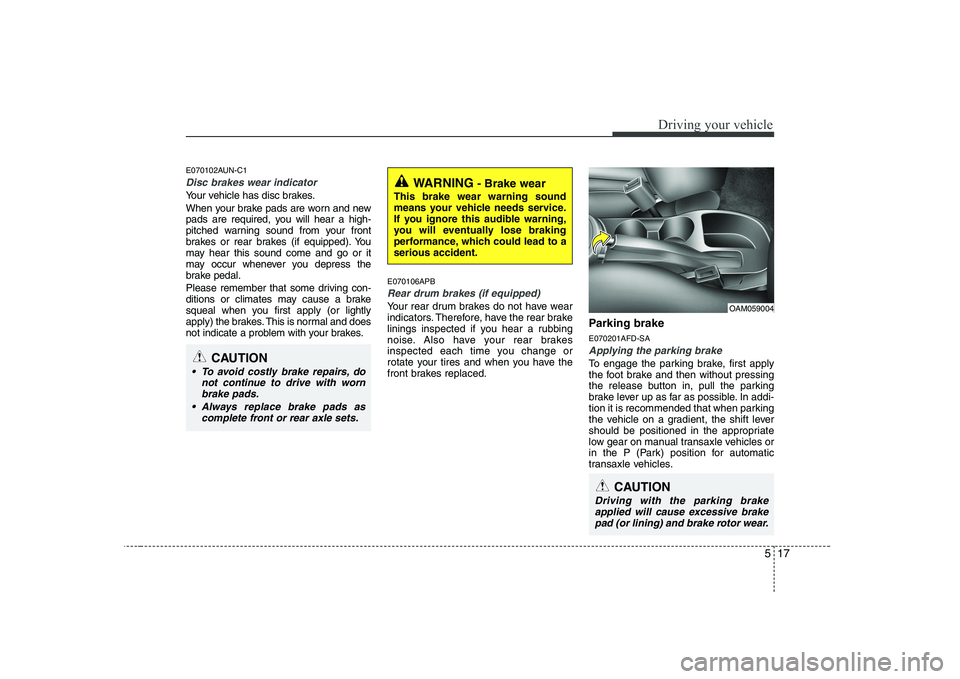
Applying the parking brake
To engage the parking brake, first apply
the foot brake and then without pressing
the release button in, pull the parking
brake lever up as far as possible. In addi-
tion it is recommended that when parking
the vehicle on a gradient, the shift lever
should be positioned in the appropriate
low gear on manual transaxle vehicles or
in the P (Park) position for automatic
transaxle vehicles.
WARNING
- Brake wear
This brake wear warning sound
means your vehicle needs service.
If you ignore this audible warning,
you will eventually lose braking
performance, which could lead to aserious accident.
CAUTION
To avoid costly brake repairs, do not continue to drive with wornbrake pads.
Always replace brake pads as complete front or rear axle sets.
CAUTION
Driving with the parking brakeapplied will cause excessive brakepad (or lining) and brake rotor wear.
OAM059004
Page 189 of 328
519
Driving your vehicle
E070300AUN-EE-U1
Anti-lock brake system (ABS) (if equipped)The ABS continuously senses the speed
of the wheels. If the wheels are going to
lock, the ABS system repeatedly modu-
lates the hydraulic brake pressure to the
wheels.
When you apply your brakes under con-
ditions which may lock the wheels, you
may hear a “tik-tik’’ sound from the
brakes, or feel a corresponding sensation
in the brake pedal. This is normal and it
means your ABS is active.
In order to obtain the maximum benefit
from your ABS in an emergency situa-
tion, do not attempt to modulate your
brake pressure and do not try to pump
your brakes. Press your brake pedal as
hard as possible or as hard as the situa-
tion allows the ABS to control the force
being delivered to the brakes.
WARNING
ABS (or ESP) will not prevent acci-
dents due to improper or danger-
ous driving maneuvers. Even
though vehicle control is improved
during emergency braking, always
maintain a safe distance between
you and objects ahead. Vehicle
speeds should always be reduced
during extreme road conditions.
The braking distance for vehicles
equipped with an anti-lock braking
system (or Electronic Stability
Program System) may be longer
than for those without it in the fol-
lowing road conditions.
During these conditions the vehicle should be driven at reducedspeeds:
Rough, gravel or snow-covered roads.
With tire chains installed.
(Continued)
(Continued)
On roads where the road surfaceis pitted or has different surface height.
The safety features of an ABS (or
ESP) equipped vehicle should not
be tested by high speed driving or
cornering. This could endanger the
safety of yourself or others.