change time KIA Soul 2012 1.G Owner's Manual
[x] Cancel search | Manufacturer: KIA, Model Year: 2012, Model line: Soul, Model: KIA Soul 2012 1.GPages: 393, PDF Size: 8.76 MB
Page 1 of 393
Kia, THE COMPANY
Thank you for becoming the owner of a new Kia vehicle.
As a global car manufacturer focused on building high-quality, value
for money prices, Kia Motors is dedicated to providing you with a
customer service experience that exceeds your expectations.
All information contained in this Owner’s Manual is accurate at the
time of publication. However, Kia reserves the right to make changes
at any time so that our policy of continual product improvement can
be carried out.
This manual applies to all Kia models and includes descriptions and
explanations of optional as well as standard equipment. As a result,
you may encounter material in this manual that is not applicable to
your specific Kia vehicle.Drive safely and enjoy your Kia!
Page 2 of 393
i
Thank you for choosing a Kia vehicle.
When you require service, remember that your Kia Dealer
knows your vehicle best. Your dealer has factory-trained tech-
nicians, recommended special tools, genuine Kia replacement
parts and is dedicated to your complete satisfaction.
Because subsequent owners require this important information
as well, this publication should remain with the vehicle if it is
sold.
This manual will familiarize you with operational, mainte-
nance and safety information about your new vehicle. It is sup-
plemented by a Warranty and Consumer Information manual
that provides important information on all warranties regarding
your vehicle.
We urge you to read these publications carefully and follow the
recommendations to help assure enjoyable and safe operation
of your new vehicle.
Kia offers a great variety of options, components and features
for its various models. Therefore, some of the equipment
described in this manual, along with the various illustrations,
may not be applicable to your particular vehicle.
The information and specifications provided in this manual
were accurate at the time of printing. Kia reserves the right to
discontinue or change specifications or design at any time
without notice and without incurring any obligation. If you
have questions, always check with your Kia dealer.
We assure you of our continuing interest in your motoring
pleasure and satisfaction in your Kia vehicle.
© 2011 Kia Canada Inc.
All rights reserved. Reproduction by any means, electronic or
mechanical, including photocopying, recording, or by any
information storage and retrieval system or translation in
whole or part is not permitted without written authorization
from Kia Canada Inc..
Printed in Korea
Foreword
Page 28 of 393
35
Safety features of your vehicle
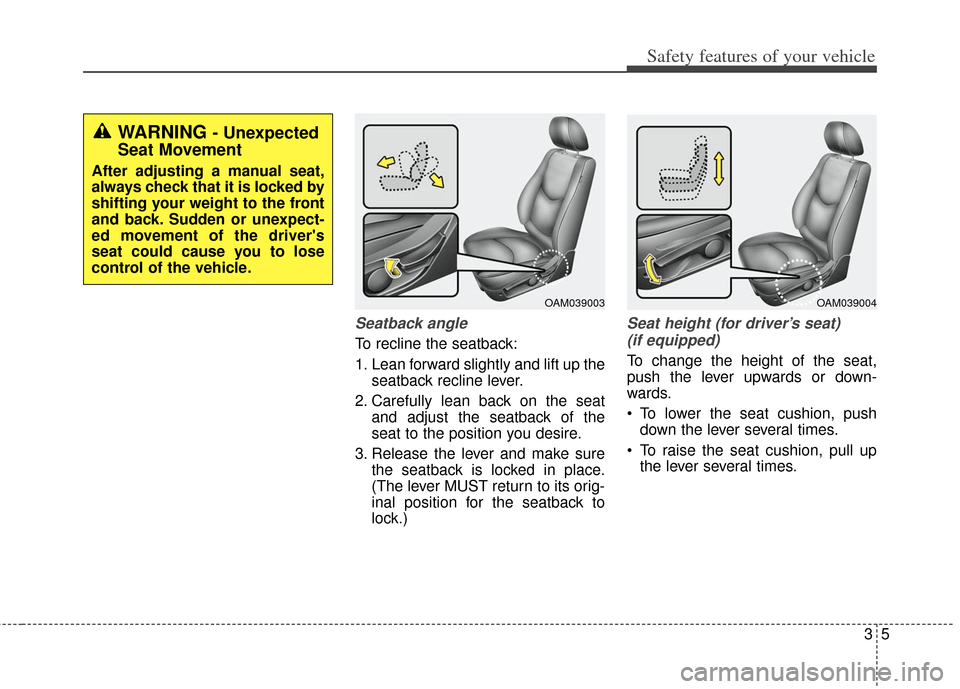
Seatback angle
To recline the seatback:
1. Lean forward slightly and lift up theseatback recline lever.
2. Carefully lean back on the seat and adjust the seatback of the
seat to the position you desire.
3. Release the lever and make sure the seatback is locked in place.
(The lever MUST return to its orig-
inal position for the seatback to
lock.)
Seat height (for driver’s seat)
(if equipped)
To change the height of the seat,
push the lever upwards or down-
wards.
To lower the seat cushion, push down the lever several times.
To raise the seat cushion, pull up the lever several times.
OAM039004OAM039003
WARNING - Unexpected
Seat Movement
After adjusting a manual seat,
always check that it is locked by
shifting your weight to the front
and back. Sudden or unexpect-
ed movement of the driver's
seat could cause you to lose
control of the vehicle.
Page 31 of 393
Safety features of your vehicle
83
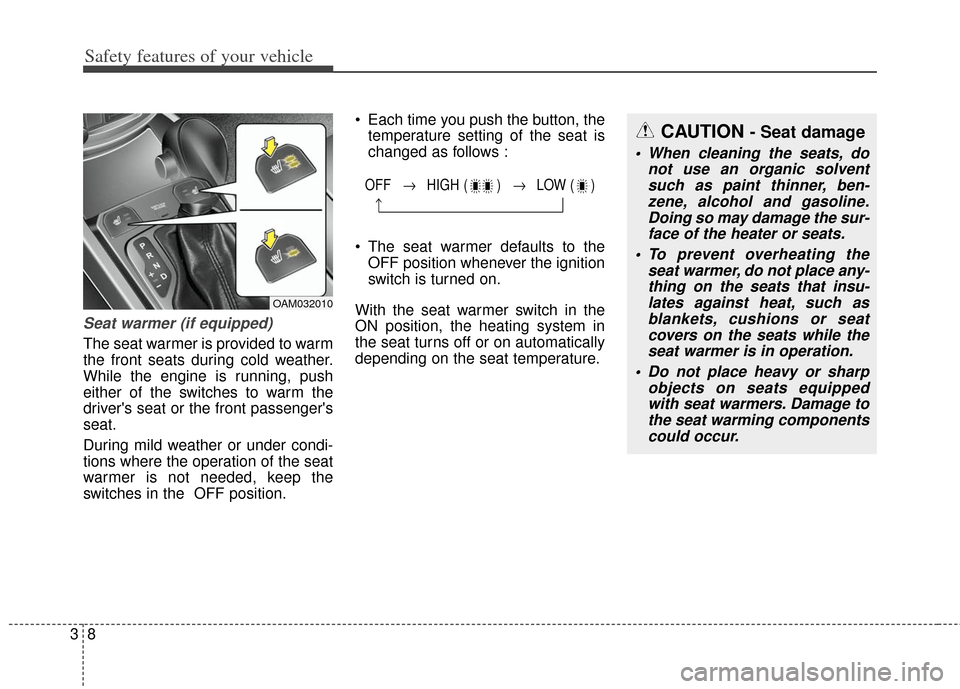
Seat warmer (if equipped)
The seat warmer is provided to warm
the front seats during cold weather.
While the engine is running, push
either of the switches to warm the
driver's seat or the front passenger's
seat.
During mild weather or under condi-
tions where the operation of the seat
warmer is not needed, keep the
switches in the OFF position. Each time you push the button, the
temperature setting of the seat is
changed as follows :
The seat warmer defaults to the OFF position whenever the ignition
switch is turned on.
With the seat warmer switch in the
ON position, the heating system in
the seat turns off or on automatically
depending on the seat temperature.
OFF → HIGH ( ) → LOW ( )
→
OAM032010
CAUTION - Seat damage
When cleaning the seats, do not use an organic solventsuch as paint thinner, ben-zene, alcohol and gasoline.Doing so may damage the sur-face of the heater or seats.
To prevent overheating the seat warmer, do not place any-thing on the seats that insu-lates against heat, such asblankets, cushions or seatcovers on the seats while theseat warmer is in operation.
Do not place heavy or sharp objects on seats equippedwith seat warmers. Damage tothe seat warming componentscould occur.
Page 83 of 393
Features of your vehicle
44
Do not put metal accessories near
the ignition switch.
Metal accessories may interrupt the
transponder signal and may prevent
the engine from being started.
If you need additional keys or lose
your keys, consult an authorized Kia
dealer.This device complies with
Industry Canada Standard RSS-
210.
Operation is subject to the following
two conditions:
1. This device may not cause harm-
ful interference, and
2. This device must accept any inter- ference received, including inter-
ference that may cause undesired
operation.Limp home (override) proce-
dure
When you turn the ignition switch to
the ON position, if the immobilizer
indicator ( ) goes off after blink-
ing 5 times, your transponder
equipped in the ignition key is out of
order. You cannot start the engine
without the limp home procedure. To
start the engine, you have to input
your password by using the ignition
switch. Your password is only avail-
able from an authorized Kia dealer-
ship. Contact an authorized dealer
for more information.
The following procedure is how to
input your password of “2345” as an
example.
1. Turn the ignition s witch to the ON
position. The immobilizer indicator
( ) will blink 5 times and go off
indicating the beginning of the limp
home procedure.
2. Turn the ignition switch to the ACC position.
CAUTION - Immobilizerdamage
Do not expose your immobilizer
system to moisture, static elec-tricity and rough handling. Thismay damage your immobilizer.
CAUTION - Immobilizer alterations
Do not change, alter or adjust
the immobilizer system becauseit could cause the immobilizersystem to malfunction.
WARNING
Changes or modifications not
expressly approved by the party
responsible for compliance
could void the user's authority
to operate the equipment.
Page 85 of 393
Features of your vehicle
64
Remote keyless entry system
operations
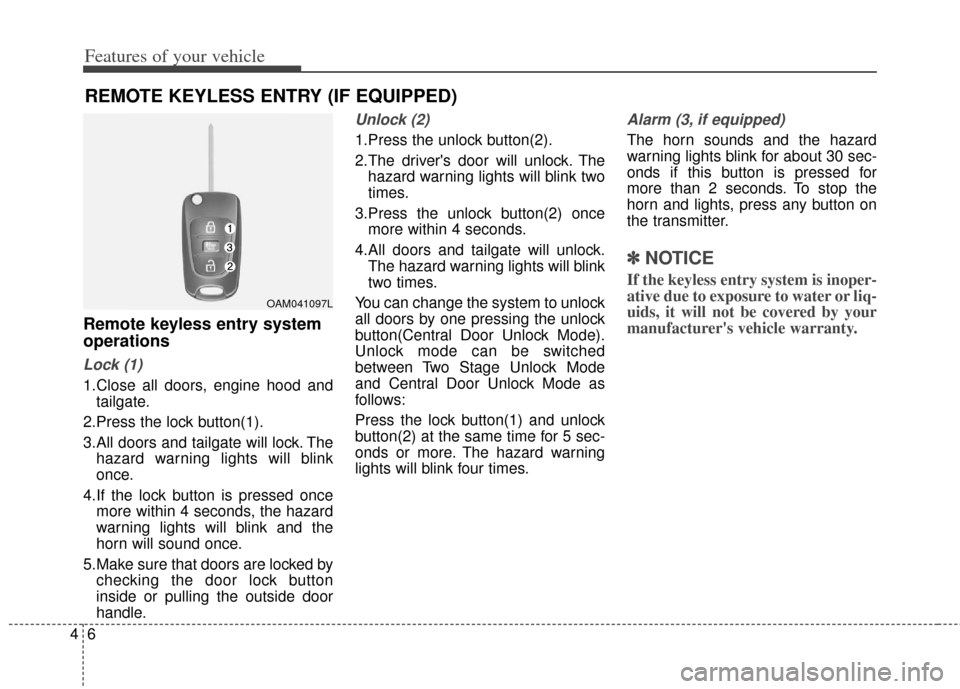
Lock (1)
1.Close all doors, engine hood andtailgate.
2.Press the lock button(1).
3.All doors and tailgate will lock. The hazard warning lights will blink
once.
4.If the lock button is pressed once more within 4 seconds, the hazard
warning lights will blink and the
horn will sound once.
5.Make sure that doors are locked by checking the door lock button
inside or pulling the outside door
handle.
Unlock (2)
1.Press the unlock button(2).
2.The driver's door will unlock. Thehazard warning lights will blink two
times.
3.Press the unlock button(2) once more within 4 seconds.
4.All doors and tailgate will unlock. The hazard warning lights will blink
two times.
You can change the system to unlock
all doors by one pressing the unlock
button(Central Door Unlock Mode).
Unlock mode can be switched
between Two Stage Unlock Mode
and Central Door Unlock Mode as
follows:
Press the lock button(1) and unlock
button(2) at the same time for 5 sec-
onds or more. The hazard warning
lights will blink four times.
Alarm (3, if equipped)
The horn sounds and the hazard
warning lights blink for about 30 sec-
onds if this button is pressed for
more than 2 seconds. To stop the
horn and lights, press any button on
the transmitter.
✽ ✽ NOTICE
If the keyless entry system is inoper-
ative due to exposure to water or liq-
uids, it will not be covered by your
manufacturer's vehicle warranty.
REMOTE KEYLESS ENTRY (IF EQUIPPED)
OAM041097L
Page 90 of 393
411
Features of your vehicle
Using the button on the smart key
1.Press the unlock button (2) of thesmart key.
2.The driver’s door will unlock. The hazard warning lights will blink and
the chime will sound two times.
3.Press the unlock button (2) once more within 4 seconds.
4.All doors and tailgate will unlock. The hazard warning lights will blink
and the chime will sound two
times. After pressing the button, the doors
will lock automatically unless any
door or tailgate is opened within 30
seconds.
You can change the system to unlock
all doors by one pressing the unlock
button(Central Door Unlock Mode).
Unlock mode can be switched
between Two Stage Unlock Mode
and Central Door Unlock Mode as
follows:
Press the lock button(1) and unlock
button(2) at the same time for 5 sec-
onds or more. The hazard warning
lights will blink four times.Tailgate unlocking
Using the tailgate handle button
1.Carry the smart key.
2.Press the tailgate handle button.
3.When all doors are locked, the
hazard warning lights will blink two
times.
Using the button on the smart key
1.Press the tailgate unlock button(3) for more than 1 second.
2.When all doors are locked, the hazard warning lights will blink two
times.
Page 113 of 393
Features of your vehicle
34
4
Electric power steering (EPS)
The power steering uses a motor to
assist you in steering the vehicle. If
the engine is off or if the power steer-
ing system becomes inoperative, the
vehicle may still be steered, but it will
require increased steering effort.
The motor driven power steering is
controlled by a power steering con-
trol unit which senses the steering
wheel torque and vehicle speed to
command the motor.
The steering becomes heavier as
the vehicle’s speed increases and
becomes lighter as the vehicle’s
speed decreases for optimum steer-
ing control.
Should you notice any change in the
effort required to steer during normal
vehicle operation, have the power
steering checked by an authorized
Kia dealer.
✽ ✽
NOTICE
The following symptoms may occur
during normal vehicle operation:
• The steering effort is high immedi-
ately after turning the ignition
switch on. This happens as the sys-
tem performs the EPS system
diagnostics. When the diagnostics
is completed, the steering wheel
will return to its normal condition.
• A click noise may be heard from the EPS relay after the ignition
switch is turned to the ON or
LOCK position.
• Motor noise may be heard when the vehicle is at a stop or at a low
driving speed.
• The steering effort increases if the steering wheel is rotated continu-
ously when the vehicle is not in
motion. However, after a few min-
utes, it will return to its normal
conditions.
• When you operate the steering wheel in low temperature, abnor-
mal noise could occur. If tempera-
ture rises, the noise will disappear.
This is a normal condition. (Continued)(Continued)
• When the vehicle is stationary, if
you turn the steering wheel all the
way to the left or right continuous-
ly, the steering wheel becomes
heavier from the end. But this is
for your safety, not system mal-
function. As time passes, the steer-
ing wheel return to its normal con-
dition.
If the Electric Power Steering System
does not operate normally, the warn-
ing light will illuminate on the instru-
ment cluster. The steering wheel may
become difficult to control or operate
abnormally. Take your vehicle to an
authorized Kia dealer and have the
vehicle checked as soon as possible.
STEERING WHEEL
Page 162 of 393
483
Features of your vehicle
Air conditioning system operation tips
If the vehicle has been parked indirect sunlight during hot weather,
open the windows for a short time
to let the hot air inside the vehicle
escape.
To help reduce moisture inside of the windows on rainy or humid
days, decrease the humidity inside
the vehicle by operating the air
conditioning system.
During air conditioning system operation, you may occasionally
notice a slight change in engine
speed as the air conditioning com-
pressor cycles. This is a normal
system operation characteristic.
Use the air conditioning system every month only for a few minutes
to ensure maximum system per-
formance. When using the air conditioning
system, you may notice clear water
dripping (or even puddling) on the
ground under the passenger side
of the vehicle. This is a normal sys-
tem operation characteristic.
Operating the air conditioning sys- tem in the recirculated air position
provides maximum cooling, how-
ever, continual operation in this
mode may cause the air inside the
vehicle to become stale.
During cooling operation, you may occasionally notice a misty air flow
because of rapid cooling and
humid air intake. This is a normal
system operation characteristic.CAUTION - ExcessiveA/C
When using the air conditioning
system, monitor the enginecoolant closely while driving uphills or in heavy traffic whenoutside temperatures are high.Air conditioning system opera-tion may cause engine over-heating and potential enginedamage. Continue to use theblower fan but turn the air con-ditioning system off if theengine coolant temperaturegauge indicates engine over-heating.
Page 163 of 393
Features of your vehicle
84
4
Climate control air filter
(if equipped)
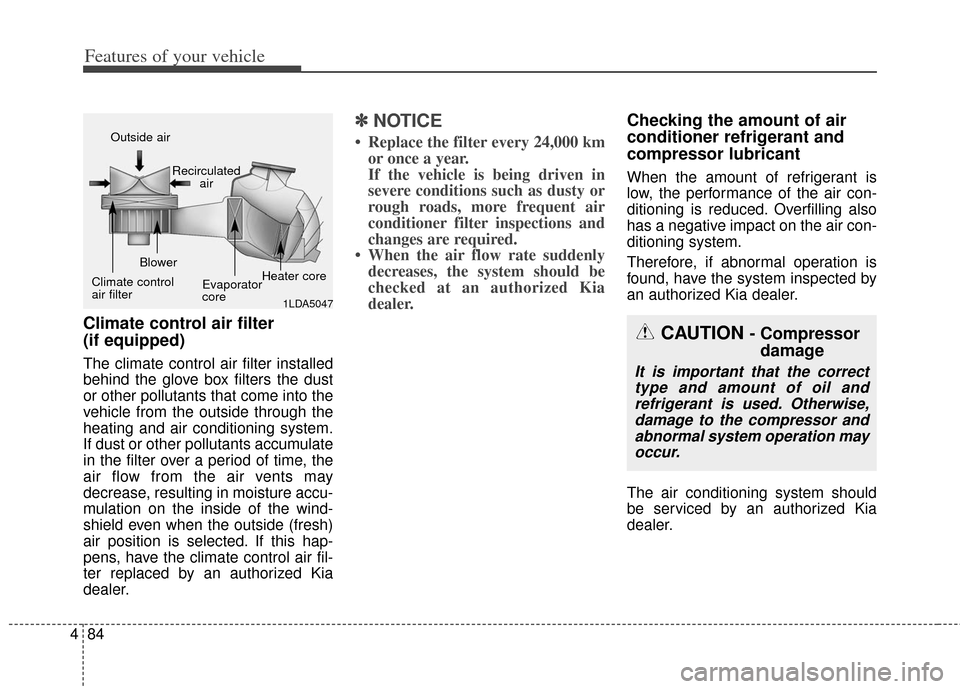
The climate control air filter installed
behind the glove box filters the dust
or other pollutants that come into the
vehicle from the outside through the
heating and air conditioning system.
If dust or other pollutants accumulate
in the filter over a period of time, the
air flow from the air vents may
decrease, resulting in moisture accu-
mulation on the inside of the wind-
shield even when the outside (fresh)
air position is selected. If this hap-
pens, have the climate control air fil-
ter replaced by an authorized Kia
dealer.
✽ ✽
NOTICE
• Replace the filter every 24,000 km
or once a year.
If the vehicle is being driven in
severe conditions such as dusty or
rough roads, more frequent air
conditioner filter inspections and
changes are required.
• When the air flow rate suddenly decreases, the system should be
checked at an authorized Kia
dealer.
Checking the amount of air
conditioner refrigerant and
compressor lubricant
When the amount of refrigerant is
low, the performance of the air con-
ditioning is reduced. Overfilling also
has a negative impact on the air con-
ditioning system.
Therefore, if abnormal operation is
found, have the system inspected by
an authorized Kia dealer.
The air conditioning system should
be serviced by an authorized Kia
dealer.
1LDA5047
Outside air
Recirculatedair
Climate control
air filter Blower
Evaporator
coreHeater core
CAUTION - Compressor
damage
It is important that the correct
type and amount of oil andrefrigerant is used. Otherwise,damage to the compressor andabnormal system operation mayoccur.